Blacklight: Illuminating AI Agent Artifacts for Attackers and Defenders
TL;DR: Blacklight is an open-source security research toolkit for discovering and analyzing AI agent artifacts that reside on endpoints. It helps authorized security teams assess exposure, guide next decisions, and develop detection and hardening guidance. This project used models made available through SpecterOps’ participation in OpenAI’s Trusted Access for Cyber program to support this security research. The operator toolkit and defender guidance can be found on the SpecterOps GitHub URL here: https://github.com/SpecterOps/Blacklight.
Introduction
Local AI agents are now a regular part of developer endpoints and, increasingly, general user endpoints. Teams are embedding these tools into real workflows and relying on them to help build, troubleshoot, and ship products. Like other endpoint applications, they also create local artifacts that are often accessible within the user’s security context.
Blacklight was built to help authorized security teams assess this emerging endpoint surface and help defenders reduce the resulting exposure. For now, Blacklight maps artifacts across Codex, Claude Code, Cursor, and Antigravity CLI. Rather than treating local agents just as a credential-dumping target, Blacklight aims to demystify what they expose and show how data beyond credentials can support better decisions for operators, defenders, and the people who build them.
Why Local Agent Artifacts Matter
Developers and other technical users rely on agents for many parts of their workflow. They commonly use them to debug and fix issues within codebases. Agents may also inspect repositories, execute commands and scripts, or interact directly with the machine it is being run on. The resulting artifacts can reveal what the user was working on and which external systems were involved. They may also expose additional access available to the user or endpoint. This makes collected artifacts valuable even when they do not directly contain raw secrets. Security teams and threat actors already treat browser profiles, shell history, cloud CLI configurations, and other local application state as valuable post-exploitation targets. Those targets are better understood and more heavily monitored. It is now time to understand, monitor, and protect local agent artifacts with the same level of care.
For operators, Blacklight shows that these artifacts can expose a broader operational picture, including user intent, active projects, established trust relationships, and potential paths into connected systems. Because agents are invoked from terminals, IDEs, and other development environments, their transcripts and configuration data can consolidate activity that would be distributed across multiple applications. Blacklight’s main objective is to give operators sufficient context before they commit to broader or noisier actions, such as credential collection, agent abuse, or persistence. Rather than targeting every installed tool, Blacklight Scout identifies which agents are active and which are most likely to contain information relevant to the current attack path.
For defenders, Blacklight provides a way to inventory this exposure and alert on the activity on the artifact paths. Existing research into local AI agents has largely focused on credential leakage or abusing the agent as an execution primitive. Blacklight extends that work by formalizing exposure assessment across multiple agents, then translating confirmed paths into inventory and detection guidance. This gives defenders a repeatable way to understand where agent data exists and which paths need stronger controls, monitoring, or retention policies.
What Gets Left Behind
For this research, the initial scope focused on Codex, Claude Code, Cursor, and Antigravity (Gemini) CLI. The information below describes the exposure these locations can create and the defensive value of validating and mitigating them through detection or hardening.
Authentication and credential material
Authentication files such as Codex’s .codex/auth.json and Claude Code’s .claude/credentials.json may contain access tokens, refresh tokens, identity tokens, account identifiers, authentication state, and token-refresh metadata associated with the user’s active session. Claude Code configuration files, including settings.json, can also define environment variables containing sensitive values such as API keys, cloud credentials, or configuration used to access third-party model providers and externally hosted model instances.
A valid access token may allow impersonation of the user’s authenticated agent session. While a refresh token may enable continued access after the original access token expires, identity tokens and this account metadata can also expose further information about the user showing their emails and OAuth metadata. They may also expose workspace and tenant identifiers, which can help identify potential pivots through the organization’s identity provider.
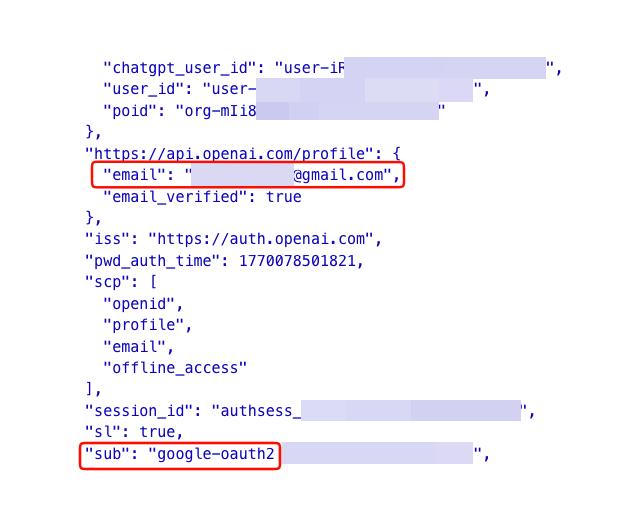
These artifacts should be treated as high-priority targets because they can provide direct access to user accounts, model providers, cloud services, or agent infrastructure rather than merely confirming the presence of credentials.
Configuration and Settings
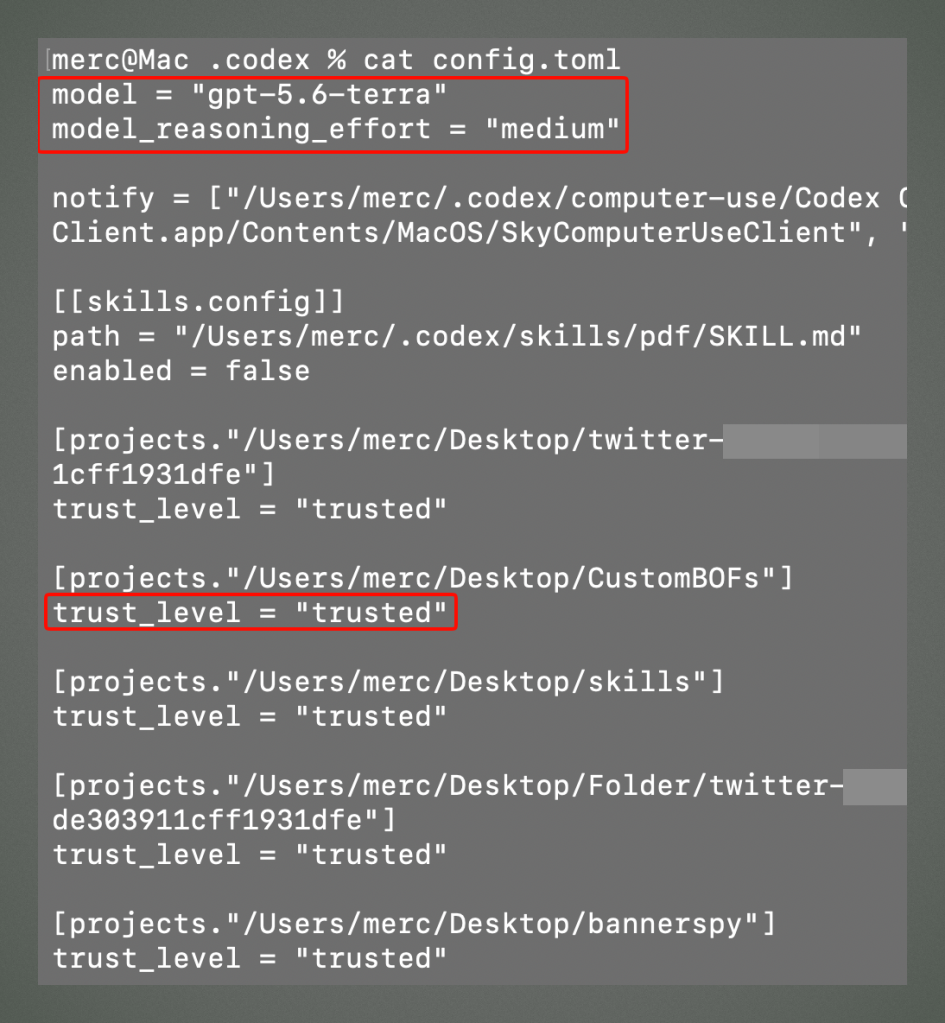
Settings show which models are configured and most frequently used, which projects have been marked as trusted, whether user approval is required for sensitive actions, how the execution sandbox is configured, and which MCP servers or external tools the agent can access. These settings can reveal weak security boundaries, including whether the agent is permitted to execute commands without confirmation and which directories, repositories, or external services are already treated as trusted resources. From an operator’s perspective, this information helps establish what actions the agent could perform on behalf of a compromised user and which existing trust relationships could be leveraged to extend access or influence.
Sessions and Chat Content
Sessions reveal what the user asked the agent to do, which projects they are working on, internal file paths, repository names, infrastructure references, credentials discussed in prompts, debugging output, and operational intent. Sessions may also contain commands with credentials, code snippets, internal URLs, hostnames, cloud resources, deployment procedures, or sensitive business context. For an operator, this can identify high-value systems, potential follow-on targets, and actions the user or agent already performed.
Session Indexes and Activity History
Session indexes reveal an organized list of session names, timestamps, recent activity, message volume, frequently accessed projects, and the recency of agent use. This allows operators to prioritize users, workstations, and sessions before performing deeper analysis.
Workspace and Project Metadata
This metadata can reveal repository locations, workspace roots, project names, recently opened files, development plans, prompt history, IDE state, and references to internal systems. Artifacts in this category also map the user’s active development environment and identify which codebases, services, clients, or infrastructure components are important to their role. For an operator, workspace metadata provides a direct path from a compromised endpoint to the systems and repositories most relevant to the user.
Rules, Permissions, and Trusted Roots
These settings reveal command allowlists, deny rules, approval requirements, trusted directories, execution policies, sandbox exceptions, and tool-specific permissions. These settings define what the agent is permitted to read, modify, execute, or access without additional user approval. For an operator, this can expose paths where the agent has broader access than the current process and reveal potential privilege-escalation or lateral-movement opportunities.
Local Databases and Structured Stores
SQLite databases are processed only after selected artifacts have been downloaded due to their complexity in parsing. For Cursor, Blacklight surfaces .cursor/chats/**/store.db databases that match the expected blobs and meta schema. The parser creates a temporary read-only snapshot and extracts chat metadata and JSON message blobs to recover session titles, timestamps, and activity. For the Antigravity CLI, Blacklight shows /conversations/*.db and conversation_summaries.db when they match known locations or recognized conversation and summary schemas. Collection is limited to schema information and table-row counts. Body, content, and message columns are deliberately excluded.
MCP Servers, Extensions, and External Integrations
Artifacts in this category may reveal connected tools, configured MCP servers, extension state, connector metadata, service endpoints, authentication references, and external automation capabilities. These integrations may provide access to source-control platforms, ticketing systems, databases, cloud services, documentation systems, or internal APIs. For an operator, they identify downstream systems that the agent can interact with and may expose additional credentials, trust relationships, or paths into connected environments.
Combined Operational Value
Individually, these artifacts provide identity, activity, configuration, or project context. When correlated, they can reveal who the user is, what they are working on, which systems they can access, how their agent is configured, and whether reusable authentication material is present. The resulting exposure can range from passive intelligence gathering to direct session impersonation or access to connected systems, depending on the validity, scope, and permissions of the recovered material.
Execution Model
Blacklight execution is tiered around the level of endpoint disruption appropriate for the assessment. The model also considers various operating systems, over-the-wire volume, and when file-content parsing is allowed to happen. The idea is to start at the quietest level of execution that answers the operator’s question and escalate only when there is an unresolved decision. For the least amount of noise, Blacklight Scout loaders are provided for each operating system:
- A Windows beacon object file (BOF): ai_path_scout.x64.o
- A macOS dynamic library (dylib): libai_path_scout.dylib
- A Linux shared object: libai_path_scout.so
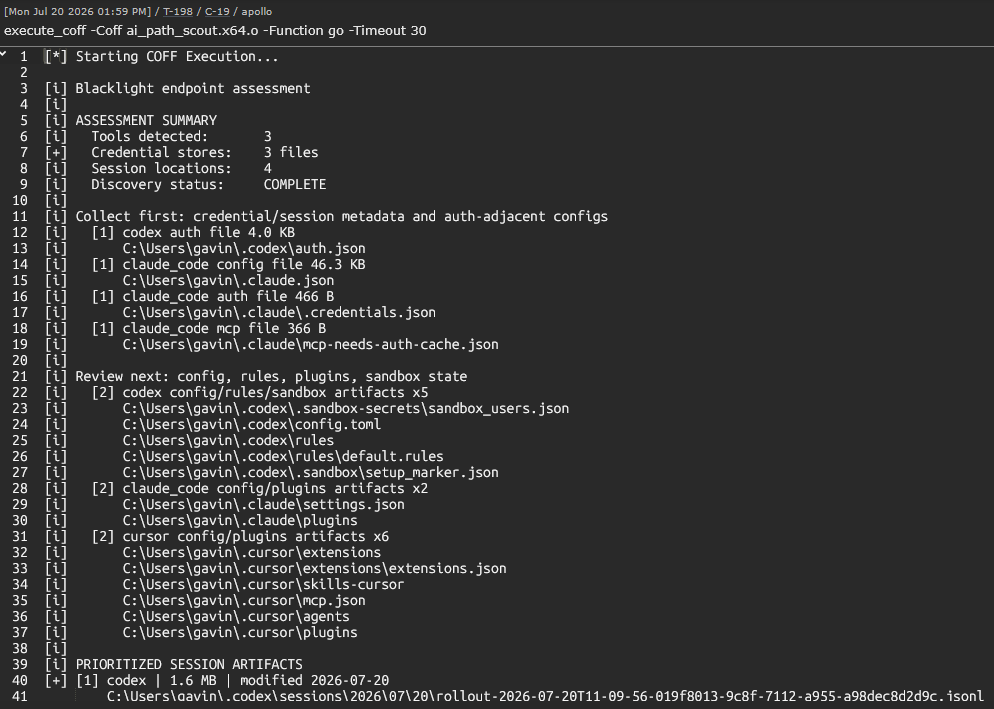
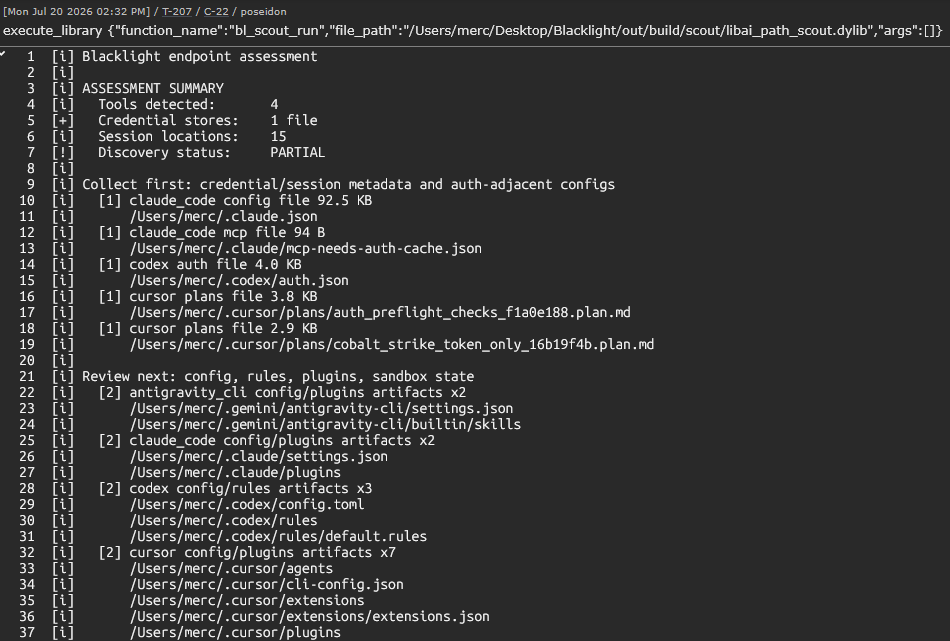
The loaders emit a filesystem triage of what is currently on the host. The triage results also include discovered roots, valuable artifacts to collect first, and up to three ranked session-file candidates per tool with their file size and recency. None of these loaders read artifact bodies, preserving OPSEC.
If process execution or assembly loading is accepted or allowed, the Windows executables add deeper analysis without sending session transcripts over the wire:
- ai_path_scout-windows-x64.exe for native process / unmanaged PE runners
- ai_path_scout-managed.exe for Apollo or other .NET agents via
register_assembly/execute_assembly
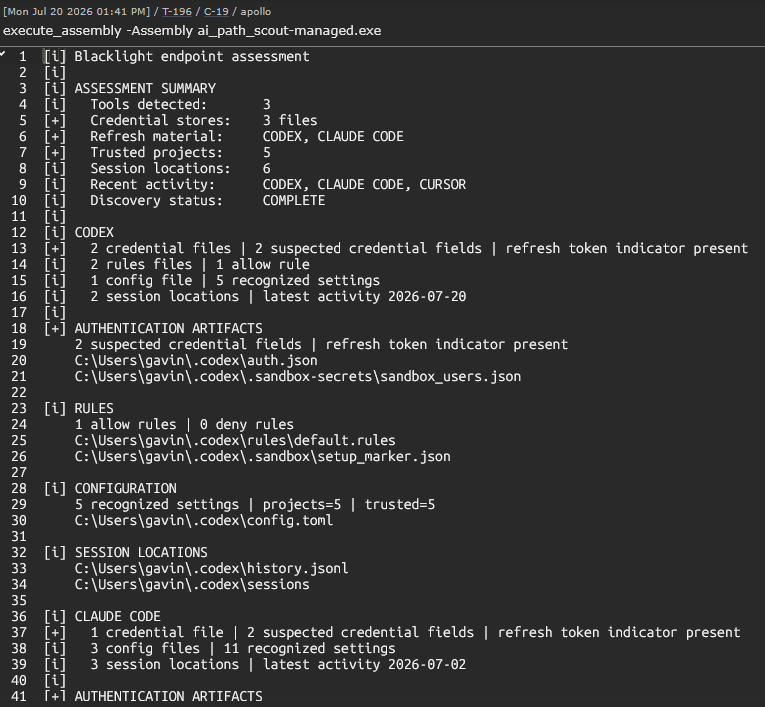
The executables will emit per-tool Config, Rules, Auth, and Sessions summaries with up to three newest as well as the three largest candidates per tool. They inspect allow-listed configuration and auth metadata, but never print actual credential values, identities, endpoints, or session text. Session and chat content stay on the endpoint when any of these tools are executed. For further session analysis, take the transcripts off host by downloading the selected candidates. Then, using the session analysis CLI on the downloaded directory, run the command:
blacklight sessions ~/Downloads/HOST-001/
The output will return something similar to the screenshot below; analysis will change depending on how many sessions you’ve downloaded:
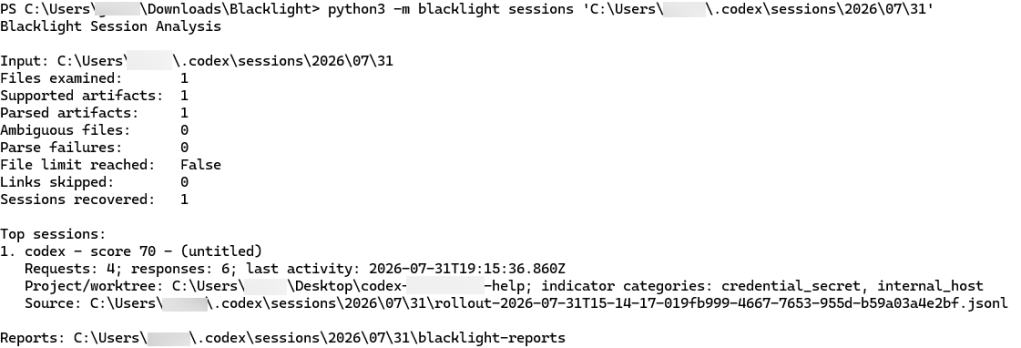
All Scout loaders share one static catalog and the same tool/family vocabulary across all agents, making it easy to add new files, paths, and agents as they come and go. Two Codex skills are provided to simplify development and extension of the project:
skills/blacklight-add-agent-artifact – This skill supports two related workflows. It can be used to add a new agent to Blacklight’s discovery surface, or to implement a parser for a new artifact. The parser can be made for an artifact that belongs to an existing agent or a newly added one.
skills/session-analysis – This skill provides interpretation and communication of findings from session data. It can be used to analyze or summarize exported session reports or even root directories like .codex if you want real-time analysis.
Blacklight Scout: Endpoint Discovery Module
Blacklight Scout confirms which supported agent roots exist by using a static target catalog, testing each path for existence and type. Depending on the loader, Scout provides the operators with a triage snapshot or on-host artifact analysis for quicker decision making. Either output returns enough metadata needed to choose downloads for further analysis. The quiet loaders prioritize path discovery and metadata analysis.
As of July 2026, Scout enumerates the following supported agent roots and related files. macOS and Linux use $HOME; Windows uses %USERPROFILE% with the same relative structure:
$HOME/
  ├── .codex/
  │   ├── auth.json
  │   ├── config.toml
  │   ├── .sandbox/setup_marker.json
  │   ├── .sandbox/setup_error.json
  │   ├── history.jsonl
  │   ├── session_index.jsonl
  │   ├── sessions/
  │   ├── archived_sessions/
  │   ├── rules/
  │   │   └── default.rules
  │   └── .sandbox-secrets/
  │       └── sandbox_users.json
  │
  ├── .claude/
  │   ├── .claude.json
  │   ├── .credentials.json
  │   ├── settings.json
  │   ├── history.jsonl
  │   ├── mcp-needs-auth-cache.json
  │   ├── sessions/
  │   ├── projects/
  │   └── plugins/
  ├── .claude.json
  │
  ├── .cursor/
  │   ├── cli-config.json
  │   ├── mcp.json
  │   ├── prompt_history.json
  │   ├── agents/
  │   ├── plugins/
  │   ├── chats/
  │   ├── projects/
  │   ├── plans/
  │   ├── extensions/
  │   ├── skills/
  │   ├── skills-cursor/
  │   ├── worktrees/
  │   ├── snapshots/
  │   └── ai-tracking/
  │       └── ai-code-tracking.db
  │
  └── .gemini/
      └── antigravity-cli/
          ├── settings.json
          ├── mcp_config.json
          ├── history.jsonl
          ├── conversation_summaries.db
          ├── brain/
          ├── conversations/
          ├── cache/
          ├── log/
          └── builtin/
              └── skills/
Triage Before Collection
For Windows, the on-host analysis returns Config, Rules, Auth, and Sessions metadata plus ranked session-file candidates. Portable operating system Interface (POSIX) loaders give filesystem metadata when operators need ranking before download. Credential-related paths are always surfaced first to maintain access. Rankings should help inform decisions but not automatically authorize collection.
Operators should perform manual review and analysis of located artifacts before sending them over the wire. In this sense, there is both a machine triage but also human triage that has to take place before downloading everything blindly for no reason. Sessions are the most useful download other than auth material, as this is where the bulk of the work and user intent is shown.
Analyze: Offline Session Parsing and Handoff
Offline session analysis can expose sensitive operational context that reveals how an organization’s systems and infrastructure are structured and used. Beyond higher-level understanding, session analysis can mine transcripts for sensitive artifacts like credentials or internal hosts being referenced. Blacklight ranks and prepares exact source-file targets for use with Nemesis, Trufflehog, or other secret scanners; it does not perform comprehensive secret discovery for this reason. While there may be a large number of false positives with the built-in secret scanners as they stand with regex, there are plans to update them for more refined detection and create easier workflows to send the data to the aforementioned tools.
Beyond sensitive material, session indexes paired with timestamps and volume allow operators to prioritize the most active sessions. When Blacklight is deployed at scale, these metrics can help operators prioritize the users and endpoints whose activity is most likely to provide useful operational context.
Using Blacklight
The GitHub repository provides pre-built loaders in the “Releases” section, if you want to skip local building.
- For manual local builds, run
.\blacklight-scout\build.ps1for the Windows loaders. For Linux loaders./blacklight-scout/build.shwill output artifacts for each architecture version. Both use Docker to build, so make sure that is running. For macOS, pull loaders from the repo or build on an Apple device with the commandmake -C blacklight-scout release-macosfor dylibs relating to the respective architecture. - Running the Blacklight Scout loaders on the Apollo and Poseidon agents through Mythic, we get the following output from my Windows Desktop PC and MacBook devices at home:
- Once Scouting has been done, download individual high-value sessions or look at the entire root directories. I ran the Session Analysis Skill on 3 of my root directories and pulled back the following information about my sessions:
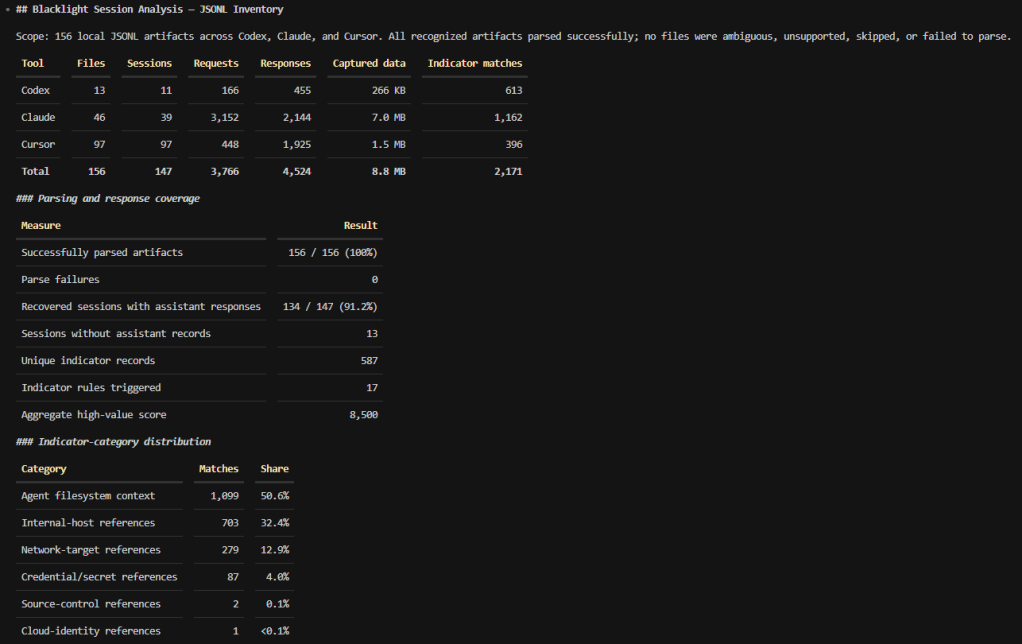
Claude’s message count is a bit inflated due to the parser originally taking in agent messages and human typed message as the same. They have now been separated and will provide more accurate message count data.
From Discovery to Targeting: Shortening the OODA Loop
Blacklight was made to shorten the operator’s decision cycle: identify what exists, determine what is worth collecting, and turn the selected evidence into an actionable next step. Rather than collecting every artifact from an endpoint and sorting through it later, the workflow introduces a decision point at each stage. The operator can stop when enough context has been gathered or escalate only when the next question requires so.
The workflow begins with Scout, which identifies cataloged agents on the endpoint and, depending on the loader, provides the operators with a triage snapshot or the on-host artifact analysis.
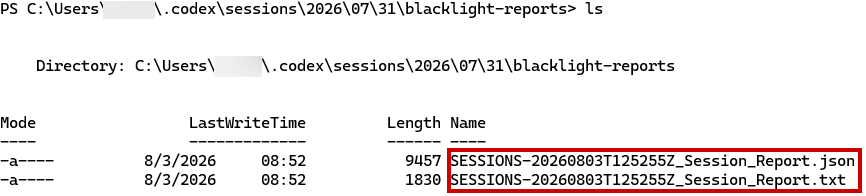
Selected session files then move over the command and control (C2) channel into any local download directory. The command blacklight sessions recursively detects supported agent artifacts, including renamed files whose schema is recognizable, parses them, emits redacted high-value indicators, and writes ranked JSON and text reports.
For defenders, Blacklight Rules applies the same confirmed artifact paths to exposure reviews and detection engineering. The Rules module provides osquery configs and SIEM queries to help teams determine what exists, who can access it, and which activity can be monitored. Documentation for each operating system and the extent of what is able to be monitored is provided in the repository.
Blacklight in its current state purposely stops short of full semantic interpretation. Regex-based matches and metadata-first scoring are used to narrow the evidence set without placing raw chat content or credential values into every report. Richer analysis remains a separate, deliberate step that operators can perform locally when the engagement’s review and data-handling boundaries allow it.
For extracted Codex sessions, OpenAI’s Euphony can serve as a session visualizer after Blacklight completes the ranking process. Euphony renders Codex JSONL sessions in a browser-based chat view, giving an operator a clearer timeline of the conversation.
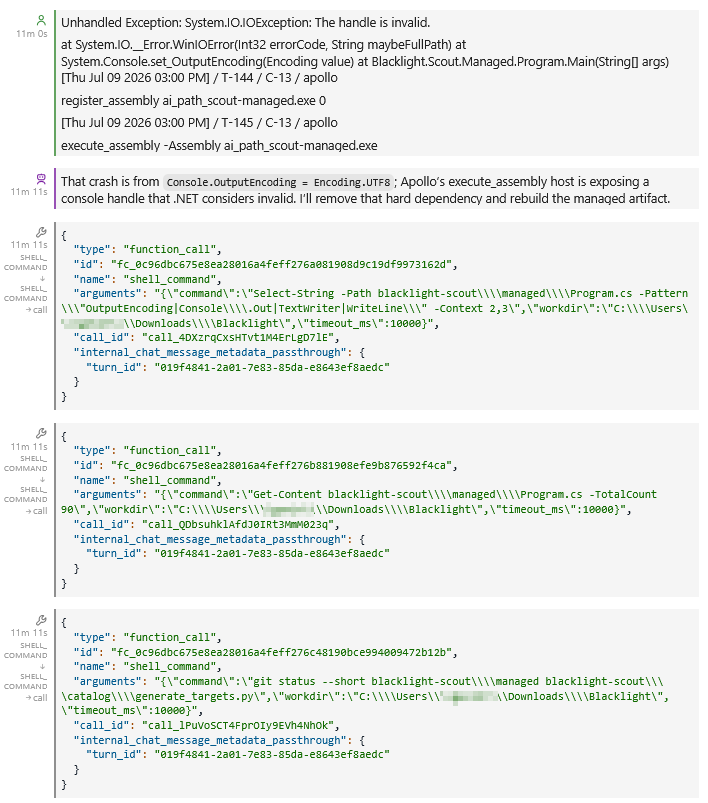
Looking at the sessions in this way allows operators to get a step-by-step understanding of the user’s intent and what the agent performed to attempt to help get there.
How Codex Helped Build Blacklight
This project would not exist with just four weeks of development and research without Codex.
With this agent by my side, I was able to categorize artifacts across different operating systems quickly and validate with repeatable tests. Codex drove most implementation milestones through a tight loop that I developed while working with many of these agents in my free time. A simple structure of this loop is documented further down in this section. To show how instrumental this agent was, I asked it to produce a timeline from Blacklight’s own Codex session metadata to illustrate the turnaround from idea to project completion:
June 30, 2026 - Project architecture. We turned an initial concept into a GitHub-ready project structure, separating endpoint discovery, operator-assisted acquisition, offline analysis, and documentation. Codex helped establish the component boundaries and a working project backlog on the first day.

July 1, 2026 - Evidence parsing and data minimization. Development moved to the session-analysis pipeline. We used Codex to design compact metadata for Codex and Claude Code session artifacts, preserve useful operational context, reduce unnecessary collection, and add support for analyzing staged evidence packages rather than only live user-profile data.

July 2, 2026 - Endpoint-native discovery and workflow design. The project gained its Scout direction: lightweight native discovery for relevant AI-agent artifacts, with collection remaining selective and operator controlled. We also defined a Fetch workflow for previewing and retrieving only the paths needed for later analysis.

July 2, 2026 - Blacklight becomes Blacklight. The toolkit was renamed from its working title, and Codex carried the change through code paths, repository structure, documentation, and the developing blog narrative instead of leaving a partial rebrand.

July 6-7, 2026 - Defensive coverage and workflow simplification. We expanded from the operator workflow into a defender-facing rules section, including hunt guidance for major SIEM and dashboard platforms. At the same time, Codex helped refocus the project around a clear host boundary: Scout on the endpoint, Analysis on the operator side, and rules for defenders.

July 8-10, 2026 - Usability and correctness hardening. Work shifted from building capabilities to making them usable. Codex reorganized the research record, improved Scout triage output for fast operator reading, fixed verified implementation discrepancies, and recorded the corrections as a self-healing engineering log.

July 13-15, 2026 - Final operator workflow refinement. The last implementation passes simplified staging and selection, improved analyzer output, tightened session-file ranking, corrected Scout parsing, and reduced BOF helper complexity. These were changes made by live testing of the workflow, not just code cleanup.

July 16, 2026 - Validation and completion. The final sessions validated the local workflow and defender telemetry guidance, including Windows auditing prerequisites. In just over two weeks, Codex supported the project from its initial structure through native discovery, controlled acquisition, offline analysis, detection content, documentation, testing, and final workflow validation.

July 17, 2026 - Public narrative and scope cleanup. Codex converted the project session metadata into a public-safe development timeline, refined the README, and removed optional evidence-packaging paths that no longer fit the focused workflow. This kept the public story aligned with the implementation rather than treating documentation as a final afterthought.

July 20, 2026 - Cross-platform Scout and architecture pass. The work resumed with a universal macOS Scout dylib using the Poseidon native ABI, clearer loader guidance, dynamic discovery and assessment improvements, and machine-context session metrics. Codex also rewrote the architecture documentation and simplified the README around the two operating phases: Scout first, offline session analysis second.

July 21-22, 2026 - Release and telemetry hardening. Codex strengthened release preparation with POSIX smoke coverage, more robust Windows build and file handling, cross-platform session-artifact reporting, and expanded Windows telemetry guidance. The changes focused on validating what operators and defenders would actually run and observe.

July 23, 2026 - Release finalization. The final release work tightened Windows smoke-test assertions, session-file exclusion and cap validation, version and changelog preparation, and the release checklist. The project now has a concise, executable path from version update through artifact verification and GitHub Release confirmation.
This amount of work would not be possible for a human to do in the amount of time allotted for this project, as the data we consume and parse is just too large. That on top of writing the modules for each operating system would have been hindered due to lack of experience I have been developing for those systems. Instead, I was able to go from idea to a fully functional suite of tools in under four weeks.
From this speed, a question may arise on how Codex can design and build this quickly with enough quality for real use. Firstly, create a concrete idea with some material support. I did this by drafting an idea of what questions I wanted to answer about the agents. It doesn’t have to be fully expanded yet, and there are other tools or methods to help ideate and expand.
For example, I used ChatGPT deep research to locate the most commonly used agents outside of the ones I had installed. This let me know the paths used for them, before testing it by installation on my lab machine. Next is a good testing suite and manual validation. For this project, Codex used live data from a test machine as well as fixtures to test the parsing afterwards. This gave Codex the ability for it to read real files and build parsers off of that data. This made the development phase faster, as the parsers weren’t guessing on the structure of files or folders.
Three features in Codex that I find useful for creating a quality development/feedback loop:
- Using Plan Mode before asking it to write code will make sure the agent aligns with the direction you are thinking. This is helpful because it explores the codebase before writing code, and you can tailor the plan to your specific needs by telling the agent what to change.
- Creating a TODO.md to keep track of your progress towards certain goals or ideas you want to complete. A tip here is to not just keep high-level TODOs. I would ask the agent to provide 2-3 bullet points below each TODO to give the agent and human more context on why they existed. If I didn’t like certain ideas from this context, I would remove it from the list completely.
- Once you have a comprehensive TODO list, you can use the /goal command to set the agent off to complete the tasks, verifying results with tests or on-host confirmation. This allowed for the agent to perform more tasks on its own without interruption, ultimately making the development cycle a lot faster.
Another big part of Codex’s help was thinking through how to minimize unnecessary over-the-wire data and keep collection focused on only the artifacts needed for analysis. This helped design the tooling to be more targeted and efficient while also making the resulting activity easier for defenders to reason about and monitor.
Lastly, Codex Used Blacklight on itself by using the toolkit as a harness for a self-improving loop. To improve scoring accuracy, Codex would run live analysis on host roots, writing a gap table of items missed or noisy telemetry. It would then patch catalogs or scoring rules and rescore with before/after deltas. Config-signal audits across all agents were driven this way with a skill or plan for the method.
While Codex was instrumental in this research, OpenAI’s participation does not constitute endorsement of uses outside authorized security research.
Defender Guidance
The same artifacts that give an operator situational awareness also create a visibility and exposure problem for defenders. This is especially true because local agent data is more easily readable than browser or most on-host credential material. This project aims to help defenders by showing them what data is exposed and providing guidance on ways to detect activity around this surface.
The first step is to understand what is exposed and then decide how to monitor it. Blacklight Scout and Rules are meant to give defenders results similar to operators. The following sections provide baseline detection and monitoring guidance for this tradecraft across each operating system:
- Inventory: The provided osquery queries enumerate known agent artifact paths and collect metadata such as ownership, permissions, size, and modification time. They do not inspect artifact contents
- Runtime telemetry: The POSIX osquery configuration monitors known agent directories and queries file_events every 60 seconds to identify changes
- Linux: When file_accesses is enabled, osquery can generate access telemetry that may indicate file reads as well as modifications. This visibility can be high-volume and should be tuned carefully
- macOS: The standard file_events table uses FSEvents and provides change-oriented telemetry, this does not confirm that a file was read. On supported macOS systems, defenders can use es_process_file_events for richer process-linked file activity. This method requires an appropriately signed osquery build, Endpoint Security support, and Full Disk Access
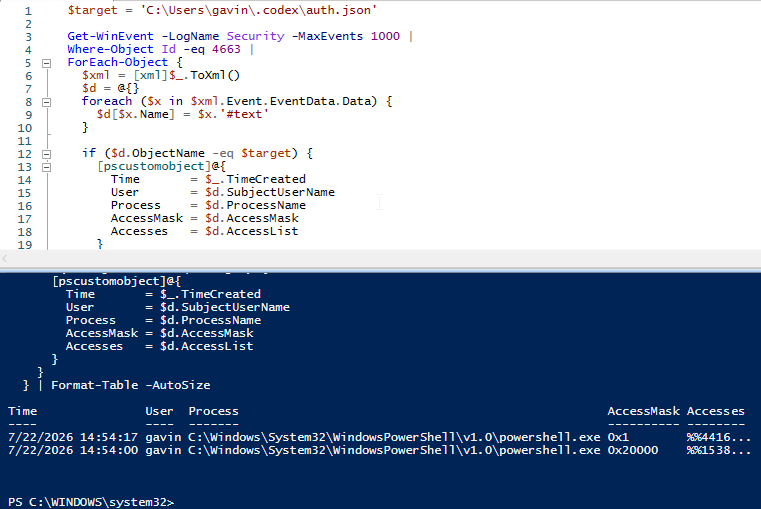
- Windows: Modification events should not be treated as proof of access. To confirm file reads, Blacklight documents the use of Security Event 4663 with Audit File System enabled and appropriate SACLs applied to the relevant paths. There is both documentation and PowerShell scripts provided to help with enablement of the Security Events on high value paths. Windows read detection does not rely on osquery. The PowerShell scripts will help configure the Security Event and produce results like the following screenshot:
Detection does not have to remain limited to endpoint telemetry. Activity may also be observable through the backend systems operated by AI providers. Brian Reitz brought provider compliance APIs to my attention, including the OpenAI Compliance Platform and Claude Compliance Activity Feed. These interfaces can expose relevant account and usage events for ingestion into SIEMs and other platforms, giving defenders an off-host source of visibility into agent activity.
Limitations and Future Work
- Agent artifact formats and storage locations will continue to change. Current support is focused on Codex, Claude Code, Cursor, and the Antigravity CLI, with additional updates planned as these platforms change
- Session analysis is currently focused on extracting and organizing available artifacts. Future work will expand the depth of analysis and prioritization
- Support will also be extended to additional agentic tools, like Grok Build or Devin
Contact Information
Linkedin – linkedin.com/in/gavin-kramer
All other Social Media – @atomiczsec


