Token Analysis and Tracking System (TATS)
TL;DR: Tracking OAuth tokens is hard, but Token Analysis and Tracking System (TATS) can help. TATS will collect, store, decode, analyze and provide visual tracking for OAuth token exchanges. It was built to account for known OAuth deviations in the Microsoft ecosystem and will work with any OAuth implementation. This blog explores functionality along with some interesting finds and tradecraft I found using the tooling.
Introduction
Repository: https://github.com/IceMoonHSV/TATS
If you have been keeping up with my posts, you might have noticed one of my current fixations involves figuring out how the Microsoft cloud ecosystem exchanges tokens. While researching agent identities a while back, I started with what I knew. Loaded up Burp, started tracking traffic, and then painstakingly went through the process of identifying token exchanges. Each filter and highlight I made annoyed me because it was slow, tedious, and difficult to track how these tokens were being handled on the user side.
If you have not gone through the process of capturing portal traffic, then you may not know how many exchanges occur behind the scenes. Microsoft deviates from OAuth specifications in a few areas, and this means some unexpected exchanges that are not fully understood by the cybersecurity community. There are fantastic researchers out there doing great work to understand how tokens are handled. However, there is still more to discover and understand, so this work is aimed at enabling faster, more efficient, and more accurate analysis for researchers and those looking to gain hands-on knowledge of OAuth token exchanges.
I am not the strongest coder, so I turned to Claude for assistance (i.e., I shamelessly vibe coded. Mea culpa). My first attempt with this project was to take an export from Burp and create a report in Markdown tracking the token exchanges. This worked well enough but was not going to scale well and had limitations primarily due to the dependency on Burp exports. After about 70-100 exchanges, the information became unreadable in this format, so I had to reconsider the approach.
On the second attempt, I had Claude instantiate a database where token information could be stored and a web graphical user interface (GUI) to view the information. There were still limitations due to Burp; for example, conversations with agents are done over web sockets which did not export as cleanly as the HTTP traffic from Burp. This was not the most helpful for the work I was doing, so I asked Claude to add support for live session tracking via Chrome Devtools Protocol (CDP) and support for mitmproxy. This allowed for information to appear nearly live in the web GUI as the database populated with token information from the browser or proxy. Lastly, I asked Claude to add a dashboard so interesting information could instantly appear and then enrich token information with application information from entrascopes.
Immediately, I started finding interesting exchanges and unexpected behavior. The database with token information and exchange visualizations made it incredibly easier to track and understand what was happening in the browser. The rest of this blog will explain features in TATS and some of the interesting initial findings.
Features and Usage
There is a very detailed README.md included in the repository which explains how to set up and use TATS and what the different flags mean. I encourage anyone using TATS to read the instructions, but I will go over some things which may not be immediately clear from the instructions.
Setup
TATS was made to be simple and easy to use. The core can be installed with no dependencies other than Python, but certain functions like mitmproxy may require the installation of additional Python modules. After downloading and installing any dependencies, you can start using TATS with two commands: one for starting the database and another for starting the web GUI.
Session Tracking
There are three options for getting data into the database to start tracking tokens.
- Burp import – Ingests HTTP traffic exports from Burp and analyzes token traffic and exchanges
- CDP – Chrome DevTools Protocol support that hooks into Chrome browser for live session token tracking
- mitmproxy – Ingests files from mitmproxy Python module
Web GUI
The web GUI is how you review information collected from the traffic. It will connect to the database specified when you start the web GUI and perform some sorting and analysis based on token values. The sections below detail different parts of the web GUI and how to interpret and work with the information.
Summary Dashboard
When you first open the TATS web GUI, you will start on the Summary Dashboard, which contains a summary of the information collected from tokens. There are counts at the top showing quick statistics on the tokens TATS has collected and these are updated as you browse and more tokens are added to the database. 12 summary cards show quick information about the session including:
- Users – each unique user tracked in the session
- Token Validity – tracking for active and expired tokens which updates as tokens expire
- Clients seen in token exchange – Client IDs found in tokens; if the –enrich flag is used, TATS will pull information from entrascopes to resolve client names and tag broker and nested application
- Audience – the resolved aud claim in tokens indicating the audience where the token can be used
- Tenants – all tenants seen in a session
- Hosts – all hosts interacted with in a session
- Privilege scopes & roles – resolved privileged scopes from tokens
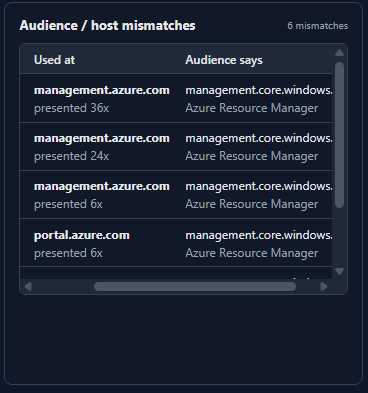
- Audience/host mismatch – traffic where a token was presented to a host which did not match the aud claim in the token (more on this later)
- Auth methods – resolved amr claims in tokens that show factors used
- Security features – tracks token activity with apps to find security features like Continuous Access Evaluation (CAE) in use
- Refresh token chains – tracks refresh token usage and indicates when there is a delta in scopes
- Sources – tracks the source of the tokens in the database
Most of the items tracked in the summary cards are clickable to make digging into areas of interest easier. When you click on one of the items in a card, it will open the token inventory with a filter for the item(s) of interest. Client names for apps are clickable as well and will open links to entrascopes with filtered results for that application.
Token Inventory
One of the most useful portions of TATS is the token inventory under the Tokens page. Each token collected and tracked in the database is assigned a unique ID (labeled “FP”) to correlate it with exchanges and track its usage.
Each column in the inventory is sortable, and you can filter tokens based on several different options for the tokens. When you find the tokens you are interested in, you can click on the entry to expand information about the token. TATS will translate JWTs and breakdown all claims in the token and show the events where the token was issued or used. Additionally, if you want to work with the token there are a few options to make it easier. Expanding the Command preview section for the token will provide some roadtx, curl, Python, PowerShell commands, and a roadtools auth file. If you start the ingest or capture with the –store-tokens flag, then these will be populated with the token values and can be exported.
Exchanges
The exchanges page is specifically for exchanges with refresh tokens. It provides some details to understand the context of the exchange. If the exchange is a brokered exchange, it will indicate the broker and nested applications. Additionally, this section will correlate the refresh token used for the input and the tokens received as an output tracked with the fingerprint (FP) ID.
FOCI and BroCI
These sections are Microsoft-specific to dig deeper into deviations they have instantiated in their OAuth implementation. Family of Client IDs (FOCI) will be less likely to see, but I wanted to have tracking for that anyway. These and the Exchanges pages are not as clickable back to the token inventory, but the information is still very useful depending on what you are trying to do.
Graph
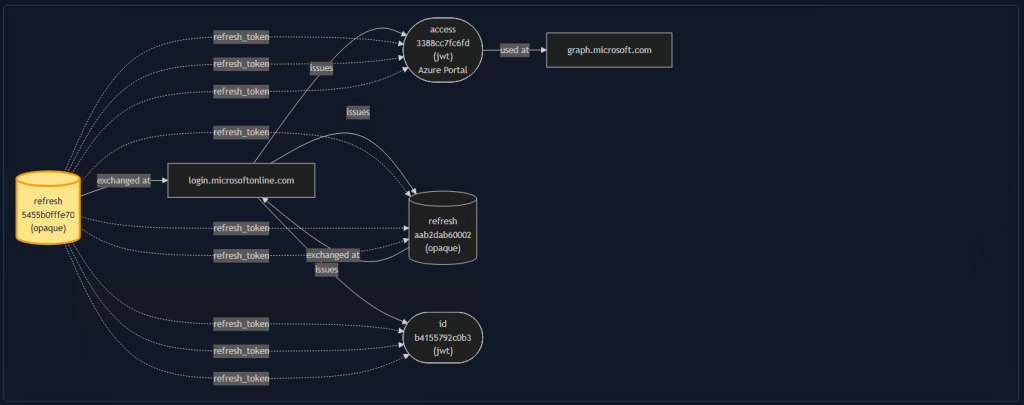
Another incredibly useful page for understanding token exchanges, the Graph page will generate a mermaid diagram showing token exchanges. If you navigate directly to this page, the graph can be overwhelming and hard to read.

While this was a step forward, I wanted to make a more focused view as well for seeing specific exchanges. Therefore, specific tokens can be isolated and highlighted in the graph to understand the exchanges they were involved in. The FP IDs are displayed so they can be searched in the Token Inventory.
Sequence
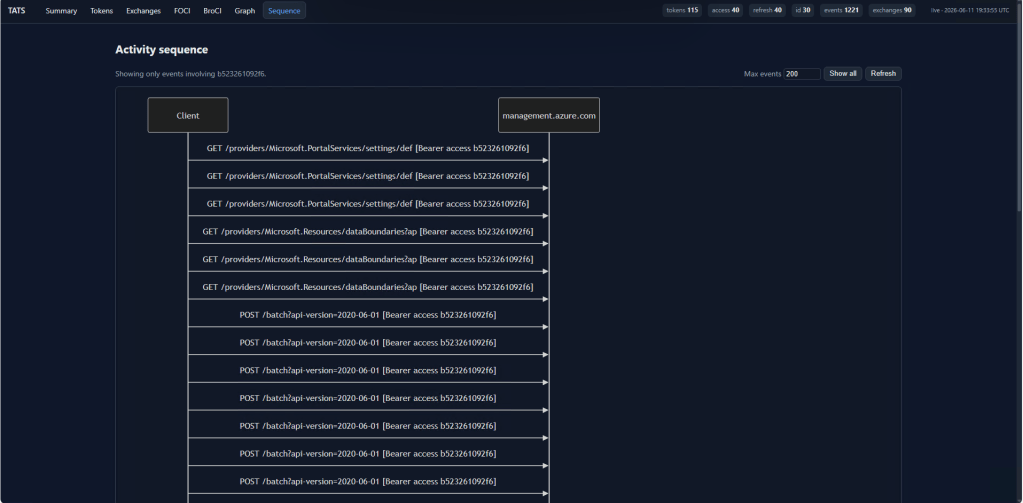
The Sequence pages is another way to visualize token exchanges in a sequence diagram. Like the Graph page, specific tokens can be isolated for the sequence diagram to track their usage.
Additional Features
The intention for TATS is to be used for research and education. For that purpose, there are a few additional features that are worth discussing briefly.
- –store-tokens – instructs TATS to store full token values instead of a truncated version. Off by default for security but certain exports and commands will not populate fully
- –enrich – gathers information from entrascopes to resolve information like app names in Microsoft and adds tags for information like brokering
- –redact-claims – allows you to list claims you want redacted from the database; intended to protect sensitive information during reporting or public release information (e.g. blogging and presentations)
Findings
So, what have I found using TATS? As I mentioned, Microsoft is deviating from OAuth specifications by implementing concepts like brokered client IDs (BroCI) and FOCI. There are a couple of small findings I discovered very quickly that surprised me.
Audience Mismatch
My first finding was that the audience claims were not as strongly tied to where the token could be used as it was supposed to be. While browsing primarily through the Azure Portal, many tokens were issued with management.core.windows.net as the audience (identified by the aud claim).
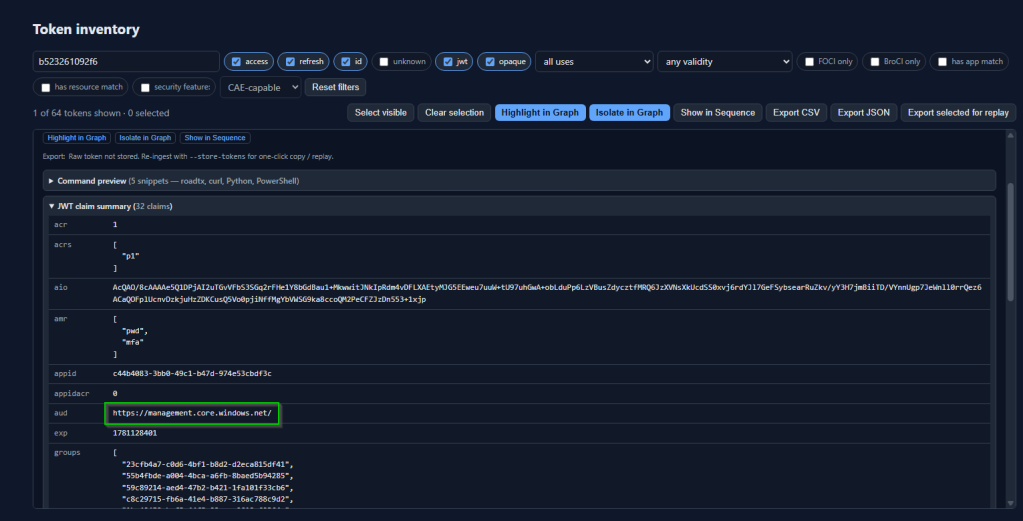
According to OAuth specifications, this should only be usable when presented to that resource. Instead, I saw these presented to resources like management.azure.com or portal.azure.com.
Conditional Access Policy Gap Abuse
Really, though, it was the second finding that surprised me. While not a multi-factor authentication (MFA) bypass, in practice it could be used to gain access to Single page applications (SPAs) and extensions when there is an oversight in Conditional Access Policies (CAPs). TATS connects to a browser and can track the entire session so, while testing, I found that tokens were issued prior to MFA being completed. After entering the username and password for the account, the user is prompted to stay logged in. When I clicked “Yes”, a token was issued before the MFA prompt appeared.
Both refresh and access tokens appeared in the database, showing they were issued. I checked the authentication method reference (amr claim) and confirmed that MFA was not included in the token. This meant that I could not actually access the portal application with this token because Microsoft has required MFA for admin portal since October 2024. However, that did not mean it was unusable because this token for the Azure Portal could be brokered to other services. I recreated work I had done previously while researching BroCI and exchanged the Azure Portal token for a key vault token. This worked successfully because the key vault did not have an explicit CAP requiring MFA.
When I instantiated a new CAP and attempted to perform this exchange again and access the same key vault, the policy blocked me. This is a likely situation to find because while Microsoft does require MFA for admin portals, this does not extend to the nested applications for those portals. Administrators who are only relying on the blocks for the admin portal can still leave significant gaps that a threat actor can abuse.


