Ghostwriter v7.3.0: A Fresh New Look
TL;DR: The upcoming Ghostwriter v7.3.0 release brings a major UI refresh to nearly every part of the application. The new design is easier on the eyes, more accessible, and better organized, with a new engagement bar, customizable sidebar with pinned work, a completely redesigned dashboard, and a plethora of other changes.
Introduction
As it is known today, Ghostwriter has been under active development for a little over eight years, and a lot has changed in that time. New workflows, reporting features, integrations, operation logs, collaborative editing, and countless other additions have steadily expanded what Ghostwriter can do.
The UI has evolved along the way, but it has been a while since we stepped back and looked at the entire application.
The last update that made significant changes to the interface was Ghostwriter v2.0 in November 2020. That release introduced a new sidebar, tabbed dashboards, inline forms, and other changes that shaped the interface many of you have been using ever since.
It has long since been time to revisit these features. With v7.3.0, we went much further.
We revisited every page in Ghostwriter to modernize the interface, improve organization, address accumulated UX friction, and create a more consistent experience across the application. Some changes are immediately obvious. Others are intentionally subtle, such as improved spacing and visual hierarchy, more consistent controls, better responsive behavior, and a more deliberate use of color.
For example, green appeared throughout the old interface as a general-purpose accent color. We have pulled that back so green can communicate “success” states more cleanly. There are dozens of small decisions like that throughout the refresh.
At the same time, we were careful not to rearrange elements and disrupt familiar workflows. The result should still feel like the Ghostwriter you’re familiar with but with a cleaner, calmer, and easier to navigate interface.
Stay in Context with the Engagement Bar
One of the biggest navigation changes is the new engagement bar at the top of the application.

This bar replaces the old breadcrumb-style navigation on every page with something designed around how people actually work in Ghostwriter. Breadcrumbs are useful, but we realized people mostly used them to jump between a report, project, and client. The engagement bar keeps your report and its surrounding context close at hand, including the related project, client, and activity logs.
Instead of breadcrumbs simply telling you where you are, the engagement bar helps you move between the things that matter the most to the engagement you are actively working on. The bulk of the bar is dedicated to displaying the names of and links to your current client, project, and report. It also does a few more things we think you’ll like.
On the left side, there is a button that opens up a new report browser (below). This window lets you browse projects and their related report(s) from anywhere. You can easily pin work to the sidebar — more on that below! — or switch to a different report without having to remember the report’s name or visit that project’s dashboard. Each entry is displayed in a clear hierarchy: a client, all projects to which you have access under that client, and then all reports for each of those projects.
You can also quickly filter for any of this information by name, pinned status, or complete status.

The right side of the engagement has a quick access menu for all activity logs associated with your current project, which makes it easy to jump to your activity logs at any time from anywhere. You can also see the status of your current report as it moves from a draft to a final and then a delivered report.
Make the Sidebar Yours
We also completely rebuilt the sidebar. Ghostwriter has accumulated a lot of tools over the years, and not everyone needs every link every day. The new sidebar can be customized so you can show or hide navigation items based on how you use Ghostwriter.
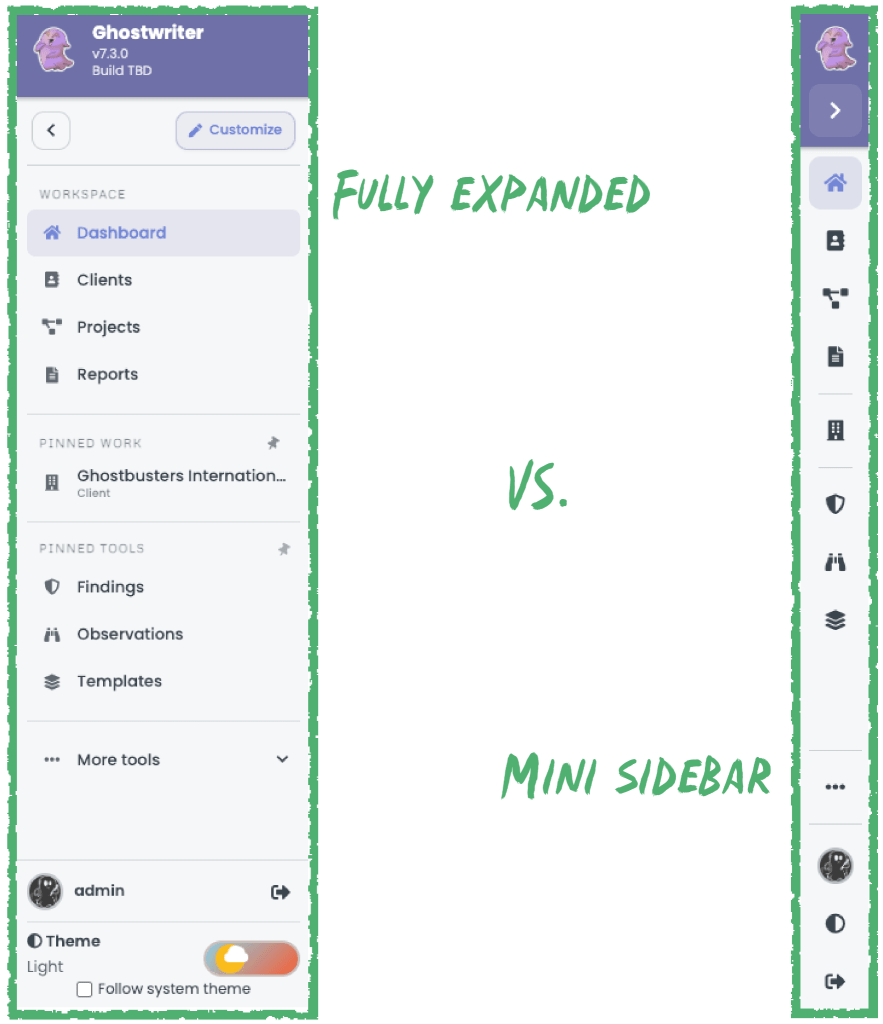
Even better, you can now pin work that is most important to you. Reports, projects, and clients can be pinned directly to the sidebar for quick access. If you are spending the week bouncing between a few active engagements, you can keep them available without repeatedly navigating through lists or searching for them.
We’ve also adjusted how the sidebar collapses. The old sidebar completely hid itself and had to be opened to access the menus. This new sidebar transforms into a miniature sidebar to free up screen real estate while still giving you access to your pinned work, tools, theme switch toggle, and other functions.
A Dashboard Built Around What’s Next
The homepage dashboard received a complete redesign as well. The old dashboard had accumulated several different ideas over the years. With v7.3.0, we wanted the homepage to answer a more useful question when you log in:
What do I need to know right now?
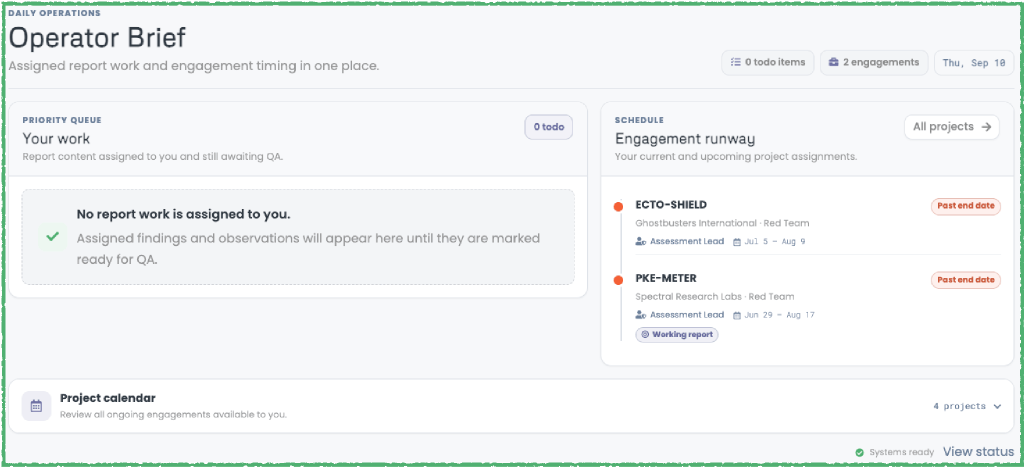
The new dashboard introduces your engagement runway, alongside your assigned work, to provide a clearer picture of what is happening now and what is coming next.
This is an area we expect to keep improving. The new dashboard gives us a much better foundation, and we want to hear how teams use it and what information would make it more useful in their day-to-day workflows.
A Refresh Across Ghostwriter
Those are the most visible highlights, but we touched every page with this refresh. We adjusted cards, tables, forms, tabs, menus, filters, status indicators, and other common components. We reconsidered everything for consistency and readability.
We also worked to address some issues with theme support, keyboard and screen-reader accessibility, and navigation in narrower browser windows. We did our best to test a variety of views and use cases to make this the most friendly Ghostwriter interface yet.
Try v7.3.0
This is a large enough change that we want to give it some extra time in the hands of users before calling it finished. It’s been quietly available for a while now and discussed with members of the SpecterOps Slack community and Ghostwriter channel, but now we want to cast a wider net to raise awareness and gather feedback before release.
Ghostwriter v7.3.0 will remain in testing until September 30, 2026.
Try the v7.3.0 testing release: https://github.com/GhostManager/Ghostwriter/releases/tag/v7.3.0-rc1
If you have an environment where you can test the refresh, give it a try and let us know what you think. We are especially interested in places where navigation feels better, places where it still gets in your way, and anything that does not behave as expected.
This refresh gives Ghostwriter a much stronger UI foundation, but—as always—we will keep improving it based on how people actually use it.


