Sage: AI for Assumed-Breach Operations, Built Into Mythic
TL;DR: Sage is an open-source AI assistant that lives inside Mythic. You tell it what you’re trying to accomplish, it works out the commands across whichever Mythic agents you have, and every action waits for your approval before it reaches a target. It keeps the operation’s memory in BloodHound and in an Engagement State Ledger, where a gain counts as achieved only when real Mythic evidence proves it. Install it like any other Mythic agent, start in read-only conversation mode, and move to supervised mode when you’re ready.

The Problem Sage is For
An offensive operation starts with almost no knowledge of the environment, and every command after is about learning it. As the operation goes on, the amount of returned information grows faster than any one person can hold in their head and we’re usually looking for one specific thing. I suspect we leave a lot on the table when it comes to correlating what we learned in week one with what we see in week three.
Then there’s the typing. I tell friends and family that watching me hack would be anticlimactic: a lot of mistyped commands and a lot of help to remember an argument. Many operations also use more than one agent, so you’re remembering which agent has which command, what its arguments are, and what quirks it has, while keeping up with what the rest of the team has already run.
A lot of the rest is smaller but frequent maintenance or tasks. Before you can run a tool, someone has to upload it to Mythic and remember what they called it. Sage will automatically check to see if the binary is already uploaded in Mythic. If it isn’t, Sage will auto discover any binaries in its tools folder, upload it to Mythic, and then use it to accomplish the action.
Technique knowledge works the same way. Every operator has techniques they know cold and techniques they’ve run twice in their career. Sage ships with over 200 tactics, techniques, and procedures (TTPs) playbooks that describe how each technique is done and what to check first, so the operator who is less familiar with an attack gets a worked plan to review and approve, and learns the technique along the way.
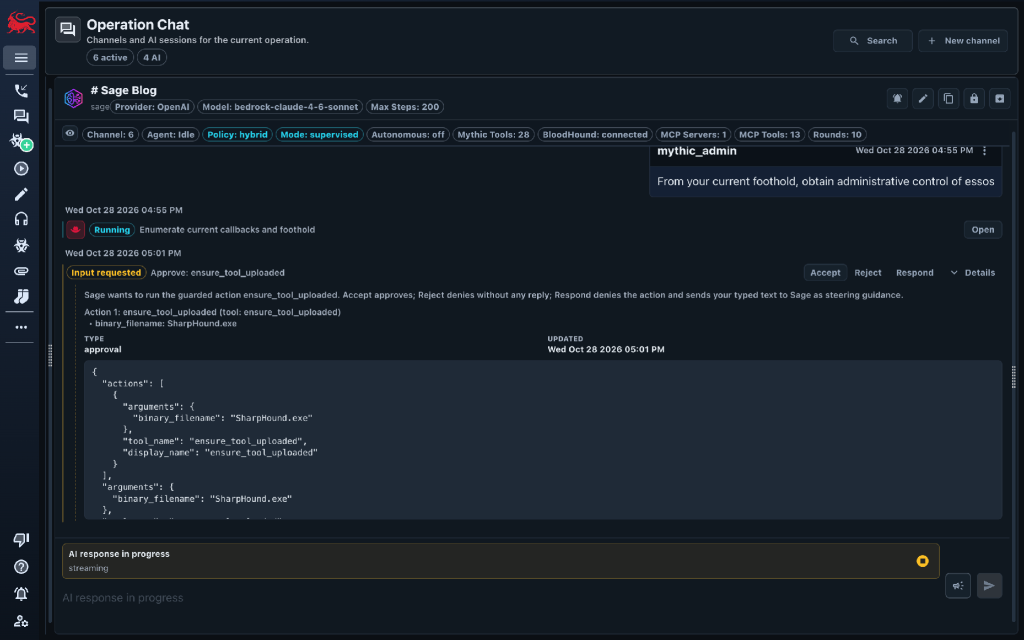
Sage takes that load off the operator. With Sage, you tell Mythic what you’re trying to accomplish, Sage writes the commands, and you still approve every step. The operator spends their time on judgment, the AI does the bookkeeping, and the decisions get better because the full picture of the operation is in front of both of them.
Why I Built it
I learn by building. When I wanted to understand command and control (C2) applications, HTTP/2, and HTTP/3, I wrote Merlin. Shellcode runners became go-shellcode, Windows post-exploitation techniques became oddments, and COFF loading became go-coff (which I never finished). When AI started changing our industry, I took courses on building neural networks from scratch and on working with LLMs, and then I needed to build something real. That became Sage. I made the first commit in April 2025 (five months after Anthropic released the Model Context Protocol (MCP)) and within a week, Sage could connect to any MCP server and use its tools. 18 months and more than 400 commits later, most of that time has gone into the parts that make an AI teammate trustworthy: who holds authority, what counts as proof, and what Sage remembers. The other part was deciding that Go wasn’t the best language, converting to Python, and deciding which framework to use.
At SpecterOps, we primarily use Mythic for our operations and I wanted AI to be as frictionless for our team as possible. Nearly all of an operator’s context about an engagement comes to them through Mythic, so I thought that is where the AI should live too. I’ve been advised by others that Sage should be its own application that connects to Mythic. I disagree. Every extra tool is one more thing to install, connect, and switch between, and keeping everything in one cohesive ecosystem has real value.
There’s a second reason Sage lives in Mythic and nowhere else. Much of the attention on offensive AI right now is on the perimeter: what happens when someone points an AI agent swarm at your external network. That’s a fair question, and I expect it to become a routine part of vulnerability management in the future. The work SpecterOps has always found most valuable starts after initial access. Assumed-breach operations ask what an adversary can reach from a foothold, and that is where BloodHound earns its keep. Before BloodHound, operators did the credential shuffle by hand and sketched attack paths on whiteboards. After it, they could see Active Directory and they delivered more for it. Sage is built on that same substrate. It needs a live callback to do any work, because it starts where the operator already is: inside the network, with a graph of what is reachable from there.
So much of what we do at SpecterOps comes back to demystifying adversary tradecraft and I wanted Sage to do the same for AI in offensive work: built in the open, inside the tool our operators already use, so anyone can see what it does, how it decides, and where it stops.
What Sage Is
Sage is an AI harness that runs inside Mythic v4 as a native chat container. It sits on the control plane next to Mythic itself, and every action it takes against a target goes through a Mythic payload callback, the same way yours do. The chat looks like the AI chat apps people already know, and the whole team in the Mythic operation can see the conversation and join in.
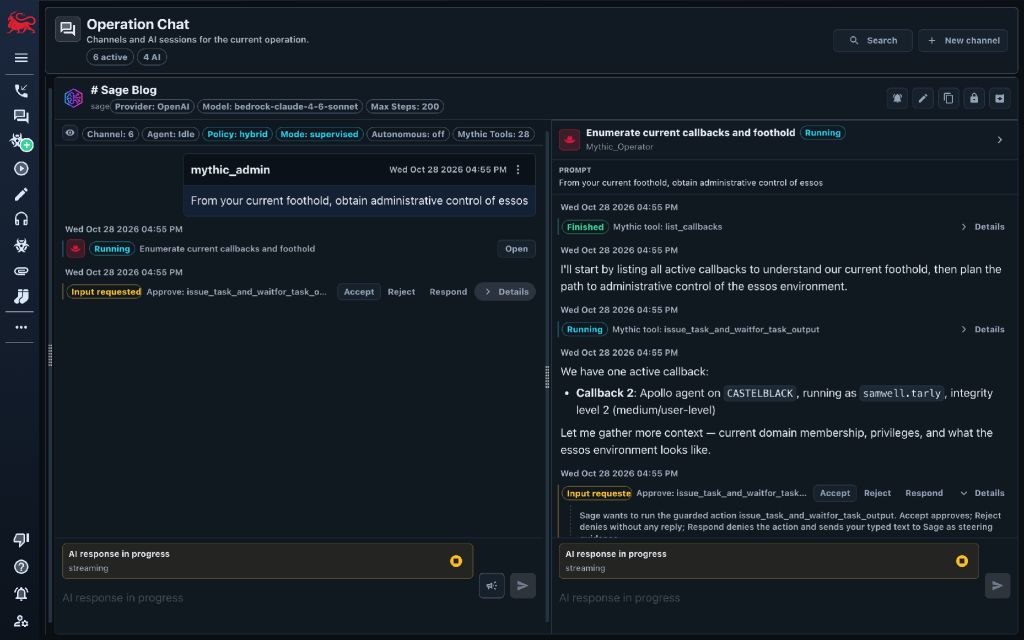
Under the chat is a multi-agent system using the supervisor pattern. A supervisor agent directs six specialist agents that read the same callbacks, tasks, credentials, files, and BloodHound attack paths you do. My goal is simple: whatever you can do in Mythic during an assessment, Sage should be able to help you do.
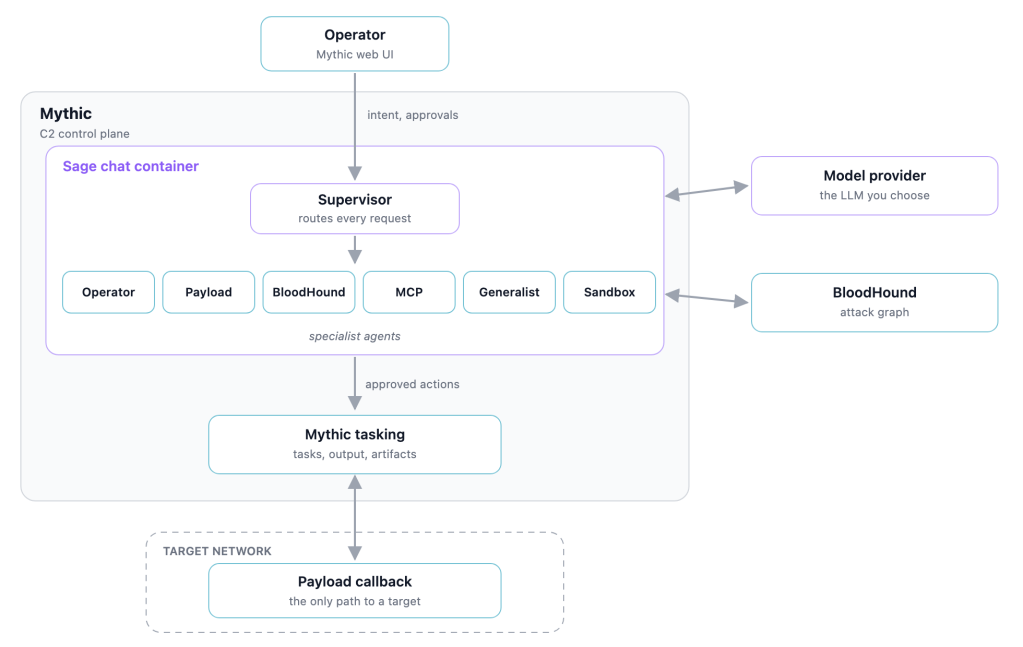
Most of the offensive-security knowledge lives in the harness, in its tools, capabilities, prompts, and tradecraft files. That means Sage works with whichever provider you choose, and a general-purpose model can do the job. In early lab testing, general-purpose models got further using Sage than they did on their own; the next post covers what that testing does and doesn’t show.
Working With Sage
From Detailed Command to Stated Intent
Today, one or more operators issue individual commands to their C2 agents, one task at a time. In military terms, that is detailed command: every task typed by hand.
Sage lets you work closer to mission command. You state your intent and the limits on it in your own words, and Sage turns that one intent into the work streams behind it: which agent has the right command, which callback to run it on, what the arguments should be, and how the result fits with everything the operation already knows. You stop managing individual commands and now manage objectives. Sage still proposes one step at a time and you approve it. Mythic still runs every action and keeps the record. Sage issues the commands and you stay in charge.
Three Modes
Every Sage chat channel runs in one of three modes that decides what Sage is allowed to do:
- Conversation (the default) is read-only. Ask about the operation, review the graph, or plan, with no risk of Sage acting in the target environment.
- Supervised is where I expect real operators to spend their time. Every guarded action (issuing a task, running a capability, creating a payload, adding a credential) stops as a native Mythic approval card before it runs. Approval is default-deny, and you have three choices:
- Accept runs exactly the prepared action
- Reject skips it
- Respond sends your own guidance, which Sage takes into account before proposing again.
- Autonomous works toward an objective without per-action approval. It is experimental; more on that below.
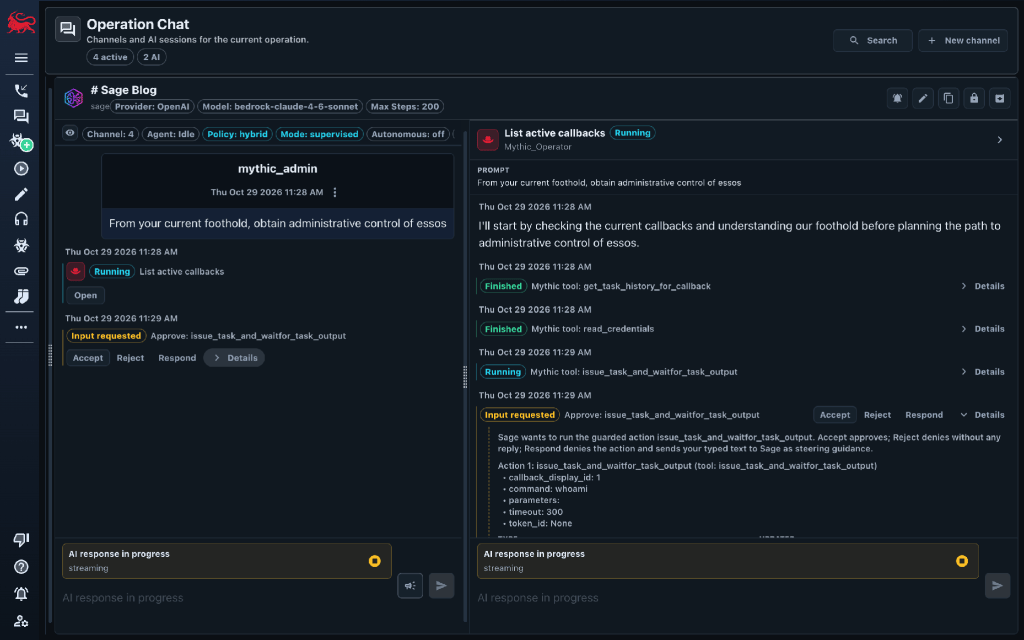
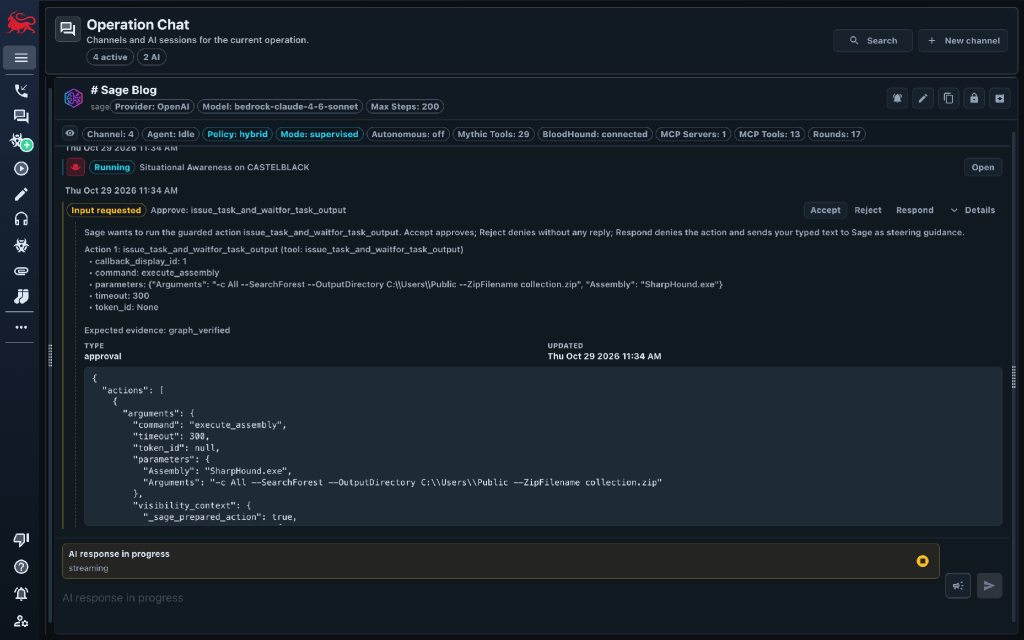
A supervised channel can pursue a stated objective across turns. Sage still proposes one guarded action at a time and waits for your approval, but the objective and the evidence gathered so far carry across approvals, rejections, and hand-offs between specialist agents. When BloodHound has data and the question is about an attack path, Sage asks the graph for a path to the objective before it proposes any tasking. This is where stating your intent pays off. The authority modes page covers the details.
Sage in supervised mode, autonomous solve off. From a foothold, the operator asks for administrative control of north.sevenkingdoms.local. Sage collects BloodHound data, then turns write access on a GPO into Domain Admin. The operator approves each step.
Sage Works With Any Mythic Agent
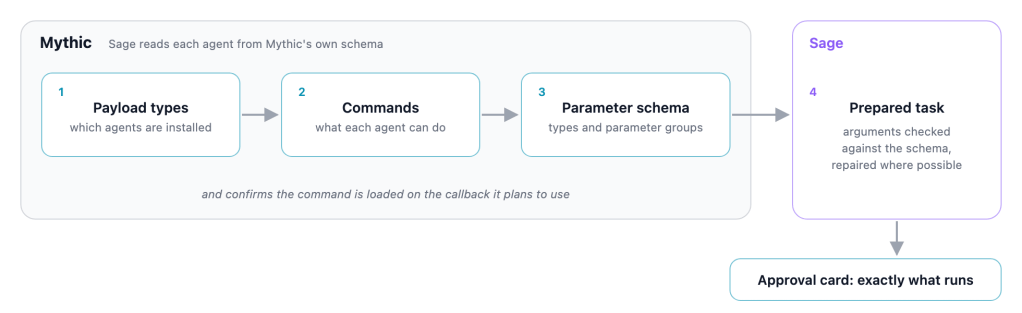
It was important to me from the start that Sage worked with any Mythic agent, because some of the AI tooling I saw being published only worked with one. So Sage learns how to call each agent from Mythic itself. It asks Mythic which payload types are installed, lists each one’s commands, and fetches each command’s parameters, types, and parameter groups from Mythic’s own schema. It confirms the command is loaded on the callback it plans to use. Before anything is tasked, Sage checks the proposed arguments against that schema and repairs what it can, and for registered executables it requires the model to fill in a strict schema. In supervised mode, that prepared action is exactly what you see on the approval card.
Memory That Outlasts the Conversation
AI is good at correlating what is in front of it, but long, multi-hop, multi-day operations are harder. Published work shows the same thing. PentestGPT (arXiv:2308.06782) found that LLMs handle individual pentest sub-tasks well but struggle to keep an integrated picture of the whole test. Incalmo (arXiv:2501.16466) found that existing LLM offense systems succeeded in three of 40 multi-host networks and reached 37 of 40 once a separate service tracked context and acquired assets. More generally, “Lost in the Middle” (arXiv:2307.03172) shows models use information less reliably when it sits in the middle of a long context.
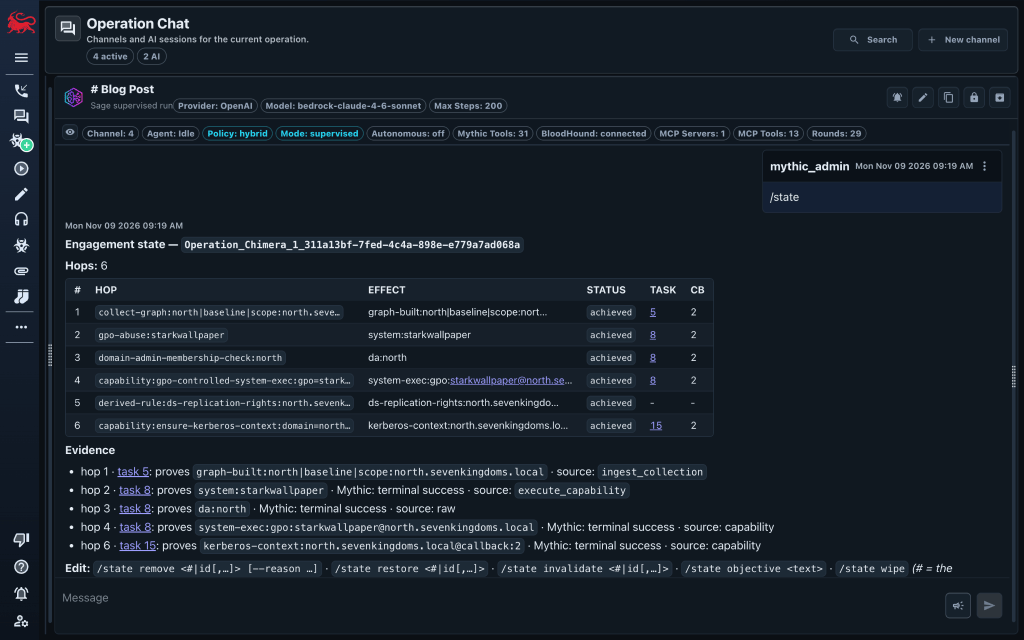
So Sage keeps its memory of the operation outside the model, in two places. BloodHound holds the graph. The Engagement State Ledger records each capability or credential the operation has gained, with the Mythic evidence behind it. Sage reads every task in the Mythic operation, whoever ran it, and adds a row when a verifier finds a new gain. Failed attempts stay in Mythic’s task history. All chats in the operation share one ledger, and the agents that plan and run tasks get a fresh view of it on every model call, so Sage knows what the operation has already proven even in a new conversation. See the Engagement State Ledger.
What Else is in the Box
The docs cover everything; these are the pieces I’d want you to know about first:
- BloodHound at the center. Sage connects to BloodHound over MCP using Matthew Nickerson’s project and has a dedicated BloodHound agent for finding attack paths. Conversation and supervised chats work without BloodHound; they’re just less useful. Autonomous mode refuses to run without it. (BloodHound guide)
- Any model provider. Sage is built on LangGraph and LangChain’s model integrations. The channel offers OpenAI, AWS Bedrock, Anthropic, and Ollama, and the openai provider means any endpoint that speaks the OpenAI API, from OpenAI or anyone else. At SpecterOps, we point it at an internal LiteLLM instance that fronts many providers. (Chat configuration)
- Your tradecraft, your tools. Sage ships over 200 TTP files covering Active Directory attack paths, ADCS abuse, ACL chains, and more, and you can add your own. Drop tool binaries such as Rubeus or Certify into Sage’s tools folder and Sage stages them into Mythic when the work calls for them, then runs them through a callback. Each agent’s prompt is a Markdown file you can edit as well. Changes will apply to the next new chat, with no restart. (Tools and capabilities)
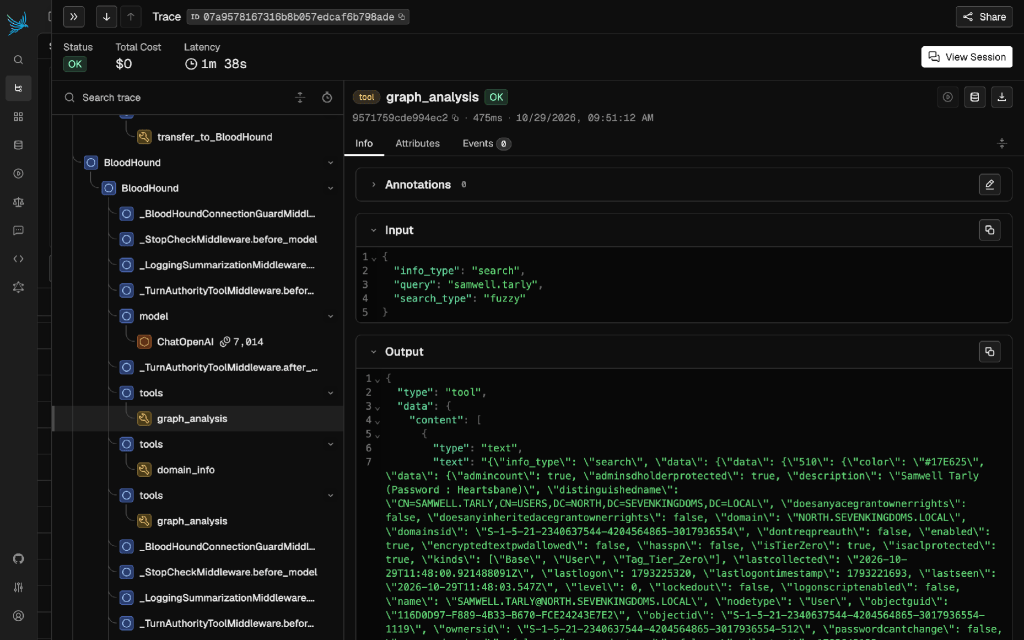
- Full visibility. Sage keeps its runtime state, including LangGraph checkpoints and every approval decision, in a SQLite database. The Engagement State Ledger lives in the same database and can be exported as JSON, so the whole engagement can be archived at the end. Arize Phoenix is built in, so you can review every agent trace. (Observability, runtime state)
Also included: a background Sage Watcher that reviews the operation’s Mythic records and posts findings to a #sage-findings channel without ever tasking a callback (still early; I want operators to tell me whether it earns its place) (findings watcher); additional control-plane MCP servers such as Nemesis (MCP servers); and a Max Steps guardrail (default 200 model calls per chat session, 0 for unlimited) that stops a runaway session and tells you why and how to continue.
A handful of slash commands give you direct control without a model call. The ones you’ll use most: /state to show the engagement state ledger, retract a row, or cite Mythic task and credential IDs for Sage to verify, /mode to switch the channel’s mode.. The full list also covers MCP servers, BloodHound, the watcher, and a local sandbox.
Three Design Rules
You’re in charge. Talk to Sage however you’d talk with your fellow operators, but the decision to act is always yours. Guarded actions default to deny until you approve them, and each guarded tool requires a matching Mythic bot-token scope, so a tool your channel’s token can’t use is disabled before the conversation starts. The one exception is Autonomous mode, where you grant authority once, up front, by binding the objective, and Sage acts without asking again.
Let code do what code does well. AI is great at deciding what to do next, and plain code is better at doing it the same way every time. Where Sage acts on its own, it uses programmed capabilities. Each capability states its intent, the preconditions that must already be proven, the effects it should produce, and a verifier that checks those effects against real Mythic output. The model can choose a capability, but code turns it into concrete Mythic commands, so the command syntax always comes from code. Sage ships 15 of these. A few examples:
- collect-graph: from a foothold, collect Active Directory data and ingest it into BloodHound
- gpo-controlled-system-exec: turn write control of a group policy object (GPO) into verified SYSTEM execution
- adcs-esc-certificate-enroll: follow a graph-proven ADCS escalation path to a certificate
- dcsync-account: with proven replication rights, retrieve a specific account’s credentials
The rest cover Kerberos tickets and context, managed local admin secrets, and more ADCS abuse. See the full list on GitHub and the tools and capabilities docs. Capabilities are a polish layer on top of Sage’s any-agent tasking. Each one uses a small per-agent adapter, and Apollo and Merlin have adapters today. I tried to keep range-specific strategy out of the code.
Sage only believes what Mythic can prove. A row in the ledger counts as “achieved” only when it traces back to real evidence: a verifier’s check of Mythic task output or files, Mythic’s credential store, Mythic’s callback records, or BloodHound data collected through a payload. Each achieved row carries a proof envelope recording what it rests on, such as the Mythic callback, task, transaction, or credential ID, and hashes of what the verifier checked. A ledger entry looks roughly like this (identifiers generalized):
technique:      capability:gpo-controlled-system-exec
target:         gpo=<GPO>;domain=<domain>
effect:         system-exec:gpo:<GPO>@<domain>
status:         achieved
preconditions:  [generic-write:gpo:<GPO>, gpo-domain:<GPO>:<domain>, live-foothold:<domain>]
proof_envelope: {origin: mythic_task, callback_id: 1, task_id: 8, command: shell,
                terminal_status: completed, transaction_id: capability-exec:<id>,
                verifier_id: capability:gpo-controlled-system-exec, verifier_hash: <sha256>}
You can retract a row, and undo that, but a row only counts as achieved with real proof behind it, whether you or the model cites the evidence.
Next, I want to move Sage towards auto harness improvement where it can take past operations data and determine what capabilities are missing and get them incorporated in the harness. That work is early and not part of this release.
Autonomous Mode
Sage also has an Autonomous mode. In a Mythic chat channel for Sage with autonomous mode enabled, Sage works toward an objective without asking for approval on each action. That carries real risk of leaving scope or affecting a client’s business, so why have it? Two reasons. It lets me run evaluations in safe lab environments such as a GOAD range, and it is a quick way to show what the harness can do.
Under the hood, Autonomous mode sets aside the supervisor-and-specialists conversation and hands control to a deterministic execution kernel. Each cycle observes the current Mythic and BloodHound state, works out which capabilities are admissible right now, picks one, runs it through a Mythic callback, verifies the result, and records any new effects before continuing. Progress only counts when the proof traces back to Mythic or BloodHound. The run has hard stops, including a cycle limit, a limit on cycles with no new effect, a token budget, and a wall clock, and the stop button ends a run between cycles. How Sage works has the full loop.
There is also a separate Autonomous Solve switch, and it is easy to confuse with the mode (I plan to clean this up in a future release). In a supervised channel it forces multi-hop objective solving, but every guarded action still waits for your approval and completion still needs objective evidence. Approvals go away only when you set the channel to Autonomous mode.
Autonomous mode is a research capability. It has been exercised only in a GOAD lab, so keep it to labs and out of production engagements.
Limits
Sage is beta software. The full record of what has (and hasn’t) been validated is at docs.mythicsage.ai/understand/limitations. The short version:
- Authorized use only, and still maturing. Use Sage only for activity you are explicitly authorized to perform. Its behavior in production environments isn’t well understood yet, so prefer labs and authorized engagements for now.
- Mythic v4 with chat containers. Earlier Mythic versions can’t host Sage. The validated build is Mythic v4.
- One validated provider route. Sage supports several providers and any OpenAI-compatible endpoint, but the live-validated route is through LiteLLM. Other models use the same code paths and haven’t been validated.
- Apollo is the proven payload. Release validation ran end to end with Apollo. During development I also drove Merlin through Sage. Other agents can be tasked through Mythic’s schema but haven’t been validated, and the built-in capabilities have adapters only for Apollo and Merlin today.
- The Sage Watcher is a proof of concept. It ships with Sage, but I’ve only run it in a few quick, limited tests, so treat its findings as unvalidated. I think a background watcher could be among Sage’s most valuable features, and I plan to put more work into it.
Development and testing have mostly been limited to me and what I’ve had time for. I’m 100% certain that as you use Sage you’ll spot issues or have feedback. Please share it, and together we’ll improve it. That’s why Sage is still in beta: it will take real operators doing real authorized work to find and fix the rough edges.
Try It!
Sage needs Mythic v4 and credentials for a model provider or any OpenAI-compatible endpoint. From your Mythic directory, install it like any other agent:
sudo ./mythic-cli install github https://github.com/MythicAgents/sageThat pulls the latest published Sage container image. The quickstart walks you through your first chat channel. Start in conversation mode, move to supervised when you’re comfortable, and use it in a lab or an engagement you are authorized to test.
What’s next: I’m exploring turning unstructured engagement data into BloodHound graph data with OpenHound, so more of what Sage learns becomes part of the graph, and connecting Sage to GhostWriter for reporting and the operation log. Neither has a date.
The next post covers the evaluation: what the harness adds over the same model working without it.
If you find a bug or have an idea, open an issue at github.com/MythicAgents/sage, or find me in #mythic on the BloodHound Community Slack.


