Principal Problems: App Registrations, Service Principals, and the Hidden Risk of Multi-Tenant Apps
TL;DR: App registrations are an app’s blueprint and hold its credentials in one home tenant. Service principals (what you see under Enterprise applications) are the identities that hold permissions in every tenant that uses the app, which is why one stolen credential in the ConnectWise Cloud Backup incident reached 100+ tenants.
What are we talking about?
On October 16, 2026, Huntress reported that an unknown threat actor had abused access obtained through ConnectWise Cloud Backup (formerly SkyKick Backup) to pivot into customers’ Microsoft 365 environments, with more than 100 compromised tenants seen at the time. Based on the published indicators, the actor used credential material tied to the vendor’s app registration to authenticate as that app’s service principal in each affected tenant. Our very own Justin Kohler and Duane Michael covered detection and response in ConnectWise SkyKick Breach: How to Check Your Microsoft 365 Tenant, so I won’t repeat the IoCs here.
What I want to cover instead is the concept of applications and OAuth in EntraID: the components that make up an application, how they work together, and how that relationship is what allowed this attack to be pulled off. From there, I want to dig into the dangers of multi-tenant app registrations and the risk that comes with consenting to apps in general.
I feel like this is important because while reading the discourse regarding this incident, as well as from teaching our Adversary Perspectives: Azure (APA) course, it seems like even though app registrations, enterprise apps, and service principals have existed since Entra was called Azure AD, they are still a concept that people often confuse (which is understandable given how Microsoft labels them). This confusion has real consequences, as it makes investigations like the ConnectWise incident harder, and it often leads to misconfigurations and over-privileged principals that can end in a full tenant takeover.

So in this post I want to walk through:
- What app registrations and service principals (enterprise apps) are
- Why Microsoft’s naming scheme makes them so easy to confuse
- How permissions and consent decide what a service principal can do
- How app registrations and service principals work together
- Why/how multi-tenant apps put an identity in your tenant whose credential material you don’t hold, and how that maps to the ConnectWise incident
- What attackers do with this, and what defenders can do about it
A quick note on terms before we start, since half the confusion comes from the words themselves. Throughout this post, app means the actual software or solution that is being integrated with EntraID. App registration (application object) is that app’s definition in EntraID. Service principal is the identity the app gets in a specific tenant, which is what you see under Enterprise applications in the portal.
App Registrations: The Template
The name “app registration” is a bit misleading. At first glance, it sounds like you’re putting your application into EntraID, as if the app itself now lives there or EntraID somehow knows about the code you deployed; however, that is not the case. Registering an app creates what Microsoft calls an identity configuration that lets the app integrate with EntraID. This includes how it signs in, what it can ask for, and who can use it. Your app’s code, hosting, and deployment have nothing to do with it. Essentially, if you want users to be able to sign in with their EntraID accounts, or if you want the app to call Microsoft Graph, it needs an app registration.
Under the hood, that identity configuration is stored as an application object. The App registrations page in the Entra admin center is where you list and manage the application objects in your tenant, which is why the two terms get used interchangeably. You’ll see “application object” in Microsoft Graph and most documentation, but for the rest of this post I’ll mostly stick with “app registration.”
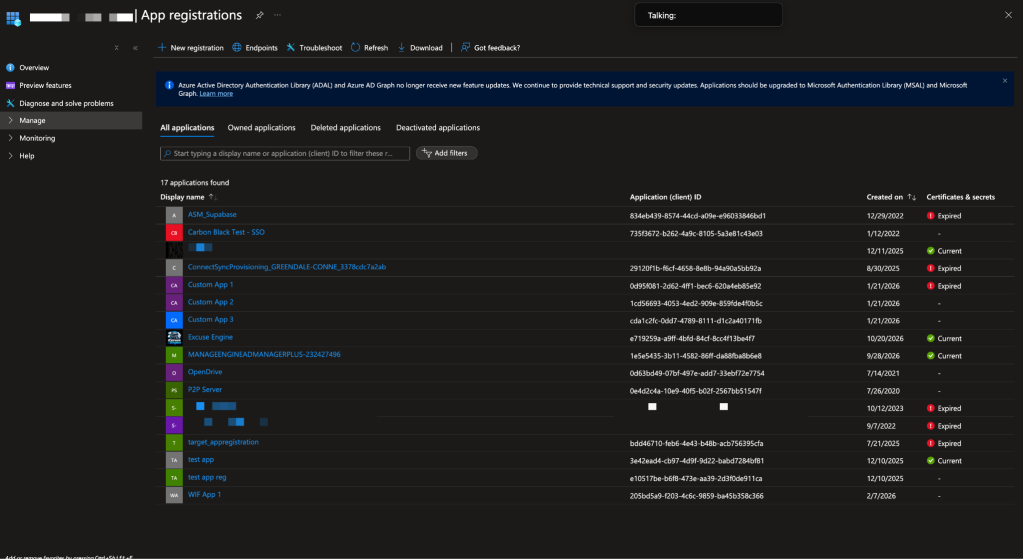
A better way to think about app registrations is as a blueprint used to create one or more service principals, similar to a class in object-oriented programming, where the app registration is the class.
Each app has exactly one app registration, and it lives in the tenant where the app was registered. That tenant is the app registration’s home tenant.
It is important to note that an app registration doesn’t always map to a real application. It’s not uncommon for people to create them to get a client ID and secret for a script, an automation, a proof of concept, or a one-off integration. When those projects get decommissioned, the app registration often sticks around, still holding valid credentials and permissions long after anyone remembers why they exist.
While app registrations contain a multitude of properties and configuration settings, from an adversary’s perspective, and for the sake of this post, these are what we care about most:
- Application ID (
appId) aka Client ID: The app registration’s globally unique ID. This ID stays the same across all EntraID tenants. - Supported account types (
signInAudience): This property dictates whether the app is single-tenant or multi-tenant. - API permissions (
requiredResourceAccess): the permissions the app requests to access APIs like Microsoft Graph. Note that requesting a permission doesn’t grant it; that only happens through consent. - Credentials: what the app uses to prove its identity to EntraID and get tokens on its own, without a user. Anyone holding a valid credential can authenticate as the app’s service principal.
- Credentials come in three forms:
- client secrets (
passwordCredentials) - certificates (
keyCredentials) - federated identity credentials (
federatedIdentityCredentials), my personal favorite to abuse, which I presented on at BSides ATL
- client secrets (
- Credentials come in three forms:
The important thing to understand right now is that an app registration is not a security principal. It cannot sign in, it is never the subject of a token, and it is never granted permissions. It is just a definition: a blueprint, or if you prefer, a class. Something else must act on its behalf in a tenant, and that something is the service principal.
Enterprise Apps and Service Principals: The Instance
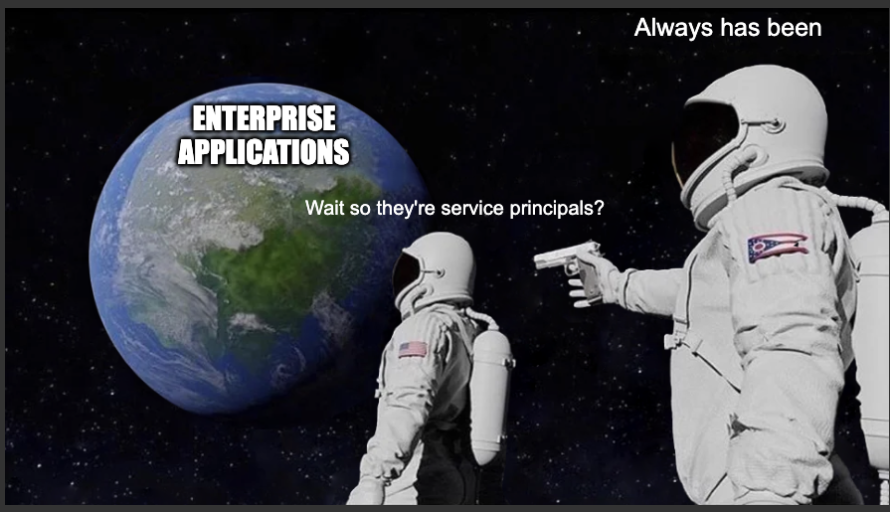
A service principal is the identity an app registration gets inside a specific tenant. Microsoft’s documentation puts it plainly: a service principal is created in every tenant where the application is used. If the app registration is the class, the service principal is the instantiation of that class.
To put it simply, the service principal is the security principal, the same way a user object is for a person. This is what actually authenticates to EntraID, what shows up as the subject of an access token, and what permissions are actually granted to.
Similar to app registrations, service principals have a lot of properties and configuration considerations, but from an adversary’s perspective, and for the sake of this post, these are what we care about most:
- Permissions: The permissions the service principal has actually been granted in this tenant, such as Microsoft Graph
Mail.Read. These are what an attacker inherits when they authenticate as the service principal.- Application permissions are stored as
appRoleAssignments, and delegated permissions asoauth2PermissionGrants. - A service principal won’t always hold everything its app registration requests. Permissions can be granted one at a time.
- Application permissions are stored as
- Directory roles: Just like a user, a service principal can be assigned directory roles.
- Enabled for users to sign-in? (
accountEnabled): Despite the portal label, this controls whether the service principal can get tokens at all, including app-only sign-ins. Setting it to “No” is how you disable a service principal in your tenant. - Owning tenant (
appOwnerOrganizationId): The tenant ID where the app registration lives, meaning its home tenant. You won’t find it in the portal, but you can via Microsoft Graph. If it isn’t your tenant ID then the app registration and its credential material live somewhere else.
Quick sidenote: not every service principal comes from an app registration. Managed identities and Agent Blueprint Principals also have service principals, but that’s a conversation for another post.
The Naming Problem
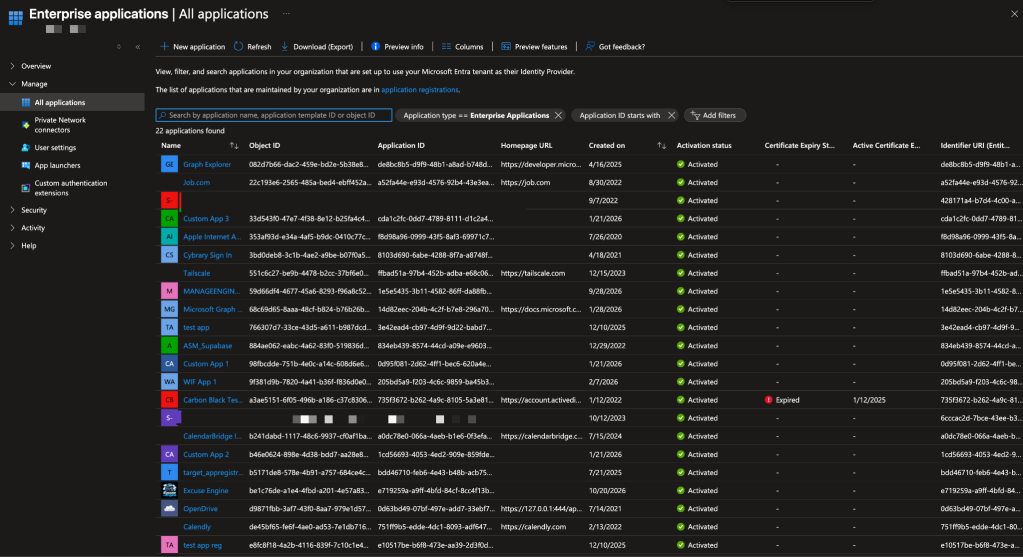
A large part of the confusion is that the term “application” is overloaded. It gets used for application registrations, application objects, enterprise applications, and the software itself. The other part is that the blade names in the Entra portal don’t match the objects behind them:
| Portal blade | What it actually shows | Graph resource |
|---|---|---|
| App registrations | Application objects whose home tenant is this tenant | application |
| Enterprise applications | Service principals in this tenant, including ones whose application registration lives elsewhere | servicePrincipal |
Additionally, the two blades show overlapping information about the same app, which makes it easy to assume they are the same thing viewed twice.
A few examples that trip people up:
- Both pages show the same Display Name and Application ID, which makes it look like one object shown in two places.
- Both pages show an Object ID and they are different values. On an app registration it is the application object’s ID. On an enterprise application it is the service principal’s ID.
- The app registration has an API permissions page, and the enterprise application has a Permissions page. The first shows what the app requests. The second shows what has actually been granted in this tenant. When you click “Grant admin consent” on the app registration page, it is really granting permissions to the corresponding service principal.
- A multi-tenant app from a vendor shows up under Enterprise applications but never under App registrations, because the app registration is in the vendor’s tenant.
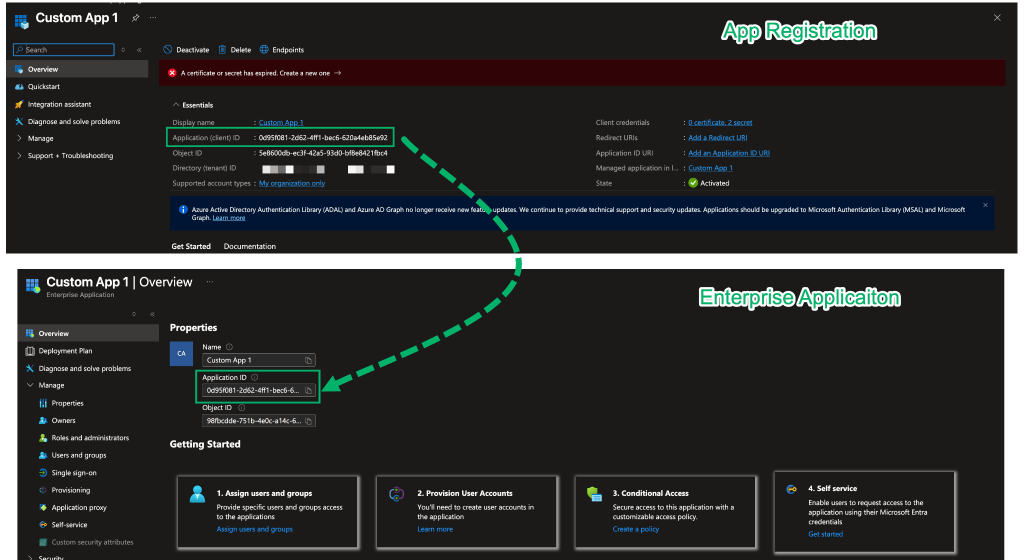
Then there’s the filter. By default, the Enterprise applications blade filters on Application Type == Enterprise Applications and only shows non-Microsoft applications. Microsoft applications and managed identities sit behind separate filter options, so the default view isn’t every service principal in your tenant.
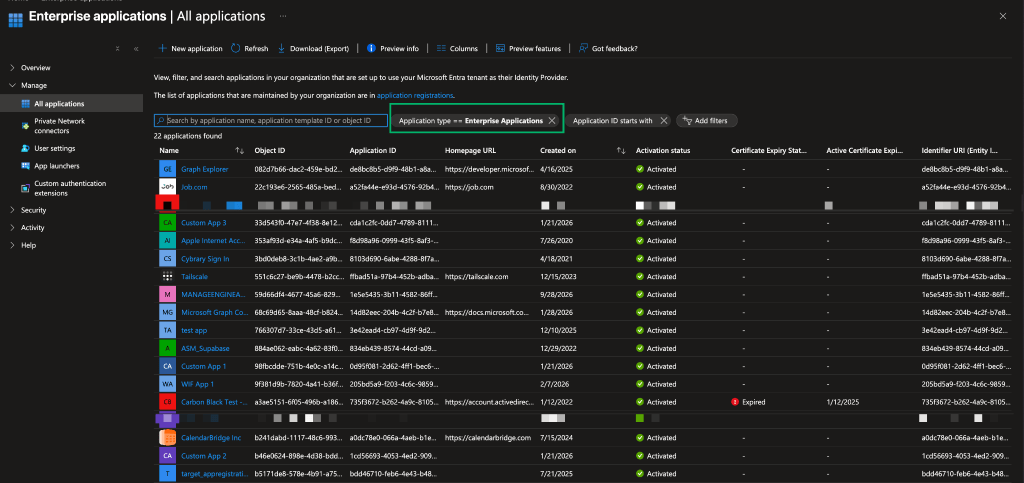
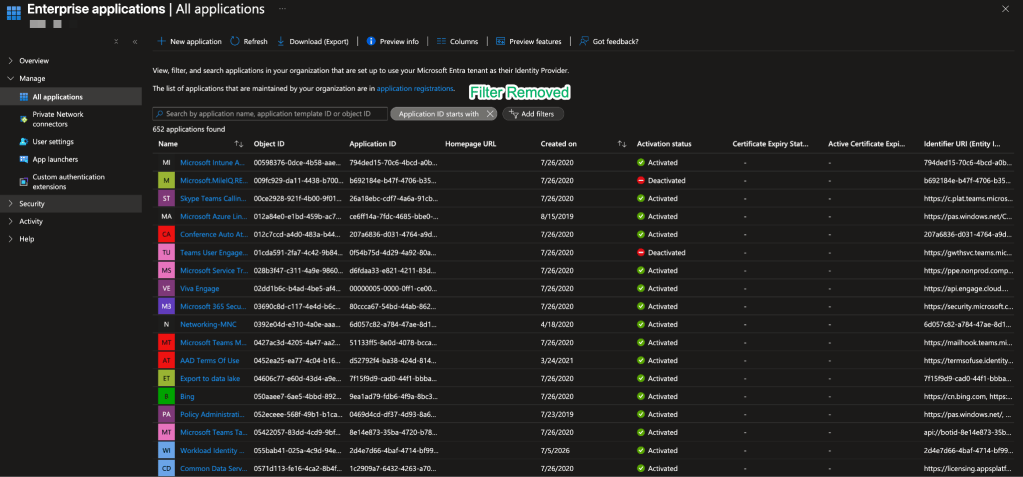
So when the portal’s wording is this confusing, it’s no surprise that people are still struggling with app registrations and service principals years later. The good news is that once we stop trusting the labels and start thinking in terms of the underlying objects, the rest of the model starts to make a lot more sense.
Permissions and Consent
So far we’ve covered what app registrations and service principals are, and why the EntraID portal makes them so easy to mix up; however, knowing what they are only gets us so far. The other half is what a service principal can actually do, and how its permissions are determined.
All of this comes down to two things: permissions and consent.
Delegated vs. application permissions
Every permission an app asks for is one of two types: application or delegated.
These two types map onto how OAuth 2.0 works in EntraID. Delegated permissions are used in flows where a user signs in, like the authorization code flow, so the app gets a token on that user’s behalf. Application permissions are used with the client credentials flow, where the app authenticates as its own service principal using its own credential. Microsoft covers the details in its overview of permissions and consent, but to keep it simple: delegated permissions require a signed-in user, and application permissions do not.
In practice, this means that delegated permissions are limited by what was consented and what the signed-in user can access, while application permissions are limited only by what was consented. For example, granting Mail.Read as a delegated permission means granting permissions to read the signed-in user’s mailbox. Granting Mail.Read as an application permission means granting permission to read every mailbox in the tenant.
That difference is also what makes a leaked credential so much worse in one case than the other. A leaked secret for an app with application permissions is tenant-wide access with no user involved. A leaked secret for an app with only delegated permissions still includes a user in the way.
How consent works
Not every user is able to grant every permission. Depending on your tenant’s user consent settings, users can consent to some low-risk delegated permissions for themselves.
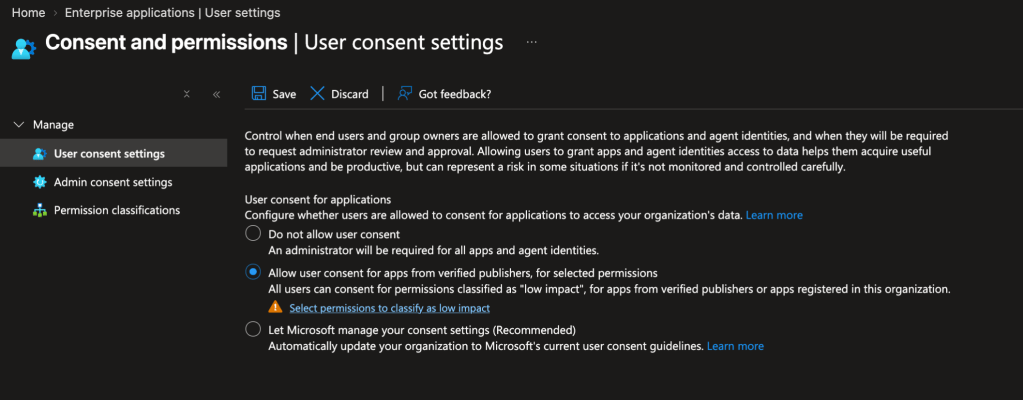
Anything marked as requiring admin consent needs an admin, and that includes every application permission. Admin consent to an application permission is effectively consent for the whole organization. Administrators can also grant delegated permissions on behalf of everyone, which saves each user from seeing a consent prompt.
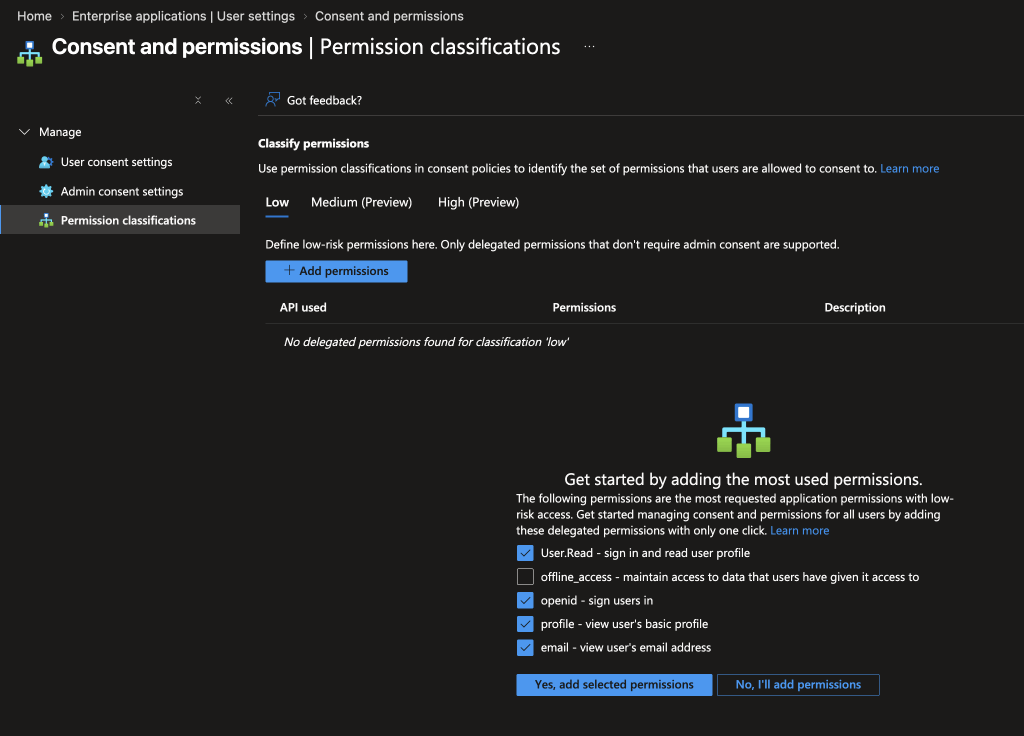
When a user or administrator consents to an app, two things happen in the tenant. First, if a service principal does not currently exist in the tenant then one is created. Second, EntraID records the permissions you just approved on that service principal. Application permissions are stored as app role assignments, and delegated permissions as OAuth2 permission grants. Those records are what actually give the service principal its access. In the portal, you’ll find them on the enterprise app’s Permissions page, split into Admin consent and User consent tabs.
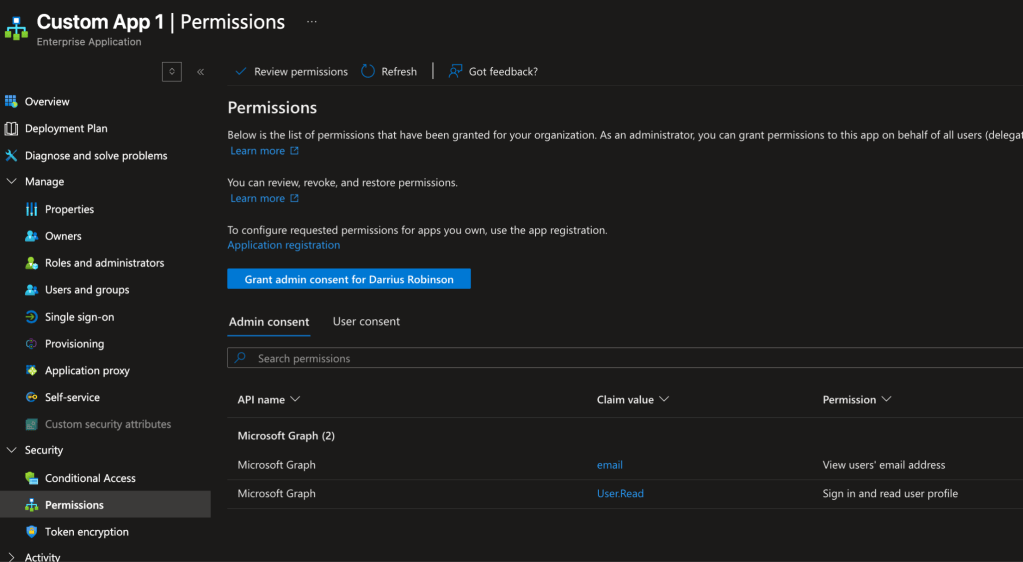
Both of those changes happen in your tenant. Nothing changes in the app registration’s home tenant (unless the app registration also lives in your tenant). In terms of multi-tenant apps, you’re not receiving anything from the vendor. Instead, you’re creating an identity for their app inside your directory and granting it permissions.
As a result, this makes every consent a trust decision, and the ramifications go further than most people realize when they click ‘Accept’:
For starters, consented permissions do not expire. The access you grant today will persist until someone explicitly revokes it. Often on assessments, I find service principals for products the organization stopped using years ago, still holding permissions and still able to authenticate to the tenant.
You’re trusting more than the product. Consenting means trusting the vendor’s code (and thus any third-party libraries they use), and their ability to protect the credentials on their app registration. If any of those are compromised, then the service principal in your tenant still has the access you granted, and nothing in your tenant changes to notify you.
Application permissions raise the stakes. For a service principal holding application permissions, all of the above applies tenant-wide, with no user in the loop to limit it.
It’s also why attackers like consent phishing. By convincing a user to click ‘Accept’ on a malicious app, the attacker gets access without ever needing that user’s password.
To recap:
| Delegated | Application | |
|---|---|---|
| Who the application acts as | The signed-in user | The service principal |
| Effective access | Only the overlap between what the service principal was granted and what that user can already reach | Tenant-wide for that permission |
| Who can consent | Users, for some permissions; admins for the rest | Admins only |
| Where the grant lives | OAuth2 permission grants | App role assignments |
Putting it all together
Before we dive into the issues with multi-tenant apps, let’s put everything we just covered together by following the flow for a web app called Excuse Engine, which reads your calendar, figures out which meetings seem pointless, and emails the organizer an excuse on why you won’t be attending. Walking through it from registration to its first access token shows how the app registration and the service principal work together.
Step 1: Registering Excuse Engine
I created an app registration for Excuse Engine in my tenant, rbnlabs. rbnlabs is now Excuse Engine’s home tenant, and Excuse Engine gets an appId that identifies it everywhere it’s used. Because I created it in the Entra admin center, EntraID also creates a service principal for Excuse Engine in my tenant.
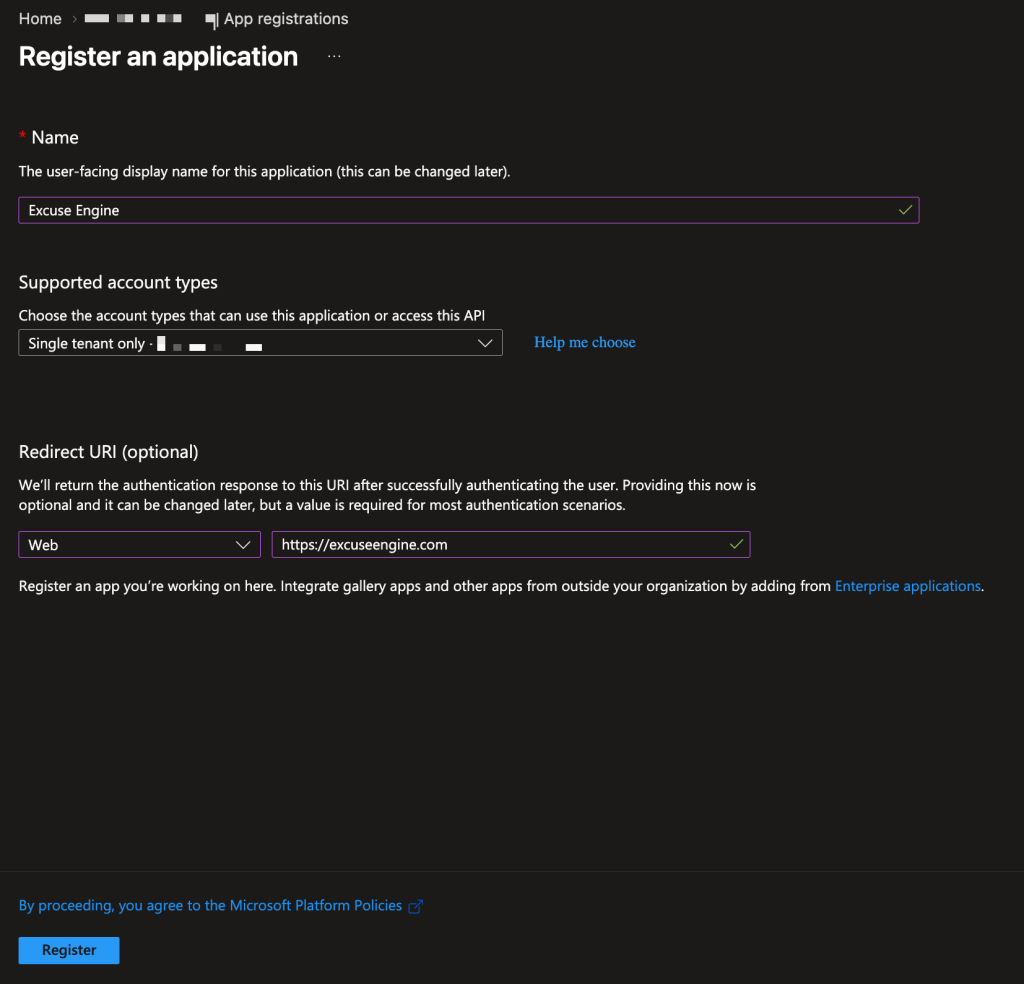
So far, that’s one app registration and one service principal (located under Enterprise applications), both in rbnlabs.
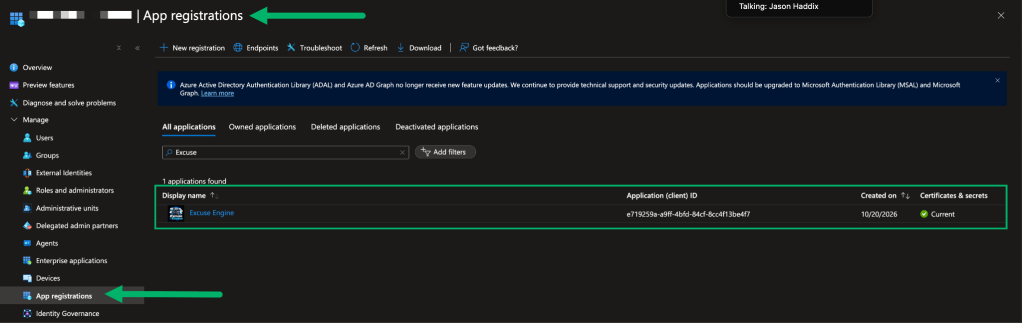
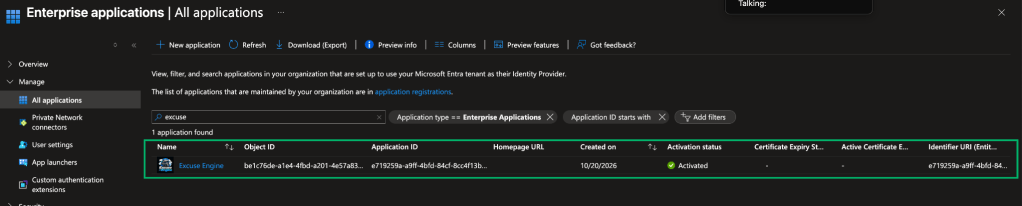
Step 2: Requesting permissions vs. granting them
Excuse Engine needs to read and update calendars and send email to function, so I add the Microsoft Graph Calendars.ReadWrite and Mail.Send permissions to its app registration. The right call would have been delegated permissions, so Excuse Engine could only act as whoever signed in, but I’m a lazy developer, so I request application permissions instead.
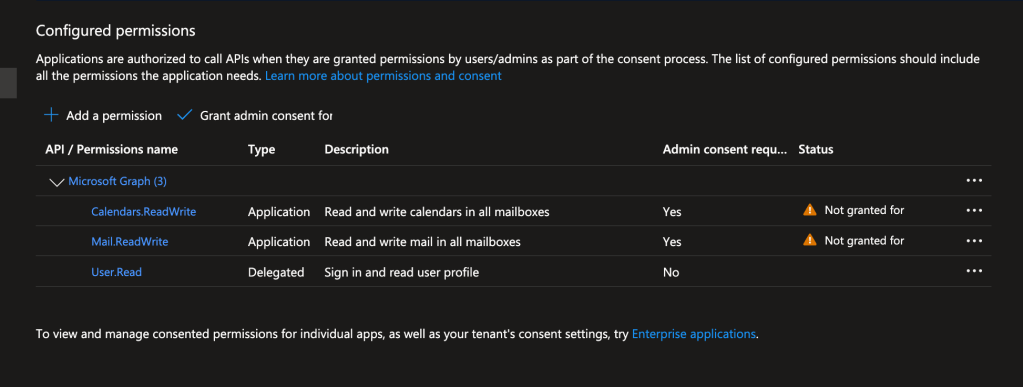
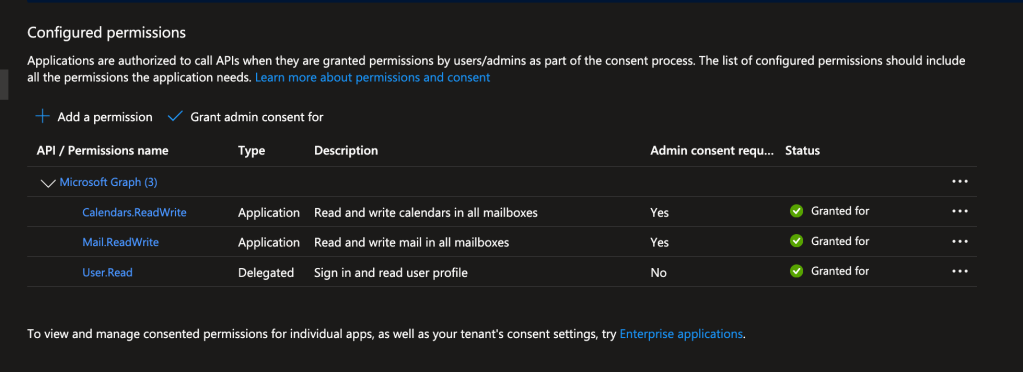
So far, Excuse Engine has only requested those permissions. Nothing is granted until an rbnlabs administrator consents, at which point the grants are recorded on the Excuse Engine service principal as app role assignments.
Step 3: Signing in without a user
Excuse Engine’s backend runs without a user, so it needs its own credential. So I added a client secret to the app registration.
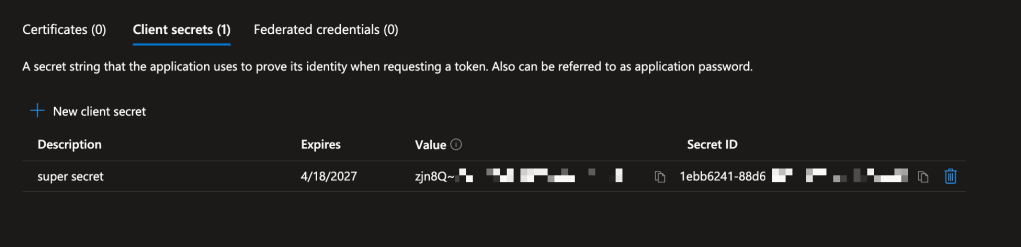
Here’s what happens when Excuse Engine requests a token using the client credentials flow:
- Excuse Engine sends its
appIdand client secret to the token endpoint,https://login.microsoftonline.com/:directoryID/oauth2/v2.0/token. - EntraID checks the secret against the app registration.
- EntraID finds Excuse Engine’s service principal in rbnlabs and makes sure it’s enabled.
- EntraID issues a token with the permissions granted to that service principal:
Calendars.ReadWriteandMail.Send.
We can expect the following claims in the access token received:
app_displayname: The name of the client using the tokenappid: The application ID of the client using the token. i.e., the app registration’s client IDidtyp: The type of identity authenticatingoid: The immutable identifier for an object in the Microsoft identity system, in this case, the service principalroles: The set of permissions that the requesting application has been given permission to call.tid: The tenant ID

It should be noted that the credential, in this case a client secret, is checked against the app registration, but the permissions come from the service principal. Right now both are in my rbnlabs tenant, but that is about to change.
The Multi-Tenant Problem
Continuing with the Excuse Engine example, word gets out about the app and my friend Andrew no longer wants to deal with pointless meetings.
Step 4: Excuse Engine goes multi-tenant
To let Andrew use it in his own tenant, mugglehackers, I change the app registration’s supported account types to multi-tenant.
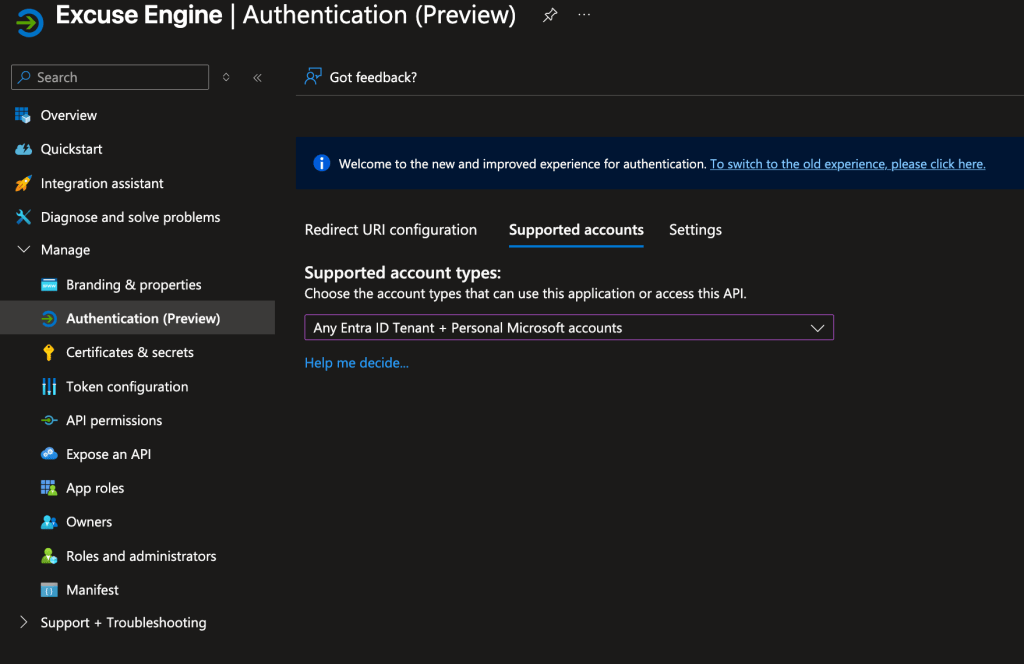
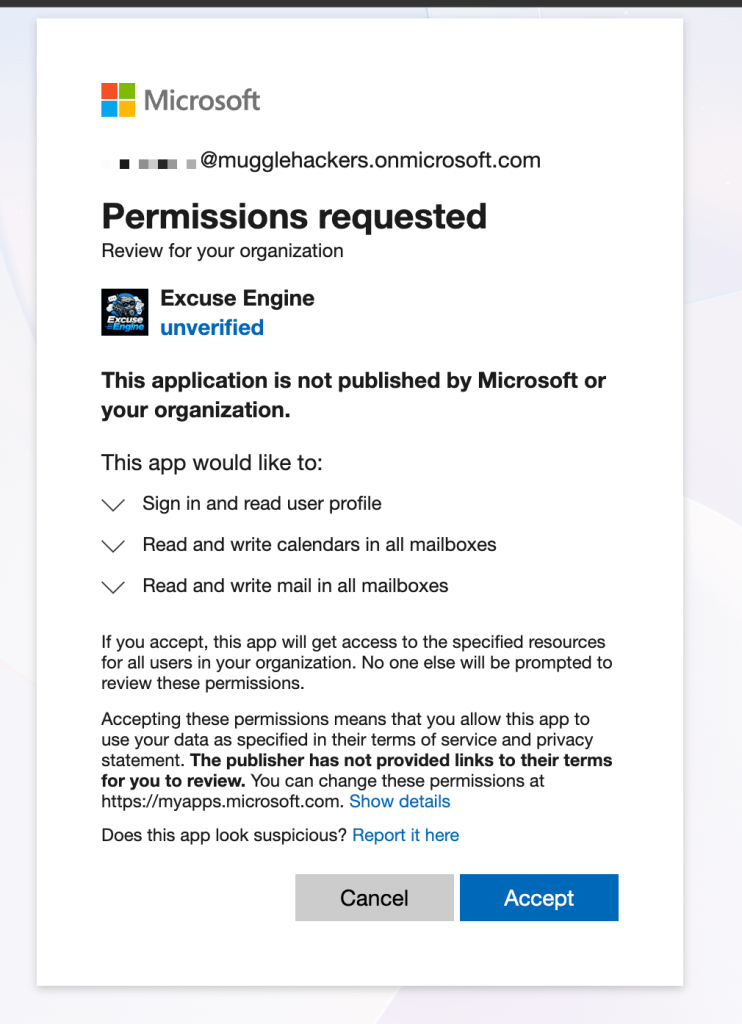
When a mugglehackers admin consents, EntraID creates an Excuse Engine service principal in the mugglehackers tenant and records mugglehackers’ grants on it.
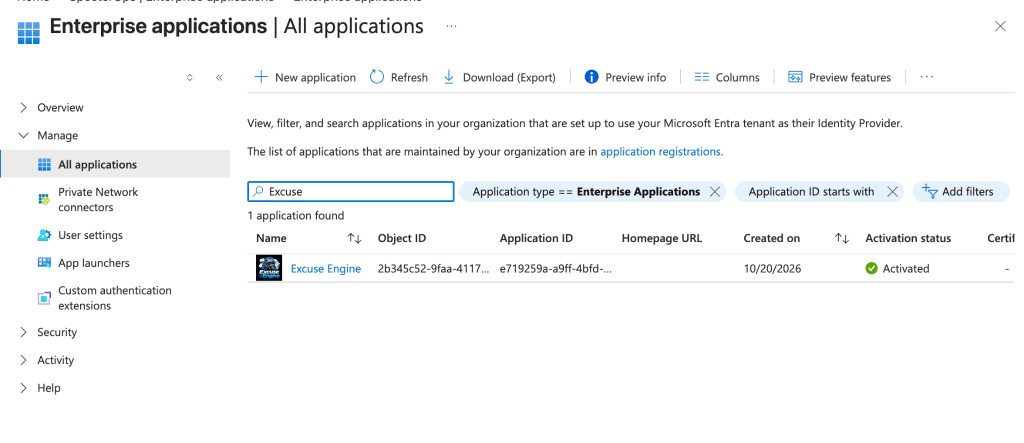
Andrew can find the service principal by looking under Enterprise apps in the EntraID portal:
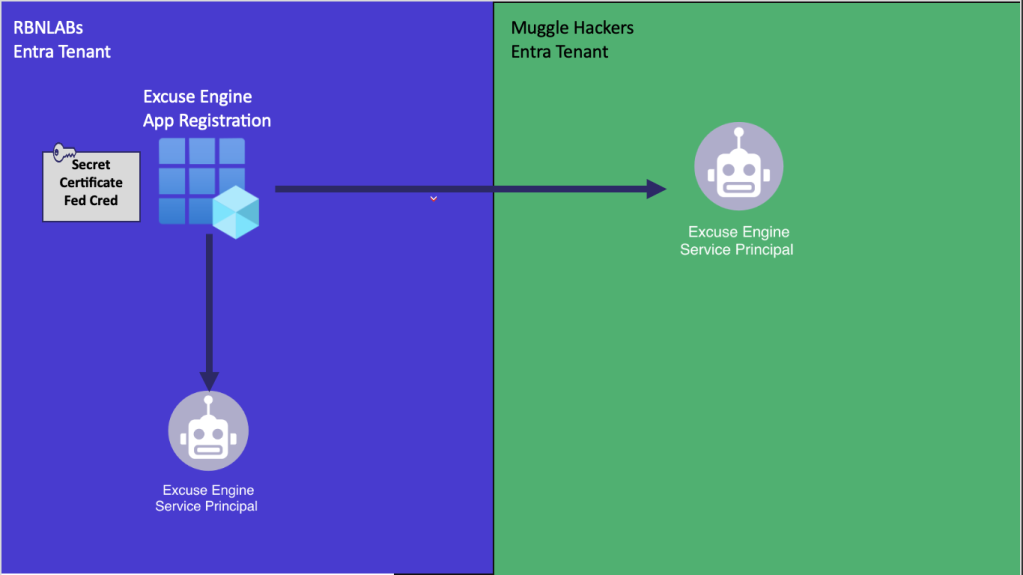
To visualize where all the components live:
| rbnlabs tenant | Mugglehackers tenant | |
|---|---|---|
| App registration | Yes | No |
| Client secret | Yes | No |
| Service principal | Yes | Yes |
appId | Same | Same |
| Service principal object ID | Unique | Unique |
| Granted permissions | Its own | Its own |
Each tenant controls its own service principal and the permissions granted to it, but the app registration and the client secret never leave my rbnlabs tenant.
Step 5: Leaked Secrets
Let’s say that one day I accidentally commit Excuse Engine’s client secret to a public repository and an attacker finds it. Without realizing it, I’ve just handed that attacker the keys to Andrew’s tenant. Here’s what happens when they use it against mugglehackers:
- The attacker sends Excuse Engine’s
appIdand the leaked secret to the same token endpoint, just with mugglehackers’ directory ID. - EntraID checks the secret against the app registration in rbnlabs and finds it valid.
- EntraID finds Excuse Engine’s service principal in mugglehackers and makes sure it’s enabled.
- EntraID issues a token with the permissions granted to that service principal:
Calendars.ReadWriteandMail.Send.
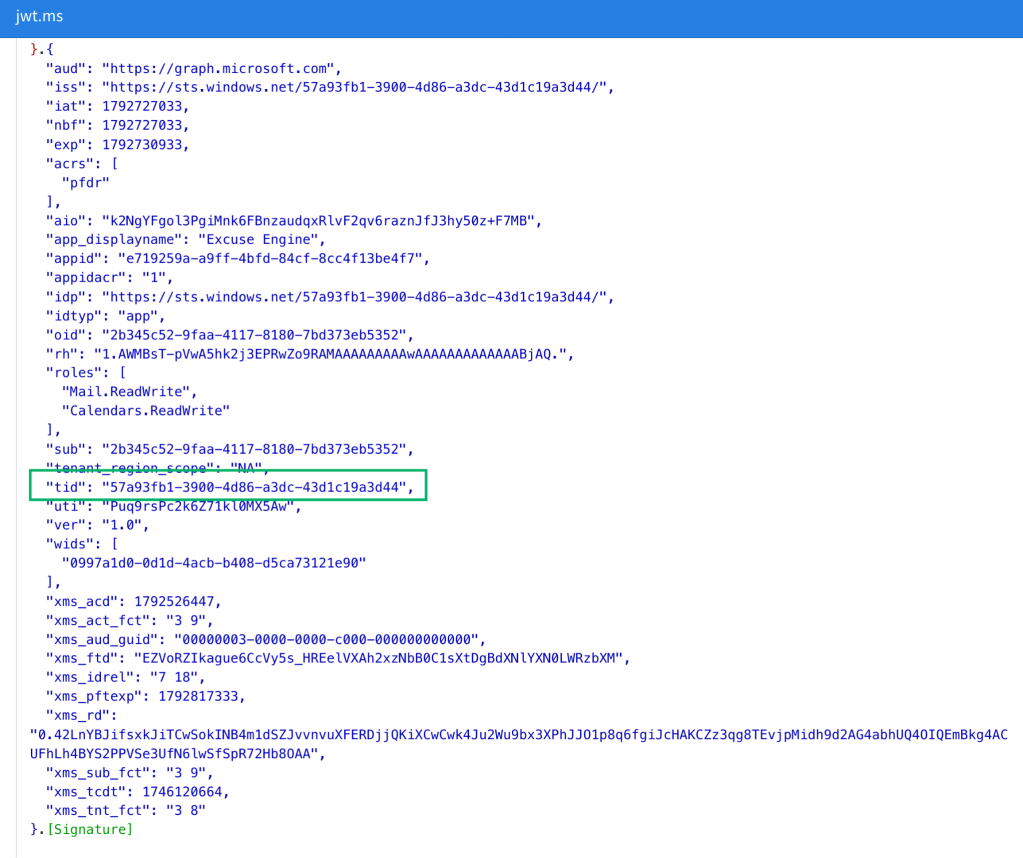
The attacker can now read and write to every calendar in mugglehackers, as well as send email as any user in the tenant.
On top of that, Andrew is unable to rotate the secret, because it does not exist in the mugglehackers tenant. The only option he has is disabling Excuse Engine’s service principal in his own tenant or revoking its permissions. The only one who can rotate the secret to prevent further abuse is me.
Beyond Excuse Engine
While Excuse Engine is just an example, it’s exactly how every multi-tenant app works. When you consent to a vendor’s app, an identity for it (the service principal) is created in your tenant with the permissions you granted. The app registration, and every credential that can authenticate as that service principal, stays in the vendor’s tenant.
None of this makes multi-tenant apps inherently bad; it’s how SaaS integration with EntraID is designed to work. However, it’s worth understanding from both sides. As admins, we need to know what we’re actually trusting when we consent to one. As developers, we need to remember that every credential on our app registration is effectively a key to every customer tenant that trusts us. Either way, that split comes with some real consequences and considerations:
For admins:
- You don’t manage the credential material, because it is not in your directory.
- You won’t know when new credential material is added to the app registration.
- Service principals are not subject to Conditional Access by default. With no user involved, there’s no MFA prompt and user-targeted Conditional Access policies will not apply. You can extend Conditional Access to service principals with additional licensing (more on that later), but it only covers single-tenant service principals.
- Requested permissions are often broad. Backup and security products often need tenant-wide access, like reading every mailbox (
Mail.Read), file (Files.Read.All), or Teams chat (Chat.Read.All), and some ask for directory write permissions likeApplication.ReadWrite.AllorRoleManagement.ReadWrite.Directorythat can lead to full tenant takeover. Before you click Accept, ask whether the vendor really needs it all.
For developers
- A valid credential on your app registration works against every tenant that has consented to your app. Meaning if you are compromised, your blast radius is effectively your entire customer base. Consider leveraging certificates or federated identity credentials over client secrets. While those can still be leaked or abused, they’re much harder to steal than a client secret.
- Request only the permissions your app actually needs, not application permissions just because they’re easier.
- Restrict who can add credentials. App registration owners and roles like Application Administrator can add new credentials, so treat them as sensitive.
Back to ConnectWise
The ConnectWise Cloud Backup incident maps onto this model almost perfectly. While at the time of this writing we don’t know how the unknown actor obtained credential material for the ConnectWise Cloud Backup app registration, what happened next follows the same path as our Excuse Engine example:
- The credentials lived in ConnectWise’s tenant.
- Every organization that consented to the app had a service principal for it, so the obtained credential material worked against all of them just by swapping the directory ID. That’s how one compromise turned into more than 100 affected tenants.
- The ConnectWise Cloud Backup app requested application permissions.
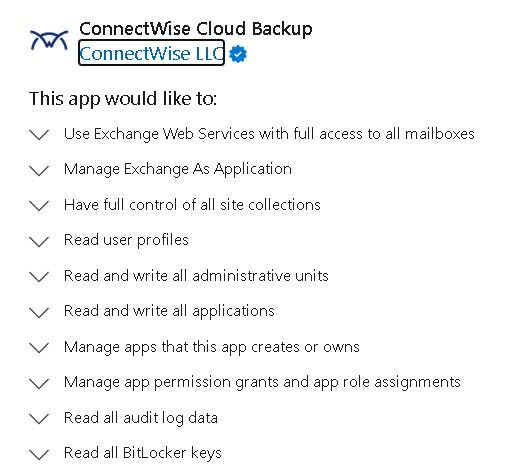
- The permissions came from each customer’s service principal and included full access to every mailbox through Exchange Web Services and full control of every SharePoint site collection. The app registration also requested
Application.ReadWrite.AllandAppRoleAssignment.ReadWrite.All. Those two let the service principal grant permissions and add credentials to other app registrations, so a stolen credential wasn’t just a path to data. It was a potential path to full tenant takeover.
An Attacker’s Perspective
The ConnectWise incident is one example, but it’s far from the only way to abuse this model. From an attacker’s perspective, almost every application-based attack path in EntraID comes down to one question: how can I get credential material to authenticate as a service principal with the permissions I want?
Whichever path we take, the end result is the same: we’re signing in as the service principal, i.e., the identity for the application in the specific tenant we’re targeting. To EntraID, every token request, permission check, and log entry looks like the app doing its normal job, which is exactly why this kind of abuse blends in so well. Plus, we typically don’t have to deal with Conditional Access.
I won’t cover every way to abuse app registrations and service principals here, but here are a few of the most common paths.
Stealing an existing credential
The most direct path is to steal a credential that already exists. Depending on what the app registration uses, that could mean finding a client secret in code, a config file, or a CI/CD pipeline, getting hold of a certificate’s private key, or getting into the context of a workload trusted by a federated identity credential, like a GitHub Actions workflow or a Kubernetes service account.
Adding a credential to the app registration
If there are no credentials to steal, we can try to create one. Anyone who can add a credential to an app registration can authenticate as its service principal and inherit every permission it has been granted. That includes the app registration’s owners, anyone holding a role like Application Administrator or Cloud Application Administrator, and any service principal holding a Graph permission like Application.ReadWrite.All. This is where over-privileged principals turn into tenant takeover. If we can reach a service principal that holds powerful permissions, we now hold them too. In BloodHound, this shows up as edges like AZAddSecret, AZMGAddSecret, and AZOwns leading to an AZApp node, followed by AZRunsAs to the AZServicePrincipal that actually holds the permissions.
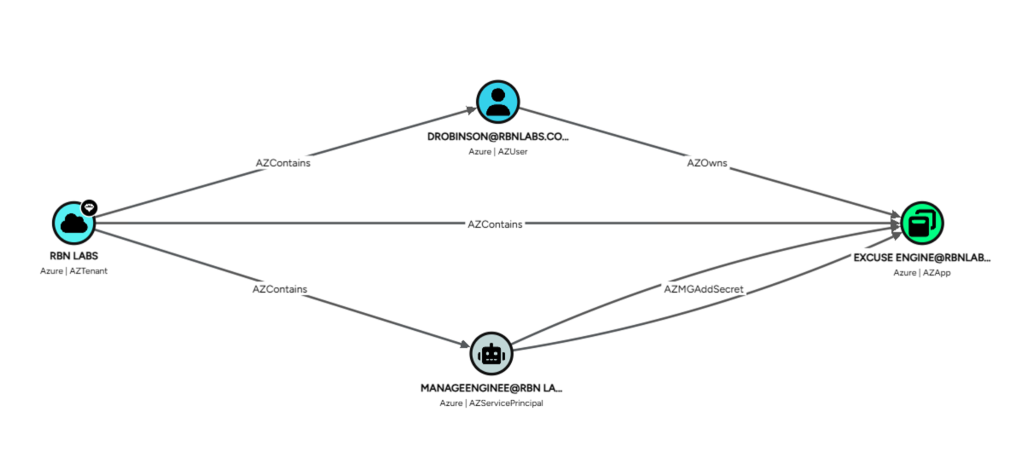
For a multi-tenant app registration, that path doesn’t end at the tenant boundary. If we control the app registration in a vendor’s tenant, we can authenticate as its service principal in every customer tenant. From the customer’s side, BloodHound will show the service principal and its permissions, but not the AZApp (the app registration), because that part of the graph lives in a tenant they never collected.
Adding a credential to the service principal
While not as common, it’s worth knowing that a secret can also be added directly to a service principal through the /servicePrincipals/{id}/addPassword Graph endpoint. Secrets added directly to a service principal do not show up in the Entra admin center, which is a plus for us.
This made for great persistence tradecraft, but it’s less practical now that app instance property lock is enabled by default for new app registrations created in EntraID. That said, older apps and service principals in a target tenant are still worth checking out.
Escalation from a principal you already control
If we already control a service principal, its current permissions may be our way to more access. Some permissions grant a service principal the ability to hand out more access. Permissions like AppRoleAssignment.ReadWrite.All can grant app roles, including to itself, and Application.ReadWrite.All can add credentials to other app registrations. BloodHound models these as edges like AZMGGrantAppRoles and AZMGAddSecret.
One caveat when we look at this in BloodHound. The graph models permissions that lead to control, so it doesn’t draw edges for data-access permissions like Mail.Read or Files.Read.All, which are often exactly what a compromised backup or compliance app holds. A service principal with no outbound attack paths could still give us every mailbox in the tenant. That’s why knowing what each service principal has been granted matters just as much as mapping its attack paths, which brings us to what defenders can do about all of this.
From a Defender Perspective
While you can’t fix a vendor’s credential hygiene from your own tenant, you can know exactly what you’ve trusted, limit it, and audit it.
1. Know what you’ve trusted
Start by finding every service principal whose appOwnerOrganizationId isn’t your tenant, or Microsoft’s. Each one is an identity in your tenant whose keys live somewhere else. Don’t rely on the Enterprise applications blade’s default view for this, since it hides some service principals. Pull the list from Microsoft Graph or BloodHound instead, and group the results by owning tenant, because a single vendor often has several apps in your tenant.
In BloodHound, the property you want is App Owner Organization ID (appownerorganizationid) on the AZServicePrincipal node, which holds the app registration’s home tenant. Comparing it to the tenant the service principal lives in, and filtering out Microsoft’s first-party apps, gives you every third-party service principal:
MATCH (sp:AZServicePrincipal)
WHERE sp.appownerorganizationid <> sp.tenantid
  AND NOT sp.appownerorganizationid IN ['f8cdef31-a31e-4b4a-93e4-5f571e91255a', '72f988bf-86f1-41af-91ab-2d7cd011db47']
RETURN sp
Once a vendor stands out, you can narrow the results to that vendor’s tenant. Tools like checktenant will turn the tenant ID into a name, so you know who you’re actually looking at:
MATCH (sp:AZServicePrincipal)
WHERE sp.appownerorganizationid = '<vendor-tenant-id>'
RETURN sp
2. Review Granted Permissions to Service Principals
For each of those service principals, look at what has actually been granted in your tenant. In the portal, that’s the Admin consent tab on the enterprise app’s Permissions page. Prioritize tenant-wide application permissions like Mail.Read, Files.Read.All, and Sites.FullControl.All, and anything that can hand out more access, like Application.ReadWrite.All, AppRoleAssignment.ReadWrite.All, or RoleManagement.ReadWrite.Directory.
For each service principal, ask yourself two questions. Do we still use the application associated with the service principal and does it make sense for it to have the granted permissions? If the answer to either is no, disable the service principal. Disabling is reversible and keeps a record of what was granted, so it’s a safer first step than deleting.
3. Audit your App Registrations and Service Principals
Next, look for the things that tend to get forgotten. That means app registrations with no real app behind them, credentials that never expire or that nobody can explain, and service principals for products you stopped using years ago. Credentials added directly to a service principal won’t show up in the Entra admin center, so check the passwordCredentials and keyCredentials on your service principals through Microsoft Graph. Expect some legitimate results, since SAML apps store their signing certificates there, but a client secret on a vendor app’s service principal is something you should be able to explain.
Additionally, review who can add credentials in the first place. That includes app registration owners, Application Administrators and Cloud Application Administrators, and any service principal holding Application.ReadWrite.All. Every one of them is a path to impersonating a service principal.
4. Control how new apps get in
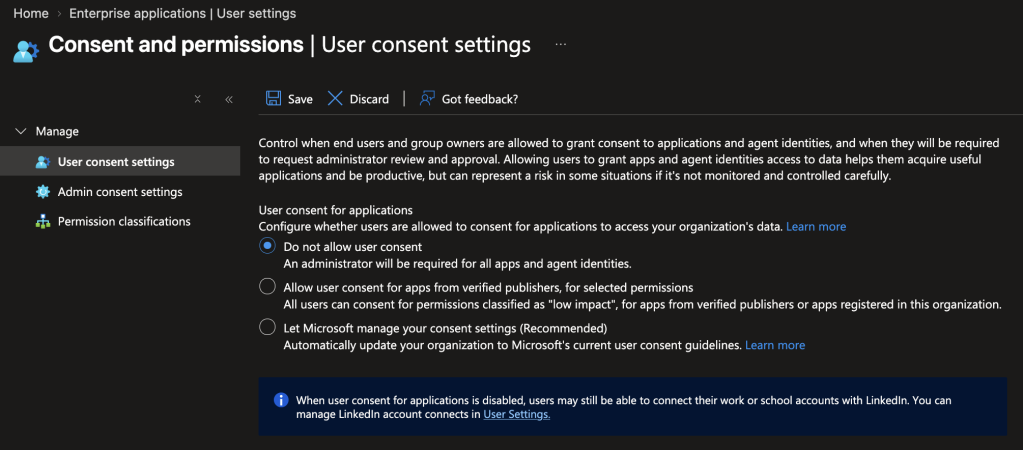
Every new consent puts a new service principal in your tenant, so be deliberate about who can create them. I’d limit user consent to low-risk permissions from verified publishers, or turn it off entirely, and enable the admin consent workflow so requests for anything more land in front of a reviewer instead of getting quietly approved.
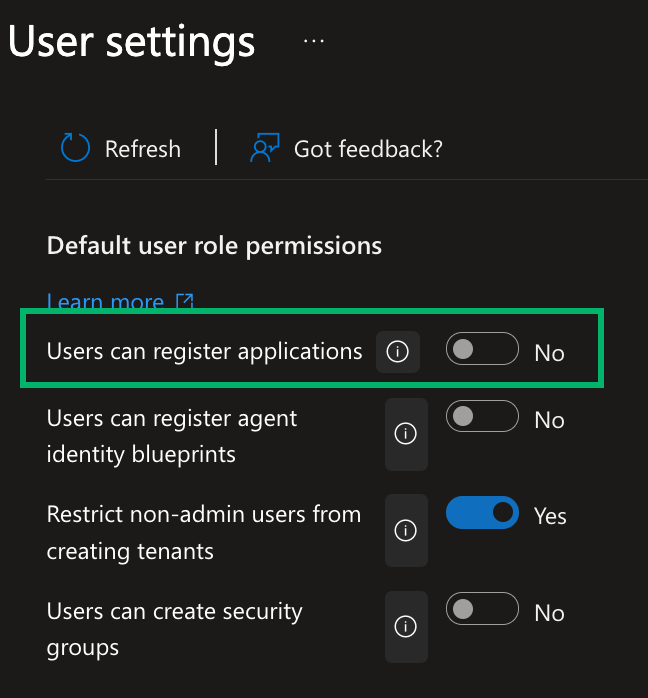
Additionally, it is recommended to restrict users from registering applications.
5. Make sure you can see service principal activity
Ensure that you’re actually collecting service principal sign-ins. They live in a separate log from user sign-ins, and getting them into Log Analytics or Sentinel requires EntraID P1 or P2 plus the right diagnostic setting.
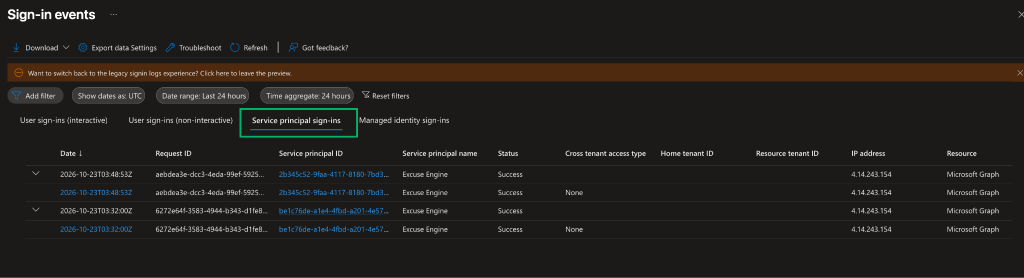
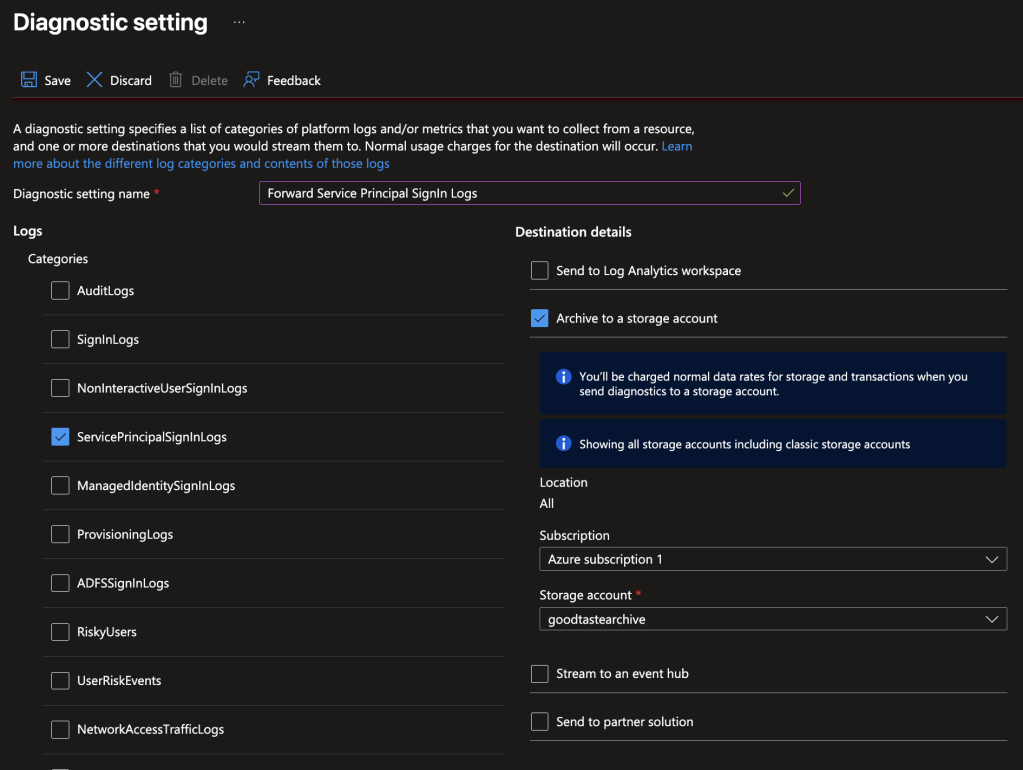
Once they’re flowing, I’d watch for an existing service principal signing in from a new IP, new credentials being added to an app registration or service principal, and new consent grants. For credentials, the audit log uses two different activity names, “Update application – Certificates and secrets management” and “Add service principal credentials,” so make sure you’re watching both.
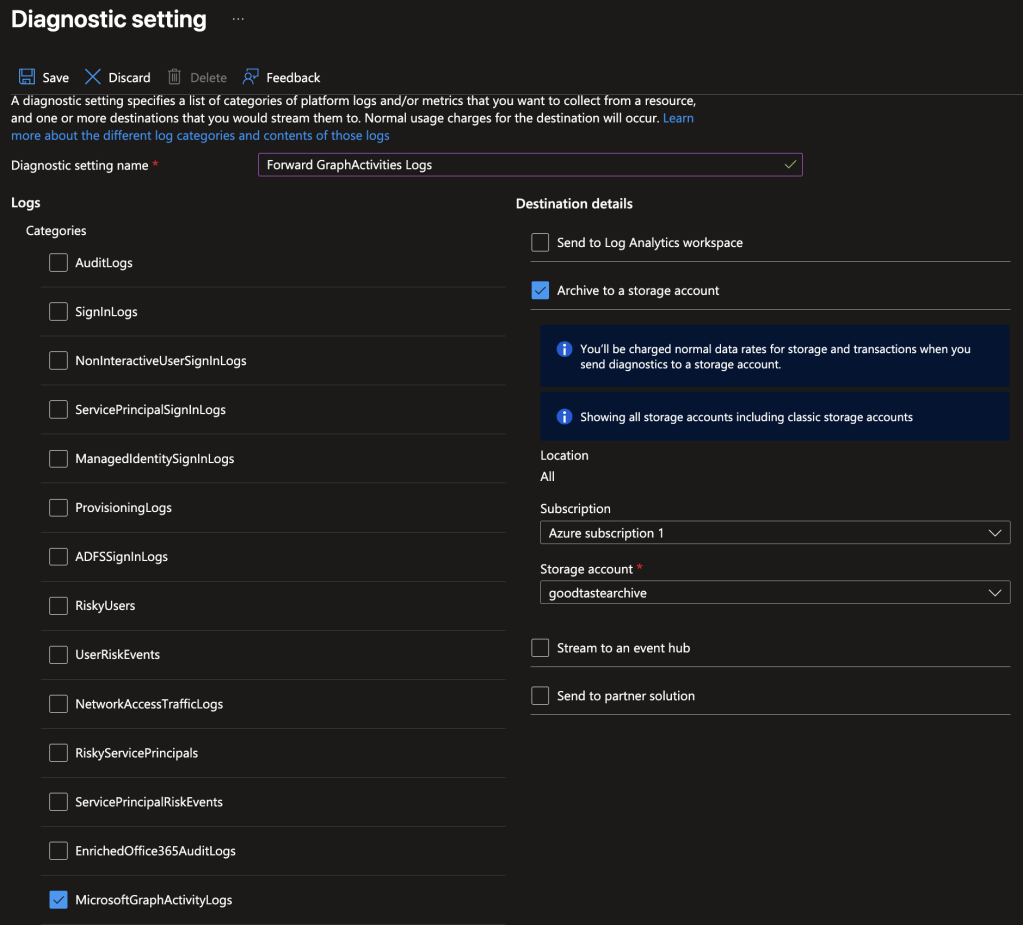
I’d also turn on MicrosoftGraphActivityLogs. It records what each service principal actually asked Microsoft Graph for. Like the sign-in logs, it only helps if it’s on before you need it.
6. Consider Conditional Access on your own service principals
As we covered earlier, service principals aren’t subject to Conditional Access by default. Out of the box, nothing stops a service principal from authenticating from anywhere, at any time. Microsoft’s answer to that is Conditional Access for workload identities, which lets you apply a subset of Conditional Access controls to service principals.
That being said, it’s worth knowing what you’re getting before you buy it. It requires Microsoft Entra Workload ID Premium, a standalone, per-identity license that isn’t included in E3, E5, P1, or P2.
It also only gives you a few conditions to work with:
- blocking sign-ins from outside known IP ranges
- blocking based on Entra ID Protection risk
- authentication contexts
There’s no MFA, device compliance, or session controls, which makes sense since there’s no user or device involved.
Additionally, coverage is narrow. Policies only apply to single-tenant service principals registered in your own tenant, so they won’t protect you from a vendor compromise like ConnectWise, and they don’t cover managed identities. Even so, it could be worth it for the service principals you own. An IP restriction on an internal app with powerful application permissions means a leaked secret doesn’t immediately work from an attacker’s infrastructure (although there are ways to circumvent this). Just don’t treat it as a fix for the multi-tenant problem.
Conclusion
App registrations and enterprise applications sound like two views of the same thing, and the portal does a lot to reinforce that impression. However, that is not the case. The app registration is the blueprint, defined once in a home tenant and holding the credentials. The service principal is the instantiation of the app registration, created in every tenant that consents, holding the permissions and doing the actual signing in.
When both live in your tenant, you control the whole picture. With a multi-tenant app, you hold the half with the permissions while someone else holds the half with the keys. The ConnectWise incident is what that looks like when the other half is compromised.
The takeaway isn’t to avoid multi-tenant apps. It’s to treat every consent as a trust decision. As admins, that means knowing which service principals in your tenant are backed by credentials you can’t see, trimming what they’ve been granted, and making sure the logs you’ll need on a bad day are already turned on. As developers, it means remembering that every credential on your app registration is a key to every tenant that trusts you and asking only for what your app actually needs.
References
- Huntress, RAPID RESPONSE thread on ConnectWise Cloud Backup (formerly SkyKick), October 16, 2026
- SpecterOps, ConnectWise SkyKick Breach: How to Check Your Microsoft 365 Tenant, October 17, 2026
- Microsoft Learn, Application and service principal objects in Microsoft Entra ID
- Microsoft Learn, Explore service principals
- Microsoft Graph, servicePrincipal resource type
- Microsoft Learn, Quickstart: View enterprise applications
- Microsoft Learn, Disable user sign-in for an application
- Microsoft Learn, Overview of permissions and consent
- Microsoft Graph, servicePrincipal: addPassword
- Microsoft Learn, How to configure app instance property lock for your applications
- Microsoft Learn, Conditional Access for workload identities
- Microsoft Learn, Microsoft Entra Workload ID FAQs
- BloodHound docs, AZServicePrincipal
- checktenant
- Microsoft Security Blog, Midnight Blizzard: Guidance for responders on nation-state attack, January 25, 2024
- BSides ATL, Feds Watching, Darrius Robinson


