Mythic 4 Public Beta: More Than a New Coat of Paint
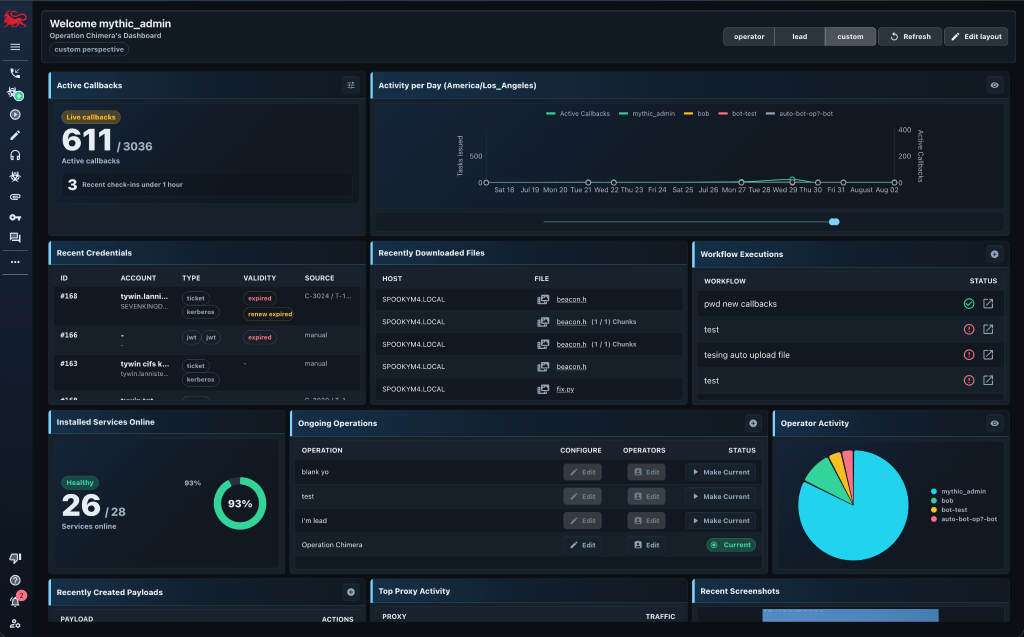
TL;DR: Mythic 4 is now available on the Mythic-v4.0.0 branch and is entering a public beta for the next few months for the community to update their services. Mythic 4 has some breaking changes, new features, AI chat container support, and so much more.
Mythic 4 is entering a public beta for the next few months. This is a large update that adds generic operation chat, a new pluggable AI chat container, human-in-the-loop interactions for AI and eventing, operator aliases, inline task references, resumable file transfers, in-browser editing of files on agents, a more consistent user interface, and much more.
This major version update includes some breaking changes for almost all integrations, agents, and Mythic services. If you maintain one of those components, or just want to try the new operator workflows, I would love your feedback during the beta. I tried to keep breaking changes as minimal as possible, and for most things simply updating the corresponding Mythic container package is all you’ll need to do.
Why a Public Beta?
With the rise of AI in everything people are doing, more and more people are using AI to control Mythic. While Mythic’s GraphQL model provides a very high level of control, the Mythic 3 model of APITokens means that you’re giving an AI full control over a user or bot account. You can, of course, add command block lists to prevent certain commands, but you’re still giving the agent a large amount of control. Mythic 4 addresses this problem by providing fine grained API Token scopes so you can really limit what automation is able to do. Naturally, this can have a large blast radius due to the very modular and customizability of Mythic.
Mythic 4 will stay in a public beta for the next few months to give agent and service developers time to update their components. This is also a great time to push Mythic to its limits and re-test all of its customizable options to make sure they’re all still compatible.
During the beta, expect fixes, interface adjustments, and some changes to the new APIs. I will document breaking changes, but I would not treat the first beta release as something to drop into an operation without testing it first.
Operation Chat
Mythic’s event log is pretty busy; it records important events, provides notifications, tracks warnings, and acts as a basic place for operators to leave messages. It works, but mixing all of those things together is not ideal once an operation becomes busy.
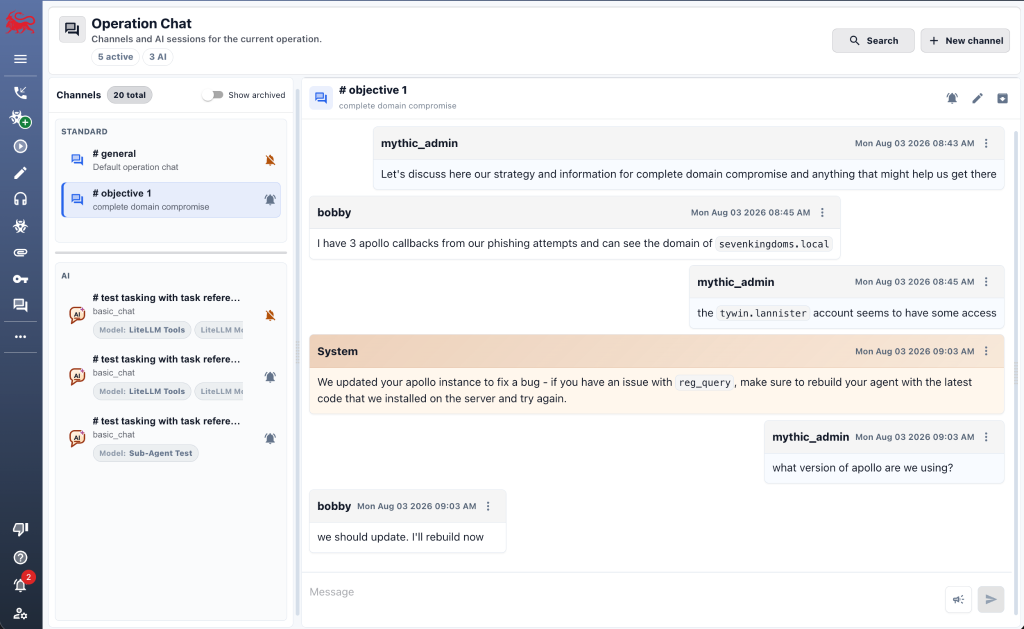
Mythic 4 adds a dedicated chat interface. Each operation has a general channel, and operators can create additional channels for whatever makes sense for their workflow. Messages stream to everybody in the operation, channels can be muted or archived, history is searchable, and the interface supports markdown formatted messages. This general chat also supports system messages. System messages allow admins to broadcast important notices to all users that even bypass their muted settings
The more interesting part is that Mythic can post structured messages into these channels. Eventing workflows that need approval or input from an operator can put an interactive card directly in the operation’s chat. An operator can respond there and the workflow continues with the supplied input. This gives long-running automation a consistent place to pause and ask for help without requiring somebody to stare at the eventing page. The ability for event workflows to stop and prompt users for input is also new in Mythic 4 in general. The screenshot below shows some operators using a custom objective 1 chat channel to discuss how they’re going to achieve an objective in their assessment.
Agents, but the Other Kind
Chat containers are a new pluggable Mythic service for connecting AI models to an operation. Mythic does not hard-code a specific model or provider; instead, a chat container advertises the models and configuration it supports, receives prompts and conversation context, and streams responses back into Mythic.
The interesting part of these containers is that you can give a model controlled access to the operation around it. Each AI chat is associated with its own scoped Mythic API token and can be locked so that only the chat creator can interact with it. The scopes on that token determine what the chat container can read or change, such as viewing callbacks, searching task output, or creating new tasking. If a chat only needs read access, there is no reason to give it write access.
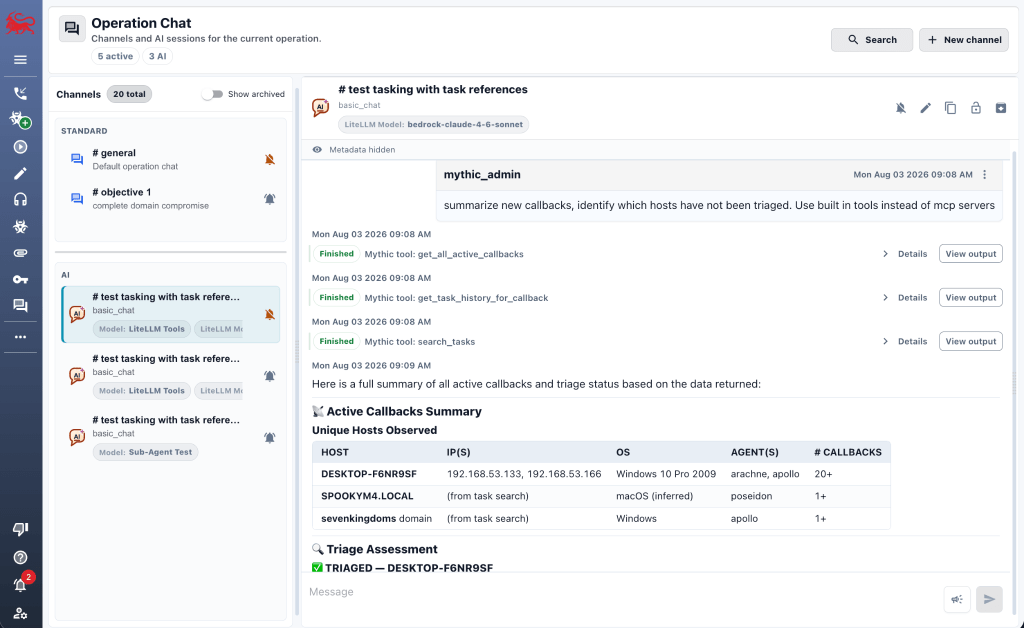
Chat containers can expose tools and slash commands, stream tool status and output, ask an operator for approval or additional input, and delegate work to sub-agents. Mythic tracks those actions in the conversation so that the operator can see what is happening instead of waiting on a single opaque response.
For example, an operator could ask a chat container to summarize new callbacks, identify which hosts have not been triaged, or find tasks that returned a certain error. A more capable container could draft tasking and stop for approval before anything is issued. The model, tools, and policy are supplied by the chat container; Mythic provides the operation context, permission boundaries, and interface. The screenshot below shows an operator asking an AI chat container to summarize new callbacks and identify which have not been triaged.
Less Copy/Paste, More Context
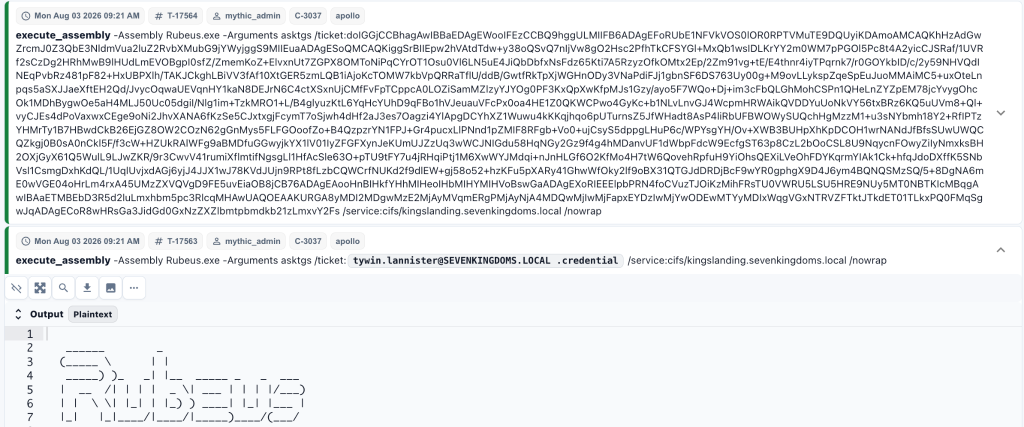
Operators repeat a lot of information during an assessment. Commands get reused, credentials get copied from one output into the next task, and peer-to-peer (P2P) links require values that Mythic already knows. Copying and pasting works, but it’s slow, ugly, and pollutes your tasking command lines. An easy example of this is pasting massive base64 kerberos ticket blobs everywhere.
To help with this, Mythic 4 revamps how you can leverage credentials throughout all tasking with “tasking references”. Instead of pasting a credential into a command, an operator can select the credential Mythic is already tracking and reference the entire record or a specific field. Mythic can do the same for information needed to establish supported P2P links. Before the task is submitted, the interface shows what each reference will resolve to so that the operator can review it.
For example, @cred:42.credential references the credential value from the stored credential 42. References are stored with the task so it is still possible to understand how the final parameters were produced. Right before the task is sent to your payload type container for processing, Mythic goes through to replace these references with their actual values. Not sure what credential number you want to leverage? No worries. Just like most things in Mythic, simply type out @cred: and press tab; Mythic will open up a quick credential dialog for you to browse and select the credential you want to use.
To go one step further, Mythic 4.0 adds per-operator aliases. An alias can expand to a command or a reusable value, and it can be global or scoped to a specific payload type or chat container. Aliases can also be exported and imported, which makes it easier to carry your preferred workflow between Mythic instances without forcing everybody on an operation to use the same set. An easy example might be to alias rubeus as Apollo’s execute_assembly -Assembly Rubeus.exe -Arguments, then you could issue a command like rubeus asktgt /user:bob /password:@cred:42.credential /ptt. In the below screenshot, these two execute_assembly commands are doing the same thing – the top one uses the base64 Kerberos ticket directly, and the second one uses the new inline tasking references. It’s pretty easy to see which one is easier to read.
File Transfers That Can Pick Up Where They Left Off
Mythic agents generally use “chunking” to send files from a target host back to the Mythic server. This is particularly important when the file you want to download is a 40GB virtual machine (VM). Chunking allows you to only read a portion of that file into memory, send it to mythic, then read the next chunk. This traditional chunking style requires each chunk to be the same size so that Mythic can seek to the right offset when saving the contents.
Mythic 4 adds offset-based transfers in addition to traditional fixed-sized chunking. Compatible agents can report the total file size and the byte offset for each piece of data, but there’s no requirement that agents use offset-based or chunk-based specifically. This is fundamentally the same as normal chunking, but allows each chunk to be a different size. This can be helpful if your agent might not always have room for the same chunk size in its C2 communications.
Mythic 4 adds one more useful feature for large file transfers – resuming. It’s very disheartening when you’re downloading a large file from a target environment and partway through, the agent dies. This could be due to a bug in the agent, something else triggering a defensive response, or even just the user logging out for the day. When you get a new callback, you still need to download that file. Having to restart a multi gigabyte file download might not even be feasible anymore. Luckily, Mythic tracks everything that’s going on, so it knows exactly where your last task left off. The new “resume” feature allows an agent to ask to resume a file transfer, and Mythic will report back exactly where that agent should continue.
Editing Files on an Agent
The normal remote file editing workflow is familiar: download a file from the target to Mythic, download it from Mythic to your operator workstation, edit it, upload it back to Mythic, and then move it back into place on the target host. This is a lot of steps for potentially changing one line.
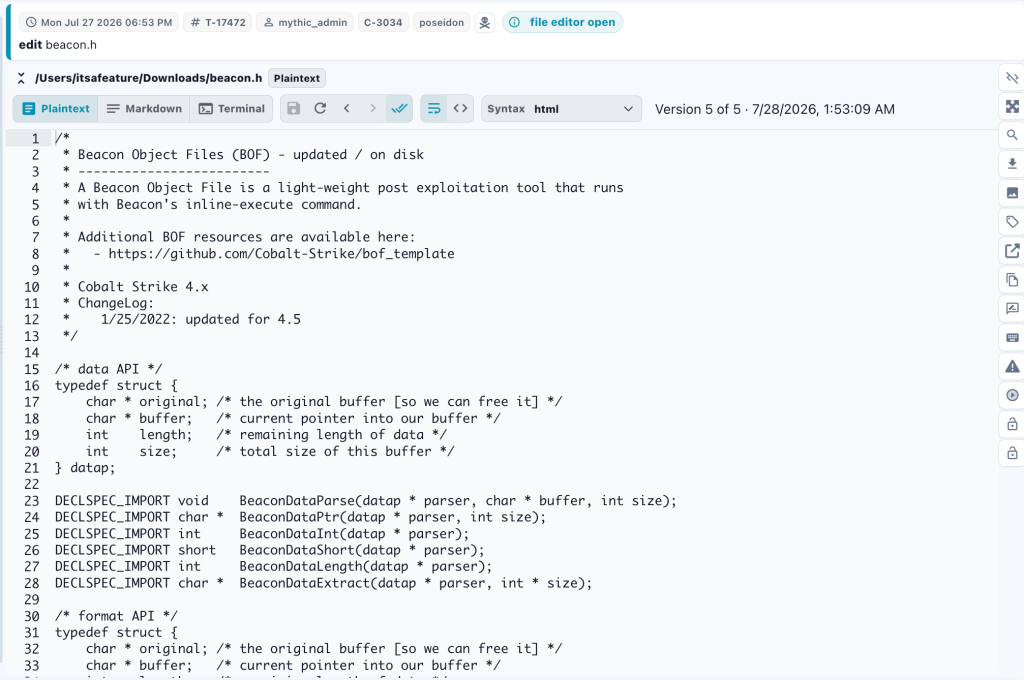
Mythic 4 introduces an interactive file editor protocol. Agents that implement it can open a remote text file directly in Mythic, let an operator make changes, and save those changes back through the existing callback. The editor tracks the version that was opened and can detect if the remote file changed before the operator saved, rather than silently overwriting newer content.
The interface also keeps the prior snapshots associated with the interactive task. This is a much nicer workflow for the quick configuration or script changes that happen during an assessment. The screenshot below shows a poseidon agent opening an interactive editing session against a header file. This view has a few more buttons for moving through the history of the file, fetching a newer version, and saving your changes.
A More Consistent Operator Experience
There are updates across nearly every page in Mythic 4. The entire UI is updated to have a more modern and fresh feel to it (while still keeping your ability to change pretty much every color everywhere). The “flow” of the UI is the same, but each page has updates to make things easier to understand and leverage.
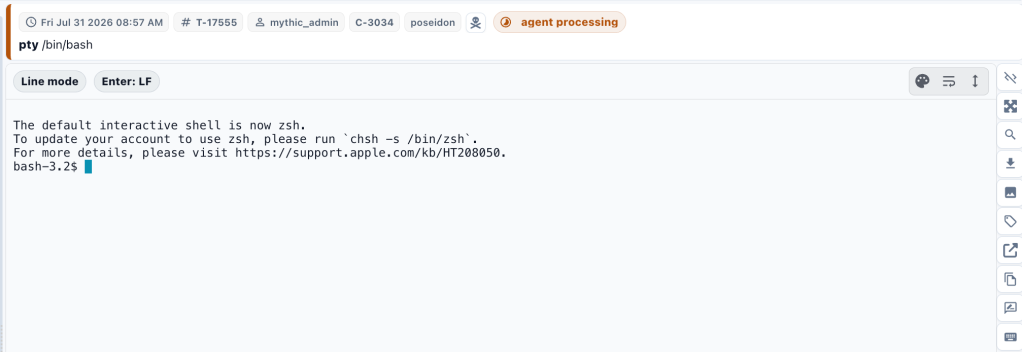
The interactive terminal renderer now uses XTerm.js for a more proper “terminal” feel when interacting with remote processes. This even has a new toggle for “line” vs “raw key” modes. Line mode allows you to queue up a lot of text and submit it as one chunk. This is a smoother experience over an async channel than the standard terminal/ssh style where each keystroke has to be echoed back to you before you see it. Raw key mode queues up each individual key press to send to the remote machine in your more traditional terminal/ssh style. This is handy when you’re doing things like leveraging vim or nano through the terminal renderer.
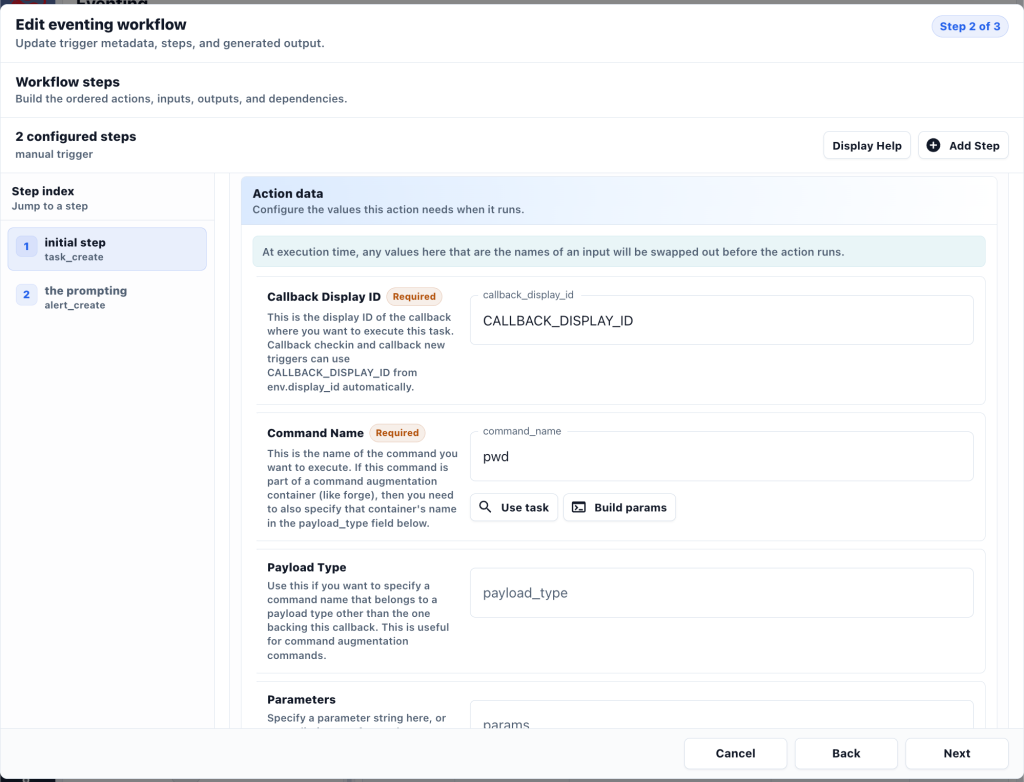
The eventing workflow wizard also got a face lift. It’s much easier to see multi-step workflows with a side index, tasking action data can be autopopulated based on already executed tasks, and the wizard can be used to edit existing workflows.
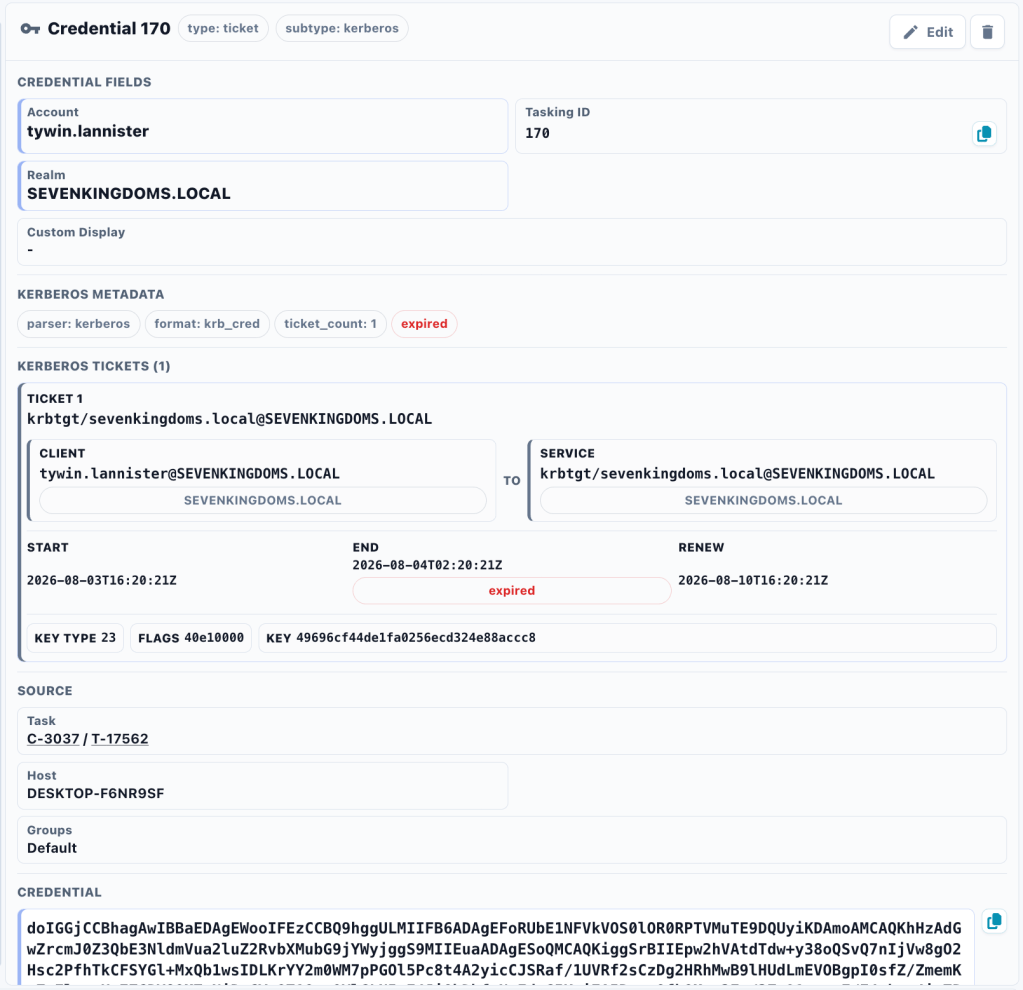
Mythic’s credential tracking is slowly becoming more useful. Instead of simply tracking a raw credential blob, if the credential type is “ticket”, Mythic will automatically try to parse it as a Kerberos ticket. If it is a Kerberos ticket, then Mythic will display the embedded information in a new format as well as track the expiration and renew_until times. This makes it much easier when trying to leverage tickets for further tasking to see what they’re referencing, if they’re expired, and if they can still be renewed. There’s also a slightly more simplified version of this for JSON web tokens (JWT). Over time, I’ll add more credential types to this style of parsing and display.
Scoped Access From the UI to RabbitMQ
Some of the most important Mythic 4 changes are not really visible (and that is intentional). API tokens now have explicit read and write scopes for Mythic resources such as callbacks, tasks, responses, files, credentials, payloads, eventing, and chat. These scopes are enforced across the web API and GraphQL access, and the originating operator, operation, token, and scopes follow requests into Mythic’s RabbitMQ-based RPC system.
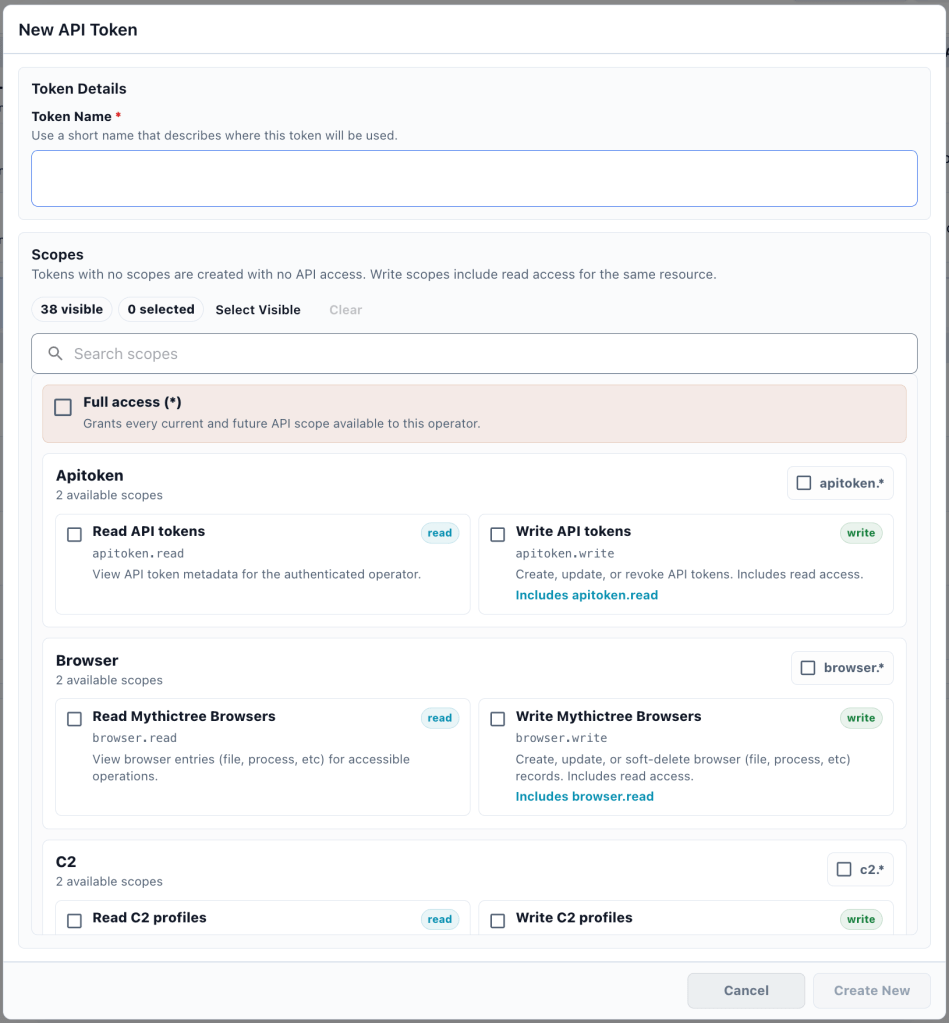
This matters for every kind of automation, but it is especially important for chat containers and eventing. A token created for one workflow should not automatically have access to everything in Mythic, nor should it be able to create another token with more access than it already has.
There are breaking authentication and API changes as part of this work, including the removal of the old API route prefix and updates to how services provide authorization context. If you maintain a Mythic integration or use Mythic Scripting, be sure to read the upgrade guide before testing against v4.
Trying the Beta
The Mythic 4.0 Beta is available from the Mythic-v4.0.0 branch.
git clone --single-branch --depth 1 https://github.com/its-a-feature/Mythic --branch Mythic-v4.0.0
cd mythic
sudo make
sudo ./mythic-cli start
To install any Mythic v4 compatible service during this beta period, be sure to use the Mythic-v4.0.0 branch:
sudo ./mythic-cli install github https://github.com/MythicAgents/apollo -b Mythic-v4.0.0
sudo ./mythic-cli install github https://github.com/MythicC2Profiles/http -b Mythic-v4.0.0
Payload types, command and control (C2) profiles, and consuming services also need v4-compatible container libraries. During the Beta, use the compatibility list to see which public components have been updated:
Please test the Beta in a development environment first, especially if you have private agents, custom C2 profiles, eventing containers, or scripts. A few months of beta testing gives us time to update public components, work through migration issues, and adjust new interfaces before the stable release.
Feedback
This post only covers some of the larger changes in Mythic 4.0. There are many smaller operator and developer quality-of-life updates throughout the framework, so please check the changelog and documentation for more details.
If you find a bug, have a feature request, run into an upgrade issue, or have feedback of any kind, please open an issue on GitHub or reach out in the #mythic channel in the BloodHoundGang Slack. The point of a public beta is to find the things that do not work well before calling the release stable, so please do not assume that your odd edge case is too small to mention.


