CiliumHound: Graphing Kubernetes Network Policies
TLDR: CiliumHound is a BloodHound OpenGraph extension for auditing Cilium network policies. It ingests a folder of JSON or YAML policies and creates a searchable, Kubernetes namespace-scoped graph.
Introduction
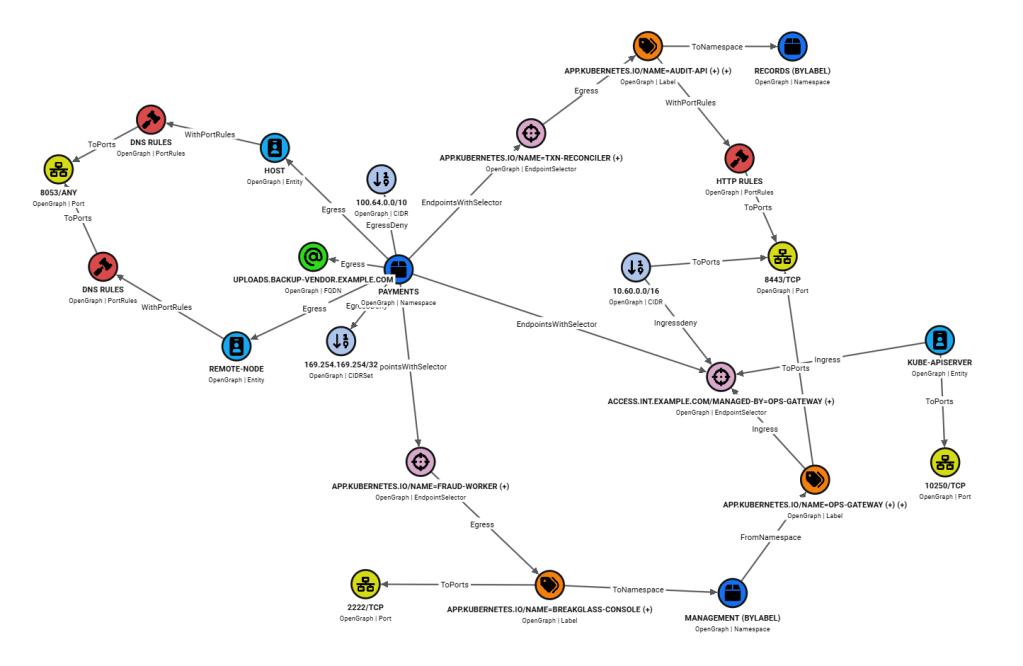
On some recent assessments, I’ve had to review large, complex Cilium network policies in a Kubernetes cluster, looking for ways in or out of isolated namespaces. Trying to make sense of dozens of network policies across numerous YAML files begins to challenge your sanity. CiliumHound is a BloodHound OpenGraph extension I put together to simplify and accelerate Cilium network policy auditing by aggregating Cilium network policies for a given namespace into a single graph.
Cilium Network Policies
Cilium is a Kubernetes Container Network Interface (CNI) plugin that enables network policies to control which pods can access resources within the cluster. Cilium can be used to enforce namespace isolation at a fine-grained level. For example, Cilium can be used to provide full access from a management namespace into an isolated namespace while limiting egress from the isolated namespace to a specific URL path.
Cilium network policies are stored in Kubernetes as CiliumNetworkPolicy objects and are defined in YAML using policy rules at different OSI model levels (L3, L4, and L7). Each rule falls under ingress and/or egress to indicate the direction of network traffic control. Policies, composed of various rules, can also be applied to specific pods using an endpoint selector.
Policies have an implied default deny rule, so any desired access must be specified in the policy. L3 rules specify destinations or sources using IP address ranges, hostnames, Kubernetes labels, etc. L4 rules allow you to limit access to specific ports, and L7 rules let you set protocol limitations (e.g., DNS and HTTP filters).
Below is a Cilium network policy example that applies to pods with the “app: backend” label (i.e., backend pods), based on the endpointSelector rule’s matchLabels filter. Backend pods can egress to 10.1.1.1/32 due to the toCIDR egress L3 rule specified. The ingress fromEndpoints L3 rule states that pods with the “app: frontend” label (i.e., frontend pods) can ingress to backend pods, but only to port 8080/TCP due to the toPorts ingress L4 rule. When no toPorts rule is specified, all ports are accessible, which is the case with the egress toCIDR rule.
apiVersion: "cilium.io/v2"
kind: CiliumNetworkPolicy
metadata:
  name: allow-frontend-to-backend
  namespace: default
spec:
  endpointSelector:
    matchLabels:
      app: backend
  egress:
    - toCIDR:
      - 10.1.1.1/32
  ingress:
    - fromEndpoints:
        - matchLabels:
            app: frontend
      toPorts:
        - ports:
            - port: "8080"
              protocol: TCP
When auditing Cilium network policies in YAML format, it is important to understand how rules combine to create an outcome. If multiple entries exist under a matchLabels or matchExpressions rule, they are processed with an AND comparison. The same AND comparison happens if both matchLabels and matchExpressions rules are under the same selector (e.g., fromEndpoints).
Separate ingress or egress rules are processed with an OR comparison. In the example below, pods matching the fromCIDRs or fromEndpoints rules can ingress. No need to satisfy both. CiliumHound presents this as separate ingress paths.
Within the fromEndpoints selector are two separate entries. The first has a lone matchLabels rule, which allows pods with both the “app: frontend” and “environment: prod” labels applied to ingress. One label without the other would not satisfy this rule. The second fromEndpoints entry uses both the matchExpressions and matchLabels rules. Since these are in the same entry, pods must satisfy both to ingress, much like multiple labels under matchLabels are handled.
To summarize, this policy defines three different ways to ingress:
- Traffic from the 10.60.0.0/16 IP range
- Endpoints with both the “app: frontend” and “environment: prod” labels applied
- Endpoints with in the payments namespace with the environment label set to either staging or dev
  ingress:
    - fromCIDRs:
       - 10.60.0.0/16
    - fromEndpoints:
        - matchLabels:
            app: frontend
            environment: prod
        - matchLabels:
            "k8s:io.kubernetes.pod.namespace": payments
          matchExpressions:
            - key: environment
              operator: In
              values:
              - staging
              - dev
Running CiliumHound
The CiliumHound script generates a BloodHound OpenGraph JSON file that can be imported into BloodHound via web UI or via a helper script. First, clone CiliumHound and set up the environment:
git clone git@github.com:Sw4mpf0x/CiliumHound.git
 cd ./CiliumHound
 python3 -m venv .venv
 source .venv/bin/activate
 pip3 install -r requirements.txt
 pip3 install -r helper-scripts/requirements.txt
Run CiliumHound by specifying a target file or folder containing YAML or JSON format policies. The CiliumHound repository includes a set of example policies you can familiarize yourself with in the ExamplePolicies folder:
python3 CiliumHound.py ./ExamplePolicies -o cilium_graph.jsonNow use the BloodHound helper script to push CiliumHound icons to BloodHound, upload Cilium saved Cypher queries to BloodHound, and optionally ingest the cilium_graph.json file into BloodHound.
The helper script uses a username and passwords stored in a .env file to authenticate to BloodHound, so copy the example.env file and modify the credentials and URL before running the helper script. See the README file for more information.
python helper-scripts/bloodhound_helper.py push-icons
 python helper-scripts/bloodhound_helper.py upload-queries --folder ./saved-queries
 python helper-scripts/bloodhound_helper.py ingest cilium_graph.json
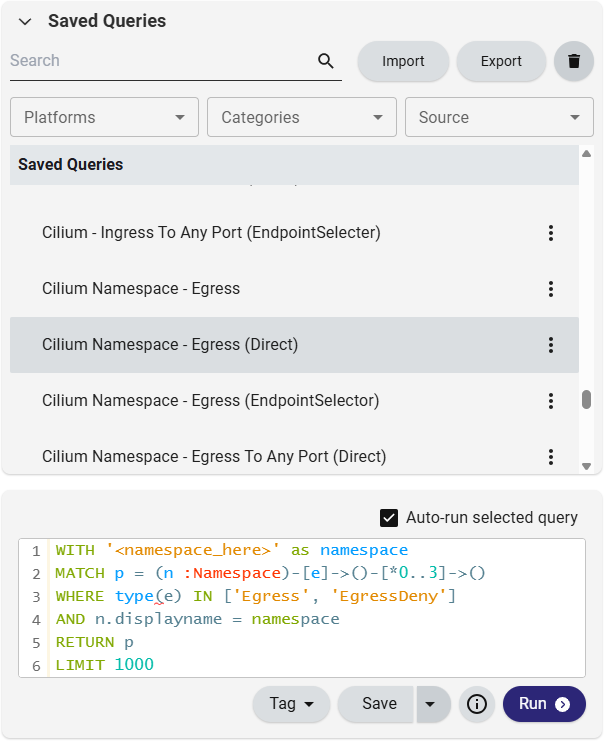
As mentioned, a collection of saved queries is stored in the repository and will be loaded into BloodHound for use. Most of them have placeholder values for the namespace you want to query, so replace <namespace_here> with the target namespace.
CiliumHound v1 Graph Design
CiliumHound’s intended use is to audit an individual Kubernetes namespace, regardless of how many separate policies are applied to it. CiliumHound Nodes combine Kubernetes elements (such as namespaces, entities, and services) with L3, L4, and L7 Cilium rules, like those covered above. Graph composition generally consists of a central Kubernetes namespace node with outgoing and incoming paths representing the various Cilium network policies. Naturally, egress rules flow away from central namespace nodes, while ingress rules flow inward. Let’s dive right into some example graphs, the YAML policies they represent, and the Cypher queries used to display them.
Direct Egress Example
Saved Query: Cilium Namespace – Egress (Direct)
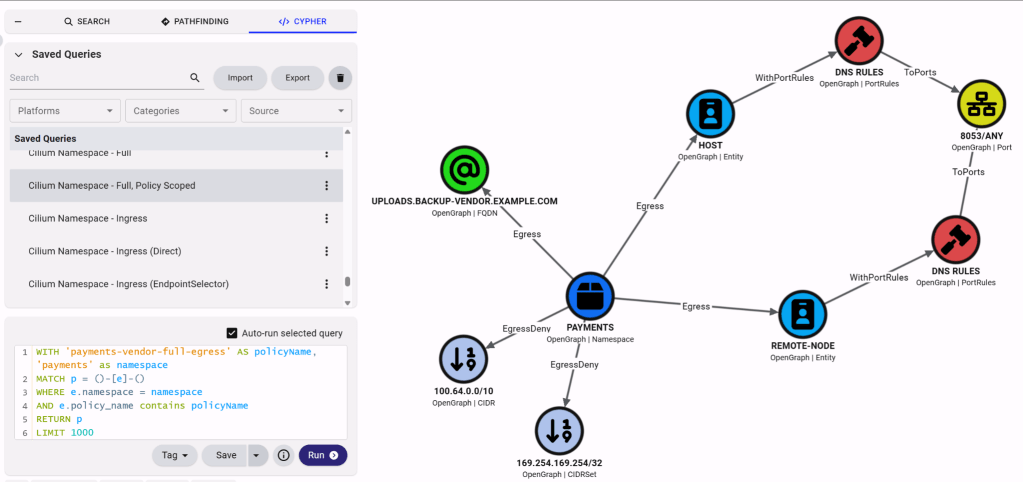
Our first example demonstrates direct egress L3 rules to a couple of Kubernetes entities, some IP address ranges (i.e., CIDR nodes), and a fully-qualified domain name (i.e., FQDN nodes). Egress and EgressDeny edges connect these to the Payments namespace, where the policies apply. The entities are limited to a specific port, whereas the rest have an implied wildcard port access since there isn’t a L4 toPorts rule in the policy. I’ve elected to place L7 rules, like the DNS PortRules node in this example, between L3 and L4 rules for easier visual attribution to their associated L3 rule. L3 rule nodes share port nodes, so placing L7 rule nodes after L4 rule nodes would become visually confusing.
spec:
  endpointSelector: {}
  egress:
  - toFQDNs:
    - matchName: uploads.backup-vendor.example.com
  - toEntities:
    - host
    - remote-node
    toPorts:
    - ports:
      - port: "8053"
        protocol: ANY
      rules:
        dns:
        - matchName: uploads.backup-vendor.example.com
        - matchPattern: "*.backup-vendor.example.com"
  egressDeny:
  - toCIDRSet:
    - cidr: 169.254.169.254/32
  - toCIDR:
    - 100.64.0.0/10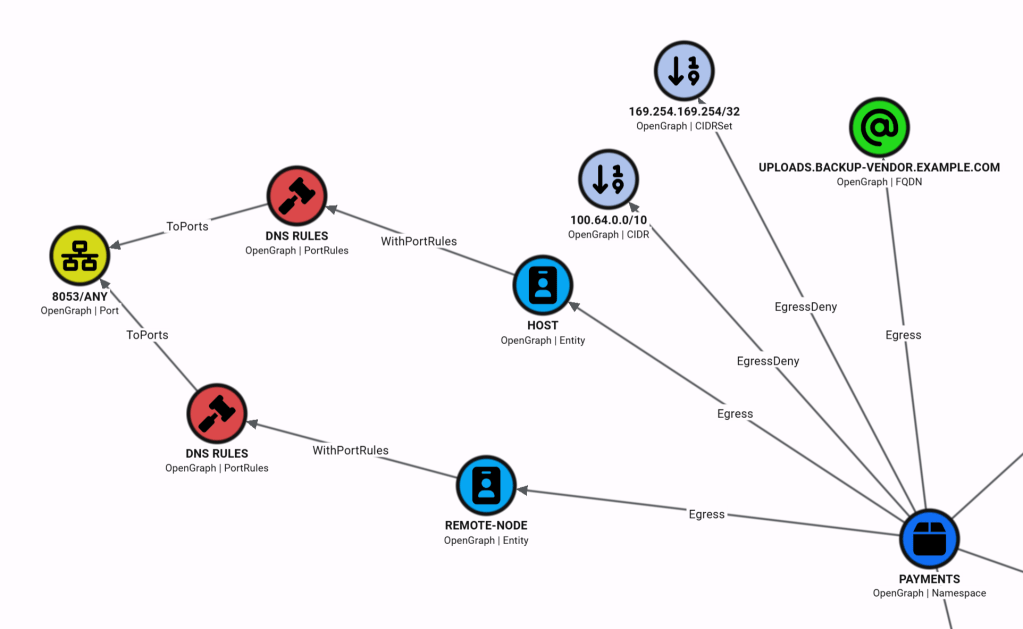
Endpoint Selector Egress Example
Saved Query: Cilium Namespace – Egress (EndpointSelector)
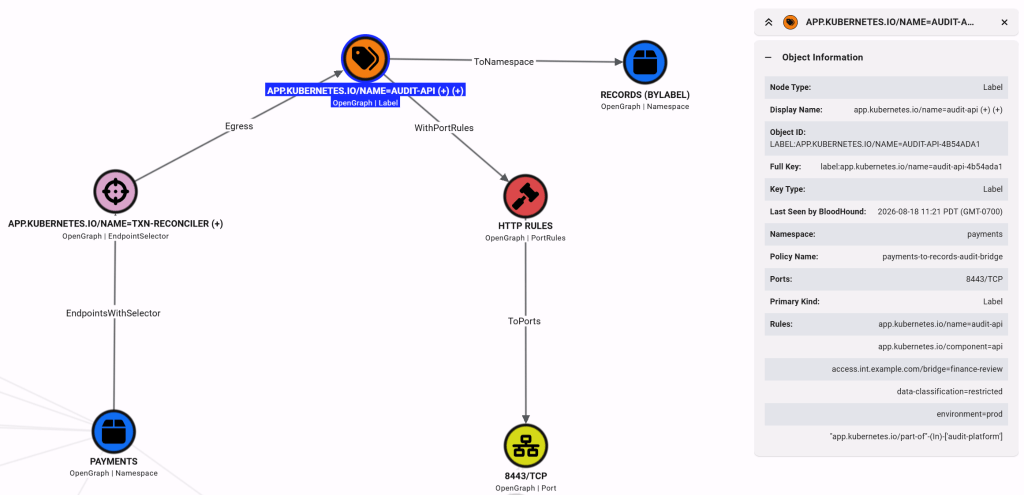
The policy in this next example includes an endpoint selector that limits the policy’s application to specific Payment namespace pods. In the graph, the endpoint selector’s matchLabels rules are captured in the node’s Rules property, a pattern you will encounter across other CiliumHound node kinds.
The overall outcome of this policy is that Payments namespace pods that match the endpoint selector can access pods in the Records namespace IF:
- Target pods have the labels listed in the Label node
- Accessing TCP port 8443
- Following the L7 limitations specified in the PortRules node
spec:
  endpointSelector:
    matchLabels:
      app.kubernetes.io/name: txn-reconciler
      app.kubernetes.io/component: worker
      access.int.example.com/bridge: finance-review
      environment: prod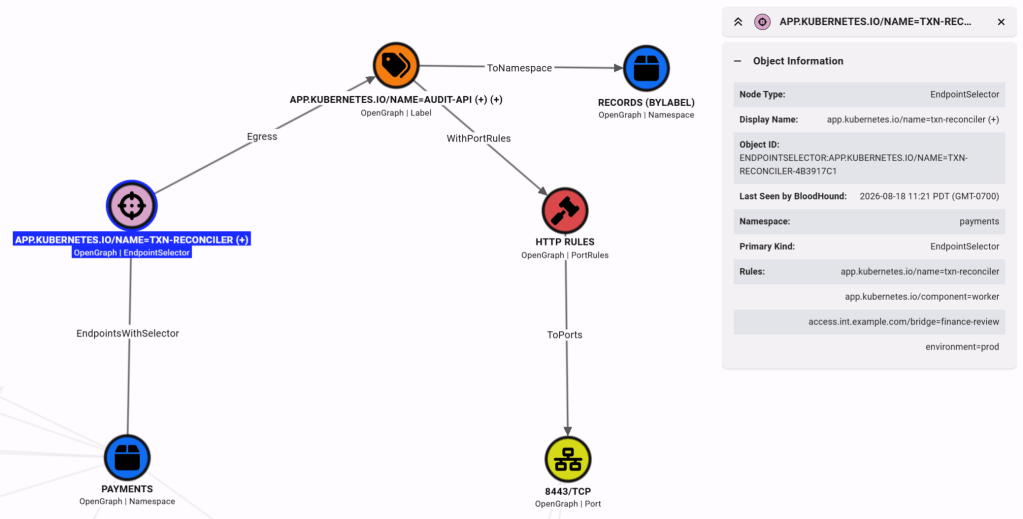
EndpointSelector and Label nodes are named after the first matchPattern or matchLabel rule that the ingestor encounters. If more than one encounter occurs, a “(+)” indicator is appended to the node name, and the complete list of rules is placed in the Rules property. Note that I am taking the k8s:io.kubernetes.pod.namespace tag and creating a Namespace node to surface that information visually instead of burying it in the Label node’s object information.
egress:
  - toEndpoints:
    - matchLabels:
        "k8s:io.kubernetes.pod.namespace": records
        app.kubernetes.io/name: audit-api
        app.kubernetes.io/component: api
        access.int.example.com/bridge: finance-review
        data-classification: restricted
        environment: prod
      matchExpressions:
      - key: app.kubernetes.io/part-of
        operator: In
        values:
        - audit-platform
Following the trend, PortRules nodes include the policy’s protocol rules in the Rules property. In this example, access is limited to “POST /v1/audit-events” and “GET /v1/reconciliation/status” requests.
    toPorts:
    - ports:
      - port: "8443"
        protocol: TCP
      rules:
        http:
        - method: POST
          path: /v1/audit-events
        - method: GET
          path: /v1/reconciliation/status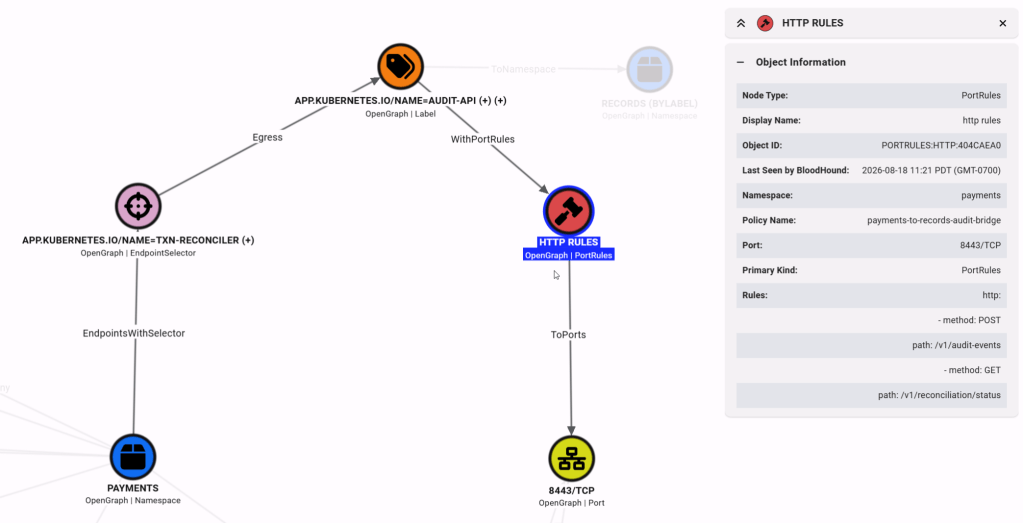
Ingress Example
Saved Query: Cilium Namespace – Ingress (EndpointSelector)
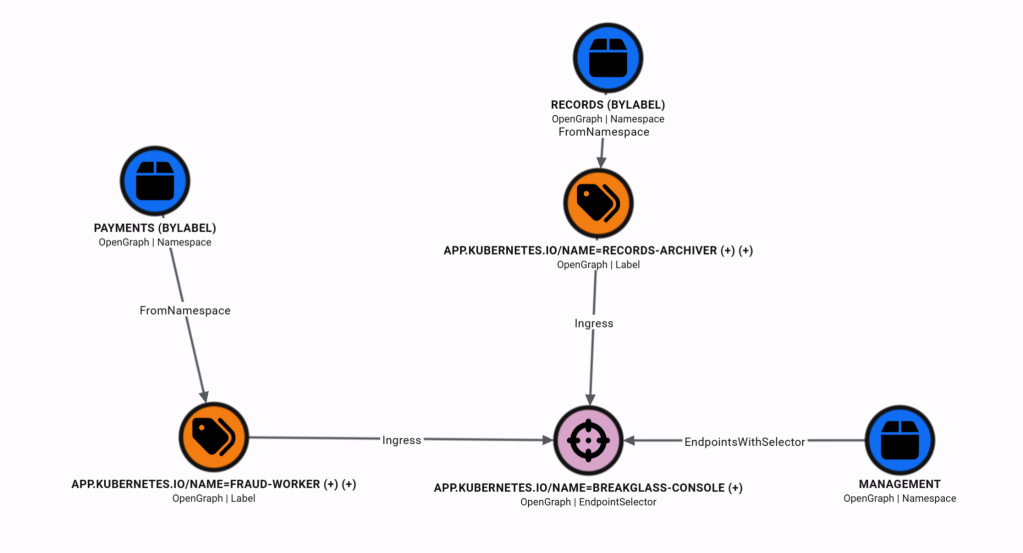
Next, I want to show an example of an ingress policy. Ingress edges directionally point inward towards the policy’s namespace, or the endpoint selector if defined. The policy namespace will always have an outward edge to EndpointSelector nodes. In this policy, pods in the Payments namespace, with the labels listed in the APP.KUBERNETES.IO/NAME=FRAUD-WORKER, can access Management namespace pods with labels specified in the EndpointSelector node. And likewise for pods in the Records namespace.
Egress To Any Port Example
Saved Query: Cilium Namespace – Egress To Any Port (Direct)
Saved Query: Cilium Namespace – Egress To Any Port (EndpointSelecter)
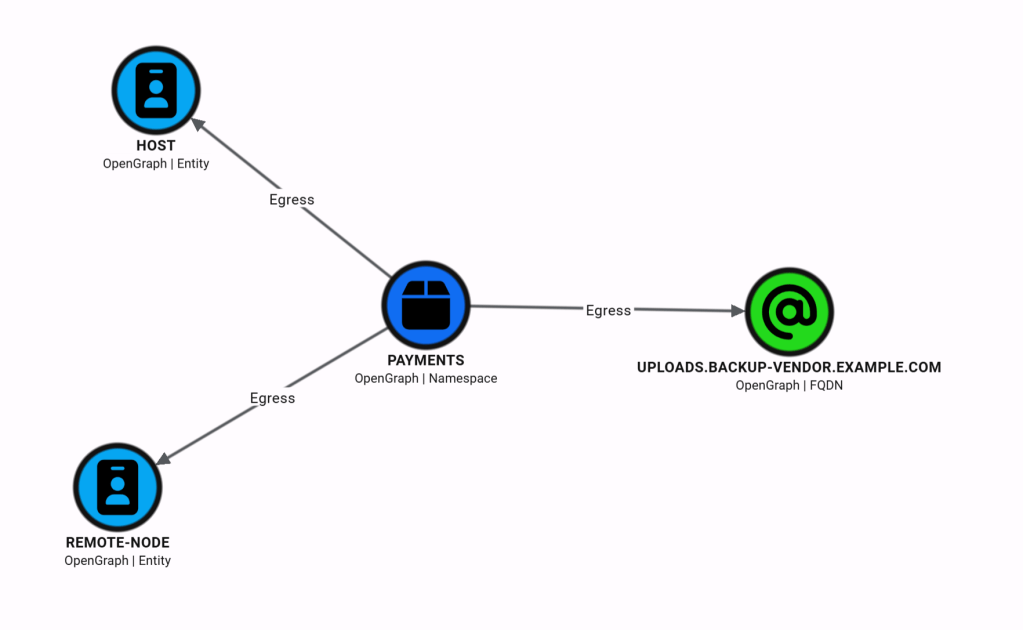
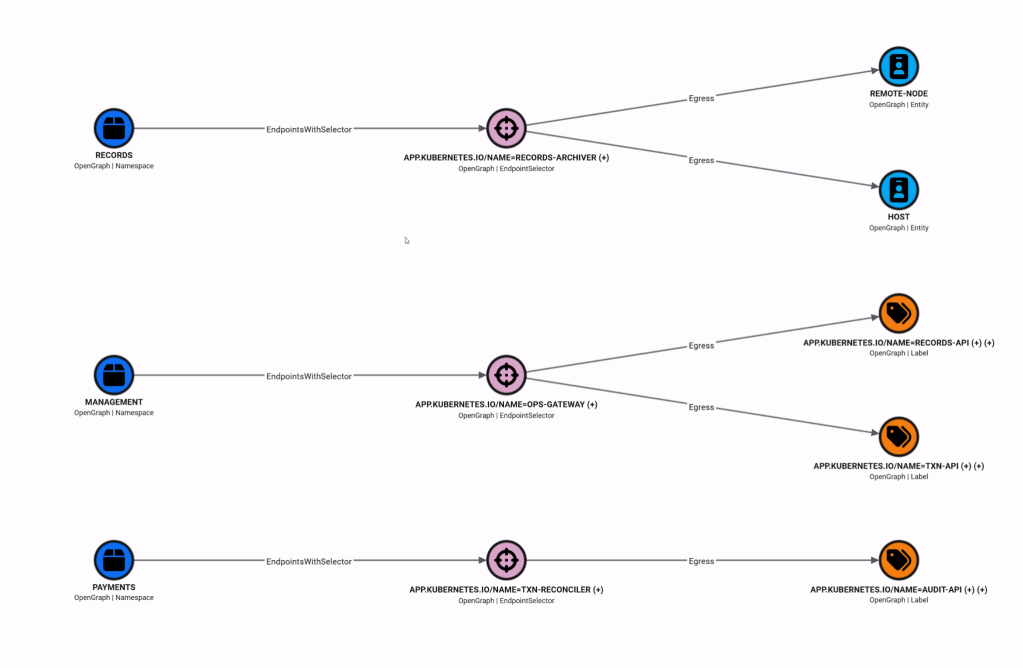
In addition to auditing policies applied to a namespace, CiliumHound can identify gaps in policy coverage. For example, the following query will surface egress policies that don’t specify an L4 rule to limit outbound access to ports. In this example, egress to the backup FQDN is not limited to web traffic (i.e., ports 80/TCP or 443/TCP)
Policy-Scoped Example
Every node and edge CiliumHound creates includes a Policy Name property. This allows us to audit individual policy files without needing to see them in aggregate with the rest of the policies applied to the namespace. In this case, you also need to specify the target policy in the saved query. The policy name is derived from the metadata name field in the policy file.
Summary
CiliumHound has undergone several iterations as I experimented with different ways to present information. Even in its rough initial state during the first assessment, I was given a few dozen policies to read, and visualizing the information made the policies instantly more mentally digestible. Cypher queries can be used to pick apart even the most congested namespace policy graphs, auditing, and then excluding the 100 FQDN rules to better see what else is defined. In future versions, I would like to add support for nodeSelector rules and CiliumClusterwideNetworkPolicy policies. I would also like to incorporate pathfinding (e.g., can this namespace access that namespace) into CiliumHound, but I haven’t solved that graph design challenge yet.


