TL;DR: Executing applications instead of scripts via SCCM’s deploy application feature will generate different artifacts due to the fundamental differences in the execution flow. While existing detection tools can catch script-based execution, they often miss stealthier methods. This post covers how to detect the more evasive SCCM application execution.
Introduction:
During BlackHat 2025’s offering of SpecterOps’s Adversary Tactics: Identity-Driven Offensive Tradecraft (AT:IDOT), my role was that of the “Threat Hunter.” For context, for both of our most popular offensive course offerings (e.g., AT:IDOT & AT:RTO), we will often schedule consultants to focus on revealing the defensive-side of operations to students based on the tradecraft choices they make during the classes. Within our AT:IDOT course, we highlight offensive tradecraft surrounding the use of Microsoft Configuration Manager (i.e., SCCM) to the students; and as I previously mentioned, it was my role to demonstrate detections based on that tradecraft.
During the AT:IDOT course, I needed to demonstrate to the students how defenders can identify behaviors related to SCCM application execution methods. I had previously done some light research on detections for SCCM application execution and ran across this blog: A Detection Engineer’s Guide to SCCM Misconfiguration Abuse. In this blog, the SnapAttack researcher, Raven Tait, presented well-researched technical guidance on offensive tooling, command execution techniques, and detection logic in relation to SCCM abuse. In the blog, Raven provided guidance for SharpSCCM’s exec function, the author used the example of executing code remotely from one SCCM client to another with PowerShell.exe and mentioned that WmiPrvSE.exe would be the parent process of PowerShell.exe. However, in the SCCMHunter script execution example, the parent process of PowerShell.exe was CcmExec.exe.
The SCCM script execution originating from CcmExec.exe made sense to me because I knew that CcmExec.exe was the core process of the SMS Agent Host service responsible for managing updates and installations. During testing a simple SCCM client script execution, I could easily see the execution process tree:
CcmExec.exe
PowerShell.exe
PowerShell Script
At the time, what did not make sense to me was “Why did the Client Application execution need to use CcmExec.exe → WmiPrvSE.exe → app.exeinstead ofCcmExec.exe → app.exe?”
Analysis Methodology:
Start Simple:
When I conducted this analysis to find the answer to my question, I started by simply researching online resources with a few goals in mind. If I can find the answer with a few Google searches, I will. My questions/goals that I started researching:
Why is SCCM application execution conducted via WmiPrvSE.exe instead of CcmExec.exe?
Are there any proof-of-concepts (POCs) or examples of Client Script/Application Execution found in the wild?
Are there any example detections that I can pull from that would inform me of the answer to my first question?
Note:
If you are like me, and you learn best through hands-on experience; you can follow along with this walkthrough by using the GOAD SCCM lab. This is what I used in my Ludus instance: https://docs.ludus.cloud/docs/environment-guides/goad-sccm/
When I looked up the first question: “Why is SCCM application execution conducted via WmiPrvSE.exe instead of CcmExec.exe?”, Google linked my old co-worker Roberto Rodriguez’s blog on WMI Win32_Process Class and Create Method for Remote Execution. This did answer my question in a way. However, this answer was not really specific to my CcmExec.exe scenario. It did remind me that when we are ever talking about WMI, CIM, or mentioning WmiPrvSE.exe, we are usually talking about COM objects. I kept this in the back of my mind while doing further research.
For the second question: “Are there any proof-of-concepts (POCs) or examples of Client Script/Application Execution found in the wild?”, I didn’t find many example of threat intelligence focused on SCCM abuse. This did not mean that adversaries are not taking advantage of SCCM. It is far more likely that defenders are not centralizing telemetry from SCCM to identify the activity.
Luckily I was able to lean on the labs that our students are taught from our AT:IDOT course to identify POCs and examples for validation and testing. Additionally, there is a pretty good write up for the SCCM GOAD lab here SCCM-LAB-part0x3.
For the last question: “Are there any example detections that I can pull from that would inform me of the answer to my first question?”, while there were great detection ideas publicly available and related to SCCM offensive abuse, none of them really enriched my answer to the first question of “Why WmiPrvSE.exe and not direct child process of CcmExec.exe?”
The below list contains Detection Blogs that didn’t really answer my question but were still helpful for other areas of SCCM abuse:
After the initial research with online resources, I will then utilize a lab environment and move onto the validation phase of research. Typically, I start with Procmon because it will provide me with a high-level summary of expected behaviors and operations during the initial phases of research.
I always validate POCs within a lab environment to verify I have a work method of execution that facilitates the goal of generating telemetry and hopefully answering my questions at the highest level (i.e., work smarter, not harder). Additionally, the benefit of starting with POC validation is that when generating detection guidance, I can reference this working POC for future SOC analysts to validate what the exact offensive behavior was used to tune the detection.
ProcMon Example of Client Script Execution:
I started by creating a benign PowerShell script to run ipconfig and Get-ComputerInfo:
#info.ps1
# Generate a timestamp
$timestamp = Get-Date -Format "yyyyMMdd_HHmmss"

# Define the output file
$outputFile = "$env:USERPROFILE\Desktop\system_info_$timestamp.txt"

# Write a header
@"
==========================================
IPCONFIG /ALL
Generated: $(Get-Date)
==========================================

"@ | Out-File -FilePath $outputFile -Encoding UTF8

# Save ipconfig output
ipconfig /all | Out-File -FilePath $outputFile -Append -Encoding UTF8

# Add a separator
@"

==========================================
COMPUTER INFORMATION
==========================================

"@ | Out-File -FilePath $outputFile -Append -Encoding UTF8

# Save computer information
Get-ComputerInfo | Format-List * | Out-File -FilePath $outputFile -Append -Encoding UTF8

Write-Host "System information saved to:"
Write-Host "  $outputFile"
Then I used sccmhunter to connect to the site server and upload the script to the SCCM client machine running ProcMon in order to record execution:
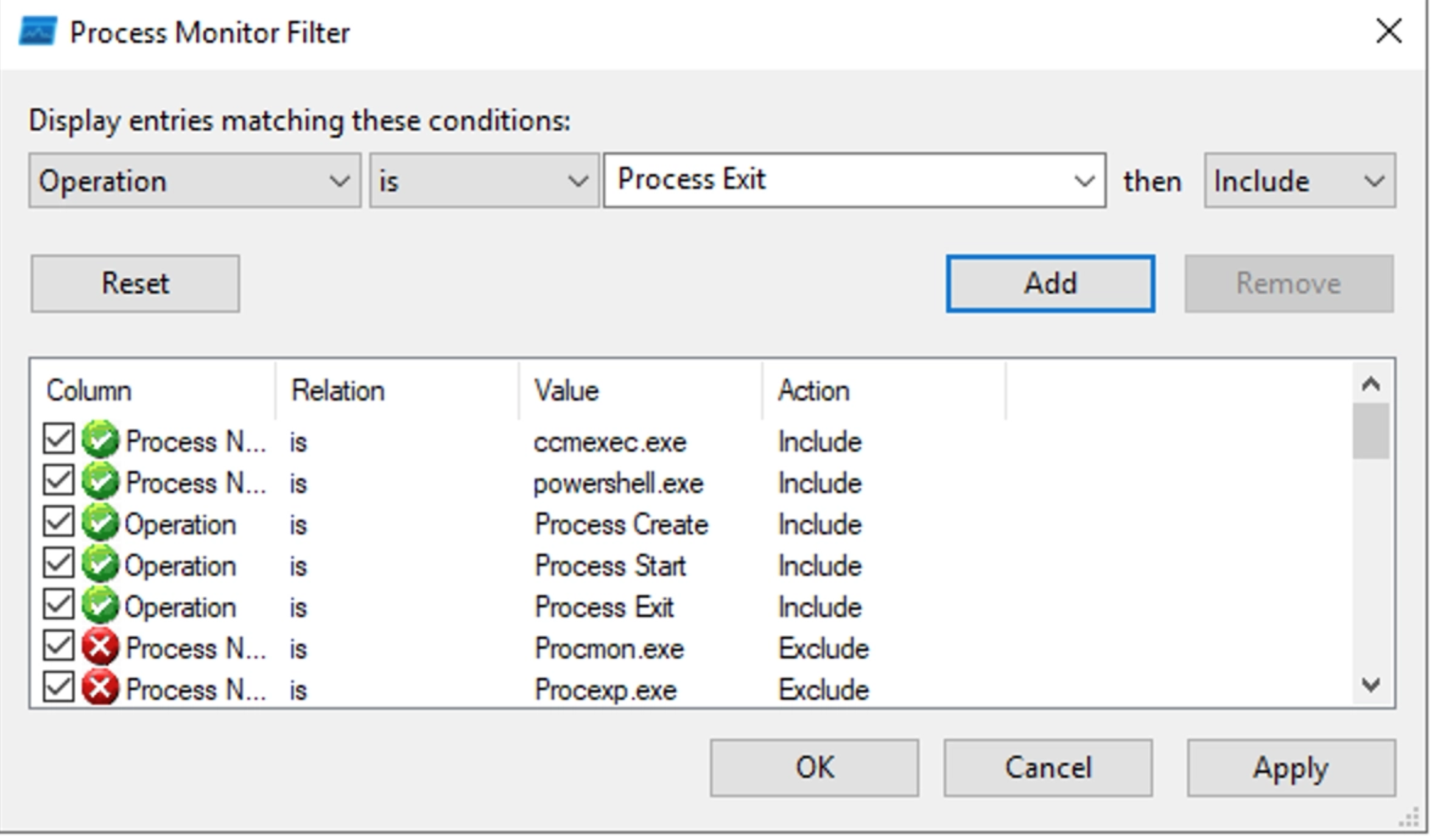
Before I pushed the script to the client, I set ProcMon to filter for CcmExec.exe and PowerShell.exe and the Operations of Process Start, Process Create, and Process Exit:
Then I hit the record button on the Client machine’s ProcMon and switched back to sccmhunter where I executed the script installation with the below command:
(16777221) (C:\) >> script /home/localuser/sccmhunter/info.ps1
[13:58:49] INFO     [+] Script 'Updates' created successfully with GUID e1ab80c6-3269-47d6-b8a7-f3d74697c132.
[13:58:50] INFO     [+] Script with guid e1ab80c6-3269-47d6-b8a7-f3d74697c132 approved.
[13:58:50] INFO     [+] Script with guid e1ab80c6-3269-47d6-b8a7-f3d74697c132 executed.
[13:59:21] INFO     [+] Got result:
[13:59:21] INFO     System information saved to:
                    C:\Windows\system32\config\systemprofile\Desktop\system_info_20260804_135912.txt
[13:59:21] INFO     [+] Script with GUID e1ab80c6-3269-47d6-b8a7-f3d74697c132 deleted.
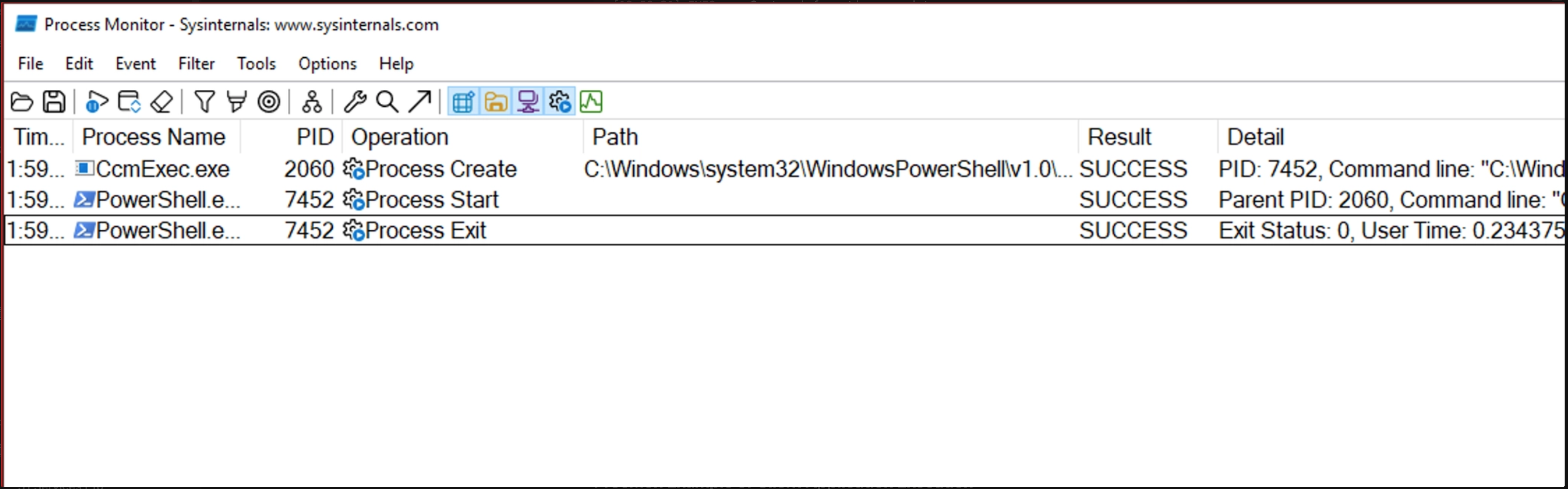
I could see that my assumption in the process tree was true based on the ProcMon output. The process tree for Client Installation was:
CcmExec.exe
PowerShell.exe
Script.ps1
ProcMon Example of Client Application Execution
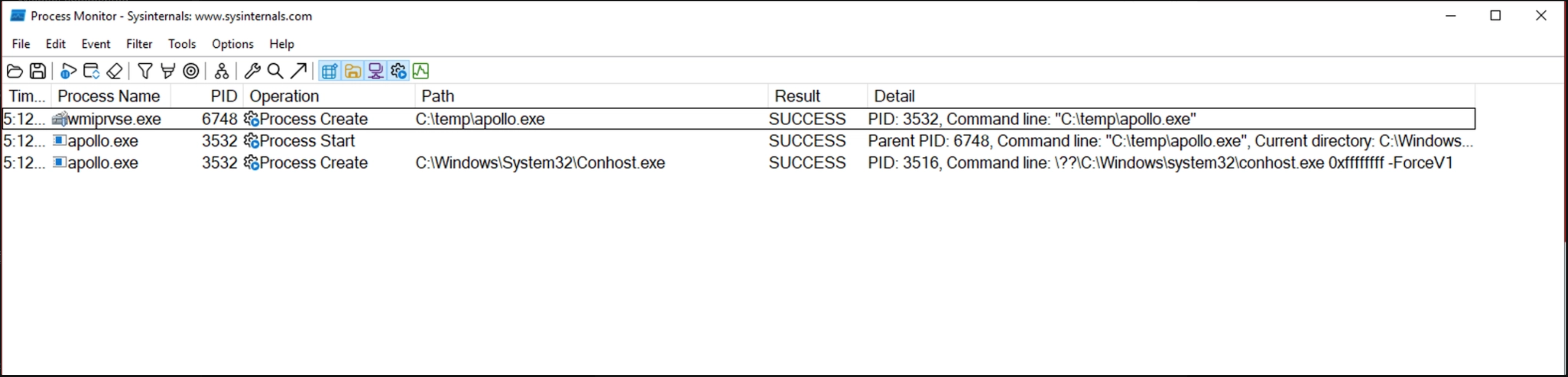
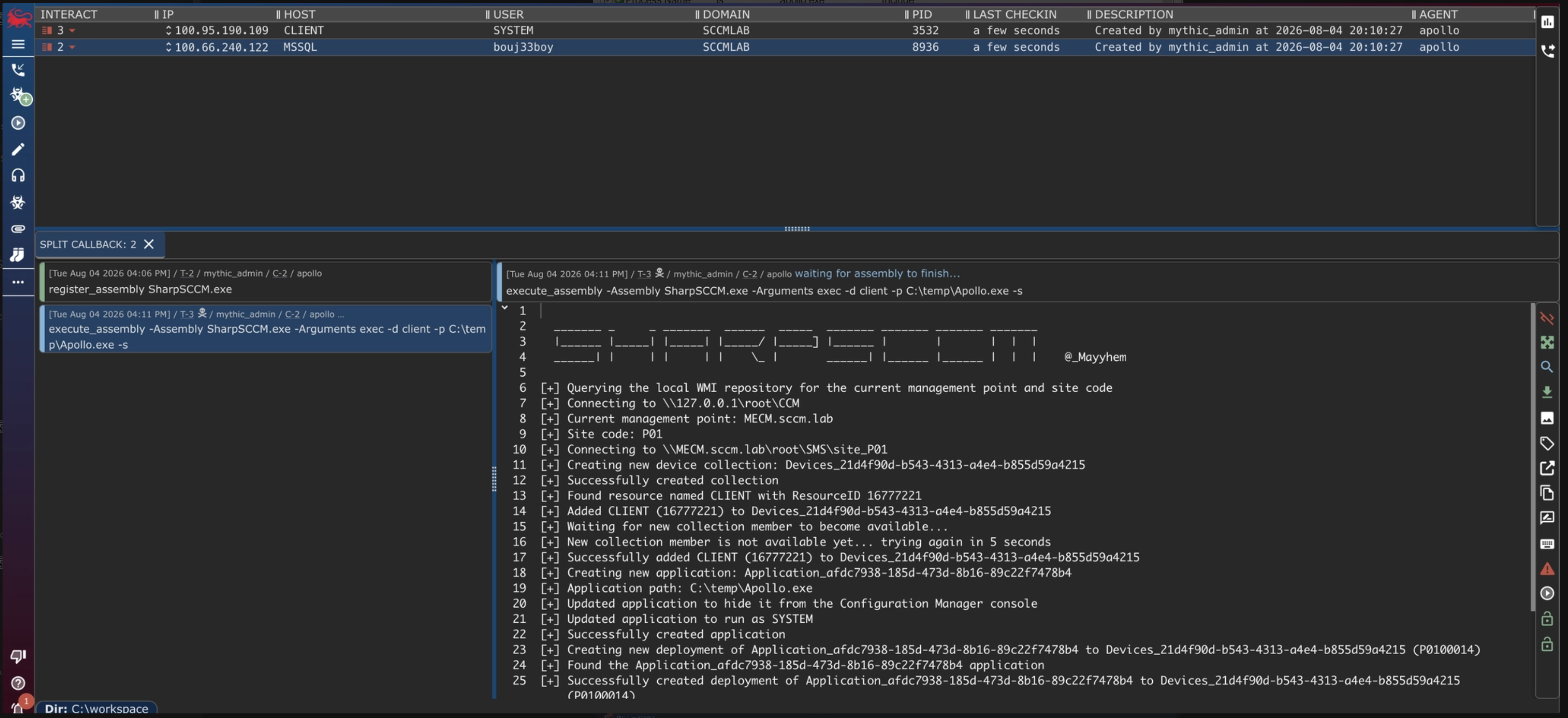
I used an Apollo callback on the MSSQL Server to execute SharpSCCM. Via SharpSCCM, I told SCCM to reach out to the Client target and execute the Apollo executables staged in C:\Temp.
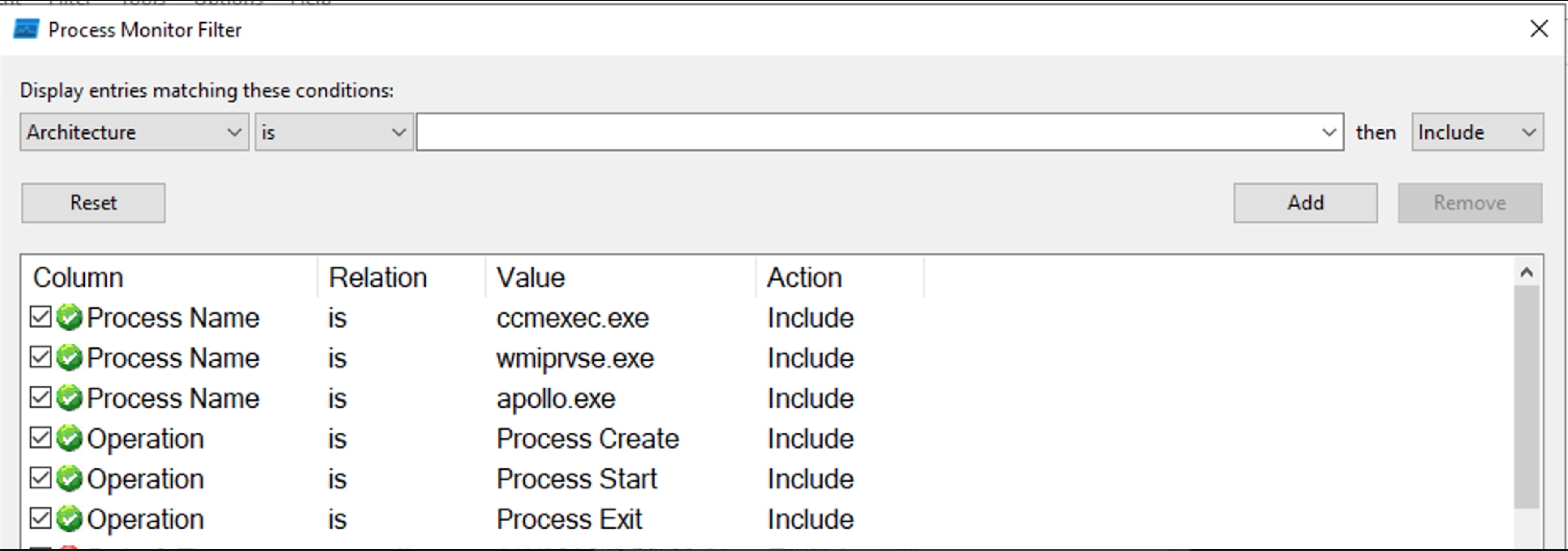
Before I executed SharpSCCM from Mythic C2, I set Procmon to filter for CcmExec.exe, WmiPrvSE.exe, and Apollo.exe. Just like before, I also set the Operation filter to Process Start, Process Create, and Process Exit.
In Mythic, I used register_assembly SharpSCCM.exe to stage SharpSCCM.exe for execution.
WARNING!
For this next part (when recording the ProcMon output of SCCM application execution), ProcMon records so many events that it may fill the memory of the target and render the host unusable. For my own testing, I had to beef up the memory of the target Client machine to avoid this issue.
Then on the client machine, I hit record in ProcMon. Finally, on Mythic I executed: execute_assembly -Assembly SharpSCCM.exe -Arguments "exec -d client -p C:\temp\Apollo.exe -s” and waited for the execution to finish by watching Mythic for a notification of a new callback.
When I looked at the ProcMon output, the first thing that stood out to me was, “Where is CcmExec.exe in this output?!” I saw WmiPrvSE.exe executed Apollo.exe but surely CcmExec did something…
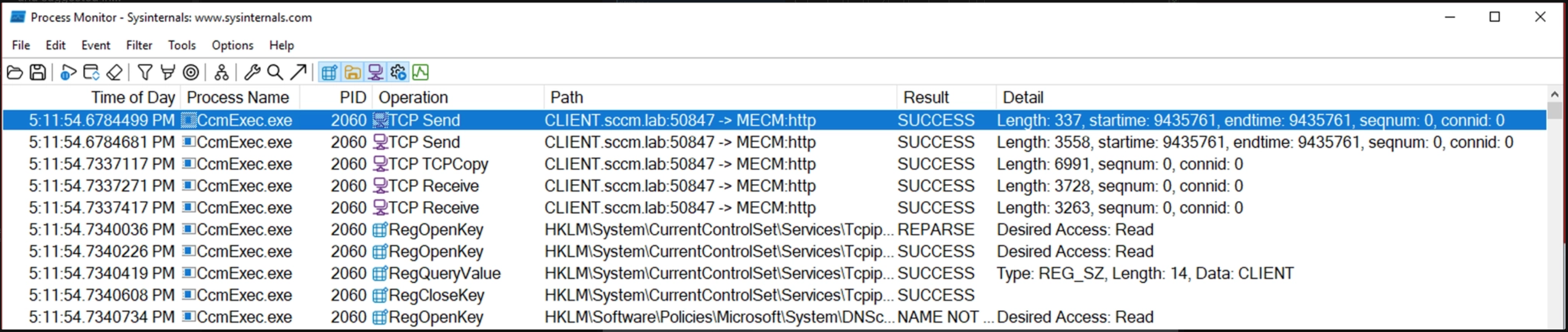
When I removed the filters for Operation = Process Create and Process Start, the first thing I saw was CcmExec.exe made a connected between Client and MECM, which was to be expected as MECM site server had to provide the policy update to tell Client to execute C:\Temp\Apollo.exe.
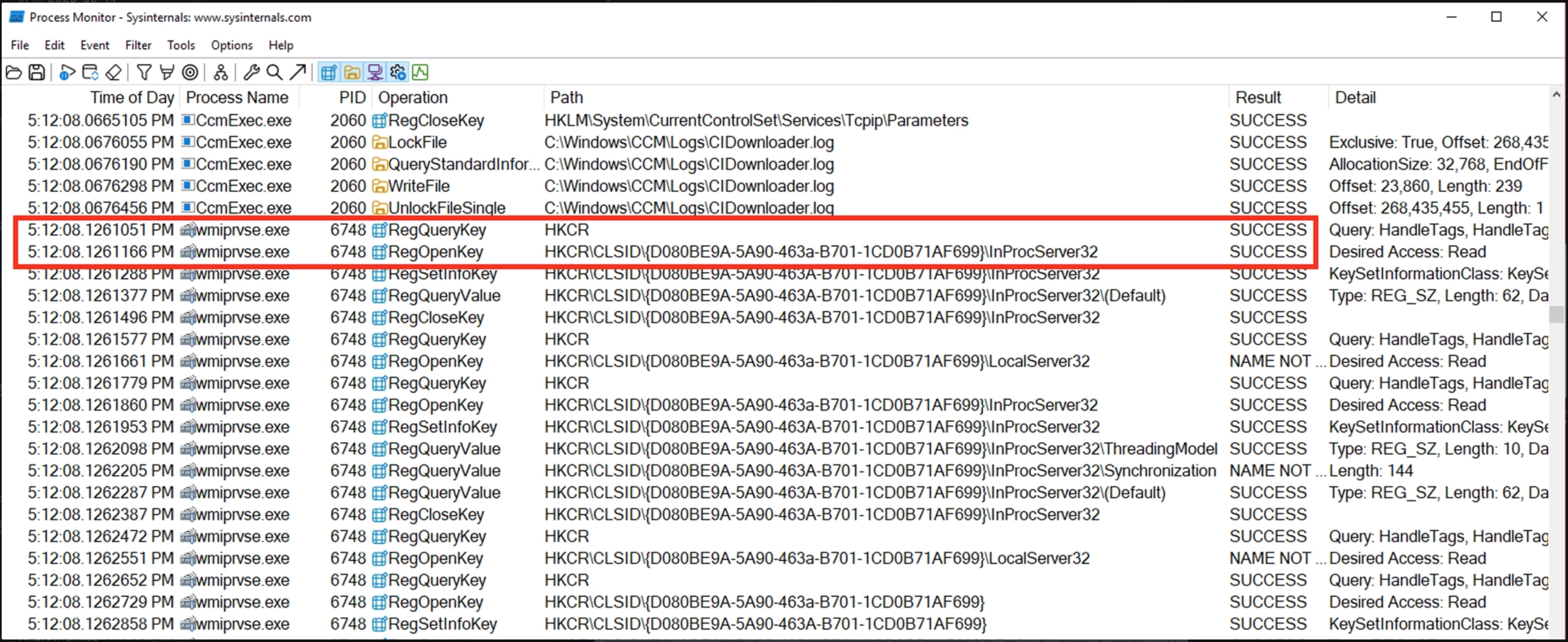
What I then looked for was the interaction between CcmExec.exe and WmiPrvSE.exe since WmiPrvSE.exe was reported as the parent process of Apollo.exe. To speed up the process of validation, it helped to exclude all WmiPrvSE.exe processes that didn’t match the process ID (PID) of the particular WmiPrvSE.exe that started Apollo.exe.
By filtering down to this level in ProcMon, the very first instance I saw of WmiPrvSE.exe mentioned is a RegOpenKey for HKCR\CLSID\{D080BE9A-5A90-463a-B701-1CD0B71AF699}\InProcServer32.
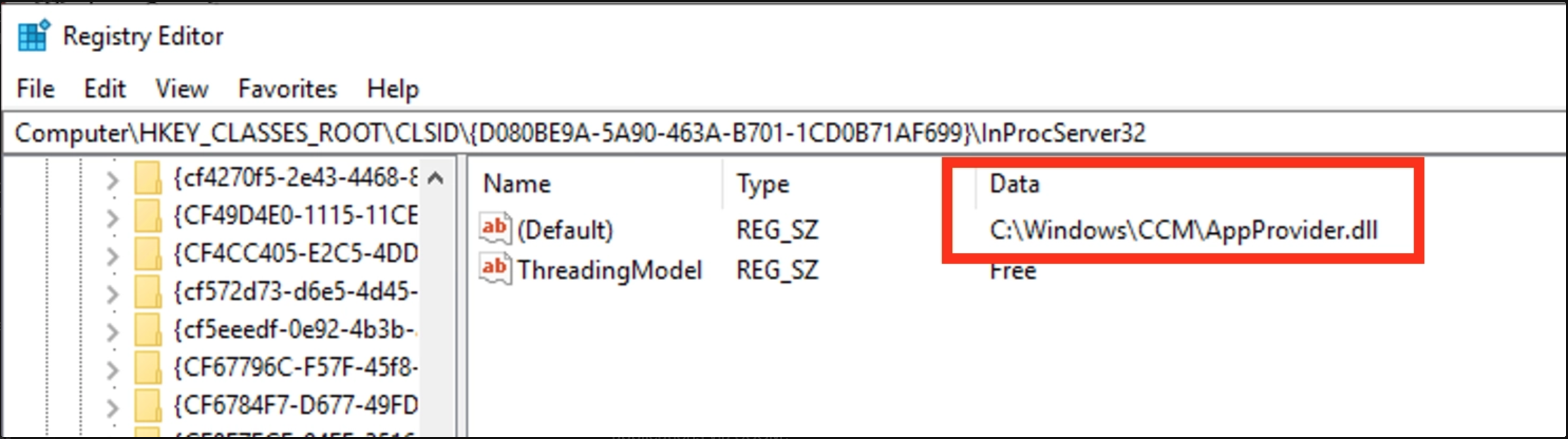
With a quick regedit.exe search, I find that this CLSID references a AppProvider.dll. I could’ve continued down this rabbit hole, but there were several other dynamic-link libraries (DLLs) loaded and referenced by that WmiPrvSE.exe process. For the time being, I decided to leave that DLL alone. More on this later.
While the validation didn’t actually answer my original question, it did help me form some new questions that would eventually lead me in the correct direction. The questions I had after validating the process tree:
Why does client script execution have a parent process of CcmExec.exe but client application execution has a parent of WmiPrvSE.exe?
Is there any connection between CcmExec.exe and WmiPrvSE.exe when executing applications via SCCM?
How does WmiPrvSE.exe actually execute Apollo.exe?
What does this execution chain have to do with AppProvider.dll?
How Does WmiPrvSE.exe Actually Execute apollo.exe?
I started with the second question in that list, because that would be the easiest to validate via some help from Codex. For Codex, I specifically used OpenAI’s GPT-5.6-Sol model. Additionally, I enhanced a lot of my analysis capabilities and efficiency with Cellebrite Lab’s ghidra-rpc. This setup enabled me to analyze several binaries related to SCCM and this project, effectively, while still maintaining more open-ended goals during the research phase. The list of binaries (CcmExec.exe and the loaded DLLs associated) were derived from ProcMon stack trace during the SCCM client application execution validation.
Based on the stack trace from ProcMon in my earlier recording, I saw the following DLLs were loaded by WmiPrvSE.exe when executing Apollo.exe:
WmiPrvSE.exe
loads AppProvider.dll
loads ScriptHandler.dll
loads AppExcnLib.dll
loads ccmcore.dll
So it was these DLLs that I added to the Codex workspace enabling Codex to walk through the code and answer technical questions about the execution of the child process. When starting Codex, I added a folder to the workspace called /workspace/intro that contained a CONTEXT.md, which explained the background of the research task.
==================
CONTEXT OF RESEARCH:

During the BH’25 IDOT training, I noticed that when pushing an application deployment from the SCCM SiteServer to the DC, that the parent process of application.exe was not CcmExec.exe but instead wmiprvse.exe. This was strange because in situations where SCCM initiated script execution occurs, I have identified CcmExec.exe to be the expected parent process. This led me to believe that while CcmExec.exe is used to identify script execution, wmiprvse.exe may be in charge of application execution.

I recently worked on this research with the goal to determine:

- Why is wmiprvse.exe the parent process of a Configuration Manager application execution but CcmExec.exe is the parent process of powershell.exe for a Configuration Manager script execution?
- What function call(s) does CcmExec.exe make to wmiprvse.exe that tells it how to execute the Configuration Manager application execution binary?
==================
PREVIOUS RESEARCH:
In the folder Previous_Research, I've included SCCM_CCMExec_IDOT_Research.pdf that shows where I'm currently at with my research in SCCM application execution with CcmExec.exe.
==================

INSTRUCTIONS:
Review the previous context, the SCCM_CCMExec_IDOT_Research.pdf, and use the ghidra-rpc skill to help me analyze CcmExec.exe and Wmiprvse.exe binaries and their respective loaded DLLs in the Workspace directory.
Upon loading Codex with this context, it began analyzing WmiPrvSE.exe and the related DLLs to generate a function chain. It also pointed out a very important answer to the question of “How does WmiPrvSE.exe execute Apollo.exe?” Codex stated above the function chain: WmiPrvSE.exe does not contain the application-launching code itself. It hosts SCCM DLLs, and those DLLs eventually call the Windows process-creation API.
This LLM generated output aligned with my expectations because when I do manual analysis, I typically look for function names that match things like: “Run”, “Create”, “Start”, “Execute.” However, I still needed to verify the output actually matched in the code itself and also it helped to take a look at the code to understand functionality a little deeper.
Trust but Verify Part 1: AppExcnLib.dll & ccmcore.dll
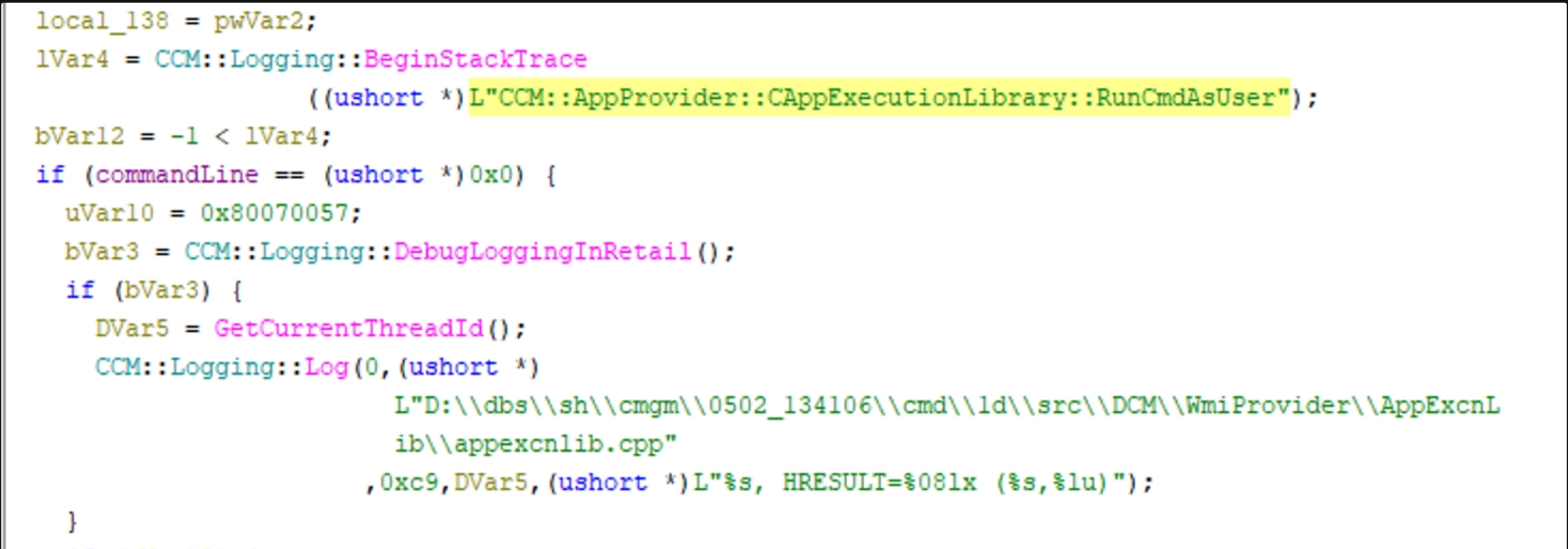
Starting with C:\Windows\CCM\AppExcnLib.dll , I loaded up Ghidra and looked for AppExcnLib.dll!CAppExecutionLibrary_RunCmdAsUser to determine how the code imports ccmcore.dll!::CCM::Utility::CcmCreateProcessEx.
Within Ghidra I analyzed C:\Windows\CCM\AppExcnLib.dll, and searched for RunCmdAsUser to find the function at 0x180001800.
Following that, I could see in Ghidra, the referenced CCM::Utility::CcmCreateProcessEx a small ways down.
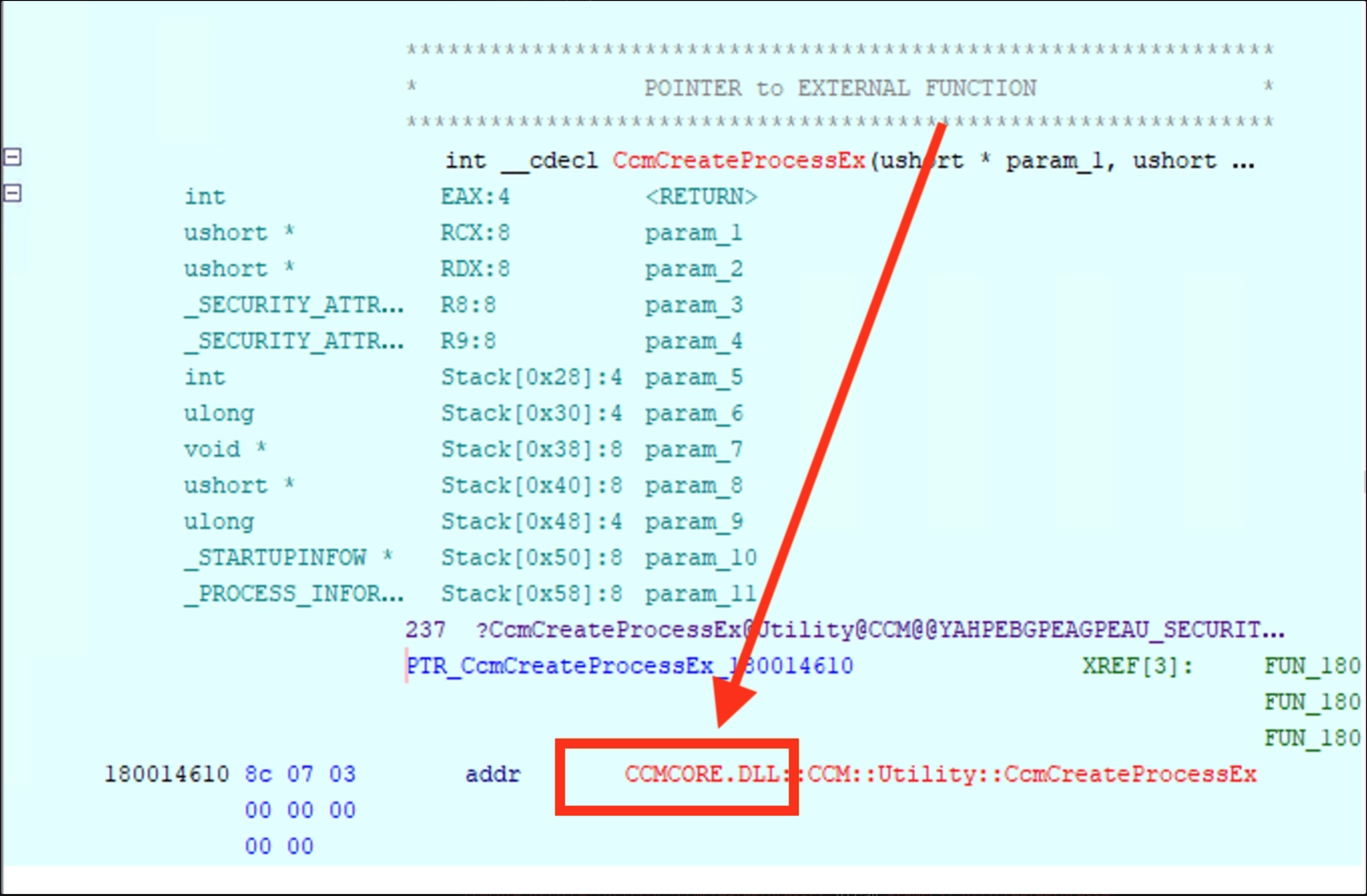
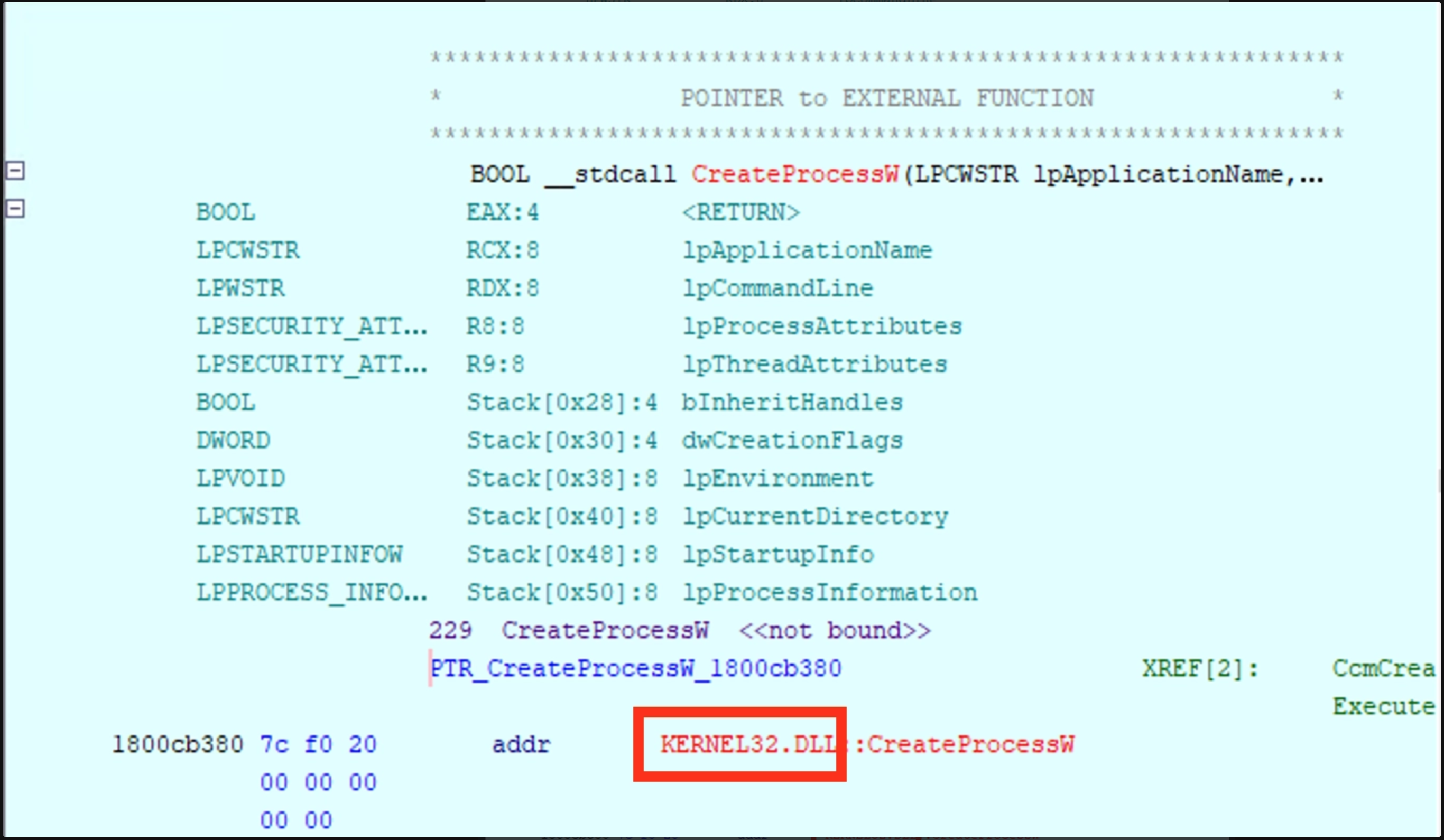
When I clicked on the CCM::Utility::CcmCreateProcessEx function, the Ghidra CodeBrowser brought me to the external function reference in the code. It was here that I was able to confirm the Codex output that the next function call would be imported from ccmcore.dll!CCM::Utility::CcmCreateProcessEx.
I’ve seen examples like CcmCreateProcessEx where I can safely assume that CcmCreateProcessEx is a wrapper for CreateProcessW. Earlier in my experience, I would ask myself, “Why not just call CreateProcessW directly instead of using wrappers to call CreateProcessW?”
The reason that these wrapper functions exist is to introduce controls before executing CreateProcessW. This method of using ccmcore.dll!CCM::Utility::CcmCreateProcessEx to call KERNEL32.dll!CreateProcessW allows the operational chain to introduce SCCM specific controls prior to executing the application with a low-level API. The wrappers centralize policy and behavior around process creation. In the case of ccmcore.dll!CCM::Utility::CcmCreateProcessEx , this wrapper allows SCCM to handle:
command-line quoting and normalization
environment-block creation
current-directory selection
startup window settings
handle inheritance
creation flags
token or execution-context handling
logging and tracing
error conversion
cleanup of partially created resources
security checks
telemetry
compatibility workarounds
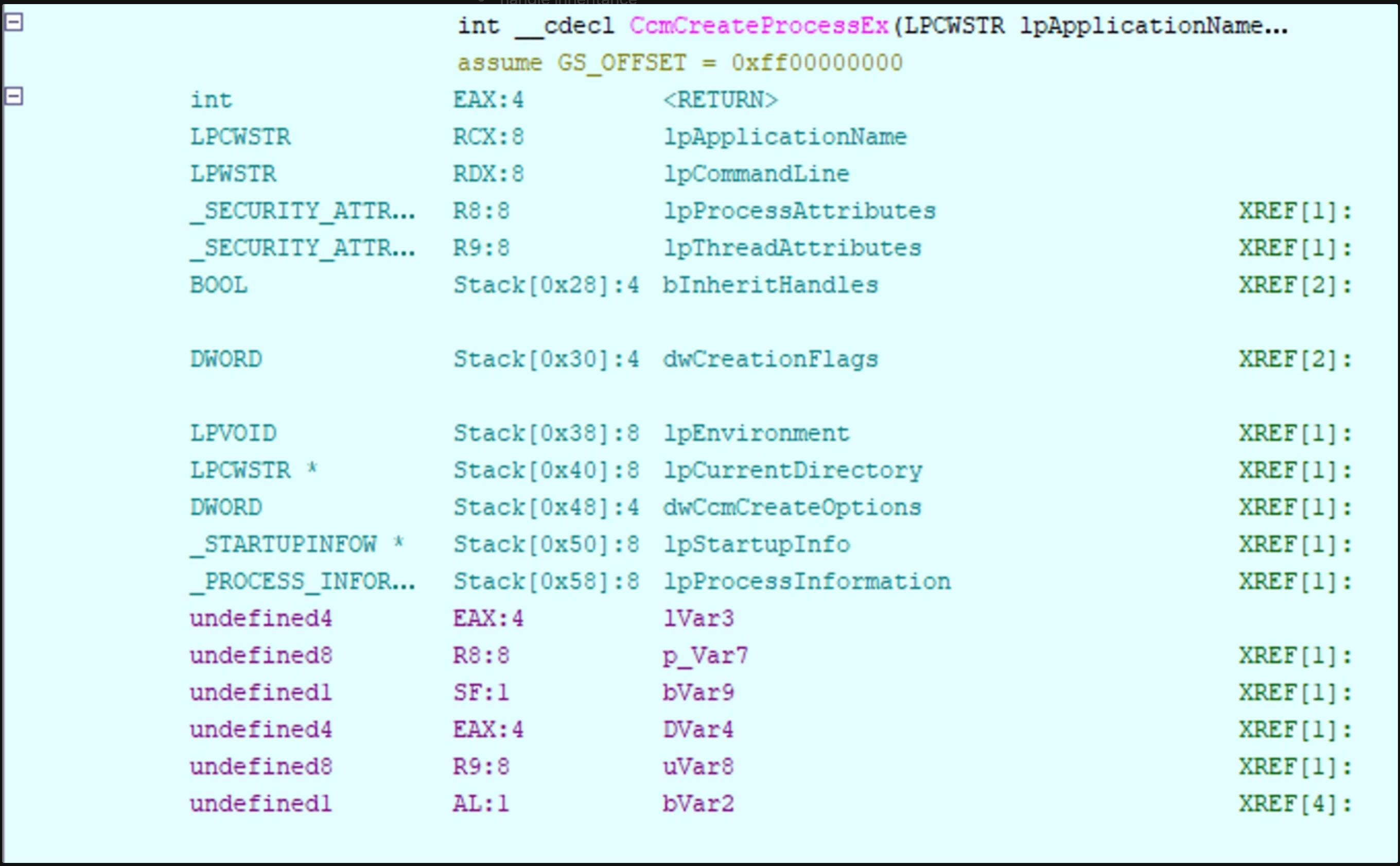
Next I analyzed ccmcore.dll within Ghidra, and took a look at CcmCreateProcessEx to confirm Codex and my assumption that CcmCreateProcessEx is a CreateProcessW wrapper.
I used the decompiler view of the CcmCreateProcessEx function and found the call to KERNEL32.DLL::CreateProcessW.
I didn’t bother analyzing KERNEL32.DLL because this is a well-known documented binary and I confirmed the analysis that Codex gave me and validated the operational flow:
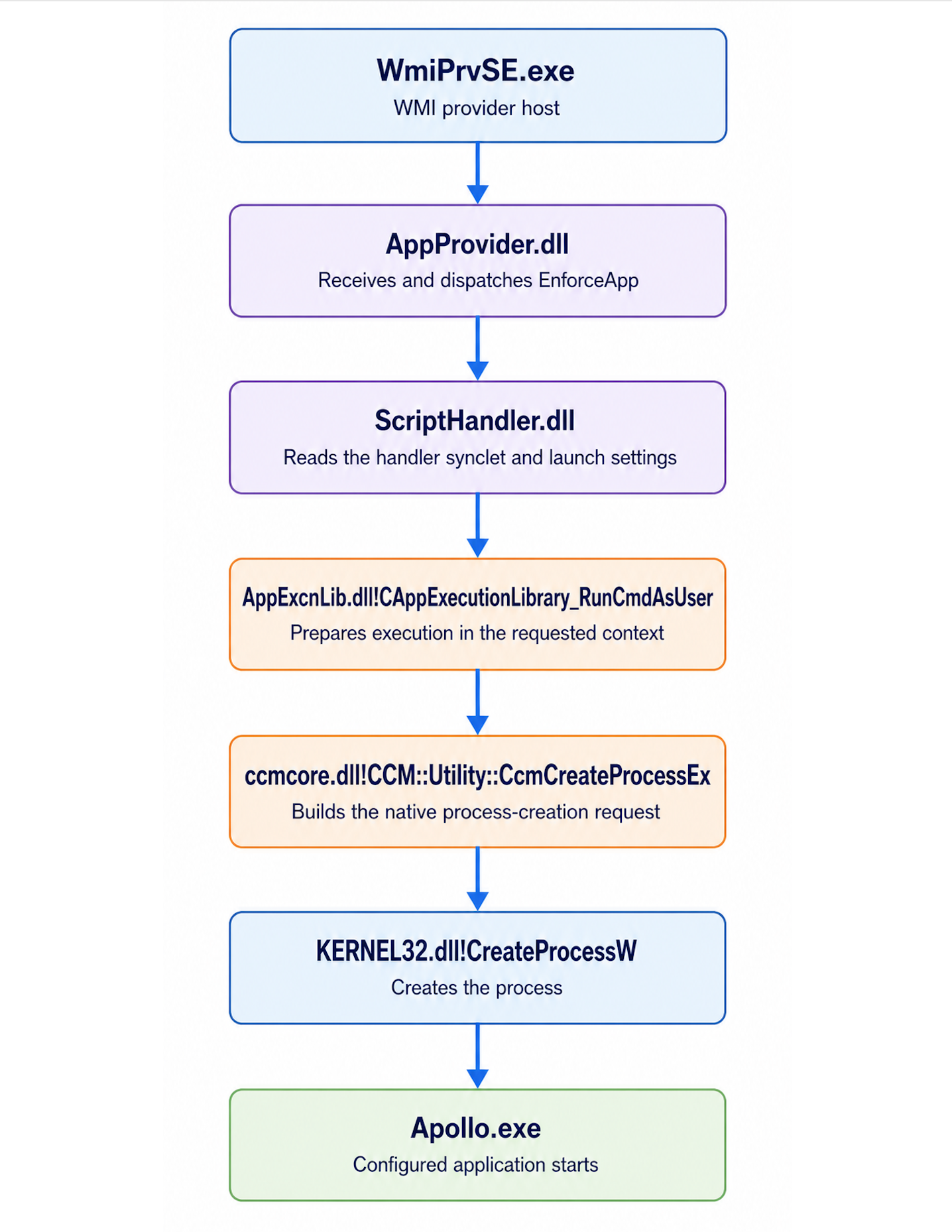
  The relevant chain is:

  WmiPrvSE.exe
    └─ AppProvider.dll
         └─ ScriptHandler.dll
              └─ AppExcnLib.dll!CAppExecutionLibrary_RunCmdAsUser
                   └─ ccmcore.dll!CCM::Utility::CcmCreateProcessEx
                        └─ KERNEL32.dll!CreateProcessW
                             └─ Apollo.exe
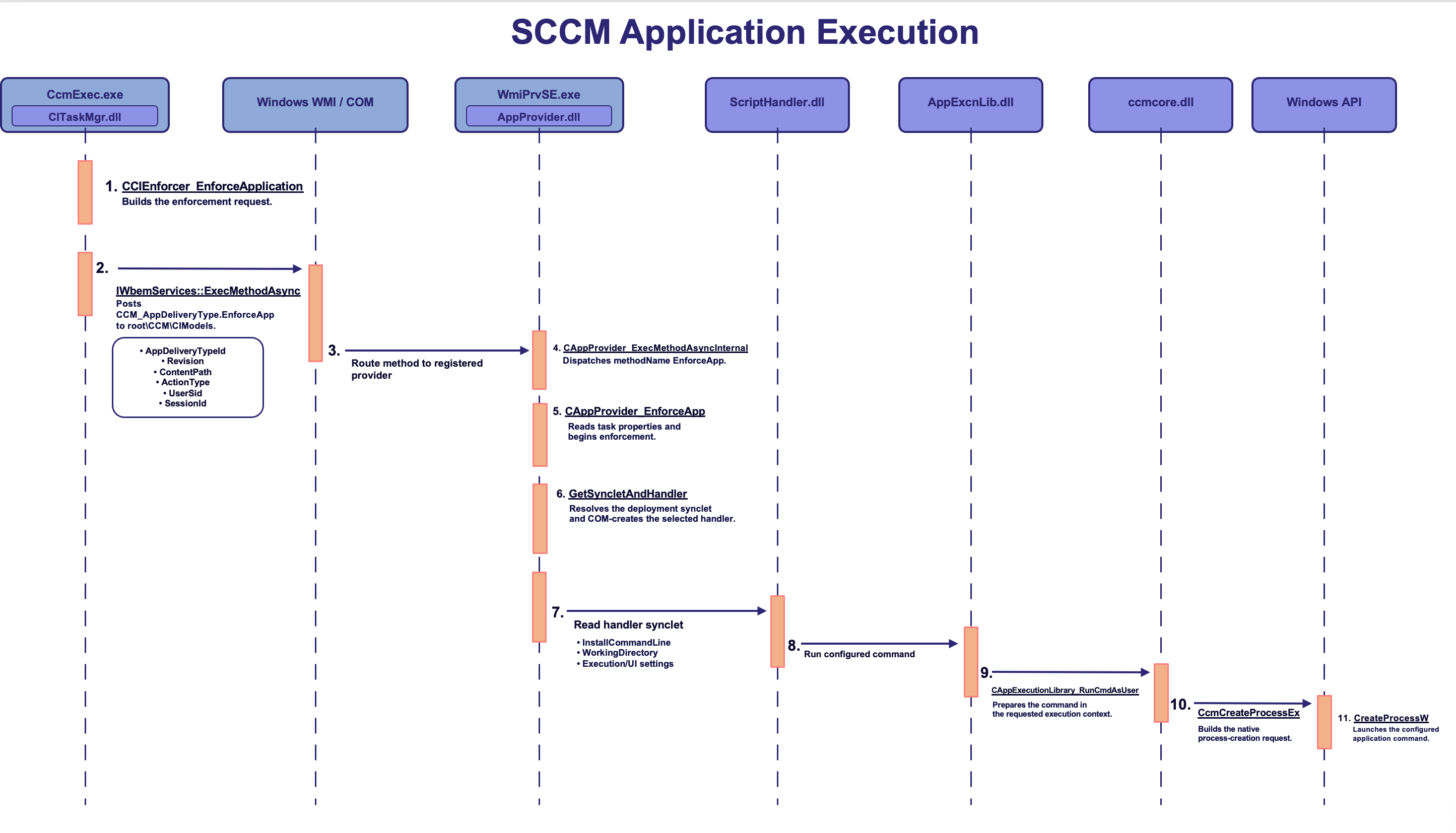
With WmiPrvSE.exe to Apollo.exe analysis finished, I was able to answer the question, “How does WmiPrvSE.exe actually execute Apollo.exe?” The answer is WmiPrvSE.exe does not launch Apollo.exe directly. It hosts AppProvider.dll and ScriptHandler.dll to delegate execution to AppExcnLib.dll!CAppExecutionLibrary_RunCmdAsUser . This call imports ccmcore.dll!CCM::Utility::CcmCreateProcessEx, which ultimately invokes KERNEL32.dll!CreateProcessW to create the Apollo.exe process in the target user context.
Is There Any Connection Between CcmExec.exe and WmiPrvSE.exe When Executing Applications via SCCM?
I continued with my analysis to find the connection between CcmExec.exe and WmiPrvSE.exe . I knew there had to be some connection between these two processes because of several reasons:
In ProcMon, I saw that CcmExec.exe made a connection Client → MECM HTTP and not WmiPrvSE.exe Client → MECM HTTP
This means that the tasking from SCCM was provided to CcmExec.exe, NOTWmiPrvSE.exe
In ProcMon, I saw the Operation type RegOpenKey to a InProcServer32, which referenced AppProvider.dll
I knew that there was some kind of interprocess comms via COM being used unlike a conventional parent/child process relationship
Just as before, I started with utilizing Codex to trace the function calls required to identify the key areas that information was passed from CcmExec.exe to WmiPrvSE.exe with the hypothesis that this connection existed.
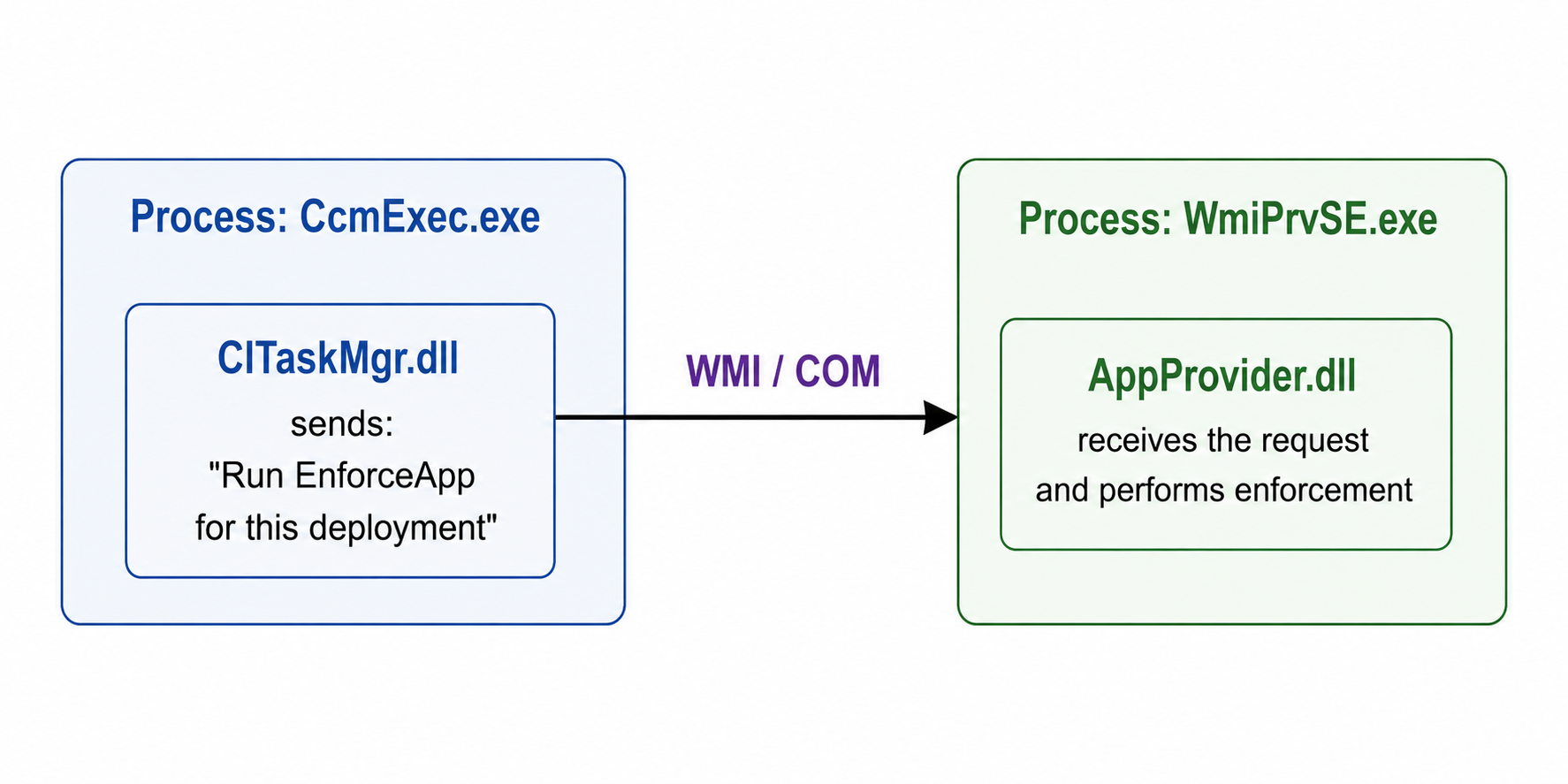
Codex matched what I was expecting with the WMI/COM communication method. In the next section, I’ll walk through what is going on to both provide an explanation and answer the overall question.
Trust but Verify Part 2: CITaskMgr.dll
What helped me understand the communication between CcmExec.exe and WmiPrvSE.exe was recognizing it as a local WMI call between the two processes. Based on the output, I identified the root\CCM\CIModels WMI namespace, CCM_AppDeliveryType as the WMI class within it, and EnforceApp as a method exposed by that class.
To make this easier to understand: I thought of the root\CCM\CIModels namespace like an API grouping, CCM_AppDeliveryType WMI class like a specific endpoint within that grouping, and EnforceApp method like the operation (e.g., a POST action) that endpoint exposes.
Essentially, what CcmExec.exe does to communicate with WmiPrvSE.exe involves communicating with a WMI namespace and class. The next question I asked myself is, “If CcmExec.exe is communicating with the namespace, what is the WMI provider that actually reads the properties of the WMI namespace and implements it?” And that is where our friendAppProvider.dllcomes into play.
Note:
When doing this type of research, I often find myself answering my questions much earlier in the research process without actually recognizing the answers. In the case of AppProvider.dll, I already saw that it was the InProcServer32 of WmiPrvSE.exe with ProcMon. However, without the additional context that I gained from the above research, that information was useless to me.
When I find myself folding back on earlier points of my research process – I use that as an indicator that I’m on the right track.
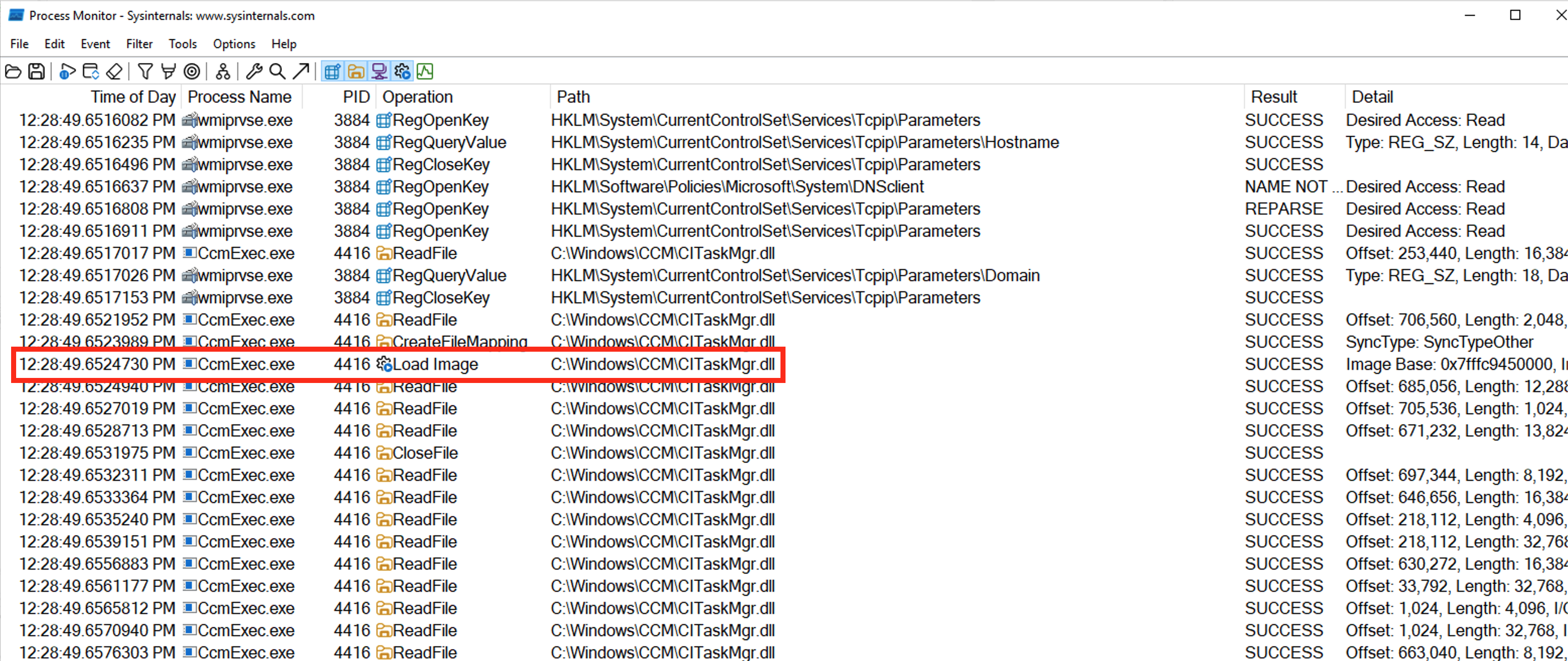
Starting with CcmExec.exe , I wanted to first validate Codex’s assumption that CcmExec.exe can host DLLs and that the hosted DLL in the application execution scenario was in fact CITaskMgr.dll. Codex generated the hypothesis that a lot of the WMI chain spawns from loading CITaskMgr.dll which Codex derived from a ProcMon stack trace export and we can see that confirmed below:
I still very much wanted to know how CcmExec.exe is hosting COM classes and how does it execute SCCM components as DLLs. For that, ProcMon was less than helpful validating, so I needed to dig into the static code of CcmExec.exe with Ghidra. Unfortunately, Microsoft doesn’t provide private PDB files for CcmExec.exe because these files are proprietary for Configuration Manager. Luckily, I was able to search for most of what I needed to validate. Also, I had Codex ripping through the code sufficiently faster to point me in the right direction.
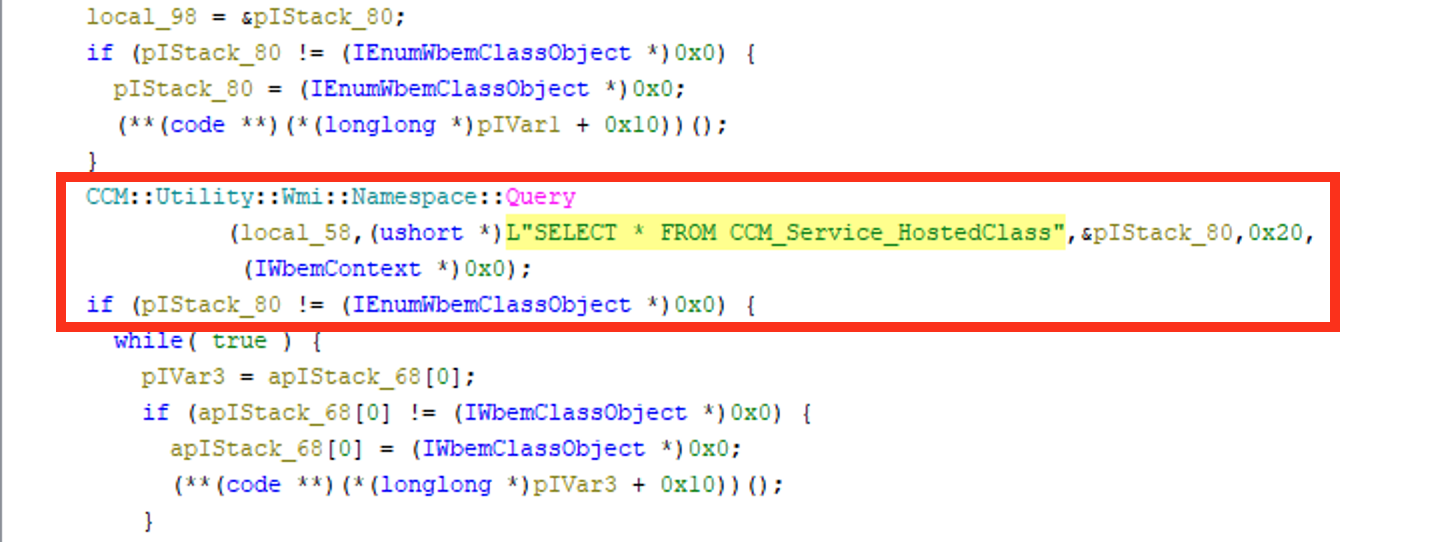
Near 0x1400a5e88, I could see a Namespace query for SELECT * FROM CCM_Service_HostedClass. To find this, I simply did a string search for *HostedClass* via Codex and the ghidra-rpc skill. It returned function FUN_1400a5e88 :
CCM::Utility::Wmi::Namespace::Query(
    local_58,
    L"SELECT * FROM CCM_Service_HostedClass",
    &pIStack_80,
    0x20,
    nullptr);
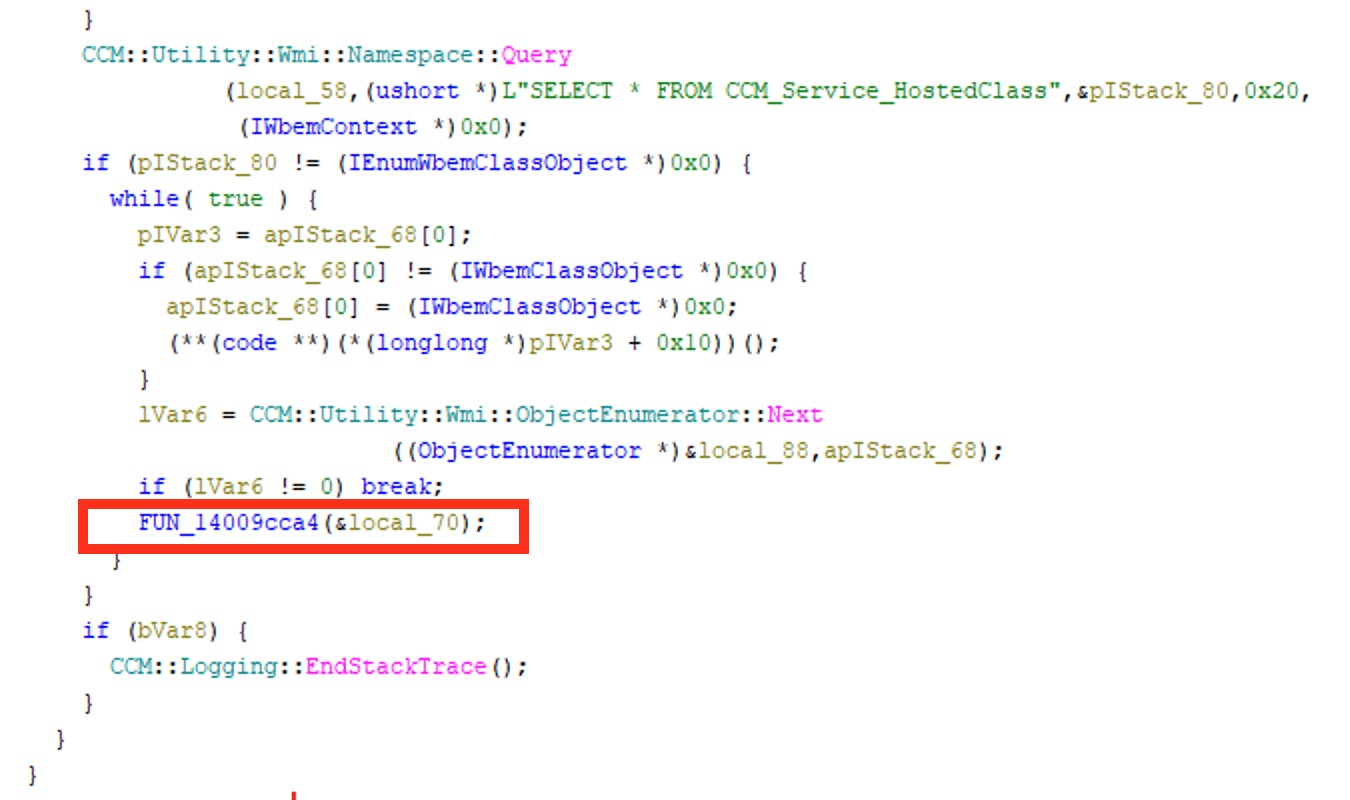
This function will loop, enumerate WMI objects and pass them to FUN_14009cca4.
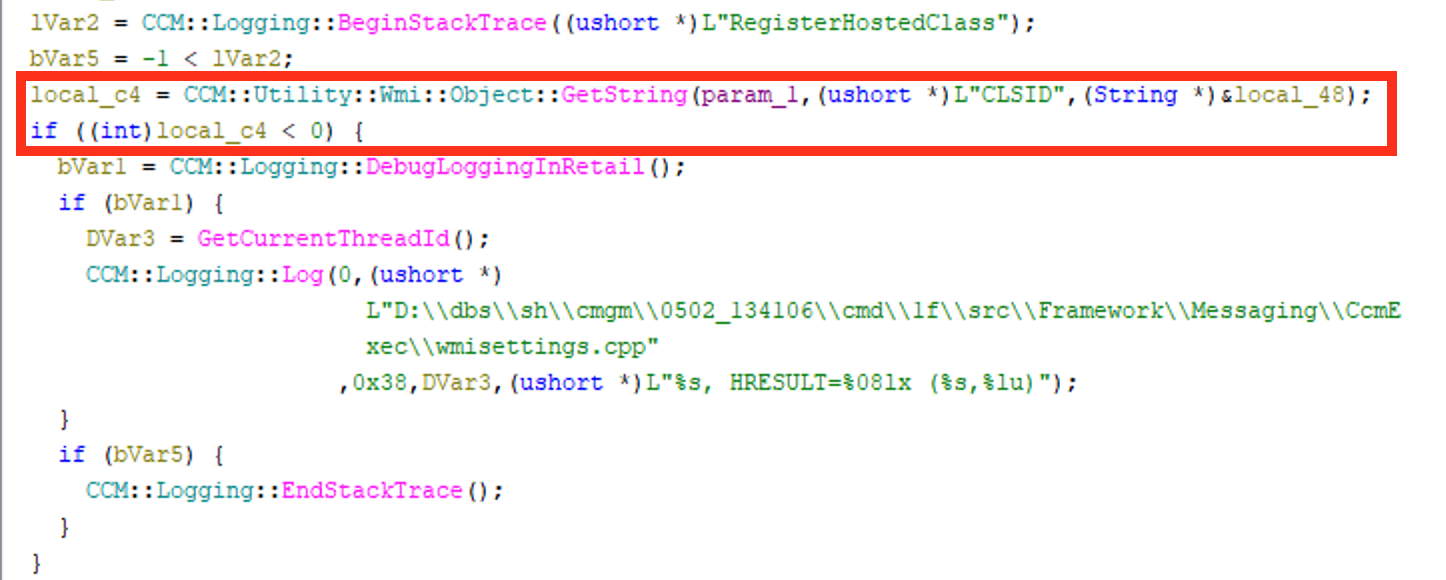
The beginning of FUN_14009cca4 will use param_1 to pass the WMI object from the enumeration loop and determine the CLSID property from the CCM_Service_HostedClass record and converts it into a COM GUID.
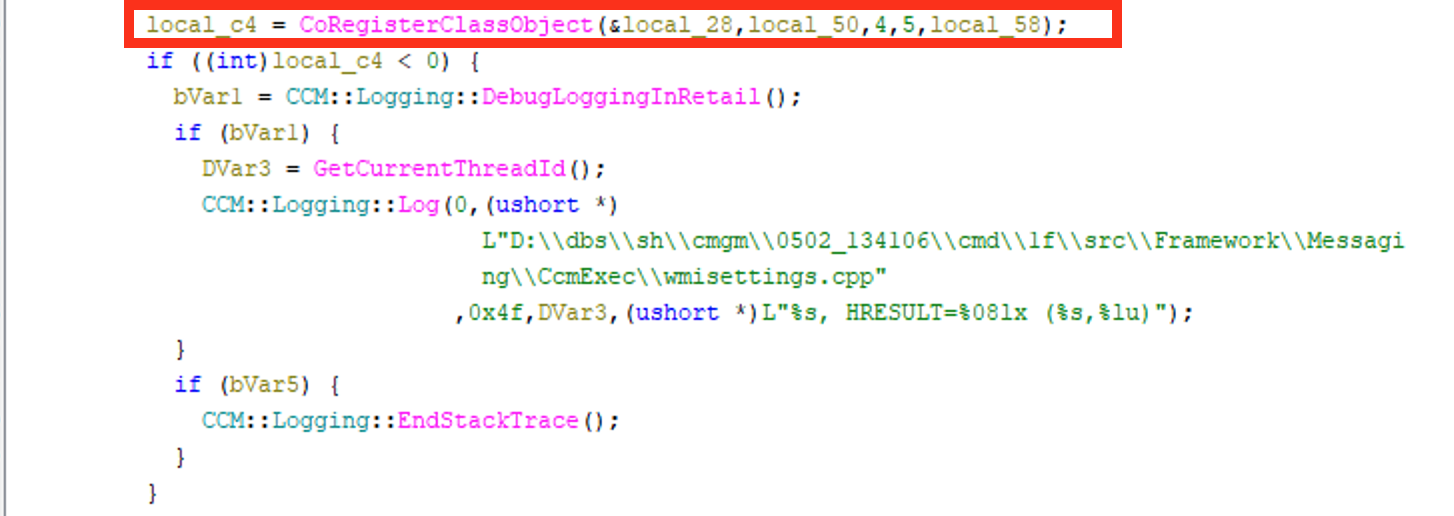
The function will locate the CLSID InProcServer32 (CITaskMgr.dll ) in the CLSID location of the registry via CoGetClassObject . The CoGetClassObject function can be used to locate files with specific CLSIDs which are GUIDs used for Registry lookups and dynamically load the file. Finally, FUN_14009cca4 will register the CITaskMgr.dll file as a file hosted by the executable CcmExec.exe via CoRegisterClassObject . Registering the DLL as being hosted by the process executable (i.e., LocalServer) enables the system to have other COM objects reference the DLL if needed.
This validates that CcmExec.exe is designed to host COM classes configured through CCM_Service_HostedClass and that CcmExec.exe will also host CITaskMgr.dll when conducting SCCM application execution.
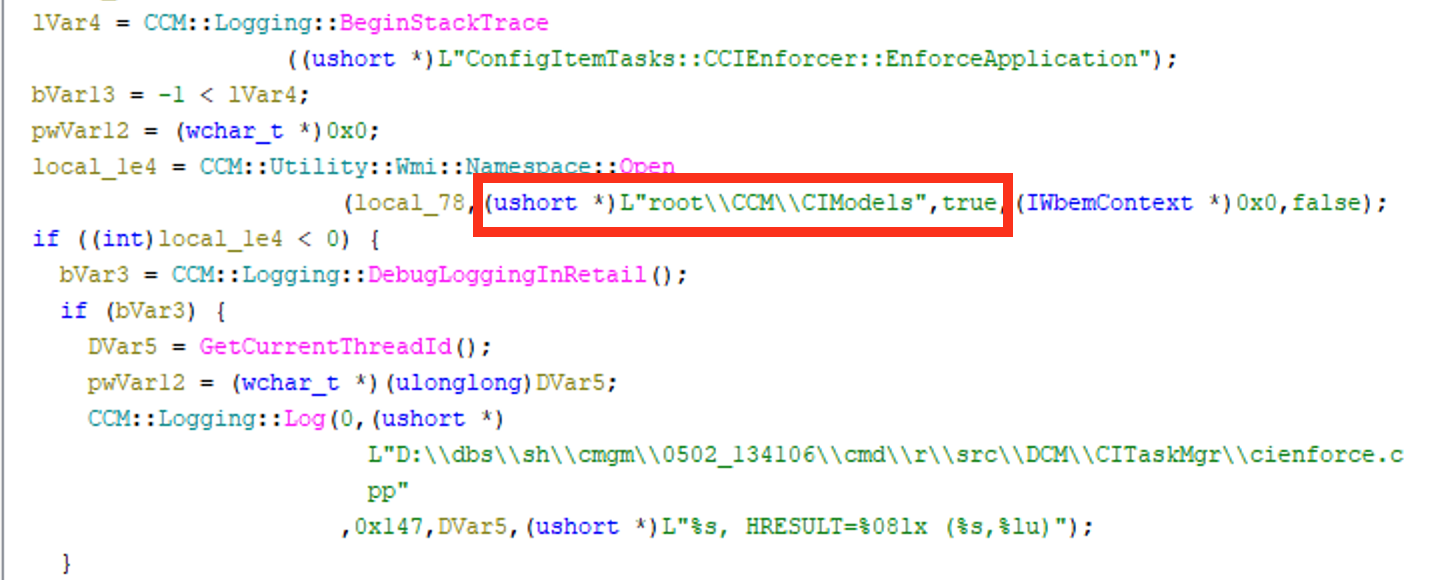
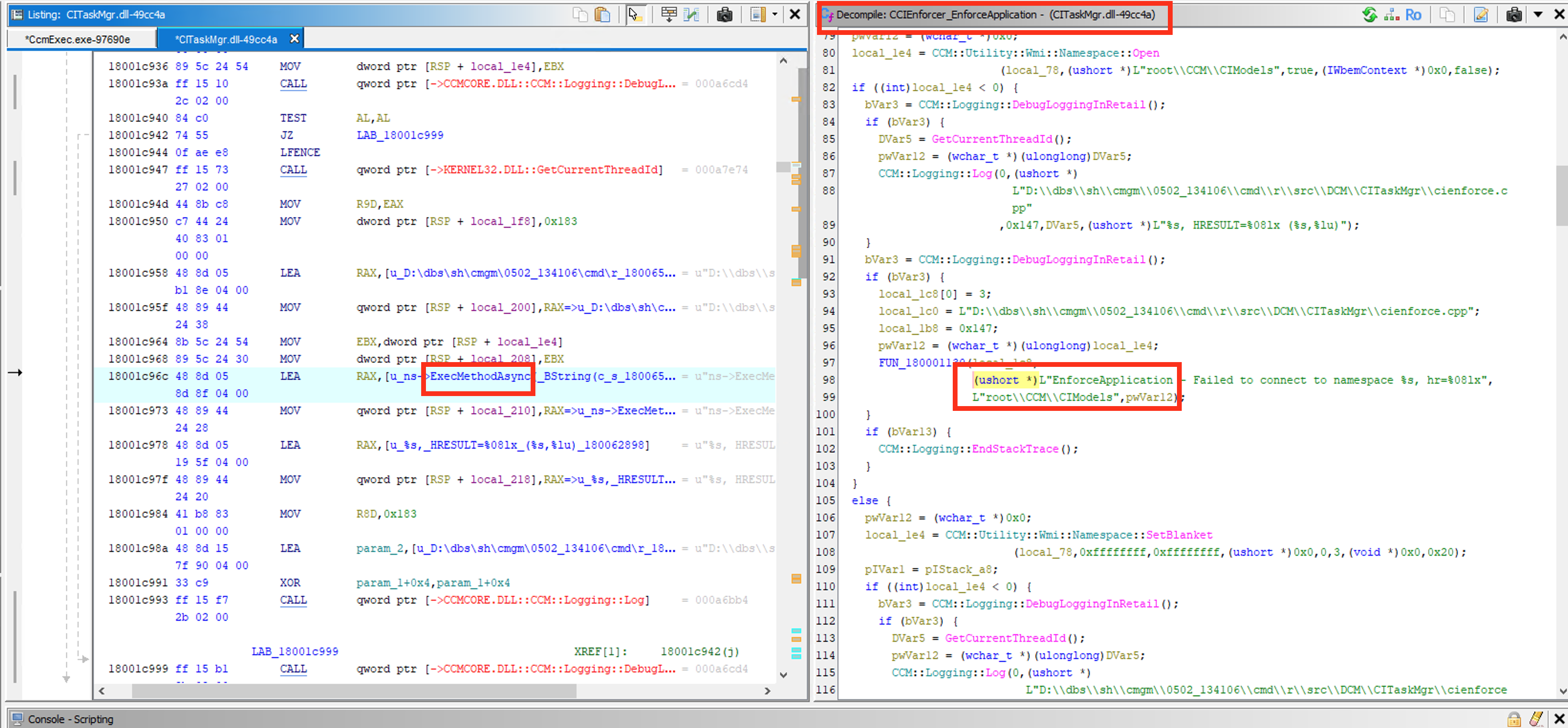
After confirming that CITaskMgr.dll was used to host COM classes, I had to verify the function that CITaskMgr.dll uses to tell the system that a deployment type needs to be enforced. I searched within Ghidra for CCIEnforcer_EnforceApplication to find the correct function. While this function looked imperfect inside of Ghidra due to the lack of PDB file, I could see that the CCIEnforcer::EnforceApplication function was building the WMI method request piece by piece. The first part of this WMI method request was the namespace for root\\CCM\\CIModels which confirms that CITaskMgr.dll is responsible for connecting to the local SCCM WMI namespace.
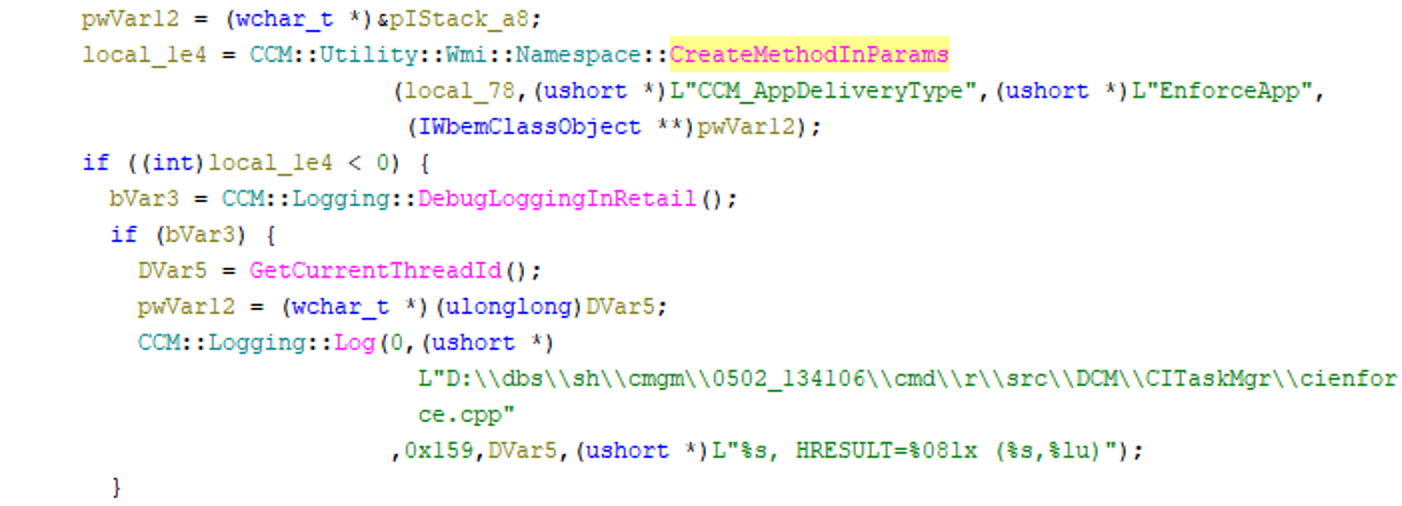
I continued the analysis of the CCIEnforcer_EnforceApplication function and identified the full WMI method request:
Following the building of the WMI method request, CITaskMgr.dll uses CreateMethodInParams to enumerate objects who properties match the input parameters previously listed.
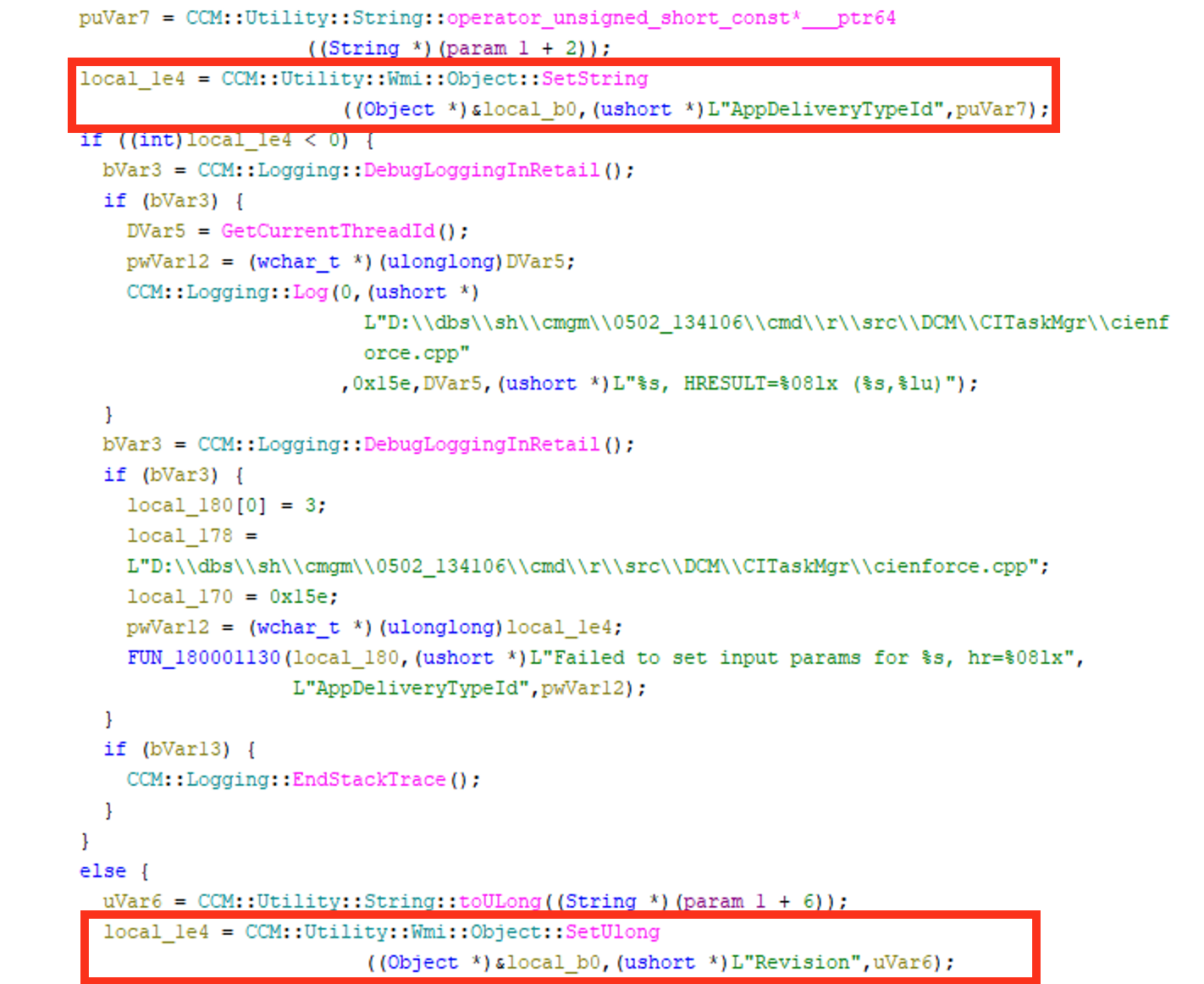
Immediately following CreateMethodInParams , the CCIEnforcer_EnforceApplication function will define and set the deployment identity with SetString(..."AppDeliveryTypeId") and SetUlong (..."Revision") .
It was at this point, that I was able to find the exact call and action that SCCM expected the client to take based on these defined properties. Immediately after the AppDeliveryTypeId is set, CITaskMgr.dll will set the properties for ContentPath, ActionType, UserSid and SessionId(i.e., user context).
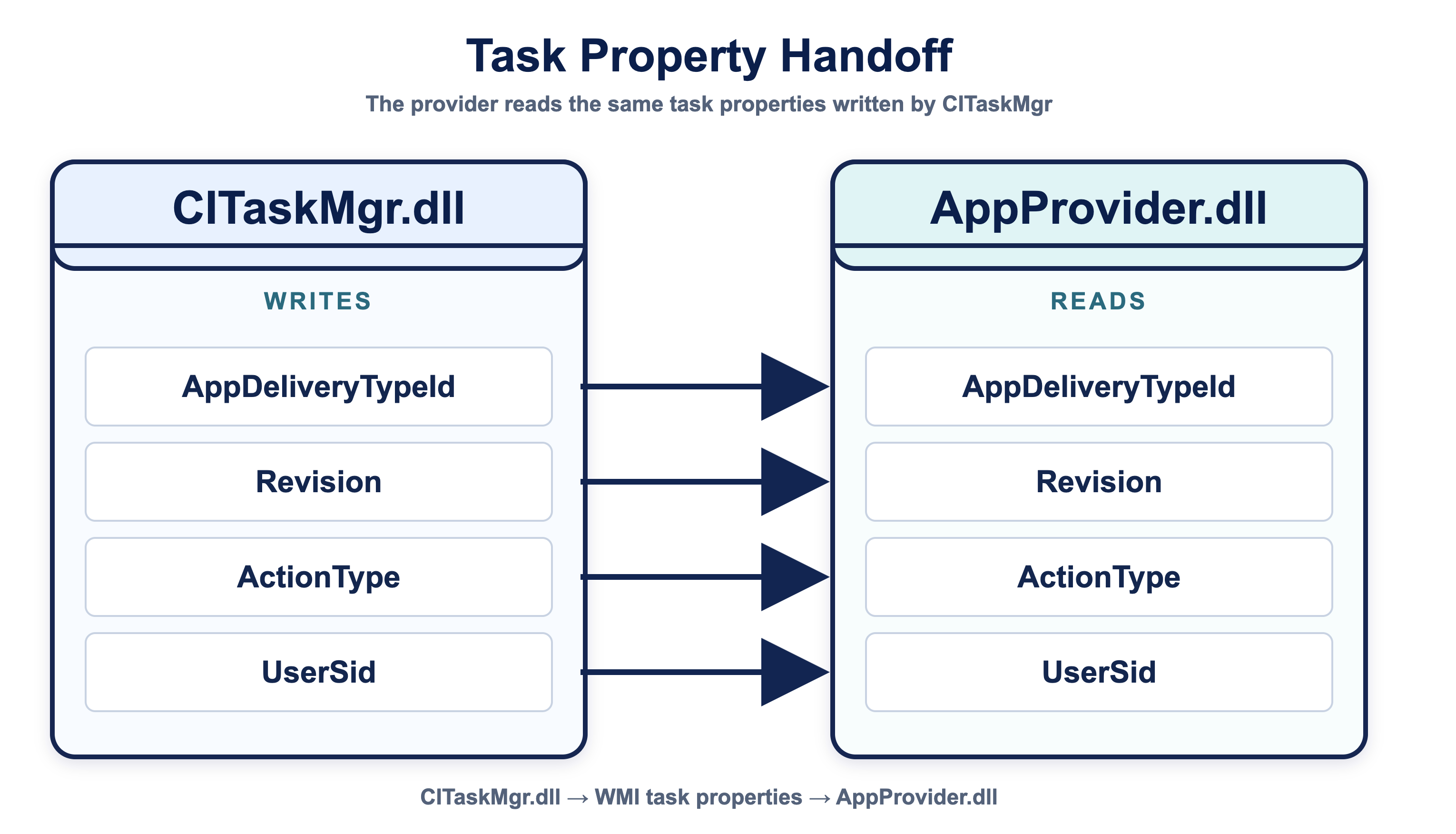
When I found this section inCITaskMgr.dll, it dawned on me that the interaction I was looking for betweenCcmExec.exeandWmiPrvSE.exewas not a direct interaction between the two processes, but insteadCcmExec.exeindirectly stored the properties of the tasking forWmiPrvSE.exeto read and then execute (i.e., an indirect tasking).
In total, this has proven that CITaskMgr.dll and its CCIEnforcer_EnforceApplication function is telling the WMI provider:
AppDeliveryTypeId
Revision
ContentPath
ActionType
UserSid
SessionId
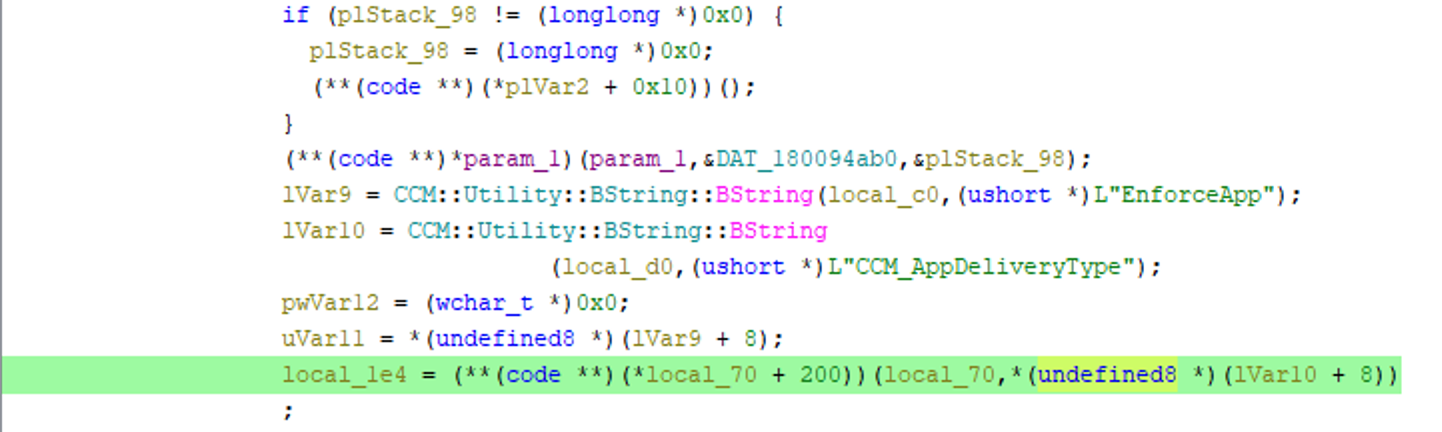
At the end of the CCIEnforcer_EnforceApplication function, there is a obscure section of code: local_1e4 = **(**(code **)(*local_70 + 200))**(local_70,*(undefined8 *)(lVar10 + 8))
This portion: (**(code **)(*local_70 + 200))(...); was not so easy to define. To figure out what this bottom portion of the CCIEnforcer_EnforceApplication function did, I right-clicked 200 in the decompiler and converted it to hexadecimal, which converted to 0xC8 for the byte displacement.
At this point, I had utilized Codex to help me understand what was being done via the ghidra-rpc skill due to being somewhat unfamiliar with the intricacies of COM interface pointers.
Codex explained that the pattern: (**(code **)(*local_70 + 0xc8))(local_70, ...) is a decompiled COM virtual method call. The way that it can be read is:
local_70 — dereference the interface pointer to get its vtable address (every COM interface starts with a vtable pointer)
local_70 + 0xc8 — offset 0xC8 bytes into that vtable to reach a specific slot
(code **)(...) — read the function pointer stored at that slot
(**(code **)(...))(...) — call through that pointer
For example:
function = services->vtable[slot];
function(services, ...);
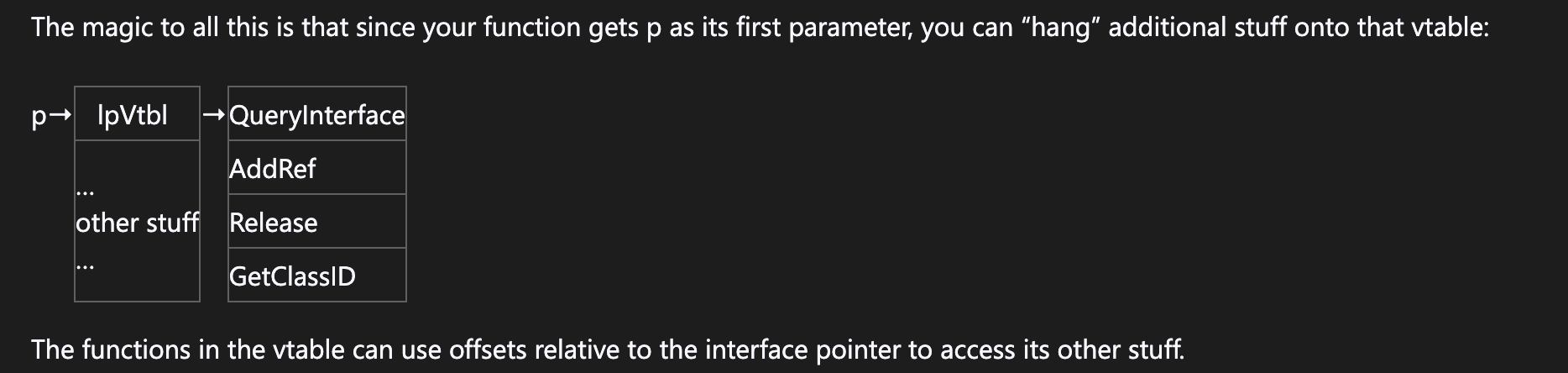
After reading this and doing some research on COM interface pointers and vtables, I understood that I needed to validate which function in the vtable is being called based on this (*local_70 + 0xc8) vtable slot. I found this blog by Raymond Chen that was really helpful to understand this at a deeper level.
A COM interface pointer is a pointer to a structure that consists of just a vtable. The vtable is a structure that contains a bunch of function pointers. Each function in the list takes that interface pointer (p) as its first parameter (“this”). ~ Raymond Chen
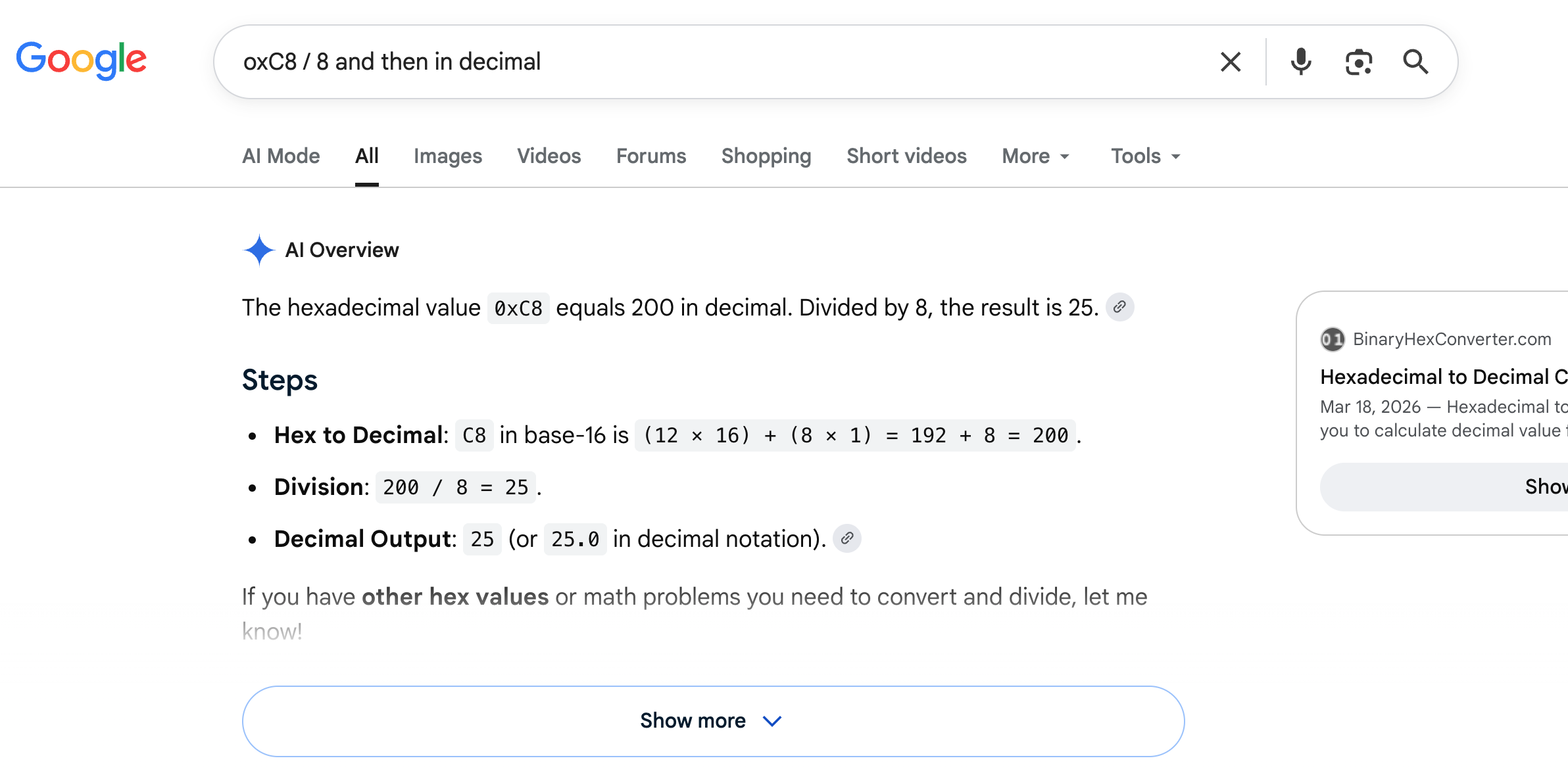
I knew CITaskMgr.dll was a 64-bit PE file, based on the properties of the file and in 64bit memory a pointer is 8 bytes. When I divided our hexadecimal value by 8, I’d get 0X19 and then convert to decimal to get a value of 25.
I then utilized the ms-wmi openspecs doc on Microsoft to determine what function is invoked at vtable slot 25 where I saw that equals ExecMethodAsync via the IWbemServices interface.
Now that I knew what specific function was called in the vtable, I searched for ExecMethodAsync in CITaskMgr.dll to see any defined reference for this call. At 0x180065900, the search finds the string:
I then searched for references to this specific address, 0x180065900 originating from the CCIEnforcer_EnforceApplication function to corraborate that the function used that operation. In References, I saw a reference to ExecMethodAsync used as part of error-handling code near the WMI call in the CCIEnforcer_EnforceApplication function.
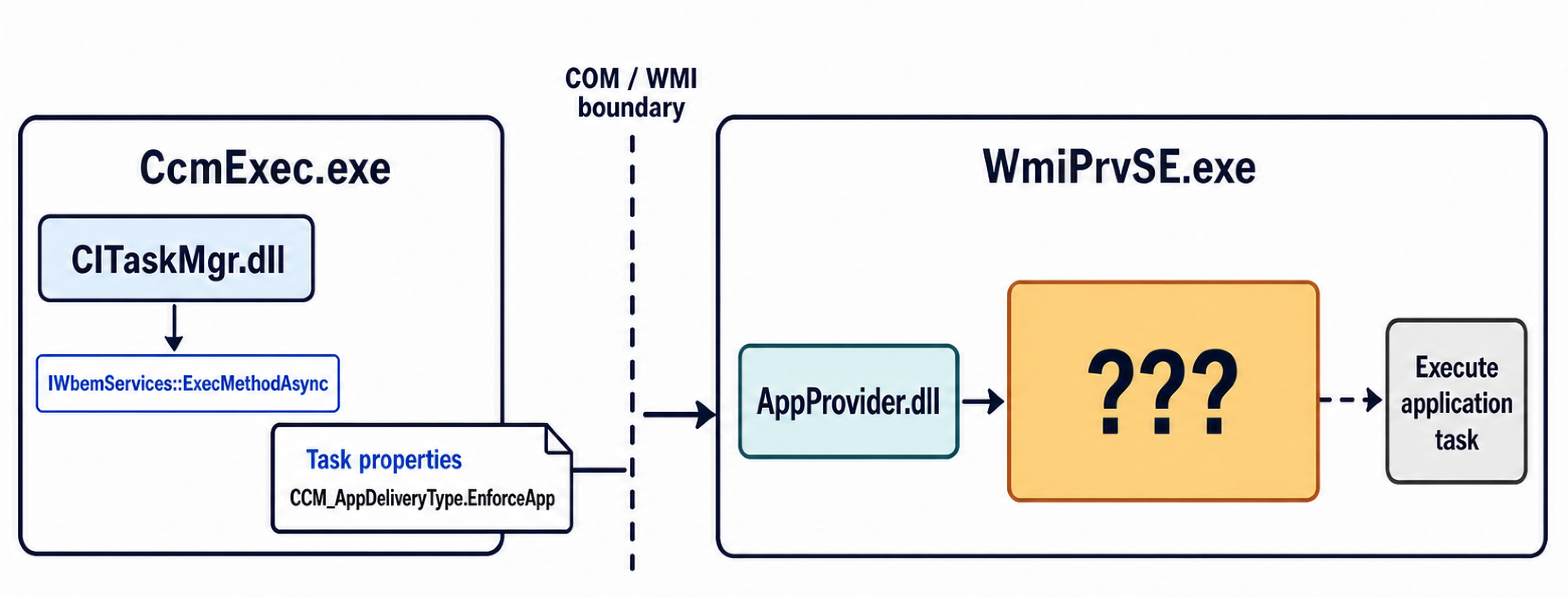
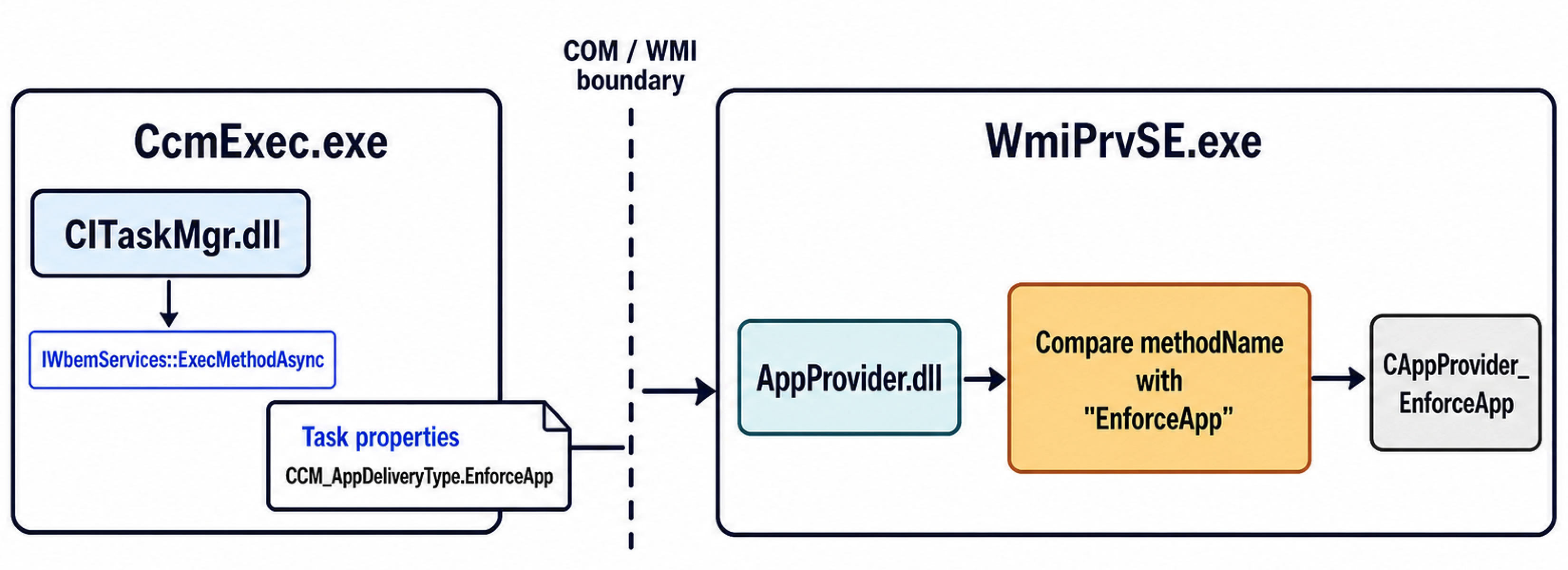
This analysis showed me that CITaskMgr.dll submits the CCM_AppDeliveryType.EnforceApp method via COM interface using IWbemServices::ExecMethodAsync. The important piece of this analysis is that CITaskMgr.dll is submitting the request asynchronously and the caller doesn’t wait till completion. It also means that the CcmExec.exe binary does not create a new process to execute applications, but instead post the information about the task, and an already running WmiPrvSE.exe picks up that task and implements the tasking.
Trust but Verify Part 3: AppProvider.dll
At this point of my analysis, I had just one more piece of the puzzle to solve: AppProvider.dll. I now understood that CcmExec.exe loads CITaskMgr.dll to use IWbemServices::ExecMethodAsync to post the properties of the tasking for WmiPrvSE.exe to read and execute. I also knew, thanks to Codex, that it was AppProvider.dll that WmiPrvSE.exe loaded to begin the operational chain to execute that tasking. However, I still didn’t know “How didAppProvider.dlllocate and read the tasking to execute?”
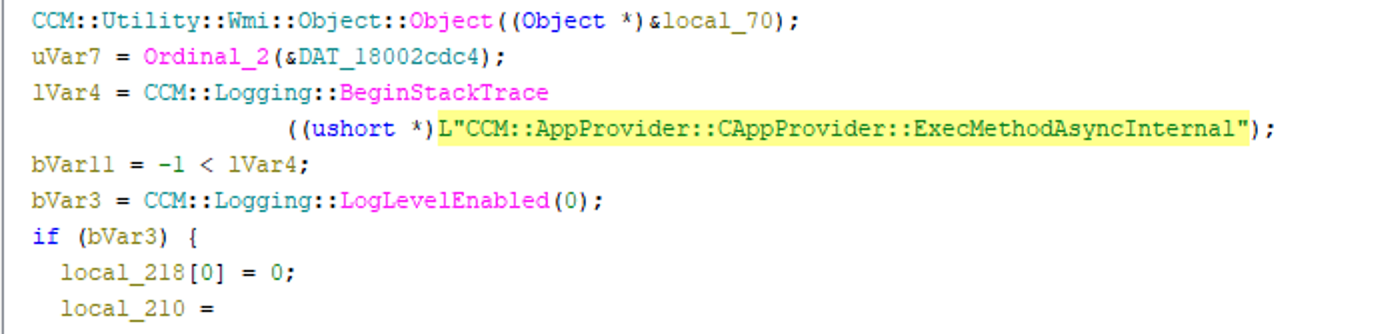
Since ExecMethodAsync was the WMI method utilized to communicate the task properties to WMI Namespace, I started with searching for ExecMethodAsync within AppProvider.dll. The string search identified the first instance of CCM::AppProvider::CAppProvider::ExecMethodAsyncInternal which was found in the function CAppProvider_ExecMethodAsyncInternal.
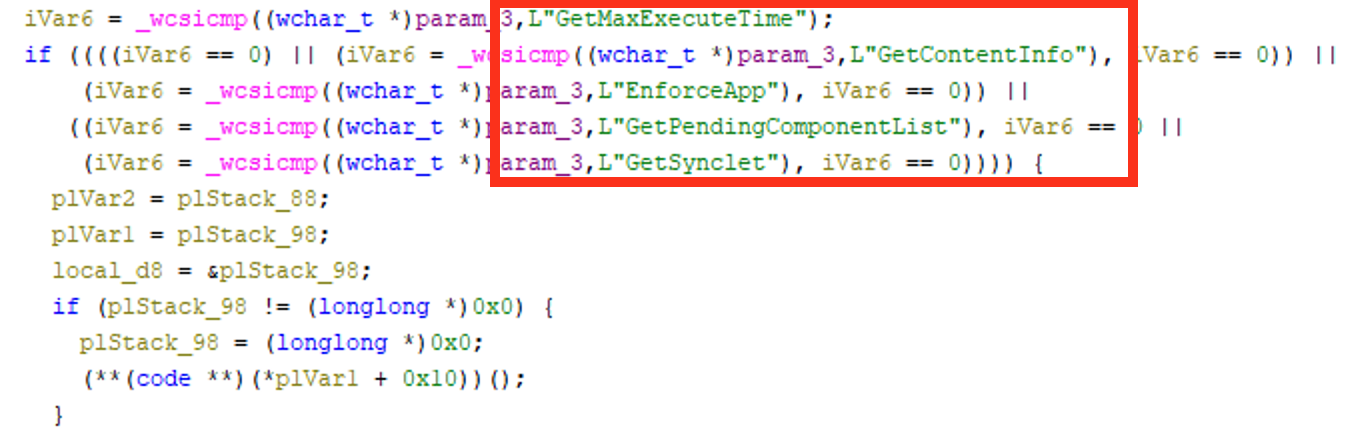
The function contained method names for the following branches:
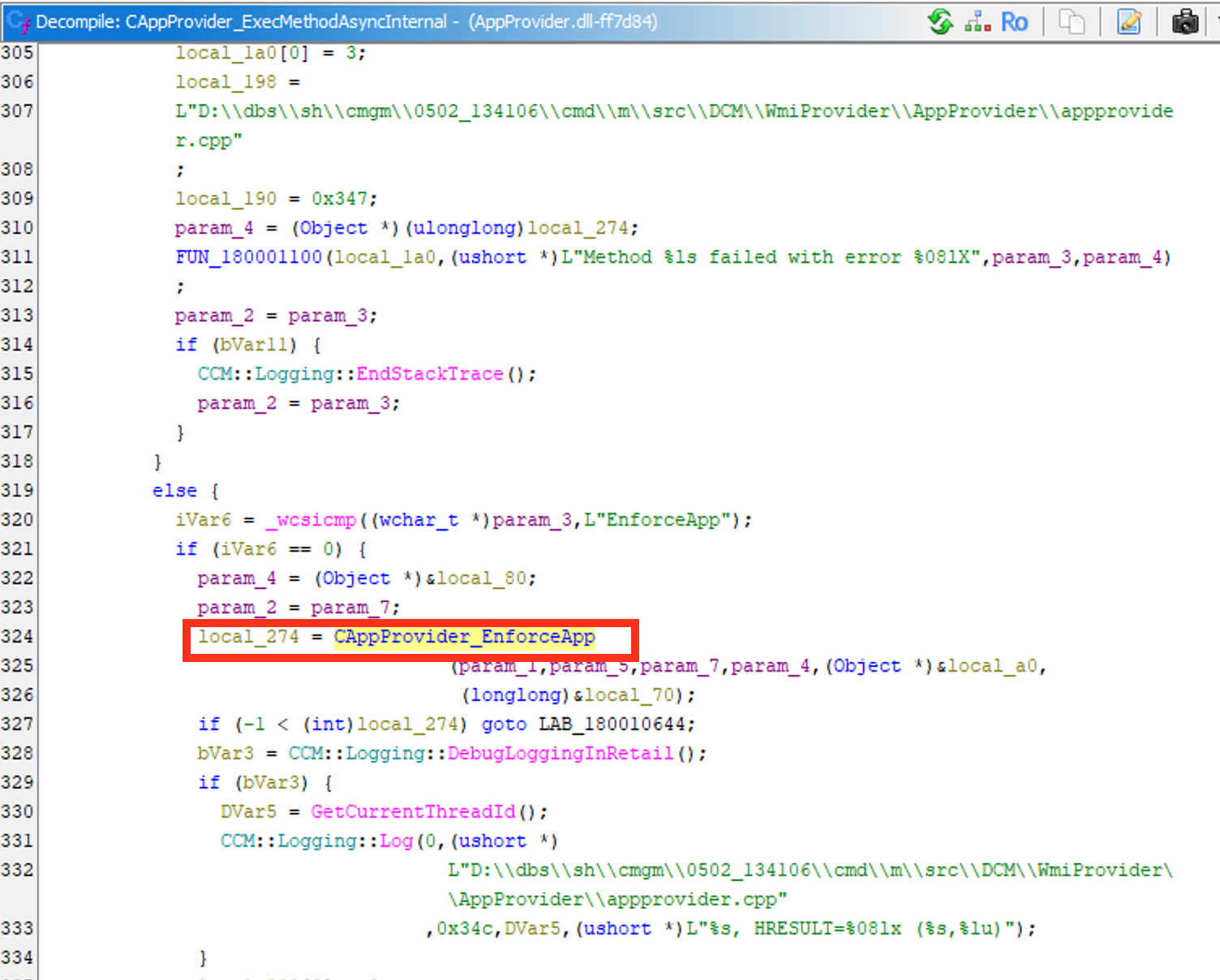
Additionally, the CAppProvider_ExecMethodAsyncInternal function contained a branch of code that specifically utilized CAppProvider_EnforceApp as the provider-side receiver for the WMI request made by CcmExec.exe and CITaskMgr.dll. What the function CAppProvider_ExecMethodAsyncInternal did here is compare the requested method name used by EnforceApp by called CAppProvider_EnforceApp.
To further validate that I was on the right track with CAppProvider_EnforceApp, I looked up the references to it and compared the strings referenced to see if they matched the task properties that CITaskMgr::CCM_AppDeliveryType.EnforceApp used. Within the CAppProvider_EnforceApp function, I found the matching parameter objects:
This proved that the AppProvider:CAppProvider_EnforceApp function read the task properties that CITaskMgr::CCM_AppDeliveryType.EnforceApp wrote.
When I was analyzing theCAppProvider_ExecMethodAsyncInternal function, I noticed this GetSynclet call. I wasn’t familiar with the term “synclet” and, after some searching, I found a pretty decent explanation of how SCCM uses synclets. From what I gathered from Microsoft documentation, a synclet can be used with public COM interface and methods (e.g., InstallApp, UninstallApp, and DiscoveryApp) to be called by the SCCM client-side framework. The synclet class can be used store install, uninstall, and look up property values for the client to manage. The way that it made sense to me is that the synclet was an internal SCCM WMI configuration recipe that contains install commands, deployment IDs, SYSTEM/user session context, etc. Based on that Microsoft documentation, the synclet handling call should be something likeCCM_HandlerSynclet .
I started searching inside of theCAppProvider_EnforceApp function because much of that function’s code was already revealed to read the properties that matched what Microsoft stated a synclet is used to store. I didn’t have a PDB file for AppProvider.dll and there were quite a lot of undefined functions referenced in CAppProvider_EnforceApp , but I started from the top and reviewed each undefined function.
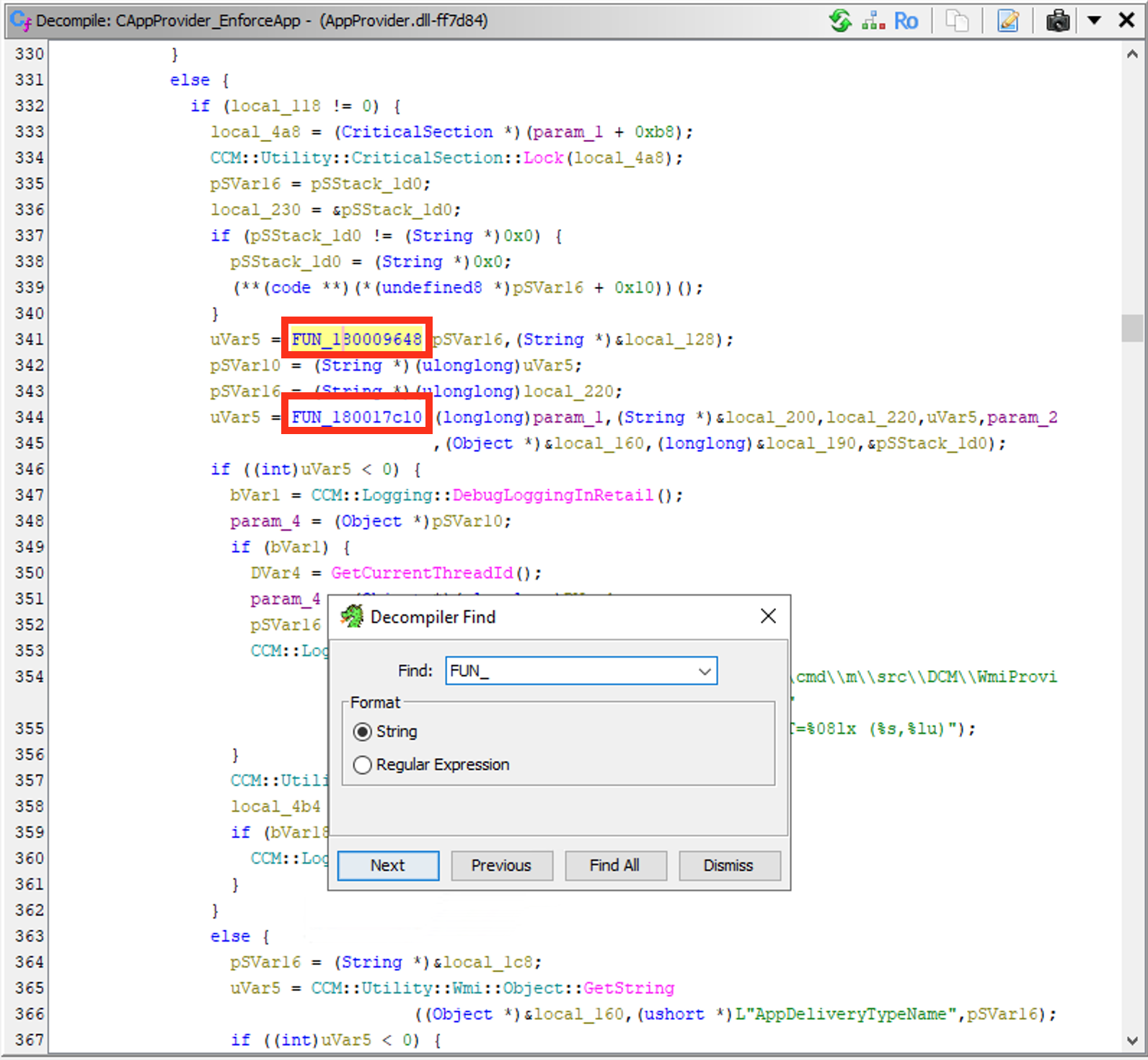
(I’m sorry if you were hoping for some awesome life-changing methodology. I just literally searched “FUN_” and started from the first function and worked my way down in the code.)
The very first undefined function call, FUN_180009648, referenced within CAppProvider_EnforceApp took me to a function that referenced the expected action type to enforce, so I was pretty sure (and hoping) that I would not have to dig much farther to find something about synclets.
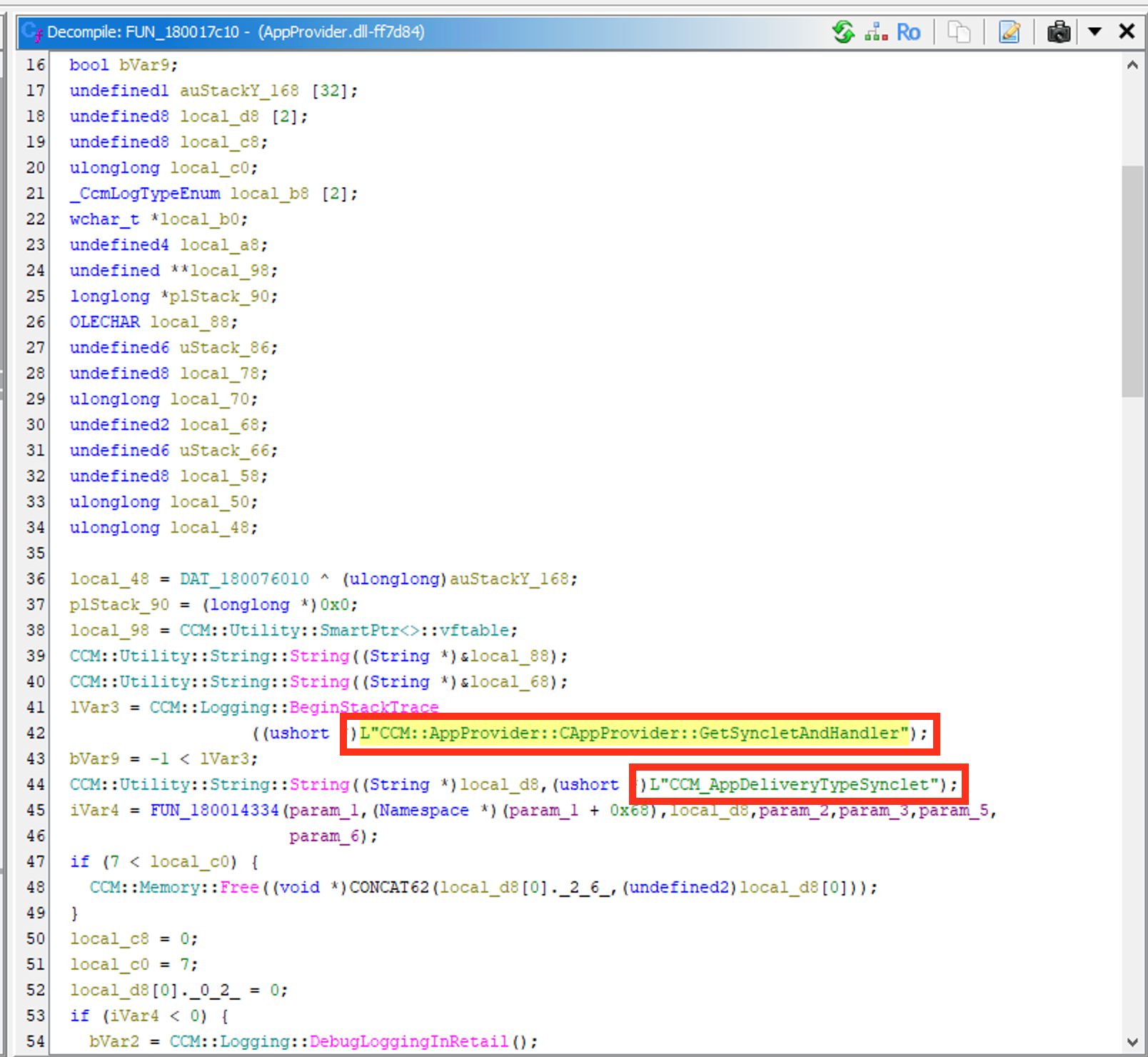
I was then blessed with the very next undefined function, FUN_180017c10, below the previously mentioned one as it revealed CCM::AppProvider::CAppProvider::GetSyncletAndHandler and the CCM_AppDeliveryTypeSynclet function.
I used the defined parameters in CAppProvider_EnforceApp to notate the parameters in CCM_AppDeliveryTypeSynclet to observe the function passing:
param_2 = AppDeliveryTypeId
param_3 = Revision
param_5 = WMI context
param_6 = deployment-type synclet output
The two parameters, AppDeliveryTypeId and Revision, are likely acting as lookup IDs to tell AppProvider which stored deployment synclet to use. The synclet is read and then the necessary deployment context properties are passed onto ScriptHandler.dll and then AppExcnLib.dll!CAppExecutionLibrary_RunCmdAsUser which completes the loop on this research.
At this point, I had most of the pieces of the puzzle.
I knew how a deployment task is initiated from SCCM to the client.
I knew how the deployment task is posted to the WMI namespace via CcmExec.exe and CITaskMgr.dll
I knew that the deployment task properties are pulled by a running WmiPrvSE.exe and AppProvider.dll
And at the very beginning I mapped out how the actual application is executed via WMI wrappers ccmcore.dll!CcmCreateProcessEx and eventually kernel32.dll!CreateProcessW
I now needed to put the research together into useable detection logic to identify unique instances of SCCM application execution.
Detecting Anomalous SCCM Application Execution
If you have jumped straight here because you just want to see detection and evasion considerations, welcome!
Originally, when trying to identify a way to write a detection for SCCM application execution, my goal was to first separate the specific “SCCM application execution” WmiPrvSE.exe from the other WmiPrvSE.exe binaries running at the same time. Before this research, that was very difficult because at least four or five WmiPrvSE.exe processes were running at all times. At scale and across an organization, that exponentially increases. Add in the fact that legitimate SCCM application execution is pushing patches and updates to a collection which can represent anything from a singular host to an entire branch of the environment – identifying the specific WmiPrvSE.exethat is responsible for loading a payload seemed like a daunting task.
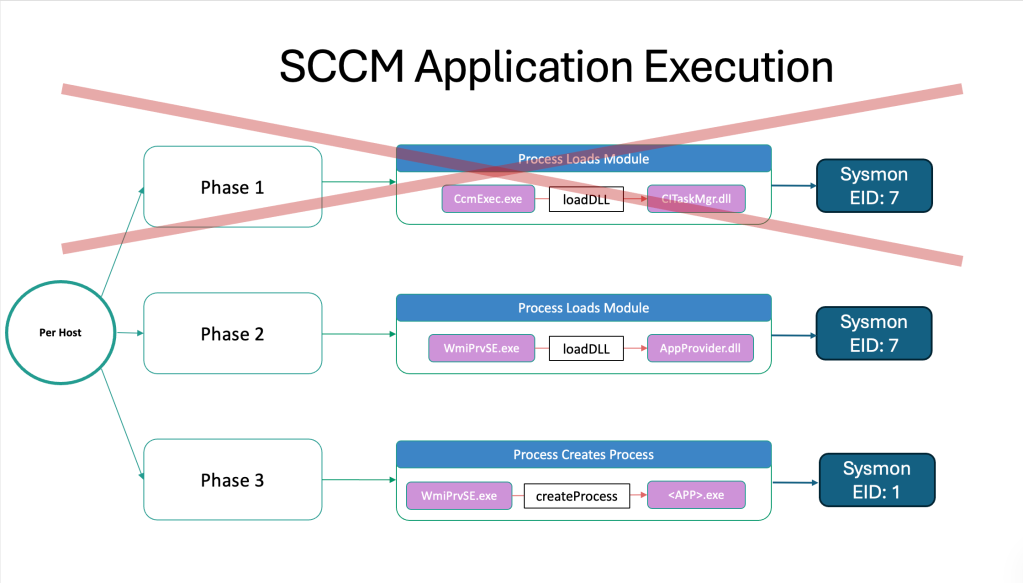
As stated in the research above, CcmExec.exe is a constantly running binary that will load C\Windows\CCM\CITaskMgr.dll upon starting SCCM Client Application Execution. This DLL will post the properties of the application to be executed and the context to execute it in. WmiPrvSE.exe will then load C:\Windows\CCM\AppProvider.dll to grab those properties and follow through with creating the child process tasked by SCCM.
This detection strategy will start with identifying all instances of SCCM application execution across all hosts per each endpoint. The detection doesn’t need to catch each instance of CcmExec.exe executing because I am more concerned with the anomalous child process of WmiPrvSE.exe. Additionally, we can reduce the amount of events we are bucketing by only focusing on WmiPrvSE.exe loading AppProvider.dll and that particular WmiPrvSE.exe with a child process to focus on the second and third phase of the operational chain.
Typically, when legitimate patches, updates or applications are pushed via SCCM they will be pushed to a large collection of hosts (e.g., legitimately using SCCM to update Zoom across every client in the collection group). So I am making the assumption (and inversely a blindspot) that if an adversary conducts malicious SCCM application execution, they will not be pushing a payload to a large group of endpoints. That would make my next step of this detection strategy to sort the resulting child processes from WmiPrvSE.exe by unique child process. Ideally, the most unique child processes would highlight an adversary using SCCM to push a payload to a handful of SCCM clients in the environment.
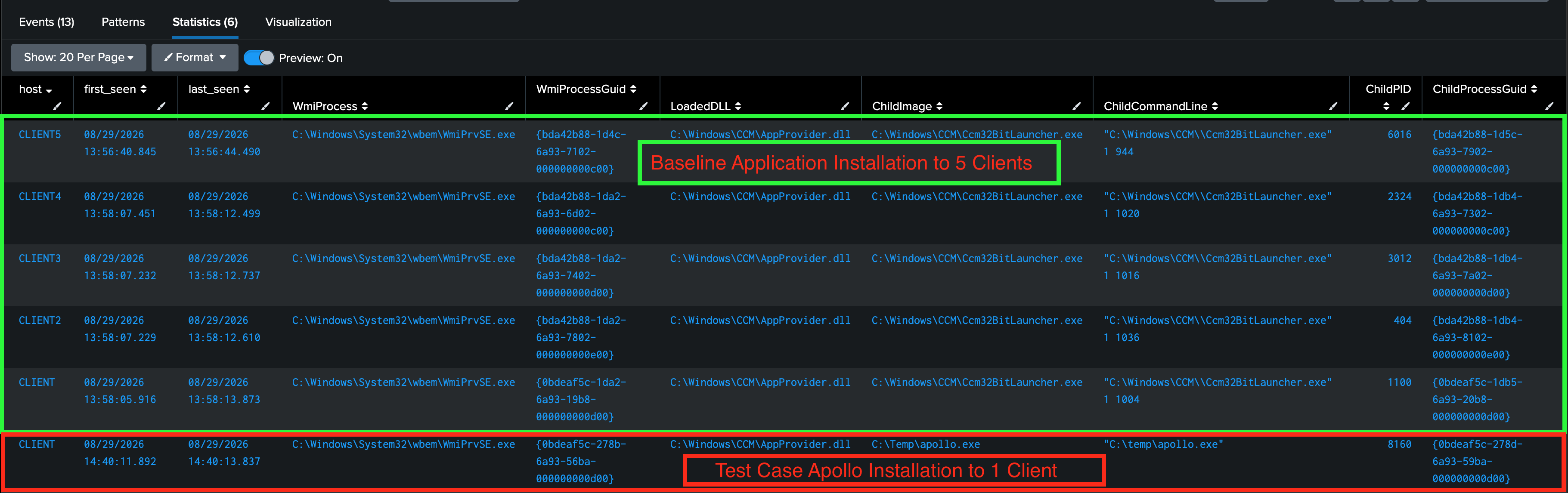
I wanted to provide a high-level query to validate my detection strategy hypothesis. I first created a SCCM application execution and tested executing a default application installation of Calc.exe to five SCCM clients. I used the x86 architecture defaults for this test which executed Calc.exe via WmiPrvSE.exe → C:\Windows\CCM\Ccm32BitLauncher.exe instead of directly Calc.exe but this was sufficient for the test. This would be the sample for my “baseline.”
To centralize the baseline telemetry, I installed the Splunk Universal Forwarder and Sysmon on all five of the SCCM client machines. Sysmon generates a globally unique ID (GUID) for every unique instance of a process identified within the telemetry. The Sysmon GUID enabled me to validate my detection by joining the ParentProcessGUID field from the child process created by WmiPrvSE.exe to the instance of WmiPrvSE.exe that matched that same ProcessGUIDand loaded the AppProvider.dll module into memory.
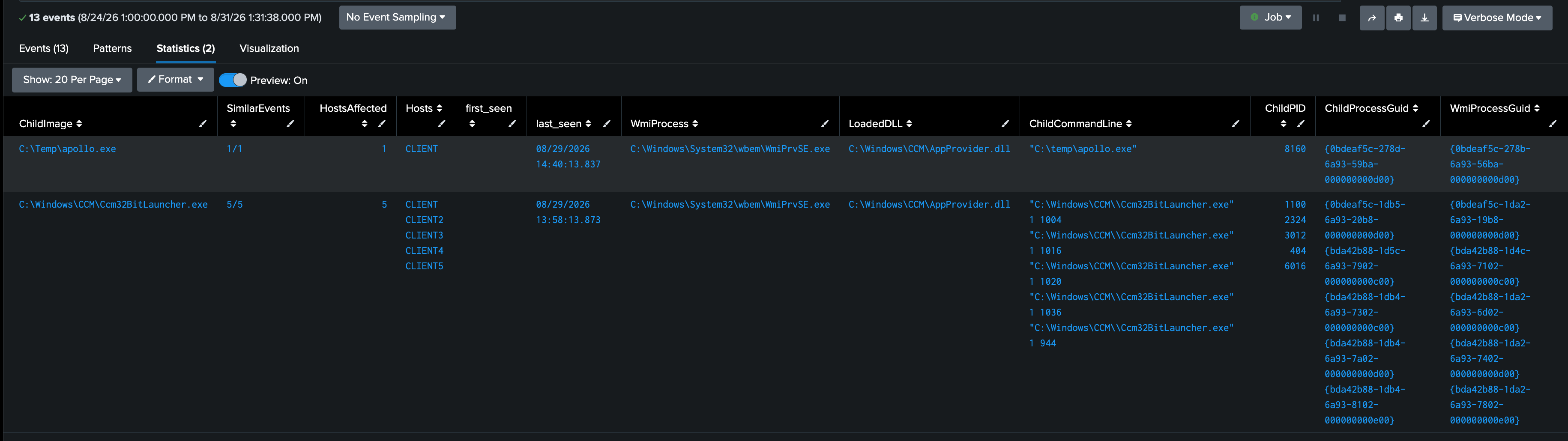
The image above is a demonstration of the total aggregation of WmiPrvSE.exe that loaded the module AppProvider.dll and then based on the Sysmon GUID found in the ParentProcessGUID of the child process correlated the executed child process. Another additional layer of enrichment to make this detection strategy more operational would be to group the events based on the child process or child command line. In Splunk, I grouped the similar instances of application installation together and highlighted the deviation (e.g., 1/1 Similar Events as compared to 5/5 similar events).
Evasion & Blindspot Considerations:
An anticipated blindspot may occur with the above detection strategy if the legitimate behavior of the organization’s SCCM team was using SCCM application execution to push out scripts instead of the script deployment method that SCCM defined. Essentially, this would make PowerShell.exe the child process of WmiPrvSE.exe . As discussed earlier, when a SCCM admin leverages the script deployment capabilities of SCCM, the parent process will be CcmExec.exe . However, if the admin chooses to invoke PowerShell.exe via UNC path and a SCCM client application execution along with an argument, this execution chain will have a parent of WmiPrvSE.exe. An adversary could execute a command such as the one referenced by the SnapAttack blog to blend in with the baselined behavior of the environment. However, this activity will still be identified and de-obfuscated (if encoded) via PowerShell Script Block Logging (i.e., Event ID 4104).
An additional gap in my detection strategy involves the malicious use of package deployments instead of client application execution. From my testing, the operational chain of package deployments always utilized Ccm32BitLauncher.exe and would skip calling WmiPrvSE.exe entirely. However, I considered this interesting caveat out of scope for the analysis of SCCM client application/script execution.
On the client side, there are a few SCCM specific log files that will highlight the execution of SCCM pushed applications. The C:\Windows\CCM\AppEnforce.log and C:\Windows\CCM\Logs\execmgr.log files on the client-side contains the details of each application enforcement executed on the SCCM client. By pointing a event forwarder at these specific events, defenders may be able to enrich the SCCM application execution monitoring to identify deviations from common baseline patching.
<