Attacking FreeIPA — Part II Enumeration
In Part I of this series, we reviewed some of the background and underlying technologies utilized by FreeIPA. We also discussed several authentication mechanisms, and forms of credential material, specifically how to identify, parse, and re-use credentials as an attacker. If you haven’t read Part I yet, you can find it here:
In this section of the series, we will dive into a custom lab environment to demonstrate how various objects and structures in FreeIPA work as well as how they interact with each other. We will then learn how to enumerate these structures.
Lab Environment
Before we dive in, let’s take a moment to briefly review how the lab environment was created, and its general structure.
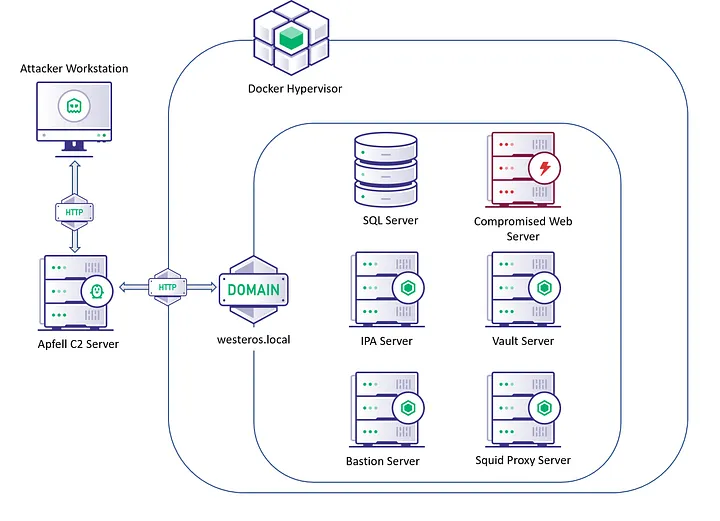
The diagram above is a general layout of the FreeIPA Lab environment I built for this series, and have been utilizing for research. The team behind FreeIPA maintains docker images for both FreeIPA servers, and clients across multiple popular operating systems. You can find these docker images on Dockerhub or Github at the links below:
All of the documentation, and setup instructions can be found on the main FreeIPA site linked below:
Our starting point in this exercise will be ceded access to a compromised web server inside the managed FreeIPA environment. The goal is to ultimately obtain an admin credential for the domain, and ex-filtrate sensitive data from the SQL Database. Before we can dive into those objectives, let’s go through some basic objects and enumeration techniques inside of FreeIPA environments.
Hosts, Users, and Groups
Much like Windows Active Directory (AD), FreeIPA allows administrators to create hosts, and users. These hosts, and users can be sorted into containers called “Host Groups” and “User Groups” respectively. When compared to AD these groups function very similarly to Organizational Units (OU).
Host-Based Access Control Rules (HBAC-Rules), Privileges, Roles, and Sudo-Rules can be applied to any of the objects above. Don’t worry if you aren’t familiar with HBAC-Rules, Privileges, Roles, or Sudo-Rules. We will be diving into those a little later in the post.
There are multiple ways to enumerate information from the IPA server about the domain. The two methods I will attempt to cover throughout this post will be the following:
- Utilizing Lightweight Directory Access Protocol (LDAP) queries against the LDAP server.
- Utilizing built-in IPA management tools
With that background let’s dive into the lab and start enumerating users, hosts, user groups, and hostgroups inside of FreeIPA.
Enumeration via LDAP Queries
By default in FreeIPA, the LDAP server allows for anonymous binds, and a large swath of data is enumerable unauthenticated. However, not all of the data is enumerable unauthenticated. Data responsible for mapping security authorization controls has been explicitly protected by ACLs. The following command will retrieve all of the data available unauthenticated:
ldapsearch -x For the rest of this post all of the ldapsearch commands will be done authenticated. In the first post of this series we detail how to identify and utilize credentials in a FreeIPA environment.
With a valid credential, we can be more specific and filter our query by setting targeted base distinguished names (DN) for each search. The following query identifies all the users in the lab environment:
ldapsearch -Y gssapi -b "cn=users,cn=compat,dc=westeros,dc=local"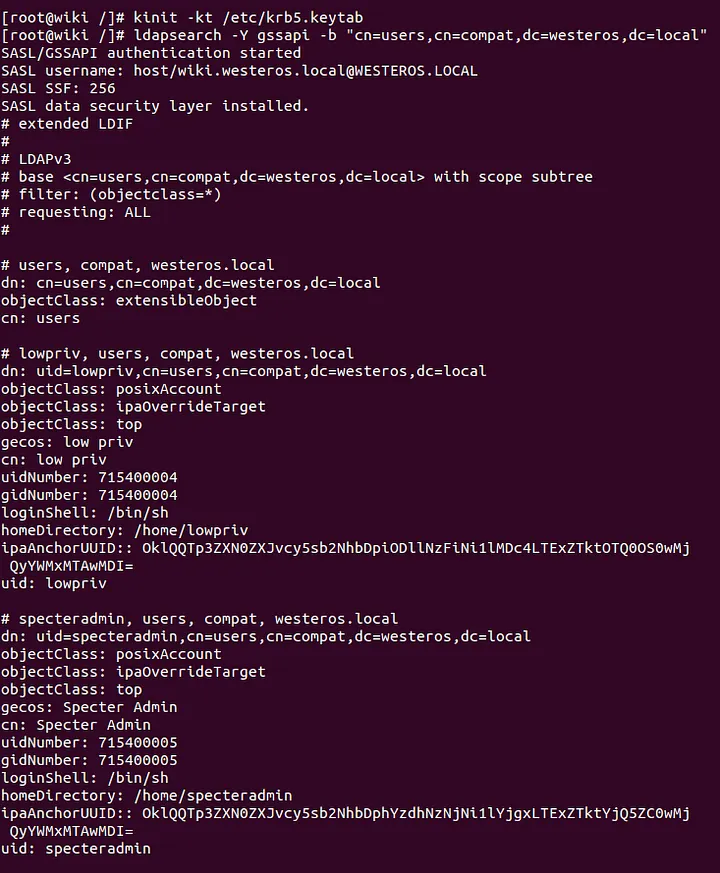
We can use the same query with a slightly modified base DN to retrieve data for all the hosts in the environment:
ldapsearch -Y gssapi -b
"cn=computers,cn=accounts,dc=westeros,dc=local"
Again, we can modify the base DN to retrieve each host group and user group respectively:
ldapsearch -Y gssapi -b
"cn=hostgroups,cn=accounts,dc=westeros,dc=local"
--------------------------------------------------------------------
ldapsearch -Y gssapi -b "cn=groups,cn=accounts,dc=westeros,dc=local"
Enumeration via IPA administrative tools
By default hosts enrolled into a FreeIPA domain have the IPA management tooling installed as part of the enrollment process. This tooling is incredibly useful for enumeration and configuration of the environment. As we discussed above let’s review how to enumerate information about users, hosts, user groups, and host groups with the builtin IPA administrative tooling.
Unfortunately, the IPA tooling cannot be used without a valid domain credential. If you find yourself in a situation where you are lacking a valid domain credential, each host is deployed with a keytab credential for that host. This keytab can be used to obtain a valid Credential Cache(CCACHE) Ticket Granting Ticket(TGT) for the host itself.
With a valid credential and access to the ipa utility, you can use the following commands to enumerate the relevant information:
ipa user-find
ipa usergroup-find
ipa host-find
ipa host-group-find
-------------------
ipa user-show <username> --all
ipa usergroup-show <user group> --all
ipa host-find <host> --all
ipa hostgroup-show <host group> --all
HBAC-Rules
The Fedora FreeIPA documentation defines HBAC-Rules as:
Access controls, at a high level, define who has access to what. The who can be either a user or a host (the source host), and the what can be either a host (target host), service, or service group, or a combination of the three.
HBAC-Rules should be used to delegate access to specific resources. This access control can be extremely effective at mitigating lateral movement, when configured correctly. As an attacker we can use HBAC-Rules to identify which accounts have been delegated access to specific resources inside of the environment.
Let’s review how to enumerate these policies.
Enumeration via LDAP QueriesHBAC-Rules
The Fedora FreeIPA documentation defines HBAC-Rules as:
Access controls, at a high level, define who has access to what. The who can be either a user or a host (the source host), and the what can be either a host (target host), service, or service group, or a combination of the three.
HBAC-Rules should be used to delegate access to specific resources. This access control can be extremely effective at mitigating lateral movement, when configured correctly. As an attacker we can use HBAC-Rules to identify which accounts have been delegated access to specific resources inside of the environment.
Let’s review how to enumerate these policies.
Enumeration via LDAP Queries
The following command can be used to retrieve all the HBAC-Rules inside of the lab environment:
ldapsearch -Y gssapi -b "cn=hbac,dc=westeros,dc=local"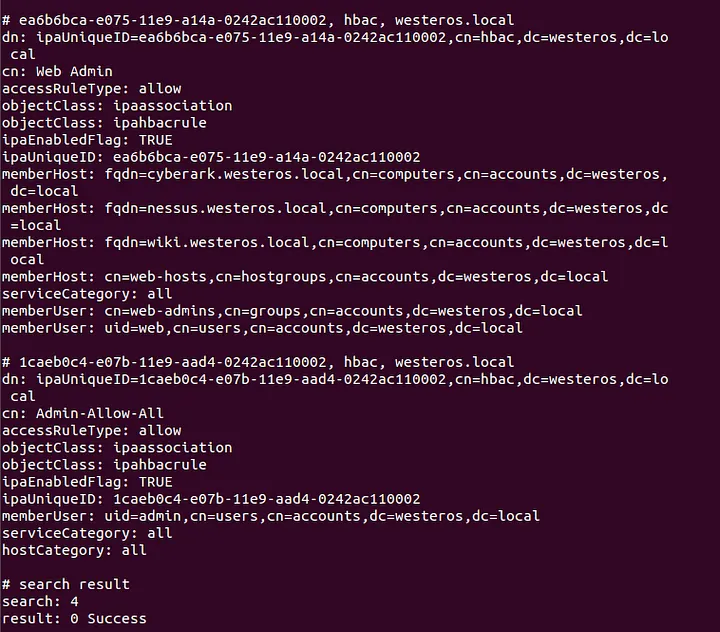
Enumeration via IPA administrative tools
The following commands can be used to retrieve all of the HBAC-Rules inside of the lab environment.
ipa hbacrule-find
-----------------
ipa hbacrule-show <hbacrule> --all
Sudo-Rules
The Fedora FreeIPA documentation defines Sudo-Rules as:
Sudo rules are in a sense similar to access control rules: they define users who are granted access, the commands which are within the scope of the rule, and then the target hosts to which the rule applies. In FreeIPA, additional information can be configured in the rule, such as sudoers options and run-as settings, but the basic elements always define who, what (services), and where (hosts).
FreeIPA provides the ability to manage sudo permissions from one centralized source through sudo-rules. These rulesets can be used to restrict or delegate the ability to execute commands as sudo on hosts enrolled in the domain. As an attacker we can enumerate which hosts and users these rulesets are applied too, and which commands are allowed through the ruleset.
Enumeration via LDAP Queries
The following command can be used to retrieve all of the sudo-rules inside of the lab environment:
ldapsearch -Y gssapi -b "cn=sudorules,cn=sudo,dc=westeros,dc=local"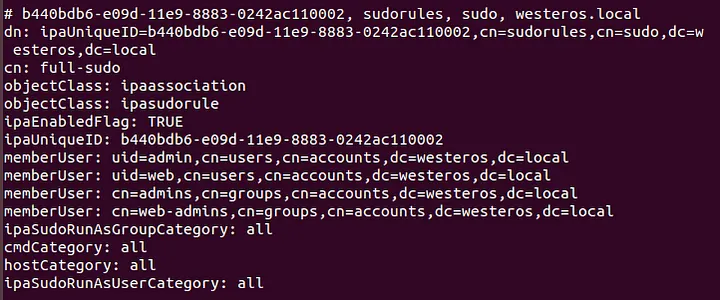
Enumeration via IPA administrative tools
The following commands can be used to retrieve all of the sudo-rules inside of the lab environment.
ipa sudorule-find
-----------------
ipa sudorule-show <sudorule> --all
Role-Based Access Control
The Fedora FreeIPA documentation defines role-based access control as:
Role-based access control (RBAC) is a hierarchical way of organizing access to the data managed by FreeIPA. Different users who perform the same tasks within an organization are typically combined into a group, and this group is made a member of a FreeIPA Role. This Role provides the member groups and users the necessary permissions to perform their assigned tasks.
Roles in FreeIPA consist of a few different elements. Each role contains a set of privileges, and those respective privileges contain a set of permissions. Roles can be applied to Users, User Groups, Hosts, Host Groups, and Services. To illustrate this concept let’s discuss the default “User Administrator” role in FreeIPA.

As the screenshot above shows the “User Administrator” role contains the following privileges:
- User Administrators
- Group Administrators
- Stage User Administrators
We can drill down further and enumerate the permissions delegated to each privilege.

As we can see the “User Administrator” role contains quite a lot of permissions inside of the environment. Understanding the general concept and structure of roles, privileges, and permissions can be critical to identifying attack paths throughout an environment.
Enumeration via LDAP Queries
The following command can be used to retrieve all the roles inside of the lab environment:
ldapsearch -Y gssapi -b "cn=roles,cn=accounts,dc=westeros,dc=local"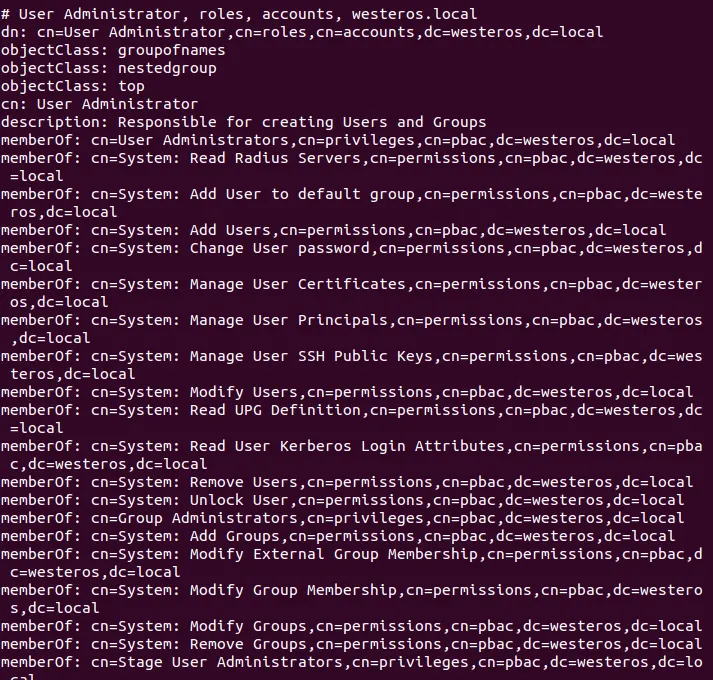
Enumeration via IPA administrative tools
The following commands can be used to retrieve all of the roles, privileges, and permissions inside of the lab environment.
ipa role-find
ipa role-show <role> --all
ipa privilege-find
ipa privilege-show <privilege> --all
ipa permission-find
ipa permission-show <permission> --all
Conclusion
Hopefully by now we have a slightly better understanding of the various different types of objects inside of a FreeIPA environment, and a little bit about their significance. As an attacker the ability to not only enumerate, but understand the significance of these objects is critical.
In the following posts of this series I will aim to cover the following:
- Utilizing the enumeration techniques covered in this post to uncover an attack path inside of the lab environment.
- Finally, an overview of some misconfigurations and unique scenarios that attackers can abuse inside of a FreeIPA environment.
References
- Defining Host-Based Access control Rules, Fedora, https://docs.fedoraproject.org/en-US/Fedora/15/html/FreeIPA_Guide/hbac-rules.html
- Defining Sudo-Rules, Fedora, https://docs.fedoraproject.org/en-US/Fedora/18/html/FreeIPA_Guide/defining-sudorules.html
- Docker, FreeIPA, https://www.freeipa.org/page/Docker
- FreeIPA Container, Github, https://github.com/freeipa/freeipa-container
- FreeIPA Server, DockerHub, https://hub.docker.com/r/freeipa/freeipa-server/
- MIT Kerberos Documentation, MIT, https://web.mit.edu/kerberos/krb5-latest/doc/
- Kerberos Credential Thievery (GNU/Linux), Ronan Loftus and Arne Zismer, https://www.delaat.net/rp/2016-2017/p97/report.pdf