One WSL BOF to Rule Them All

TL;DR – Windows Subsystem for Linux (WSL) is a powerful way for attackers to hide from defenders, since WSL2 is a completely separate VM running in Hyper-V, and is rarely monitored in any way. I’ve had lots of success pivoting from heavily monitored Windows hosts into WSL2 and going hog wild on the host and network from there with impunity.
Naturally, I wanted to make a Beacon object file (BOF) to easily enumerate and execute commands on WSL2 hosts to better use this attack primitive. Sadly, the WSL2 component object model (COM) interface underwent a ton of changes through versions under the same CLSID; this is very un-Microsoft-like and also a big pain when developing a cross-version COM client. That’s why some Specters went on this journey of discovery for you and put it in a BOF! You can find it here.
Intro
WSL has been a huge boon for the developer experience on Windows. I am a big believer myself; at this point, I see Windows as a convenient wrapper for my Ubuntu VM that lets me call Windows EXEs from time-to-time. It seems I am not alone, as more and more developer machines I land on during red teams also have a WSL instance. This is a big win for attackers, because as of the release of WSL2 in 2019, a linux distro running via WSL2 is an entirely separate VM running in Hyper-V.
As a red teamer, what you should read in between the lines of that sentence is: every host with WSL2 has an enclave where you can spawn processes, read files of interest, and access the internal network without worrying about endpoint monitoring. Plus, you get the added bonus that there’s usually unprotected SSH keys, creds in the environment variables/dotfiles, and more!
The way that I have pivoted to WSL2 hosts previous red teams is by using a BOF that wraps CreateProcess to call something like:

Sketchy WSL command
While this has never been caught (because I don’t think endpoint monitoring solutions have static detections for it – yet), it gives me major heartburn. It is an anomalous process with a scary looking command line that is going to spawn out of my agent’s process. EDR will record this and, if a defender ever looks at it, they will know something is up. Knowing this, I set about doing it a better way.
OK. Quick aside. This isn’t actually how I do it; that example is as egregious as possible for demonstration. In reality, you can write your payload straight to the WSL file system via the $WSL share with a benign name and kick it off. You can also obfuscate running multiple commands at once by writing a shell script to disk and then just calling WSL.exe to execute that. But the point stands, a random process spawning WSL.exe is sketchy… or so I thought!
A Lesson in Why You Should Decompile DLLs
Last week, I was with all my fellow SpecterOps consultants for an annual get-together. We had a 24 hour hackathon, so I proposed working on a BOF to facilitate pivoting to WSL, and I was lucky enough to lure two brilliant teammates, Adam Chester and Antero Guy, to help me out.
The BOF seemed suspiciously straightforward: there is an API function, WslLaunch, which is exposed by wslapi.h/WslApi.dll that does exactly what we wanted. You just give it a WSL instance and a command, and it’ll execute the command you want on that distro. Easy as pie!
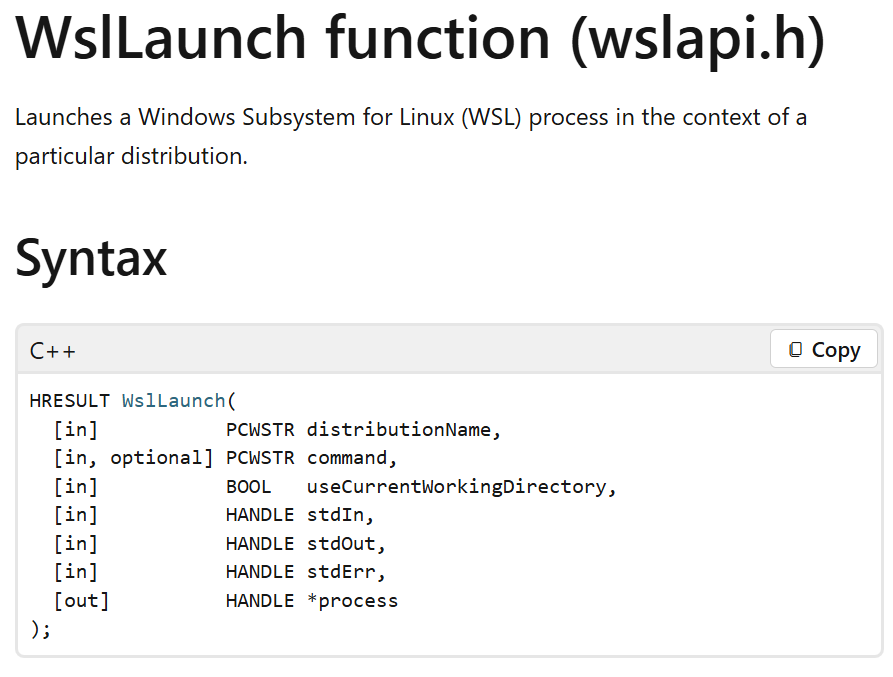
An exported function doing exactly what I wanted, thanks Microsoft!
So, we made it! And we all lived happily ever after; end of blog.
…
Just kidding! Well, partially – we did make that BOF, you can see it here, but as you’ll see in the ReadMe, there is a big disclaimer. All WslLaunchdoes is spawn a process of WSL.exe! And it does this by, you guessed it, formatting the command and calling CreateProcess – no different than how I’ve been doing it on red teams!
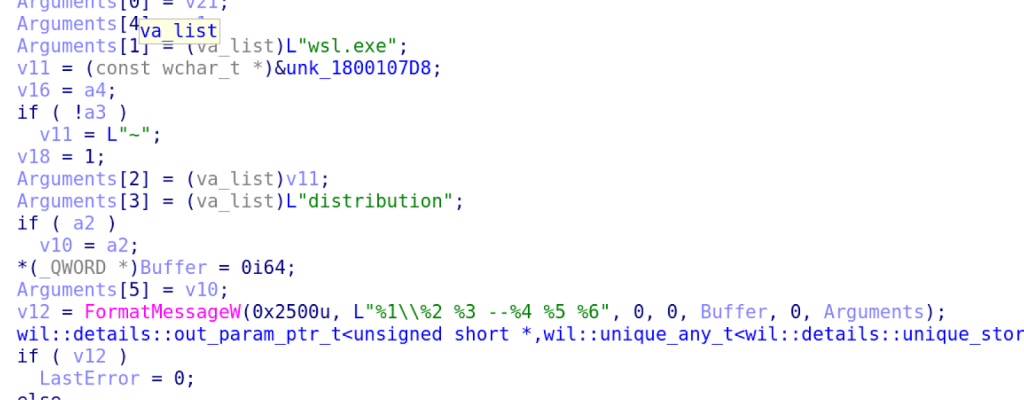
The command formatting logic in WslLaunch that WslApi.dll exports
This was both heartening and disheartening. It meant that it actually wasn’t that anomalous to spawn WSL.exe out of some random process to get commands run on a WSL instance. Maybe part of the reason this doesn’t have much detection logic around it is because there are tons of benign binaries already doing what I thought was really sketchy! That’s a win, but it also meant this newly created BOF is useless; I could just continue using any BOF or tool that lets you call CreateProcess with arbitrary commands to do the exact same thing, and there will still be the same artifacts that I’m worried about defenders finding either way.
Then there was the really bad news: If this is the Microsoft-endorsed way of reaching WSL via the Windows API, it meant that whatever WSL.exe did under the hood was so jacked up that the Microsoft developers didn’t want to reimplement it in the DLL (or worse: couldn’t).
COM’s Spaghetti on My Sweater Already
The answer to why Microsoft developers just spawn out to WSL.exe from the DLL became apparent pretty quickly. Adam found an IDL for the service we were interested in (i.e., wslservice.idl) on GitHub since WSL is now open sourced. Perfect! This will also be a piece of cake: we can just use MIDL.EXE to create the appropriate header for us from the IDL file and use that to call our function of interest (i.e., CreateLxProcess) via COM.
Well, we did that too, which is available on the COM branch of that same GitHub project. When the three of us tested it, though, the code only worked on Antero’s machine. He had just downloaded WSL for the first time that day while Adam and I had much older installs. When Adam and I ran it, we both got crashes due to memory corruption. That could only mean one thing: the COM interface varied between versions and our code (generated from the WSL repo’s IDL) expected the most recent version on our computers. Adam and I’s older versions of the COM server DLL were getting passed the wrong arguments and breaking during marshalling.
I am not a seasoned systems developer but, to me, this was very odd. Any time I’d see Microsoft introduce a change that could be breaking, it usually just got an Ex slapped onto it and was reimplemented as an entirely different function! I wasn’t used to arguments changing between versions of the same COM object with the same CLSID.
Our theory was confirmed when we came across the project wslbridge2 on GitHub, which had reverse engineered vtable definitions for different versions of this interface in a header file. These developers kindly wrote comments detailing the changes between the versions of the interfaces they reverse engineered and the changes were pretty dramatic! Arguments were added and removed from functions, and whole functions were added and removed between versions. This changed the order of some of the functions in the vtable between versions; on Adam and I’s computers, our code wasn’t even calling the right function when we used the IDL file from WSL’s GitHub page!
No wonder WslApi.dll just spawns out to WSL.exe: Microsoft understands this is pretty hellish to keep track of, but can guess that WSL.exe is built from the same IDL file as the COM server because they are installed in a bundle together. It also is likely that when one gets updated, so will the other, as they are updated via the same MSI. Their weird process-spawning implementation was in service of minimizing the chances of a client/server mismatch like Adam and I experienced during our testing.
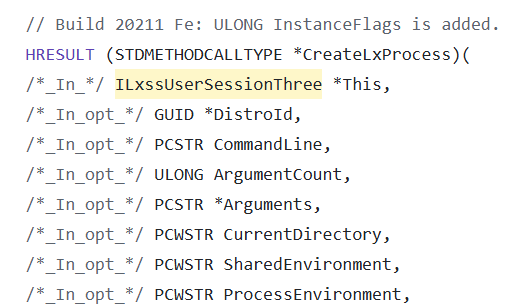
Comment highlighting newly added argument to CreateLxProcess, this is a breaking change
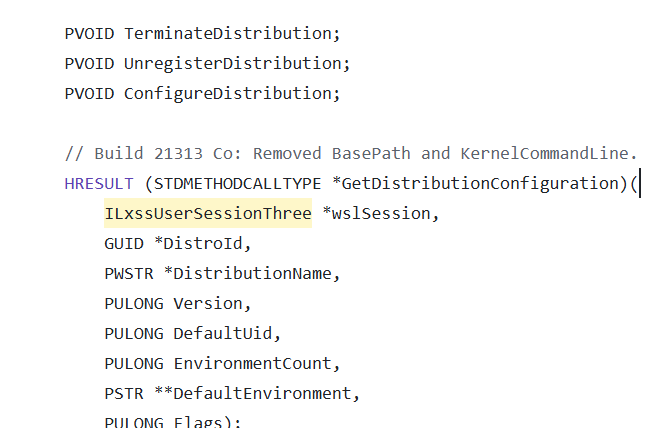
Comment showing removed functions, this is a breaking change
So we finished the hackathon defeated. We weren’t going to be able to use the repo’s IDL to make a usable BOF that could run on arbitrary machines; only ones running the newest version of WSL. If we used it on a machine with any other version, it would cause a memory access error that we caught with exception handling, so at least the whole agent wouldn’t crash. Considering that Adam and I didn’t even know how to update WSL, the chances we would find the most recent version on target machines out in the wild felt slim-to-none.
Forging The One WSL BOF

Getting the IDLs
Tell me if you heard this story in a SpecterOps blog post before: A Specter tries something novel, hits a roadblock, all hope is lost, and then Lee Chagolla-Christensen comes in with a suggestion that cracks the case. It’s a bit derivative, I know, but hey, there’s a reason studios only make sequels these days. If the story ain’t broke, don’t fix it!
In this case, Lee reminded us that OleView.Net, James Forshaw’s research tool for interacting with COM objects, allows you to dynamically generate working IDL files to create COM clients from COM servers. If we could get our hands on all the different versions of WSL, it wouldn’t be too hard to make something akin to what the wslbridge2 developers tried, where you just query the version of WSL present on a host and then utilize the appropriate interface version based on that.
This was a perfect solution, because all releases of WSL since 2.0.0.0 are available on GitHub, and the COM proxy stub DLL (i.e., WslServiceProxyStub.dll) exists inside of each of the MSIs!
You may have some questions at this point. Let me see if I can make a quick FAQ:
What is a proxy stub DLL? Our actual COM server exists in another process (i.e., WslService.exe), and so there needs to be code that handles the marshaling and transmission of our function calls and their arguments. The stub is what implements that.
Why is the proxy stub DLL useful? Because it contains a data structure called the ProxyFileList which is generated via MIDL, and it contains all the metadata needed to marshal and unmarshal COM interface calls (which we now know is this DLL’s job). This contains enough data to recreate an IDL file that we can then use with MIDL.
James Forshaw already implemented a parser for a ProxyFileList in OleView.NET that can parse the data structure, so that can be done in just two lines of code, like so:

Parsing a ProxyFileList with OleView.NET
The process of getting a pointer to that data structure can range from pretty chill to mildly convoluted. Sometimes proxy DLLs export a function named GetProxyDllInfo that will return a pointer to this data structure, along with the proxy’s CLSID. We are not so lucky:

WslServiceProxyStub.dll is missing the export GetProxyDllInfo
In cases where GetProxyDllInfo isn’t exported, you’ll need to know the proxy DLL’s CLSID. This can be found a couple of ways:
- You can search HKEY_CLASSES_ROOT\CLSID for the DLL’s name, as it’ll register itself there
- You can also find it in the registry if you know the IID at HKEY_CLASSES_ROOT\Interface\<IID>\ProxyStubClsid32
- You can use something like resource hacker to inspect the DLL, as you can sometimes find it in the resources of the proxy DLL itself
- You can often get it from Googling around and finding other projects on GitHub, standing on the shoulders of giants and whatnot
Once you have the proxy’s CLSID, you can follow these steps to pretty reliably get a pointer to the ProxyFileList:
- Call DllGetClassObject, which will be exported by your proxy DLL, with your CLSID and D5F569D0-593B-101A-B569-08002B2DBF7A as the IID. This is the IID for IPSFactoryBuffer.
- This interface is implemented in every MIDL-generated proxy DLL to aid in the marshalling and unmarshalling process, and it will always return the same struct: CStdPSFactoryBuffer. This struct conveniently has a pointer to the stub’s ProxyFileList 16 (0x10) bytes in. Wine’s source code has it defined here.
In code, it’ll look something like this:
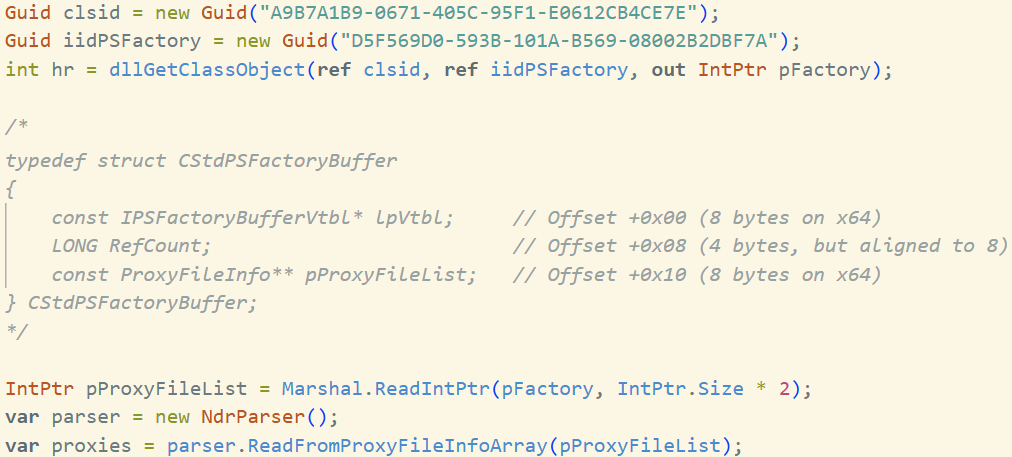
Example code to get a proxy DLL’s ProxyFileList without GetProxyDllInfo
If you want to look at the actual code I used, I added to the discovery folder of the the-one-wsl-bof repo along with all the other vibecoded tools I used to make this process less tedious. You can see those here.
The other vibecoded tools in that directory include tools for:
- Taking the parsed ProxyFileList metadata and spitting out pseudo-IDL (this is included in the .NET tool)
- Cleaning that up into real IDL files
- Hashing all the IDL files to see where changes occur to determine what ranges of WSL versions need what interface definition
- Overlaying more detailed types, function names, and arguments names for functions from the open source IDL files to all the ones I created via the method above
- Compiling those into headers via MIDL
Building the BOF
Once I had all the header files, I took inspiration from the creators of wslbridge2; they just defined each of the different versions as different interfaces and used heuristics to determine what version to use. The indicator I could find is a version number stored at HKLM\SOFTWARE\Microsoft\Windows\CurrentVersion\Lxss\MSI.
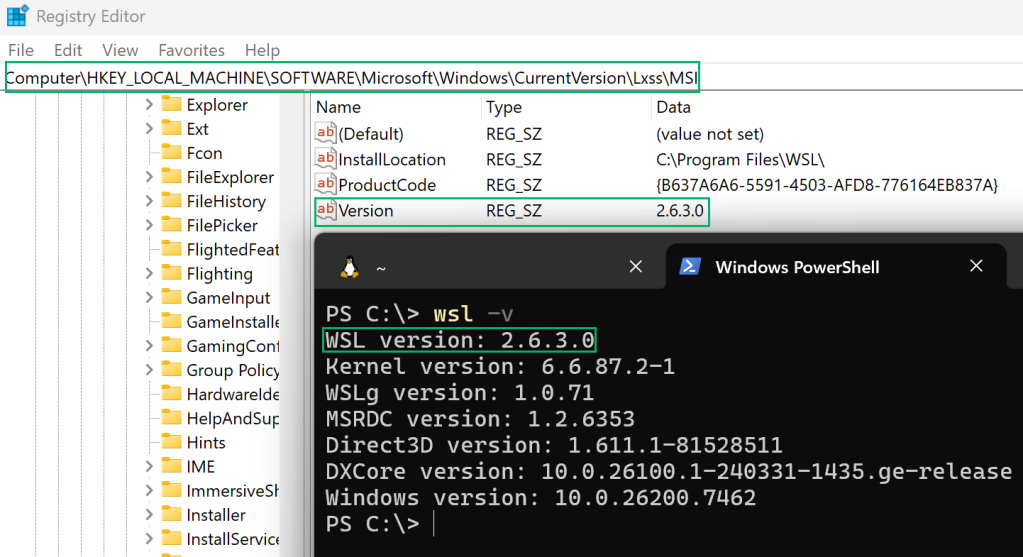
WSL version discovery via registry
This should work for all WSL2 versions with installers available on GitHub, but I didn’t do too much testing. It worked for my very old version and then again after I updated to the newest, but I would love it if people who run into issues with this on hosts out in the wild submit an issue to the BOF’s repo to let me know about it. WSL1 is unsupported at this time.
I bet you’re wondering at this point how gross that BOF looks. Well, lemme tell ya: very gross. Especially since switch statements aren’t handled correctly by some C2 agents, so there is a lot of iffing and elseing going on in there.
As of right now for WSL2, there are eight different unique interfaces that we need to keep track of by version, so each conditional looks like this:
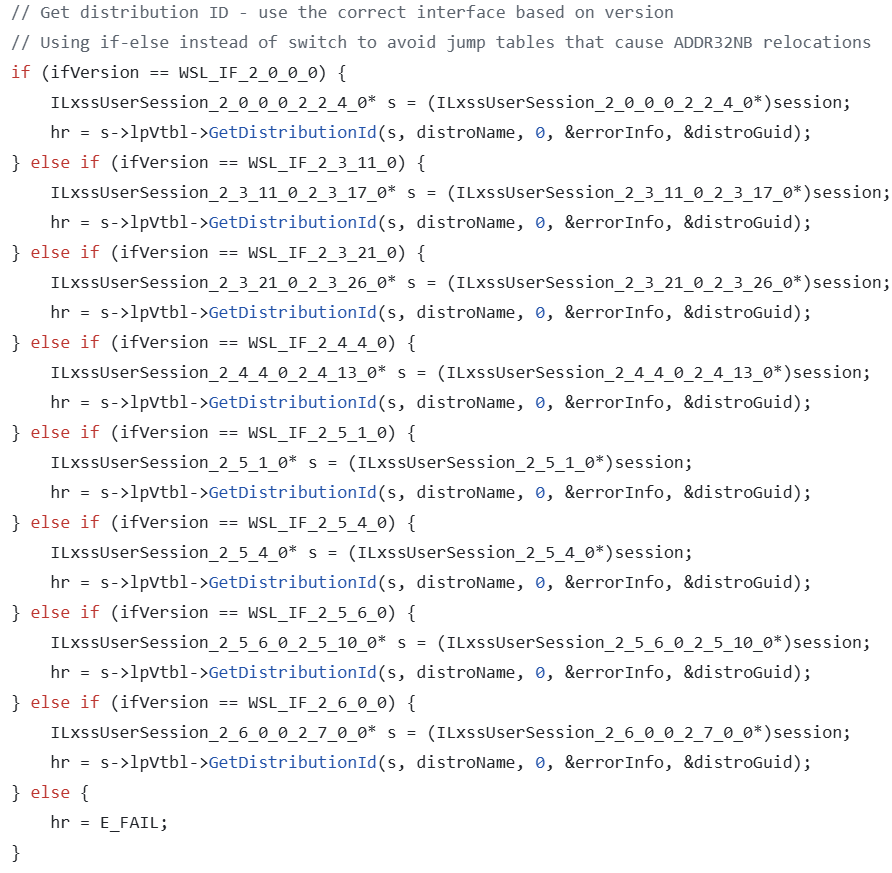
Yuck!
And I’m not so sure that there won’t be another eight to keep track of soon, as it doesn’t appear like the Microsoft team has any directives for backwards compatibility here.
I will manage expectations now: I am going to do a bad job of maintaining this if there are a lot of breaking changes in newer versions of WSL. I welcome PRs and pastes of error messages when this BOF fails on strange computers, though!
There is also future work left to do, as this same interface also seems to expose functionality for installing WSL instances, so you could bring your own attack VM onto hosts that don’t even have a WSL distro up and running. That would be pretty sick!
So there you have it: one WSL BOF to rule them all. You should be able to pivot onto any WSL2 version you come across, and I recommend using Poseidon to interact with whatever distro you find.
The source, along with a built BOF and a CNA script can be found here: https://github.com/MayerDaniel/the-one-wsl-bof/tree/main/bof. The BOF contains functionality to enumerate WSL distros via the registry, and then execute commands on any distros that the BOF finds. You can learn more in the ReadMe.
Big thanks again to Adam, Antero, Lee, James Forshaw (creator of OleView.NET), and Biswapriyo Nath (maintainer of wslbridge2) for the help, inspiration, and handy tools!
Happy hacking!