Modern Wireless Tradecraft Pt III — Management Frame Access Control Lists (MFACLs)
In Part II of this series, we described how improvements in wireless client security have put a dent in our ability to use Karma attacks against modern devices (see: https://posts.specterops.io/modern-wireless-attacks-pt-ii-mana-and-known-beacon-attacks-97a359d385f9). We then discussed the MANA, Loud Mode MANA, and Known Beacons attacks, which can be used to overcome these improvements.
In this next section, we will discuss how to use Management Frame ACLs (MFACLs) in EAPHammer to exert granular probe-level control over the offensive techniques we have described in previous sections (see: https://github.com/s0lst1c3/eaphammer). We’ll also discuss how these attacks work at an algorithmic level, and provide insight into how using MFACLs affects EAPHammer’s runtime efficiency.
Management Frame ACLs (MFACLs)
Karma, mana, and known beacon attacks are inherently messy techniques that can easily cause all of the devices around you to connect to your rogue AP, regardless of whether the devices are within the scope of your current operation. Even evil twin attacks suffer from this problem under certain circumstances, such as when the rogue AP is given a commonly used ESSID.
This presents a twofold problem: not only is targeting arbitrary nearby devices inherently illegal, it’s also detrimental to your ability to do your job. For rogue AP attacks to be useful from an operator’s perspective, we need to be able to execute them with precision. This means means limiting their impact and visibility to our intended targets.
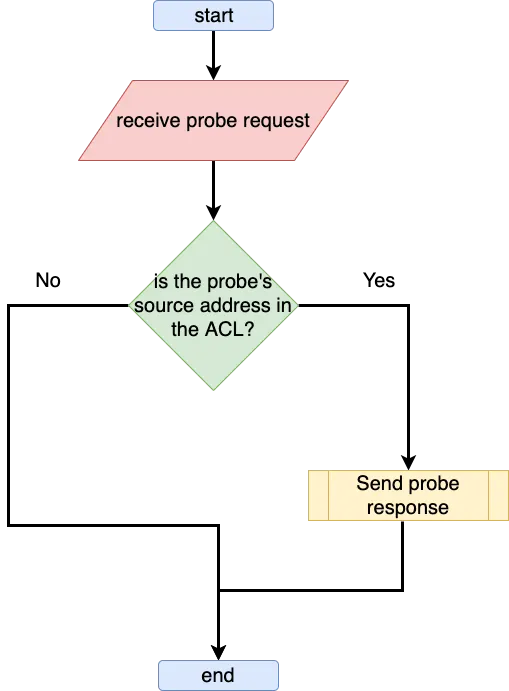
Management Frame Access Control Lists (MFACLs) are the solution to this problem. MFACLs are Access Control Lists (ACLs) that are checked by the access point prior to handling incoming probe request frames. They can be either SSID-based or MAC-based, and can be used in either whitelist or blacklist mode.
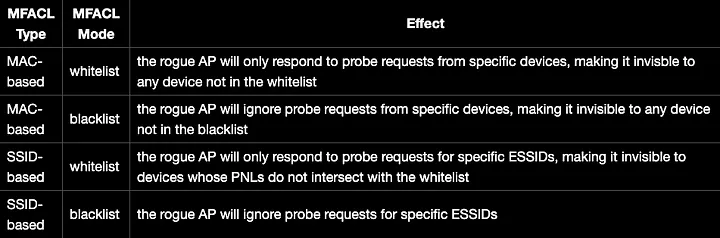
The following table lists the different type of MFACLs available, as well their effects when used:
It should be noted that MFACLs cannot be used to restrict beacon frames, so they will not prevent client devices from seeing or attempting to connect to your rogue AP if you’re executing any of the following techniques:
- evil twin attack
- loud MANA attack
- known beacon attack
Using MAC-based MFACLs in EAPHammer
Hostapd has offered native support for MAC-based MFACLs since version 2.8, which was released in April 2019 [1][2]. This saved me an enormous amount of work when incorporating them into EAPHammer, since the only modifications I had to make to hostapd were the ones pertinent to adding wildcard support. Interestingly enough, Sensepost’s hostapd-mana has supported MAC-based MFACLs since 2016 and SSID-based MFACLs since 2017, long before the adoption of MFACLs in vanilla hostapd (definitely not the first time they’ve been ahead of the curve) [3][4].
MAC-based MFACLs can be passed to EAPHammer in the form of text files containing a single MAC address per line:
# example EAPHammer MFACL file
78:f0:97:fc:b5:36
9a:35:e1:01:4f:cf
69:19:14:60:20:45
ce:52:b8:*:*:*
1f:5d:6b:c8:96:d2
c6:c8:64:79:e8:3b
32:99:49:e8:50:23
f5:e2:fe:d1:e2:78
Notice the use of wildcards in the example above. You can substitute any octet with a wildcard symbol, which allows you to do neat things like ignoring probe requests from any device with a specific OUI. This helps greatly when dealing with devices that use MAC address randomization (although EAPHammer’s implementation is not a complete solution due to insufficiently robust MAC pattern matching and inability to fingerprint devices). It’s important to point out that this isn’t an entirely unique EAPHammer feature, since both hostapd-mana and airodump-ng have been doing something similar with bitmasks for years [5][6]. In fact, EAPHammer ends up translating the wildcards to bitmasks at runtime, so the underlying implementation ends up being pretty similar [7].
Once you’ve created your MFACL file, you can pass it to EAPHammer using either the ` — mac-whitelist` flag or the ` — mac-blacklist` flag:
# use MFACL whitelisting
./eaphammer -i wlan0 --essid exampleCorp --cloaking full --karma --mac-whitelist /path/to/mac/whitelist/file.txt

# use MFACL blacklisting
./eaphammer -i wlan0 --essid exampleCorp --cloaking full --karma --mac-blacklist /path/to/mac/blacklist/file.txt
Effect of MAC-based MFACLs on Runtime Efficiency
Since MAC-based MFACLs are a built-in feature of vanilla hostapd, they’re pretty heavily optimized. Vanilla hostapd accepts a list of MAC addresses as a configuration parameter, converts the individual MAC addresses to byte arrays, and stores the byte arrays in a sorted linked-list before the access point is initialized [8].
Once the access point is up and running, the ACL lookups are performed using a binary search [8]. This yields a worst-case runtime efficiency of O(log n), where n is the number of entries in the ACL. The comparisons are done using `os_memcmp`, which is one of the more heavily optimized comparison functions that Linux has to offer. With that said, using MFACLs may still slow your AP down, particularly in dense urban environments where spectrum congestion is an issue. Ironically, using MFACLs is especially important in environments like this, so my personal recommendation is to keep your MFACLs short to avoid long processing times.
The actual binary search code is located inthe `hostapd_maclist_found()` function within the `src/ap/ap_config.c` file of hostapd’s source code. It’s absolutely beautiful from a programmer’s perspective, and a rare opportunity to witness fundamental concepts of computer science used in a practical environment [8]:
912 int hostapd_maclist_found(struct mac_acl_entry *list, int num_entries,
913               const u8 *addr, struct vlan_description *vlan_id)
914 {
915     int start, end, middle, res;
916
917     start = 0;
918     end = num_entries - 1;
919
920     while (start <= end) {
921         middle = (start + end) / 2;
922         res = os_memcmp(list[middle].addr, addr, ETH_ALEN);
923         if (res == 0) {
924             if (vlan_id)
925                 *vlan_id = list[middle].vlan_id;
926             return 1;
927         }
928         if (res < 0)
929             start = middle + 1;
930         else
931             end = middle - 1;
932     }
933
934     return 0;
935 }
src/ap/ap_cconfig.c (source: hostapd 2.8) [8]
Unfortunately, you can’t actually do a simple binary search when wildcards are introduced into the mix. To deal with the wildcard issue, EAPHammer’s updated `hostapd_maclist_found()` function first checks for the presence of a flag that denotes whether a wildcard has been set. If the flag has been set to true, the function falls back to a linear search. Otherwise, the binary search is used. I tried to make the linear search as simple as possible, and made sure to leverage `os_memcpy()` and `os_memcmp()` whenever possible [9].
851     if ( eaphammer_global_conf.acl_has_wildcards ) {
852
853         // fall back to linear search if list contains wildcards
854         for (i = 0; i < num_entries; i++) {
855
856
857             // we need to use os_memcpy to copy addr into addr_cpy, since
858             // addr is a constant pointer
859             os_memcpy(addr_cpy, addr, ETH_ALEN);
860
861             // apply current entry's bitmask to addr_cpy
862             for (j = 0; j < ETH_ALEN; addr_cpy[j] &= list[i].mask[j++]);
863
864             res = os_memcmp(list[i].addr, addr_cpy, ETH_ALEN);
865             if (res == 0) {
866                 if (vlan_id) {
867                     *vlan_id = list[i].vlan_id;
868                 }
869                 return 1;
870             }
871         }
872     }
873     else {
874
875         // no wildcards? awesome - do the binary search
876         start = 0;
877         end = num_entries - 1;
878
879         while (start <= end) {
880             middle = (start + end) / 2;
881             res = os_memcmp(list[middle].addr, addr, ETH_ALEN);
882             if (res == 0) {
883                 if (vlan_id) {
884                     *vlan_id = list[middle].vlan_id;
885                 }
886                 return 1;
887             }
888             if (res < 0) {
889                 start = middle + 1;
890             }
891             else {
892                 end = middle - 1;
893             }
894         }
895     }
896
897     return 0;
898 }
local/hostapd-eaphammer/src/ap/ap_config.c (source: eaphammer )[9]
This is an important thing to remember when using EAPHammer’s MAC-based MFACL functionality, since it has a direct impact on the tool’s runtime efficiency. When wildcards are used, the worst-case runtime efficiency of EAPHammer’s MAC address ACL lookup degrades from O(log n) to O(n), which is considerably slower. Once again, this shouldn’t make too much of a difference unless you’re in a highly populated environment and using an obsessively long ACL.
It’s probably possible to do a more efficient wildcard search using a different container structure and algorithm (directed acyclic word graphs come to mind). But as they say, premature optimization is the root of all evil. Until I start receiving issues on Github complaining of slow probe response times, and it’s clearly evident that the search algorithm isn’t the problem, I probably won’t bother unless I’m really bored.
Using ESSID-based MFACLs in EAPHammer
ESSID-based MFACLs are not currently a feature that exists in vanilla hostapd, but have existed in hostapd-mana since 2017 and in EAPHammer since October 2019 [4][10]. Like MAC-based MFACLs, ESSID-based MFACLs can be passed to EAPHammer in the form a text file with a single entry per line:
# example ESSID-based MFACL file
apples
oranges
grapes
pears
EAPHammer does not currently support wildcards for its ESSID-based MFACLs, although this may change in the future depending on feasibility and user-demand.
It’s important to note that EAPHammer will allow you to use place whitespace at at the start and end of each line in the file, and interpret this whitespace as a part of the ESSID. In other words, make sure to proofread your SSID-based ACLs before using them in production (should I need to tell you this?).
Once you’ve created your MFACL file, you can pass it to EAPHammer using either the ` — ssid-whitelist` flag or the ` — ssid-blacklist` flag:
# use MFACL whitelisting
./eaphammer -i wlan0 --essid hackresponsibly --cloaking full --karma --ssid-whitelist /path/to/mac/whitelist/file.txt
# use MFACL blacklisting
./eaphammer -i wlan0 --essid hackresponsibly --cloaking full --karma --ssid-blacklist /path/to/mac/blacklist/file.txt
Effect of SSID-based MFACLs on Runtime Efficiency
Your access point may take a performance hit when SSID-based MFACLs are used, and this performance hit may be more noticeable than the one experienced when using MAC-based MFACLs (due to string comparisons). As with MAC-based ACLs, this shouldn’t be a huge issue so long as your ACL isn’t unreasonably long. However, it’s still something to be aware of.
Conclusion
This concludes Part III of this writeup. We will conclude this series with Part IV, in which we will go over some basic tradecraft recommendations for offensive wireless practitioners, as well as some high level defensive recommendations for detecting rogue AP attacks.
References
[1] https://w1.fi/cgit/hostap/tree/src/ap/ap_config.c?h=hostap_2_8
[2] https://w1.fi/cgit/hostap/tree/src/ap/beacon.c?h=hostap_2_8
[3] https://github.com/sensepost/hostapd-mana/commit/6f07621e40e4c0272215c5502352974c7ce8d2f0
[4] https://github.com/sensepost/hostapd-mana/commit/5420e7843cdfbccc083f598f9418291baff3dc6d
[5] http://aircrack-ng.org/doku.php?id=airodump-ng
[6] https://sensepost.com/blog/2016/handling-randomised-mac-addresses-in-mana/
[7] https://github.com/s0lst1c3/eaphammer/blob/master/local/hostapd-eaphammer/hostapd/config_file.c
[8] https://w1.fi/cgit/hostap/tree/hostapd/config_file.c?h=hostap_2_8
[9] https://github.com/s0lst1c3/eaphammer/blob/master/local/hostapd-eaphammer/src/ap/ap_config.c
[10] https://github.com/s0lst1c3/eaphammer/commit/6a421a0edf637fd4f336b7a5dadeb4c17e0a313b