Less Praying More Relaying – Enumerating EPA Enforcement for MSSQL and HTTPS
TL;DR – It’s important to know if your NTLM relay will be prevented by integrity protections such as EPA, before setting up for and attempting the attack. In this post, we share how to solve this problem for additional protocols (MSSQL and HTTP), as well as publish RelayInformer tools to automate the solution.
Problem Statement
NTLM relays can be challenging and time consuming to conduct, especially when the relay is taking place over command and control (C2). There are plenty of variables to worry about between setup, coercion, tunnels, and traffic redirection. All that setup and headache could be for naught if Extended Protection for Authentication (EPA) is configured to protect the target service.
For years, the offensive security community relayed NTLM to LDAPS with the only indication of EPA enforcement being a successful or unsuccessful relay. This was “fine” for a while because EPA enforcement was uncommon, but that’s no longer the case and we have solutions to this problem. However, we still don’t have similar solutions for other protocols that have become increasingly popular targets of NTLM relay attacks. Some examples include MSSQL and HTTPS.
In this post, we will:
- Demonstrate the process for identifying how to enumerate all possible EPA settings for MSSQL and IIS HTTP/S
- Provide a methodology so you can identify EPA enforcement in additional protocol implementations
- Note popular server (e.g., IIS) quirks with EPA implementation defaults and additional attack surface that exposes
- Release RelayInformer – a Python project and multiple Beacon object files (BOFs) to conduct the EPA enumeration of multiple protocols
Don’t care for the details? Feel free to skip to the Tool Release(s) / Conclusion and Key Takeaways sections.
Why Does It Matter?
We touched on the popularity of NTLM relays to LDAP and LDAPS services (e.g., KrbRelayUp style privilege escalation). LDAP signing and EPA enforcement on LDAPS have been increasingly common to see configured in environments over the last five years. However, from an offensive standpoint, tools (e.g., LdapRelayScan, LdapSignCheck, and SharpLdapRelayScan) provide a low-cost mechanism to determine if these NTLM mitigations are present and thus a determination on whether the attack path is worth pursuing.
Alternatively, we’ve experienced fairly consistent success with Misconfiguration Manager’s TAKEOVER-1 attack (i.e., NTLM relay to the SCCM site database’s MSSQL service) and we’ve personally not yet seen EPA enforcement on a site database’s MSSQL service in production. We expect that to begin changing in the near future since Microsoft’s December 2024 release of SCCM added support for MSSQL EPA.
We originally set out to add tooling to cover MSSQL checks and eventually it evolved to include checking for Active Directory Certificate Services (ADCS) ESC8 protections. ESC8 has been around publicly since the Certified Pre-Owned whitepaper was published in 2021 and many organizations have since remediated it. Most do this via removing the ADCS web enrollment service entirely, though we do still occasionally see the service and until now have not had an effective way to determine if EPA protected the IIS HTTP/S sites.
EPA Background and Fundamentals
Introduction and Basics
EPA is a commonly misunderstood protocol amongst the offensive security community, and with good reason. There are many ways a protocol can make use of this protection, and even more room for variance with how servers choose to enforce it. However, it’s important that we understand EPA enough to know when and where relay attack surfaces might exist.
At a high-level, EPA is a security feature to protect the integrity of authentication mechanisms such as NTLM and Kerberos. It does this by binding the authentication to the intended channel and/or service on the client-side, then verifying that binding on the server-side. EPA implementations across servers implementations typically consist of three enforcement levels:
- Disabled / Never
- Allowed / Accepted / When Supported
- Required
Implementation of EPA happens with channel binding, service binding, or some combination of the two. Channel binding works by incorporating unique data from the underlying secure channel (such as TLS session identifiers or cryptographic proofs) into the authentication exchange, ensuring that both parties verify they’re operating over the same protected channel. Service binding works by incorporating validating the Service Principal Name (SPN) of the target service as part of the authentication process. A common misconception is that EPA = channel binding, but this is not the case. For some servers, maybe channel binding is all that is validated as far as EPA is concerned (such as with LDAPS on domain controllers [DCs]). This makes sense because the unencrypted connections already have integrity coverage with server signing. However, this is not always the case. Service binding can be utilized to verify the integrity of unencrypted connections conducting NTLMv2 authentication.
When a server is validating EPA from a client, the following attribute/value (AV) pairs in the client’s Type 3 NTLM authentication message will be inspected:
- Channel Binding – MsvAvChannelBindings
- Service Binding – MsvAvTargetName
And what do these “bindings” look like on the wire?
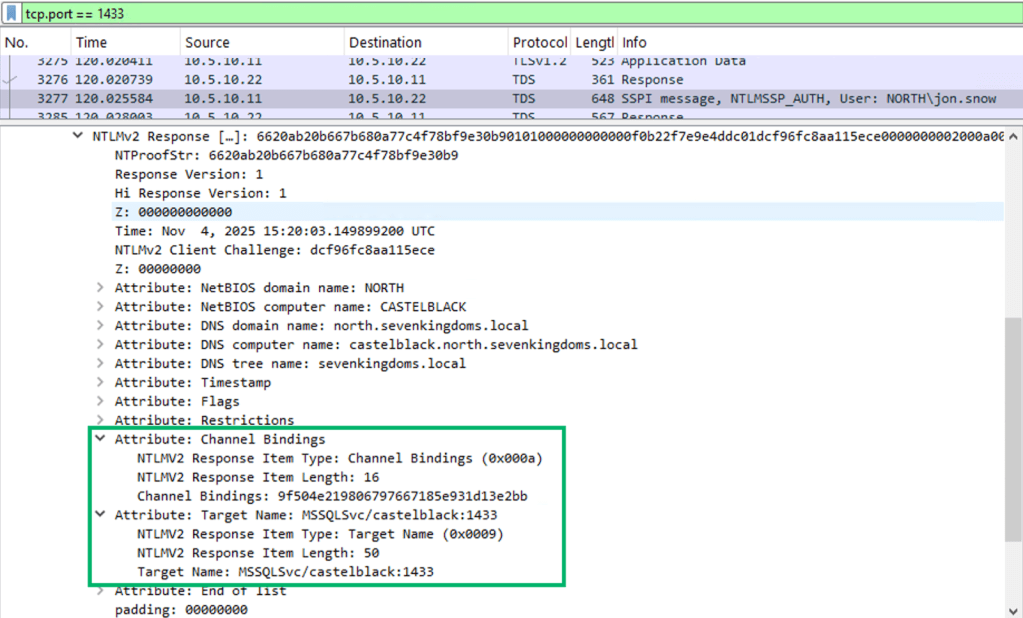
As seen above, the actual bindings exist as AV pairs sent by the client in the NTLM Type 3 authentication message, which are protected by things like the NTProofStr and Message Integrity Check (MIC) in the case of NTLMv2. NTLMv1 does not support the AV pairs relevant to EPA, so if the target server is set to “when supported”, you’re in luck, as the target server will likely accept the lack of AV pairs. Just as you would expect, though, if the server is set to require EPA, you still lack those AV pairs with NTLMv1 and authentication will fail.
Enforcement Settings (Common Client Behavior)
So we have three possible enforcement states for EPA protections and two AV pairs the server will use to validate EPA. In what enforcement states does a server care about these AV pairs?

Generally understanding when a target server cares about what will be useful for more than just an enumeration strategy. It will inform when we can expect coerced or poisoned authentication yield a successful relay. Modern Windows SSPI includes both MsvAvChannelBindings and MsvAvTargetName AV pairs by default when constructing NTLMv2 authentication, regardless of whether the target protocol actually supports channel binding. This default behavior becomes important when understanding how to enumerate EPA enforcement.
So imagine you’ve just coerced NTLM authentication in for the following common beginnings to a relay attack:
- PetitPotam or Printerbug to coerce NTLM authentication (SMB or WebDAV)
- Responder to poison broadcast traffic resulting in SMB-based NTLM authentication
- Mitm6 to poison DHCPv6 resulting in NTLM authentication
This will all generally result in Windows SSPI initiating the NTLMv2 authentication flow and (by default) including the AV pairs relevant to EPA, even if it’s null. A null value still indicates to the server the client supports EPA.

So When Can I Relay, In Plain English?
- EPA = Disabled / Never
- You should generally be able to target with NTLM relay, regardless of the client’s support for EPA or version of NTLM being used
- EPA = Allowed / Accepted / When Supported
- You can theoretically conduct an NTLM relay but common relay scenarios will not work because standard coercion / poisoning techniques (mentioned above) will result in the addition of EPA-relevant AV pairs, indicating the client’s support for EPA
- EPA = Required
- NTLM relay should be prevented by validation of values provided in EPA-relevant AV pairs
Server Implementation Nuances
As previously mentioned, EPA can protect encrypted connections and unencrypted connections. For encrypted connections, the channel binding token can be implemented with algorithms such as tls-server-end-point (IIS), tls-unique (MSSQL),and tls-unique-for-telnet. For unencrypted connections, service binding is included by most NTLMv2 clients and contains the Service Principal Name (SPN) of the target service. So when EPA is configured on the server in some capacity, there should be coverage for both by default… right?

MSSQL EPA Implementation and Defaults
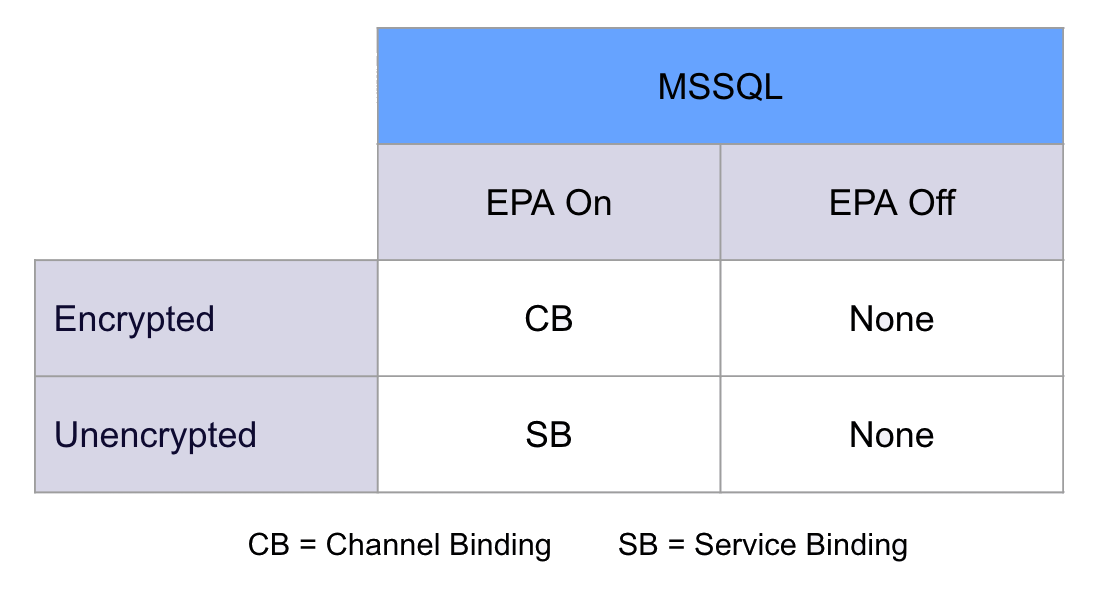
MSSQL servers exhibit the expected behavior. MSSQL servers can support both encrypted and unencrypted connections. When the optional “Force Encryption” configuration and EPA are enabled (either “Allowed” or “Required”) on MSSQL, the implementation intuitively applies protection to both connection types – but validates different bindings:
- Encrypted connections – Channel binding validation (using tls-unique)
- Unencrypted connection – Service binding validation
The important part to note with standard MSSQL service enforcement of EPA is that, by default, the server supports both channel and service binding.
While the protection scenarios are relatively straightforward above, which binding gets checked across varying configurations gets confusing fast without a graphic. So we’ll slowly build this out chart to keep track of which protection matters for each configuration as we go.
Deviation – IIS EPA Implementation and Defaults
The IIS implementation of EPA is not quite as straightforward. Pierre Milioni and Geoffrey Bertoli from Synactiv released a very in-depth blog on this topic that covers the IIS nuances in greater detail than we will here. In summary, when EPA is enabled in the IIS Manager, it will apply protection, in the form of channel binding, to only the encrypted HTTPS service. It’s important to note that an IIS site can have multiple bindings, simultaneously serving an HTTPS and HTTP version of the same site (and some administrators do configure the ADCS web enrollment service in this manner). This means when EPA is configured with the IIS Manager GUI, no protection is applied to the plain HTTP site binding.
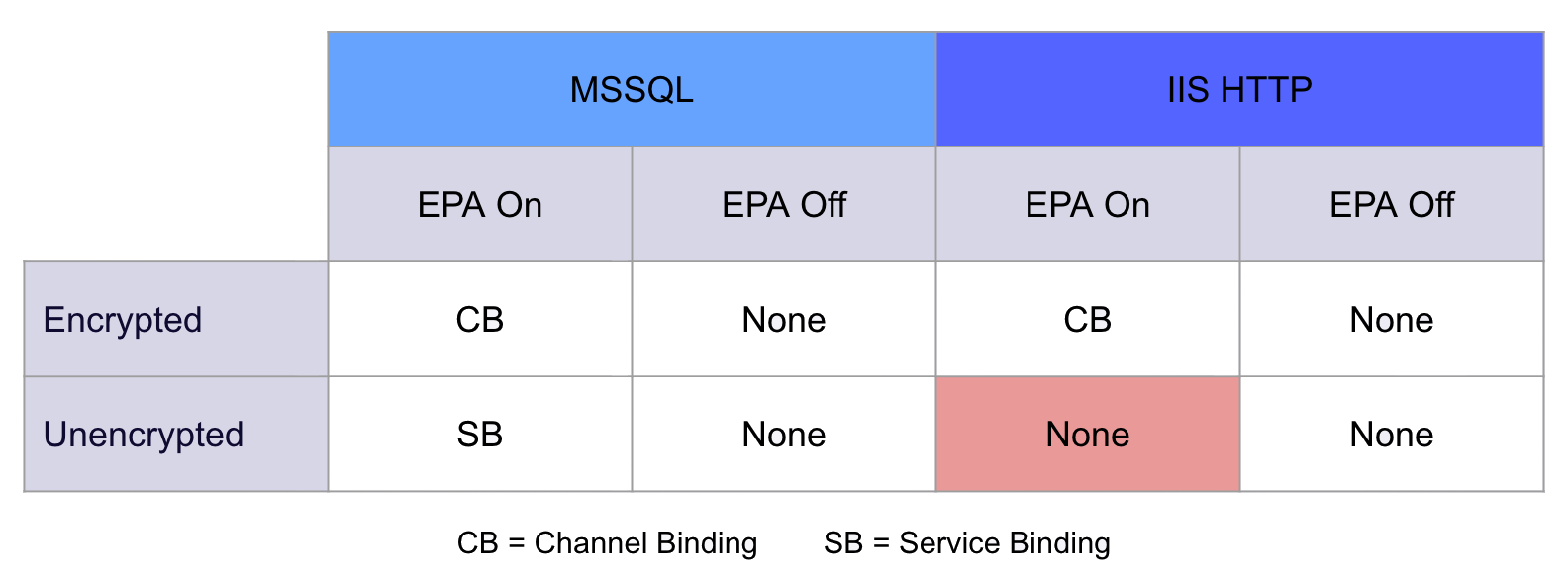
Protection can be applied to the unencrypted service, in the form of service binding, by manually editing the site’s applicationHost.config file and modifying the extendedProtection tag’s flag attribute to the various values outlined in the Synactiv blog. When set up correctly, this will enable protection for both unencrypted and encrypted site bindings; however, it will be service binding protecting both.
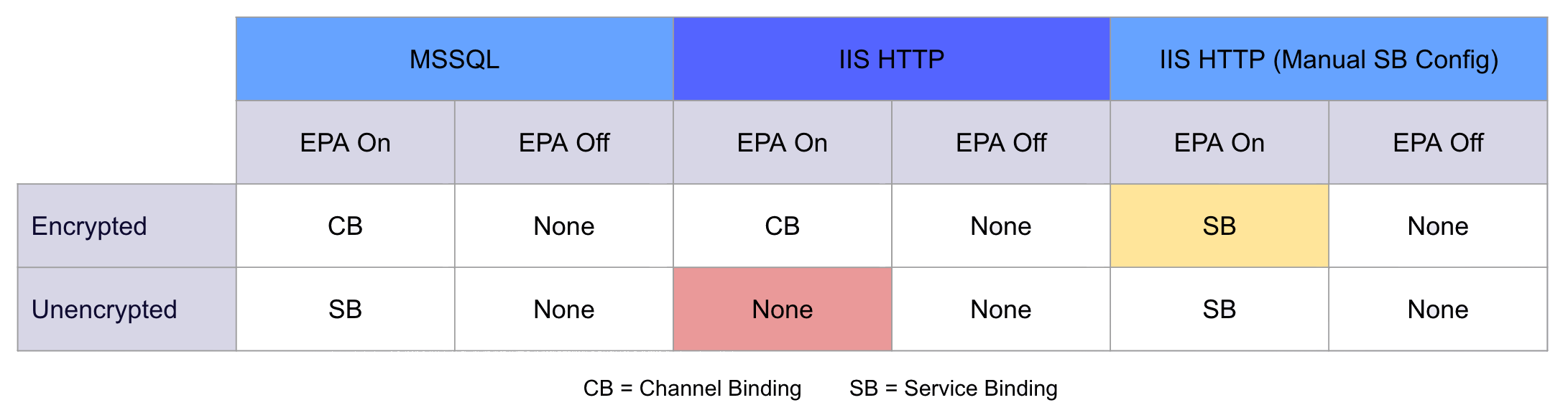
The service binding protection of the encrypted site binding is somewhat unintuitive, and while most likely an edge case, is something we need to keep in mind as possible when performing our determination of EPA enforcement.
Client Error-Based Enumeration Strategy
When we understand what AV pairs a target server expects, and when, in most cases we can use this to enumerate all enforcement levels of EPA. We can manipulate the relevant AV pairs during encrypted or unencrypted authentication attempts. This is how a unique error was used to determine all three enforcement levels of LDAPS EPA from an unauthenticated perspective.

The key insight enabling EPA enumeration is that servers often respond differently to EPA validation failures versus standard authentication attempts. By controlling the client and manipulating the relevant AV pairs, we can identify these unique responses and determine enforcement levels.
Our enumeration strategy involves:
- Establishing baseline responses with valid authentication
- Systematically manipulating MsvAvChannelBindings and MsvAvTargetName values
- Observing differences in server responses (error codes, messages, timing)
- Inferring EPA enforcement based on response patterns
MSSQL EPA Enumeration
MSSQL servers can support both unencrypted and encrypted authentication, but can optionally be configured with “Force Encryption” to only allow encrypted connections. Encryption of the connection determines whether channel or service binding is used to validate EPA on the server-side. With this knowledge, we can run through test cases by manipulating AV pairs in search of unique responses.
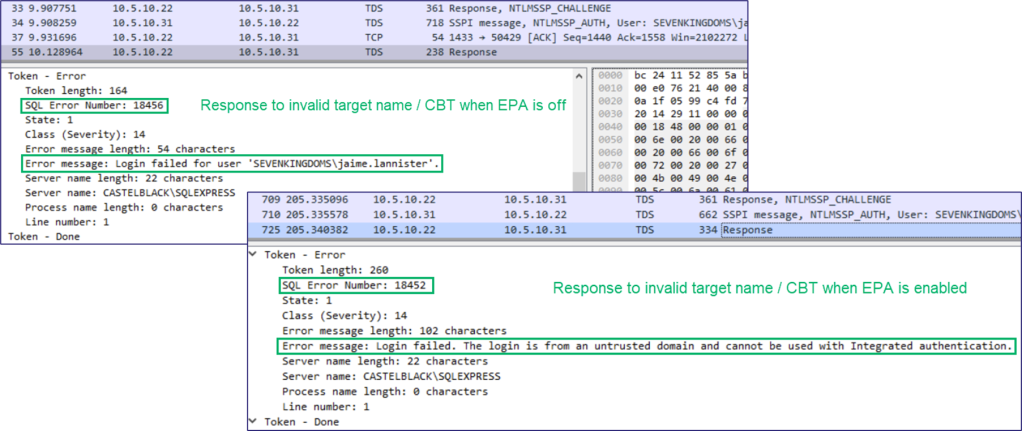
And as we see above, a unique response is identified when valid domain credentials are used in an authentication attempt to the target MSSQL service (regardless of whether the credentials have access to the database).
Therefore, the following logic can be used to determine all EPA enforcement levels:
- Validate the supplied credentials, with proper channel binding and service binding
- Send TDS pre-login message to determine encryption requirement
- If encryption is required
- Send authentication with an invalid channel bindings AV pair value
- Send authentication without a channel bindings AV pair
- If encryption is not required
- Send authentication with an invalid target name AV pair value
- Send authentication without a target name AV pair
So with any valid domain credentials, we can determine all potential enforcement levels of EPA on a target MSSQL server.
NOTE: There were edge cases identified to enumerate EPA enforcement unauthenticated, such as when MSSQL is configured with a GUEST account (a uniqueness in error occurs). To prevent confusion, we opted to implement an approach that applied more generically.
HTTP/S EPA Enumeration
For enumeration of HTTP/S, we take a similar approach to MSSQL. However, for the technique’s implementation to apply generically to multiple HTTP/S services while still accounting for deviations such as with IIS, we use an HTTP 200 (i.e., “OK”) response code as the base success case.
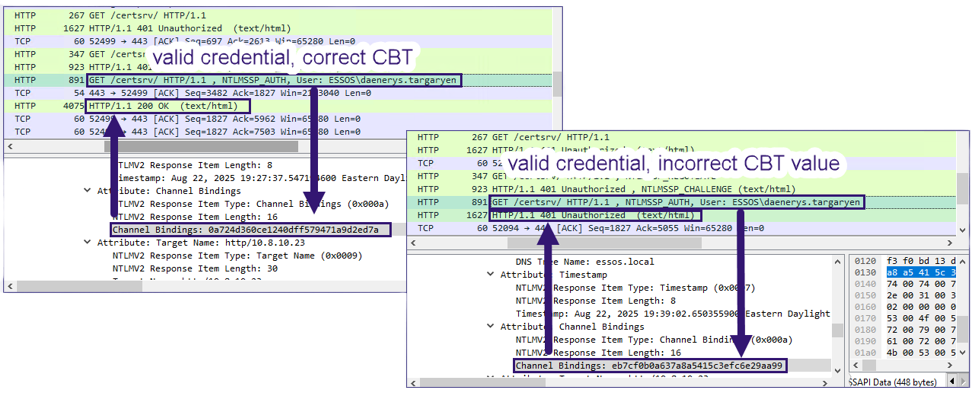
The benefit of this approach is being able to generically apply it across multiple server implementations of HTTP/S, but the downside is the need for credential material that results in a 200 to determine the enforcement level. This will hopefully be a realistic requirement for common use cases, such as ADCS web enrollment where domain users are granted access by default.
The logic to determine the exact EPA enforcement level for HTTP/S, similarly to MSSQL but also accounting for the deviation previously mentioned, is as follows:
- Validate the supplied credentials, with proper channel binding and service binding
- If target service is HTTPS
- Send authentication with an invalid channel bindings AV pair value
- Send authentication without a channel bindings AV pair
- Send authentication with an invalid target name AV pair value
- Send authentication without a target name AV pair
- If target service is HTTP
- Send authentication with an invalid target name AV pair value
- Send authentication without a target name AV pair
So with any credentials that can authenticate to a target HTTP/S service successfully, you can determine the exact level of EPA enforcement.
NOTE: There were edge cases identified where EPA could be enumerated without credential material, specifically against IIS with timing-based enumeration. We opted for an approach that would apply to a larger number of potential target servers.
Tool Release(s)

RelayInformer is now published on GitHub as a Python tool and series of BOFs to ideally fit in your preferred offensive workflow.
RelayInformer Python
The Python implementation includes functionality ported from LdapRelayScan (ability to determine LDAPS channel binding enforcement and LDAP server signing requirement), along with new modules for enumerating EPA for MSSQL and HTTP.
For MSSQL, all EPA enforcement levels can be determined, regardless of encryption requirements:
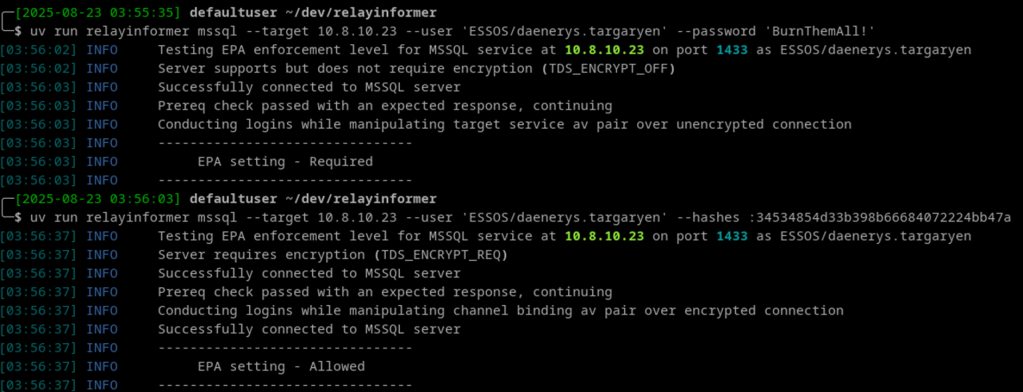
The following demonstrates HTTP and HTTPS enumeration against an ADCS Web Enrollment service:
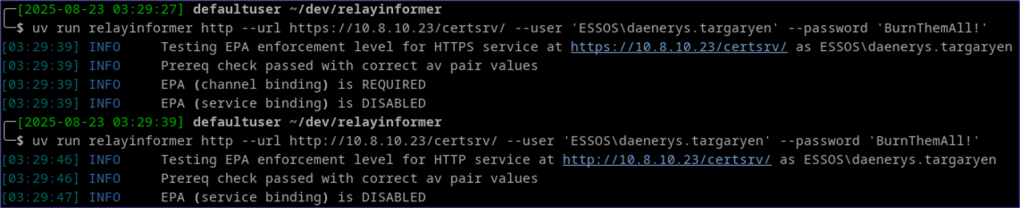
NOTE: If either service binding or channel binding is something other than DISABLED, it can impact your NTLM relay. See the Enforcement Settings (Common Client Behavior) section for more detail.
The following demonstrates the ported ability to check LDAPS EPA enforcement from an unauthenticated perspective, as well as LDAP server signing when credential material is provided:

RelayInformer BOFs
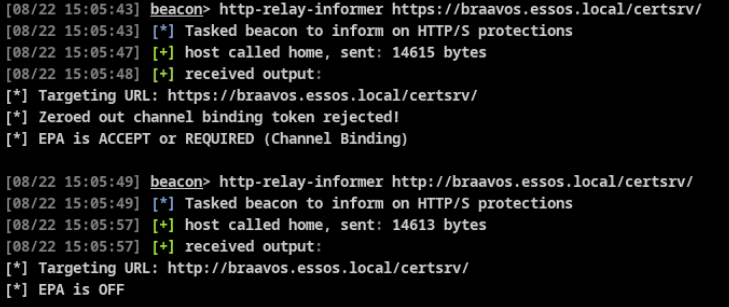
The GitHub repository also contains BOF implementations of the EPA checks. The BOFs leverage the current logon session and do not take explicit credentials for NTLM authentication. As a result of reliance on the Windows SSP, the BOFs can determine if the target service has EPA disabled or not, but cannot distinguish between server-side required and allowed/accepted settings because the relevant AV pairs will always be present in the NTLM type 3 message.
The BOFs set hardware breakpoints on SSPICLI APIs and use an exception handler to manipulate call parameters to:
- Force NTLM authentication, since the enumeration approach revolves around NTLM AV pair manipulation
- Invalidate the MsvAvChannelBindings and MsvAvTargetName depending on the test being performed
A deeper dive on the inner workings can be found on the RelayInformer BOF README. Example usage from Cobalt Strike targeting an ADCS web enrollment service where HTTP and HTTPS site bindings are present, and EPA was configured through the IIS Manager GUI:
Example usage against a MSSQL service requiring encryption and EPA:

OPSEC Notes
For the techniques that require credential material for enumeration (basically everything but LDAPS), a failed logon event will be generated. Though the password used is valid, login attempts failed due to service/channel binding enforcement still generate 4625 events (an account failed to log on). It does not increase the user’s badPwdCount value.
Conclusion and Key Takeaways
We can now easily enumerate EPA enforcement for MSSQL and HTTP/S, popular targets of NTLM relay, from the offensive perspective. Ideally, this will:
- Better inform when an NTLM relay will be possible before allocating time to prepare for the attack
- More clearly demonstrate the root cause of vulnerability when an NTLM relay is performed
As a reminder for when an authenticated context will be required, here is a summary of the EPA enumeration scenarios:
- LDAPS – still does not require authentication
- MSSQL – requires any valid credentials, no need for DB access
- BOF supplements the credential requirement if you are authenticated on-host
- HTTP/S – requires credentials that can authenticate (200) to target service
- BOF supplements the credential requirement if you are authenticated on-host
We hope the described methodology will assist future research with identifying gaps in EPA implementations as well as additional EPA enumeration opportunities.
Defender Guidance
If you have legacy systems or applications that do not support EPA, configuring a service to enforce EPA as “allowed” / “when support” / “accepted” can still provide substantial coverage for relay attacks. This is due to the default inclusion of EPA-relevant AV pairs by the modern Windows SSPI, as discussed in Enforcement Settings (Common Client Behavior). Configuring this setting also comes with less risk for breaking authentication for legacy apps or systems that do not support EPA, because that authentication will still be allowed.
Ideally, EPA is set to “required” to disallow clients not including the appropriate integrity values entirely. Enforcing EPA in audit-only mode first will help identify if there are legacy authentication attempts that will be affected by this setting before enabling enforcement.
References and Credits
- Alex Demine – initial effort in MSSQL EPA research
- @Defte_ – “A journey implementation Channel Binding on MSSQLClient.py”
- @lowercase_drm – early open-source implementation of LDAP channel binding in LDAP3 library
- Pierre Milioni & Geoffrey Bertoli – “A study on Windows HTTP Authentication (Part II)
- Adam Crosser – “Relaying to ADFS Attacks”
- Open-source developers contributing to libraries such as Impacket, msldap, LdapSignCheck, and many more