Git SCOMmit – Putting the Ops in OpsMgr
TL;DR Yet another System Center Ludus configuration for your collection. https://github.com/Synzack/ludus_scom

Intro
As you may know, here at SpecterOps we have been big on SCCM. See https://specterops.io/blog/category/research/?s=sccm.
But SCCM is only a part of the larger Microsoft System Center product suite.
Among the suite’s other offerings is System Center Operations Manager, more commonly recognized by its acronym SCOM or its shorter form: OpsMgr.
Although not as popular as its SCCM sibling, SCOM is likely the second most deployed product in the System Center suite. When analyzing networks we operate in, we see about 25% of them deploy SCOM in some form.
Historically, the SCOM attack surface has been relatively unresearched. The NCC group published a blog in 2017 describing how the RunAs credentials in the SCOM workflow could be decrypted and recovered in plaintext. But since then, I am not aware of any public blogs describing further attack surfaces.
Given the success of SCCM research, naturally we gravitated towards this new SCOM frontier looking for any new attack paths. At Black Hat Europe 2025, two of our team members, Garrett Foster and Matt Johnson, will be giving a talk named “SCOMmand and Conquer – Attacking System Center Operations Manager” describing how default configurations and design choices can create abusable attack paths that can be used to compromise a domain.
While we will not be going into the attack paths here, I highly recommend checking out their talk and blogs when they are released.
As a red team operator, while I may not always be conducting the research, I need an environment where I can reliably test all the new tradecraft my team puts out and know how to perform these attacks in real environments. Historically, if you have ever set up something like SCCM, you know how painful some of the installs are, and how many different variables you can introduce during setup that may or may not be representative of real-world installs. Or after so many exploits, you find your lab in a broken state and maybe your snapshot hygiene hasn’t been great lately.
These were the exact types of problems I love solving with automation, and my tool of choice for doing this is ansible scripts deployed with my Ludus environment in my home lab. You may have seen my previous collection for SCCM.
In this blog, I’ll give you a quick crash course on SCOM—what it is, how its infrastructure and accounts work, and how to build a Ludus environment where you can practice techniques and pursue your own research.
What is SCOM?
Since most of you are likely familiar with the SCCM research in the offensive community, I will be using it for a point of comparison when talking about SCOM. SCCM is a product administrators use as a single pane of glass to manage a network of endpoints (e.g., pushing updates, deploying applications, managing configurations, etc.).
SCOM compliments SCCM and has the role in the System Center suite of monitoring your applications, environments, devices, etc. One of the best ways to understand the function of something is with a story that may be relatable to some admins.
In Kevin Greene’s “Getting Started with Microsoft System Center Operations Manager”, he gave a great example that I would like to paraphrase below.
In his example, he describes a Friday afternoon as a system administrator where there is an outage right before you are about to log off for the weekend. You are scrambling to go through the email or ticket chain trying to figure out exactly what has happened. You are working until midnight trying to figure out the issue, only to find out someone disconnected one of the switches in the datacenter and it was just a cable that needed to be re-plugged in.
But what if you had a monitoring solution that can pinpoint what that issue is and you don’t have to do all that manual digging? That is the issue that SCOM aims to fix. In the scenario where a network device has been unplugged, he gives the following screenshot from a SCOM console:
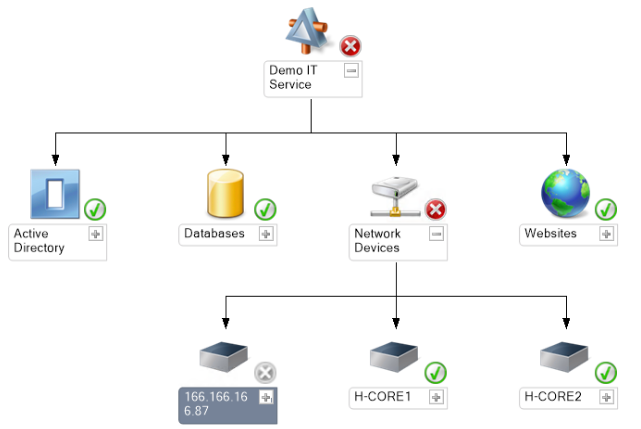
Figure 1 – SCOM Diagram from Kevin Greene
Here, we can immediately identify that “Network Devices” are the issue within the network hierarchy, and can save an administrator time by only focusing on the services that are reporting issues.
SCOM Infrastructure
Now that we have a high-level understanding of SCOM, let’s dive into the different components that comprise the solution. These following roles are used:
- Management Group
- Operational Database
- Data Warehouse Database
- Management Server
- Reporting Server
- Gateway Server
- Agents
Management Group
The management group is a logical container that holds all SCOM-related objects and data created during installation. This group defines the boundaries of the SCOM environment. Each management group must be unique, but you may have multiple management groups for multiple installations. Each management group is made up of the roles below:
Operational Database
Similar to SCCM, SCOM on the backend is essentially a collection of databases that store all the information needed for SCOM to function. The first of these databases is known as the “Operational Database.” By default, this database is named “OperationsManager” and stores all configuration and monitoring data. Information in this database is retained for up to seven days and can be thought of as the short-term memory of SCOM.
Data Warehouse Database
The second SQL database in SCOM is known as the “Data Warehouse Database” and has a default name of “OperationsManagerDW.” This database compliments the “Operational Database” because it stores the historical data from SCOM with a retention period of up to 400 days. This is the long-term memory for SCOM. This database can be hosted on the same SQL server as the “Operational Database,” or it can be hosted on a separate SQL server.
Management Server
The “Management Server” is essentially exactly what it sounds like. Its entire purpose is to manage and push configurations by communicating both with the above SQL databases and with agents on hosts with SCOM installed. Think of the primary site server in SCCM.
Reporting Server
The “Reporting Server” is an optional component of SCOM and integrates with SQL Server Reporting Services (SSRS). The reporting server’s purpose is to generate and schedule reports from the data in SCOM. It can create visual diagrams of the data and export that data to various formats including, but not limited to Word, Excel, PDF, and CSV. The server can also be configured to email you reports on a regular basis.
Agents
“Agents” are the actual software installed to monitor the respective Windows and Linux operating systems that are enrolled in SCOM. These agents can be installed via push installation or manual deployment. The purpose of “Agents” is to communicate from the installed system to the SCOM management server. They can execute workflows and run diagnostics on their hosts. This information is sent back to its assigned primary management server which writes the data to the operational database and the data warehouse database. Additionally, a heartbeat is sent to the management server on a regular basis, by default 60 seconds. Communications to the management server occur over port 5723/TCP for Windows agents and port 1270/TCP for Linux/UNIX agents.
SCOM Consoles
Operations Console
The Operations Console is the main and most common console for interacting with and administering SCOM. It is installed as an executable on the corresponding server and will feel very similar to the SCCM management console if you have used it.
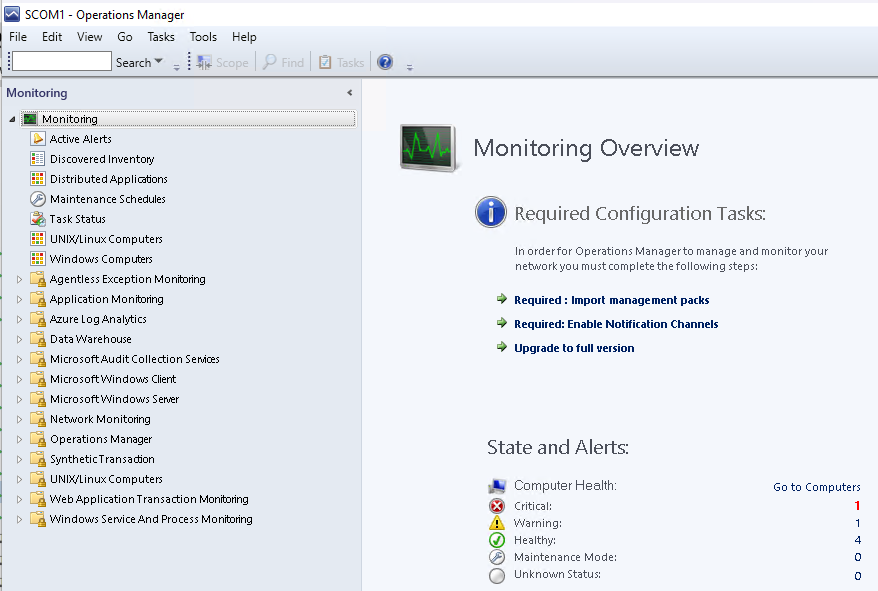
Figure 2 – Operations Console
Web Console
The Web Console is an optional, lightweight version of the Operations Console that runs on an IIS server. It cannot perform administrative actions, but can be used for read-only monitoring of the environment. The default URL can be found at http://<webserverName>/OperationsManager.
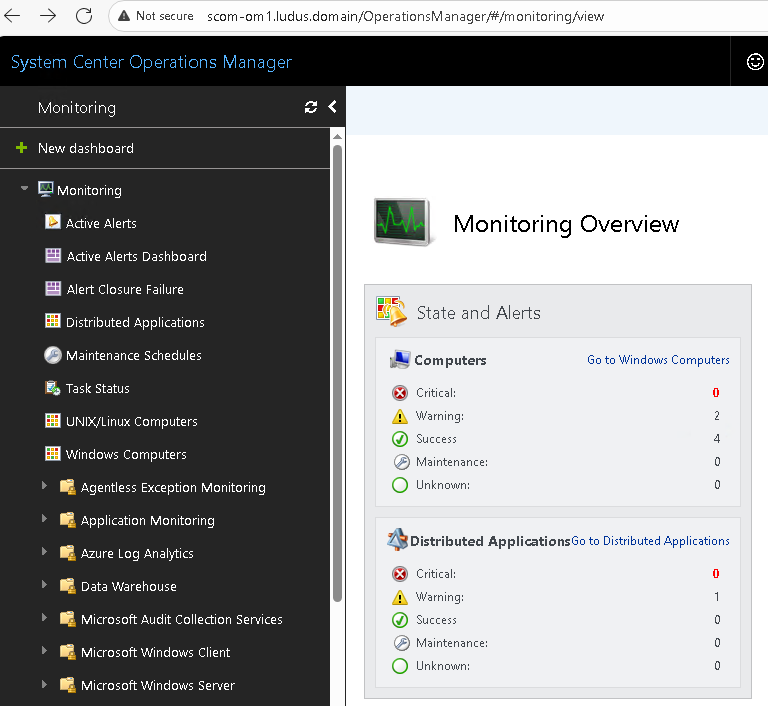
Figure 3 – Web Console
Topology Designs
Similar to SCCM, where the individual roles can be installed on one or multiple servers, SCOM follows the same methodology. Depending on the size of the environment and needs of individual companies, there are several topology designs that are typically implemented when setting up SCOM. Below we will look at some common design examples from Kevin Greene. These are not exhaustive, but will give you an idea of what you may see in the real-world.
Single Server Design
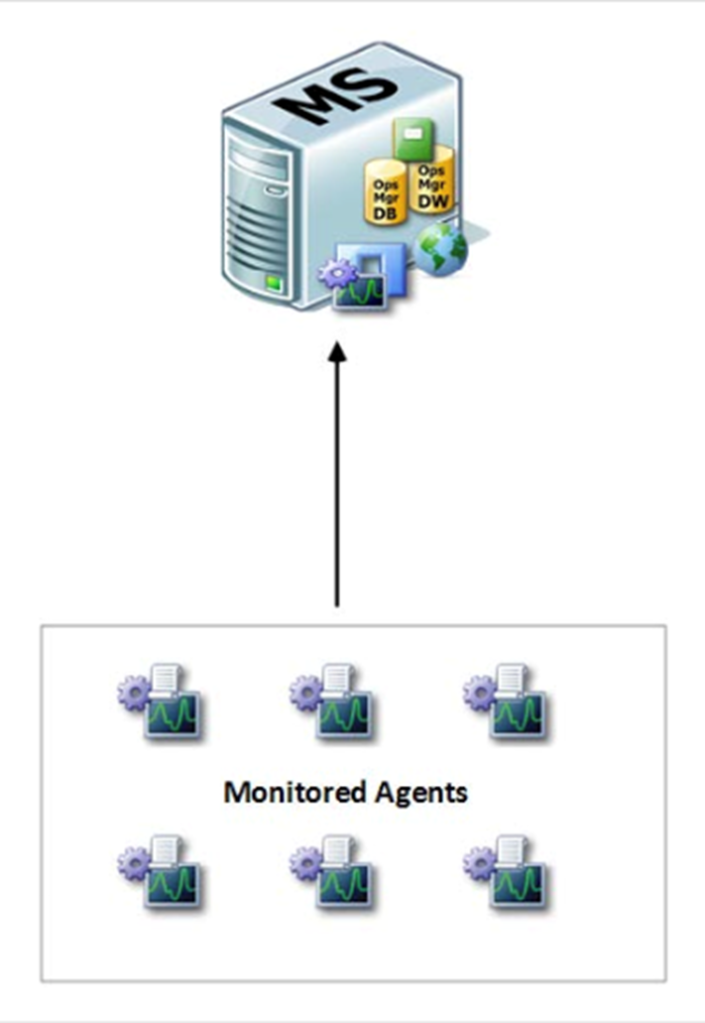
Figure 4 – Single Server Design from Kevin Greene
The “Single Server” design is the most basic implementation of SCOM and consists of all the above roles hosted on the same server. This design is mostly used for testing purposes when demoing SCOM, or for very small organizations.
Small Distributed Design

Figure 5 – Small Distributed Design from Kevin Greene
The “Small Distributed” design consists of two servers, one for the Management Server, and one for all SQL related roles. This design constitutes the smallest design recommended for production environments within small organizations, but provides no resilience or fallbacks if either server goes offline.
Medium Distributed Design

Figure 6 – Medium Distributed Design from Kevin Greene
The “Medium Distributed” design adds several more servers for the individual roles as well as adding an additional Management server for high availability. The individual SQL roles are separated onto different servers. The Management servers automatically create Resource Pools which facilitate load balancing and redundancy if one of the servers goes offline.
Other Designs
These designs are not an exhaustive list of every potential design and every environment could have a different configuration of the same roles. Kevin Greene describes one other design in his book called the “Large Distributed” server design. This role adds an additional role called the “Gateway” server. This server is not currently included in this Ludus role, but its purpose is to join an untrusted domain and uses PKI certificates to establish trust with the main domain. If you are curious about in-depth design topologies and details, I highly recommend reading his book.
SCOM Service Accounts
Similar to our SCCM sibling, SCOM uses various service accounts to perform its functionality within the network. The roles are as follows:
- Action Account
- Data Access Account
- Data Reader Account
- Data Writer Account
These accounts have different naming conventions depending which guidance administrators followed. In Kevin Greene’s book for example, he recommends a prefix of “opsmgr”, while Kevin Holman’s blog recommends a “SCOM” prefix.
Action Account
The “Action” account is the account SCOM used for collecting data and responding to the monitored hosts within the network. It is recommended to configure this account as a standard domain user account. It SHOULD NOT be granted administrative privileges such as “Domain Admin”. It can be configured as the computer account if needed.
Common names: “opsmgr_action” or “SCOMAA”.
Data Access Account
The “Data Access” account is responsible for reading and updating information in the Operational Database. This account can be the Local System account, or a domain account. The caveat is that if the Operational database is on a remote system and separate from the Management server, this MUST be a domain account to facilitate authentication.
Common names: “opsmgr_sdk” or “SCOMDAS”.
Data Reader Account
The “Data Reader” account is required when using the Reporting server role. Its responsibility is to run queries against the Data Warehouse Database. This account SHOULD be configured as a domain account and requires both SQL server logon rights and Management server logon rights.
Common names: “opsmgr_dataread” or “SCOMREAD”.
Data Writer Account
The “Data Writer” account’s responsibility is to write data from the Management server to the Data Warehouse SQL database and read data from the Operational database. This account SHOULD also be configured as a domain account with standard permissions. Similar to the “Data Reader” account, it will require SQL Server logon rights and logon rights to both the Operational and Data Warehouse databases.
Common names: “opsmgr_datawrite” or “SCOMWRITE”.
OpsMgr Security Group
Kevin Greene’s book provides recommended guidance to create a new Active Directory group to be created and contain all the above service accounts. If you are familiar with SCCM, you may already have guessed that this group is recommended to have Local Admin privileges on each SCOM management server. Optionally, Kevin recommends creating a SCOM service account that has Domain Admin permissions to easily install SQL and Management servers and reduce manual post-installation changes.
Common names: “OpsMgr_AdminGroup” or “SCOMAdmins”.
Automation – Ludus Roles
Now that we have reviewed SCOM infrastructure and service accounts at a very high level, we will discuss what is included in the attached Ludus lab. The individual roles are as follows:
- install_db
- install_omconsole
- install_omreporting
- install_omserver
- install_omwebconsole
- install_additional_omserver
- create_scom_accounts
- deploy_agents
- disable_firewall
install_db
This role installs SQL Server 2022 and sets up the accounts in correspondence with the service accounts within your configuration. It also installs SQL Server Management Studio (SSMS). Of note, this role does not install any of the SCOM databases. This role simply configures SQL Server and SSMS in a barebones configuration, creating a blank canvas to install either the Operational or Data Warehouse databases.
install_omconsole
This role installs the Operations Manager Console role on the server.
install_omreporting
This role configures an SQL database with SQL Server Reporting Services (SSRS) and then configures the Reporting SCOM role.
install_omserver
This role installs the Management server role on the designated host. This is also the role where you will specify which SQL server(s) (created by install_db) will host your Operational and Data Warehouse databases.
install_omwebconsole
This role installs both IIS on the host and the Operations Manager Web Console role.
install_additional_omserver
This role is used when you are creating more than one Management server, such as when in the Medium Distributed design. The reason this role is separated from install_omserver, is because the way the Ludus roles are configured, install_omserver handles additional functionality, where install_additional_omserver simply creates the role and joins it to the greater SCOM infrastructure.
create_scom_accounts
Creates all service accounts needed for SCOM:
- Action Account
- Data Access Account
- Read Account
- Writer Account
- SQL account
Additionally, it creates the SCOM admins group which will become local admin on each server.
deploy_agents
This role does exactly what it sounds like and enrolls each designated host into SCOM by installing an agent with the OperationsManager PowerShell module.
disable_firewall
This role also does exactly what it sounds like. It disables the Windows firewall on each designated host. I typically use this for my labs as firewalls are often a source of errors in advanced setups, and poking individual holes can be cumbersome.
Automation – Considerations
Unlike my previous SCCM Ludus collection, which was rigid in its design, I wanted to make this configuration as modular as possible. All of the roles can be thought of as individual components you can set up à la carte on your servers. I have provided three Ludus YAML configurations for “single-server.yml”, “small-distributed.yml”, and “medium-distributed.yml”. In each of these instances, these are not three individual rigid labs, but three different combinations of the provided roles to create the specific design. You can think of the roles as follows:
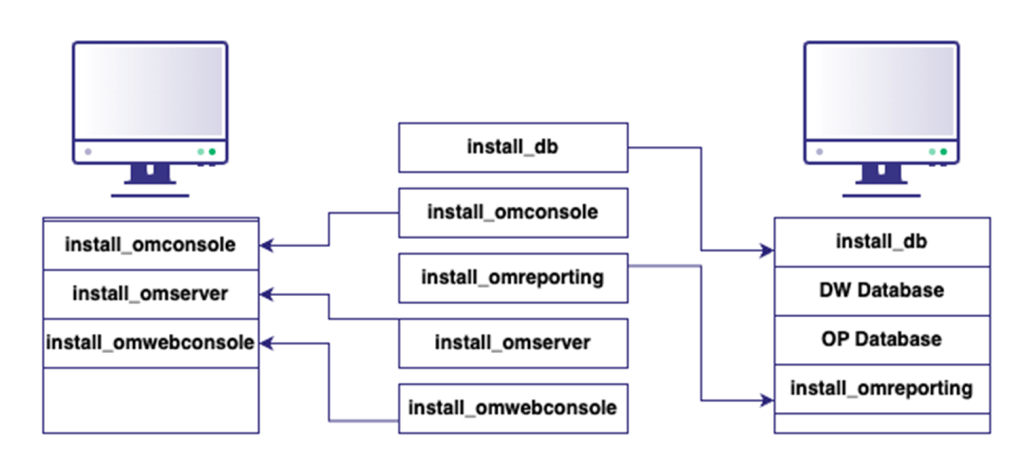
Figure 7 – Role Design
The goal of this is to make it easier as unique environments and setups are seen. You should be able to make any combination you need (minus Gateway Servers). It will require you to be aware of order of operations (e.g., install_db on the individual servers before install_omserver).
You will also notice the Ludus “depends_on” configuration for roles such as Reporting (install_omreporting), which needs to have pre-existing Management servers (install_omserver) and Web Consoles (install_omwebconsole).
Lastly, I made use of “global_role_vars” for any configurations shared across the greater SCOM configuration that are not server specific. This includes things such as the groups, usernames, and passwords.
I hope this lab helps you practice the various techniques that have and will be released and allow you to practice and even conduct your own research. The configuration can be found at https://github.com/Synzack/ludus_scom.
Please see the references below for information I found valuable going down this path.
References
- Getting Started with Microsoft System Center Operations Manager, Kevin Greene, https://www.packtpub.com/en-us/product/getting-started-with-microsoft-system-center-operations-manager-9781785280870?srsltid=AfmBOoqsfAazFFZ_F62N6Vblm8uEeSwd6LcPxnmoYA4cjhWzYelUo4EK
- SCOM 2022 – QuickStart Deployment Guide, Kevin Holman, https://kevinholman.com/2022/05/01/scom-2022-quickstart-deployment-guide/
- SCOM 2025 – QuickStart Deployment Guide, Kevin Holman, https://kevinholman.com/2024/11/22/scom-2025-quickstart-deployment-guide/