Introducing ConfigManBearPig, a BloodHound OpenGraph Collector for SCCM
tl;dr: Security researchers have discovered 30+ unique attack techniques targeting SCCM in the past several years, as its widespread control of an organization’s devices offers an appealing target. ConfigManBearPig is a PowerShell script that collects data from SCCM to map out the misconfigurations that cause these issues. This data can be uploaded to BloodHound, an open-source tool with Maps-style navigation and an interactive graph that helps users visualize and remediate attack paths.
This post details how ConfigManBearPig collects information and provides practical examples of how it can be used discover attack paths through SCCM using BloodHound.
How can I operationalize this?
It’s been a goal of mine for a long time to incorporate all of the recent attack path research revolving around Microsoft Configuration Manager (formerly SCCM, sometimes referred to as ConfigMan) into a BloodHound collector. Now that OpenGraph allows you to add your own custom nodes and edges to BloodHound, I finally made it happen.
First, I wrote MSSQLHound so I could visualize the underlying nodes and edges needed to depict SCCM hierarchy TAKEOVER-1. Next, I got to work on ConfigManBearPig, an OpenGraph collector you can use to get a comprehensive understanding of the SCCM attack techniques that are possible in an environment.
Why the name? Because SCCMHound was already taken and I’m a big fan of South Park!
ConfigManBearPig adds 5 new nodes, 20 new edges, and 13 existing edges and counting to the BloodHound graph.
It can be used to identify every known SCCM hierarchy TAKEOVER technique documented in Misconfiguration Manager, all but one of them from an unprivileged domain context. It can also identify a handful of ELEVATE and CRED techniques.
I included 16 prebuilt Cypher queries you can import into BloodHound and use to easily identify these issues.
I will be adding new SCCM attack paths to ConfigManBearPig as they are discovered. Come hang out in the #sccm channel in the BloodHound Slack if you want to stay tuned in to the latest SCCM tradecraft, ask questions, or collaborate on research.
How does it work?
By default, ConfigManBearPig performs the following collection phases in order. Users can also specify specific collection phases to run using the -CollectionMethods command-line option.
Run-once Collection Phases
These phases are executed a single time to identify SCCM nodes and targets for the subsequent per-host collection phases by contacting services that are typically accessible to any user on an internal network.
LDAP Collection
First, ConfigManBearPig uses its domain user execution context to identify a domain controller (DC), authenticate to LDAP, and enumerate objects in the Active Directory System Management container that are created when the schema is extended to support SCCM. Much of this phase (as well as the HTTP and SMB phases that happen later) is based on SCCMHunter by Garrett Foster (@unsigned_sh0rt).
Specifically, it identifies:
- potential primary site servers (objects with
Full Controlof theSystem Managementcontainer) - primary sites:
(objectClass=mSSMSSite) - management points, central administration sites, and fallback status points:
(objectClass=mSSMSManagementPoint) - potential SCCM client devices:
(servicePrincipalName=CmRcService/*) - potential PXE-enabled distribution points:
(&(objectclass=connectionPoint)(netbootserver=*)) and (objectclass=intellimirrorSCP)
Note that other systems may have Full Control of the System Management container, so there may be a few identified targets that are not related to SCCM. For example, Exchange servers often get this permission for some reason. Don’t worry, ConfigManBearPig runs additional checks to figure out whether or not these systems are actually part of SCCM.
The script adds each identified system to a list of targets for the subsequent collection phases, creates corresponding Computer, SCCM_Site, and SCCM_ClientDevice nodes, and adds them to a list of nodes that will be converted to JSON that BloodHound can ingest.
Local Collection
When this method is enabled and ConfigManBearPig is executed on an SCCM client device, it enumerates the device’s primary site and available management points, then adds corresponding SCCM_ClientDevice, SCCM_Site, and Computer nodes to the script results.
Feeling spicy and want to throw caution to the wind? Execute ConfigManBearPig with the -EnableBadOpsec flag to execute the CRED-3 technique, which will read the encrypted blobs containing the network access account (NAA) username and password from the local Windows Management Instrumentation (WMI) repository and launch a scheduled task as SYSTEM that executes both cmd.exe and powershell.exe to decrypt the blobs with the DPAPI system master keys. You will get caught by EDR/AV, but maybe you’re on a pentest or a smash and grab and don’t need to be stealthy or are a defender trying to make a point that the NAA must die.
ConfigManBearPig will always display the NAA username but will only decrypt and display the NAA password if you also enable the -ShowCleartextPasswords flag to avoid storing creds in output and logs by default. A User node is created for the NAA, then the Computer node where ConfigManBearPig was run is connected to that node with the SCCM_HasNetworkAccessAccount edge.
Note that the password may have expired or be otherwise invalid. It could even be a canary.
Next, ConfigManBearPig identifies all URLs and UNC paths in the SCCM client device logs directory (C:\Windows\CCM\Logs), resolves and filters them to those in private IP address space, and adds them to the list of targets for subsequent collection phases. These systems are likely management points, distribution points, or other client-facing SCCM site system roles the client device has tried to contact.
DNS Collection
Next, ConfigManBearPig uses the list of sites identified in previous phases to enumerate management points that are published to _mssms_mp_$siteCode._tcp.$domain ADIDNS SRV records, then creates Computer nodes for each and adds them to the list of targets for subsequent collection phases.
DHCP Collection
This is a work in progress based on research by Christopher Panayi (@Raiona_ZA), Carsten Sandker (@0xcsandker), and Adam Chester (@_xpn_) and is not yet ready for primetime.
ConfigManBearPig will mimic the PXE boot process that occurs during operating system deployment and send a DHCP broadcast message requesting the TFTP server IP address and boot file location for the PXE server, which is often a distribution point.
Next, it will fetch the identified boot file via TFTP, attempt to obtain any other prestaged boot media files stored on the distribution point via SMB/HTTP (ELEVATE-5), and attempt to decrypt them with the default value that’s used when SCCM administrators do not require a password to be entered to begin the PXE boot process.
If decryption is successful, it will identify the management point to contact to continue operating system deployment and check whether the client authentication certificate allows authentication as the distribution point (ELEVATE-4).
Finally, it will fetch the machine policy accessible to unknown devices and decrypt any secrets it contains, which may include passwords such as NAAs and those stored in task sequences (e.g., join domain, add local admin, run as user, etc.) and collection variables (CRED-1). I may add this bit to the HTTP phase instead of or in addition to the DHCP phase.
Systems discovered during this phase will be added to the list of targets for subsequent collection phases and Computer nodes will be added to the script results. User nodes will be added for any discovered accounts and SCCM_HasStoredAccount edges will be created from the SCCM_Site to each User.
Per-host Collection Phases
These phases are executed against every target identified in the run-once collection phases to determine what roles they serve in SCCM and create additional SCCM nodes and edges. If any new targets are identified in any of the per-host collection phases, all per-host collection phases are run against the new targets as well. This process repeats until all per-host collection phases are completed against the entire list of targets and no new targets are discovered.
Remote Registry Collection
During this phase, which is based on research by Dylan Bradley (@slygoo), ConfigManBearPig attempts to contact each identified target’s Remote Registry service to determine its site system roles based on whether certain subkeys are present and remotely accessible to Users.
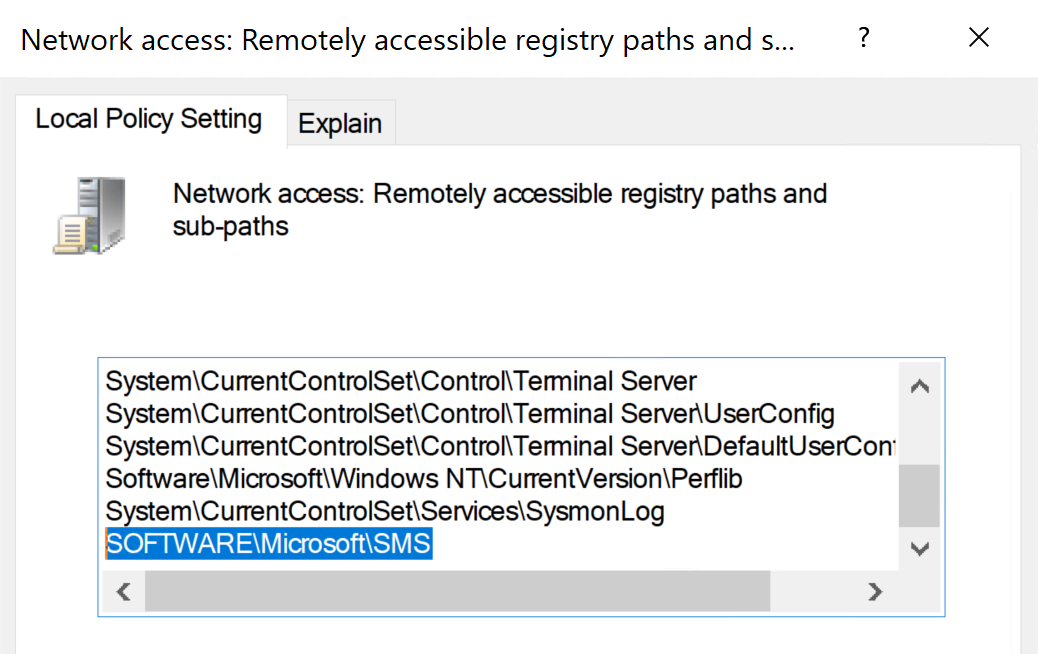
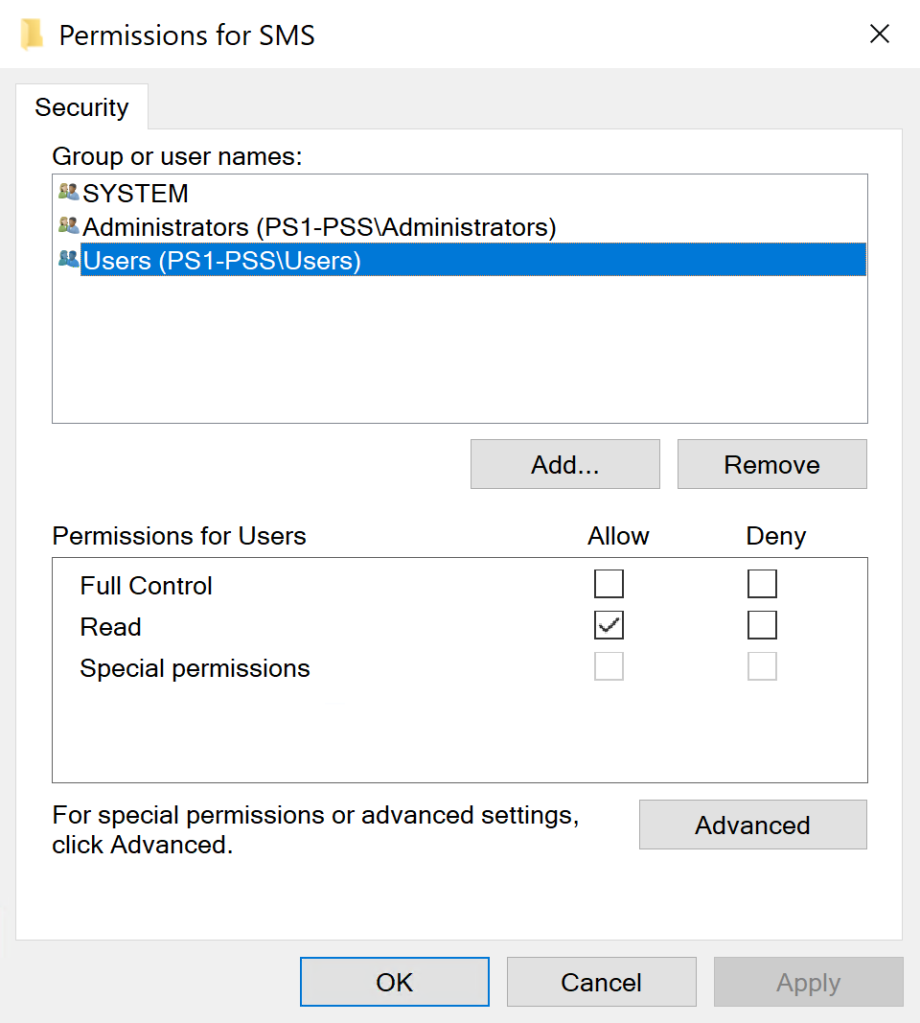
The following information is remotely accessible to Users on site servers:
- the three character site code for the primary site:
SOFTWARE\Microsoft\SMS\Triggers - the list of site systems with the
Component Serverrole (i.e., any server that runs theSMS_EXECUTIVEservice, including site servers, site database servers, management points, and service connection points):SOFTWARE\Microsoft\SMS\COMPONENTS\SMS_SITE_COMPONENT_MANAGER\Component Servers - The list of
Multisite Component Servers, which should all be site database servers:SOFTWARE\Microsoft\SMS\COMPONENTS\SMS_SITE_COMPONENT_MANAGER\Multisite Component Servers
In addition, the SOFTWARE\Microsoft\SMS\CurrentUser subkey, which contains the SID of the currently logged-in user, is remotely accessible to Users on site servers and distribution points. It is also present on SMS Providers, site database servers, distribution points, and management points (and maybe other roles I haven’t checked), but is only remotely accessible to administrators on these site systems.
ConfigManBearPig creates or updates SCCM_Site, Computer, and User nodes based on the data collected in this phase, then creates the following MSSQL nodes for any identified site database servers:
MSSQL_Server: the instance of MSSQL Server on the site database serverMSSQL_Database: the site database, the name of which is inferred from the three character site code (e.g.,CM_PS1)MSSQL_ServerRole: thesysadminfixed server role that exists on all MSSQL instancesMSSQL_DatabaseRole: thedb_ownerfixed database role that exists in all MSSQL databases
Next, ConfigManBearPig connect these new nodes with the following edge classes based on MSSQL and SCCM defaults:
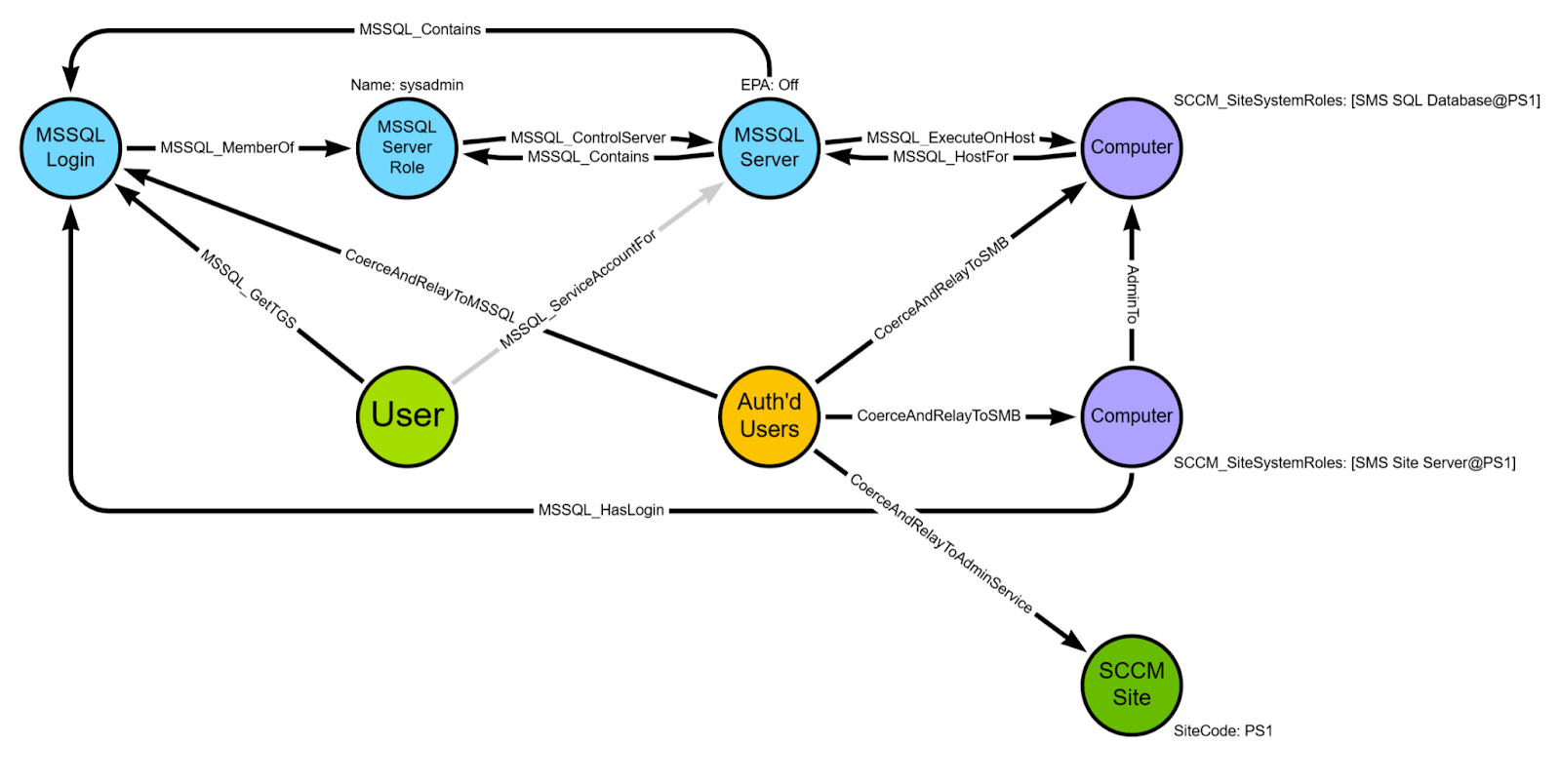
(siteDatabaseServer:Computer)-[MSSQL_HostFor]->(mssqlInstance:MSSQL_Server)(mssqlInstance:MSSQL_Server)-[MSSQL_ExecuteOnHost]->(siteDatabaseServer:Computer)(mssqlInstance:MSSQL_Server)-[MSSQL_Contains]->(siteDatabase:MSSQL_Database)(mssqlInstance:MSSQL_Server)-[MSSQL_Contains]->(sysadmin:MSSQL_ServerRole)(sysadmin:MSSQL_ServerRole)-[MSSQL_ControlServer]->(mssqlInstance:MSSQL_Server)(siteDatabase:MSSQL_Database)-[MSSQL_Contains]->(db_owner:MSSQL_DatabaseRole)(db_owner:MSSQL_DatabaseRole)-[MSSQL_ControlDB]->(siteDatabase:MSSQL_Database)(siteDatabase:MSSQL_Database)-[SCCM_AssignAllPermissions]->(primarySite:SCCM_Site)
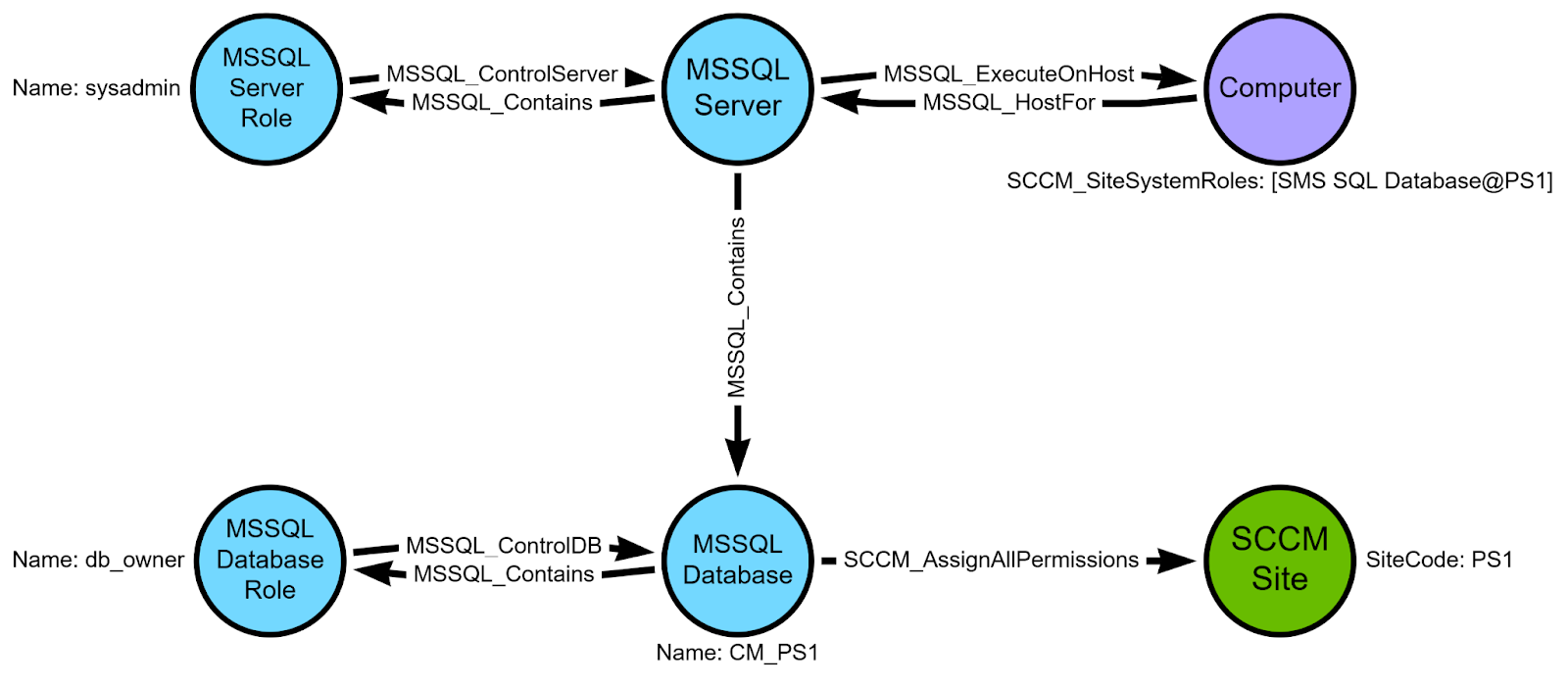
We know these edges exist because the primary site server’s domain computer account (as well as the computer accounts for SMS Providers and passive site servers) are required to be members of the sysadmin MSSQL server role and the db_owner database role in the site database. These permissions allow us to take over the entire SCCM hierarchy by adding or modifying rows in the tables that control administrative users and security role assignments. We’ll add their MSSQL_Login and MSSQL_DatabaseUser nodes and edges during post-processing after we know all of the site system roles.
You can learn more about the MSSQL edge classes in MSSQLHound’s README.
We can also add a HasSession edge for the User that is currently logged in to the remote registry collection target.

If the account executing ConfigManBearPig is a member of the local Administrators group on the target, we can also query the SOFTWARE\Microsoft\Microsoft SQL Server\MSSQL*.MSSQLSERVER\MSSQLServer\SuperSocketNetLib registry key to determine whether extended protection for authentication (EPA) is set to Allowed or Required on the MSSQL server, preventing NTLM relay attacks.
If the account isn’t a local admin, don’t worry! We can still collect these settings remotely as any domain user using techniques that Nick Powers (@zynergy) and Matt Creel (@Tw1sm) recently published during the next collection phase.
MSSQL Collection
During this phase, ConfigManBearPig connects to the site database server via tabular data stream (TDS) to determine whether connections require encryption, then hooks InitializeSecurityContextW and connects to MSSQL using messages crafted to identify whether EPA is set to Allowed, Required, or Off through error-based enumeration.
When Force Encryption is set to Off and EPA is Allowed or Required, service binding is used to prevent NTLM relay attacks, whereas when EPA is Allowed or Required and Force Encryption is On, channel binding is used to prevent NTLM relay attacks.
If EPA is Off, the default setting, the site database MSSQL server is susceptible to NTLM relay attacks that could allow hierarchy takeover.
AdminService Collection
During this phase, ConfigManBearPig connects to each target identified in previous phases via HTTPS and makes requests to the AdminService REST API. If the target is an SMS Provider and the account executing the script is an SCCM administrative user with an assigned security role, ConfigManBearPig can enumerate all known attack paths in the hierarchy via specific endpoints with base https://$Target/AdminService/wmi.
SMS_SCI_SiteDefinition
This endpoint returns sites and their site servers and site database servers, allowing us to use the same Computer and MSSQL_* node and edge creation logic in the remote registry collection phase.
SMS_SCI_Reserved
This endpoint returns the list of accounts stored in SCCM and their site codes that we can use to create User nodes, update SCCM_Site nodes with a list of stored accounts, and create an SCCM_HasStoredAccount edge from the SCCM_Site to the User node. They can be decrypted using a variety of techniques documented in CRED-5 and CRED-8.
SMS_CombinedDeviceResources
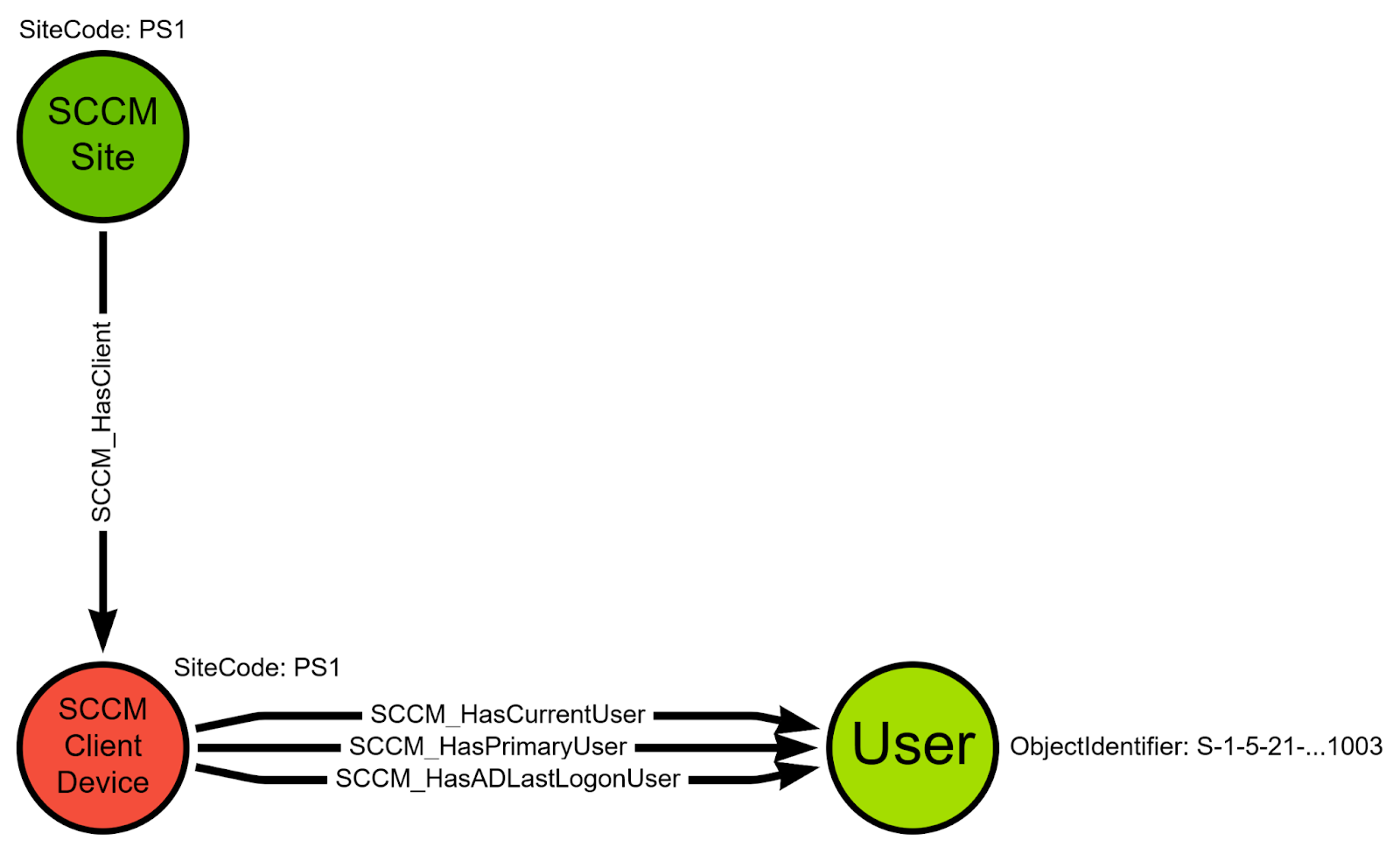
This endpoint returns client devices and properties we can use to create SCCM_ClientDevice nodes and the following edge classes:
(primarySite:SCCM_Site)-[SCCM_HasClient]->(client:SCCM_ClientDevice)(client:SCCM_ClientDevice)-[SCCM_HasADLastLogonUser]->(:User)(client:SCCM_ClientDevice)-[SCCM_HasCurrentUser]->(:User)(client:SCCM_ClientDevice)-[SCCM_HasPrimaryUser]->(:User)
SMS_R_System
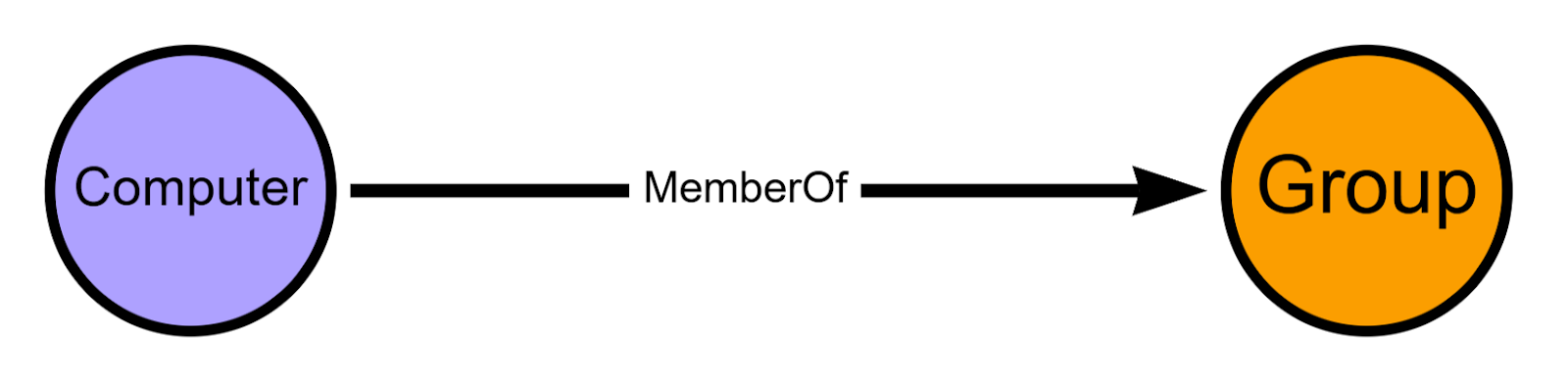
This endpoint returns all systems that the SCCM hierarchy is aware of via the various discovery methods it supports, which often includes all systems in the Active Directory domains where SCCM is used. We can also use this endpoint to determine whether each system is an SCCM client device or not and what security groups each system is a member of, allowing us to create corresponding Computer, SCCM_ClientDevice, and Group nodes and MemberOf edges.
SMS_R_User
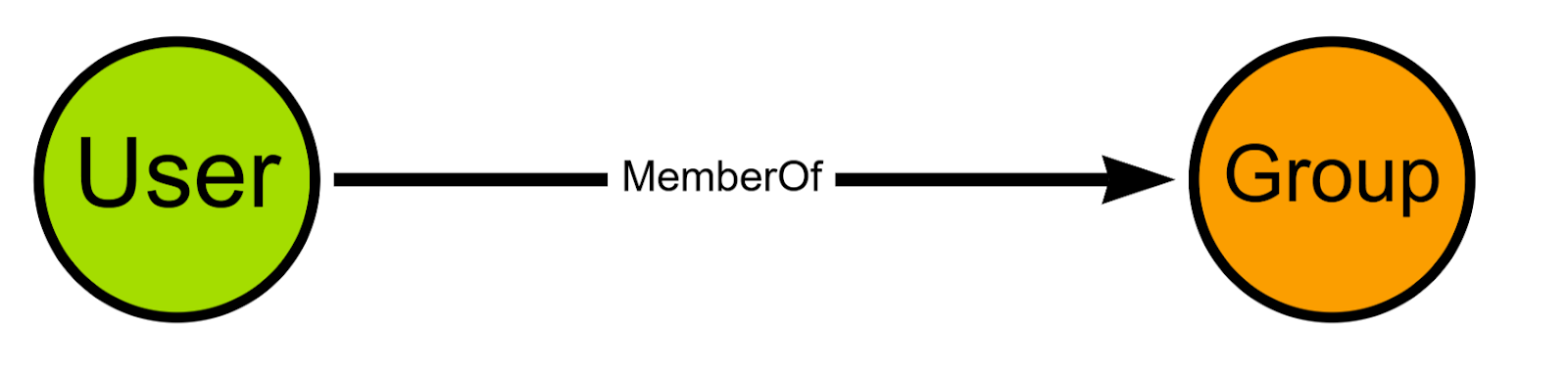
Similarly to the SMS_R_System endpoint, this endpoint returns all users that the SCCM hierarchy has discovered, likely including all users in the Active Directory domains where SCCM is used, allowing us to create User nodes as well as Group nodes and MemberOf edges for each security group the user is a member of.
SMS_Collection
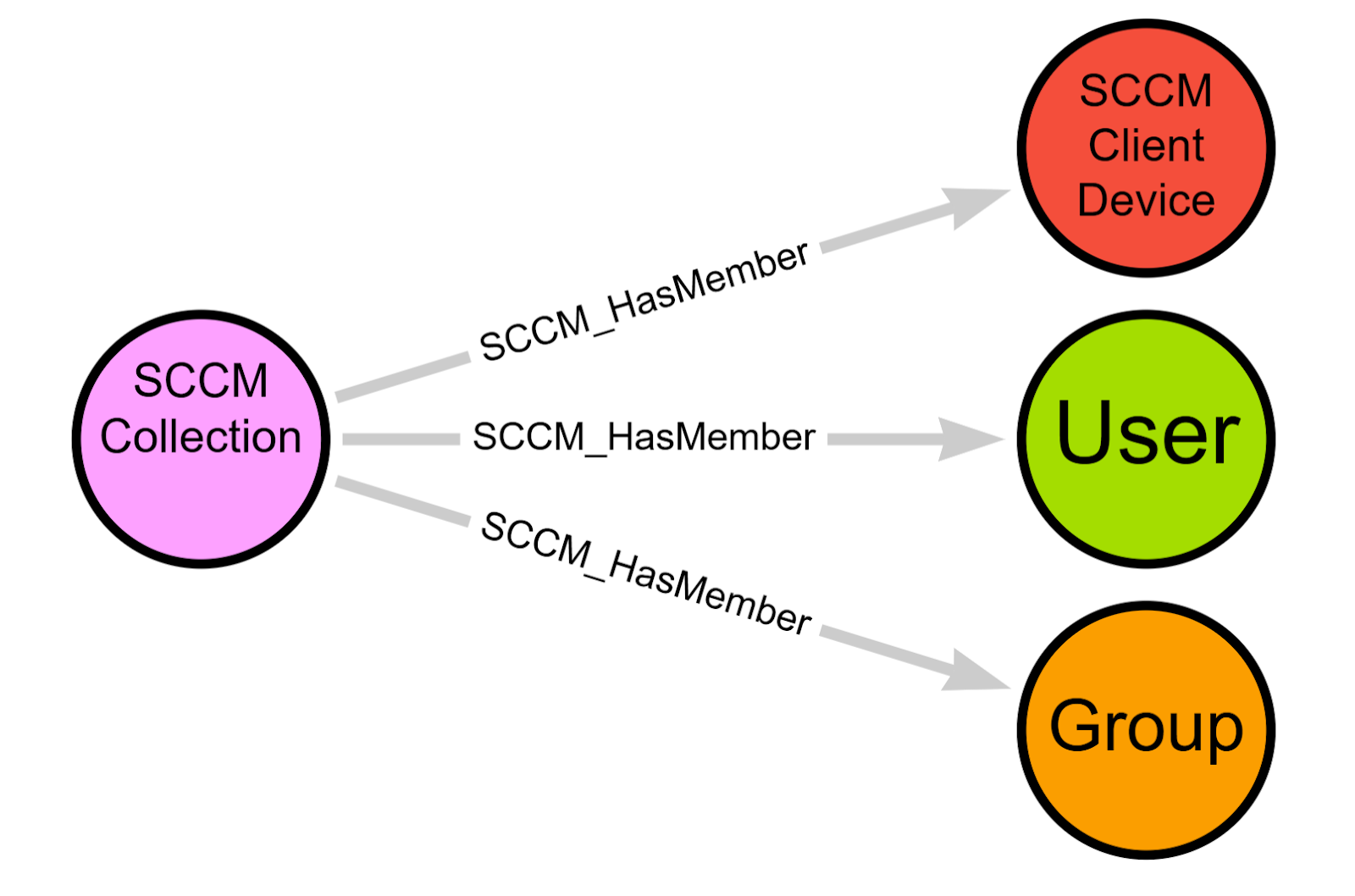
This endpoint allows us to collect user and device collections, which are groups of principals SCCM can target for operations such as application deployment or patching. For example, an organization may create a collection containing software developer domain user accounts or groups to install department-specific software, or may create a collection of all domain computers belonging to users in the Eastern time zone to run a resource-intensive installation outside of business hours. With this information, we can create SCCM_Collection nodes.
SMS_FullCollectionMembership
This endpoint returns the members of each collection identified by querying the SMS_Collection endpoint, including domain users, groups, and computers that we can use to connect SCCM_HasMember edges from SCCM_Collection nodes to User, Group, and SCCM_ClientDevice nodes, as well as update each SCCM_ClientDevice node with the identifiers for collections it is a member of.
SMS_Role
This endpoint returns the security roles that SCCM administrative users can be granted, for example the superuser Full Administrator role or the Application Administrator role that can deploy software to collections.
SMS_Admin
This endpoint returns the SCCM administrative users for the hierarchy, which can be mapped to local Windows or Active Directory domain users or groups. This allows us to create SCCM_AdminUser nodes as well as SCCM_IsMappedTo edges from the corresponding AD object to the new SCCM_AdminUser nodes.
This endpoint also returns the collections and security roles that are assigned to each administrative user, allowing us to create SCCM_IsAssigned edges between them.

SMS_SCI_SysResUse
Last but not least, this endpoint returns the list of domain computers that host SCCM site system roles, allowing us to update the corresponding Computer node’s SCCMSiteSystemRoles property array.
It also returns the name of the service accounts for the site database servers, which we can use to create or update User nodes and connect them to the corresponding MSSQL_Server nodes with MSSQL_ServiceAccountFor and MSSQL_GetAdminTGS edges.
The MSSQL_GetAdminTGS edge indicates that if any domain principal is a member of the sysadmin role on the MSSQL server, the underlying service account can request service tickets for that principal to the MSSQL instance, allowing full control of the MSSQL_Server node. Since we know that the primary site server’s domain computer account is required to be a member of this role, we can create this edge.
We also create a HasSession edge from each service account User node to the corresponding site database server Computer node.

WMI Collection
Work in progress as a fallback when AdminService is unreachable (e.g., due to firewall rules) and the account running ConfigManBearPig is assigned a security role in SCCM.
HTTP Collection
During this collection phase, ConfigManBearPig makes HTTP/S requests to each target identified in the previous collection phases and conducts unauthenticated and error-based enumeration to determine what systems host a site system role in SCCM. This phase is based on SCCMHunter by Garrett Foster (@unsigned_sh0rt) and research by Mehdi Elyassa.
Management Points
First, it sends GET requests to the /SMS_MP/.sms_aut?sitesigncert endpoint via HTTP and HTTPS, which returns the site signing certificate when the target is hosting the management point site system role. We can also decode the cert’s Issuer to determine what system hosts the primary site server that issued the cert.
Next, ConfigManBearPig sends GET requests to the /SMS_MP/.sms_aut?MPKEYINFORMATION endpoint, which returns the management point’s fully qualified domain name (FQDN) and primary site.
Next, it requests the full list of management points for the site from the /SMS_MP/.sms_aut?MPLIST endpoint and for other sites in the hierarchy from the /SMS_MP/.sms_aut?MPLIST1&<sitecode> endpoint.
Distribution Points
To detect distribution points, ConfigManBearPig sends an unauthenticated request to /SMS_DP_SMSPKG$ on each target and confirms that this site system role is present when an HTTP 200 (Success), 401 (Unauthorized), or 403 (Forbidden) response code is received, as opposed to the 404 (Not Found) error that would be returned otherwise.
SMS Providers
ConfigManBearPig sends an unauthenticated request to /AdminService/wmi/SMS_Identification and confirms that this site system role is present when an HTTP 200 (Success), 401 (Unauthorized), or 403 (Forbidden) response code is received.
If a 403 is received in the HTTP phase, client certificates are required for authentication.
With this information, ConfigManBearPig creates or updates the corresponding Computer node and its SCCMClientCertificateRequired and SCCMSiteSystemRoles properties. If any new targets are identified, all per-host collection phases are run against each.
SMB Collection
During this phase, using techniques based on SCCMHunter by Garrett Foster (@unsigned_sh0rt), ConfigManBearPig enumerates SMB share names and descriptions on each target identified in previous collection phases to determine what SCCM site system roles are present.
Specifically, the script enumerates the following SMB shares:
SMS_SITE(primary site servers)SMS_DP$(distribution points)REMINST(PXE-enabled distribution points)SCCMContentLib$(servers hosting the content library)SMSPKG(legacy content library name)^SMS_(\w+)$(various site system roles)
If we find a matching share, we can check whether any of the SMS_* shares’ description matches “SMS Site (\w+)” to identify the three-character site code.
With this information, ConfigManBearPig creates or updates the corresponding Computer node and its SCCMSiteSystemRoles property array. If any new targets are identified, all per-host collection phases are run against each.
Post-processing
Wow, that was a lot.
Now that we have all of our nodes, properties, and simple edges collected, we can loop through them to identify more complex relationships and create some additional BloodHound edges.
SCCM_Site Nodes
ConfigManBearPig loops through all of the SCCM_Site nodes first to identify all sites in each hierarchy, parent/child site relationships (e.g., the central administration site, or CAS, if present, is the parent of all primary sites, which may be parents of secondary sites), and the top-most root site.
Since global data in the site database, including SCCM administrative users, security roles, and collections, is replicated between primary sites, SCCM_AdminsReplicatedTo edges are created bidirectionally between the CAS and primary sites as well as in one direction from primary sites to their child secondary sites.
Now that we’ve identified the root site code, we also use it to update all global data node identifiers to prevent creation of duplicate SCCM_AdminUser, SCCM_SecurityRole, and SCCM_Collection nodes and edges from subsequent collections that might take place in another site. For example, if an SCCM_AdminUser node has an identifier of MAYYHEM\sccmadmin@PS1 because that’s the site it was collected from, but it has a parent central administration site named CAS, its object identifier is overwritten with MAYYHEM\sccmadmin@CAS. These updated object identifiers are also applied to node properties where the old object identifier is stored. For example, the SCCM_AdminUser.memberOf property array that contains the identifiers of SCCM_SecurityRole nodes that admin user is a member of is overwritten to include the root site code instead of the site code for the site the property was originally collected from.
Then, SCCM_Contains edges are created from the root site’s SCCM_Site node to each SCCM_AdminUser, SCCM_SecurityRole, and SCCM_Collection node in the hierarchy.
Next, these three node types that represent global data are processed to identify additional edges. Specifically, ConfigManBearPig loops through every security role, then every admin user member of that security role, then every collection that admin user is assigned, then every client device that is a member of those collections to determine where to draw edges representing the permissions granted by the security role assignment.
This step is designed this way because when a security role such as Full Administrator is assigned to an administrative user in SCCM, that admin user can only leverage those permissions against the collections it is also assigned.
After applying this logic, we can draw the following edge classes that we know are abusable and allow code execution on client devices:
(SCCM_AdminUser)-[SCCM_FullAdministrator]->(SCCM_ClientDevice)(SCCM_AdminUser)-[SCCM_ApplicationAuthor]->(SCCM_ClientDevice)(SCCM_AdminUser)-[SCCM_ApplicationAdministrator]->(SCCM_ClientDevice)(SCCM_AdminUser)-[SCCM_ComplianceSettingsManager]->(SCCM_ClientDevice)(SCCM_AdminUser)-[SCCM_OSDManager]->(SCCM_ClientDevice)(SCCM_AdminUser)-[SCCM_OperationsAdministrator]->(SCCM_ClientDevice)(SCCM_AdminUser)-[SCCM_SecurityAdministrator]->(SCCM_ClientDevice)

I’m not aware of abuses for the other security roles, so they’re excluded from edge creation, but maybe you can find them. Hit me up if you do!

If the All Systems and All Users and User Groups collections are assigned to an admin user, they can target all client devices using the permissions granted to them via their assigned security roles, so we also create the SCCM_AllPermissions edge from the SCCM_AdminUser to every SCCM_Site in the hierarchy.
Computer Nodes
Next, we create SameHostAs edges in both directions between Computer nodes and the corresponding SCCM_ClientDevice nodes.

Then we begin processing the SCCMSiteSystemRoles property for each Computer object. Because the domain computer accounts for every primary and passive site server require local Administrators group membership for the site to function and be recoverable as intended, we create LocalAdminRequired edges from each primary and passive site server Computer node to the Computer nodes for every other site system in the site. We can’t create AdminTo edges because OpenGraph does not yet support addition of existing post-processed edges.
With control of a Computer node with the SMS Provider site system role, an attacker can abuse the AdminService or WMI to add or modify an administrative user assigned the Full Administrator role and all collections, we create an SCCM_AssignAllPermissions edge from every SMS Provider to every SCCM_Site node in the hierarchy.
Primary and passive site server and SMS Provider domain computer accounts require the sysadmin server role and the db_owner database role in the site database, allowing an attacker to execute SQL statements to add or modify an administrative user assigned the Full Administrator role and all collections, so we create MSSQL_Login and MSSQL_DatabaseUser nodes for each, then create the following edge classes:
(mssqlInstance:MSSQL_Server)-[MSSQL_Contains]->(sysadminComputer:MSSQL_Login)(sysadminComputer:MSSQL_Login)-[MSSQL_MemberOf]->(sysadmin:MSSQL_ServerRole)(sysadminComputer:Computer)-[MSSQL_HasLogin]->(sysadminComputer:MSSQL_Login)(sysadminComputer:MSSQL_Login)-[MSSQL_IsMappedTo]->(sysadminComputer:MSSQL_DatabaseUser)(sysadminComputer:MSSQL_DatabaseUser)-[MSSQL_MemberOf]->(db_owner:MSSQL_DatabaseRole)(siteDatabase:MSSQL_Database)-[MSSQL_Contains]->(sysadminComputer:MSSQL_DatabaseUser)
The SCCM_AssignAllPermissions edge from the MSSQL_Database nodes to every SCCM_Site node in the same hierarchy should already exist from creation during the remote registry or AdminService collection phases.

SCCM_Site Nodes (Again!)
Now that we know which site systems have MSSQL_Login nodes, we can create CoerceAndRelayToMSSQL edges from Authenticated Users to these login nodes when the MSSQL_Server containing them does not require EPA and does not restrict inbound NTLM authentication.
We can also create CoerceAndRelayToAdminService edges from Authenticated Users to every SCCM_Site node in the hierarchy if a computer with the SMS Provider site system role does not restrict inbound NTLM authentication. The SMS Provider AdminService and WMI services that can be used to take over the hierarchy do not support EPA or similar mitigations for authentication relay attacks.
Finally, we create CoerceAndRelayToSMB edges from Authenticated Users to every Computer that does not require SMB signing or restrict inbound NTLM authentication that also hosts a site system role in each site.
Next, ConfigManBearPig loops identifies all MSSQL_Login and service account User nodes for the corresponding MSSQL_Server site database server node.
With this information, we can create MSSQL_GetTGS edges from the site database service account User node to every MSSQL_Login node in that MSSQL instance, since we know that the service account can request tickets for any login to the MSSQL service.
Using ConfigManBearPig in Operations
We have a ton of info, so let’s finally do something with it and walk through how to use ConfigManBearPig.
In this contrived example, we’ll use my SCCM lab environment that builds on Zach Stein’s (https://x.com/synzack21) Ludus SCCM project (https://github.com/Synzack/ludus_sccm) to expand the standalone primary site (PS1) to a parent central administration site (CAS) and child secondary site (SEC), resulting in a three-tiered SCCM hierarchy with:
- DC
- central administration site database (CAS-DB)
- child primary site database (PS1-DB)
- SMS Provider (PS1-SMS)
- management point (PS1-MP)
- distribution point (PS1-DP)
- passive site server (PS1-PSV)
- our objective, a developer’s workstation (PS1-DEV)
- child secondary site (SEC) under PS1
I’ll be releasing a Ludus lab template for this lab very soon.
Unprivileged Collection
All we need to map out the SCCM attack surface with ConfigManBearPig is a domain context on a Windows system.
The DNS, Local, and DHCP run-once collection phases don’t technically require a domain context to collect information, but the domain context is needed to connect the SCCM graph to the existing Active Directory graph in BloodHound, so ConfigManBearPig can’t create object identifiers based on the domain SID without it.
By default, ConfigManBearPig attempts to run all collection phases against all discovered systems that may be related to SCCM, so you can run the script without any arguments and get as much data as it is capable of collecting in your authentication context. However, I recommend the following options for troubleshooting any issues that might come up:
.\ConfigManBearPig.ps1 -LogFile ConfigManBearPig_output.log -VerboseRun ConfigManBearPig with the -Help flag set to display all arguments, options, and acceptable values and customize how it collects information or narrow its scope.
ConfigManBearPig is pretty relaxed in terms of allowing potential false positives by default to facilitate offensive use cases. For example, if it can’t identify which site a system belongs to, it will make an educated guess so that potential attack path edges can be created that users can validate manually. If you want to get rid of as many potential FPs as possible, set the -DisablePossibleEdges flag.
ConfigManBearPig saves all the nodes and edges to a JSON file and zips it up to reduce file size. Upload this zip to BloodHound to explore the SCCM graph.
You’ll also want to run the script with the -OutputFormat CustomNodes option once and upload the resulting JSON to the custom-nodes BloodHound API endpoint so that the node glyphs are nice and pretty in the graph.
Exploring the SCCM Graph
I added a folder to the ConfigManBearPig repository containing BloodHound Cypher queries that may be useful during operations, including most of the queries in this section.
Please submit your own useful queries in a PR as you come across them!
If the prebuilt Cypher queries return failed to translate kinds: unable to map kinds: errors, upload seed_data.json to populate a single fake instance of each new edge class so they can be queried.
Note that I’m using Postgres instead of Neo4j for the backend graph database by making the following change in my docker-compose file:
-      bhe_graph_driver: ${bhe_graph_driver:-neo4j}
+      bhe_graph_driver: ${bhe_graph_driver:-pg}
Your mileage may vary using Neo4j to run these queries. Actually, it won’t. A lot of them just might never finish.
The first thing we should probably do is get a lay of the land by graphing the general architecture of any SCCM hierarchies that ConfigManBearPig discovers.
Kinda boring.
So before we do that, why not just swing for the fences?
Let’s see if we have any paths to take over SCCM.
MATCH p = (a:Group)-[:CoerceAndRelayToAdminService|:CoerceAndRelayToSMB|:MSSQL_HostFor|:MSSQL_Contains|:CoerceAndRelayToMSSQL|:MSSQL_IsMappedTo|:MSSQL_MemberOf|:MSSQL_ControlDB|:MSSQL_ControlServer|:MSSQL_LinkedAsAdmin|:SCCM_AssignAllPermissions|:SCCM_AdminsReplicatedTo*..]->(b:SCCM_Site)
WHERE a.name CONTAINS 'AUTHENTICATED USERS'
RETURN p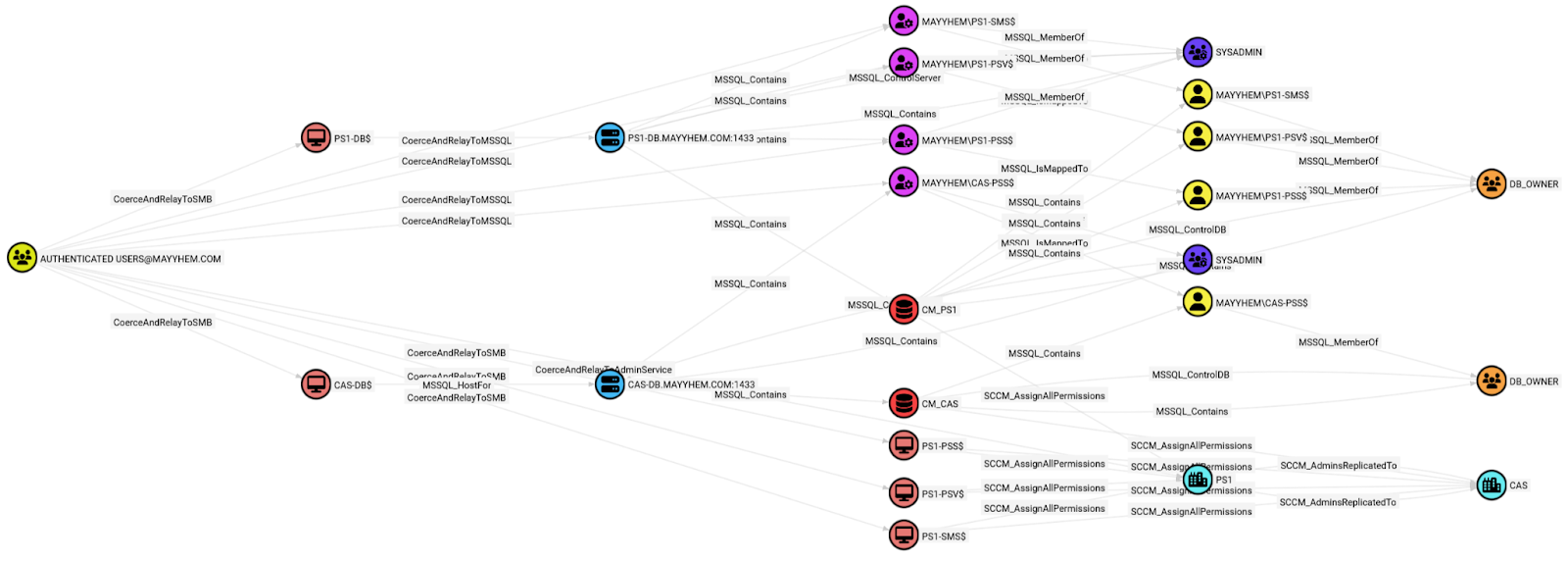

We definitely have some paths to take over the hierarchy, but the graph ain’t pretty and is tough to read at a glance. There are too many to choose from!
Let’s break these down further by technique. I won’t dive too much into the technical details of every specific technique in this post, so please refer to the links to the Misconfiguration Manager repo if you’d like to learn more about abusing or remediating these issues.
SCCM Hierarchy TAKEOVER-1
If extended protection for authentication isn’t set to Allowed or Required on any SCCM site database server, any domain user to coerce authentication (e.g., using PetitPotam or SpoolSample) from a remote site server or SMS Provider (their computer accounts require the sysadmin and db_owner roles) and relay it to the MSSQL service, then grant any domain user any permissions that exist in SCCM (e.g., the Full Administrator superuser role).
To check whether this configuration exists in the environment you’re testing, run the following Cypher query:
MATCH p = (a:Group)-[:CoerceAndRelayToMSSQL|:MSSQL_IsMappedTo|:MSSQL_MemberOf|:MSSQL_ControlDB|:SCCM_AssignAllPermissions|:SCCM_AdminsReplicatedTo*..]->(b:SCCM_Site)
WHERE a.name CONTAINS 'AUTHENTICATED USERS'
RETURN p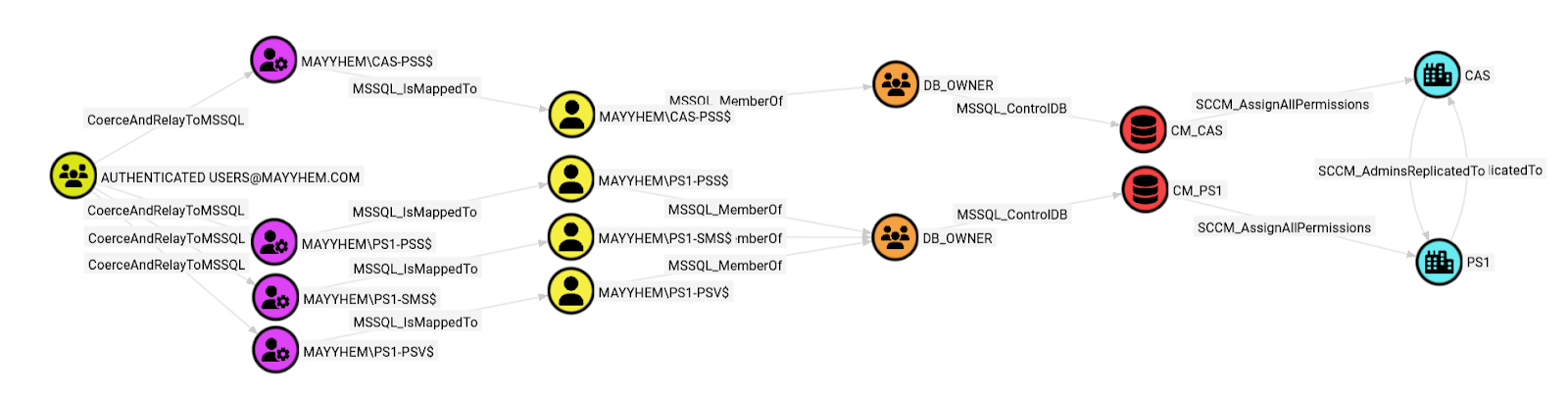
We can see that the AUTHENTICATED USERSPS1-PSS, the site server for the PS1 primary site, and relay it to the CM_PS1 site database, gaining access to the MAYYHEM\PS1-PSS$ MSSQL login that’s mapped to a site database user with the db_owner role, then assign all permissions in SCCM.
If we open the entity panel for any of the CoerceAndRelayToMSSQL edges, we can see the specific systems to coerce authentication from and the MSSQL server hostname and port to relay to.

I’ll be adding Abuse Info and other useful information to the entity panels in the near future.
We can also see that after assigning all permissions in the CM_PS1 database, those changes are automatically replicated to the CAS via the SCCM_AdminsReplicatedTo edge. If there was another primary site in the hierarchy, we’d have paths to its client devices at this point as well.
SCCM Hierarchy TAKEOVER-2
If SMB signing is not set to Required on site database servers hosted remotely from the primary site server, any domain user can coerce authentication from the site server and relay it to SMB on the site database server, then dump the service account password from LSA secrets and obtain a service ticket for the site server to the database, then grant any domain user any permissions in SCCM.
To check whether this configuration exists in the environment you’re testing, run the following Cypher query:
MATCH p =
  (a:Group)
    -[:CoerceAndRelayToSMB
      |:MSSQL_HostFor
      |:MSSQL_Contains*1..]
    ->(:MSSQL_Database)
    -[:SCCM_AssignAllPermissions]
    ->()
    -[:SCCM_AdminsReplicatedTo]
    ->(:SCCM_Site
WHERE a.name CONTAINS 'AUTHENTICATED USERS'
RETURN p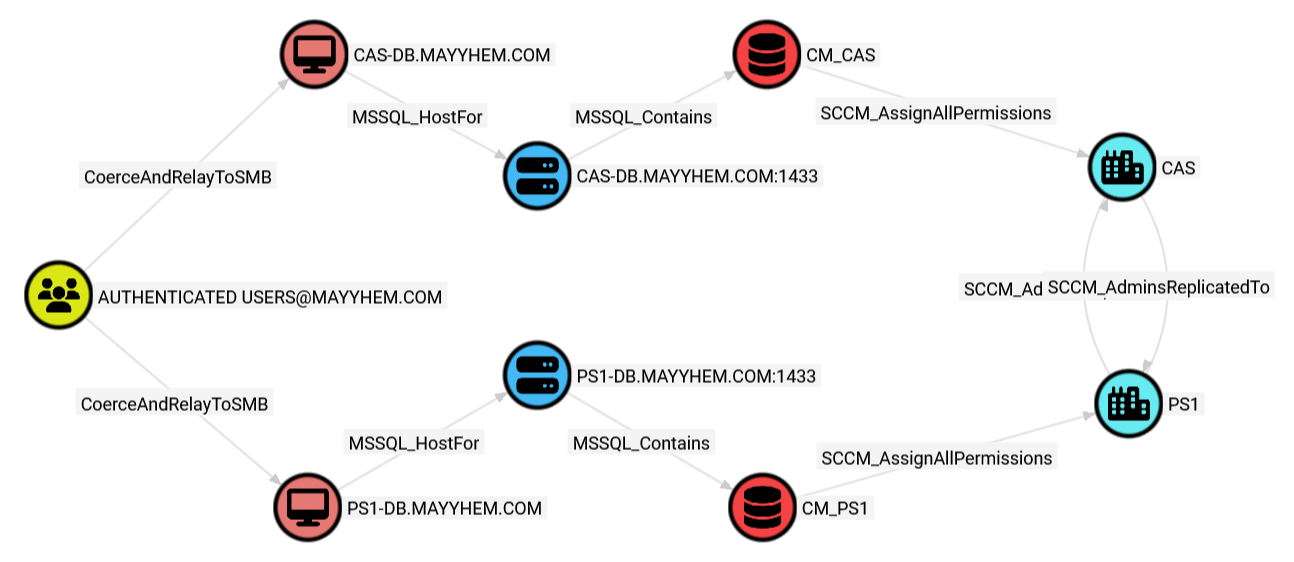
Looks like AUTHENTICATED USERSPS1-PSS, the site server for the PS1 primary site, and relay it to the PS1-DB site database server or coerce authentication from CAS-PSS, the site server for the CAS central administration site and relay it to the CAS-DB site database server, then grant ourselves the Full Administrator role in SCCM.
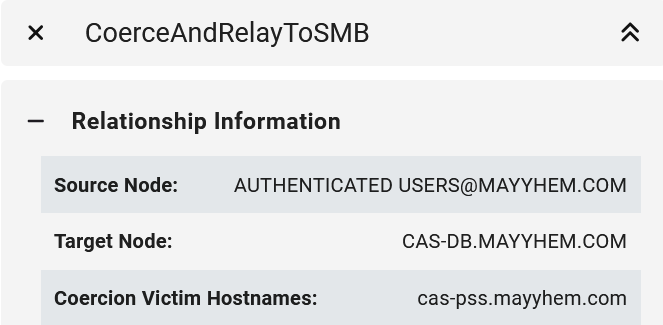
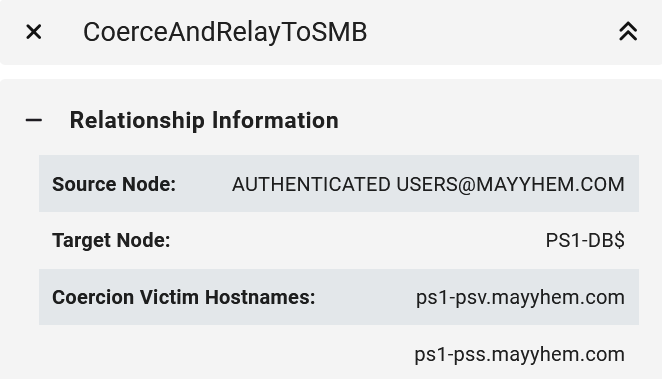
If we drill down into the entity panel for the CoerceAndRelayToSMB edge, we can see what systems we can coerce authentication from to relay to each susceptible domain computer.
SCCM Hierarchy TAKEOVER-3
It’s worth noting that I had to add the CoerceAndRelayToSMB edge, which is NOT the same as the CoerceAndRelayNTLMToSMB edge that ships with SharpHound but is based on the same logic, to ConfigManBearPig because OpenGraph does not yet support addition of preexisting post-processed edge classes like CoerceAndRelayNTLMToSMB because post-processed edge classes are deleted after ingest and recreated during post-processing.
An attacker may coerce NTLM authentication from a coercion target and relay to the AD CS enrollment web service to enroll in and acquire a valid certificate template on behalf of the target. The template can then be used to escalate to “Full Administrator” in SCCM by impersonating the coerced target.
You’ll need to run a SharpHound collection for this, then run this “Enrollment rights on certificate templates published to Enterprise CA with vulnerable HTTP(S) endpoint (ESC8)” prebuilt Cypher query that ships with BloodHound. I’ve also added a copy of this query called “SCCM Hierarchy TAKEOVER-3” to the repo.
MATCH p = (:Base)-[:Enroll|GenericAll|AllExtendedRights]->(ct:CertTemplate)-[:PublishedTo]->(eca:EnterpriseCA)
WHERE eca.hasvulnerableendpoint = True
RETURN p
LIMIT 1000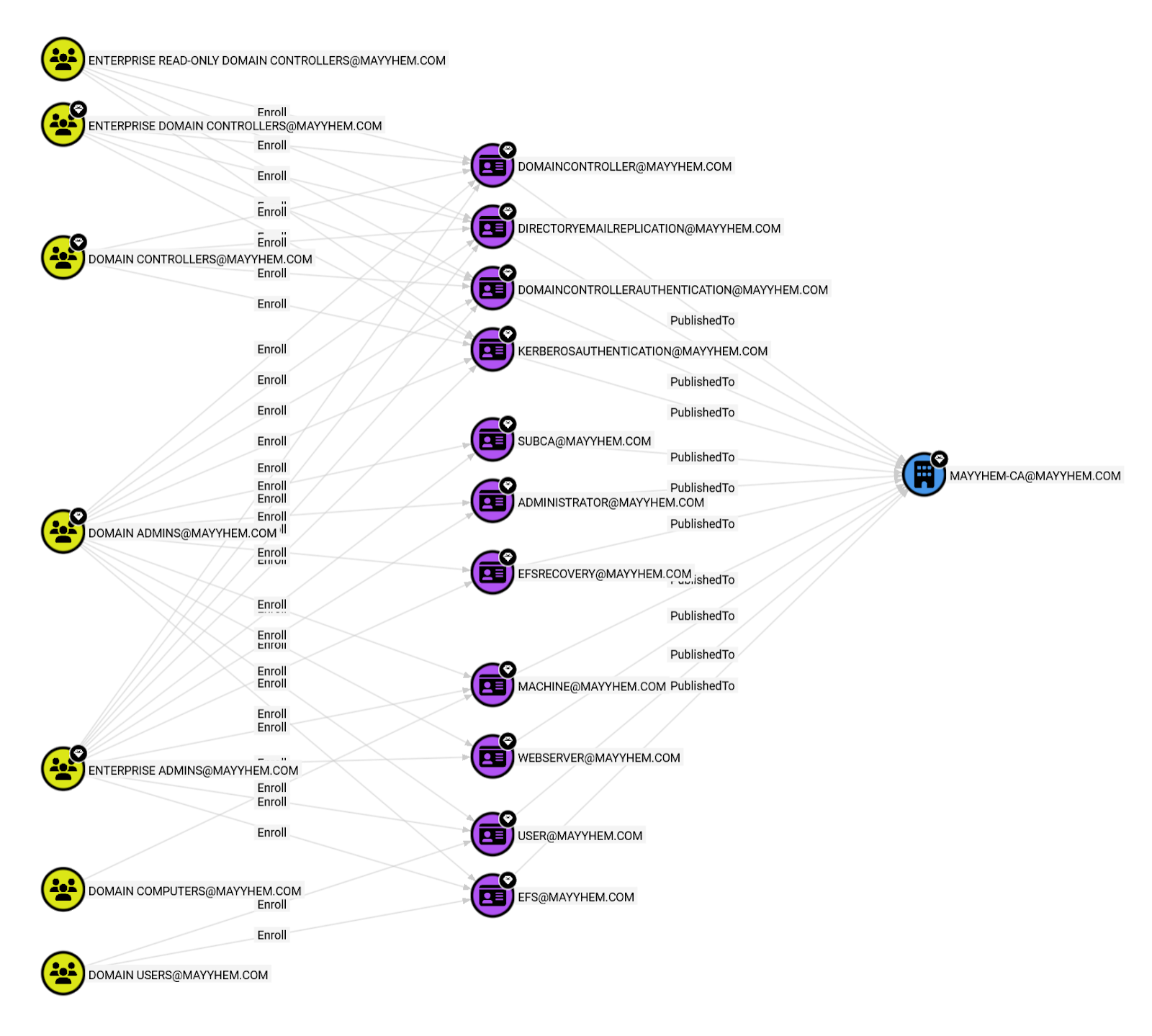
In this graph, we can see that the DOMAIN COMPUTERS domain group, which includes all of the computers hosting site system roles in our SCCM hierarchy, can enroll and get a client authentication certificate using the MACHINE template published to the certificate authority (CA).
The following privileged site system roles can be accessed to grant any SCCM permissions via the site database or the AdminService/WMI on SMS Providers:
- TAKEOVER-3.1: Coerce primary site server
- TAKEOVER-3.2: Coerce SMS Provider
- TAKEOVER-3.3: Coerce passive site server
- TAKEOVER-3.4: Coerce site database server
SCCM Hierarchy TAKEOVER-4
When a standalone primary site server installs a CAS to expand the hierarchy, the CAS site server’s domain computer account must be a member of the standalone primary site server’s local Administrators group.
The docs say it can be removed after installation, but who really does that?
If it’s still there and SMB signing isn’t required on the CAS site server, any domain user can coerce authentication from the CAS site server and relay it to SMB (or to the SMS Provider, if the role is installed) on the child primary site server, then use its domain computer account to access the site database or SMS Provider, then grant any domain user any permissions in SCCM.
This one is challenging to implement in ConfigManBearPig because I’m not sure how to remotely identify which primary site server was used to install the central administration site server or whether its account is still a local admin without privileged access.
However, we can still check whether SMB signing is required on child primary site servers with this query:
MATCH p = ()-[:SCCM_AdminsReplicatedTo]->(b:SCCM_Site)
WHERE b.parentSiteCode <> "None"
MATCH (n:Computer)
WHERE n.SCCMSiteSystemRoles CONTAINS "SMS Site Server"
AND n.SMBSigningRequired = false
RETURN p,n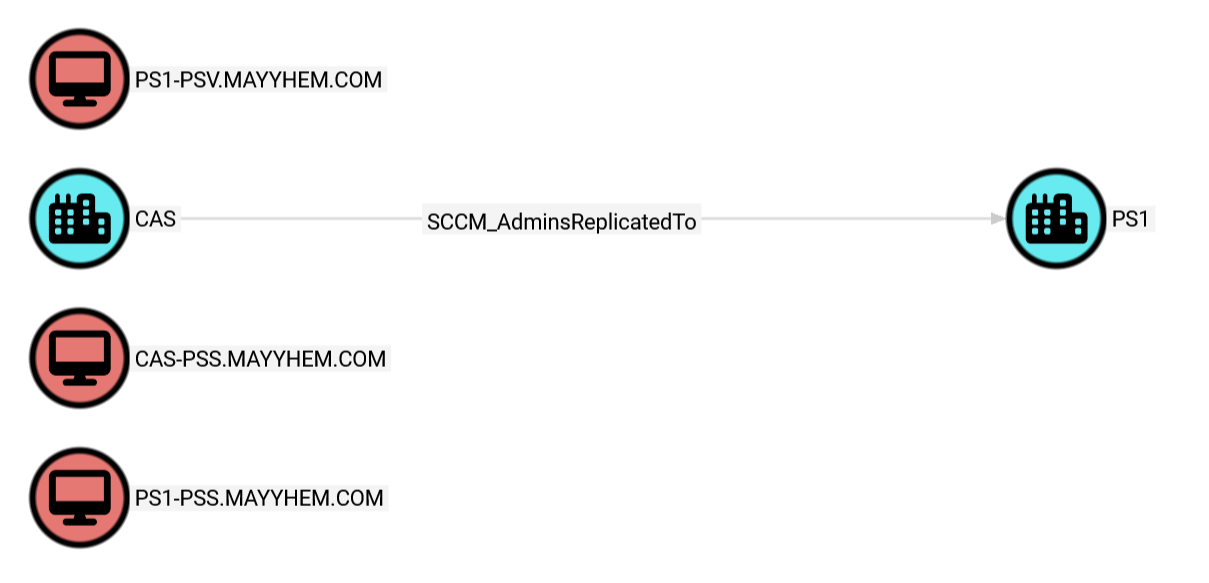
This shows us that PS1 is a child site of CAS and displays all site servers where SMB signing is not required. If we open the entity panels for each site or computer, we can see which site each computer hosts the site server for, so we can see that CAS-PSS.MAYYHEM.COM is the site server for the CAS central administration site and PS1-PSS.MAYYHEM.COM is the site server for the PS1 child primary site.
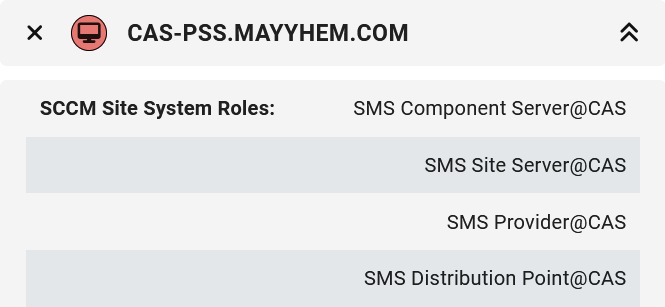
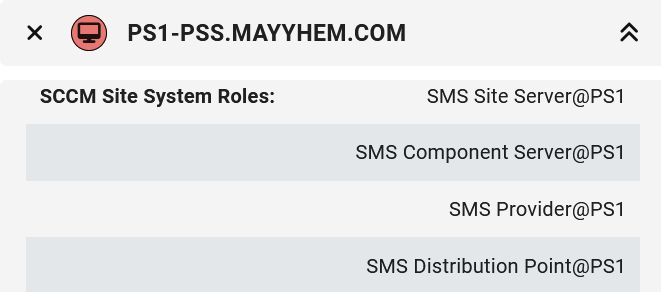
Odds are we can coerce authentication from CAS-PSS and relay to SMB on PS1-PSS to take over this hierarchy if its account was never removed from the local admins group after central administration site installation.
SCCM Hierarchy TAKEOVER-5
The SMS Provider site system role provides access to the site database via the administration service (AdminService) REST API and uses Microsoft Negotiate for authentication. In default configurations, the AdminService is vulnerable to NTLM relay attacks, and it doesn’t support service or channel binding to prevent them. If the SMS Provider role is hosted remotely from the site server, it is possible to coerce authentication from the site server and relay it to the AdminService on the SMS Provider.
MATCH p = (a:Group)-[]->(b:SCCM_Site)
WHERE a.name CONTAINS ‘AUTHENTICATED USERS’
RETURN p
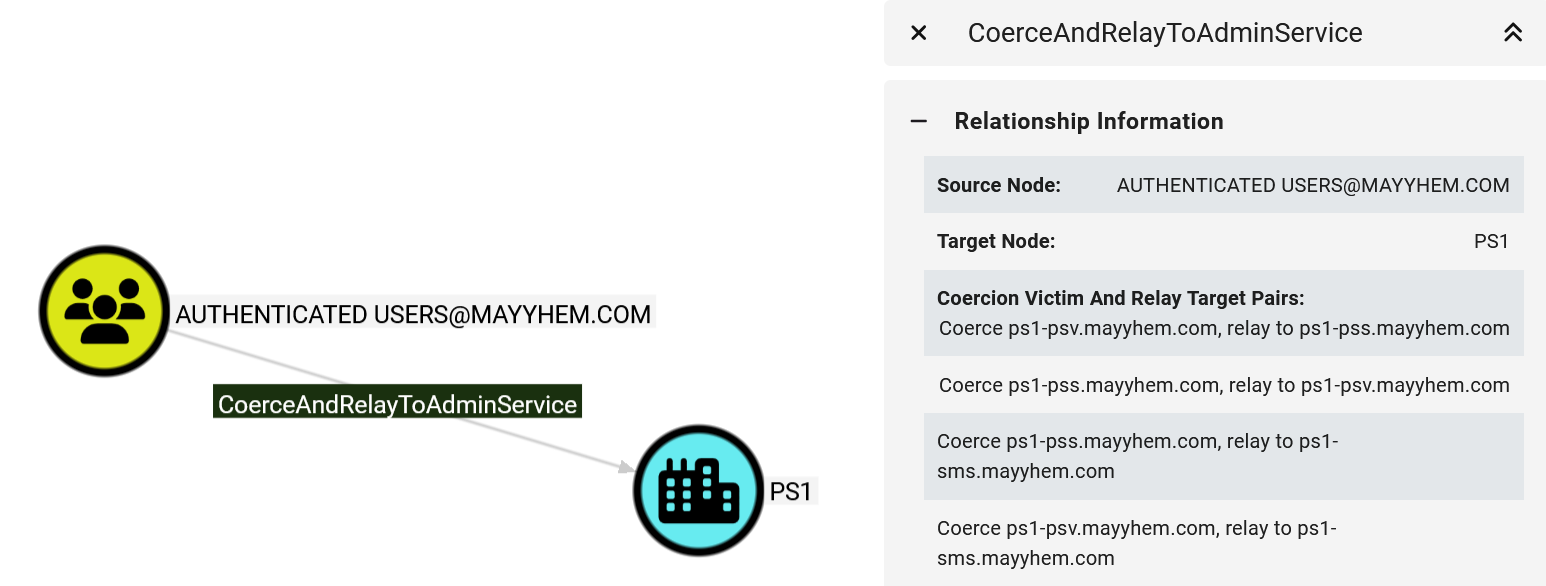
This edge is drawn directly from AUTHENTICATED USERS to the SCCM site node because we can only abuse this technique to gain access to SCCM. We can’t access the SMS Provider computer at the operating system level.
After opening the entity panel, we can see that we can take the hierarchy over using four different combinations of coercion victims and relay targets because there are two site servers (PS1-PSS and PS1-PSV) and three systems hosting the SMS Provider role (PS1-PSS, PS1-PSV, and PS1-SMS) in the site.
SCCM Hierarchy TAKEOVER-6
If SMB signing is not set to Required on SMS Providers hosted remotely from the primary site server, any domain user can coerce authentication from the site server and relay it to SMB on the SMS Provider, then use its domain computer account credentials to access the local AdminService/WMI methods or the site database (where its domain computer account requires privileged access) to grant any user any permissions in SCCM.
To check whether this configuration exists in the environment you’re testing, run the following Cypher query:
MATCH p = (a:Group)-[:CoerceAndRelayToSMB|:SCCM_AssignAllPermissions|:SCCM_AdminsReplicatedTo*..]->(b:SCCM_Site)
WHERE a.name CONTAINS 'AUTHENTICATED USERS'
RETURN p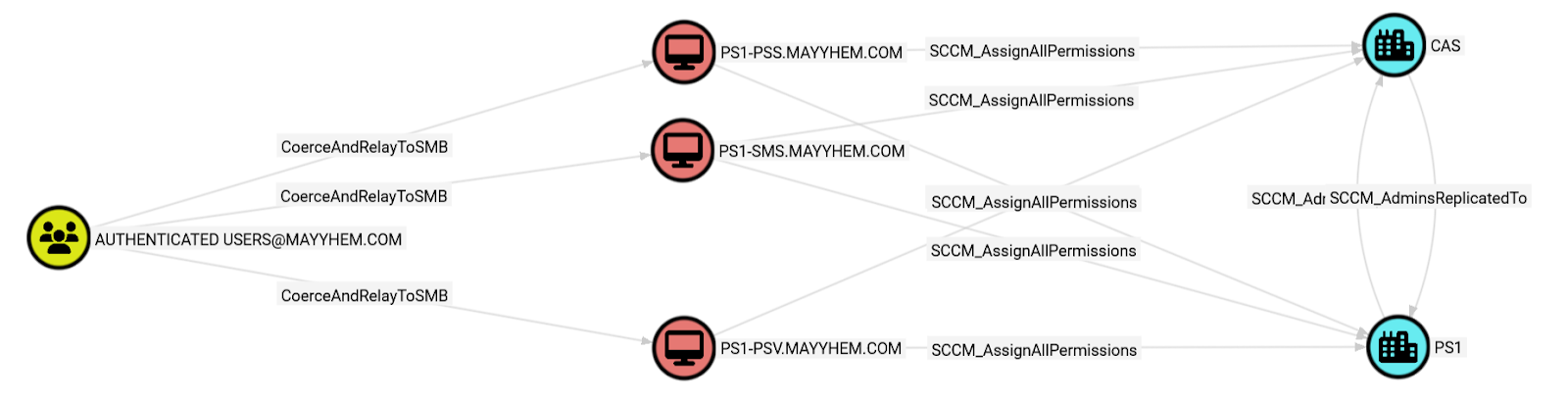
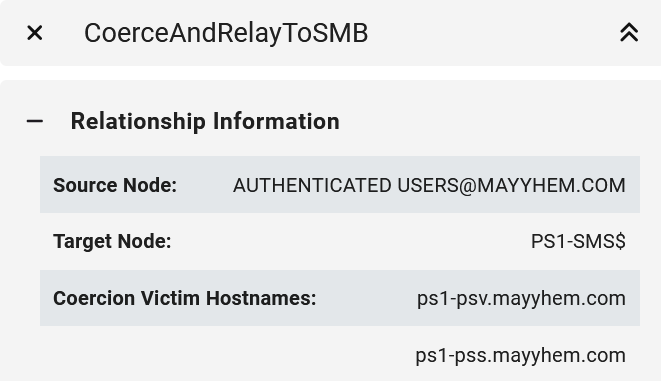
Here, the AUTHENTICATED USERS group can take over the hierarchy using this technique in several ways. We can coerce authentication either from PS1-PSS or from PS1-PSV, the primary and passive site servers for the PS1 primary site, and relay it to the SMS Providers on PS1-PSS, PS1-SMS, or PS1-PSV, then grant ourselves the Full Administrator role in SCCM. But remember, we can’t relay back to the same system we coerced from.
Once again, if we drill down into the entity panel for the CoerceAndRelayToSMB edge, we can see what systems we can coerce authentication from to relay to each susceptible domain computer.
SCCM Hierarchy TAKEOVER-7
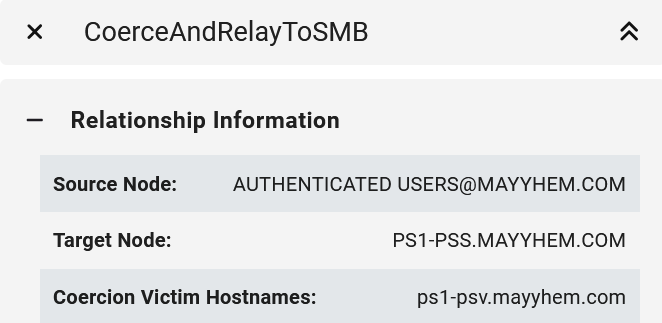
For high availability configurations, the passive site server role is deployed in SCCM sites where redundancy for the site server role is required. During setup, the passive site server’s domain computer account is required to be added to the active site server’s local Administrators group and vice versa. An attacker who can coerce authentication from an active or passive site server and relay it to SMB on a remote active or passive site server with no SMB signing requirements can compromise the host, access the site database or an SMS Provider in the context of the site server’s domain computer account, then grant any permissions in SCCM.
We can run the following query to identify this misconfiguration::
MATCH p =
 (:Group)
  -[:CoerceAndRelayToSMB]
  -(c:Computer)
    -[:SCCM_AssignAllPermissions]
    ->(s:SCCM_Site)
WHERE
  (size(split(s.siteSystemRoles, 'SMS Site Server@')) - 1) >= 2
AND c.SCCMSiteSystemRoles CONTAINS ('SMS Site Server@' + s.siteCode)
AND c.SMBSigningRequired = false
RETURN p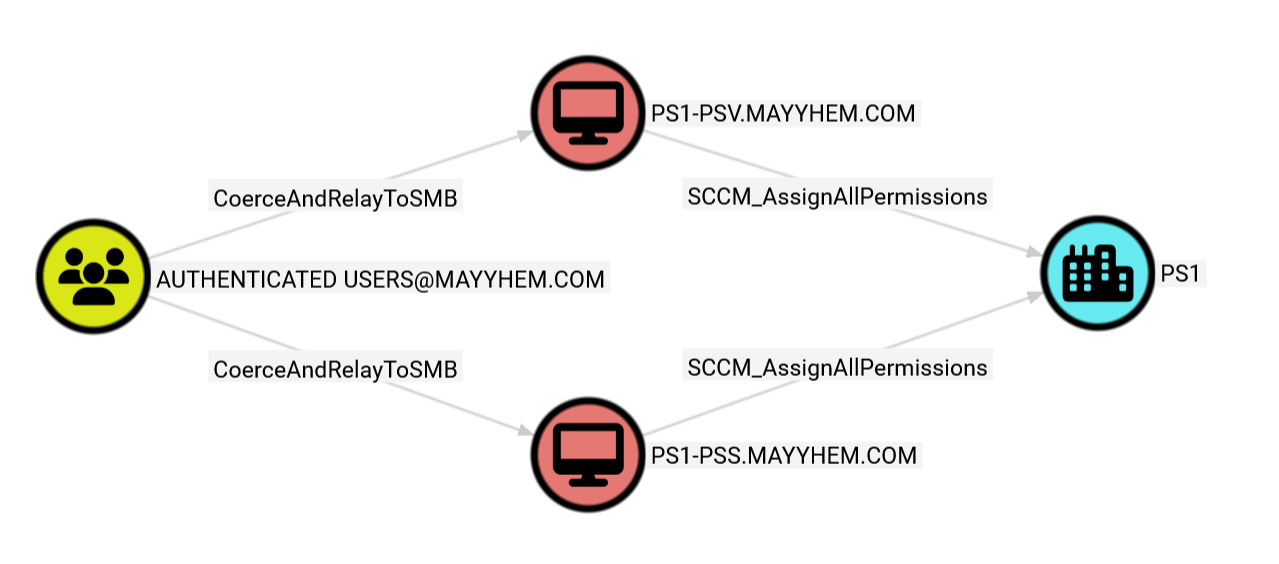
We can open the entity panel for either CoerceAndRelayToSMB edge to display the site server to coerce from for each relay target.
SCCM Hierarchy TAKEOVER-8
If LDAP signing or channel binding is not required on a DC, it is possible to coerce authentication from any domain computer account, relay it to the DC, and configure resource-based constrained delegation (RBCD) or shadow credentials (both techniques pioneered by Elad Shamir) to compromise the corresponding host.
SharpHound already scans DCs for this setting and BloodHound has a prebuilt Cypher query called “DCs vulnerable to NTLM relay to LDAP attacks” we can use to identify this issue. There’s also a copy of the query called “SCCM Hierarchy TAKEOVER-8” in the ConfigManBearPig repo for convenience.
MATCH p = (dc:Computer)-[:DCFor]->(:Domain)
WHERE (dc.ldapavailable = True AND dc.ldapsigning = False)
OR (dc.ldapsavailable = True AND dc.ldapsepa = False)
OR (dc.ldapavailable = True AND dc.ldapsavailable = True AND dc.ldapsigning = False and dc.ldapsepa = True)
RETURN p
The following privileged site system roles can be accessed to grant any SCCM permissions via the site database or the AdminService/WMI on SMS Providers:
- TAKEOVER-8.1: Coerce primary site server
- TAKEOVER-8.2: Coerce SMS Provider
- TAKEOVER-8.3: Coerce passive site server
- TAKEOVER-8.4: Coerce site database server
SCCM Hierarchy TAKEOVER-9
If any MSSQL Server instance is linked to the site database with a SQL login that has sysadmin privileges, that link can be followed to gain administrative control of the site database and SCCM.
This is not a default configuration like many of the other TAKEOVER techniques, but it’s fairly common to see linked servers in large environments.
The credentials that allow access to linked servers are stored in MSSQL and in many cases are automatically used when querying the linked server without the operator needing to know the password.
Fun fact – this was the first hierarchy takeover primitive we ever found and we came across it in a real client environment, where a random database server we had creds for was linked three layers deep to the central administration site database server as a member of sysadmin.
To identify this issue, we need to run MSSQLHound in the target environment with an MSSQL login that can access the server instance that is linked to the site database, then upload the data to BloodHound.
Afterward, we can run:
MATCH p = (:MSSQL_Server)-[:MSSQL_LinkedAsAdmin]->(:MSSQL_Server)-[:MSSQL_Contains]->(:MSSQL_Database)-[:SCCM_AssignAllPermissions]->(:SCCM_Site)
RETURN p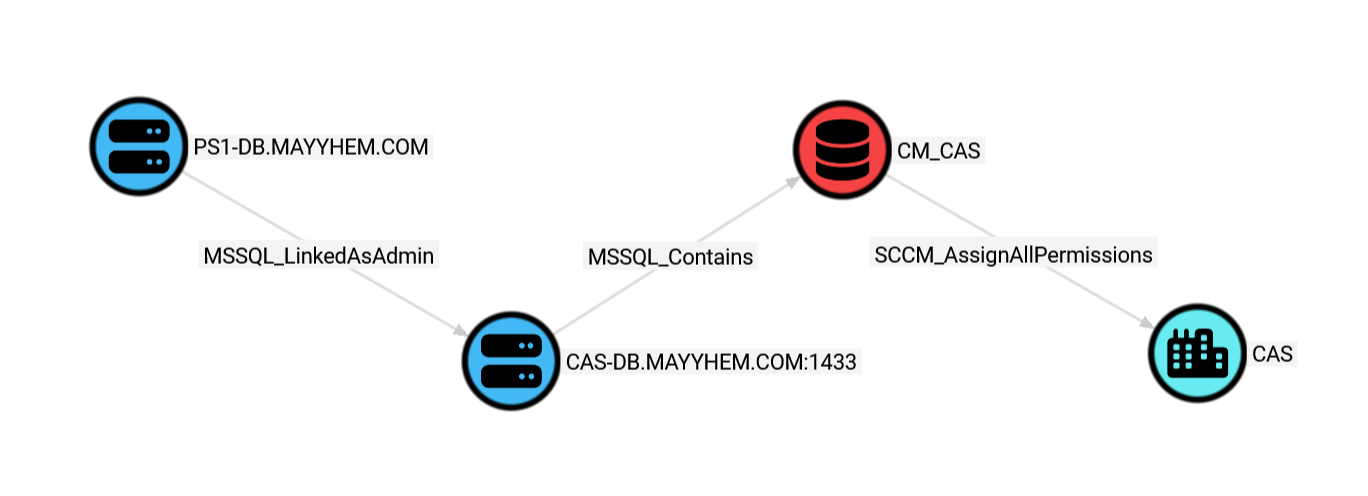
Here, we can see that the PS1-DB MSSQL server is linked with a sysadmin account to the CAS-DB MSSQL server that hosts the site database for the CAS SCCM site.
If we can access the PS1-DB MSSQL server, we can execute SQL statements against the site database in the context of the sysadmin account and grant ourselves any permissions in SCCM. Abuse info is located in the entity panel for MSSQL_LinkedAsAdmin.
Let’s see if we have a path to that MSSQL server.
MATCH p = shortestPath((a:Group)-[*1..]->(b:MSSQL_Server))
WHERE NOT a = b
AND a.name CONTAINS 'AUTHENTICATED USERS'
AND b.name = 'PS1-DB.MAYYHEM.COM'
RETURN p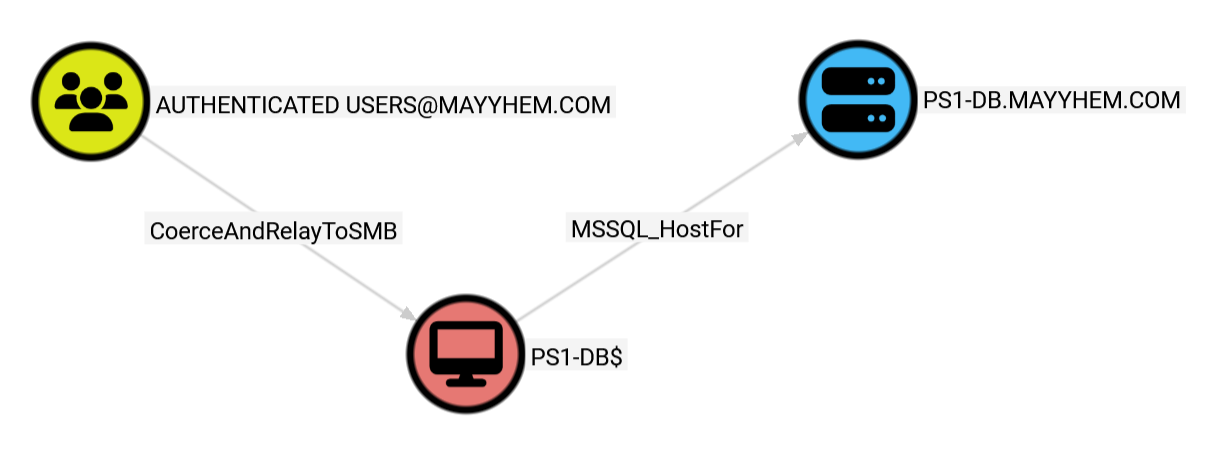
EZ.
Paths to Specific Client Devices
We can also identify specific attack paths through SCCM to our objective that resides on the PS1-DEV SCCM client device.
This query looks for any paths from the AUTHENTICATED USERS domain group to the device in 2 hops or less, which is going to return some shorter TAKEOVER attack paths leading to PS1-DEV:
MATCH p = (a:Group)-[*1..2]->(b:SCCM_ClientDevice)
WHERE a.name CONTAINS 'AUTHENTICATED USERS'
AND b.name CONTAINS 'PS1-DEV'
RETURN p
Pro tip: Don’t remove AND b.name CONTAINS 'PS1-DEV' or the number 2 from the query or you’re going to be stuck waiting for a long, long time. Scope your Cypher query to the sources you control and targets where your objectives are hosted.
Also please note that this will only work if -DisablePossibleEdges is not set or if running a collection with SCCM admin privileges. ConfigManBearPig will only assume that every device with the CmRcService SPN is an SCCM client device when potential false positives are allowed.
We can also query for paths that may start in Active Directory, go through SCCM, and end up back in Active Directory, for example the shortest path from AUTHENTICATED USERS to the PS1-DEV domain computer account:
MATCH p = shortestPath((a:Group)-[*1..]->(b:Computer))
WHERE a.name CONTAINS 'AUTHENTICATED USERS'
AND b.name CONTAINS 'PS1-DEV'
RETURN p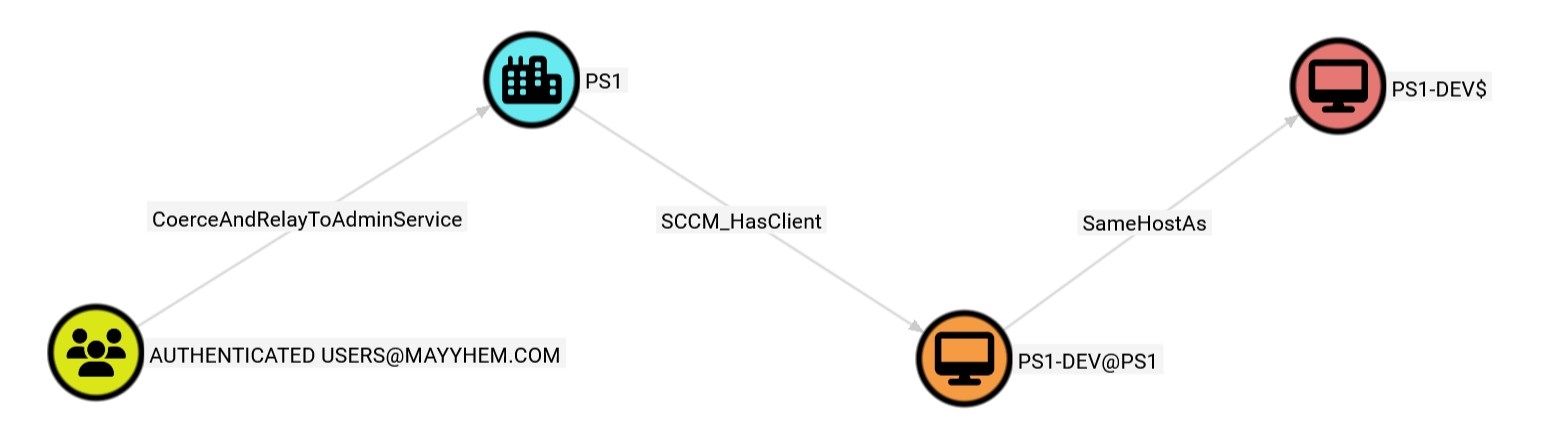
SCCM CRED-3
If you executed ConfigManBearPig with the -EnableBadOpsec flag to execute the CRED-3 technique, you can run the following query in BloodHound to display systems where ConfigManBearPig discovered an NAA:
MATCH p = (:Computer)-[:SCCM_HasNetworkAccessAccount]-(:User)
RETURN p
Note that the password may have expired or be otherwise invalid. Run ConfigManBearPig with the -DisablePossibleEdges to prevent it from collecting this information.
However, much more likely is that this account is overprivileged. Click on the User node to open its entity panel and display its group memberships under the Member Of accordion.
It’s also worth checking if this account is an SCCM administrator, which you can check by running ConfigManBearPig in its context or by executing Get-WmiObject -Namespace root/SMS/site_<sitecode> -ComputerName <sms_provider> -Class SMS_Identification against a known SMS Provider.
I’d like to add support for parsing and decrypting usernames and passwords stored in task sequences and collection variables in the near future.
SCCM Hierarchy Overview
Alright, let’s pretend that all those queries didn’t turn up any easy wins and circle back to our original plan to depict all SCCM site nodes in the hierarchy and any paths between them.
MATCH p = (:SCCM_Site)-[]-(:SCCM_Site)
RETURN p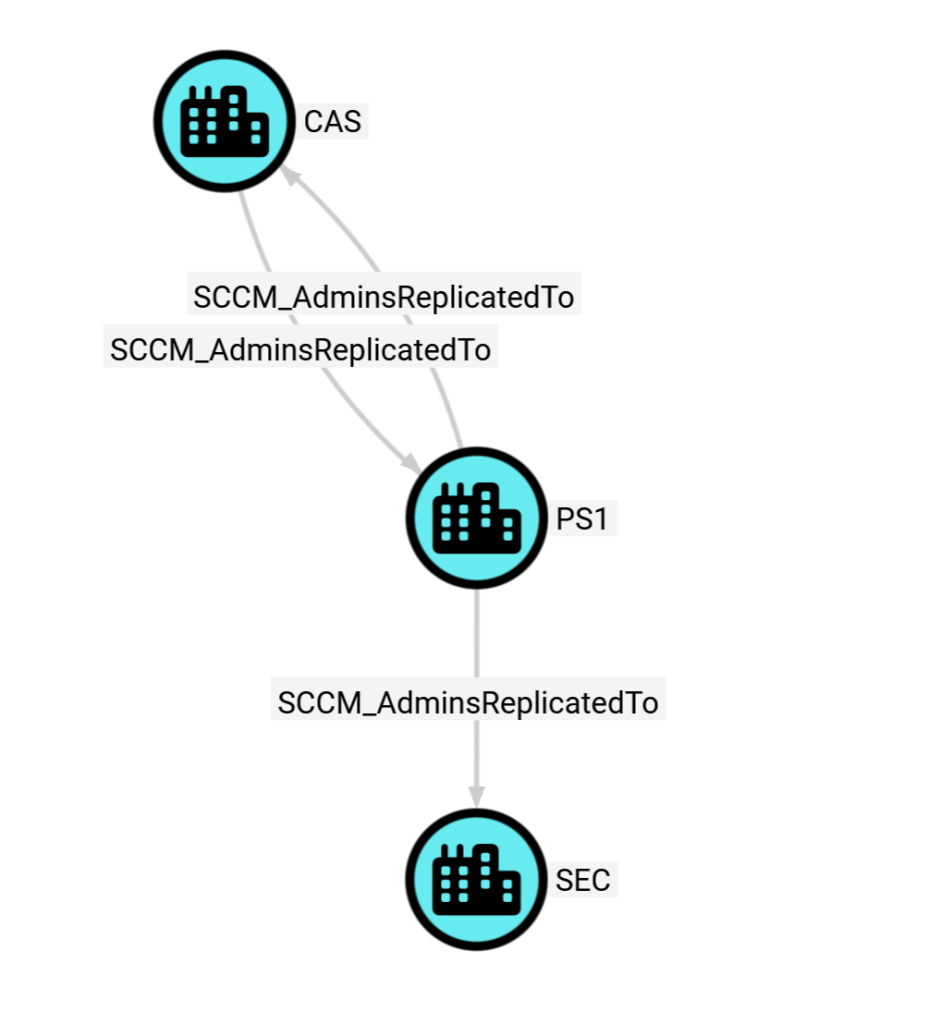
In this example, we can see that there’s a three-tiered SCCM hierarchy in the environment where we ran ConfigManBearPig, where CAS is the top-level central administration site, PS1 is a child primary site under CAS, and SEC is a secondary site under PS1. Note that the SCCM_AdminsReplicatedTo edge is drawn bidirectionally between primary and central administration sites but only toward secondary sites, because control of a secondary site does not allow hierarchy takeover like control of a primary or central administration site does.
Next, click on any SCCM_Site node to bring up its entity panel, which includes a lot of useful information, including the three-character site code, primary site server, site database server, and other devices hosting site system roles for that site:
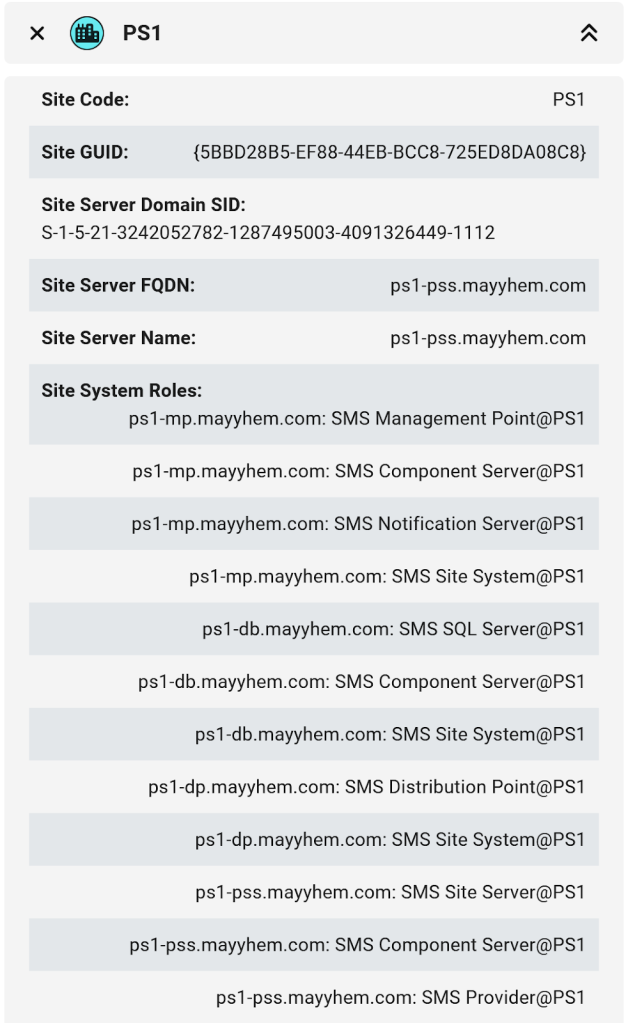
We know that site servers are required to be members of the local Administrators group on every other server hosting a site system role, so if we can coerce authentication from a site server, this Site System Roles list includes a bunch of great relay target candidates if SMB signing is not required. This is referred to as ELEVATE-1 in Misconfiguration Manager.
SCCM ELEVATE-1
Of course, we can just have BloodHound do the hard work for us and discover systems susceptible to the ELEVATE-1 technique:
MATCH p =
  (a:Group)-[:CoerceAndRelayToSMB]->(b:Computer)
WHERE a.name CONTAINS 'AUTHENTICATED USERS'
AND b.SMBSigningRequired = false
RETURN p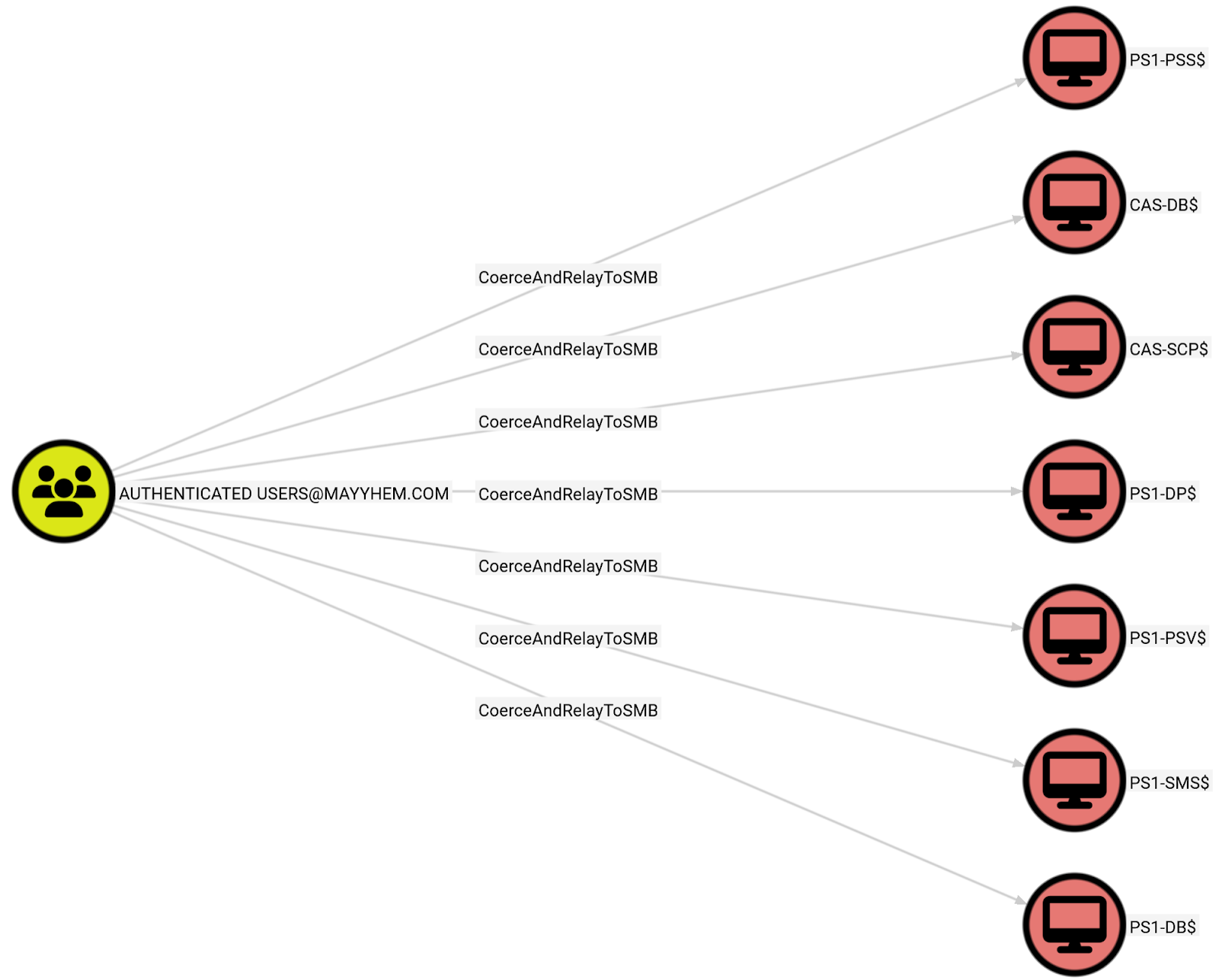
If ELEVATE-1 works, there are often SCCM admins logged on we can dump tickets or creds for, even if that particular site system role doesn’t allow direct takeover of SCCM. SCCM servers don’t get rebooted super often.
If not, we can check out the other site system roles for issues manually or with other tools and techniques.
Privileged Collection
By now, we’ve probably taken over SCCM, so we can finally run a privileged collection with ConfigManBearPig. Just run it again in the context of a domain user with an SCCM administrative user role and it will get all the juicy details we didn’t have from our unprivileged collection.
.\ConfigManBearPig.ps1 -DisablePossibleEdges -LogFile ConfigManBearPig_output.log -VerboseNo need to leave possible edges enabled because we can see everything now.
If we have site database access, we can also run MSSQLHound to turn up any misconfigurations there such as links to other database servers.
Once we upload these to BloodHound, we can now see SCCM administrative users, security roles, client devices, and collections containing those devices. This allows us to query which admins can execute code on specific computers.
ConfigManBearPig also grabs all of the domain users, computers, and groups that SCCM knows about, so you should have a lot of domain visibility even if you didn’t run a SharpHound collection.
Let’s find out who all our our SCCM admins are first:
MATCH p = ()-[:SCCM_AllPermissions|SCCM_IsMappedTo|SCCM_IsAssigned]-()
RETURN p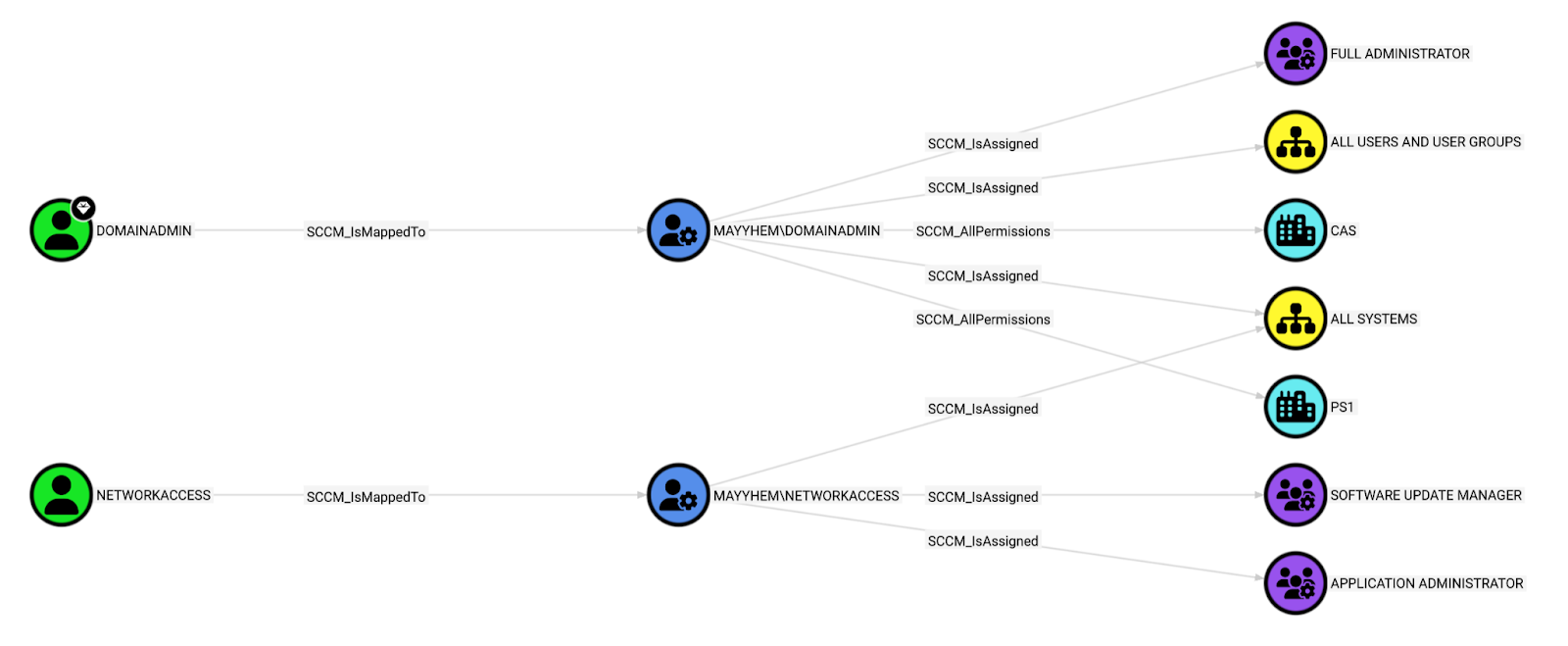
This query shows us that there are two SCCM administrative users: domainadmin and networkaccess. Whoops. Shouldn’t have left those NAA creds lying around, I guess.
In SCCM, admin users are assigned roles that are scoped to specific device collections that they can target with actions like application/script deployment, software updates, etc.
The domainadmin user is assigned the Full Administrator security role and the All Systems and All Users and User Groups collections, encompassing all permissions in SCCM, so it also has the SCCM_AllPermissions edge to both sites in the hierarchy.
The networkaccess user is only assigned the Software Update Manager and Application Administrator roles for the All Systems collection, so it has more narrowly scoped permissions.
We can execute the following query to see which admin users can execute code to gain access to PS1-DEV:
MATCH p = (a:SCCM_AdminUser)-[]->(b:SCCM_ClientDevice)
WHERE b.name CONTAINS 'PS1-DEV'
RETURN p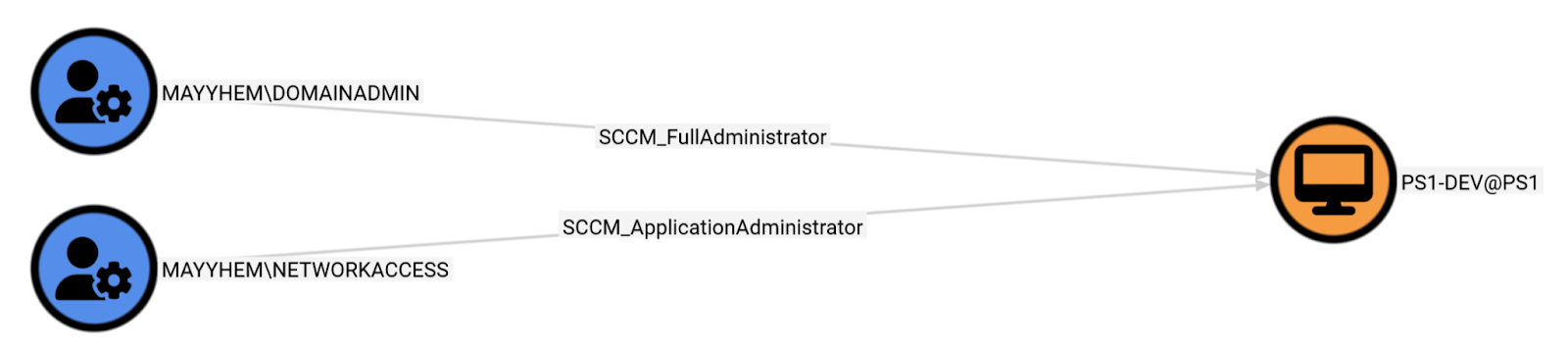
Nice.
Our privileged collection also scooped up the service accounts used to run each of the site databases, so we can check whether they have a path to our objective:
MATCH p = shortestPath((:User)-[:MSSQL_GetAdminTGS|MSSQL_Contains|SCCM_AssignAllPermissions|SCCM_HasClient|SameHostAs*1..5]->(c:Computer))
WHERE c.name CONTAINS 'PS1-DEV'
RETURN p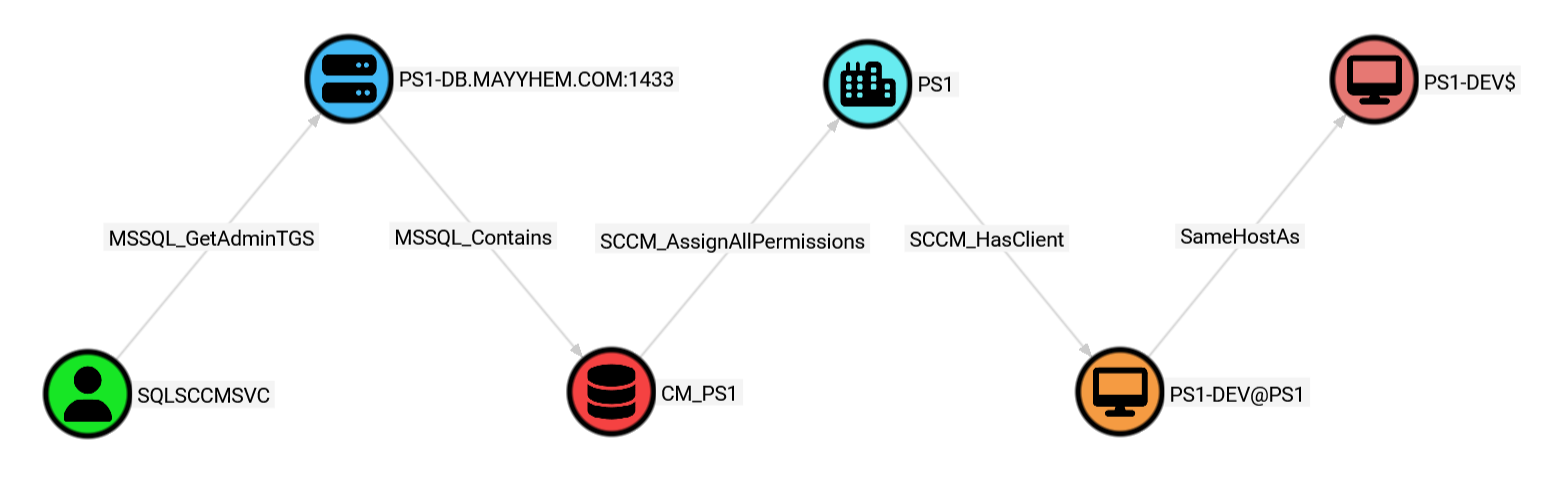
Another bit of info we have access to with a privileged ConfigManBearPig collection is who the users are on specific client devices. We can query who was currently logged on the last time the device checked in, who the primary user is, and who AD reports as the last logon user:
MATCH p = ()-[:SCCM_HasADLastLogonUser|:SCCM_HasCurrentUser|:SCCM_HasPrimaryUser]-(c:SCCM_ClientDevice)
WHERE c.name CONTAINS 'PS1-DEV'
RETURN p
Finally, we can query the list of accounts that have credentials stored in the SCCM site database. These credentials can be decrypted either by using a private key that’s on the primary site server or by adding them to the list of network access accounts and having SCCM decrypt them for you.
MATCH p = (:SCCM_Site)-[:SCCM_HasStoredAccount]->(:User)
RETURN p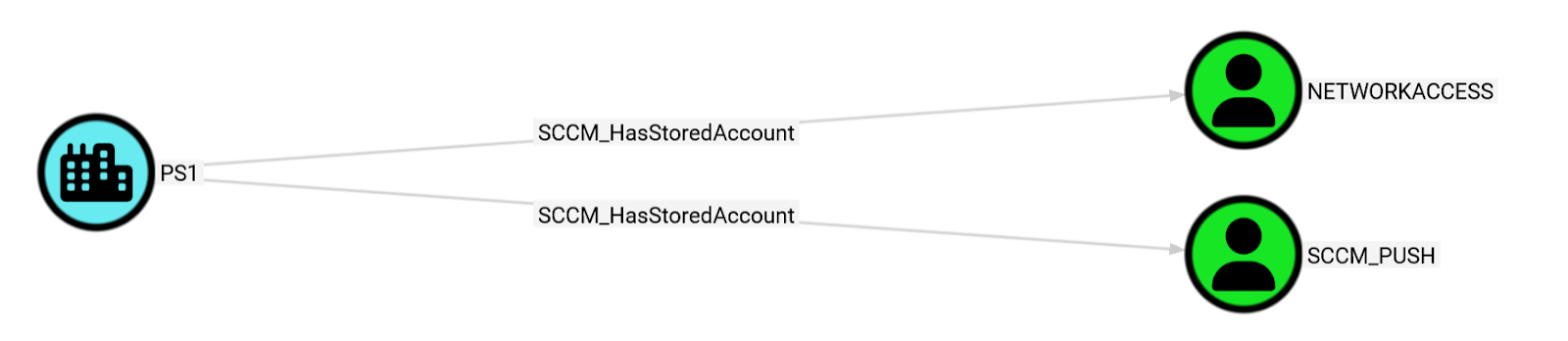
Future Improvements
- Edge entity panels with abuse info
- altauth to allow collection when client cert is required
- Get members of groups with permissions on System Management container
- Parse task sequences and collection variables for usernames and passwords during Local collection
- Automatic client push installation detection (ELEVATE-2)
- Identify site database service account via RemoteRegistry + SPNs
- Relay management point computer accounts to site databases
- Secondary site databases
- Group and user collection members
- DHCP Collection (requires unauthenticated network access)
- WMI Collection (requires an SCCM admin account)
- CMPivot Collection (requires an SCCM admin account)
I will be releasing my Ludus lab template (heavily based on Zach Stein’s Ludus SCCM project (https://github.com/Synzack/ludus_sccm) in the next few weeks to stand up a large SCCM hierarchy with a central administration site, child primary site, and additional site system roles hosted remotely from the site servers to facilitate practicing these SCCM attack techniques.
If you have any questions or feedback about this post, ConfigManBearPig, or SCCM attack techniques, please reach out to me in the BloodHound Slack (I’m @Mayyhem) or on X (@_Mayyhem). I’d love to chat more about this stuff. I’m super cereal.