Updates to the MSSQLHound OpenGraph Collector for BloodHound
tl;dr: MSSQLHound, a PowerShell script that collects security information from remote MSSQL Server instances, now scans them to determine whether or not NTLM relay attacks are possible, accounts for a recent privilege escalation vulnerability, and includes queries you can import into the BloodHound attack path graph to visualize, navigate, and remediate misconfigurations in MSSQL.
Updates to the MSSQLHound OpenGraph Collector for BloodHound
NTLM Relay Scanning
MSSQLHound now supports scanning remote MSSQL servers for Extended Protection for Authentication (EPA), a security feature that organizations can use to prevent authentication relay attacks. This is particularly useful during offensive operations. Upload both an MSSQLHound collection and a SharpHound Active Directory collection to BloodHound to discover domain computer accounts that attackers can coerce authentication from and relay to MSSQL servers.
Nick Powers (@zyn3rgy) and Matt Creel (@Tw1sm) recently released RelayInformer, enabling users to scan one or more systems for susceptibility to NTLM relay attacks against a variety of services, including MSSQL and IIS.
RelayInformer checks whether EPA is required by using Impacket to send a series of crafted authentication requests to the MSSQL service and examining the resultant responses for indicators of the current settings.
I updated MSSQLHound with a port of this functionality to allow users to scan MSSQL instances in the domain for EPA settings to determine whether NTLM relay attacks, including SCCM hierarchy TAKEOVER-1, are possible.
Specifically, MSSQLHound connects to the site database server via tabular data stream (TDS) to determine whether connections require encryption, then crafts messages with and without valid, invalid, and null service/channel binding fields to identify whether EPA is set to Allowed, Required, or Off through error-based enumeration.
Nick and Matt explain it best in their blog post on these techniques:
“The following logic can be used to determine all EPA enforcement levels:
- Validate the supplied credentials, with proper channel binding and service binding
- Send TDS pre-login message to determine encryption requirement
- If encryption is required:
- Send authentication with an invalid channel bindings AV pair value
- Send authentication without a channel bindings AV pair
- If encryption is not required:
- Send authentication with an invalid target name AV pair value
- Send authentication without a target name AV pair
So with any valid domain credentials, we can determine all potential enforcement levels of EPA on a target MSSQL server.”
When Force Encryption is set to Off and EPA is Allowed or Required, service binding is used to prevent NTLM relay attacks, whereas when EPA is Allowed or Required and Force Encryption is On, channel binding is used to prevent NTLM relay attacks.
In SCCM, if EPA is Off, the default setting, the site database MSSQL server is susceptible to NTLM relay attacks that allow hierarchy takeover. ConfigManBearPig, my new SCCM collector for BloodHound OpenGraph, checks for this configuration with any domain user account.
I highly recommend adding this check to your recon arsenal.
CVE-2025-49758: MSSQL Server ALTER ANY LOGIN Permission Elevation of Privilege
While writing MSSQLHound, I found an issue in SQL Server that allowed any server login with the ALTER ANY LOGIN permission to change the password for principals with the securityadmin role or IMPERSONATE ANY LOGIN permission without knowing the old password. This allowed server compromise, because these principals could be used to grant or impersonate members of the sysadmin server role that have all permissions available in MSSQL.
The issue bypassed the intended security feature that prevented these permissions from being obtained by a principal that did not have knowledge of the old password, so Microsoft patched it across all supported versions.
MSSQLHound now detects whether or not the patched version of MSSQL is installed.
If you’d like to read more about how I discovered the issue, including some lessons I learned while reporting the vulnerability to Microsoft, check out my recent blog post about the process.
Saved BloodHound Queries
I also added a folder to the MSSQLHound repository containing several BloodHound Cypher queries that may be useful during operations, including several that are detailed in my first blog post about MSSQLHound.
If the prebuilt Cypher queries are returning failed to translate kinds: unable to map kinds: errors, upload seed_data.json to populate a single fake instance of each new edge class so they can be queried.
Specifically, you can use them to identify the following attack paths:
MSSQL: Domain Principals with MSSQL Logins
This query displays all domain principals (i.e., Users, Computers, and Groups) that are mapped to an MSSQL server login:
WARNING: This is a heavy query and might not return in very large environments. If possible, scope the source object down to a subset of Base objects using a WHERE clause.
MATCH p = (:Base)-[:MSSQL_HasLogin]->() RETURN p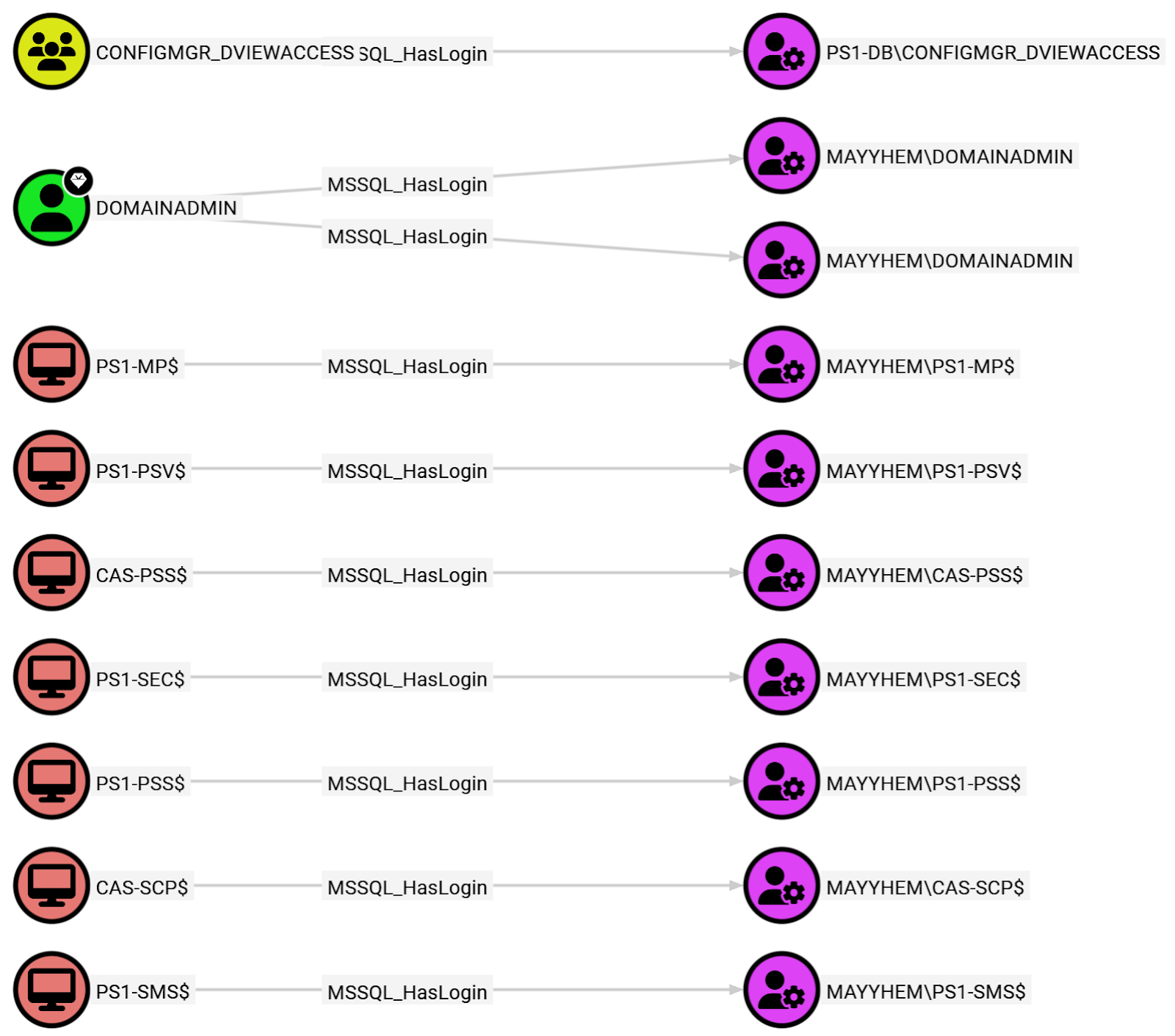
MSSQL: Service Account Paths to MSSQL Servers
This query displays domain service accounts that can access MSSQL servers when server logins are mapped to domain users:
MATCH p = (:Base)-[:MSSQL_GetTGS|MSSQL_GetAdminTGS|MSSQL_ServiceAccountFor]->() RETURN p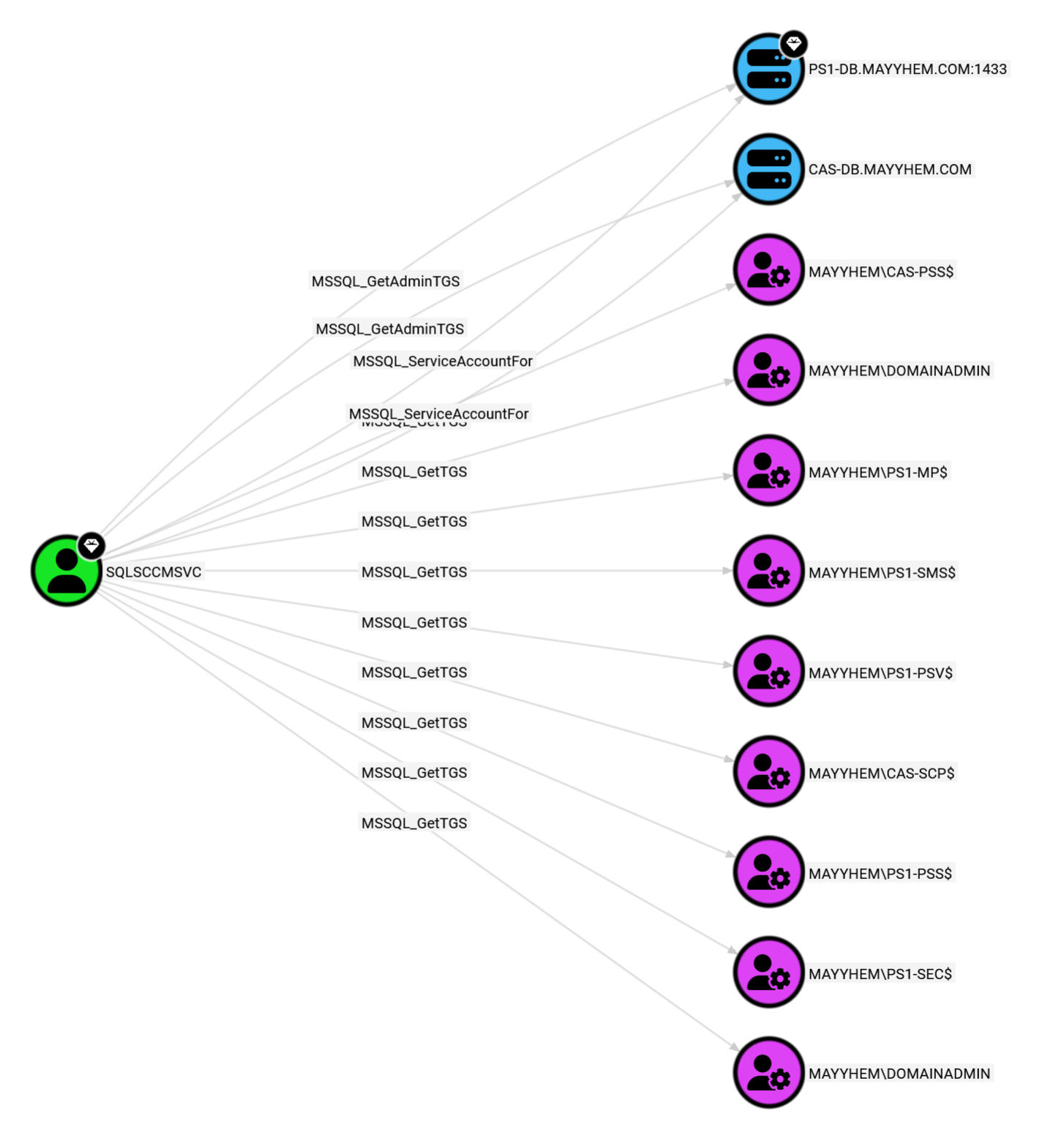
MSSQL: Domain Principals that Can Coerce and Relay to MSSQL
This query displays when the AUTHENTICATED USERS group can coerce authentication from a domain computer account that has an MSSQL server login due to lack of EPA requirements on the server:
MATCH p = (:Group)-[:CoerceAndRelayToMSSQL]->() RETURN p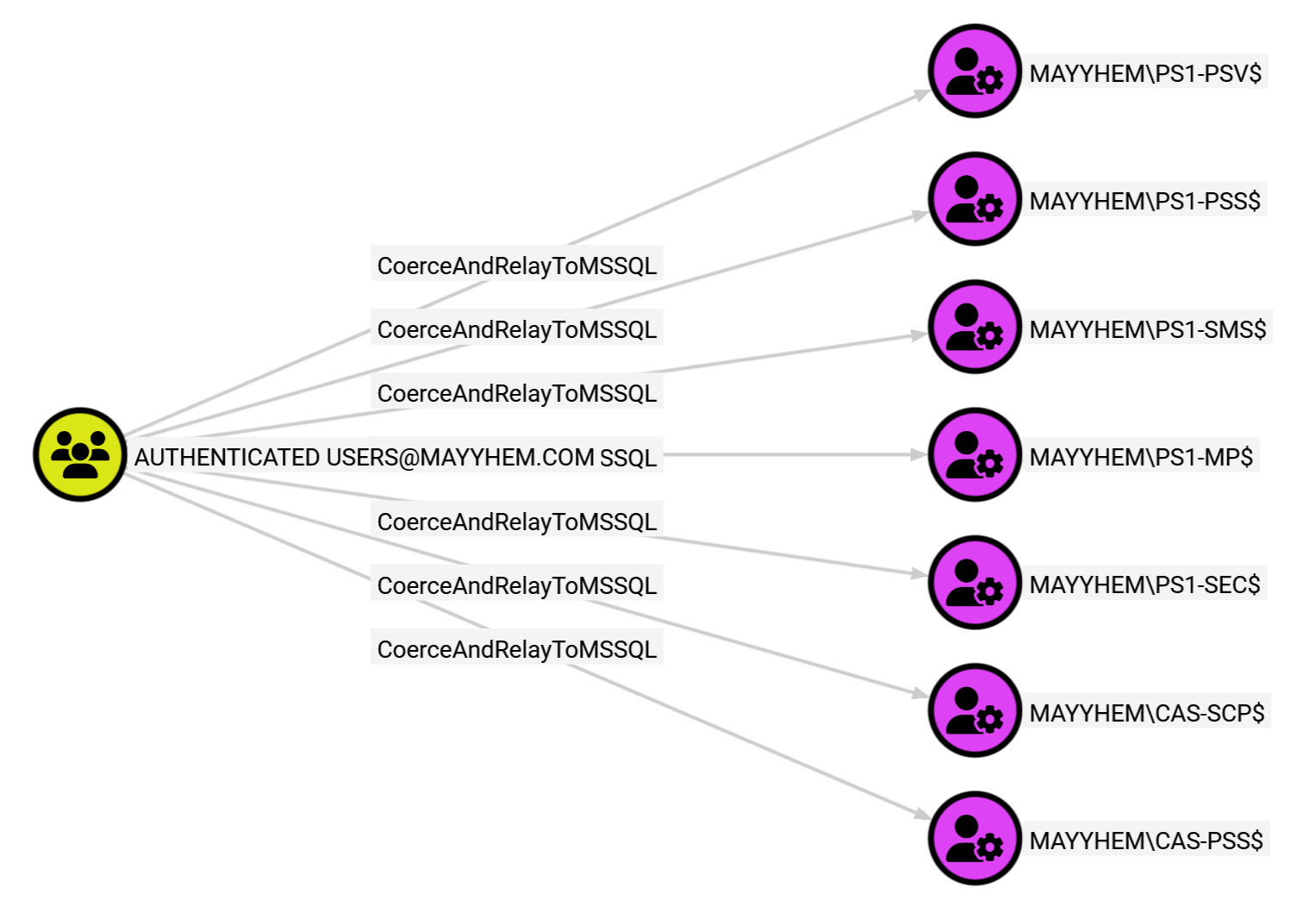
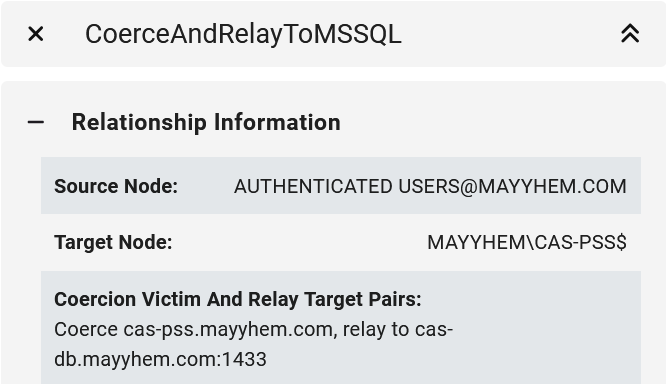
If we open the entity panel for any of the CoerceAndRelayToMSSQL edges, we can see the specific systems to coerce authentication from and the MSSQL server hostname and port to relay to.
MSSQL: Paths from MSSQL to Active Directory
This query displays all hybrid paths from MSSQL server and database principals to Active Directory:
MATCH p = ()-[:MSSQL_ExecuteOnHost|MSSQL_HasDBScopedCred|MSSQL_HasMappedCred|MSSQL_HasProxyCred]->(:Base) RETURN p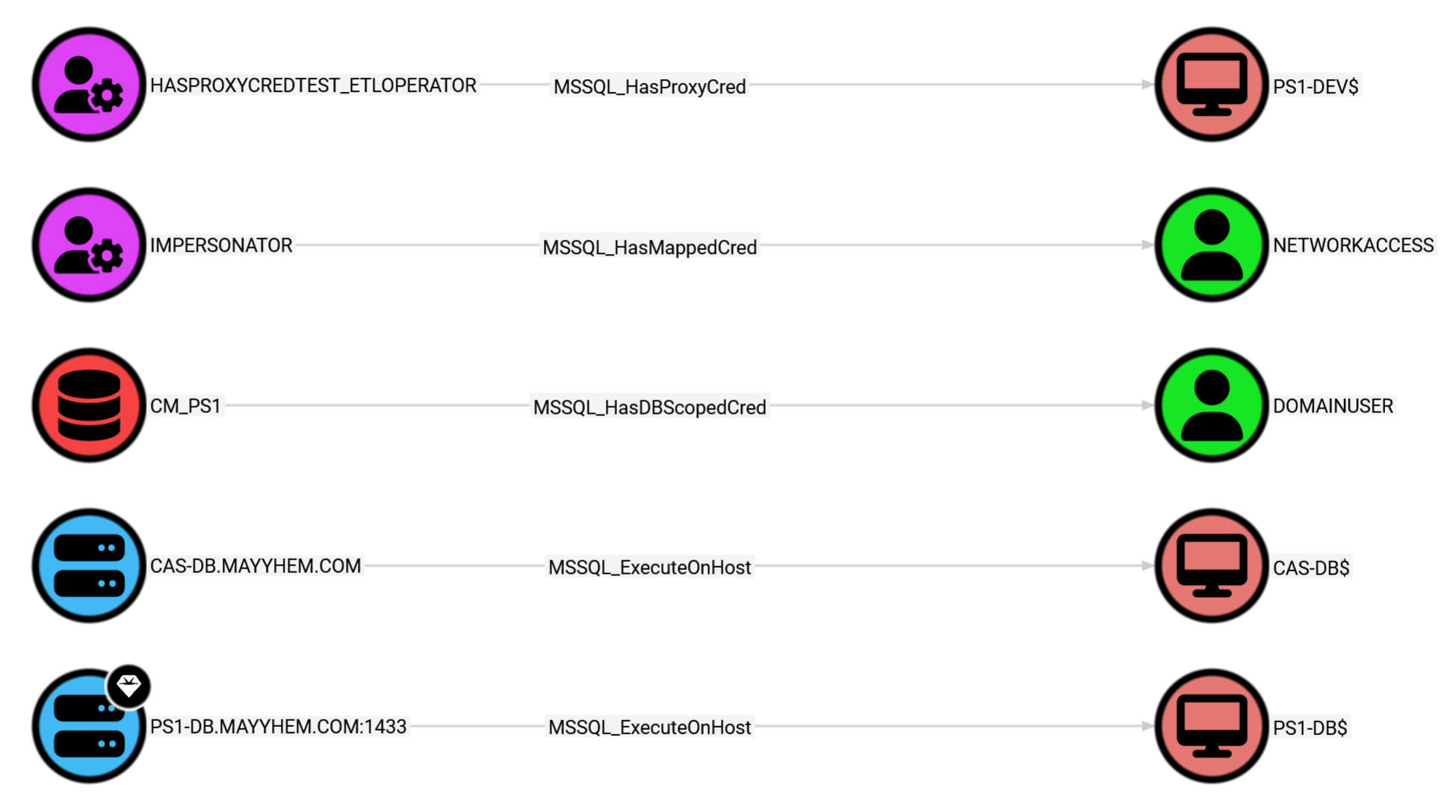
MSSQL: Linked SQL Servers
This query displays all linked SQL servers, noting where the link is traversable with sysadmin or equivalent privileges:
MATCH p = (:MSSQL_Server)-[:MSSQL_LinkedAsAdmin|:MSSQL_LinkedTo]->(:MSSQL_Server) RETURN p
MSSQL: Databases with Server-Level Execution Privileges
This query displays which databases are owned by a sysadmin or equivalent principal and have the TRUSTWORTHY attribute, allowing compromise of the MSSQL Server instance via the EXECUTE AS OWNER statement:
MATCH p = ()-[:MSSQL_ExecuteAsOwner]-() RETURN p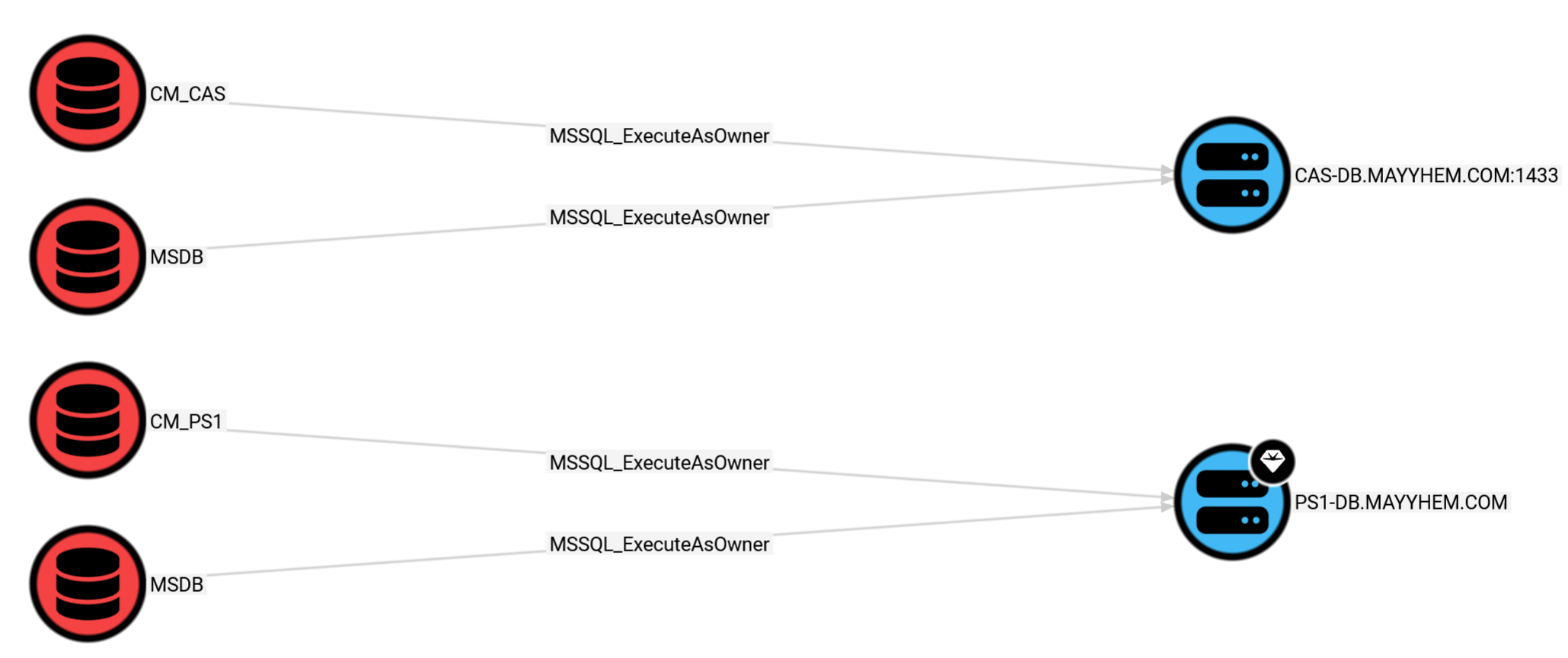
MSSQL: Domain Principals with Control of MSSQL Databases
This query displays all domain principals (i.e., Users, Computers, and Groups) that have a path to compromise an MSSQL database. This may return a lot of results and should be scoped to your target with a WHERE clause if possible:
MATCH control =
(:Base)-[
:MSSQL_HasLogin
|CoerceAndRelayToMSSQL
|MSSQL_IsMappedTo
|MSSQL_ControlServer
|MSSQL_Contains
|MSSQL_ControlDB
|MSSQL_MemberOf
|MSSQL_AddMember
|MSSQL_ExecuteAs
|MSSQL_ChangePassword
|MSSQL_Owns
|MSSQL_ExecuteAsOwner
|MSSQL_LinkedAsAdmin
|MSSQL_TakeOwnership
*..4]->(:MSSQL_Database)
RETURN control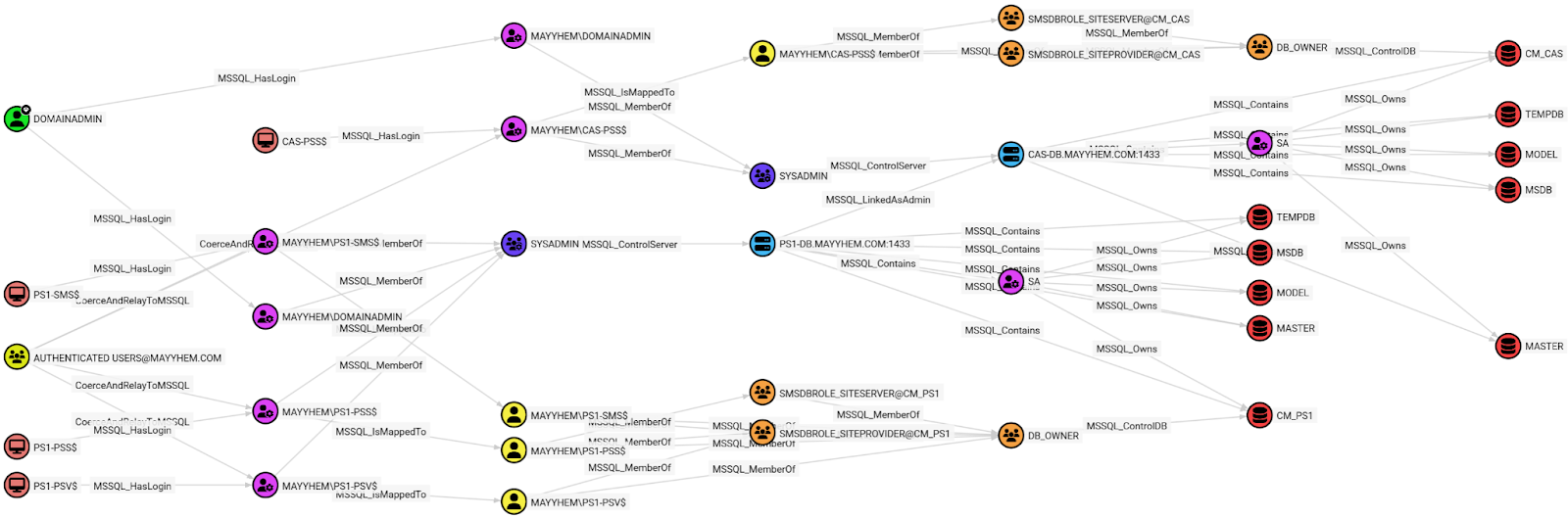
MSSQL: Domain Principals with Control of MSSQL Servers
This query displays all domain principals (i.e., Users, Computers, and Groups) that have a path to compromise an MSSQL Server instance. This may return a lot of results and should be scoped to your target with a WHERE clause if possible:
MATCH control =
  (:Base)-[
    :MSSQL_HasLogin
    |CoerceAndRelayToMSSQL
    |MSSQL_IsMappedTo
    |MSSQL_ControlServer
    |MSSQL_ControlDB
    |MSSQL_MemberOf
    |MSSQL_AddMember
    |MSSQL_ExecuteAs
    |MSSQL_ChangePassword
    |MSSQL_Owns
    |MSSQL_ExecuteAsOwner
    |MSSQL_LinkedAsAdmin
    |MSSQL_TakeOwnership
    |MSSQL_GrantAnyPermission
    |MSSQL_ImpersonateAnyLogin
    |MSSQL_ExecuteOnHost
    *..7]->(:MSSQL_Server)
RETURN control 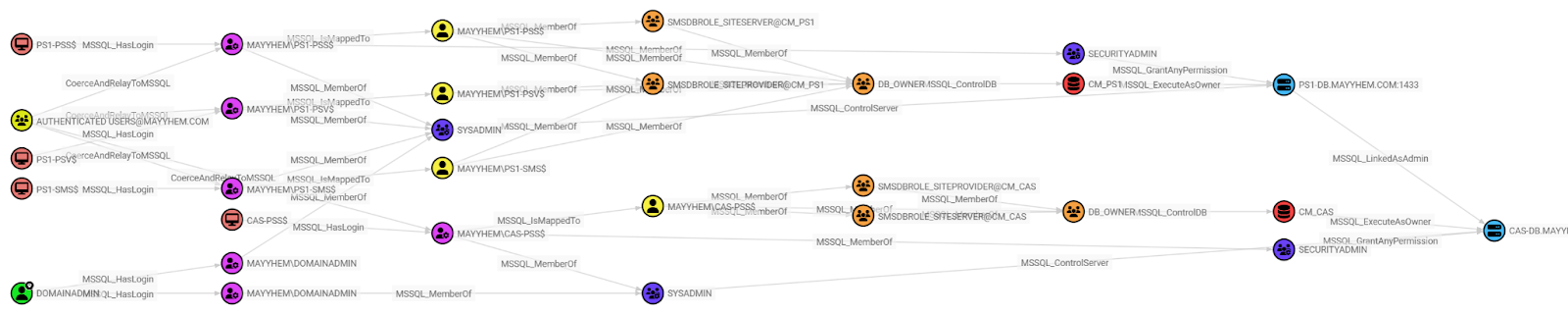
These last two are pretty verbose since they depict all paths. I recommend narrowing it down to a specific target database or server by adding something like WHERE serverOrDatabase.name CONTAINS 'string' to your Cypher query.
I hope you find these new features useful. As always, if you have any questions, issues, or feedback or would like to contribute to the project, please don’t hesitate to reach out to me on Twitter/X (@_Mayyhem) or in the BloodHound Slack!