Weaponizing Whitelists: An Azure Blob Storage Mythic C2 Profile
TL;DR: Mature enterprises lock down egress but often carve out broad exceptions for trusted cloud services. This post shows how reviewing deployment guides can help identify those exceptions and weaponize them with a new Mythic C2 profile called azureBlob.
During a recent Hackathon, we discussed some common issues operators run into. One unfortunately common one: in very mature enterprise environments, highly restrictive egress firewall rules or network proxy rules would prevent operators from receiving callbacks from their targets. As a result of these roadblocks, we reviewed installation and deployment guides and discovered many vendors will recommend broad wildcard exceptions in firewalls and proxies to ensure cloud services function during initial deployment. For example, guidance from Citrix for System and Connectivity Requirements, Parallels Remote Application Server with Azure Virtual Desktop, and Nerdio Enterprise Manager all includes rules allowing outbound access to *.blob.core.windows.net in some fashion.
That insight led us to build a new Mythic command and control (C2) profile, azureBlob, that leverages Azure Blob Storage and integrates it into a modified version of Medusa as a proof of concept. Azure Blob Storage is Microsoft’s object storage solution for the cloud and optimized for storing massive amounts of unstructured data. Using Azure Blob Storage isn’t a new method for C2 comms (tools like Loki already demonstrate this), but we wanted to develop a proof of concept that could extend into other Mythic agents and have SOCKS support. We also took some additional OPSEC precautions around the Azure container and token scoping detailed in the “Container Isolation and Token Security” section farther down. Next, we’ll dive into how to set up and install the Mythic C2 profile, azureBlob, and we’ll discuss how it works!
Mythic C2 Profile Setup
Before we dive into the configuration of the Mythic C2 profile, we need to perform some setup in Azure. First, you’ll need to create a Storage Account in the Azure portal.
- Go to https://portal.azure.com
- In the Search bar, type “Storage accounts”
- Select “+ Create”
- Create or assign a resource group
- Select a Region
- Select Premium Performance
- Select “Block Blobs” account type
- Select “Local-redundant storage”
- Select “Review + Create”
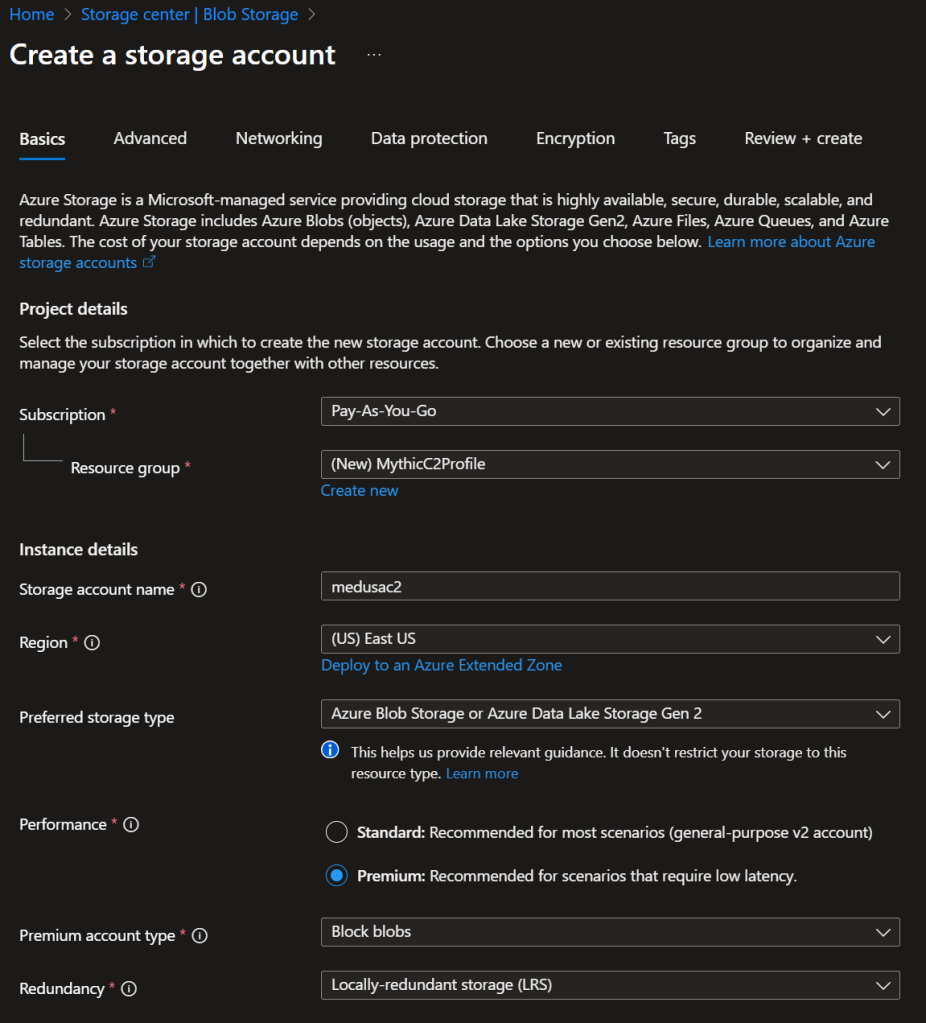
Azure Storage Account Setup
Next, you’ll need to retrieve the Storage Account key under “Security + Networking” -> “Access Keys”.
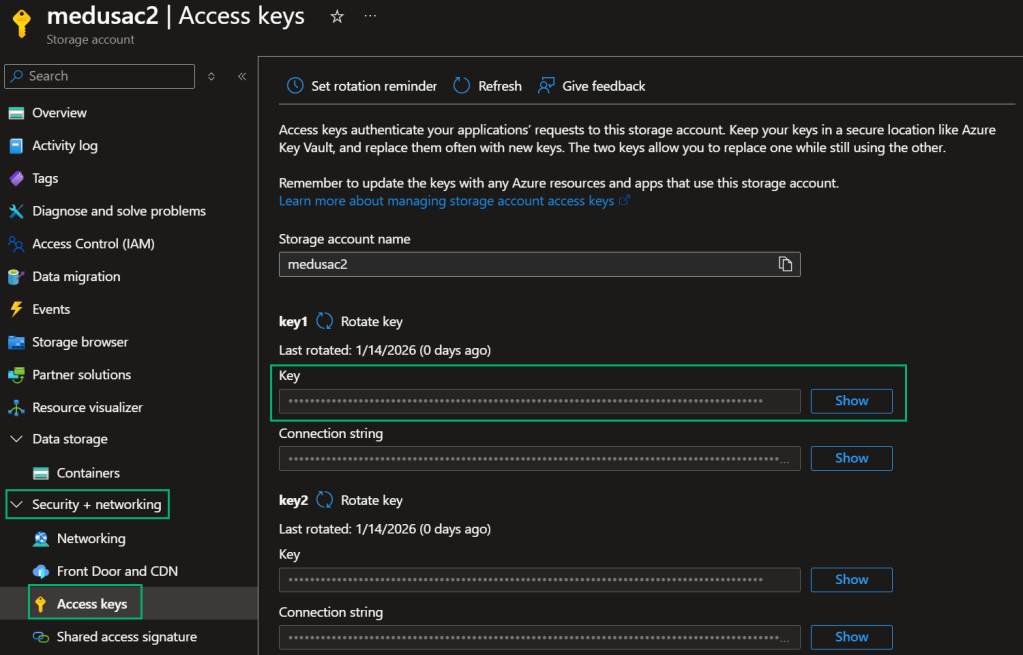
Retrieve Storage Account Access Key
Next, install the C2 profile and agent on your Mythic server.
| sudo ./mythic-cli install github https://github.com/senderend/azureBlob sudo ./mythic-cli install github https://github.com/KingOfTheNOPs/Medusa |
Mythic C2 Profile and Agent Install Commands
With the C2 profile and agent installed, the next step involves configuring the C2 profile config. Select “Installed Services” -> “C2” and then select “View/Edit Config”.
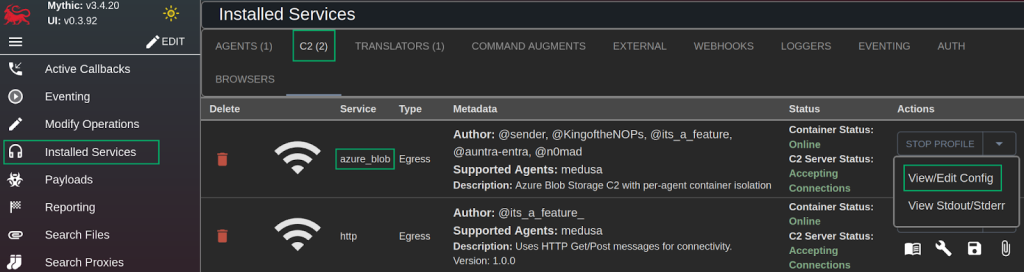
Mythic Installed Services
Insert the Storage Account name and key, and select “Submit.”
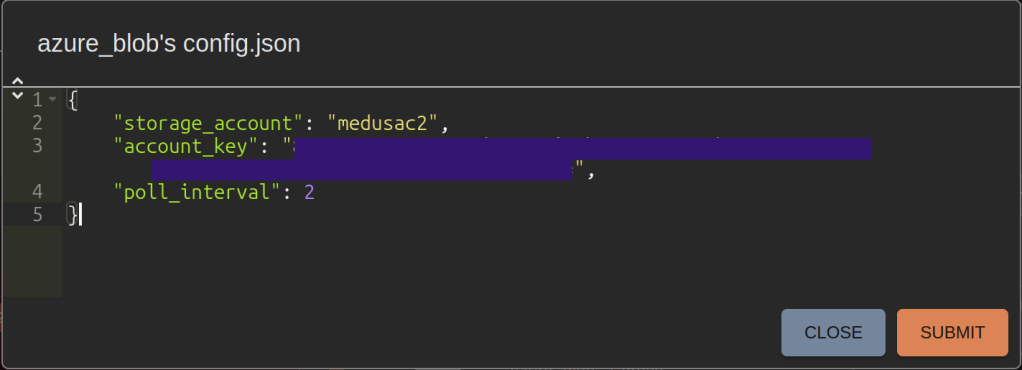
Azure Blob C2 Config
Next, you’ll create a payload and select the Medusa agent.
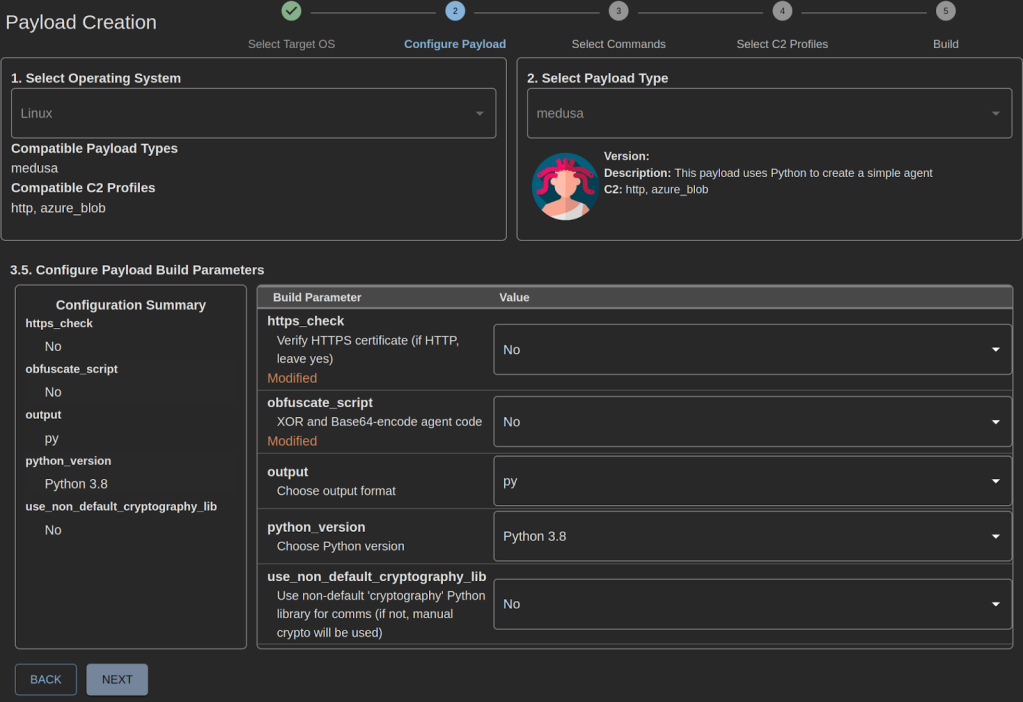
Medusa Build Parameters
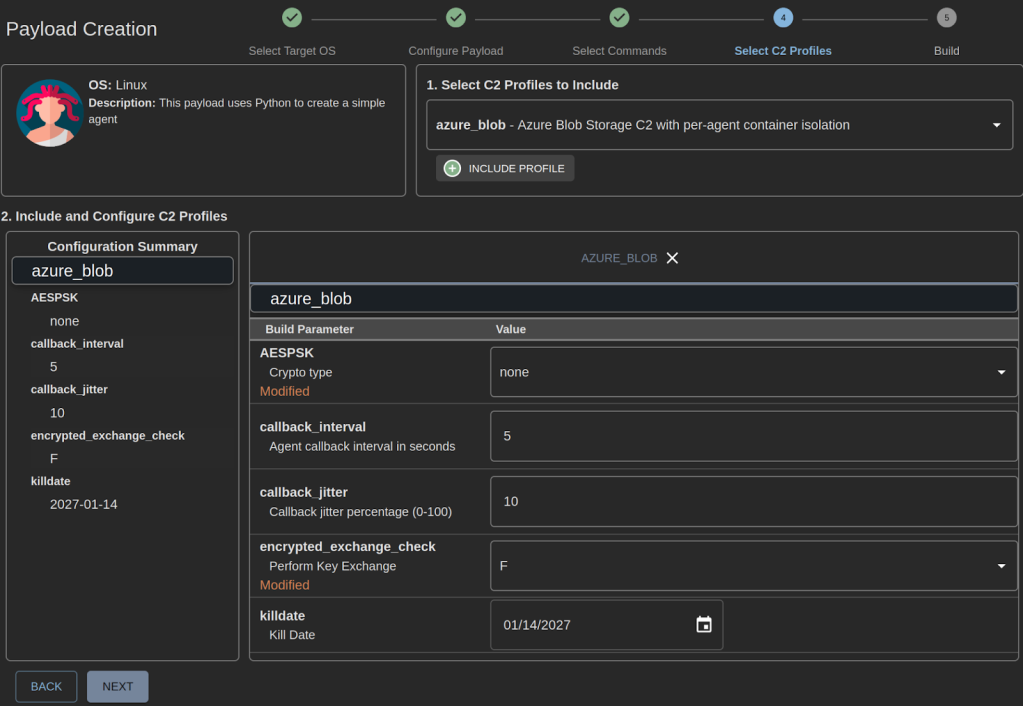
Azure Blob C2 Parameters
For demonstration purposes, we disabled HTTPS verification, payload obfuscation, and set AESPSK and encrypted exchange to “false”. During an actual engagement, we recommend setting these values to “true”. On the final page, review the payload configuration and select “Build Payload”.
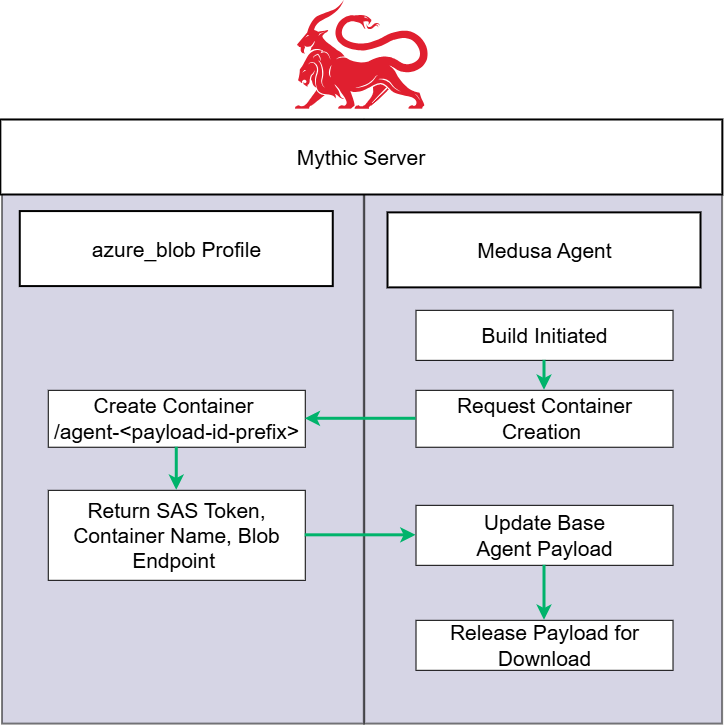
Build Process Overview
In the backend when this payload generates, the builder.py script within the Medusa project executes. We modified this script to check which profile the operator selected. If the operator selected the azureBlob profile, an RPC call sends to the C2 profile to generate an Azure Blob Storage Container scoped to that specific payload with the “agent-*” prefix as the container name. Once the container is created, the container name, SAS token, and blob endpoint return to the builder to finalize payload creation. Let’s take a look under the hood of the container creation RPC call process.
Server-Side Infrastructure Provisioning
One design goal involved eliminating any unnecessary traffic from agents to Azure management APIs. All Azure infrastructure provisioning happens on the Mythic server during payload generation. Agents never make calls to Azure management APIs; they only PUT, GET, and DELETE blobs from their assigned container.
The C2 profile exposes a custom RPC function called generate_config that PayloadTypes can call during the build process. When you build a payload through the Mythic UI, here’s what happens:
| # In your PayloadType’s builder.py config_data = await SendMythicRPCOtherServiceRPC(MythicRPCOtherServiceRPCMessage( ServiceName=”azure_blob”, ServiceRPCFunction=”generate_config”, ServiceRPCFunctionArguments={ “killdate”: killdate, “payload_uuid”: self.uuid } )) if config_data.Success: blob_endpoint = config_data.Result[‘blob_endpoint’] container_name = config_data.Result[‘container_name’] sas_token = config_data.Result[‘sas_token’] # Stamp these into your agent code |
The RPC function reads the storage account credentials from the server’s config.json, creates the container, generates the scoped SAS token, and returns everything the agent needs. The agent never touches Azure management APIs; it only makes GET, PUT, and DELETE requests to its assigned container.
This approach also means the C2 server can discover new agents automatically by listing containers with the agent-* prefix, without requiring agents to register themselves.
Container Isolation and Token Security
The storage account key never leaves the Mythic server. Agents each get their own container, and only receive a container-scoped SAS token that restricts access to their assigned container. This is a deliberate departure from how other Azure Blob C2 implementations work.
Existing implementations typically bake an account-wide SAS token into every agent, meaning a burned/reversed agent exposes credentials that can access other agents’ blobs, list all containers in the storage account, read and delete data across the entire operation, or even issue rogue tasking to agents if they obtain AES encryption keys.
With container-scoped tokens, a compromised agent can only access its own container. The blast radius is limited to that single agent.
The SAS token expiration ties to the payload kill date selected during its generation in Mythic, so tokens automatically expire when the payload does. With an understanding of how the server side provisioning works, lets break down how the C2 communication works.
How C2 Communication Works
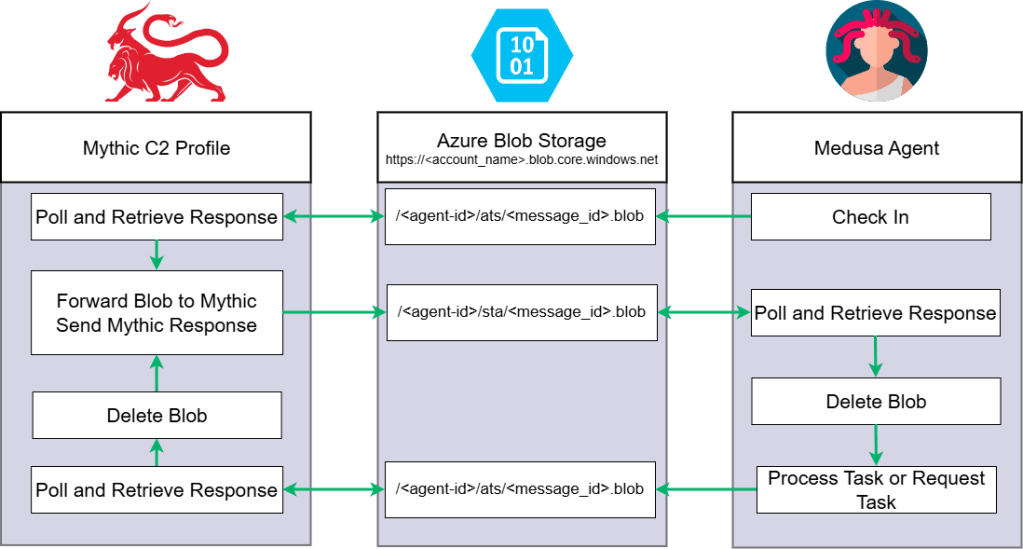
Azure Blob C2 Flow
The message flow follows Mythic’s standard “postMessageAndRetrieveResponse” and “getMessageAndRetrieveResponse” patterns, making integration into other agents straightforward.
| agent-{uuid[:12]}/ ├── ats/ │ └── {message-id}.blob # Agent-to-Server messages └── sta/ └── {message-id}.blob # Server-to-Agent responses |
To send a message:
- Agent generates a unique message ID
- Agent uploads encrypted message to ats/{message-id}.blob via PUT
- Agent polls sta/{message-id}.blob for the response
- Agent deletes the response blob after reading
The C2 server runs a polling loop that:
- Lists all containers with the agent-* prefix
- For each container, lists blobs in the ats/ folder
- Downloads and deletes each agent message, forwards to Mythic
- Writes Mythic’s response to the corresponding sta/{message-id}.blob
Each message includes a UUID prefix followed by JSON, matching Mythic’s expected format.
Pegasus Test Agent
The azureBlob repository includes Pegasus, a minimal Python agent with two main purposes:
- Validate your C2 configuration or try out the profile without having to do any agent dev
- Reference implementation with simple, stripped down code that can serve as a template for integrating C2 profile support into other agents
The agent code contains placeholders that the Mythic replaces during payload generation:
| BLOB_ENDPOINT = “BLOB_ENDPOINT_PLACEHOLDER” CONTAINER_NAME = “CONTAINER_NAME_PLACEHOLDER” CONTAINER_SAS = “CONTAINER_SAS_PLACEHOLDER” CALLBACK_INTERVAL = int(“CALLBACK_INTERVAL_PLACEHOLDER” or “30”) CALLBACK_JITTER = int(“CALLBACK_JITTER_PLACEHOLDER” or “10”) AGENT_UUID = “AGENT_UUID_PLACEHOLDER” |
When the payload builds, the agent’s builder.py calls the C2 profile’s generate_config RPC function to provision the container and get the SAS token, then stamps those values into the agent code. The account key is never stamped; only the scoped SAS token.
Pegasus supports shell, whoami, pwd, hostname, and exit commands. It demonstrates the full message lifecycle (checkin, get_tasking, post_response) as a reference.
Additionally, this test agent does not support crypto, so we don’t recommend operational use. We built this agent for lab and personal testing only.
To test your setup:
| sudo ./mythic-cli install github https://github.com/senderend/azureBlob |
Build a Pegasus payload through the Mythic UI. If it checks in, your configuration is correct and you can proceed with integrating the profile into your actual agent.
Integrating Into Your Agent
We designed the profile to work with any Mythic agent. You need to:
- In your builder.py: Call the
generate_configRPC function during build to provision the container and return the scoped SAS token, and replace placeholder variables in your agent code with the results - In your agent code: Define placeholder variables to be replaced by the above process, and implement blob PUT/GET/DELETE operations against the ats/ and sta/ paths using the values stamped into these placeholder variables at build time
Agent comms to Azure Storage are simple HTTP REST API calls, made using standard request libraries available in most programming languages. You may notice that we’ve used the Microsoft Azure Storage Blobs Python library for the server-side container provisioning and account-level administration that’s necessary in the C2 profile (not the agent). While Azure Storage client libraries and SDKs exist for many languages, they’re not necessary for the simple read/write/delete operations the agents require. We chose to build our own simple requests with standard libraries, in order to avoid payload dependencies and provide customization options for operators
The container URL format is https://{storage_account}.blob.core.windows.net/{container_name}/{blob_path}?{sas_token}.
Future Work: Faster SOCKS
While testing SOCKS with Medusa and the azureBlob profile, we saw speeds up to 19-21 KB/s.

SOCKS Speed Test
These speeds were by no means pleasant, but Andrew Luke and Paul Kim spearheaded an effort to port the client side of ProxyBlob from Go to Python for inclusion in agents that support the Azure Blob Storage C2 profile. ProxyBlob is Quarkslab’s purpose-built SOCKS5 proxy designed specifically for Azure Blob Storage transport, achieving around 1.5 MB/s throughput. These speeds would provide a huge improvement over our tested ~21KB/s, and bring agents’ SOCKS capabilities via Azure Blob Storage to a level that robustly supports proxying-in offensive tooling. Be on the lookout for an additional blog post once we flesh out the proof of concept!
Conclusion
Deployment guides are a gold mine of information for defenders and adversaries. Oftentimes, these guides leave opportunities to develop techniques that live inside what organizations already trust. Azure Blob Storage isn’t a new method for C2 comms as popular tools such as Loki already demonstrate this; we just wanted to expand the ground work already laid down! We designed this Mythic profile to help others integrate Azure Blob Storage into their Mythic C2 agents. A huge thank you to Cody Thomas for helping build this tool and for his developer series for Mythic. If anyone is interested in developing their own C2 profile or agent in Mythic, I highly recommend watching his series! Also shout out to Andrew Luke and Paul Kim for their help during the development of this Mythic profile.