Offensive DPAPI With Nemesis
TL;DR: Nemesis 2.2 automates the entire DPAPI decryption chain – from SYSTEM/user masterkeys through CNG keys to Chromium’s latest App-Bound Encryption – with robust forward as well as retroactive decryption.
The Windows Data Protection API, or DPAPI, is the fun little technology that just won’t disappear from offensive operations. I first talked about abusing DPAPI on operations in my 2018 post Operational Guidance for Offensive User DPAPI Abuse. Some things have changed since then, but plenty stayed the same. SpecterOps has touched on using DPAPI in specific use cases over the last several years, from Slack, to capturing custom entropy, and even how it factors into protections for certificates and CA private keys, but the major systems and tool(s) we used for abuse didn’t majorly change until Nemesis 1.0.0 (and then with my colleague Andrew Gomez’ cookie-monster project for Chrome v1.37+).
During our recent Nemesis 2.2 development sprint, we turned our eyes to DPAPI yet again and heavily revamped how we use and abuse DPAPI. This post will summarize the major new DPAPI features, how everything works internally, and will give you everything you need to get started analyzing and abusing DPAPI in Nemesis!
Note: What we’re talking about here will not touch on TPM usage. We’re handling purely file and memory based approaches.
Another note: In case it isn’t obvious, DPAPI applies to only Windows, so while there is some overlap in how Chrome/Chromium protects secrets on other platforms like macOS. We’re only going to focus on the Windows side of the house today.
DPAPI Background
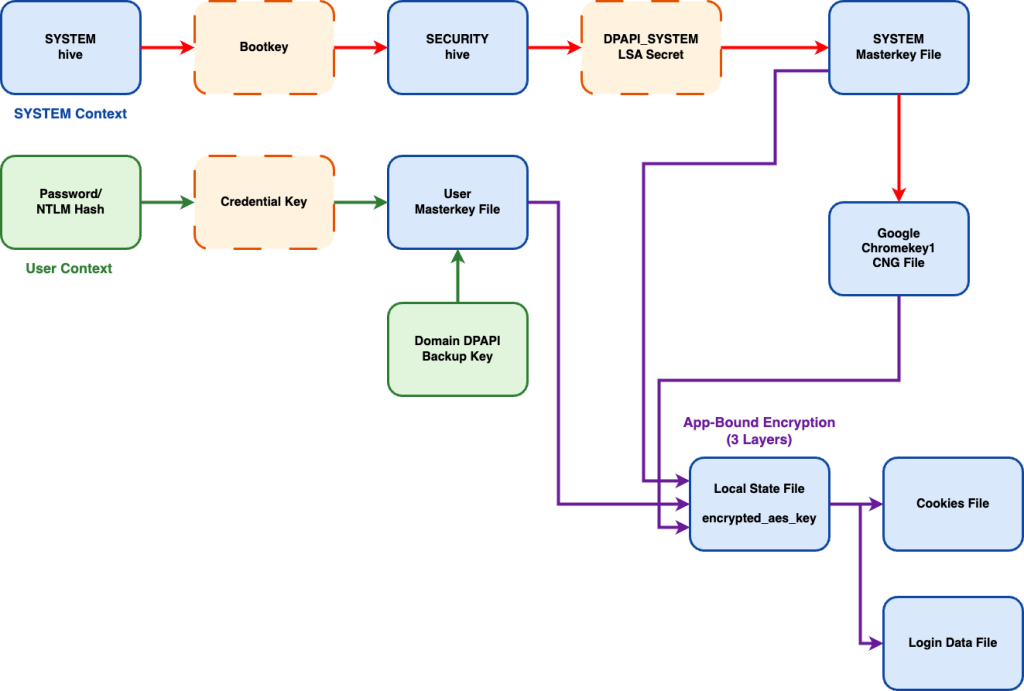
Every DPAPI post has to begin with a quick (or no-so-quick) primer on DPAPI. As I listed a number of DPAPI references in the introduction, I’m going to make this on the quicker side. This diagram explains the current state of Windows DPAPI protection, specifically in relation to Chromium Cookie and Login Data protection:
Definitely not complicated. Nope. Not at all.
While things have gotten more complicated with Google Chromium’s App-Bound Encryption (ABE) approach, particularly with the Chromium 137+ update that introduced the Cryptography API: Next Generation (CNG) wrinkle, the base of everything else is heavily the same.
There are a lot of interconnected files here that link forward and backward, something you can certainly decrypt manually piece by piece, or now have Nemesis automate everything for you!
To note: Nemesis doesn’t do anything particularly novel here. We just adapted public code and information to automate the DPAPI + Chromium decryption processes as much as we could. The rest of this post will break down specific subcomponents and show how Nemesis handles them. Shoutout to these awesome projects that we built on top of: pypykatz, Impacket, DPAPIck3. Also shoutout to these awesome projects that helped work out the newest version of Chromium’s app-bound-encryption approach: chrome_v20_decryption, cookie-monster, and DIANA.
SYSTEM DPAPI Masterkeys
The DPAPI masterkeys for a particular system are treated a bit differently than domain user keys. They’re located at C:\Windows\System32\Microsoft\Protect\S-1-5-18\User\ and are encrypted with the DPAPI_SYSTEM LSA secret (specifically, the user key) and has no domain backup key component. There are three ways we know of to get the decrypted key material for these:
- Use offline copies of the SYSTEM (for the bootkey) and SECURITY (for the LSA secrets) hives to extract the DPAPI_SYSTEM LSA secret to then decrypt the system masterkey file (thanks pypykatz!)
- Use existing LSA Secret extractors live on the host to extract the DPAPI_SYSTEM LSA secret to then decrypt the system masterkey file
- Extract the decrypted keys from an LSASS dump
We wanted Nemesis to support all the current options.
If you are submitting offline registry hive files extracted from a system, the registry_hive file enrichment module will extract the DPAPI_SYSTEM key from SYSTEM/SECURITY hives and store it for system masterkey decryption. Additionally, the dpapi_masterkey file enrichment module will attempt decryption for any new SYSTEM masterkey files that come in using available DPAPI_SYSTEM keys.
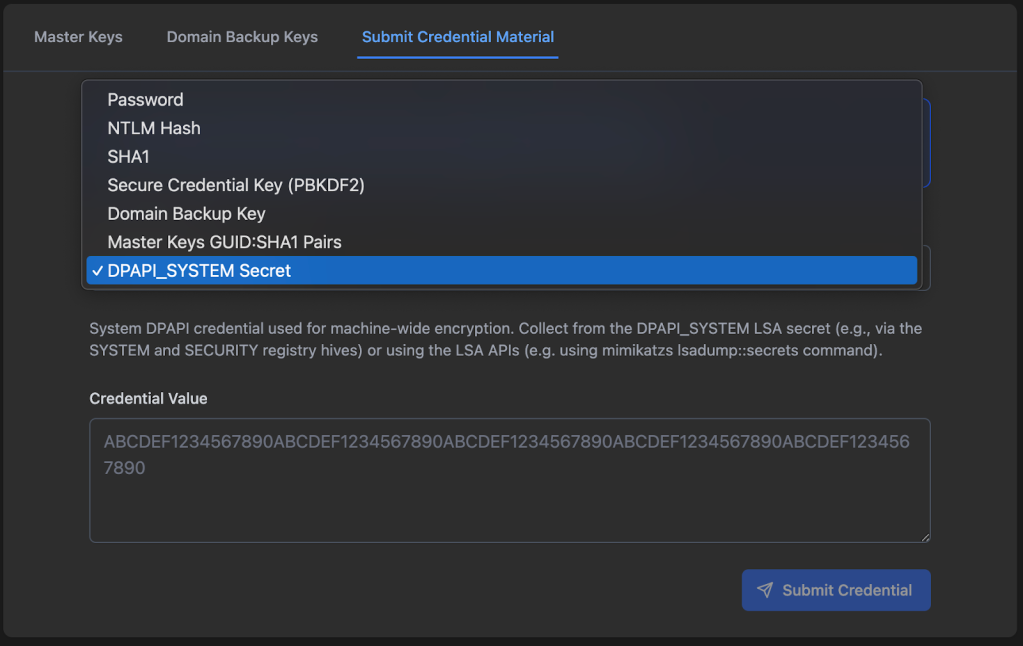
If you’re able to extract the DPAPI_SYSTEM LSA secret via other methods, we have the option to submit this via the Nemesis Chrome/DPAPI -> Submit Credential Material tab with the DPAPI_SYSTEM Secret credential type:
And finally, the lsass_dump file enrichment module will scrape any system (and user) plaintext masterkeys and GUIDs and save them in the backend for later blob/file decryption.
These SYSTEM masterkeys are linked to a particular SOURCE ID (i.e., a host name) that’s used to correlate the files with others that are needed for decryption. We’ll show how these keys are used later to decrypt CNG files and Chromium Local State encryption keys.
User DPAPI Masterkeys
User keys are located at %APPDATA%\Microsoft\Protect\<user_sid>\<guid> and are a bit more complicated for us attackers, but also grant us a number of different options for decryption. User DPAPI masterkeys have the final blob key protected twice, via two different methods.
Firstly, the key is protected with an intermediate key derived from the user’s password. This key can be derived from a user’s plaintext password or their NTLM hash, as shown in this diagram from our Adversary Tactics: Red Team Operations training:
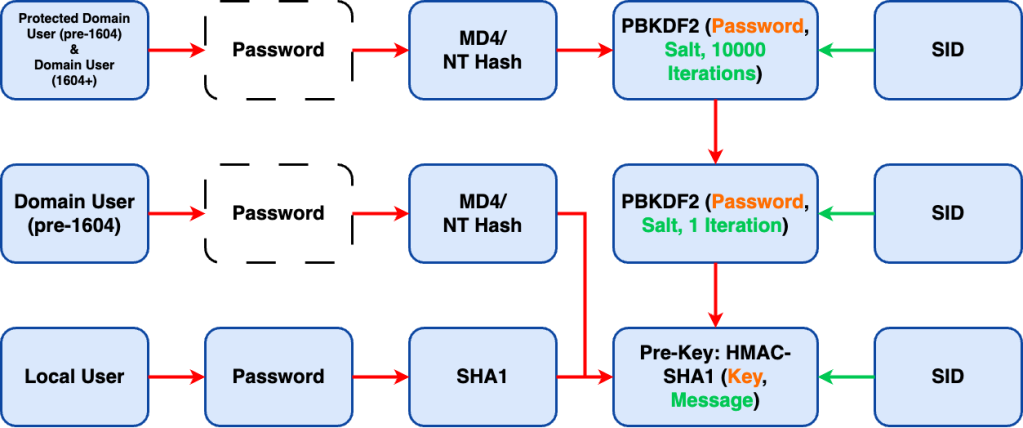
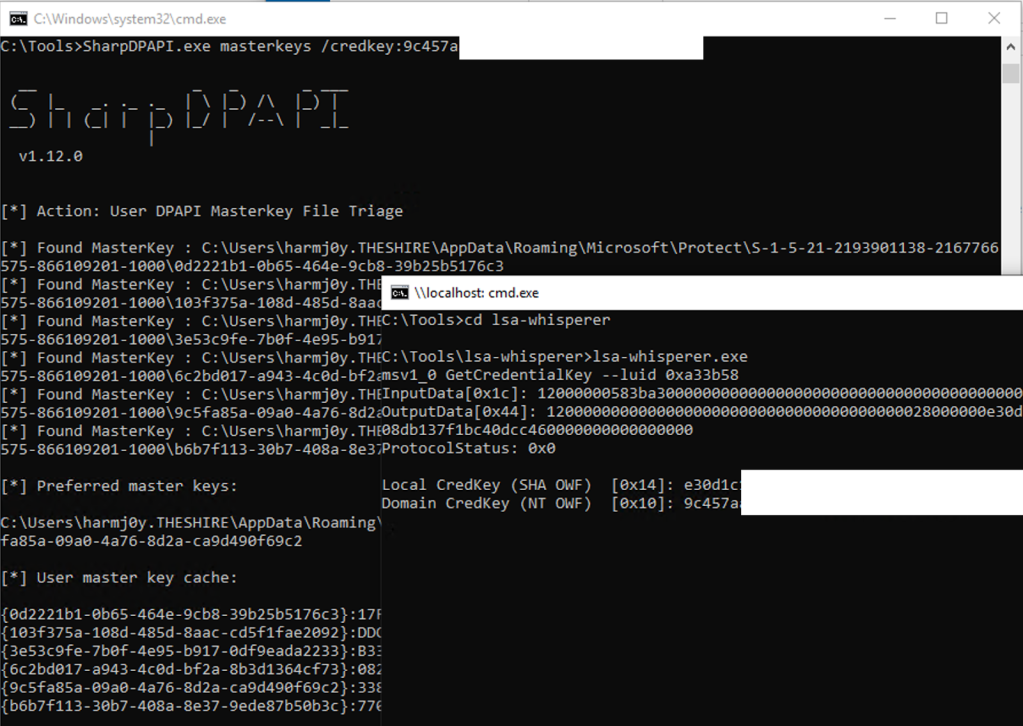
This ultimately results in what Microsoft refers to as a credential key (a.k.a., pre-key) which you can also retrieve from LSASS via lsa-whisperer via the msv1_0 GetCredentialKey or msv1_0 GetStrongCredentialKey (from a SYSTEM context on the host) and used with SharpDPAPI:
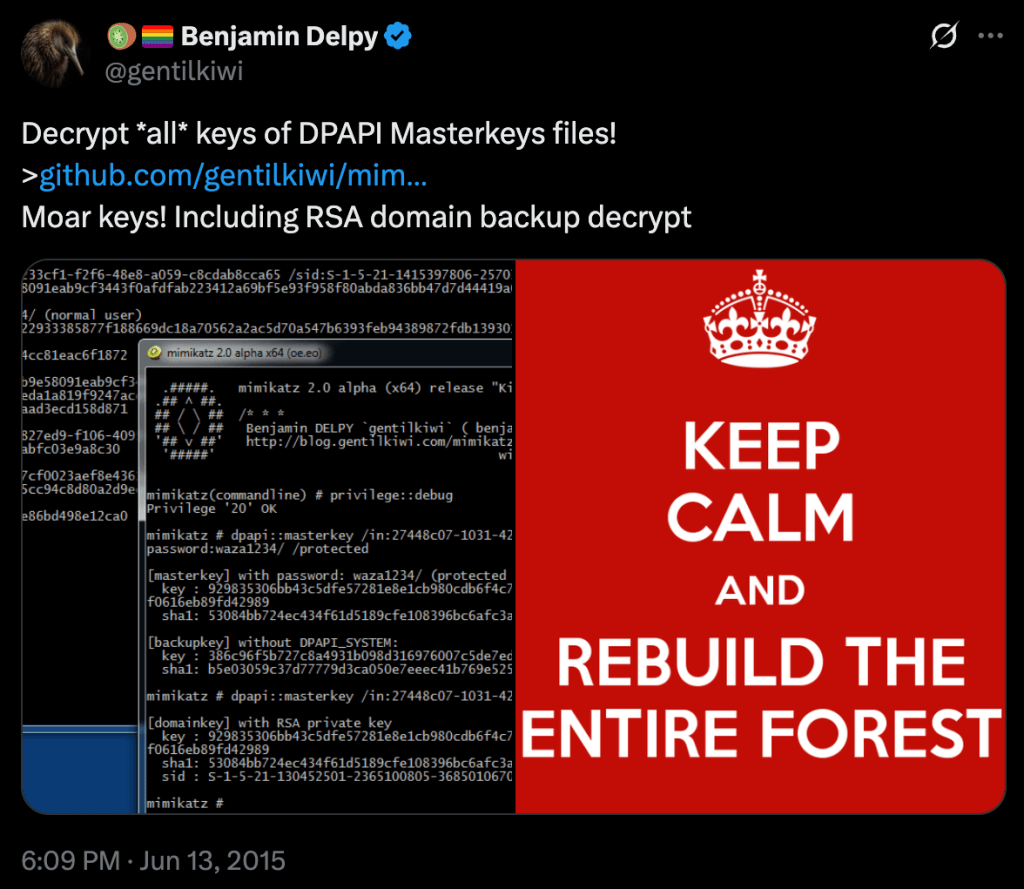
Secondly, the blob key is protected with the public key component of the domain DPAPI backupkey (described in more detail in the Scenario 4: Elevated Domain Access section of the original DPAPI post). If you can retrieve the private key component of this keypair from a domain controller (DC), you can decrypt any domain user’s DPAPI masterkey blobs in the past or future:
Side note: We noticed during our dev that, on the most recent versions of Windows, the structure of the decrypted master key changed. We accounted for this, but existing DPAPI libraries we tested (dpapick3 and Impacket) were broken as of the drafting of this post (late 2025). We have test data in the repo for anyone interested!
You can also use the BackupKey Remote Protocol ([MS-BKRP]), famously implemented in Mimikatz, from a list system (from the target user’s context) to retrieve a user DPAPI masterkey:
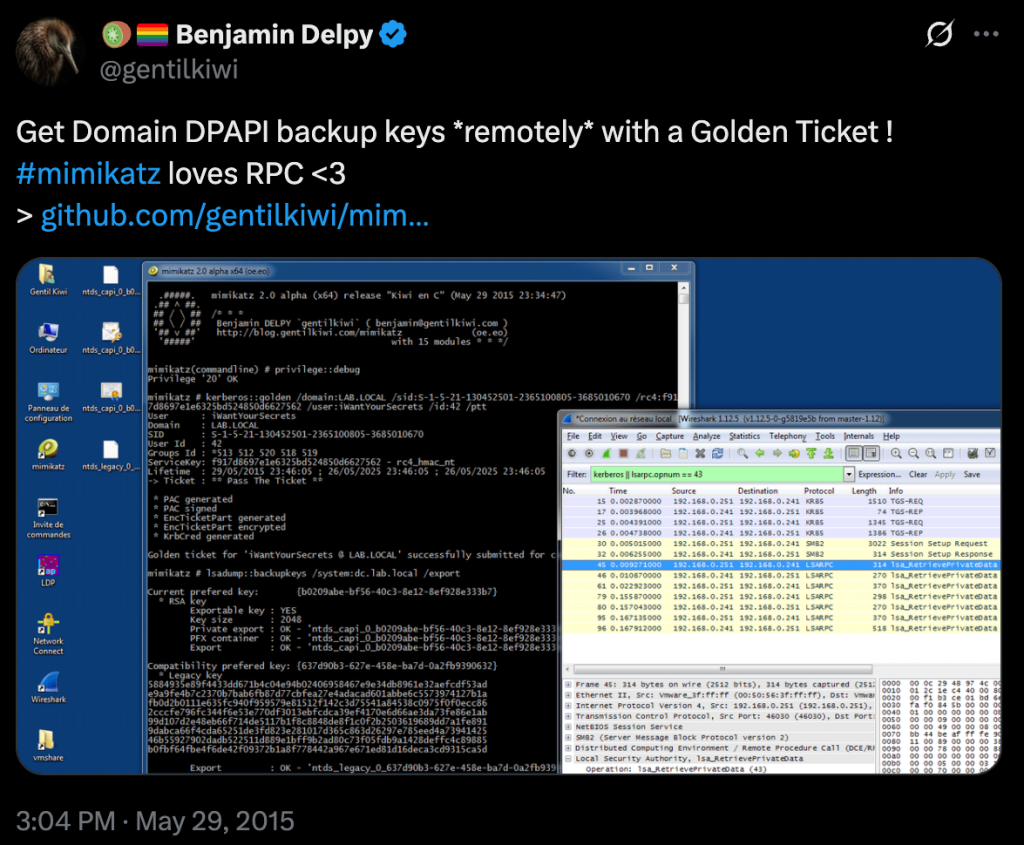
Sidenote for those who weren’t aware, you can also do this with SharpDPAPI!
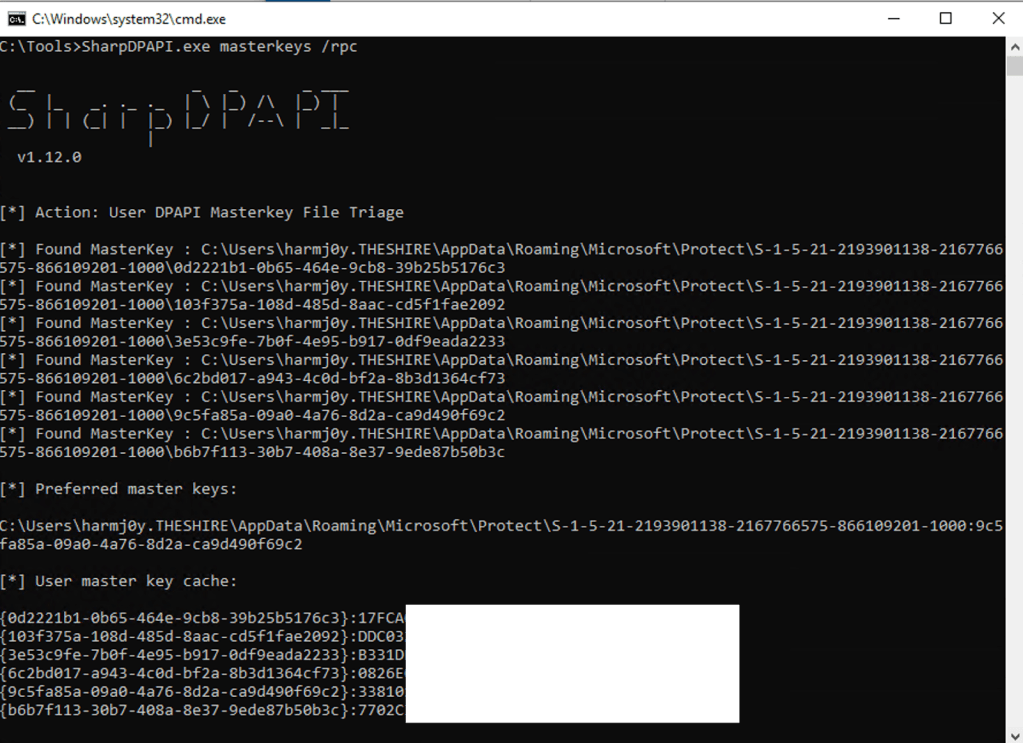
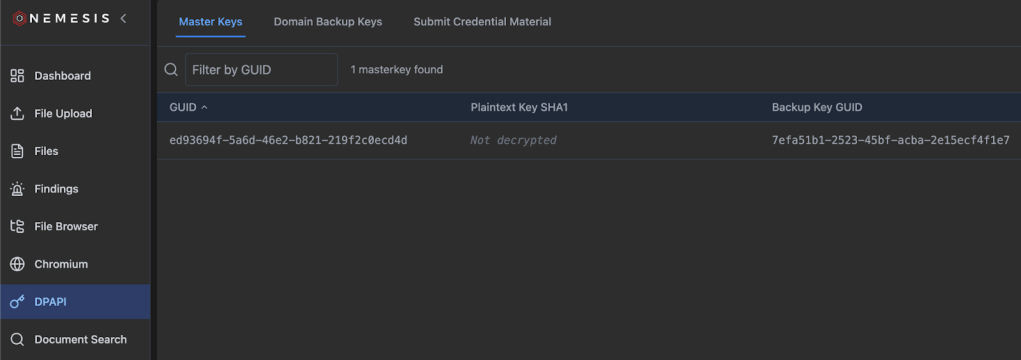
However, with Nemesis, as it’s a file-enrichment platform without direct implant interaction, we’re confined to file based methods for retrieval. To execute this, Nemesis will try to parse any GUID-named file as a DPAPI masterkey file, storing the encrypted sections into the storage backend. Any parsed user/system masterkey files are then displayed in the DPAPI page (on the left navigator) under Master Keys:
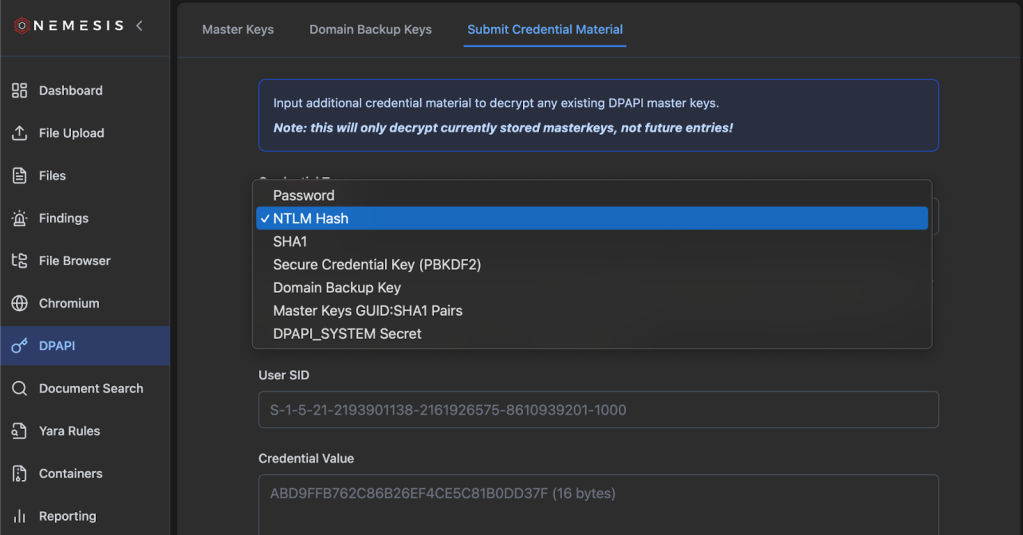
If you have a user password, NTLM hash, or lsa-whisperer credential key, you can submit these through the Chrome/DPAPI -> Submit Credential Material tab. This will retroactively decrypt any existing encrypted masterkeys, but not any in the future (more on this at the end of this section). However, if you submit a domain DPAPI backupkey, these not only decrypt existing domain user masterkeys, but backup keys are stored in the Nemesis backend and will decrypt any newly linked user masterkeys that come in.
And as mentioned, similarly to SYSTEM DPAPI masterkeys, we automatically scrape user DPAPI masterkeys from any LSASS dumps submitted as well.
However, to note: while we store DPAPI domain backup keys, masterkeys, and chromium cookie/login data (more on this in the next section) in the schema, we do not currently store user passwords, NTLM hashes, or secure credential keys persistently. We decided on this approach as we wanted to greatly simplify the old data model. We may add back in individual DPAPI blob tracking at some point but for now we opted for simplicity. This means that if you do not have a domain DPAPI backup key, in order to decrypt any NEW masterkeys submitted, you need to resubmit a user password/NTLM hash/secure credential key as each submission will only attempt to decrypt masterkeys currently present in the database.
DPAPI Blobs
Nemesis 2.0, unlike Nemesis 1.0.0, does not extract and store every single DPAPI carved DPAPI blob in the backend database as first-class citizens. This was part of our schema simplification and general performance optimization with the Nemesis 2.0 rewrite. However, every file is still scanned for DPAPI and up to 100 DPAPI blobs are carved and directly stored with a file’s enrichments. This data is exposed in a few tabs for files with discovered DPAPI blobs.
First, a finding is created if DPAPI data is found in a file, along with the unique set of masterkey GUIDs for the discovered blob:
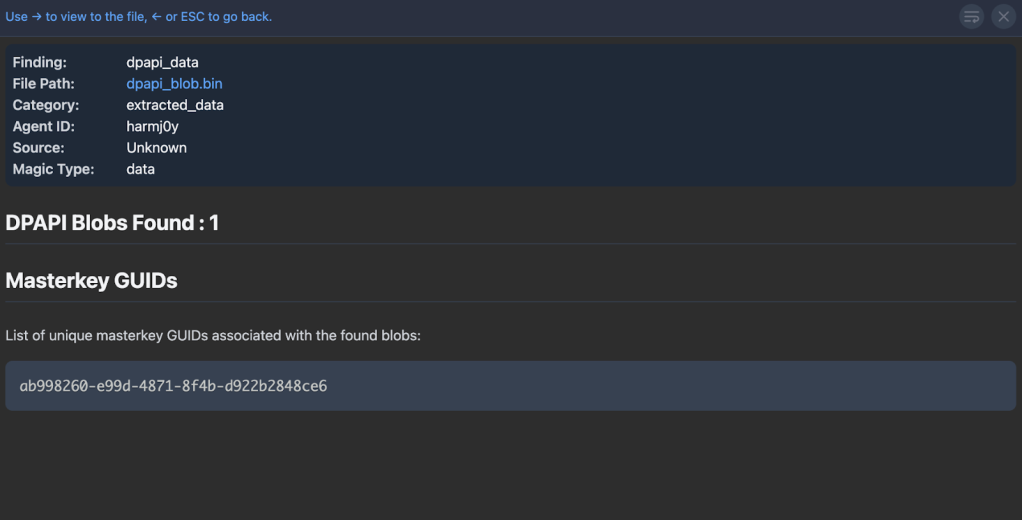
Second, a .csv transform is created for all carved DPAPI blobs, which contains the masterkey guid, the blob offset and length, whether the blob is decrypted, and if the blob is less than 1000 bytes and was decrypted a base64 encoded string of the decrypted bytes is included:
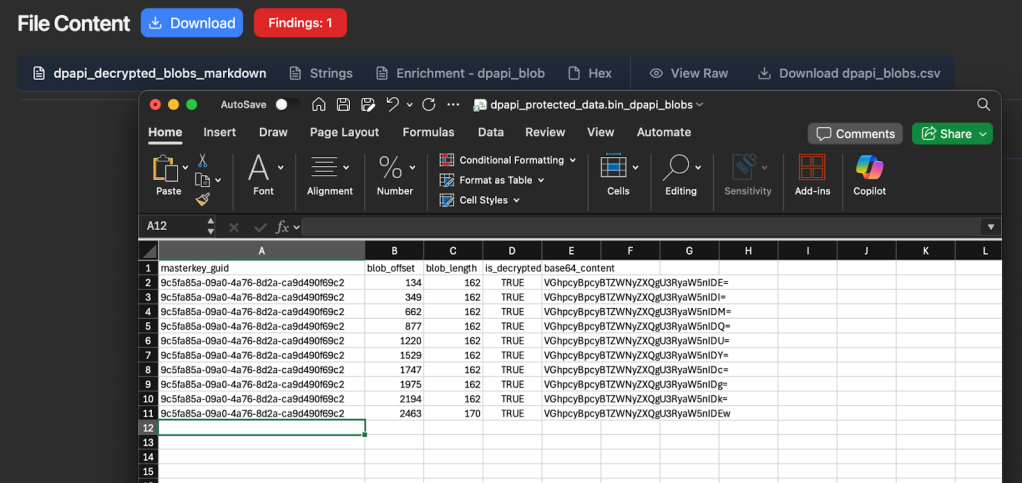
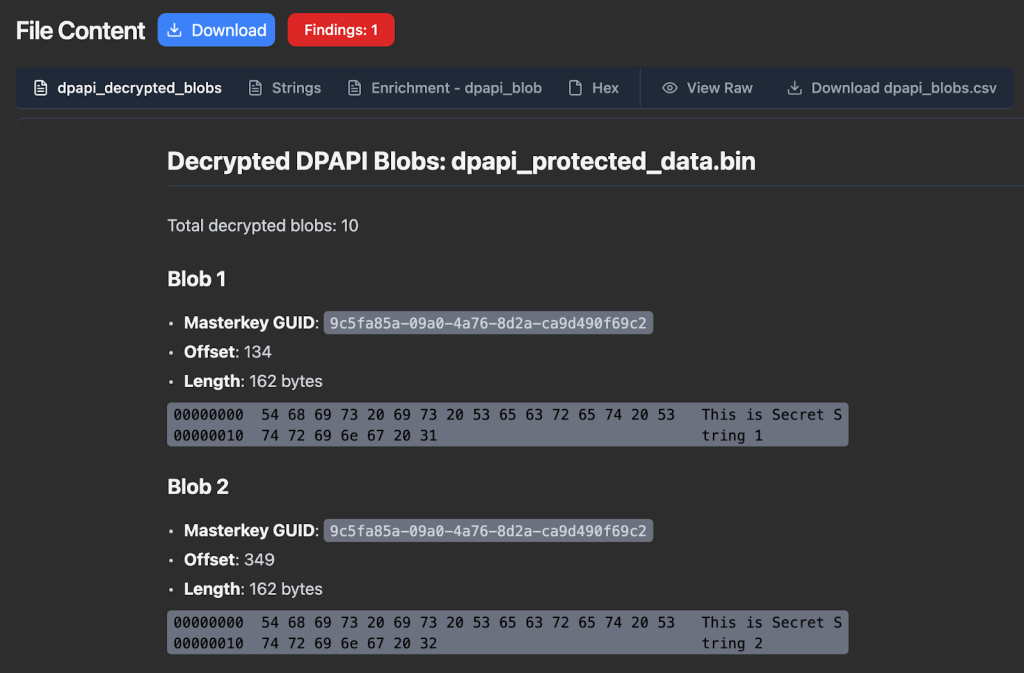
Finally, Nemesis creates a separate Markdown transform for all decrypted DPAPI blobs, which again displays the masterkey guid/blob offset/blob length but will display any <=1000 byte decrypted blobs as a hex dump for easier triage:
Chromium Cookies and Login Data
On to the main event, one of the main targets people have when trying to abuse DPAPI: Chromium browser cookies and saved logins. Here’s where things get a bit more complicated.


Back in the ancient days, the Chromium code base protected its cookie and saved login values the old fashioned way: by calling the CryptProtectData/CryptUnprotectData DPAPI functions on the secret values directly for storage and retrieval. And things were… good for us attackers at least 🙂 All it took was code execution within a user’s context to decrypt sensitive values.
With Chrome 80’s release on February 4, 2020, Chrome changed their protection approach to mirror the one used on macOS. The Local State file for a user’s Chrome/Chromium instance contained a key at encrypted_key that was also DPAPI encrypted. This key was then used to protect cookie values and login entries. Offensively for us, this made little difference, as code execution in a user’s context gave us the single decryption key needed for all sensitive entries. And (attacker) life was good.
But alas, the development team at Chrome is crafty and infostealer malware authors are not nice people. On July 30, 2024, the Chrome team released the awesome (for defenders, not us attackers) “Improving the security of Chrome cookies on Windows” blog. In this post, they detail their new Application-Bound (App-Bound) Encryption primitives to store sensitive Chromium data such as cookie values and login passwords. My colleague Andrew Gomez goes into this in more detail in “Dough No! Revisiting Cookie Theft”, but to summarize: the app_bound_encrypted_key entry in the Local State file was now protected first with a SYSTEM DPAPI masterkey, and the decrypted bundle was then decrypted with the user’s DPAPI masterkey. As Andrew describes, “In order to use the user’s and SYSTEM’s master key for protecting the App-Bound key, Chromium browsers utilize an elevation service to perform privileged operations such as EncryptData and DecryptData via the iElevator COM interface.”
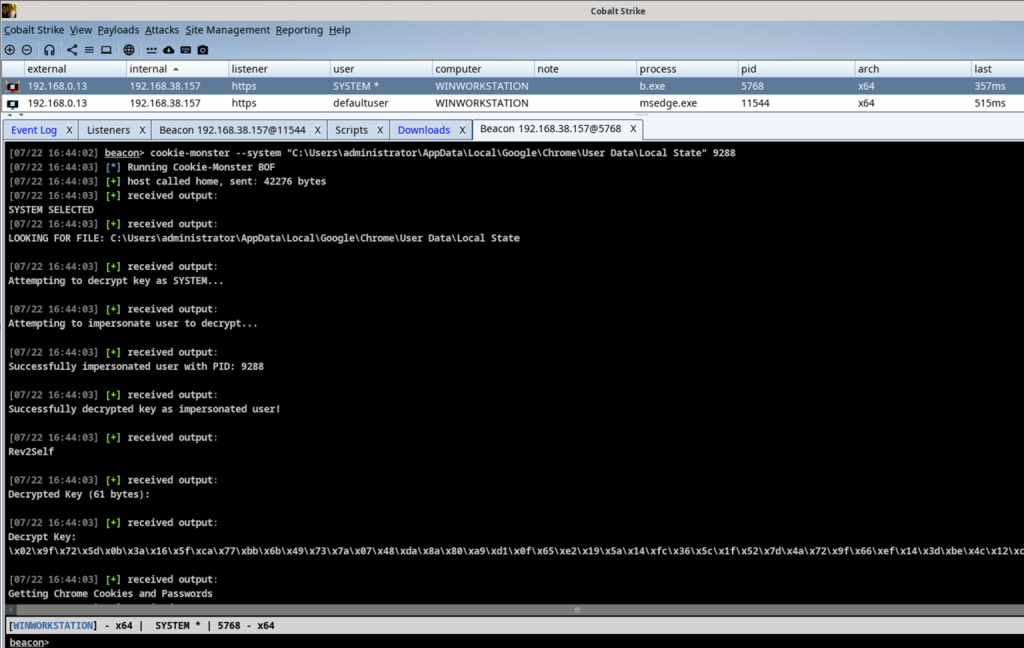
This absolutely raised the bar for attackers, but hasn’t stopped them completely. Given SYSTEM execution, cookie-monster will allow you to decrypt the encrypted_aes_key in a Chromium’s Local State file. Andrew’s post goes into details on how this is possible, and this screenshot from his post shows the Beacon object file (BOF) in action:
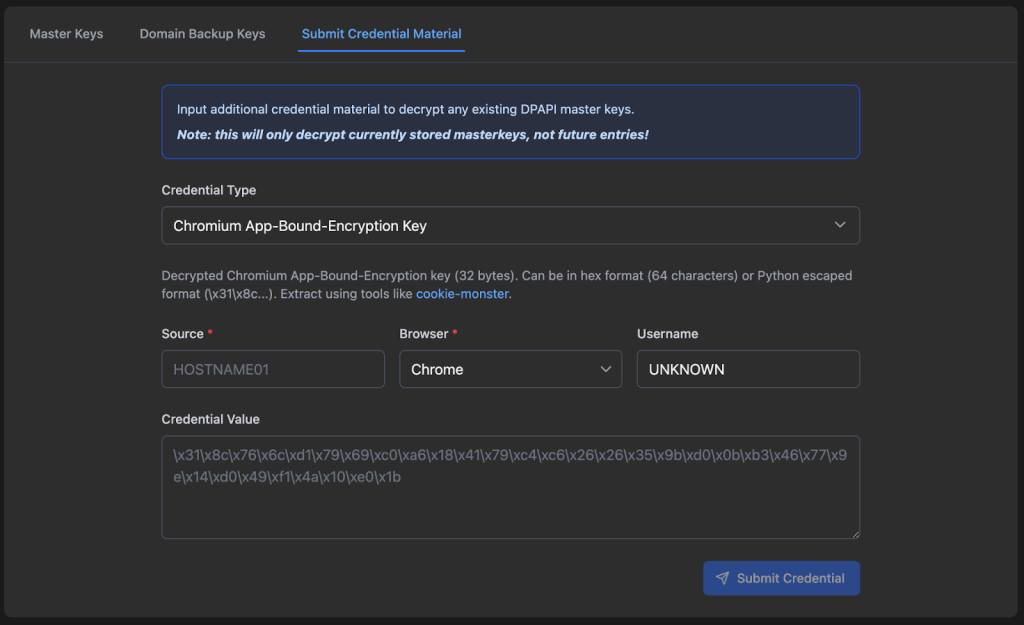
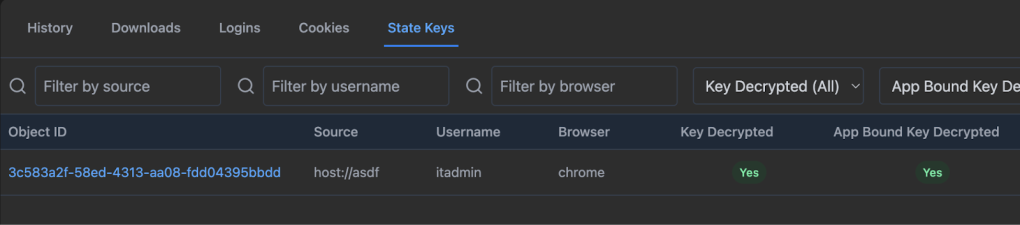
You can actually submit this decrypted app-bound-encryption key directly to Nemesis via the Nemesis Chrome/DPAPI -> Submit Credential Material tab with the Chromium App-Bound-Encryption Key credential type. The Source field is required, so we can link this key to the appropriate host:
I want to emphasize that I am NOT ragging on the developers of this system in any way whatsoever; it’s an extremely clever solution to the constraints Chrome operates under on Windows systems. Preventing user secret retrieval when an attacker has code execution in a user’s context is a nearly impossible task. As the Chrome team states in the original “Chrome app-bound encryption Service” design document:
IMPORTANT: The aim is not to prevent an attacker who is running at a higher privilege than Chrome from performing these operations – e.g. Administrator, SYSTEM, an enterprise admin, a rootkit, or a kernel driver. This is just to prevent an attacker with the same privilege as Chrome from trivially calling the APIs.
ABE obviously complicated our lives as attackers and I tip my hat to the Chrome development team. 👏
This ABE function/approach changed several times (specifically with some of the encryption algorithm specifics) up to the drafting of this post, with the most recent version being released in Chrome 137+. Specifically now, after decrypting with the SYSTEM and user DPAPI keys/functions, the final app-bound key is THEN decrypted with the Google Chromekey1 key from the Cryptography API: Next Generation Key Storage Provider (KSP). My best guess as to why they did this is that CNG keys can be stored on TPMs, which would prevent their retrieval (if configured correctly).
So, are we out of luck? Well, if the target is using software-based storage for the KSP, these files are stored in C:\ProgramData\Microsoft\Crypto\SystemKeys\<hash>_<machineGuid> where the <hash> is calculated with this function and results in the value 7096db7aeb75c0d3497ecd56d355a695. In this case, the private keys from these files are protected with a SYSTEM DPAPI masterkey as well: a class of files we’re already handling. Given the proper keys, we can decrypt this CNG file, extract the “chromekey” needed, and decrypt the final app-bound encryption key needed to decrypt our cookies and logins. And Nemesis can handle just this!
Retroactive Decryption
So now, with all of these files linked together, you’re probably feeling like a meme I totally don’t overuse in my posts:

If our ultimate goal is, say, Chromium Login Data decryption for a modern browser based purely off of file decryption (i.e., no code execution directly on host), the files we’ll need to review are:
- The Chromium Login Data file itself
- The Chromium Local State file from the same Chromium install (Chrome, Edge, etc.)
- The user masterkey key blob from:
- The specific user masterkey file + Domain DPAPI backup key, user password, NTLM hash, etc.
- Raw carved user masterkey from an LSASS dump
- The SYSTEM masterkey key blob from:
- SECURITY + SYSTEM hive carving of the DPAPI_SYSTEM secret, along with the specific SYSTEM masterkey file to decrypt
- Raw carved SYSTEM masterkey blob from an LSASS dump
- The Google Chromekey1 CNG file from C:\ProgramData\Microsoft\Crypto\SystemKeys\<hash>_<machineGuid>
Here’s the previous graphic showing these files interacting:
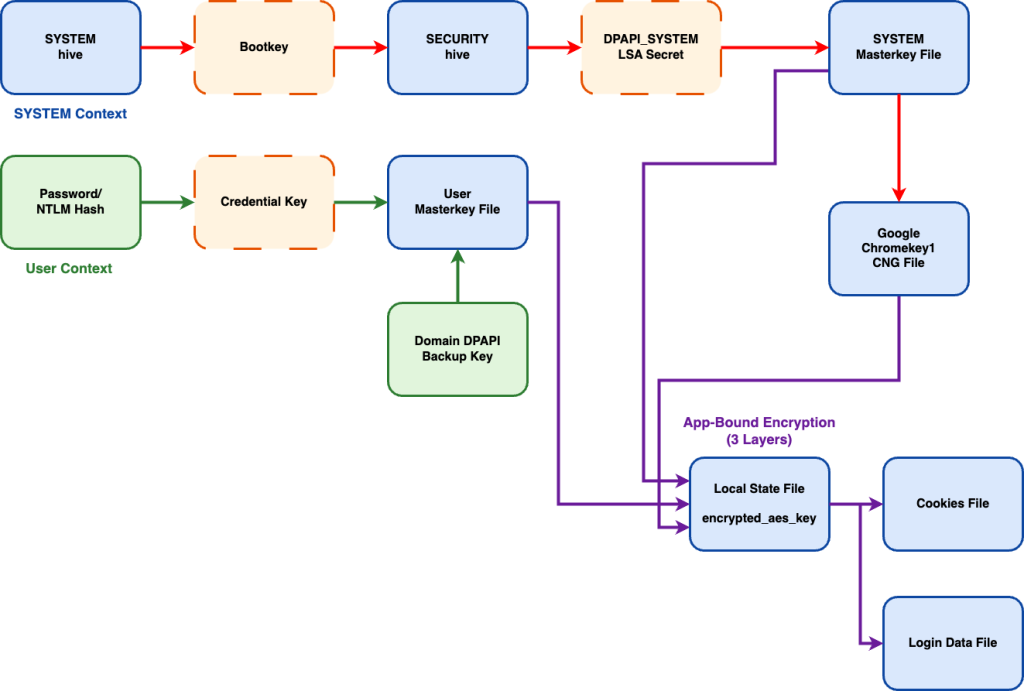
This is a lot of files, and there is an element of state-dependency here as well. For example, the Local State file needs the linked user and system decrypted masterkeys, as well as the decrypted chromekey, before it can be decrypted and then used to decrypt Login Data entries.
We didn’t want users to have to use some kind of state diagram to determine an exact order all of these files need to be submitted in, so we built in robust retroactive decryption for this process. TL;DR no matter what order you submit all of these files in, decryption of specific parts will be used to decrypt future and retroactive linked files (with the only exception being the submission of user password/NTLM/credkey entries to decrypt user masterkeys). This is because we don’t currently store and track individual credentials in the Nemesis backend, though this may be something we add in the future. Decrypted masterkeys, Chromekeys, Chromium local state keys, and domain backup keys are all tracked and linked (where possible) in the backend.
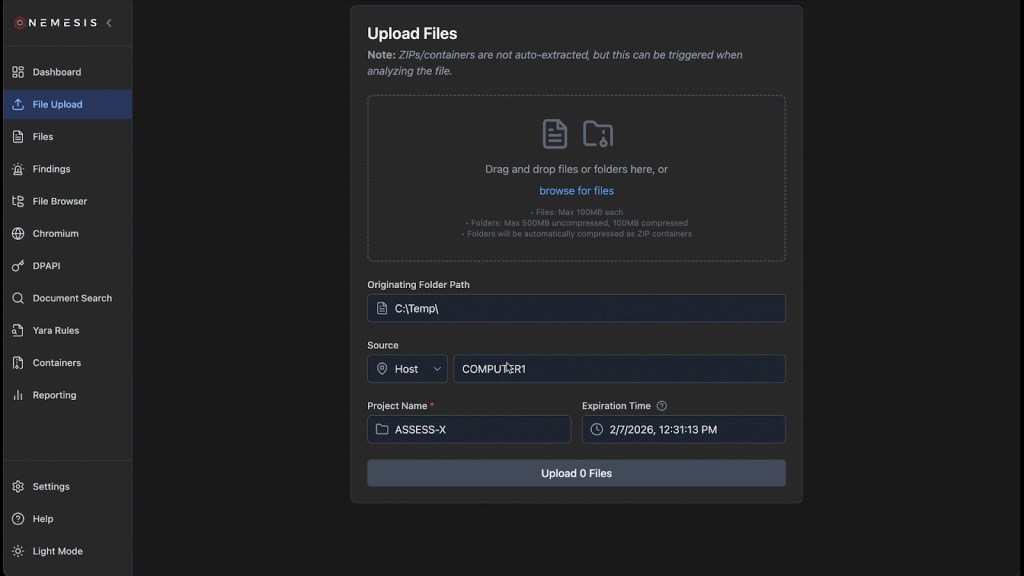
For example, if you submit Chromium Login Data and Local State files, and the Google Chromekey1 CNG file, and then submit an LSASS dump containing plaintext DPAPI user/system keys, everything will retroactively decrypt down to the Login Data entries. This will work even if the files have non-standard names and download locations, as long as the SOURCE (host) field is the same for each file!
Wrapup
Nemesis has come a long way since its 1.0.0 release, and has progressed even more since its 2.0 release this year. DPAPI functionality is something we care deeply about and have been working on for nearly 10 years, and we’re excited that Nemesis can function as part of the next generation of DPAPI analysis tools.
All of these changes are live in the main branch of Nemesis! Join us in the #nemesis-chat channel in the BloodHound Slack for any questions or feedback, and please report any issues on GitHub.