Discovering Unexpected Okta Attack Paths with BloodHound
TL;DR: OktaHound is a new data collector for the Okta Platform that ingests information about entities and their relationships within an Okta organization and represents them as nodes and edges in BloodHound’s graph database. Security professionals can then visualize their Okta environments, discover policy violations in their security model, and search for possible attack paths and privilege escalations. After unleashing the full power of BloodHound’s OpenGraph by ingesting data from multiple sources, hybrid paths and unexpected security dependencies between Okta and connected resource or identity providers will start lighting up.
Why Okta?
Okta Platform (A.K.A. Okta Workforce Identity Cloud) is a popular cloud-based enterprise identity and access management (IAM) solution.
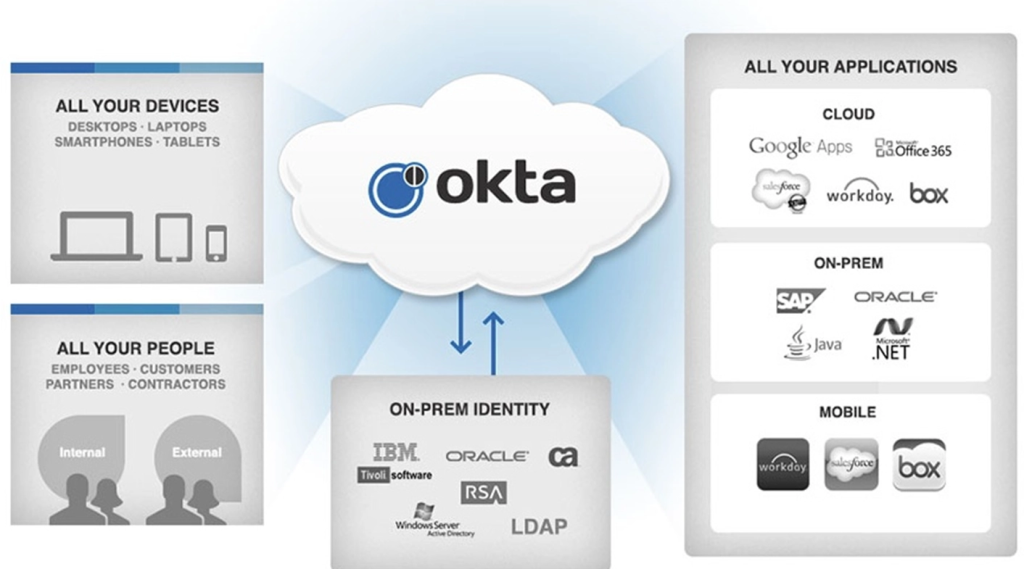
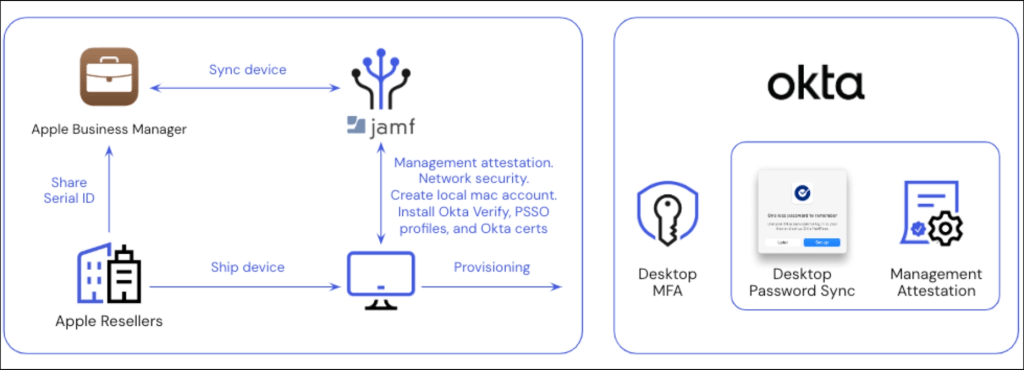
Okta is an interesting target for attackers, as organizations widely use it to manage access to their cloud and on-premises applications. When connected to a third-party mobile device management (MDM) solution like Jamf or Intune, Okta could indirectly be misused for endpoint takeover. Compromising an Okta organization (i.e., tenant) could thus provide attackers with access to a wide range of resources and data.
Having said that, Okta organizations seem to be secure by default. Multi-factor authentication (MFA) is enforced for all users and re-authentication is required for sensitive administrative tasks.
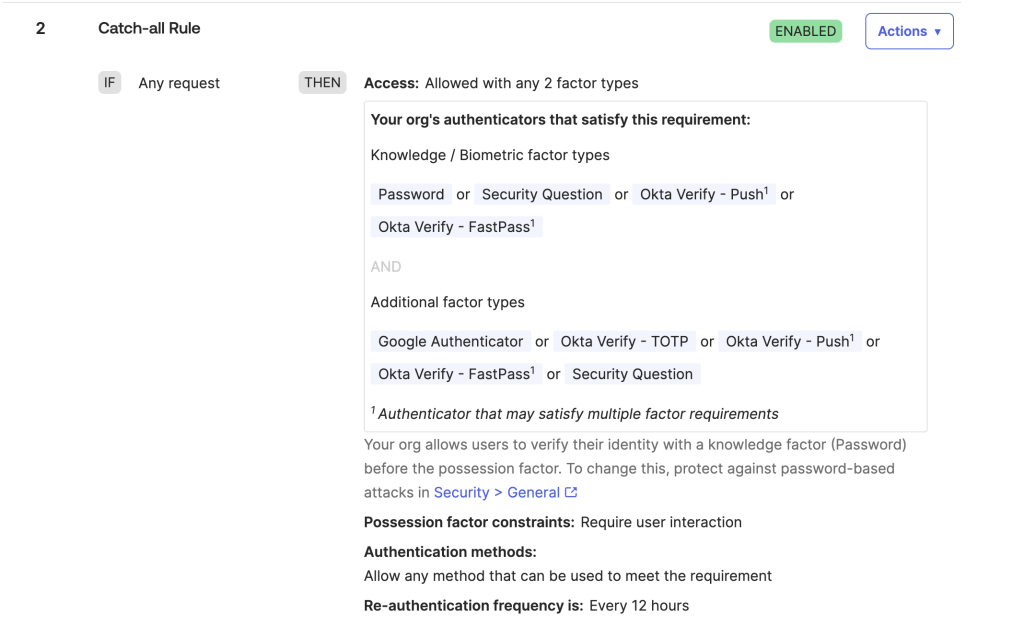
Moreover, Okta has taken steps to mitigate privilege elevation paths through role-based access control (RBAC). For example, only Super Administrators can manage groups with administrative roles. Most attack paths thus arise from misconfigurations, such as excessive role assignments, weak authentication policies, insecure application integrations, and sensitive credential exposure.
It is also important to note that a non-privileged Okta user might have administrative access in connected applications, such as GitHub Enterprise Cloud or Amazon Web Services (AWS). Hybrid attack paths between (insecure) on-premises Active Directory environments and Okta are also possible.
The other main product in Okta’s portfolio is Auth0, previously known as Customer Identity Cloud. For the time being, Auth0 is outside of the scope of our research.
Prior Work
The following blog posts provide great insights into Okta attack vectors and techniques:
- Adam Chester (SpecterOps): Okta for Red Teamers
- Adam Chester (SpecterOps): Identity Providers for RedTeamers
- Eli Guy (XM Cyber): Attack Techniques in Okta – Part 1 – A (Really) Deep Dive into Okta Key Terms
- Eli Guy (XM Cyber): Attack Techniques in Okta – Part 2 – Okta RBAC Attacks
- Eli Guy (XM Cyber): Attack Techniques in Okta – Part 3 – From Okta to AWS Environments
- AppOmni: Okta PassBleed Risks – A Technical Overview
- Luke Jennings (PushSecurity): Abusing Okta’s SWA authentication
- David French (Elastic): Testing your Okta visibility and detection with Dorothy and Elastic Security
Here are some interesting GitHub repositories related to Okta security research:
Introducing OktaHound
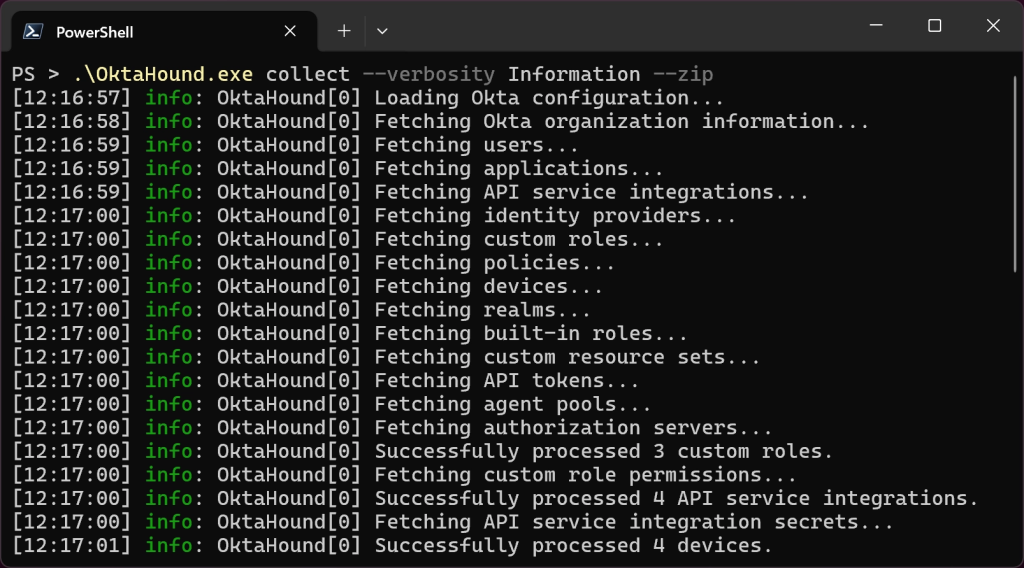
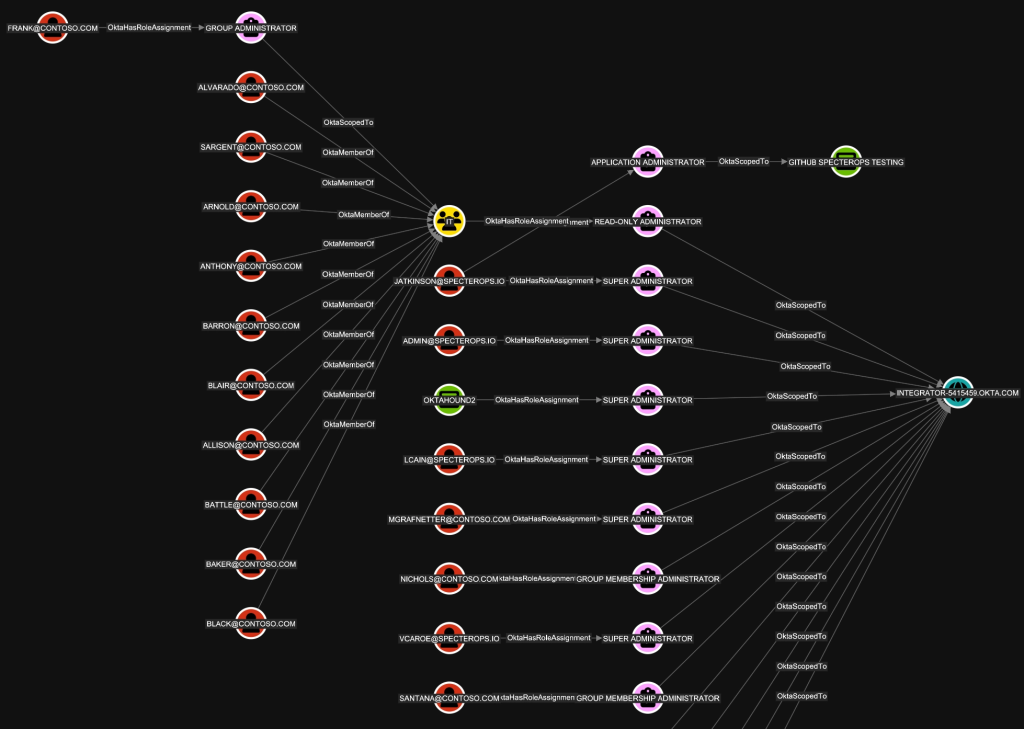
Today, we are publicly releasing OktaHound Beta: our data collector for BloodHound. This command-line interface (CLI) application for Windows, Linux, and macOS connects to the Okta Management API, fetches data about users, groups, devices, applications, roles, policies, identity providers, directory integrations, and other entities within an Okta organization, and exports the information to the OpenGraph JSON format. The graph data can then be uploaded to BloodHound for visualization and attack path analysis.
Required Permissions
OktaHound primarily targets the blue teamers and must be registered as an API Services application in an Okta organization.
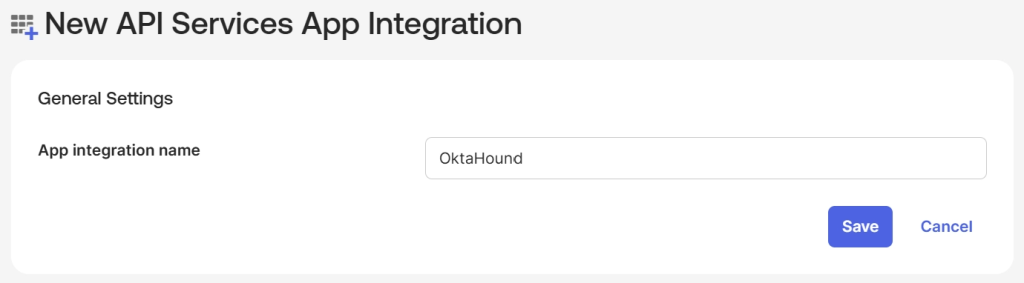
In accordance to the principle of least privilege, the application then needs to be granted the following OAuth 2.0 scopes:
- okta.orgs.read
- okta.users.read
- okta.groups.read
- okta.apps.read
- okta.appGrants.read
- okta.devices.read
- okta.roles.read
- okta.apiTokens.read
- okta.agentPools.read
- okta.idps.read
- okta.authorizationServers.read
- okta.oauthIntegrations.read
- okta.policies.read
- okta.features.read
- okta.realms.read
- okta.realmAssignments.read
- okta.logs.read
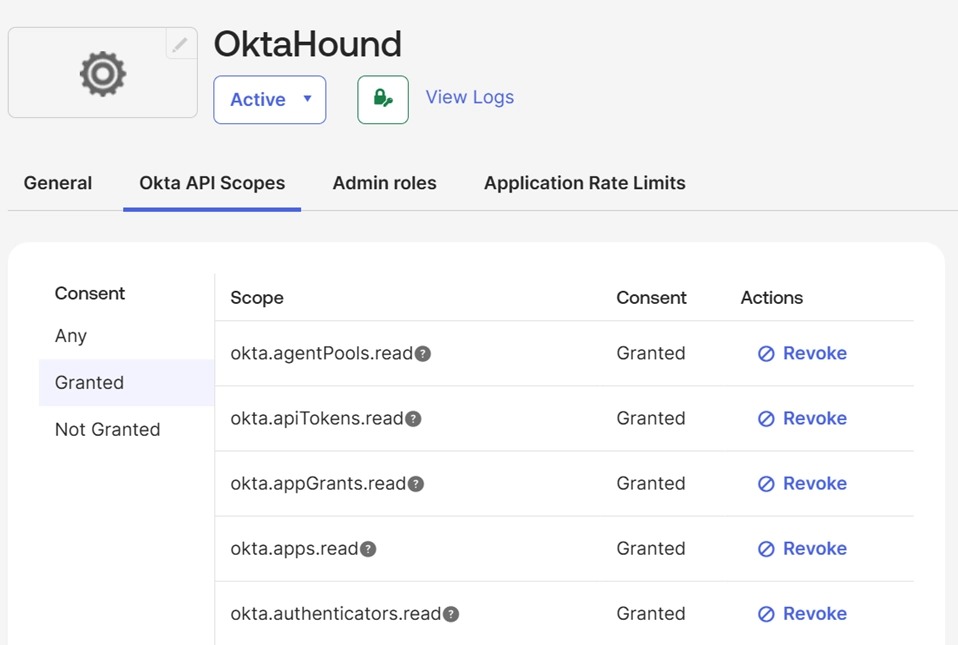
The application also needs to be assigned the Super Administrators role, permissions of which are filtered by the scopes listed above. OktaHound thus cannot perform any modifications in Okta.
As an alternative to registering OktaHound as an application in Okta, the collector can use (stolen) API tokens of Super Admins as well. Red teamers could use this approach to map outbound hybrid attack paths targeting external systems. Blue teamers should avoid using Okta API tokens to authenticate OktaHound, as they do not provide granular access control.
OktaHound Extension Schema
OktaHound extends the BloodHound schema with the following node kinds:


OktaHound creates the following edge kinds:
| Edge Name | Description | Traversable |
|---|---|---|
| Okta_AddMember | Ability to add or remove members in scoped Okta groups | ✅ |
| Okta_AgentMemberOf | Membership of an Okta agent in an agent pool | ✅ |
| Okta_AgentPoolFor | Relationship between an AD agent pool and its backing AD application | ✅ |
| Okta_ApiTokenFor | User ownership of an Okta API token | ✅ |
| Okta_AppAdmin | Application administrator role assignment | ✅ |
| Okta_AppAssignment | Assignment of users or groups to an Okta application | ❌ |
| Okta_Contains | Contains relationship between the Okta organization and its objects | ✅ |
| Okta_CreatorOf | Creator relationship for API service integrations | ❌ |
| Okta_DeviceOf | Ownership relationship between a device and its assigned user | ❌ |
| Okta_GroupAdmin | Group administrator role assignment | ✅ |
| Okta_GroupMembershipAdmin | Group membership administrator role assignment | ✅ |
| Okta_GroupPull | Import of group memberships from an external application | ✅ |
| Okta_GroupPush | Provisioning of group memberships to an external application | ❌ |
| Okta_HasRole | Assignment of a built-in or custom role to a principal | ❌ |
| Okta_HasRoleAssignment | Relationship between a principal and a role assignment | ❌ |
| Okta_HelpDeskAdmin | Help desk administrator role assignment | ✅ |
| Okta_HostsAgent | Relationship between an AD server and the Okta agent running on that host | ✅ |
| Okta_IdentityProviderFor | Trust relationship between an identity provider and Okta users | ✅ |
| Okta_IdpGroupAssignment | Identity provider group assignment to an Okta group | ❌ |
| Okta_InboundOrgSSO | Single sign-on (SSO) from an external organization into Okta | ✅ |
| Okta_InboundSSO | SSSO from an external identity provider into Okta | ✅ |
| Okta_KerberosSSO | Agentless desktop SSO relationship from on-premises AD user account to Okta AD application | ✅ |
| Okta_KeyOf | JSON Web Key (JWK) associated with an Okta application | ✅ |
| Okta_ManageApp | Ability to manage scoped Okta applications | ✅ |
| Okta_ManagerOf | Manager relationship between Okta users | ❌ |
| Okta_MemberOf | Membership of a user in an Okta group | ✅ |
| Okta_MembershipSync | Bidirectional synchronization between Okta groups and external groups | ✅ |
| Okta_MobileAdmin | Mobile administrator role assignment | ✅ |
| Okta_OrgAdmin | Organization administrator role assignment | ✅ |
| Okta_OrgSWA | Secure Web Authentication from an Okta application to an external organization | ❌ |
| Okta_OutboundOrgSSO | SSO from an Okta application to an external organization | ✅ |
| Okta_OutboundSSO | SSO from Okta to an external identity provider | ✅ |
| Okta_PasswordSync | Password synchronization between user accounts via AD integration, Org2Org, or SCIM | ✅ |
| Okta_PolicyMapping | Association of a policy with an Okta application | ❌ |
| Okta_ReadClientSecret | Ability to read client secrets for scoped Okta applications | ✅ |
| Okta_ReadPasswordUpdates | Application can read password updates over the SCIM protocol | ✅ |
| Okta_RealmContains | Contains relationship between an Okta realm and its users | ✅ |
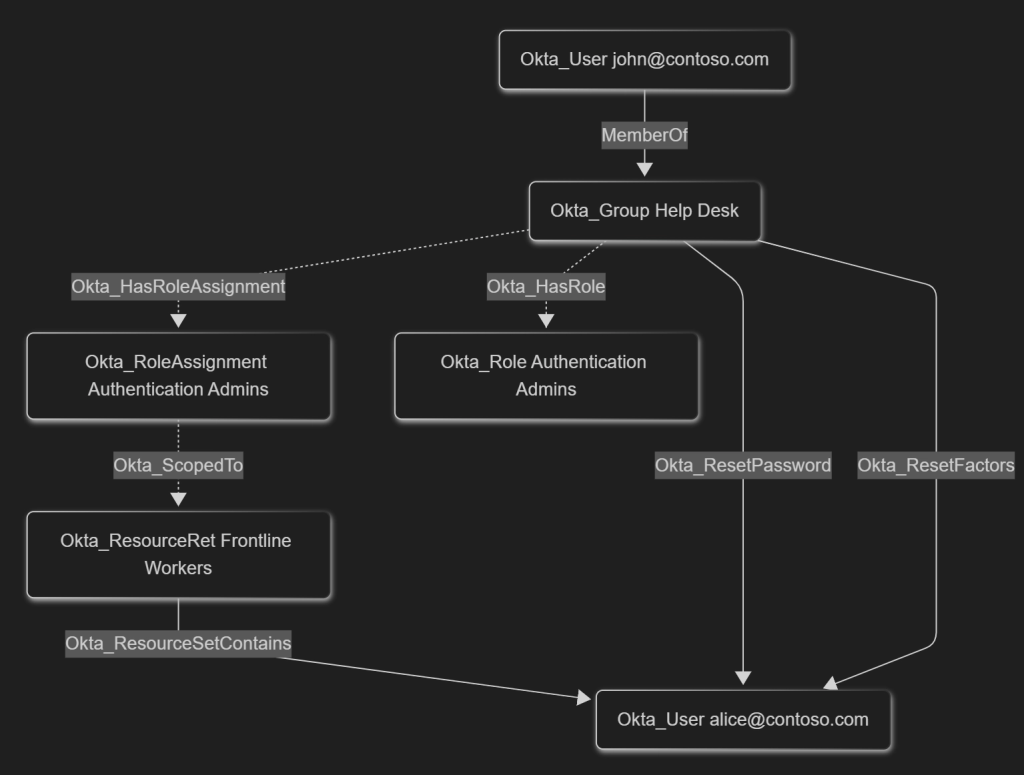
| Okta_ResetFactors | Ability to reset MFA factors for scoped Okta users | ✅ |
| Okta_ResetPassword | Ability to reset passwords or temporary credentials for scoped Okta users | ✅ |
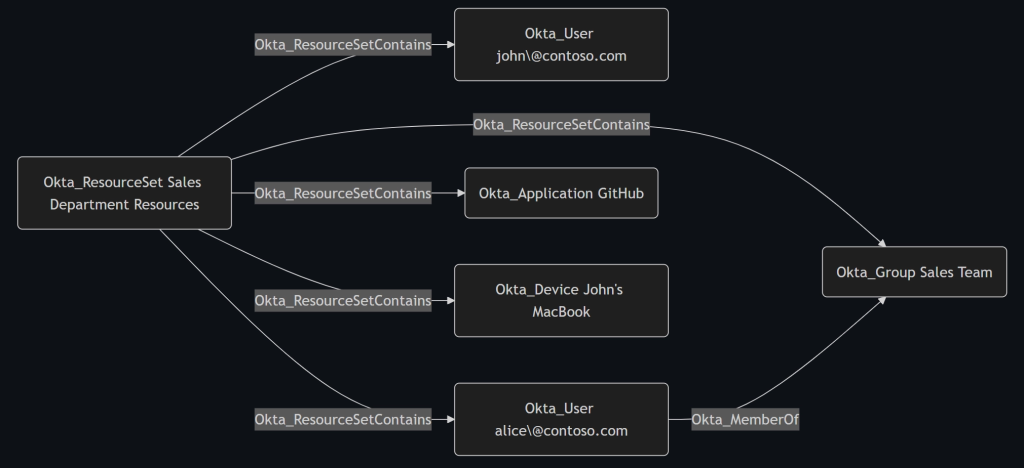
| Okta_ResourceSetContains | Membership of objects within an Okta resource set | ✅ |
| Okta_ScopedTo | Scope relationship between a role assignment and its target | ❌ |
| Okta_SecretOf | Client secret associated with an application or service integration | ✅ |
| Okta_SuperAdmin | Super Administrator role assignment | ✅ |
| Okta_SWA | Secure Web Authentication from Okta to an external application | ❌ |
| Okta_UserPull | Import of users from an external application | ❌ |
| Okta_UserPush | Provisioning of users to an external application | ❌ |
| Okta_UserSync | Bidirectional synchronization between Okta users and external identities | ❌ |
Built-In Roles
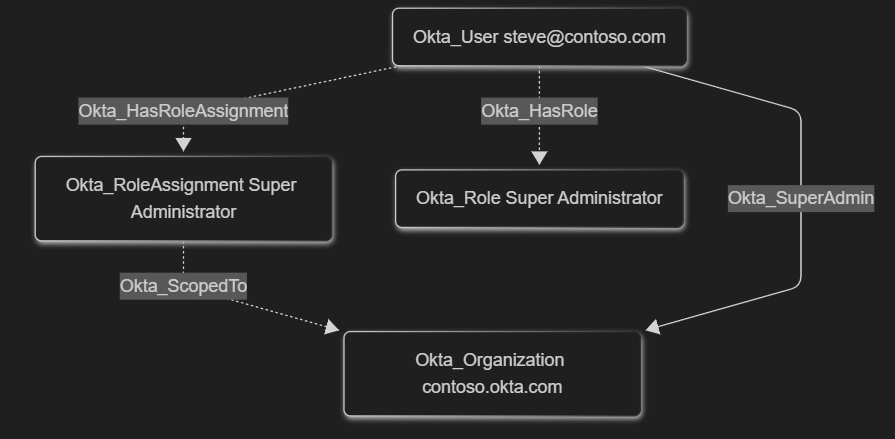
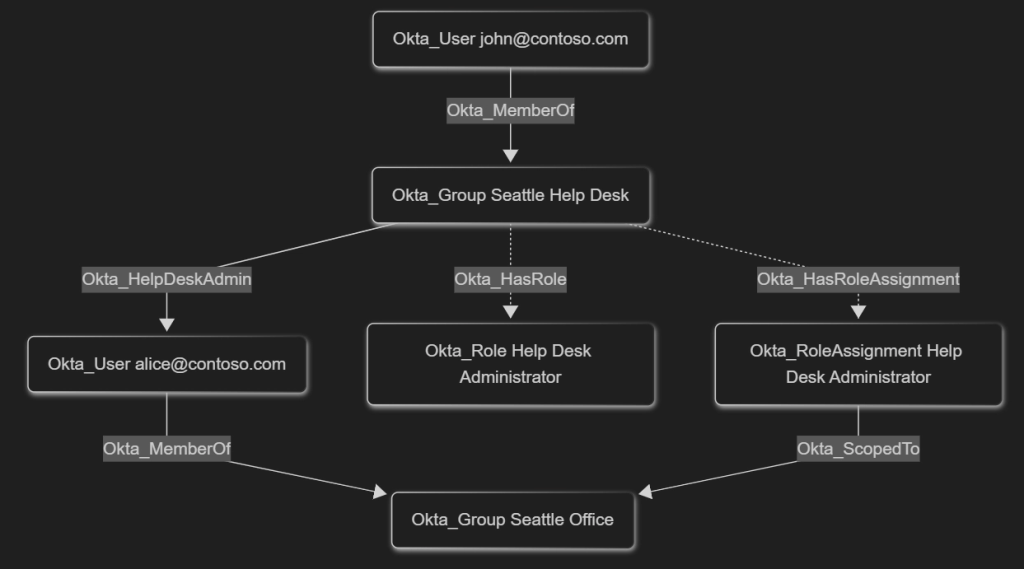
Each built-in Okta role assignment is modeled using a role-specific direct traversable edge, such as Okta_SuperAdmin or Okta_GroupAdmin, and indirect non-traversable Okta_HasRoleAssignment, Okta_ScopedTo, and Okta_HasRole edges.
Custom Roles
Custom roles are modeled similarly to the built-in roles, but with these key differences:
- They are always scoped to resource sets
- Traversable edges are modeled using individual permissions
| OAuth Permission(s) | Edge |
|---|---|
okta.users.manage okta.users.credentials.manageTemporaryAccessCodeokta.users.credentials.resetPassword okta.users.credentials.expirePassword | Okta_ResetPassword |
okta.users.manage | Okta_ResetFactors |
okta.groups.manage | Okta_AddMember |
okta.apps.manage | Okta_ManageApp |
okta.apps.clientCredentials.read | Okta_ReadClientSecret |
Okta Attack Paths
Short Native Attack Paths
One thing that comes as a surprise is that native Okta attack paths are relatively short when compared to our security models of Active Directory (AD) and Microsoft Entra ID. There are multiple reasons for this:
- Okta does not support group nesting and only users can be members of groups
- Many theoretical privilege elevation paths are intentionally mitigated by only allowing Super Administrators (the most privileged role in Okta) to modify users, groups, and applications that have role assignments, built-in or custom
- Lateral movement between connected computers is extremely limited by the absence of built-in device management capabilities, such as Group Policy. Moreover, Okta authentication is not integrated with popular remote computer management protocols like RDP, SSH, SMB, WMI, or WinRM
On the other hand, real-world Okta deployments are seldom isolated and often contain inbound and outbound trust relationship in the form of SAML/OIDC SSO, password replication, or group membership synchronization. These hybrid or cross-technology relationships are part of OktaHound’s data model.
Overprivileged Auditors
While trying to come up with the least-privilege set of permissions required to run OktaHound, we stumbled upon these practical problems:
- Users assigned the Read-Only Administrators built-in role cannot read role assignments within Okta environments. A custom role with this permission (IAM) can be created, though
- We were unable to figure out a way of delegating the permission to read OAuth 2.0 scopes granted to Okta Applications. Only the Super Administrators role seems to be able to read application permissions
As a consequence, security auditors cannot use the Read-Only Administrators role. It is therefore safe to assume that many external security auditors are assigned the Super Administrators role.
Reading Application Secrets
As soon as an Okta-integrated service application is assigned an administrative role in Okta, users assigned the Application Administrators role scoped to this service application are no longer able to modify any of its properties. However, we identified these built-in roles to be able to read pre-existing client secrets of privileged service applications:
- Application Administrators
- Read-Only Administrators
- API Access Management Administrators
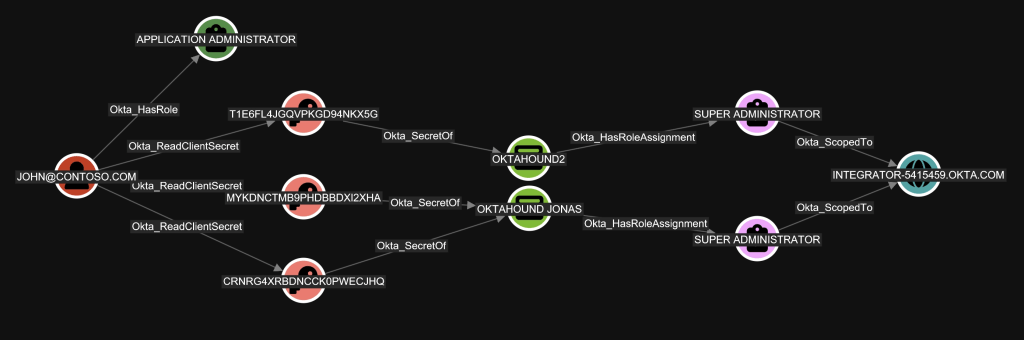
Malicious actors could easily abuse this behavior to first read the client secret of a highly-privileged application and then authenticate with it against Okta, impersonating the application identity. This could lead to unexpected privilege elevation, which we model using the Okta_ReadClientSecret edge.
Before publishing this article, we contacted Okta in this matter through their official bug bounty program. We were told that this behavior was intentional and Okta did not consider it a security issue. Interestingly, our colleague Andy Robbins has discovered that Ping One, a competing IAM product, had the same behavior. On the other hand, Microsoft’s Entra ID never reveals existing client secrets, not even to Global Administrators.
SCIM Password Synchronization
The SCIM protocol has become a de-facto standard for identity synchronization, so Okta naturally supports SCIM for user provisioning to/from external systems, including password change notifications.
A well-known attack path exists where Application Administrators can modify the endpoint to which Okta sends password updates for assigned users. Malicious actors could thus redirect the password updates to a URL under their control and potentially read the fresh cleartext password of a highly privileged Okta user. Another variant of this attack would be registering a new SCIM application object and assigning the Everyone group to it.
In OktaHound we model this permission using the Okta_ReadPasswordUpdates and Okta_PasswordSync edges.


Secure Web Authentication (SWA)
As an alternative to the recommended OIDC and SAML single sign-on protocols, Okta provides a feature called Secure Web Authentication (SWA). It is basically an enterprise password manager, which allows users to save web application passwords into Okta and then use the autofill capability of the Okta Browser Plugin. Administrators can also define common passwords all users share.
Although these saved passwords are never directly exposed to the end-user, the F12 developer tools in most desktop browsers and an undocumented Okta API endpoint can be misused to read the cleartext passwords of the currently logged-in user, as detailed in Luke Jennings (PushSecurity): Abusing Okta’s SWA authentication blog post.
We model this security risk of cleartext password exposure using two edges: Okta_OrgSWA and Okta_SWA.

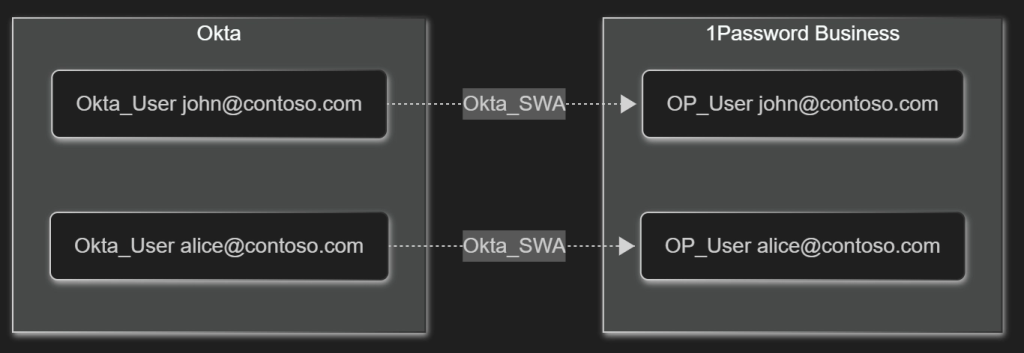
The management plane for the SWA feature is very limited and we were unable to fetch the inventory of saved passwords for all users through the Okta Management API. Our security model of the SWA feature is thus incomplete.
Okta Workflows
Workflows in Okta provide a robust way to automate tasks related to user provisioning and deprovisioning. To achieve this, Okta must be granted non-trivial permissions in connected systems. Here is an example of permissions needed by the Microsoft Office 365 connector:
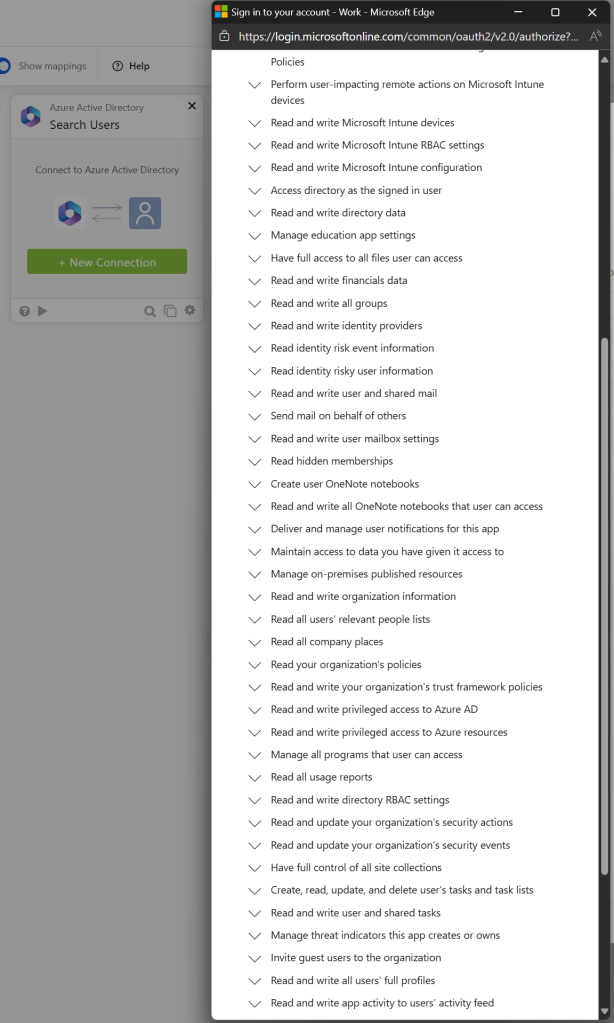
Anyone in control of the workflow could perform administrative actions in Microsoft Entra.
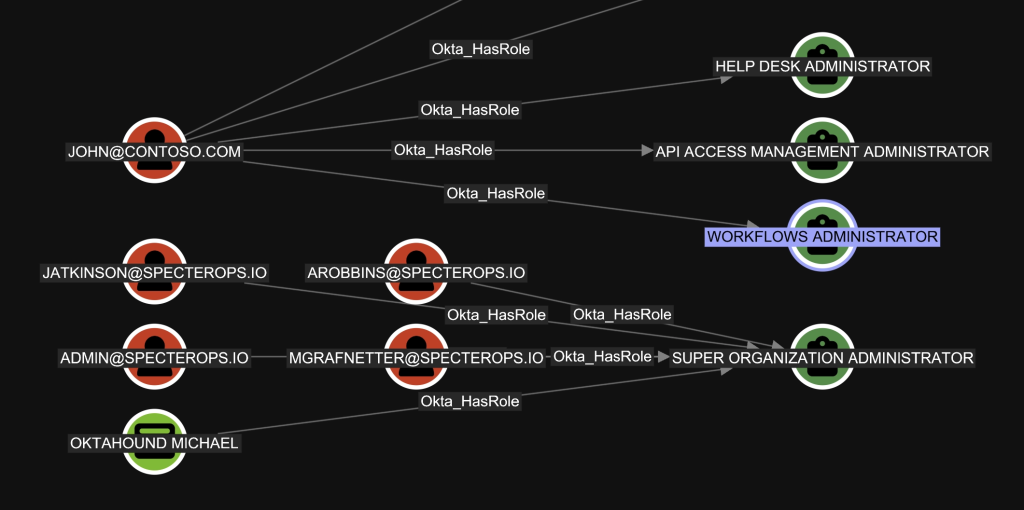
As there is no documented API for reading the information about existing workflows and their configuration, workflows are currently absent in our security model. BloodHound can only be used to analyze the Workflow Administrators role assignment:
Using Users With API Tokens Instead of Service Apps
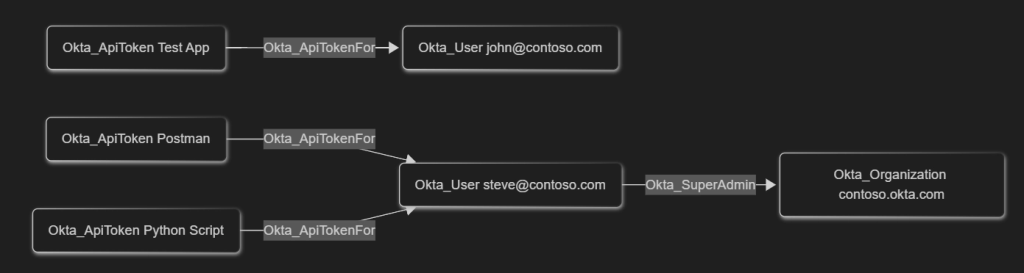
While performing Okta security assessments, we have seen many applications use regular user accounts with API token authentication, which are basically passwords that bypass MFA requirements, instead of using dedicated API Services registrations with JWKs and fine-grained permissions. This goes against the principle of least-privilege and may lead to unintended credential disclosure.
The traversable Okta_ApiTokenFor edges represent the API token assignments for users in Okta.
Agentless Desktop Single Sign-on
With agentless Desktop SSO (DSSO), you don’t need to deploy IWA agents in your Active Directory domains to implement DSSO functionality. This reduces or eliminates the maintenance overhead and provides high availability as Okta assumes responsibility for Kerberos validation.
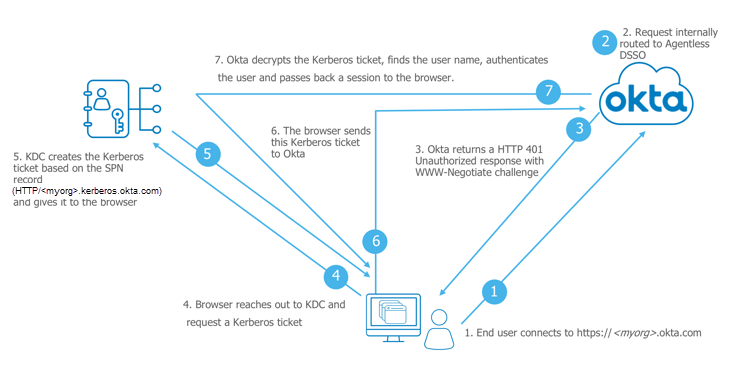
Whoever has control over the Kerberos SSO account in Active Directory can impersonate all users, except secondary authentication factors. For a red team-oriented perspective on how Okta’s Kerberos SSO / DSSO works (and how it can be abused in practice), see Adam Chester’s Okta for Red Teamers write-up.

Active Directory Agents
Okta’s Active Directory agents can be installed on member servers to provide synchronization of AD users and groups to/from Okta. This capability is thus similar to Microsoft’s Entra Connect. Unlike Microsoft, Okta recommends for the synchronization service accounts to be added to the Domain Admins group in AD, granting Okta administrators unlimited control over Active Directory. As managed service accounts are not supported by Okta, a human must set and manually rotate service account passwords.
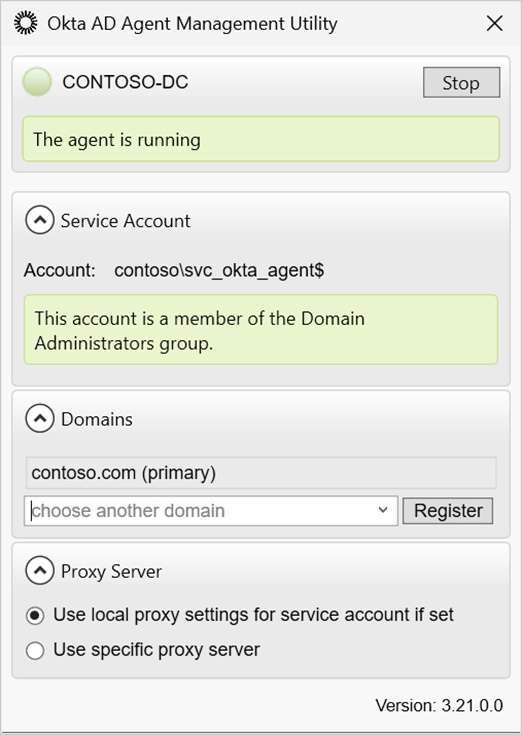
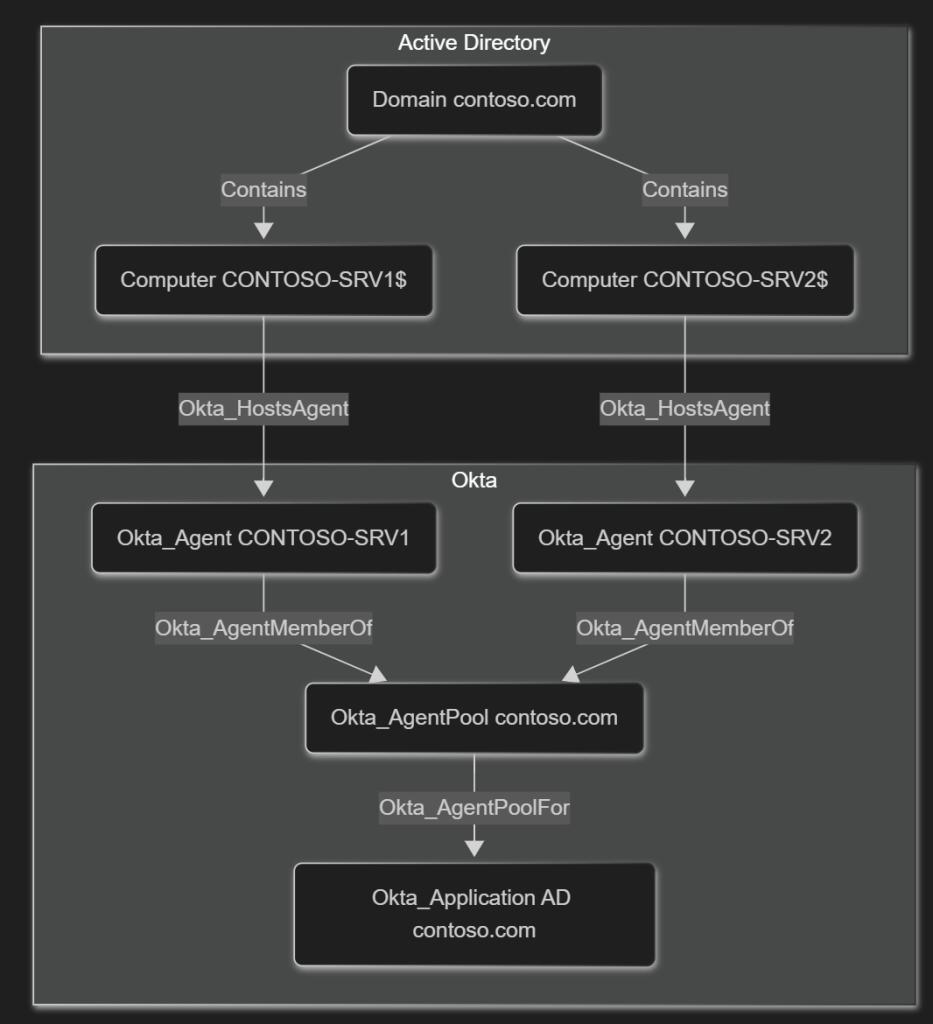
The relationships between servers and agents they are hosting are represented using the Okta_HostsAgent, Okta_AgentMemberOf, and Okta_AgentPoolFor edges.
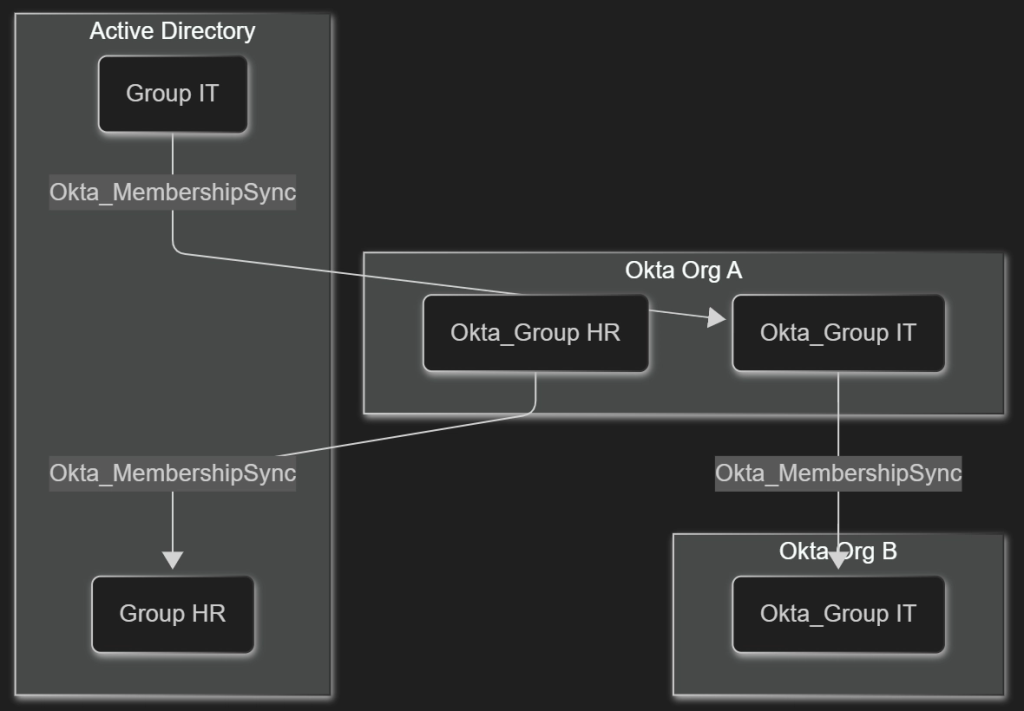
The potential for privilege elevation exists in both directions: By taking over an AD user account synchronized onto a privileged account in Okta, an attacker could move from on-premises to the cloud. Alternatively, if an Okta group is pushed into Active Directory and assigned some permissions there, an Okta user in control over the group membership could add themselves to said group and perform privilege elevation from Okta to Active Directory. OktaHound uses the following edges to represent these relationships:
- Okta_UserSync
- Okta_MembershipSync
- Okta_PasswordSync
- Okta_UserPull
- Okta_UserPush
- Okta_GroupPull
- Okta_GroupPush

As previously mentioned, well-designed Okta authentication policies can render user impersonation less feasible. Luckily for attackers, many users are susceptible to MFA fatigue.
Credential Hygiene
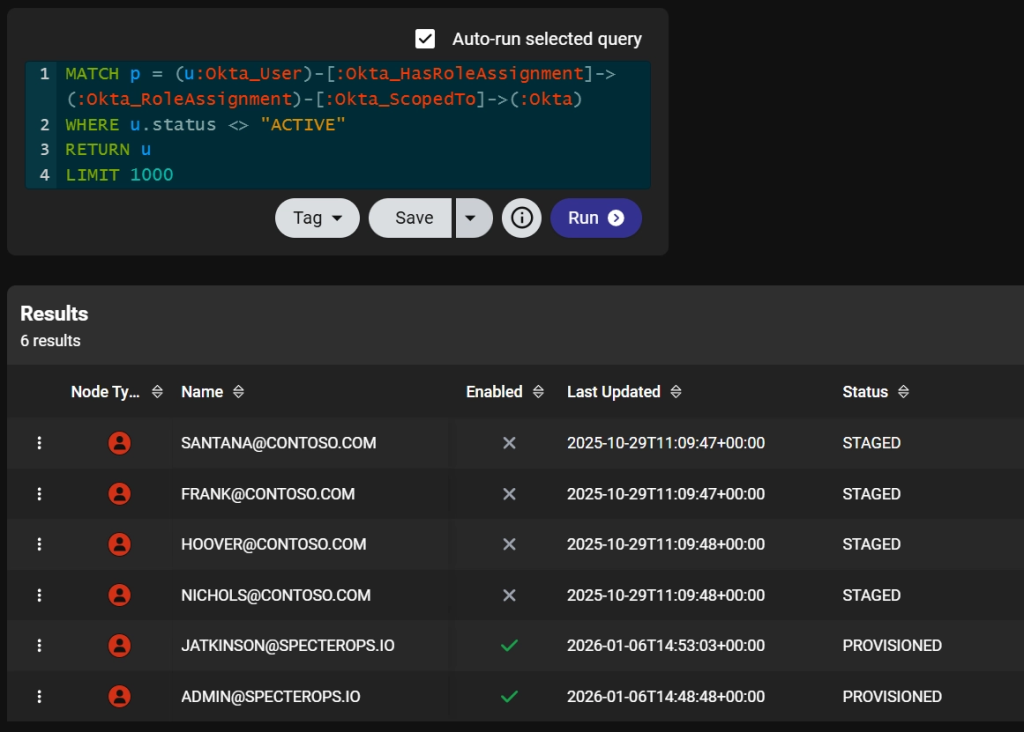
Although this is not BloodHound’s primary use case, data collected by OktaHound also provides insight into an organization’s credential hygiene. Security auditors can generate simple reports containing stale privileged users or identify applications with “eternal” client secrets. The data can even be exported from BloodHound into Excel.
Join Us and Stay Tuned
Please join us in the #okta channel of the BloodHound Community Slack workspace if you want to chat about attack paths in Okta or the usage of OktaHound. You are also welcome to open an issue or pull request on GitHub.
Our security research on Okta attack paths is still ongoing. We will announce additional product capabilities at SO-CON.