JamfHound v1.1 Update: SSO Attack Paths and Okta Additions
TL;DR : New SSO Attack Paths and Okta Edges in JamfHound: Updates have been added to the JamfHound OpenGraph collector to identify IDP integrated attack paths starting with Okta and JamfHound is now an official OpenGraph collector of BloodHound Enterprise.
Since the initial release at Black Hat USA 2025, JamfHound has received positive feedback from our clients and the broader cybersecurity community as a tool for visualizing attack paths and hardening JAMF Pro environments. At SpecterOps, we have continued investing in research to identify the most dangerous attack paths exploitable by threats targeting our customer environments. A common configuration for JAMF Pro we encounter in macOS-integrated environments during our penetration tests, purple teams, and red teams has been the use of external Identity Providers (IDPs) for authentication to JAMF Pro using single sign-on (SSO). This piqued our interest to learn more about how JAMF integrates SSO. After months of research, we are glad to share v1.1 updates to the JamfHound OpenGraph collector, featuring new attack paths affecting JAMF Pro deployments. We are elated to share that in addition to updates to the BloodHound Community Edition collector, this newest version of JamfHound will be integrating into BloodHound Enterprise this spring.
v1.1 Highlights
- New Node
o jamf_SSOIntegration – A representation of SSO configurations enabled in a JAMF Pro tenant - New Edges
o jamf_SSO_Login – A representation of the relationship between SSO configured authentication and local JAMF Pro accounts or groups
o jamf_Update_SSO_Settings – A representation of the relationship between principals with permissions to enable and configure SSO and accounts, groups, or SSO configuration node
o jamf_Okta_Same_Device – A hybrid path relationship between an Okta registered device and JAMF Pro enrolled device - New Collection Argument
o –okta A CLI argument for the collector to perform additional processing to create hybrid edges between JamfHound and OktaHound collections
How JAMF Pro Handles Single Sign-On
When configured for SSO, JAMF Pro optionally redirects users authenticating at the console to external identity providers such as Okta, Azure, and Google Identity. JAMF offers detailed documentation on configuring JAMF Pro instances for integration with identity providers. A simplified workflow when SSO is configured, would-be JAMF Pro users redirect from JAMF Pro to their IDP login portal and authenticate with the IDP. The IDP informs JAMF Pro of user attributes such as account names, emails, and groups that apply to the authenticating principal and the server uses this information to create a logon session. This allows external IDPs to employ enhanced authentication requirements that may not be natively supported in JAMF Pro such as conditional access policies (CAPs), multi-factor authentication (MFA), device compliance checks, and more.
The two SSO protocols JAMF Pro supports are OpenID Connect (OIDC) and Security Assertion Markup Language (SAML). Setting up OIDC configurations requires a JAMF Pro cloud-hosted instance integrated with a JAMF Account organization that serves as an identity broker to external identity providers. The OIDC configurations, such as the IDP URL and domain to associate with SSO accounts, are stored in settings configured under JAMF Account. The SSO setting on a JAMF Pro server is then configured to use OIDC and, optionally, to allow bypass for local logon or to use a failover URL when the IDP is not available. OIDC configuration can also be set up to use SAML for actions such as enrollments. JAMF recommends using OIDC SSO over SAML SSO, when possible, to ensure compatibility with future platform changes.
When configuring SAML SSO, all settings are managed within JAMF Pro, which allows configuring SSO for on-site JAMF Pro tenants in addition to JAMF cloud-hosted subscriptions. SAML has no requirement for JAMF Account integration. The JAMF Pro server is configured with the SAML metadata URL, IDP URL, certificate for secure signing of SAML exchanges, user attribute mappings, group attribute mappings (if enabled), Relative Distinguished Name (RDN) key for LDAP (if needed), and optional configurations for device enrollment using SAML. Both SSO methods allow generation of and use of a Failover Login URL in case an IDP becomes unavailable. Administrators can navigate to this web location to log in locally to the JAMF Pro server.
jamf_SSOIntegration Node
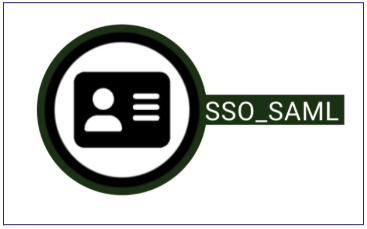
The new node introduced in JamfHound affords admins and defenders insights into current SSO configurations within their JAMF Pro tenant. The jamf_SSOIntegration node will only be created during the JamfHound collection if the target JAMF Pro instance has SSO enabled and will otherwise be omitted. When SSO is enabled, the new node will populate notable attributes such as the type of SSO enabled, SAML, OIDC, or OIDC_WITH_SAML, that will also be shown in the display name, as well as SAML attributes if available such as the IDP URL or failover login URL. When created, the jamf_SSOIntegration node will automatically have jamf_SSO_Login edges created outbound to local jamf_Account nodes, and, if SAML group attribute elements have been configured, then additionally to jamf_Group nodes.
A known limitation is that collection does not currently enumerate JAMF Account information for OIDC SSO, so it does not create edges to groups when OIDC is in use as group role assignment properties are not known. We intend to address this in a future update.
jamf_SSO_Login Edge

This new edge represents the relationship between a configured JAMF SSO integration and JAMF Pro accounts and groups. When SSO is configured in JAMF Pro, an identity provider can provide attributes, such as username or email, that match to local accounts to authenticate to JAMF Pro. This allows inheriting the permissions and group assignments of local accounts. Additionally, if SSO is configured to replicate group attributes, IDP-authenticated principals can inherit the permissions of any matching groups sent via SAML attributes. This is a critical traversable edge for rendering the attack paths discussed below and simplifies hybrid path creation with other open graph collectors.
jamf_Update_SSO_Settings Edge

This edge represents a principal that is not a full access administrator but still possesses privileges to update the JAMF Pro tenants’ SSO settings. When a JAMF Pro account, group, or API client role possesses the “Update SSO Settings” privilege, this allows that entity to both enable and configure an IDP provider for authentication to a JAMF Pro tenant. Using API calls or the graphical console can accomplish this.
If a jamf_SSOIntegration node exists within the collection, then that node will be set as the destination for this edge since the source possesses privileges to update the current configuration. If SSO is not currently enabled in the JAMF Pro tenant, then all jamf_Account and jamf_Group nodes will be set as a destination for the relationship since the principal possesses sufficient privileges to enable SSO and define how attributes are mapped to JAMF Pro accounts and groups when a principal authenticates.
jamf_Okta_Same_Device Edge

This is one of the newest exciting edges introduced for JamfHound to visualize the impacts of compromise between JAMF Pro and Okta organizations using a hybrid edge. Okta as an IDP typically requires devices to be registered for MFA prompting or platform security checks resulting in the population of known device attributes. By matching on the globally unique UDID attribute Apple assigns to each of their macOS laptops in both environments, a traversable edge is created between jamf_Computer nodes and the recently released OktaHound Okta_Device node to signify the same device is registered in both platforms creating a hybrid edge between the two collections.
New Attack Paths Revealed
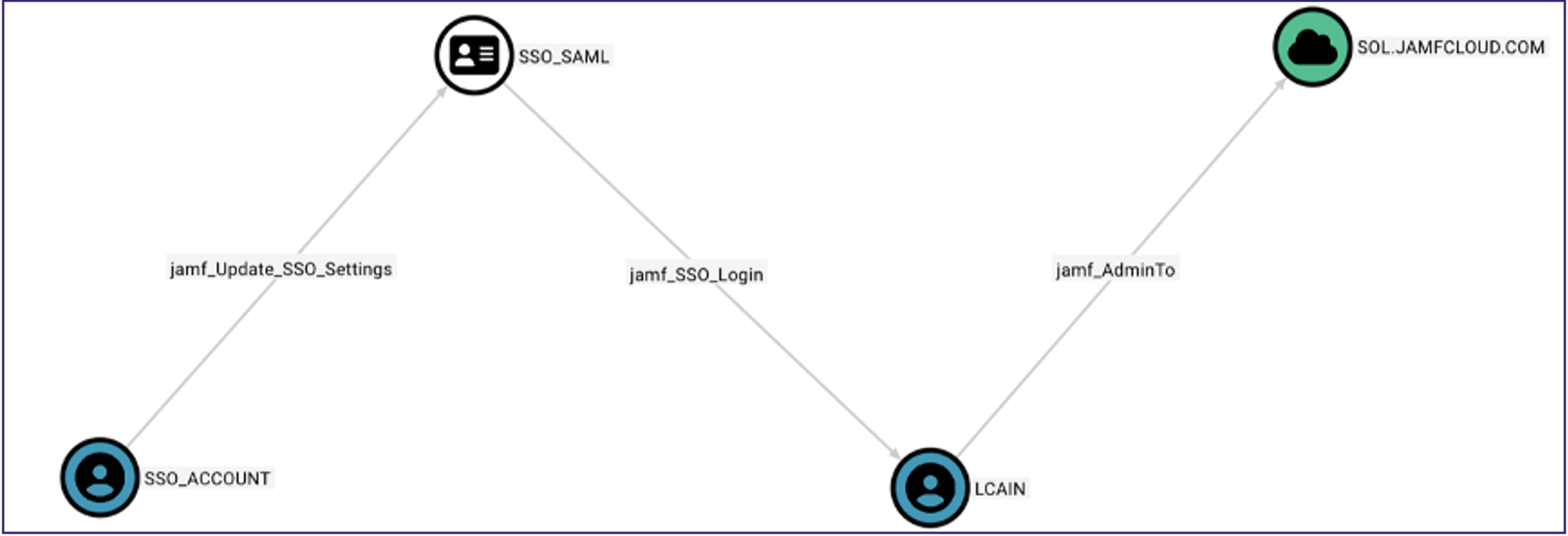
The first new JAMF Pro attack path we have identified is that, when any account, group member, or API client is compromised, and the JAMF Pro Server privilege “Update SSO Settings” is granted, privilege escalation in a JAMF Pro tenant can occur. “Update SSO Settings” allows a principal to both configure and enable all necessary components of SAML SSO to integrate with an external IDP. This leads to a potential attack path where a compromised principal updates SSO settings to point to an attacker-controlled IDP and can subsequently log into the JAMF Pro tenant by mapping authentication attributes to match privileged accounts or groups. In the image below, the SSO_ACCOUNT is a derivative admin to the JAMF Pro tenant because of the control to modify the SSO configuration.
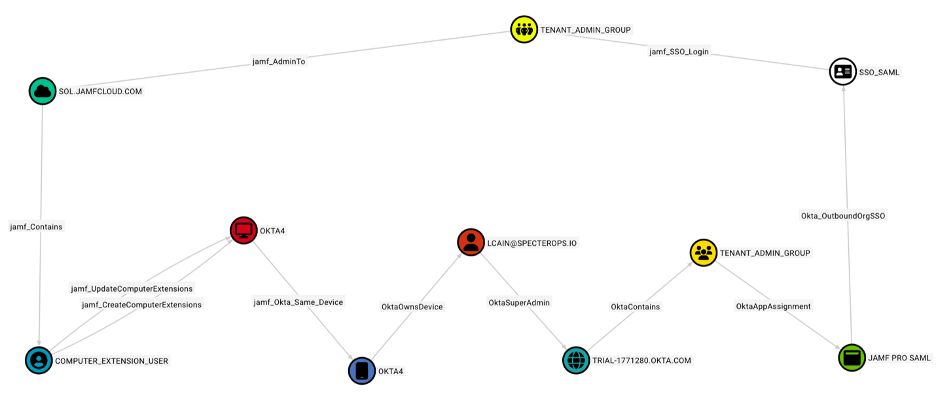
The addition of the latest node and edges also allows use of BloodHound to visualize what we have found to be complex and common attack paths in modern enterprises which we refer to as hybrid attack paths or attack paths with hybrid edges. Rarely, during an offensive security assessment do we find ourselves compromising a single technology platform such as JAMF or Okta and accomplishing all our adversarial objectives. Instead, we more commonly pivot through different technologies during an assessment. One example shown below demonstrates compromising a JAMF Pro account that can execute code as a computer extension on a macOS device belonging to an Okta administrator. The Okta organization also has an admin group that is assigned to the JAMF Pro application with SAML SSO which matches one of the JAMF Pro admin groups. Since group attributes are configured to replicate between JAMF Pro and Okta, any user assigned to the matching group in Okta that authenticates to JAMF will have group assignment carried over into JAMF Pro granting full access administrator privileges.
In this case, compromise of a low-privileged principal allows gaining access to Okta, which in turn grants more privileged access back into the JAMF Pro tenant as an administrator, escalating privileges not because of an internal JAMF attack path, but because of a previously unknown hybrid path.
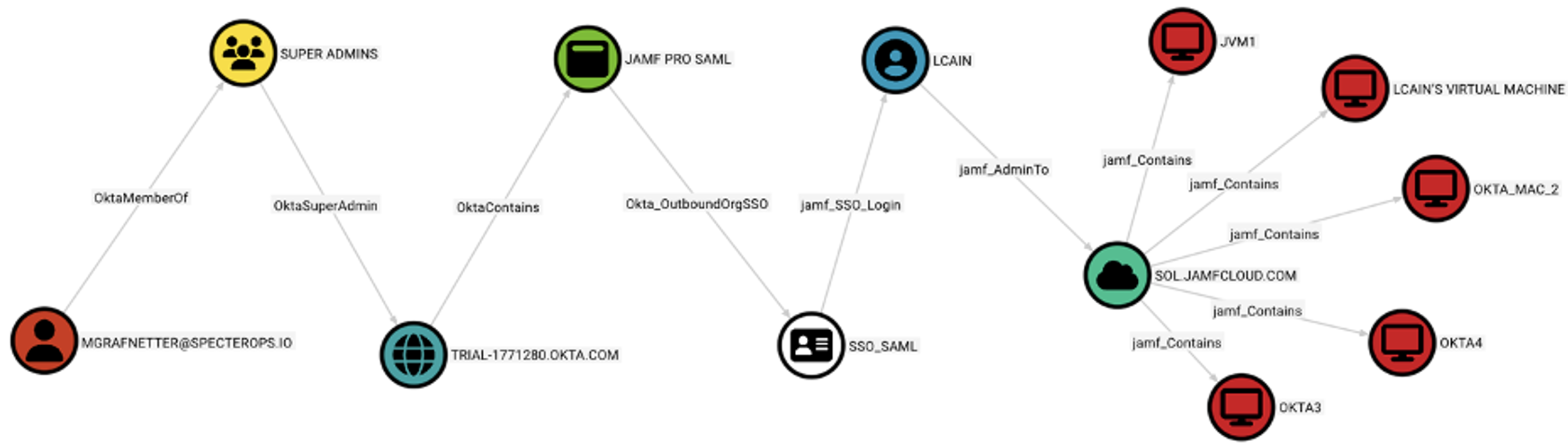
Another attack path revealed is when compromise of accounts in an IDP results in privileged access to JAMF Pro. This shows scenarios where compromise of a session, browser, or other authenticated access to an IDP-integrated platform such as Okta, even though user devices or accounts may not even be registered in JAMF Pro, we can start to see what types of impacts there will be. The image below represents a case where an Okta application administrator that primarily used Windows is compromised and, as a result, can assign themself or others to the JAMF Pro application in Okta resulting in SSO login as a privilege JAMF Pro account that then expands the breach to other macOS devices controlled in the JAMF Pro tenant.
Conclusion
While the examples in this blog post reflect our testing and lab environments, these exact attack paths represent real-world actions taken during our red teams and other cybersecurity assessments that prove to be the most dangerous to organizations. It is up to every enterprise to know as much as they can about the paths attackers may exploit in their environment so that they can be proactive rather than reactive, and we strive to aid the community in doing so. As we continue to expand our latest collectors, we anticipate more hybrid paths and further integration of different technologies giving a more complete picture of modern enterprise cybersecurity postures. We invite everyone invested in staying on top of the latest attack paths to join us in the SpecterOps #BloodHoundGang Slack channel. For anyone wanting more details about the JamfHound updates, we recommend viewing the official documentation available here.