MSSQLHound Now Available in Go
TL;DR: Javier Azofra and I vibe-ported MSSQLHound to Go to drastically improve run duration, enable cross-platform execution, support SOCKS proxying for stealth and NT hashes/Kerberos tickets for authentication, enhance logging, detect the latest encryption and extended protection for authentication (EPA) settings, and enable pathfinding in BloodHound.

MSSQLHound adds 7 new nodes and 37 new MSSQL attack path edges to BloodHound, an open-source tool with Maps-style navigation and an interactive graph that helps users visualize and remediate attack paths in various technologies.
For an introduction to what MSSQLHound is all about, please check out this blog post: https://specterops.io/blog/2025/08/04/adding-mssql-to-bloodhound-with-opengraph/
A few months ago, Javier Azofra from Siemens Healthineers reached out to me and told me he’d been porting BloodHound OpenGraph collectors to Go to optimize them for enterprise use, focusing on scalability and speed. He made a massive PR to MSSQLHound with a Go port and I got to work validating it and helping bring it to feature parity. I was so impressed with the improvements that I’ve decided to focus on developing the Go version of MSSQLHound moving forward.
The initial PowerShell version of MSSQLHound was a decent proof-of-concept, but didn’t work well for many use cases for one reason or another.
For red teamers, any EDR worth using detects and blocks PowerShell tradecraft, including MSSQLHound, and proxying traffic from PowerShell tools into an environment via SOCKS is a real pain, especially if you operate from a Linux system.
For defenders and admins who ran MSSQLHound with a privileged account, gaining visibility into a truly massive number of objects across all SQL Server instances in an enterprise, collection took days or never finished due to lack of parallelization prior to PowerShell 7, which isn’t installed by default on Windows.
So as of now, I recommend using the Go version of this tool, which in addition to finding ALL attack path edges found by the original PowerShell version, ships with the following improvements:
- Target multiple servers concurrently, resulting in WAY shorter run duration (down from 17 minutes to under 17 seconds targeting the same lab environment and settings with the Go version and 15 workers)
- Tunnel traffic through a SOCKS proxy (–proxy option)
- Run on Linux, Windows, or Mac
- Use an NT hash or Kerberos ticket instead of cleartext creds (–nt-hash and –kerberos options)
- Directly upload collected data to BloodHound (–bloodhound options)
- Connect via TDS 8.0 (Force Strict Encryption option introduced with SQL Server 2022)
- Detect additional Extended Protection for Authentication (EPA) configurations
- Tons of quality of life improvements (run with -h to display all options)
- More specific targeting options
- Multiplex console logging and write per-target log output
- Automated integration testing in GitHub actions (PRs welcome!)
The new version of MSSQLHound also conforms to the new OpenGraph schema, enabling pathfinding in BloodHound!
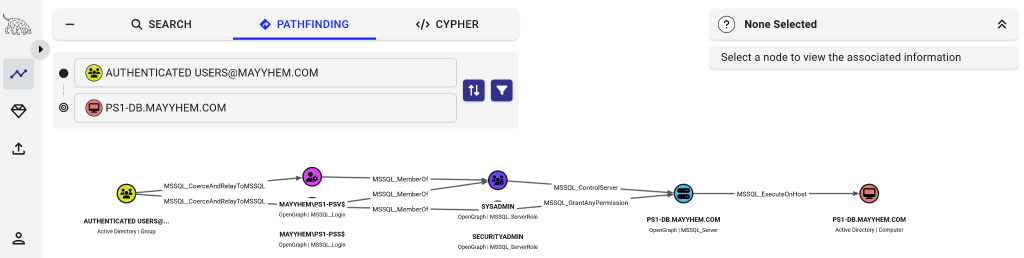
There are tons of examples of the new command line options in the repo and you can run MSSQLHound with the -h flag to display them.
The PowerShell version of MSSQLHound will remain available in the GitHub repo but I will no longer be making updates.
Some changes to be aware of:
- Non-traversable edges are collected by default since pathfinding is now available in BloodHound OpenGraph; -IncludeNontraversableEdges was inverted and is now –disable-nontraversable-edges
- Edges that might be traversable but require additional validation (e.g., stored credentials) are enabled by default; -MakeInterestingEdgesTraversable was inverted and is now –disable-possible-edges
If you run into any issues or have any questions please don’t hesitate to reach out to me (@Mayyhem) in the BloodHound Slack or on (@_Mayyhem) on Twitter/X!