Introducing TailscaleHound: Mapping Tailscale Attack Paths in BloodHound
TL;DR: TailscaleHound is an OpenGraph collector for BloodHound that maps Tailscale users, devices, groups, tags, ACLs, grants, SSH rules, routes, app connectors, services, keys, invites, webhooks, and hybrid Azure identity relationships. The result is a graph that helps answer practical questions like, “Which users can reach this device?”, “Who can use this exit node?”, “Which routes are exposed through subnet routers?”, and “Which Azure users inherit Tailscale access?”
Introduction
In Leveraging Tailscale Keys, Andrew Luke covered the Tailscale concepts and red team tradecraft that matter when authentication keys show up during an assessment. That post is the right place to start if you want a primer on tailnets, nodes, subnet routers, exit nodes, and why Tailscale access can matter so much during an operation.
This blog picks up where Andrew Luke left off.
Once Tailscale exists in an environment, the next problem is visibility. Tailscale access is not just a “VPN” but, rather, a set of identity, device, group, tag, route, SSH, posture, and policy relationships. A user may not have direct access to a sensitive host, but they may be in a group that has access to a tag. A tagged device may advertise routes to internal network spaces. An exit node may provide traffic egress from a privileged location. A Tailscale user may also line up cleanly with an Azure user that already exists in BloodHound. These can quickly turn into identity problems during an incident.
TailscaleHound turns Tailscale into OpenGraph data so those relationships can be queried and visualized as attack paths. The “Saved Queries Overview” section will cover each of these scenarios.
What TailscaleHound Collects
TailscaleHound currently models 39 node kinds and 64 relationship kinds under the TS namespace. The main object families include but are not limited to:
| Area | Node Kinds |
|---|---|
| Tailnet metadata | TS_Network, TS_IDP, TS_ExternalTailnet |
| Identities | TS_User, TS_ExternalUser, TS_Group, TS_AutoGroup, TS_Tag, TS_ExternalTag , |
| Devices and routes | TS_Device, TS_ExternalDevice, TS_Route, TS_Cidr, TS_HostAlias |
| Policy | TS_ACL, TS_Grant, TS_SSHRule, TS_ACLTest, TS_SSHTest , TS_PortSpec |
| Posture | TS_Posture, TS_DefaultSrcPosture, TS_NodeAttr |
| Tailnet objects | TS_AuthKey, TS_APIKey, TS_ClientKey, TS_FederatedKey, TS_Service, TS_AppConnector, TS_Webhook, TS_UserInvite, TS_DeviceInvite |
| Area | Relationship Kinds |
|---|---|
| Identity and roles | TS_IsMemberOf, TS_IsOwnerOf, TS_IsAdminOf, TS_IsNetworkAdminOf, TS_IsITAdminOf |
| Devices | TS_RegisteredDevice, TS_HasTag, TS_EnabledRoute, TS_IsExitNode |
| ACLs and grants | TS_AclSource, TS_AclTargetsDevice, TS_GrantSource, TS_GrantTargetsRoute, TS_RequiresPosture |
| SSH | TS_SSHRuleSource, TS_SSHRuleTargetsDevice, TS_SSHRuleTargetsSelf, TS_SSHRuleAllowsUser |
| Funnel and services | TS_HasFunnelCapabilities, TS_HasFunnelEnabled, TS_HasService, TS_ServiceRunsOn, TS_ServiceHasTag |
| Hybrid identity | TS_AZUserSyncedToUser |
The collector has two main collection modes:
- Remote collection through the Tailscale API, with optional admin-panel enrichment through a
tailcontrolcookie. - Local collection from
tailscale status --json, useful for quick user, device, route, tag, and shared-device visibility when API access is not available. A status file can be augmented with a local Access Policy file to model ACLs, grants, SSH rules, posture requirements, host aliases, ipsets, node attributes, and app connectors.
Remote collection gives the broadest graph because it can include ACL policy, grants, SSH rules, keys, services, invites, webhooks, DNS settings, contacts, and other tailnet metadata. Local collection is intentionally narrower, but it can still map registered devices, external users, external tailnets, externally scoped tags, advertised and enabled routes, exit node options, Funnel state visible in status, and policy-derived access paths when an Access Policy file is supplied.
TailscaleHound Account Setup
Read Only OAuth Credentials
TailscaleHound requires Read permissions to enumerate the environment. I recommend generating an OAuth token with only Read permissions to run TailscaleHound. To generate an OAuth token login to Tailscale as an Owner, Admin, IT Admin or Network Admin. Browse to “settings -> Trust Credentials -> click + Credential... ”
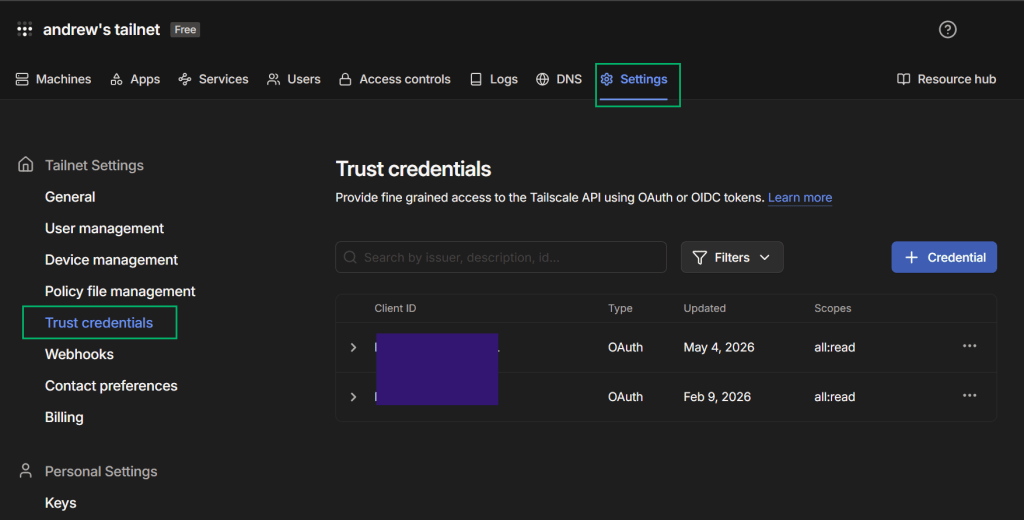
Provide the key read-only across all resources, click “Generate credential”, and record your credentials.

Tailscale Auditor Account
Some useful fields are not available from the public API paths this collector uses (e.g., external devices, which devices have an active funnel, or what IDP is being utilized). If you provide a tailcontrol cookie to TailscaleHound, it will try to enrich the graph with additional machine, user, key, identity provider, and settings data.
The minimum role I’ve seen that can provide this information is the Auditor role. To grant this role to a user, login with an Owner, Admin, or IT admin account and go to Users panel, select the ... next to the user, and select Edit Role. Grant them the Auditor role to give them read only access to the admin console.

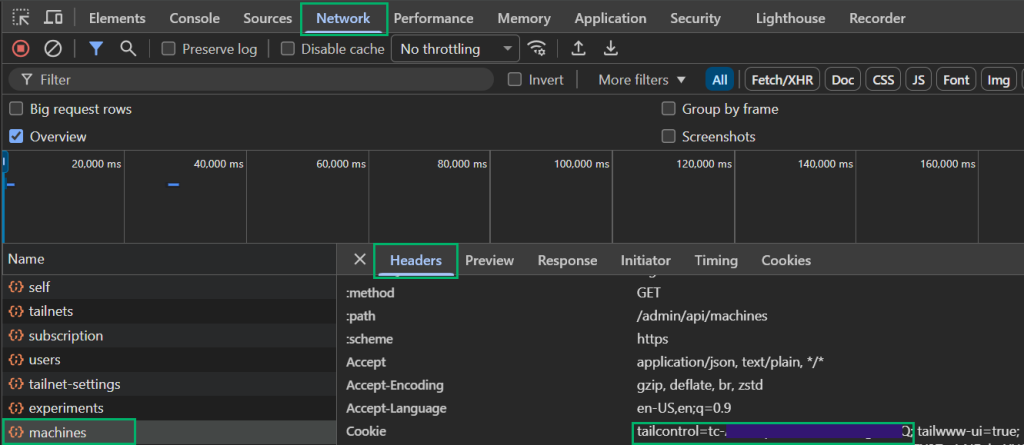
To obtain a tailcontrol cookie, open your browser and launch the Network tab in the DevTool console by pressing the F12 key. Log into Tailscale and look for any network call to the /admin/api endpoint such as self, tailnets, etc.
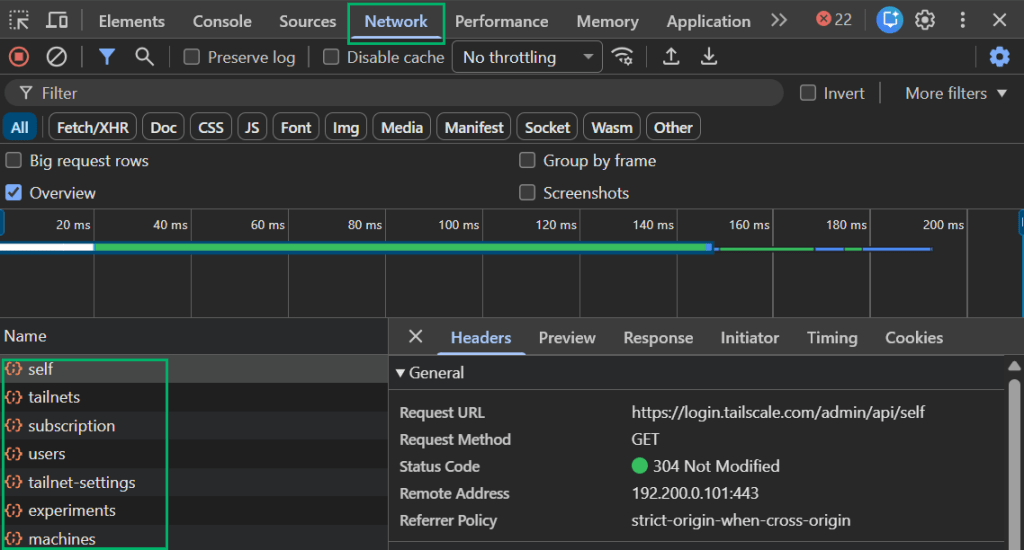
Select one of those calls, such as machines and inspect grab your tailcontrol cookie from the Headers tab under to Cookie section
Remote Collection With OAuth + Tailcontrol
Using the OAuth credentials and tailcontrol cookie we created, run TailscaleHound with the following command. This will output a JSON file that can then be ingested into BloodHound.
python3 TailscaleHound.py --ts-client-id "$TAILSCALE_CLIENT_ID" --ts-oauth-secret "$TAILSCALE_OAUTH_SECRET" --tailcontrol "$TAILCONTROL_COOKIE" --output ./tailscalehound-output --verbose
Local Collection With Status and Policy
During an engagement, you may land on a host that already has Tailscale installed but not have Tailscale API credentials. You may also find a copy of the tailnet Access Policy, especially in environments where policy is managed through GitOps. In that situation, local collection lets you turn the host’s Tailscale view into graph data:
tailscale status --json > tailscale-status.json

python3 TailscaleHound.py --status-file tailscale-status.json --policy-file access-policy.json --output ./tailscalehound-output --verbose
A policy file is optional. With only the status file, local mode maps devices, users, external tailnets, external users, external tags, routes, and capabilities visible from the joined host. Adding the policy file connects that local inventory to ACL, grant, SSH, posture, host alias, ipset, app connector, and Funnel policy edges, which is where the attack-path context starts to show up.
BloodHound Setup
Next, we’ll need to enable the TailscaleHound extension in BloodHound as outlined here.
Once enabled, upload the TailscaleHound schema under Administration → OpenGraph Management:

Next, ingest the generated TailscaleHound JSON through BloodHound file ingest. Pathfinding through traversable nodes outlined in the schema should now be enabled!
Saved Queries Overview
TailscaleHound ships with saved queries under the SavedQueries folder. These queries can be imported using this guide. A useful review of the saved queries flow is:
| Question | Saved query family |
|---|---|
| What is in the tailnet? | Network overview, users, devices, groups, tags |
| Who owns or administers the tailnet? | Users – Admins and Owners, Users – Tailnet Roles |
| Who can reach devices? | Access – Device Access Paths |
| Which ports are attached to access rules? | Access – Device Port Access, ACL – Port Specs |
| Who can reach subnet routes? | Routes – Access Via Device |
| Who can use exit nodes? | Exit Nodes – Policy Paths, Exit Nodes – Device Options |
| Who can SSH and as whom? | SSH – Rule Paths, SSH – As User |
| Which app connectors matter? | App Connector – Usage Paths, App Connector – Runs On Devices |
| What is exposed through Funnel? | Funnel – Capabilities, Funnel – Enabled |
| Which tagged devices are policy sources? | Tags – Tagged Device Policy Sources, Tags – Tagged Device Access To Devices |
| Which shared devices came from outside the tailnet? | Network – External Tailnets, Network – External User Devices, Network – External Device Tags |
| Which keys exist and who created them? | Auth/API/Client/Federated Keys, Keys – Created By, Keys – Tags |
| Where do tests say access should fail? | ACL Tests and SSH Tests |
| How does Azure identity connect to Tailscale? | Hybrid – AZUser Synced, Hybrid – AZUser Device Access Paths |
Below are some examples of how these queries can help identify attack paths
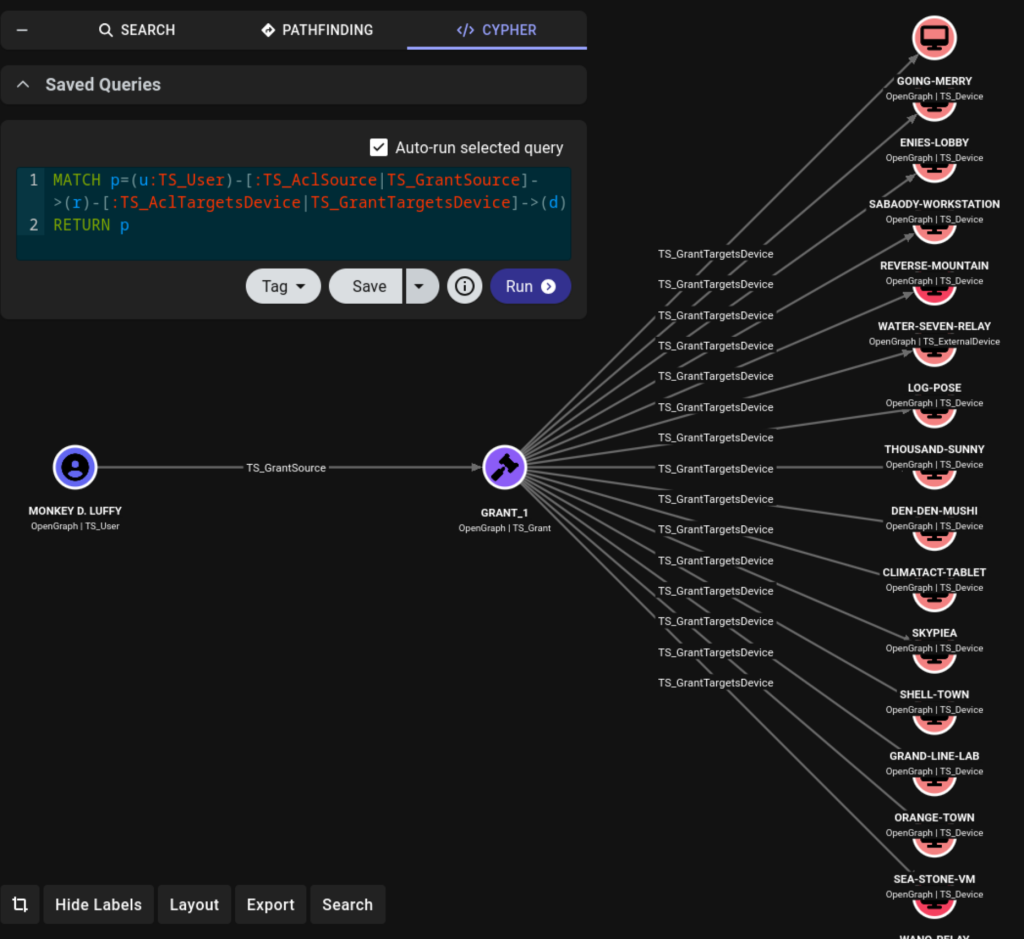
Scenario 1: Who Can Reach a Device?
The most direct graph question is: which Tailscale users can reach a device through ACLs or grants?
MATCH p=(u:TS_User)-[:TS_AclSource|TS_GrantSource]->(r)-[:TS_AclTargetsDevice|TS_GrantTargetsDevice]->(d)
RETURN p
Scenario 2: Which Routes Are Exposed?
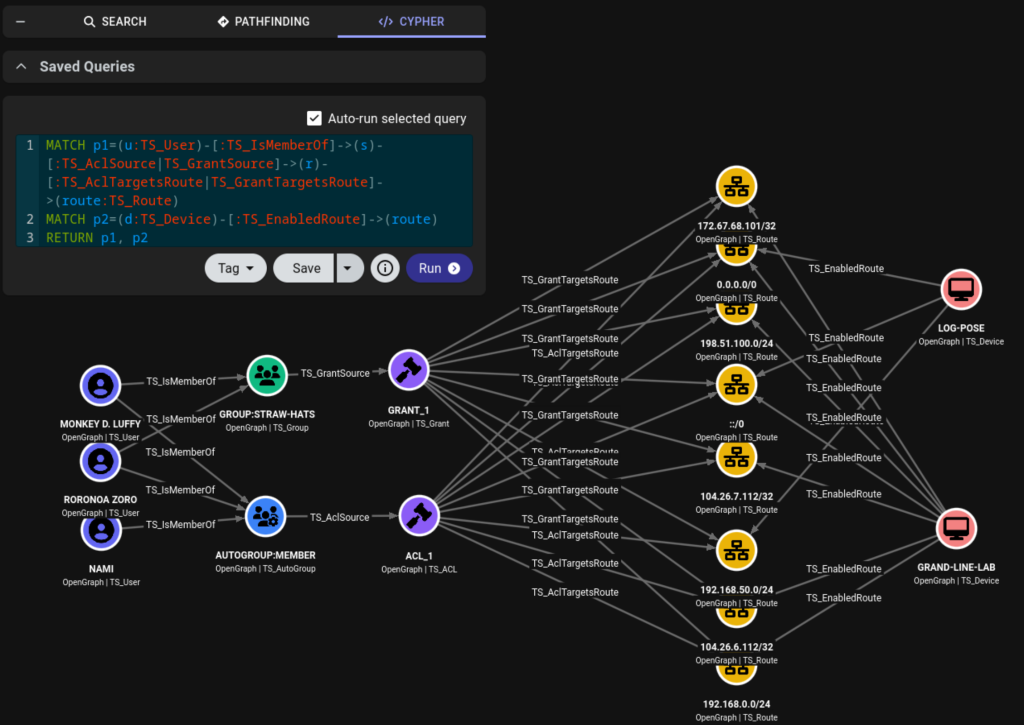
Subnet routers change the shape of a tailnet. A user may not only access Tailscale device IPs; they may also reach private CIDRs or host routes advertised by a device.
MATCH p1=(u:TS_User)-[:TS_IsMemberOf]->(s)-[:TS_AclSource|TS_GrantSource]->(r)-[:TS_AclTargetsRoute|TS_GrantTargetsRoute]->(route:TS_Route)
MATCH p2=(d:TS_Device)-[:TS_EnabledRoute]->(route)
RETURN p1, p2
This query is useful for finding access to lab ranges, cloud VPC ranges, production subnets, or other internal spaces that might not be obvious from the machine list alone.
Scenario 3: Who Can Use Exit Nodes?
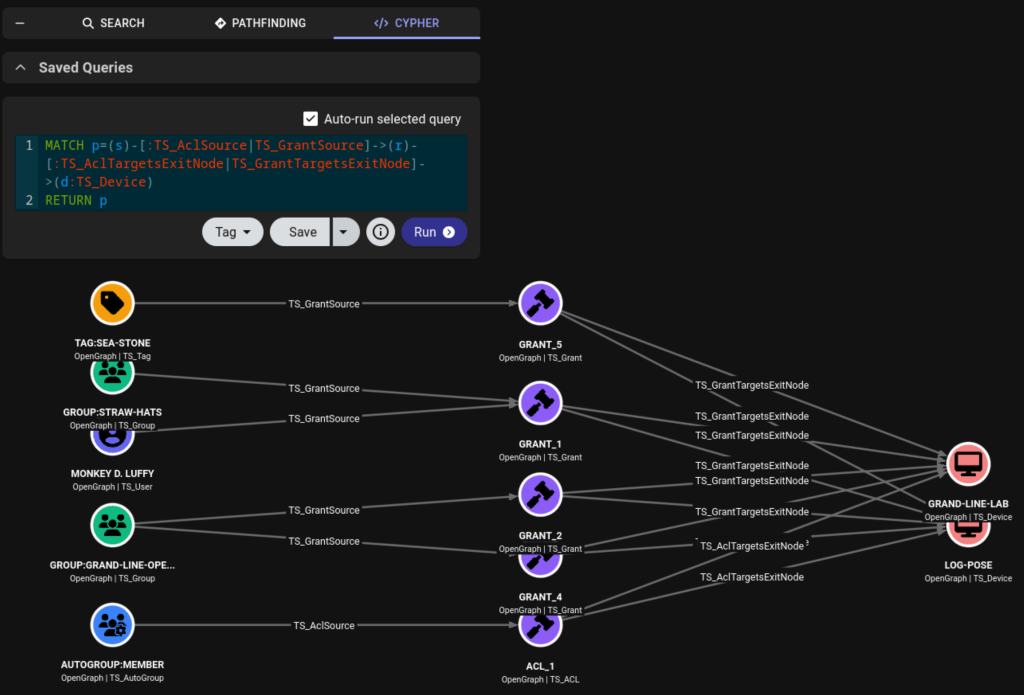
Exit nodes can matter when access to a third-party resource is restricted by source IP, network location, or expected egress path. TailscaleHound models exit-node-capable devices and policy paths that target those devices:
MATCH p=(u:TS_User)-[:TS_IsMemberOf]->(s)-[:TS_AclSource|TS_GrantSource]->(r)-[:TS_AclTargetsExitNode|TS_GrantTargetsExitNode]->(d:TS_Device)
RETURN p
This helps identify users who may be able to send traffic through an egress point that other systems (such as conditional access rules) trust.
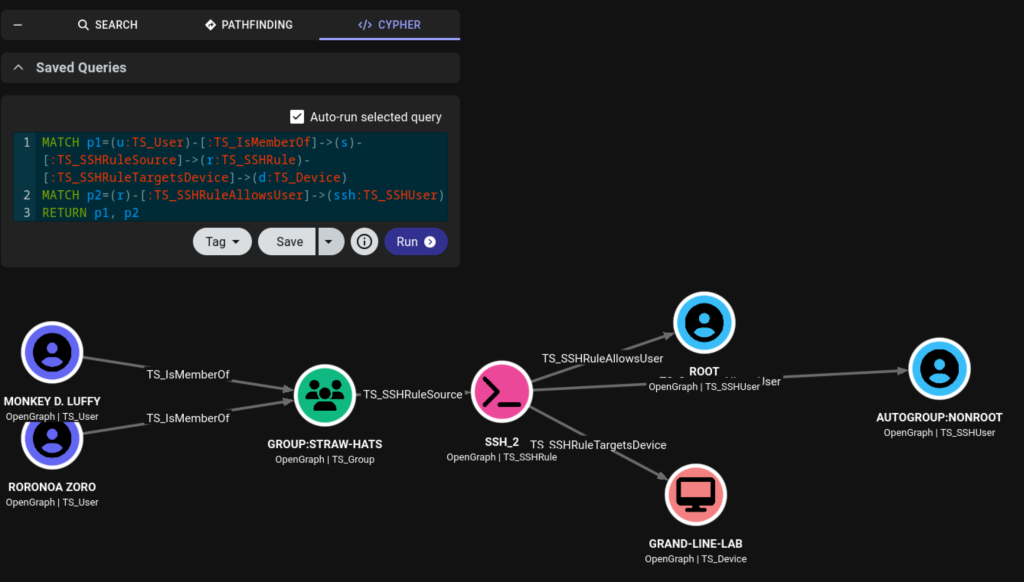
Scenario 4: Who Can SSH, and as Which User?
Tailscale SSH rules deserve their own treatment because the interesting question is “Which users can SSH to which devices, and what user can they SSH as?”
MATCH p1=(u:TS_User)-[:TS_IsMemberOf]->(s)-[:TS_SSHRuleSource]->(r:TS_SSHRule)-[:TS_SSHRuleTargetsDevice]->(d:TS_Device)
MATCH p2=(r)-[:TS_SSHRuleAllowsUser]->(ssh:TS_SSHUser)
RETURN p1, p2
This can expose paths where a broad Tailscale group can SSH to a sensitive server as root, admin, or another privileged local account.
Scenario 5: Keys, Tags, Invites, and Admin Context
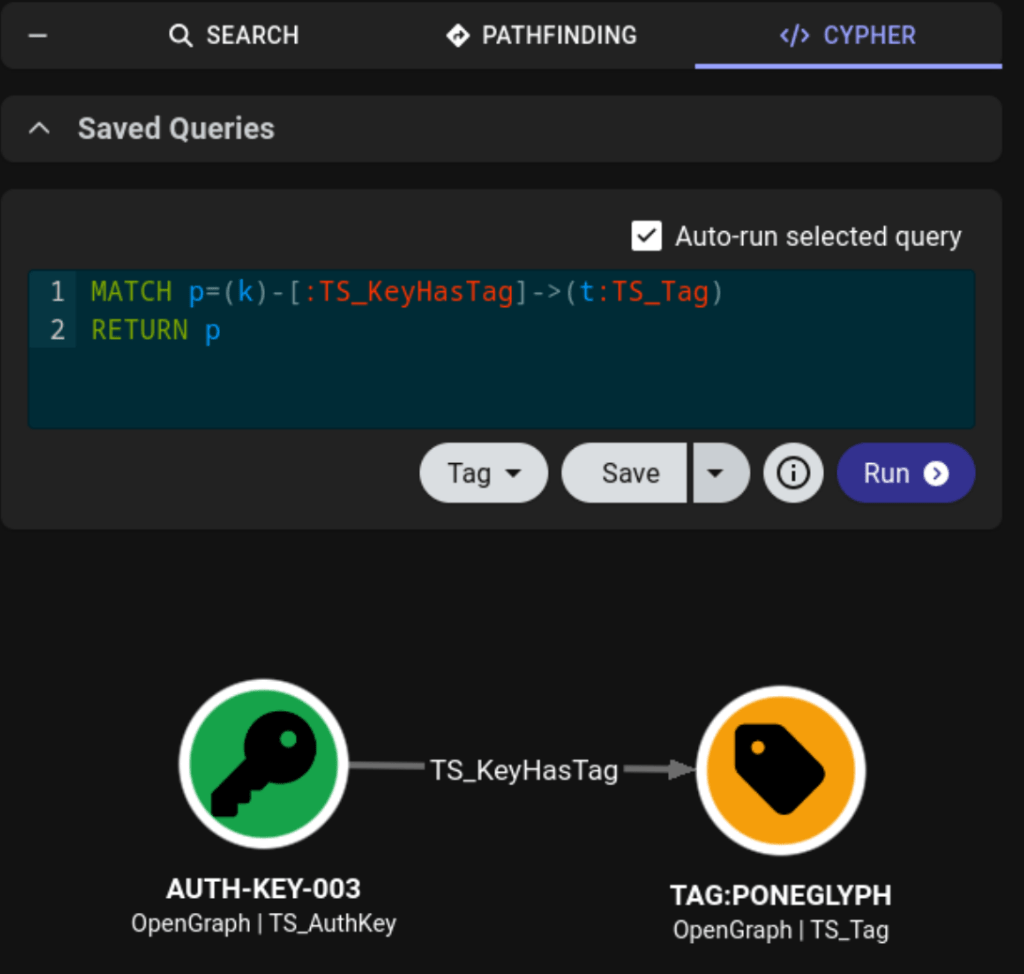
The previous Tailscale keys post explained why keys matter during assessments. TailscaleHound adds graph context around key objects where the data is available:
MATCH p=(k)-[:TS_KeyHasTag]->(t:TS_Tag)
RETURN p
The collector also models user and device invites, webhooks, tag ownership, auto approvers, host aliases, posture definitions, and default source posture. Not every one of these should be a traversable attack path edge, but they are useful context when deciding whether a path is expected, risky, or stale.
Scenario 6: Local Status and Policy Attack Paths
Local ingestion is where TailscaleHound can be useful even without control-plane credentials. Suppose you have tailscale status --json output from a joined workstation and a copy of the tailnet’s Access Policy. Status tells you which devices, users, external devices, tags, routes, and exit node options are visible from that host. The policy file tells you how ACLs, grants, SSH rules, posture, node attributes, host aliases, and ipsets are intended to work. TailscaleHound combines those into one graph.
One useful question is whether a local tagged device is not just present, but is itself a policy source that receives access to another device:
MATCH p=(src:TS_Device)-[:TS_HasTag]->(tag:TS_Tag)-[:TS_GrantSource|TS_AclSource]->(rule)-[:TS_GrantTargetsDevice|TS_AclTargetsDevice]->(dst:TS_Device)
RETURN p
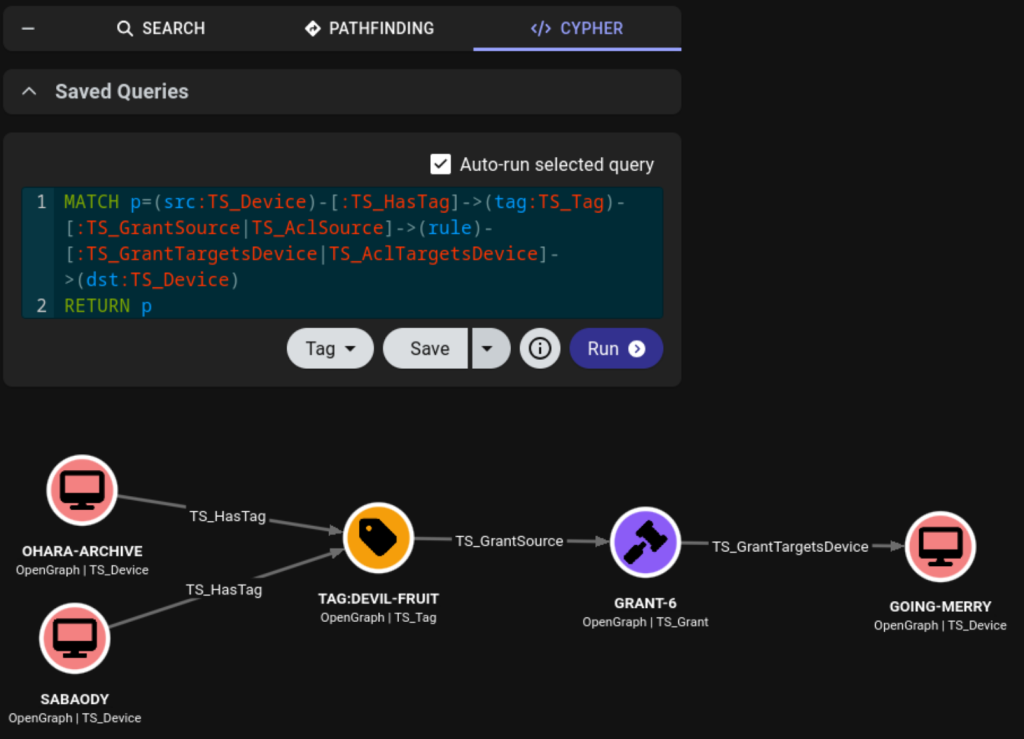
That path can highlight scenarios like a lab box, app server, or automation host carrying a tag that the Access Policy trusts. If an operator has code execution on that tagged device, the graph can show which hosts the device may be able to reach because of its tag.
Hybrid Attack Paths
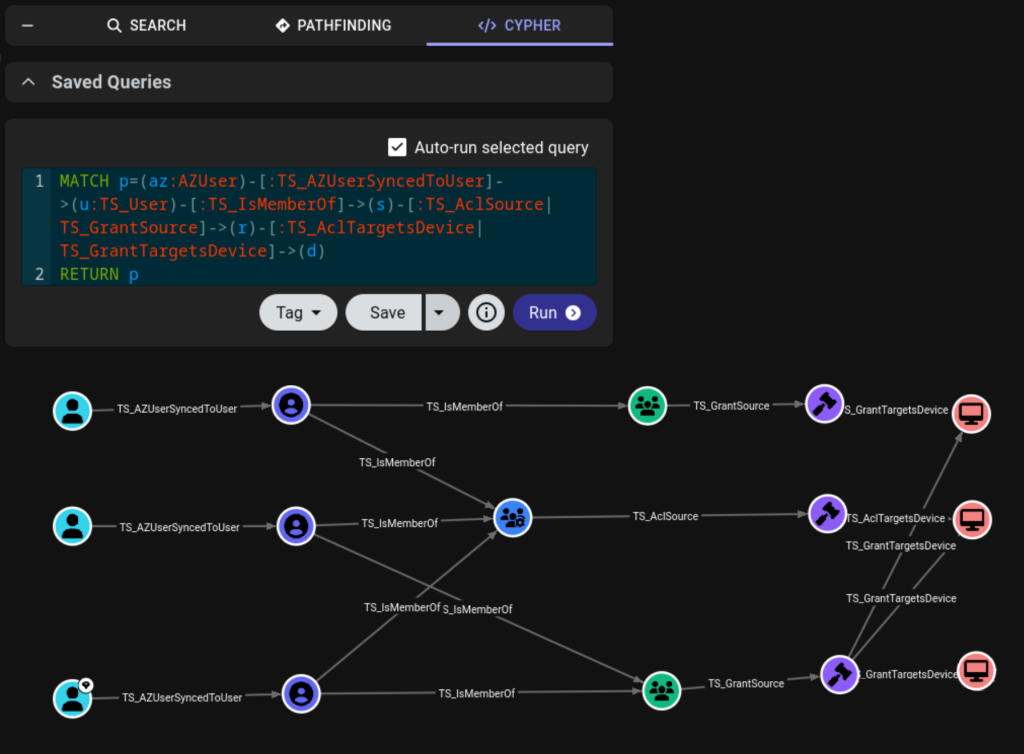
TailscaleHound can also create a bridge from Azure users to Tailscale users. If Azure and TailscaleHound data already exist in BloodHound, the hybrid mapper queries BloodHound for AZUser and TS_User nodes, then creates TS_AZUserSyncedToUser edges by matching AZUser.userPrincipalName to TS_User.LoginName.
python3 TailscaleHound.py --hybrid-attacks Windows --bh-url "$BH_URL" --bh-user "$BH_USER" --bh-password "$BLOODHOUND_SECRET" --output ./tailscalehound-output
Once those bridge edges exist, Azure identity paths can continue into Tailscale policy paths:
MATCH p=(az:AZUser)-[:TS_AZUserSyncedToUser]->(u:TS_User)-[:TS_IsMemberOf]->(s)-[:TS_AclSource|TS_GrantSource]->(r)-[:TS_AclTargetsDevice|TS_GrantTargetsDevice]->(d)
RETURN p
Or into Tailscale SSH:
MATCH p1=(az:AZUser)-[:TS_AZUserSyncedToUser]->(u:TS_User)-[:TS_IsMemberOf]->(s)-[:TS_SSHRuleSource]->(r:TS_SSHRule)-[:TS_SSHRuleTargetsDevice]->(d:TS_Device)
MATCH p2=(r)-[:TS_SSHRuleAllowsUser]->(ssh:TS_SSHUser)
RETURN p1, p2
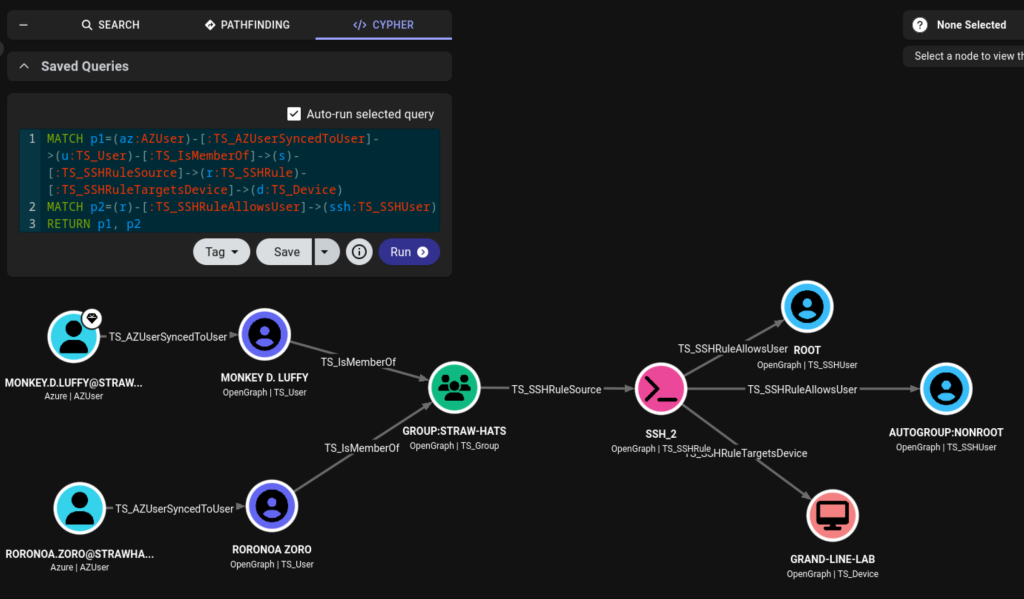
This is where TailscaleHound becomes more than a Tailscale inventory tool. It can show how a cloud identity compromise, group membership, or synchronized user account may lead to network access, SSH access, route access, or exit-node access in the tailnet.
What to Do With the Results
The graph is useful for both offensive and defensive workflows.
For red teams, it helps identify:
- Tailscale users with direct or group-based access to sensitive devices
- Routes that expose internal networks through subnet routers
- Exit nodes that provide useful egress points
- SSH rules that allow privileged local users
- Keys, tags, and invite paths that may support persistence or lateral movement
- Azure identities that extend into Tailscale access
For defenders, it helps prioritize:
- Overbroad ACL and grant sources
- Stale groups, tags, keys, invites, and webhooks
- Sensitive routes exposed to broad groups
- Exit node usage and auto approval rules
- Tailscale SSH rules that grant privileged local users
- App connectors and Funnel devices that should be reviewed
The goal is not only to find attack paths, but to give teams a way to explain, reproduce, and reduce them. In the future this OpenGraph collector will be integrated into OpenHound as an extension but, for now, the collector can be found at: https://github.com/KingOfTheNOPs/TailscaleHound