PingOne Attack Paths
TL;DR: You can use PingOneHound in conjunction with BloodHound Community Edition to discover, analyze, execute, and remediate identity-based attack paths in PingOne instances.
Brief
A few months ago the Ping Identity Corporation reached out to us and asked if we’d work to identify abuse primitives and bring our attack path management approach to their PingOne product. We of course agreed and Ping provided us with a free PingOne environment in which to perform our research efforts. We commend Ping for approaching us with this request and for enabling our research with the free PingOne instance they provided us.
That work was performed by me and my colleague Garret Foster.
The product of that work is PingOneHound – an OpenGraph extension for BloodHound Community Edition and BloodHound Enterprise. PingOneHound is free and open source software which you can get here.
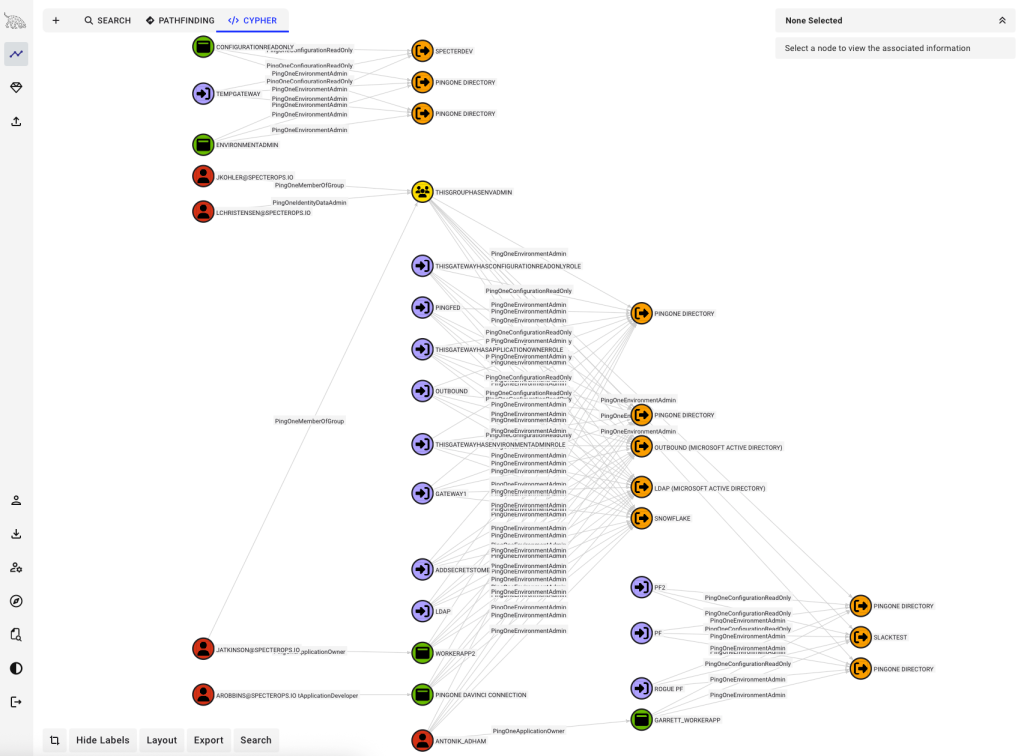
PingOne is a cloud-based identity provider (IdP). As an IdP, PingOne has both authentication and authorization systems. Attack paths emerge from the combination of those systems’ mechanics and configurations.
PingOne complies with SAML, OIDC, and other identity-federation standards – users can be authenticated by one system and authorized by another. When configured, these create attack paths not just within PingOne, but also into and out of a PingOne instance.
This blog post explains the fundamental architecture and mechanics of PingOne, as they are relevant to a security professional analyzing attack paths within a PingOne organization.
Prior Work
In 2024, my colleague Adam Chester published a blog post titled “Identity Providers for RedTeamers”, where he detailed abusing the Ping Identity Gateway agent. I’ll discuss gateways in this post, too.
I have been unable to find other content out there regarding offensive tradecraft focused on PingOne. If you are aware of more prior work in this area, please let me know.
PingOne Vocabulary
PingOne Organization
The top-level object for every PingOne instance is called an organization. Under organizations, you will find environments. Organizations can contain one or more environments. Environments can only be contained by a single organization. Organizations only contain environments, they do not directly contain any other object class.
PingOne Environment
It is within an environment where you will find users, groups, roles, applications, and all the other objects for which we’ve developed tradecraft for. In this way, you can think of a PingOne environment being somewhat analogous to an Entra ID tenant.
An environment called “Administrators” is created any time a PingOne organization is created.
PingOne User
PingOne users are what they sound like – an identity that can be authenticated, typically with a password. But something that sets PingOne apart from other IdPs is that PingOne is not exclusively marketed toward enterprises to use as their internal IdP. Instead, PingOne is heavily marketed as a solution for both enterprise identity management and end-user identity management.
PingOne Group
PingOne groups work much the same way you’d expect groups to work in another IdP. You can delegate permissions to groups and add users to those groups. But there are some key design choices Ping Identity made with PingOne groups that I believe help prevent the emergence of attack paths.
For example, PingOne groups can be configured to automatically include a user as a member if the user has a certain property with a certain value. Maybe we want all users with “IT” in their description to be automatically added to an “IT” group in PingOne. You can do that, BUT, you cannot do that for groups with role assignments.
Further, role assignments are only delegated through group memberships to the direct members of those groups. If you have a user that belongs to a group, which belongs to a group, which has a role assignment, the user will not gain that role assignment because it is too far nested away from the group with the role assignment.
Admins might be frustrated by this design choice, but I for one celebrate it. IdPs are extremely complicated and difficult to manage safely. This is the kind of guard-rail that I think serves admins well by making the platform inherently safer (albeit a bit less convenient) to operate.
PingOne Application
PingOne applications are objects that store configuration and authorization data. They are analogous to “Application Registration” objects in Entra ID.
A PingOne application is itself not a discrete piece of software that you might call an “application”. PingOne does not have compute hosting services where you can host your own software application.
Instead, PingOne applications are OAuth constructs that admins can use to control access to actual applications.
PingOne applications of the “Worker” type are able to authenticate as themselves with a secret.
PingOne Gateway
PingOne gateways are objects that store configuration information for authenticating users via an external LDAP service. Gateways store — but do not expose — credentials that PingOne uses to authenticate to the external LDAP service.
Gateways are able to authenticate as themselves to PingOne with a secret.
PingOne Propagation Store
PingOne propagation stores are objects that store configuration information for authenticating to external resources and propagating users into them. For example, a PingOne admin can configure a PingOne propagation store to automatically create a Salesforce user for each PingOne user.
Propagation stores are unable to authenticate as themselves to PingOne, but they do store and expose OAuth tokens (to principals with enough permissions) that can be used to authenticate into external services.
PingOne Object Hierarchy
Environments contain other object classes, but this document is constrained only to those object classes that we have identified abuse primitives for.
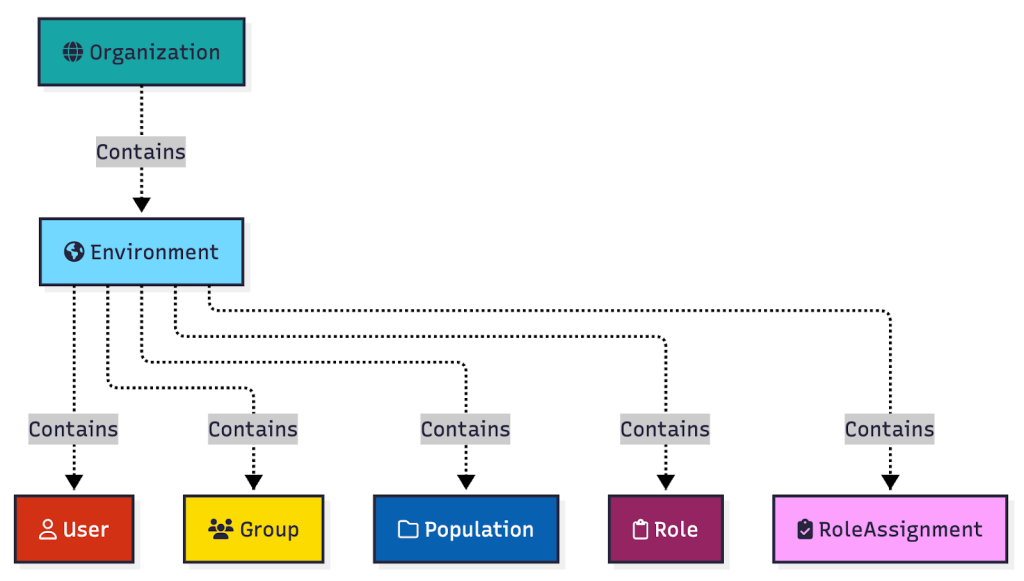
At the top of every PingOne hierarchy is a single organization. Organizations contain one or more environments. Environments contain users, groups, populations, roles, role assignments, applications, gateways, and propagation stores:
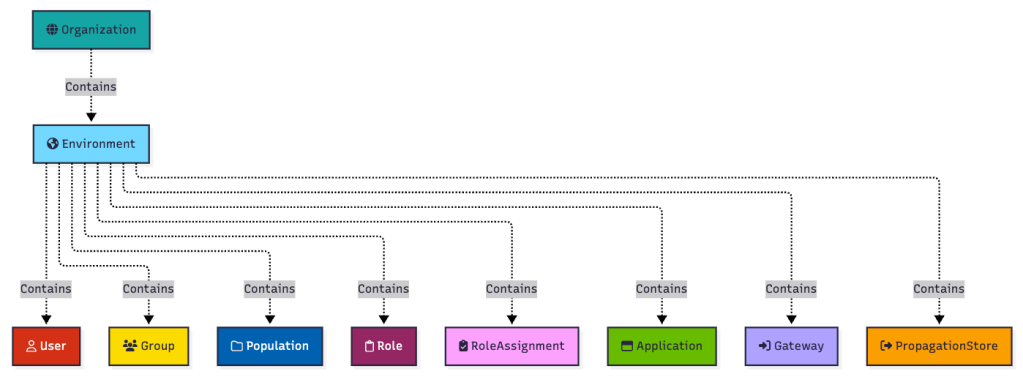
Environments contain other object classes, but this document is constrained only to those object classes that we have identified abuse primitives for.
Abuse Primitives
Abuse Primitive 1: Resetting User Passwords
Pretty straight forward, and also the least attractive abuse primitive of the bunch, in my opinion. With a properly formed request, you can update a target user’s password to a provided value. This is the least attractive abuse primitive, to me, because:
- Disrupting user authentication is a good way to raise alarms
- PingOne aggressively pushes MFA onto PingOne admin users
BARK function:
- Set-PingOneEnvironmentUserPassword
PingOne API documentation reference:
Abuse Primitive 2: Adding Principals to a Group
Groups in PingOne can be granted role assignments. When a PingOne group has been granted a role assignment, that group can not have members added to it dynamically – users must be added one at a time. This may lead to an escalation of privilege.
BARK function:
- Add-PingOneEnvironmentUserToGroup
PingOne API documentation reference: https://apidocs.pingidentity.com/pingone/platform/v1/api/#post-add-user-to-group
Abuse Primitive 3: Granting Role Assignments
Certain roles in PingOne allow you to grant new role assignments; however, PingOne does not allow you to grant a role assignment for a role that has permissions you do not currently possess. This mechanism provides a built-in anti-privilege-escalation into the platform. This abuse primitive is therefore more relevant for persistence than it is for privilege escalation.
BARK functions:
- New-PingOneEnvironmentUserRoleAssignment
- New-PingOneEnvironmentGroupRoleAssignment
- New-PingOneEnvironmentApplicationRoleAssignment
- New-PingOneEnvironmentGatewayRoleAssignment
PingOne API documentation references:
- https://apidocs.pingidentity.com/pingone/platform/v1/api/#post-create-user-role-assignment
- https://apidocs.pingidentity.com/pingone/platform/v1/api/#post-create-group-role-assignment
- https://apidocs.pingidentity.com/pingone/platform/v1/api/#post-create-application-role-assignments
- https://apidocs.pingidentity.com/pingone/platform/v1/api/#post-create-gateway-role-assignments
Abuse Primitive 4: Reading Worker Application Secrets
PingOne worker applications can authenticate as themselves with their own credential. That credential is called a secret. The plaintext value of that secret can be read by other principals with the right role assignments. This may lead to an escalation of privilege.
BARK function:
- Read-PingOneEnvironmentApplicationSecret
PingOne API documentation reference: https://apidocs.pingidentity.com/pingone/platform/v1/api/#get-read-application-secret
Abuse Primitive 5: Creating New Gateway Credentials
PingOne gateways can have role assignments. Further, PingOne gateways can authenticate as themselves with their own credential. Other principals with the right role assignments can create new credentials for gateways, and then authenticate as the gateway. This may lead to an escalation of privilege.
BARK function:
- New-PingOneEnvironmentGatewayCredential
PingOne API documentation reference: https://apidocs.pingidentity.com/pingone/platform/v1/api/#post-create-gateway-credentials
Abuse Primitive 6: Reading Propagation Store OAuth Tokens
PingOne propagation stores hold information needed to authenticate to other platforms, such as Entra ID and Salesforce. Principals with the right role assignments can read that authentication material from the propagation store. This may lead to lateral movement to another platform outside PingOne.
BARK function:
Get-PingOneEnvironmentPropagationStoreAuthenticationMaterial
PingOne API documentation reference: https://apidocs.pingidentity.com/pingone/platform/v1/api/#get-read-one-store
PingOne RBAC – Configurations and Abusable Outcomes
PingOne RBAC is based on roles, permissions, role assignments, scopes, and populations.
PingOne roles are listed in the PingOne administration portal under “Directory -> Administrator Roles”:

Role assignments are created by navigating to the principal you want to create the role assignment for. For example, I will navigate to the “Matt Nelson” user, then click “Roles”, then click the “Grant Roles” button:
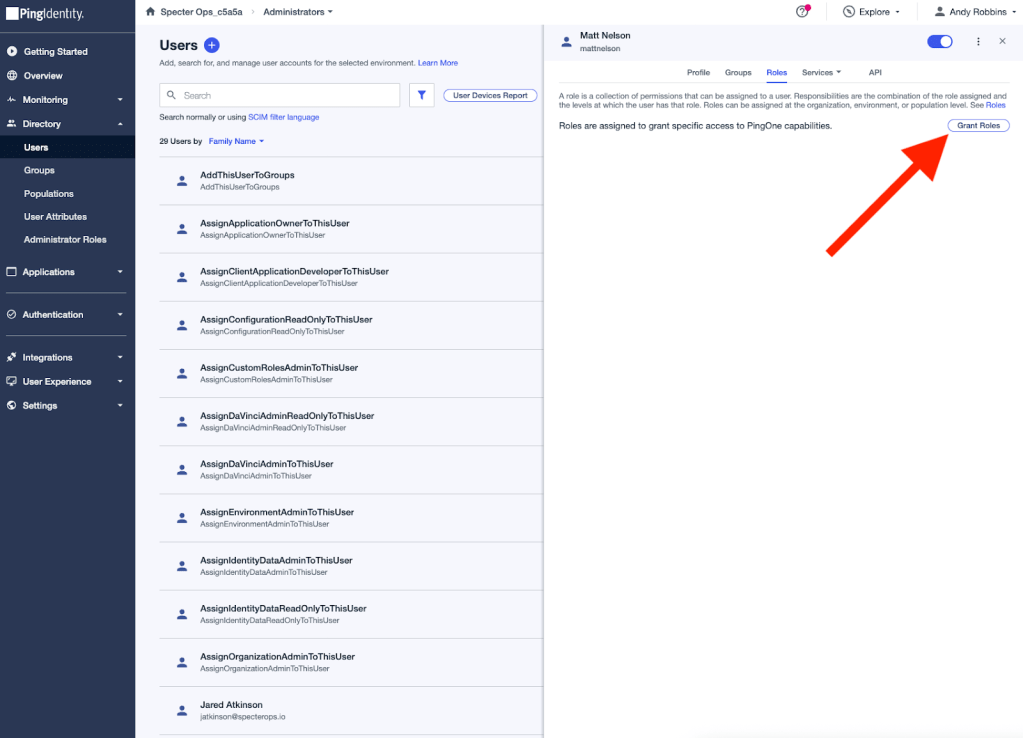
I’ll select the “Application Owner” role. Then I am presented with a list of environments to which I can scope the role assignment:
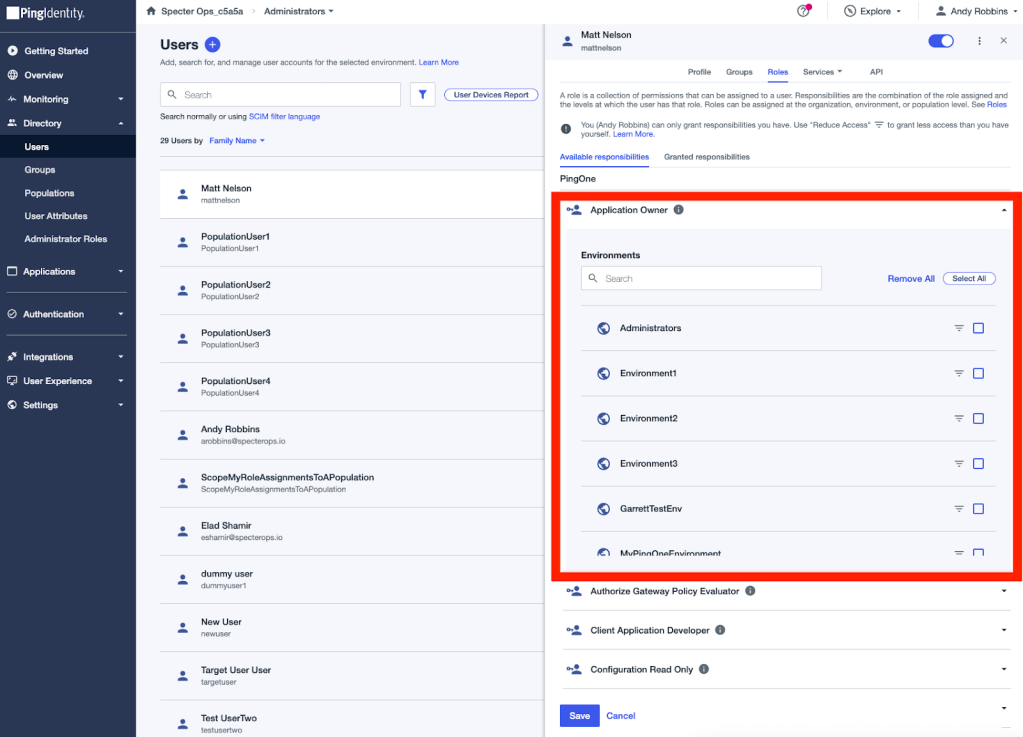
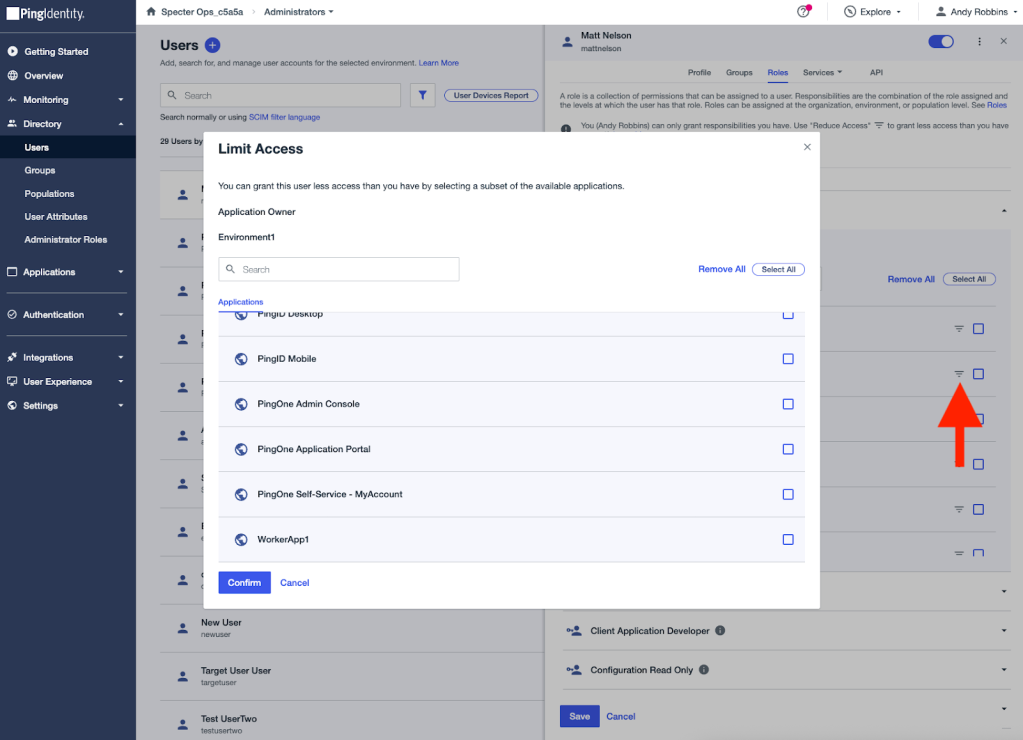
I can scope the assignment to some or all environments. I can also scope the role assignment to specific applications by clicking the hamburger icon next to each environment name:
I’ll scope the role assignment to one environment. Once complete, you can see the role assignment in the administration portal:
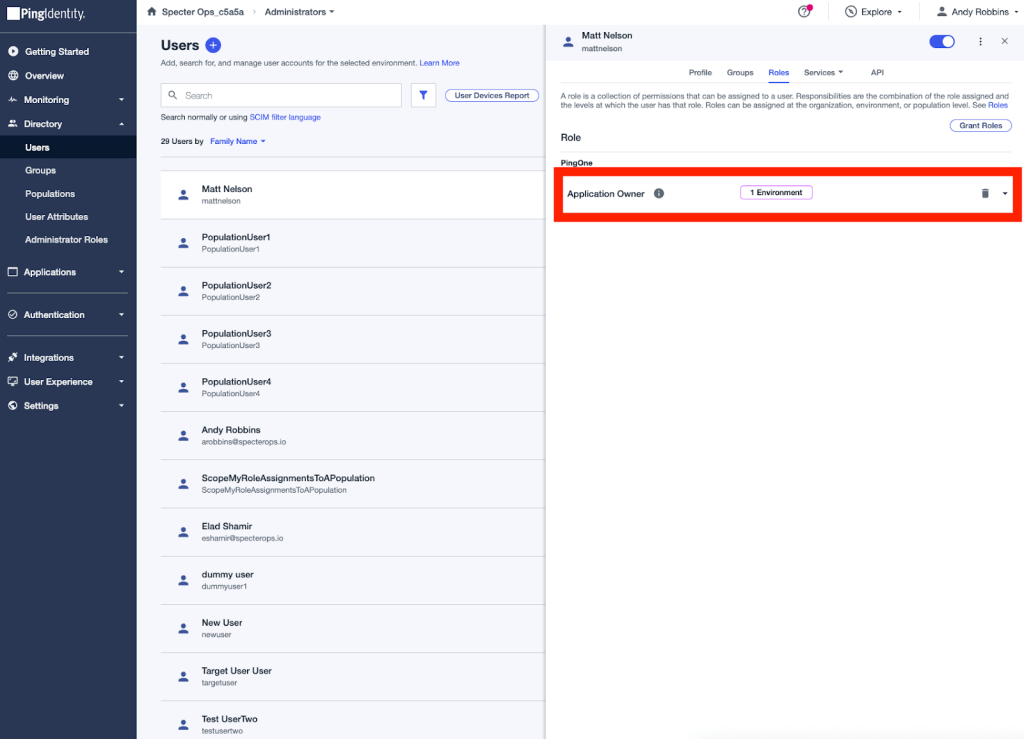
That’s how the portal renders the role assignment. The role assignment as it is presented by the Ping One API is a JSON object:
{
  "_links": {
    "environment": {
      "href": "https://api.pingone.com/v1/environments/fb0be848-aeb0-4984-9b8e-2ab4e5226f74"
    },
    "self": {
      "href": "https://api.pingone.com/v1/environments/fb0be848-aeb0-4984-9b8e-2ab4e5226f74/users/ce22cf66-7960-4dec-afcd-2cca4c3ff0a6/roleAssignments/368f2d3e-9754-4aee-b182-817d6a191739"
    },
    "user": {
      "href": "https://api.pingone.com/v1/environments/fb0be848-aeb0-4984-9b8e-2ab4e5226f74/users/ce22cf66-7960-4dec-afcd-2cca4c3ff0a6"
    }
  },
  "id": "368f2d3e-9754-4aee-b182-817d6a191739",
  "scope": {
    "id": "67ff9b9b-17a3-424b-9f28-4a887c659ec2",
    "type": "ENVIRONMENT"
  },
  "role": {
    "id": "da1f99b8-148c-11ee-be56-0242ac120002"
  },
  "environment": {
    "id": "fb0be848-aeb0-4984-9b8e-2ab4e5226f74"
  },
  "readOnly": true,
  "type": "DIRECT",
  "user": {
    "id": "ce22cf66-7960-4dec-afcd-2cca4c3ff0a6"
  }
}
The JSON object gives us important pieces of information about the role assignment:
- The ID of the associated role – da1f99b8-148c-11ee-be56-0242ac120002
- The scope type – “ENVIRONMENT”
- The scope ID – 67ff9b9b-17a3-424b-9f28-4a887c659ec2
- The principal type – “user”
- The principal ID – ce22cf66-7960-4dec-afcd-2cca4c3ff0a6
- The ID of the assignment itself – 368f2d3e-9754-4aee-b182-817d6a191739
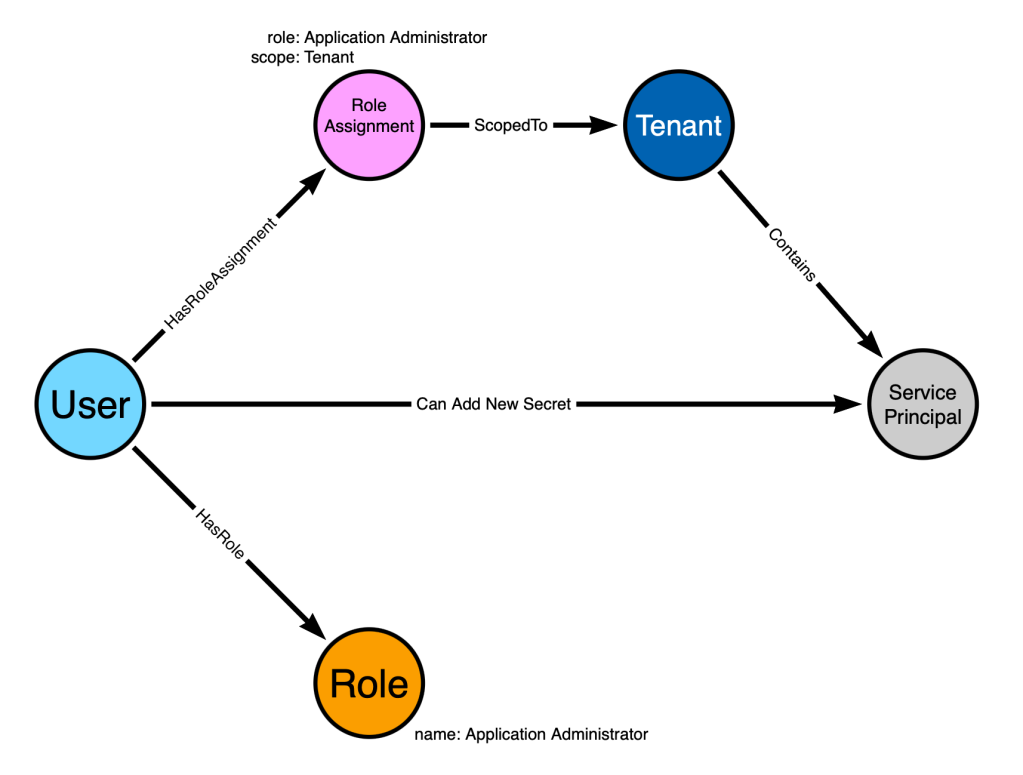
Now we can model the configuration using the RBAC graph model I described in this blog post:
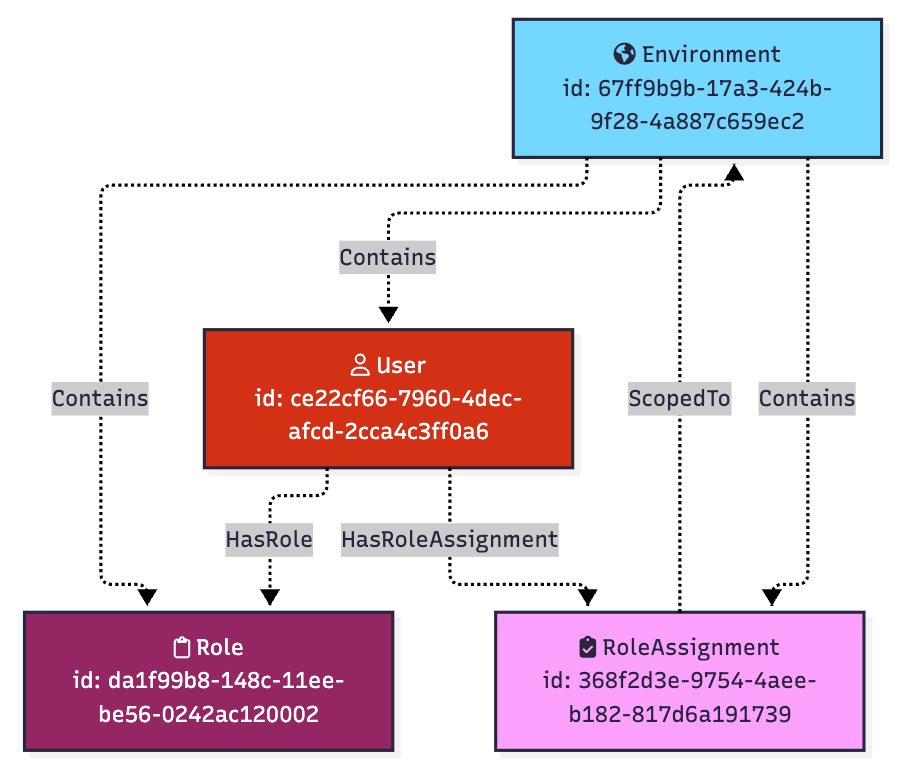
This graph models the configuration of the relevant parts of a PingOne role assignment. But what is the abusable outcome of this configuration? To answer that question, let’s first talk about role permissions.
Roles in PingOne list the permissions defined in that role. For example, we can observe the “Permissions” tab for the “Application Owner” role in a PingOne Environment to see the permissions defined by that role:
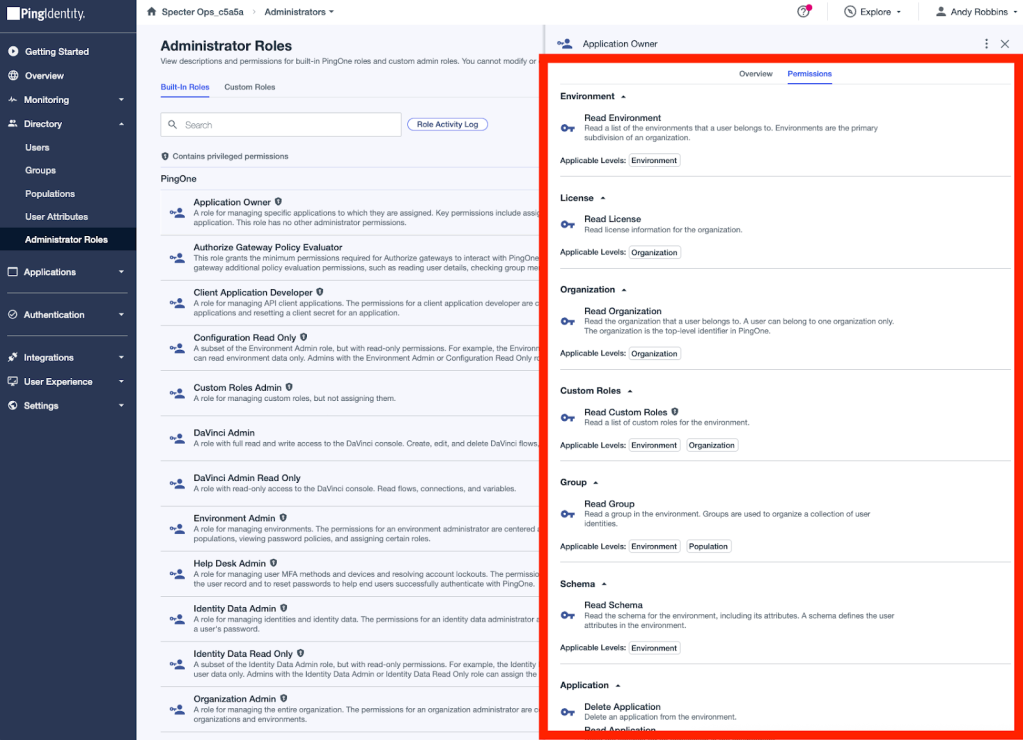
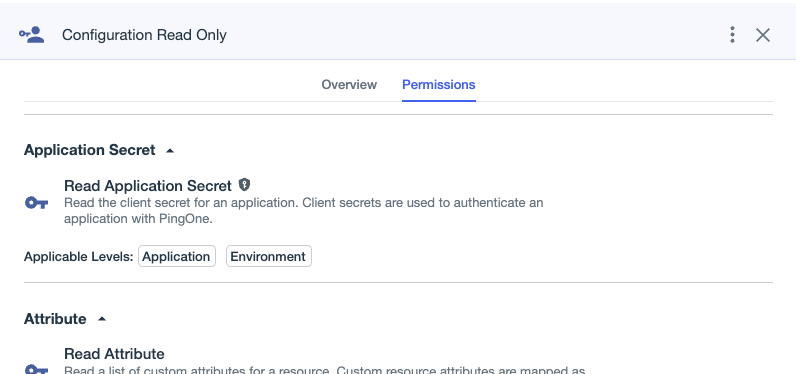
I spent some time researching each permission in PingOne to identify those that can be used by an adversary during the execution of an attack path. I identified one such permission: “Read Application Secret”. Here is a screenshot of that permission in the PingOne portal:
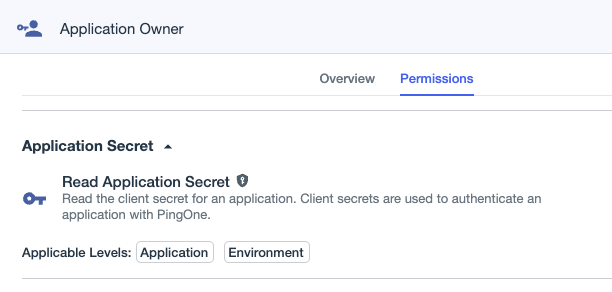
Certain PingOne applications (called “Worker Apps”) can authenticate as themselves using a secret. If we can read that secret, we can authenticate as the worker application.
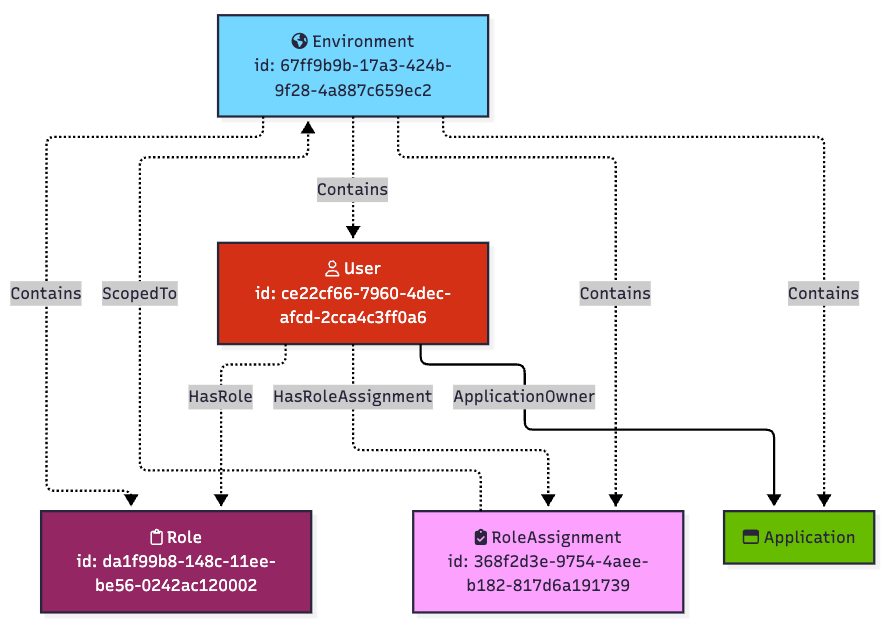
That is the abusable outcome of Matt Nelson’s role assignment. Because the role assignment is scoped to an environment, Matt can read the secrets of all worker applications within that environment.
We can model this abusable outcome in the graph with an edge originating at the user and ending at each worker application in the environment:
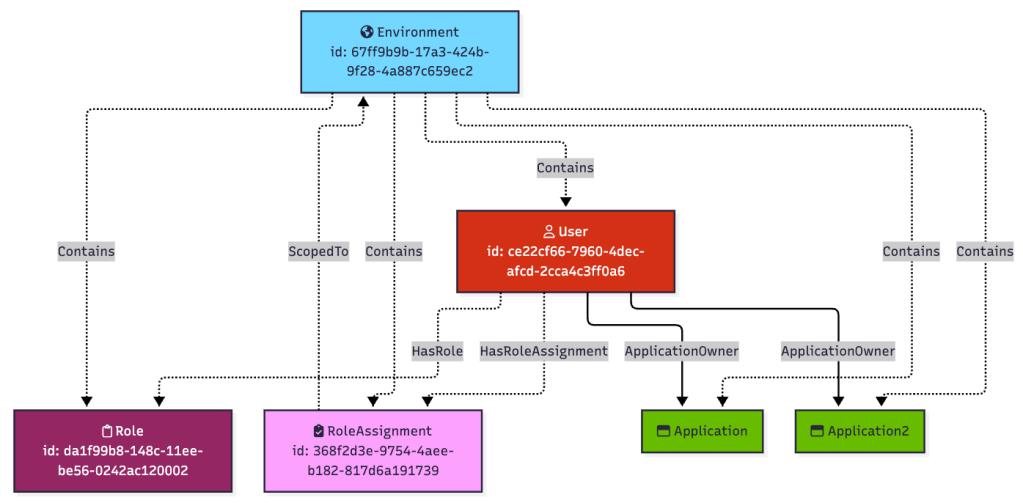
If there is more than one worker application in the environment, the user Matt can read its secret as well:
Or the role assignment may be scoped to only one particular application, in which case the user Matt will only have the ability to read that one application’s secret, but not the other:
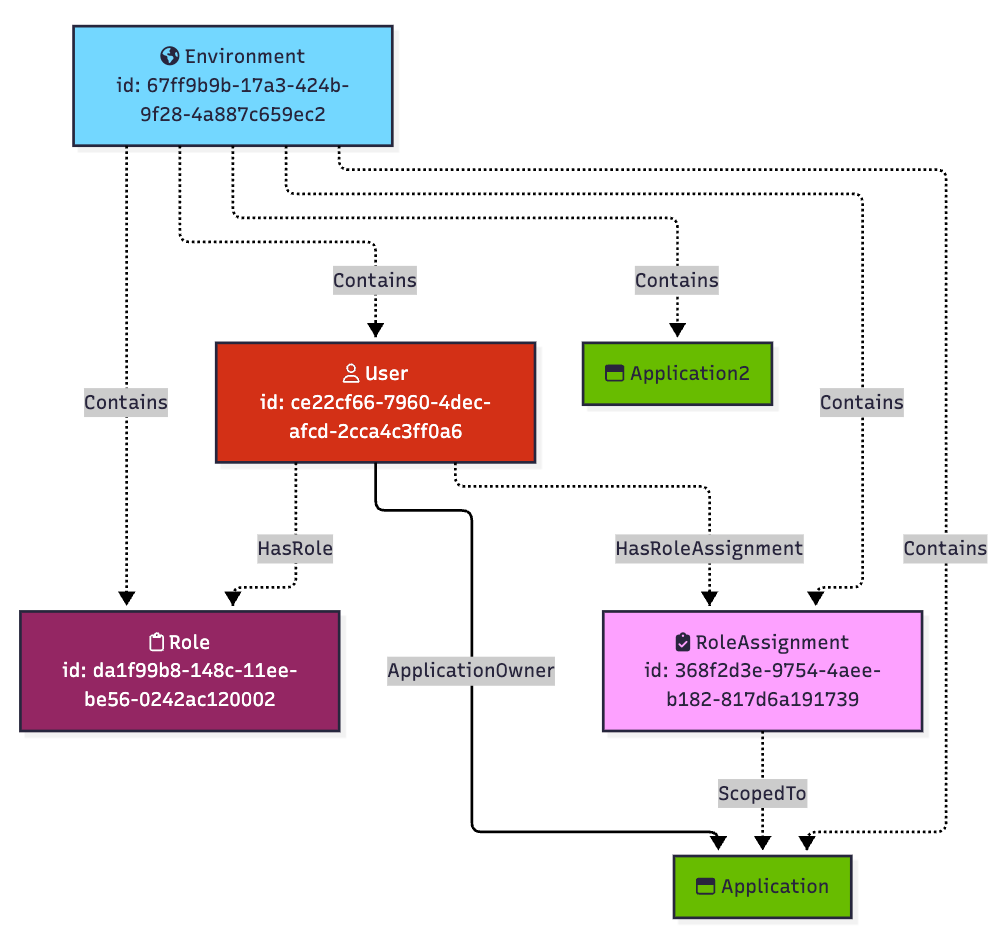
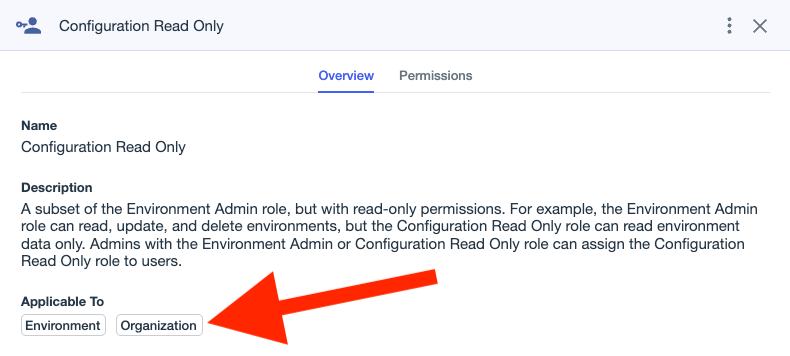
The “Application Owner” role can be scoped to environments and applications. Some roles can also be scoped to organizations.
For example, consider the built-in role called “Configuration Read Only”. From this screenshot of the Ping One admin portal, you can see that this role can be assigned such that the scope is either an environment or an organization:
The name of this role, “Configuration Read Only”, might lead you to think this role doesn’t have an abusable permission, but it does: it has the same “Read Application Secret” permission as “Application Owner”:
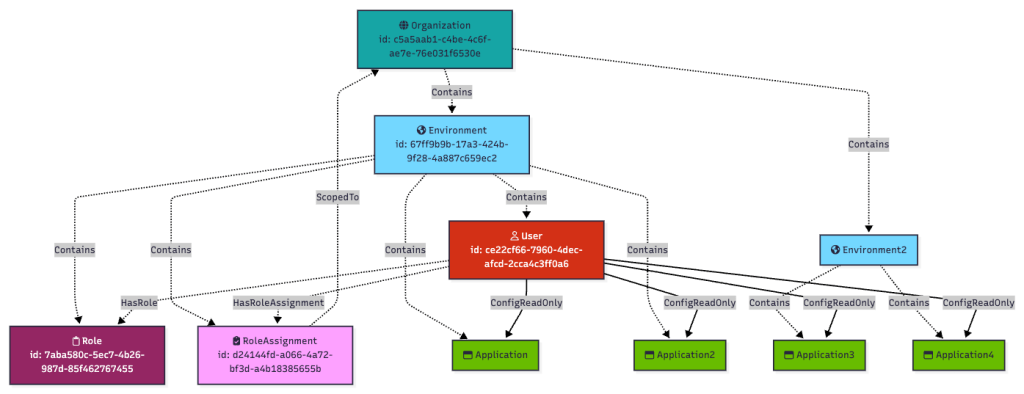
Going back to our user Matt, we can grant Matt the “Configuration Read Only” role and scope that assignment to the top-level organization:
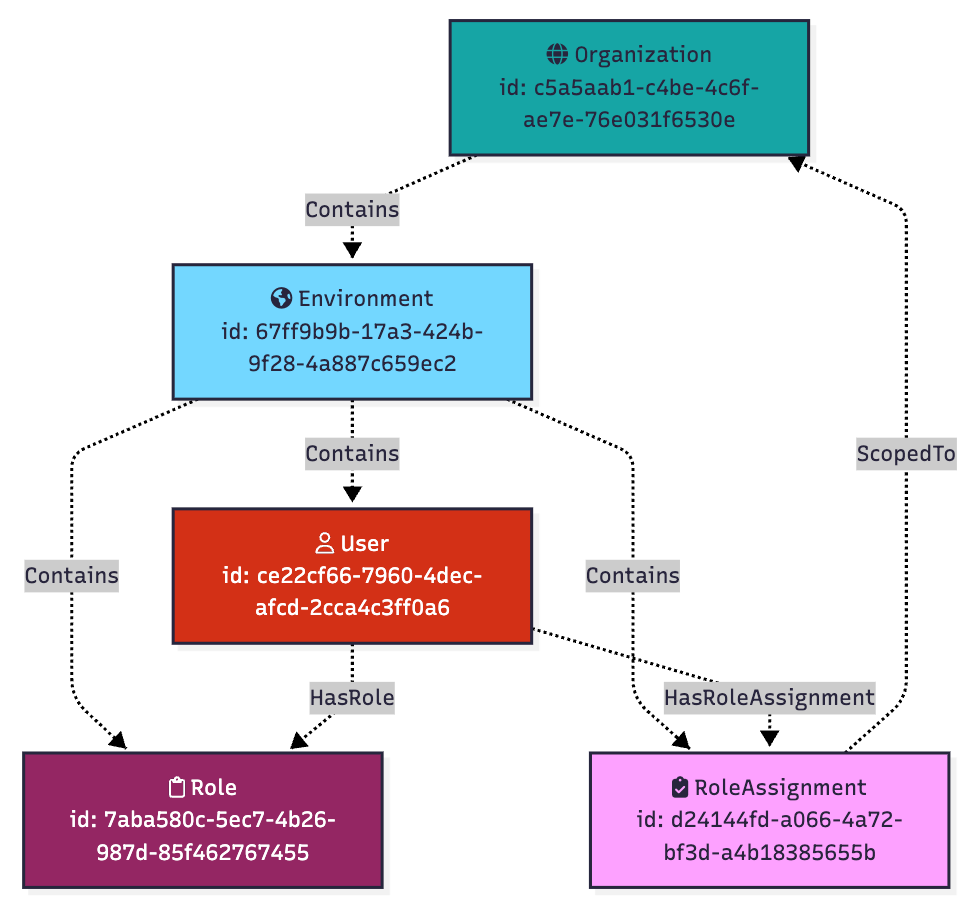
The above is the configuration. What about the outcome? The outcome of this configuration is that the user Matt has the ability to read secrets from worker apps not just in his own environment, but in every environment under the top-level organization, too:
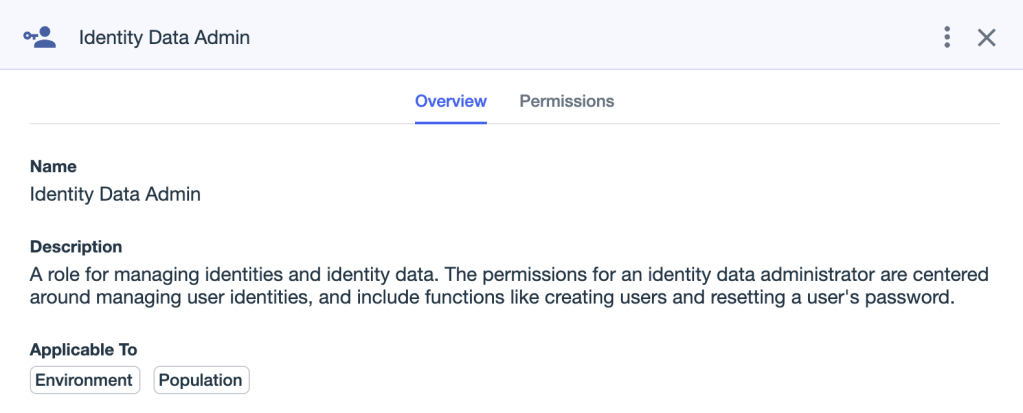
Role assignments can also be scoped to populations. For example, the “Identity Data Admin” role can be scoped to either an environment or a population:
As a reminder, here is where the relevant objects find themselves within the PingOne hierarchy:
Every PingOne user must belong to a population. There is a “Default” population created that all PingOne users are added to unless otherwise configured:
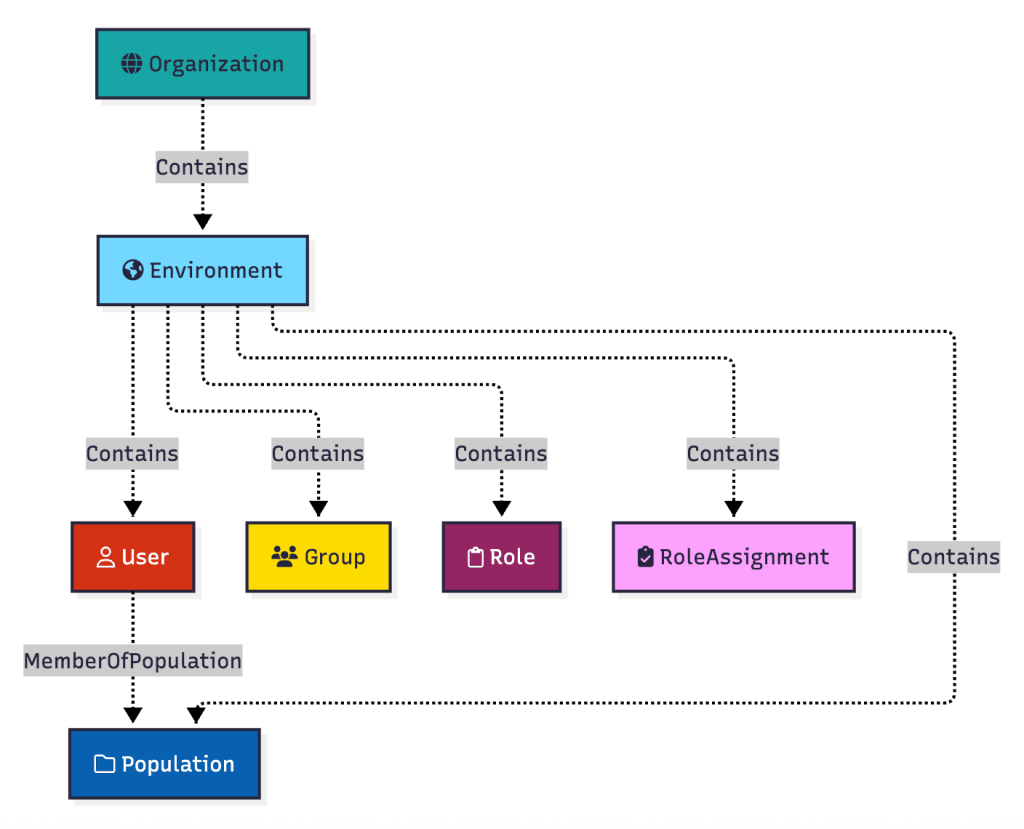
Let’s introduce a second user and a second population to the environment:
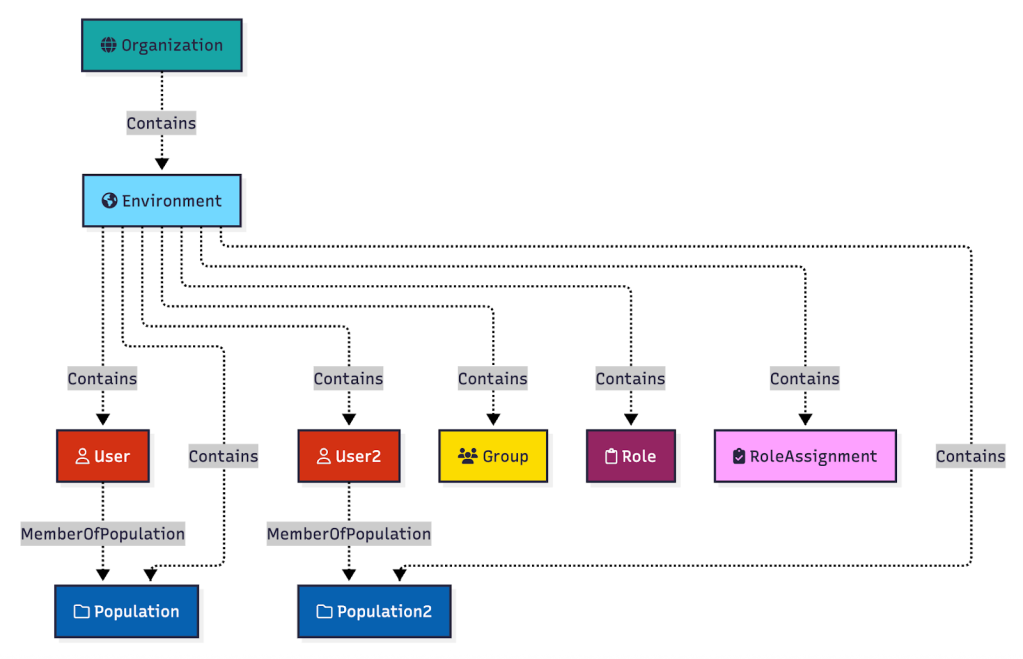
Now let’s grant the first user a role assignment, scoped to Population2. We will say we are granting the user the “Environment Admin” role, which allows for force updating a user’s password:
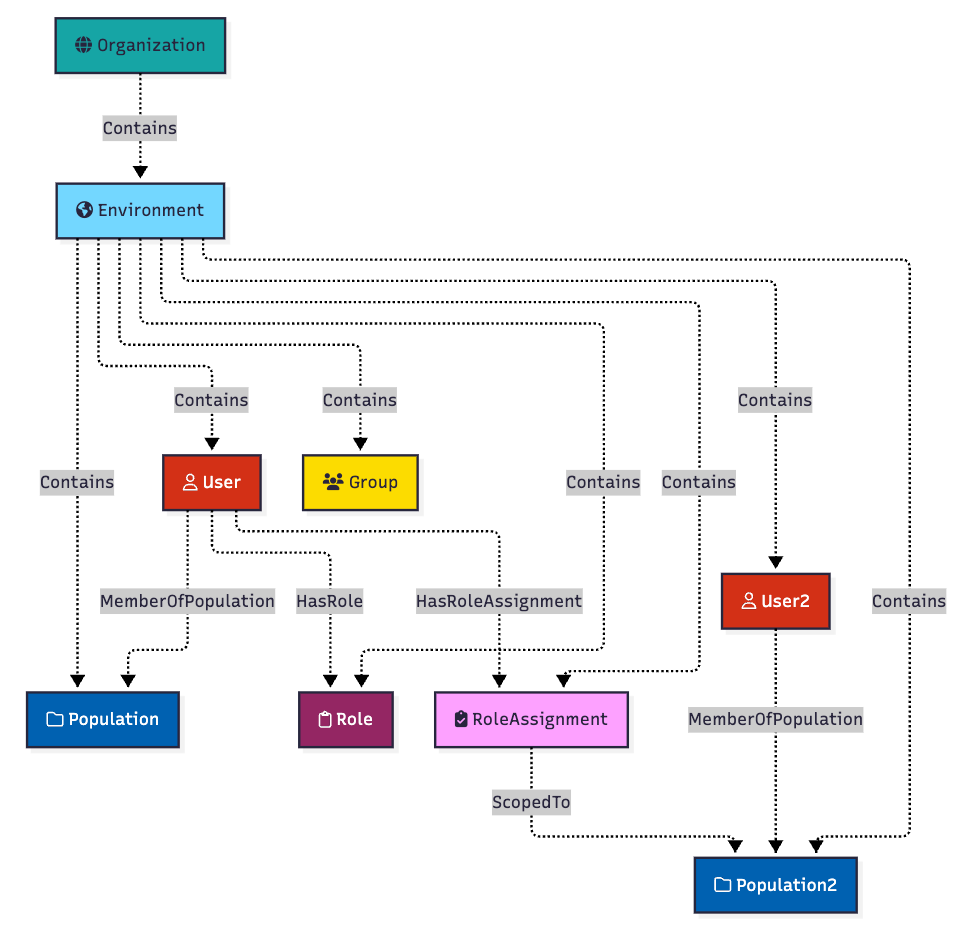
The outcome of this configuration is that the user gains the ability to reset the password of any user that belongs to “Population2”. In this case, this configuration enables the first user to change the password of “User2”. We represent that in the model with an edge starting at the first user and ending at the second user, where the edge name is derived from the role name:
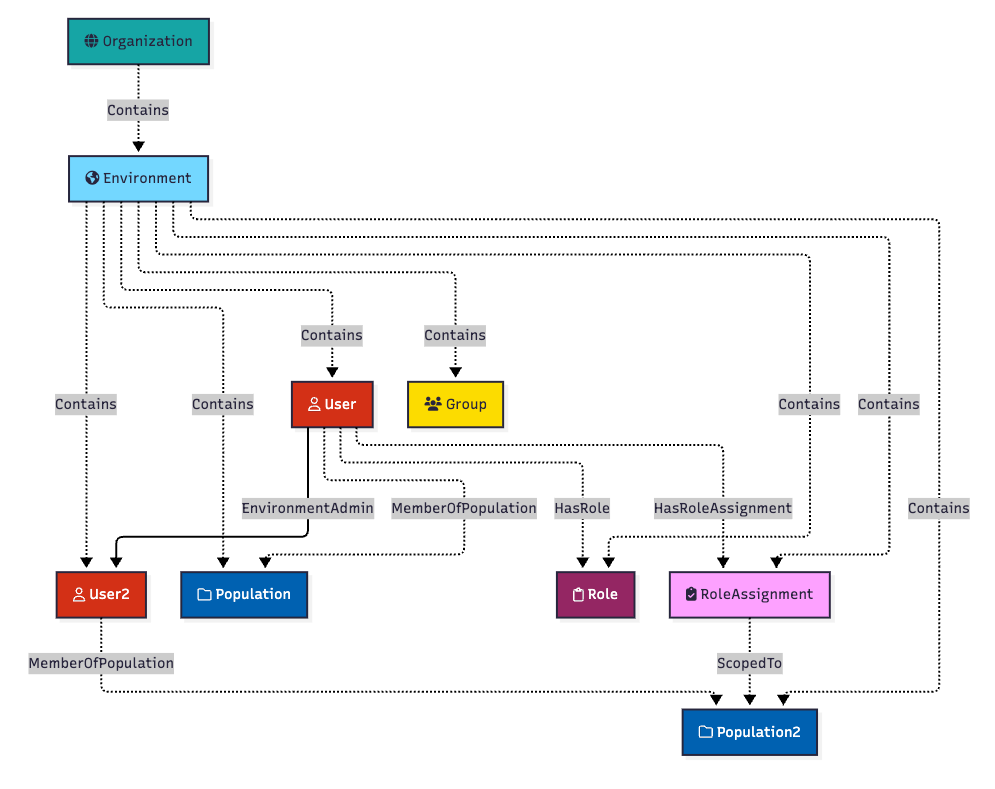
You may notice the “EnvironmentAdmin” edge is the only one in solid black format. That is because it is the only edge in the design that is actually abusable. It is the only edge that BloodHound should traverse when finding attack paths between “User” and “User2”.
All of the logic for how PingOne RBAC configurations create outcomes like this has been encoded into PingOneHound. You do not need to understand these mechanics to get value out of PingOneHound, but you should understand these mechanics when it comes time to remediating attack path findings uncovered by PingOneHound and BloodHound.
Conclusion
Ready to get started? Get PingOneHound here. Join us in the BloodHound slack in the #ping channel to discuss PingOneHound and Ping tradecraft.
Have feedback? Please open an issue in the PingOneHound repo linked above and I will be happy to review and respond there.