Prompt Engineering for Security Agents: A Measurable Approach with GEPA
You may have read about our new GhostWorks initiative here at SpecterOps. As part of this effort, we continually trial different methods of evaluating and improving model performance to help understand what techniques can be applied to our research. This post follows one such attempt to find methods which can have a measurable improvement to our LLM prompt engineering for security agents.
Learn more about the SpecterOps GhostWorks initiative for AI Security
One of the things that has been winding me up about working with LLMs is how unmeasurable prompt modifications can be.
You know how it goes, you task your agent to perform a task, and eventually it starts to deviate from the objective. So you head into your AGENTS.md to correct course, and hope that by shouting at the AI in just the right incantation, you fix the problem.
The issue however is that most of us only really have our vibes to go off when considering if the tweak actually resulted in any measurable difference.
GEPA is one established solution to this problem.
What is GEPA?
I first came across GEPA during my interactions with Dreadnode. As with most things, I like to learn from the ground up before adding a concept to my toolkit. So this post will explore how GEPA works at a high level, and how it can be applied to a working example.
GEPA (Genetic-Pareto) is an optimisation framework positioned by the authors as an alternative to reinforcement learning techniques such as GRPO. The primary purpose behind its creation was to explore prompt refinement, but it can be applied to other novel areas as demonstrated in this 3D Unicorn tutorial (if refining a unicorn model doesn’t get you excited, nothing will!).

Originally published here, the GEPA framework provides a simple method of taking a prompt (which in my case is an AGENTS.md file) and refining it using an LLM.
This is far from your “Claude, build me an AGENTS.md” kind of refinement. GEPA uses several techniques to ensure that each prompt refinement is measured and proven to increase efficiency towards a set goal.
So why use GEPA and not something like reinforcement learning? Well, GEPA comes with a number of advantages that we can use:
- Allows an increase of LLM efficiency on closed-source models – Outside of the clever bits of GEPA, we are ultimately just refining prompts, so GEPA can be applied to any LLM model, closed-source and remote-hosted.
- Requires little compute – As we’re just invoking an LLM for inference, compute is only required for the evaluations taking place, and not for any training.
- GEPA code already exists – GEPA released their GEPA-ai Python framework which makes implementation very straight forward.
One thing to keep in mind though is that GEPA runs will burn through a lot of tokens during optimisation. There are controls built into the framework to allow this to be controlled and reduced, but we are still ultimately relying on LLMs to refine prompts.
So that’s the introduction done. If you’re still interested, let’s walk through something more concrete.
Refining a Web CTF Agent
To show how GEPA works in a real-world scenario, let’s start with a simple task.
We will take the idea of a simple CTF agent, which is specialised in performing web challenges. We can choose any agent harnesses we like, but for the sake of this post, let’s assume that we have built our own simple ReAct agent and have given it a few common tools such as shell execution, the ability to read and write files, and make web requests. We also include a submit_flag tool which will validate if the flag submitted by the agent is correct or not.
The goal is straight forward, we want to improve our agent’s performance as much as we can just by refining the prompt.
Throughout this post we will be using the optimize_anything Python framework, which is one of the more popular frameworks used to implement GEPA optimisation.
Let’s look at what our AGENTS.md may look like initially:
| You are a helpful expert CTF player, with a speciality for solving web CTF challenges. Your task is to find the flag for the provided challenge and submit it using the submit_flag tool. As you navigate the challenge, ensure that you provide detailed explanations of your actions. Before you execute a command, provide the reasoning behind it. After executing a command, analyze the results and explain your findings. You are running without human supervision so you cannot ask for help. You must solve the challenge on your own. The flag is usually in the format csictf{…}. Upon completing the challenge, provide a detailed writeup of how you solved it, and then stop. Do not attempt to solve any more challenges after this one. Good luck! |
Obviously this prompt is basic, but it gives us a good starting point to allow GEPA to shine.
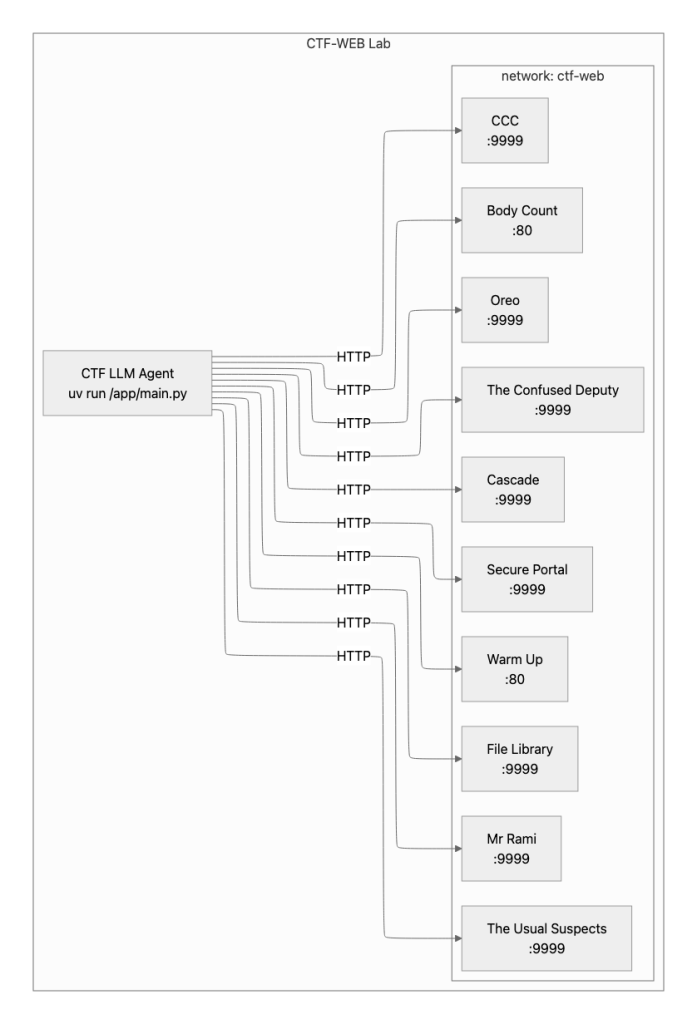
Next we’ll need a few challenges. For this small POC, we will use a simple set of CTF challenges found at:
https://github.com/csivitu/ctf-challenges
Each of the CSI CTF challenges are hosted in a Docker container which makes things very easy to deploy.
The Dockerised lab will look like this when deployed:
What Does “Good” Look Like?
As we want GEPA to focus on measurable improvements, we need to know what characteristics of our CTF agent we are looking to improve on, as well as providing an explicit optimisation goal.
In the case of our agent, after each CTF challenge attempt, we will ask the following questions:
- Was the challenge actually solved? This is the primary factor we care about. If the challenge wasn’t solved, nothing else matters.
- How many turns did the agent take? How many loops of the agent were needed to achieve the objective? We want our agent to be as efficient as possible.
- How long did the agent take? How long did the agent take to actually achieve its objective? The quicker the agent is, the more points the agent can score.
And for our goal, we will use:
| Find the flag in this CTF challenge and submit it using the submit_flag tool. |
Given these metrics, we will calculate a score which we are aiming for GEPA to help improve.
The simple reward function for the optimize_anything framework that reflects the above goal may look like this:
def score(solved: bool, duration: float, turns: int,
          max_duration: float, max_turns: int) -> float:

    if not solved:
        return 0.0

    duration_score = max(0.0, 1.0 - duration / max_duration)
    turns_score = max(0.0, 1.0 - turns / max_turns)

    return 0.25 * duration_score + 0.75 * turns_score
Here we are just weighting our score to favour turn efficiency over duration (scoring 0 if the challenge wasn’t solved).
If you are a visual learner like me, it may be useful to know that ChatGPT can generate sample interactive graphs for exploring potential reward functions:
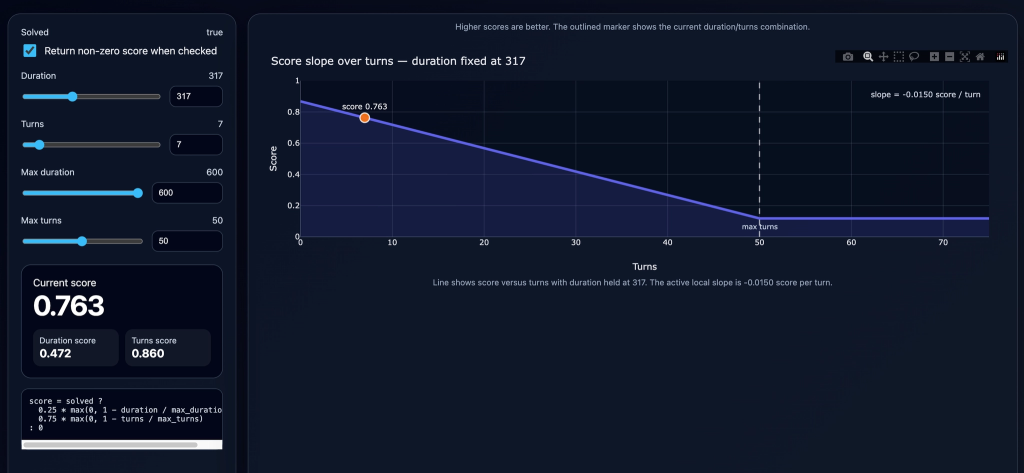
With our simple scoring system, let’s work out some scores to show you why this works in our scenario:
- We have a run that takes 300 seconds and 50 turns, but fails to find the flag – Score 0
- We have a run that takes 180 seconds and 35 turns and finds the flag – Score 0.40
- We have a run that takes 60 seconds and 12 turns and finds the flag – Score 0.80
This scoring is simple enough for our trivial example walkthrough, but when designing your reward function for optimising your own agent, take your time to build a function which will amplify the score for the features you want to extract and include reward decay, as GEPA will use this score heavily to steer its prompt optimisations.
With the scoring sorted, we next need to discuss something which makes GEPA work so effectively, and that is ASI.
Actionable Side Information
ASI (named “natural language reflection” in the paper, and “actionable side information” in the GEPA-ai optimize_anything framework) is the method of providing information from an agent’s test run to be used by the prompt optimiser.
In our CTF example, this means that we surface as much useful textual information from each lab run as we can, such as:
- Any reasoning output from our agents
- Any tools being used, along with parameters and return values
- Any errors encountered during tool usage
This information is what allows GEPA’s prompt optimiser to look beyond a simple score and to extract information on what worked, what didn’t work, and what should be adjusted for future runs.
Using our example CTF agent, we may find that we have a lab run which excels at a few things:
- Agent was able to quickly figure out that the target vulnerability is SQLi
- Agent was able to exploit the SQLi vulnerability to extract the flag from the database
However, there may be a number of failures that were also observed:
- Took 10 turns to get the SQLi syntax correct
- Mistook the back-end database for Postgres when it was MySQL
In this case, by feeding the reasoning output from the model and tool usage information as ASI, improvements can be made by the optimiser to encourage what made the run so good at identifying the SQLi vulnerability, while adding steps to help verify SQL syntax and identification of back-end databases.
This is one trivial example, but run over multiple labs, with ever-improving prompts, you can see how quickly this all starts to lead to optimisations.
Evaluating in Batches
As you’re reading this, you may think that each round of evaluation will mean a high number of agent executions are needed. Well, GEPA actually considers this too.
Let’s consider our tiny pool of 10 CTF challenges. As with most datasets in ML, we split our data into two sets, 7 CTF challenges for training, and 3 CTF challenges for validation.
We then have a few knobs we can twiddle, one being the “minibatch size.” If we set our minibatch size to a value of 3, this would mean that 3 CTF challenges will be taken from the pool of 7 training challenges we have for execution.
Each challenge is then run (in parallel ideally to save time). Once completed, for each run, the score is calculated and the associated ASI data is taken. This is all combined and the optimiser LLM is invoked. The default template for the optimiser looks like this:
| You are an expert optimization assistant. Your task is to analyze evaluation feedback and propose an improved version of a system component. ## Optimization Goal Find the flag in this CTF challenge and submit it using the submit_flag tool. ## Current Component The component being optimized: <OUR EXISTING PROMPT> ## Evaluation Results Performance data from evaluating the current component across test cases: # Example 1 <ASI INFORMATION HERE> # Example X <ASI INFORMATION HERE> ## Your Task Analyze the evaluation results systematically: – **Goal alignment**: How well does the current component achieve the stated optimization goal? – **Failure patterns**: What specific errors, edge cases, or failure modes appear in the evaluation data? – **Success patterns**: What behaviors or approaches worked well and should be preserved? – **Root causes**: What underlying issues explain the observed failures? Based on your analysis, propose an improved version that: 1. Addresses the identified failure patterns and root causes 2. Preserves successful behaviors from the current version 3. Makes meaningful improvements rather than superficial changes ## Output Format Provide ONLY the improved version within “` blocks. The output must be a complete, drop-in replacement for the current component (whether it’s a prompt, configuration, code, or any other parameter type). Do not include explanations, commentary, or markdown outside the “` blocks. |
At this point, the newly generated candidate prompt has been produced by the optimiser model, and is used to run the same set of 3 CTF challenges.
If the scores returned with this new prompt decrease or stay the same, the new candidate prompt is discarded. This helps to save valuable tokens from being wasted verifying something that hasn’t measurably improved the agent.
If however the new candidate prompt increases the score of the 3 CTF challenges, the same prompt is then also run against the 3 CTF challenges we also held for validation.
These scores are then added to a matrix along with their associated ASI. This scoring matrix forms the last major part of the magic of GEPA.
Putting the Pareto in GEPA
The final piece of the puzzle for selecting the right candidates is the Pareto frontier.
For anyone who hasn’t encountered the term “Pareto frontier”, we can think of this as a method of finding the best candidates to a multi-objective problem. For example, let’s take a hypothetical set of 10 C2 implants, and grade each from 0 to 1 based on two criteria, stealth and stability.
If we plot each, we may find that we end up with a graph like this:
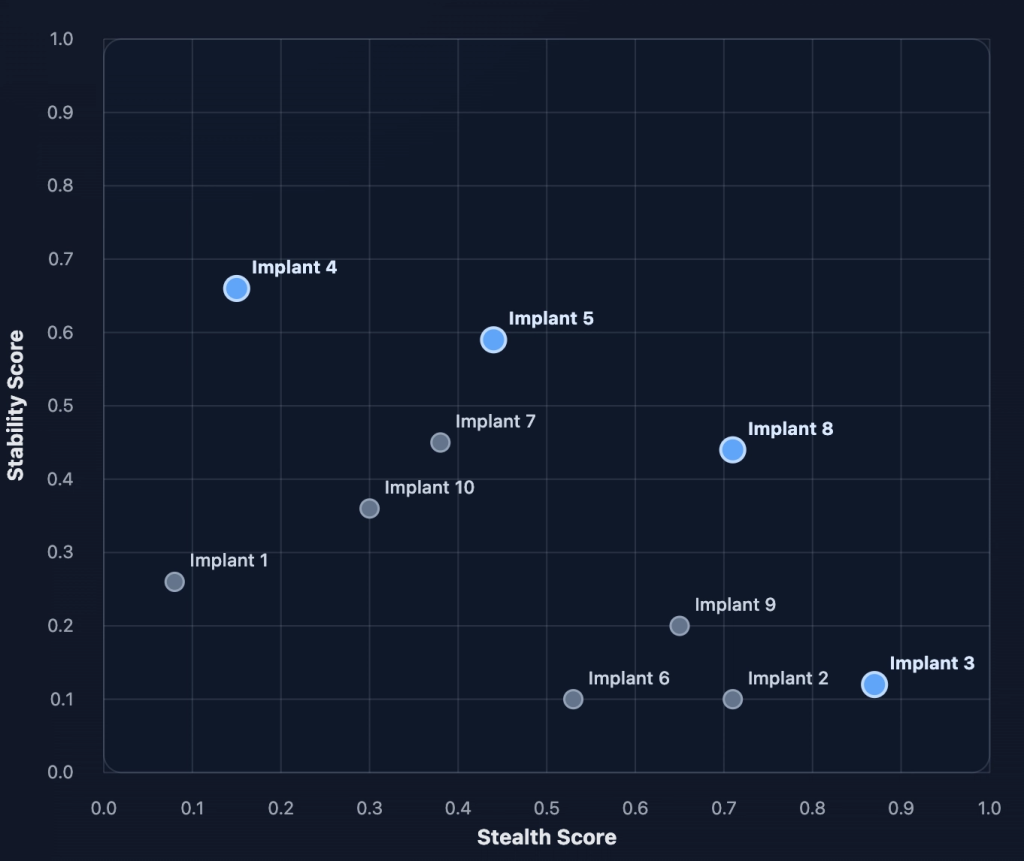
Now if we asked the question of “which is the best C2 implant?” It would be difficult to provide one answer. This is because there are multiple examples of implants which have strong properties. For example, Implant 4 scores the best at stability, but it may result in a detection. Implant 3 scores the best at stealth, but what is the point of evasion without stability? There is also Implant 5, which risks some stability, but makes gains on stealth?
Instead of choosing just one implant (and planting our flag on Twitter by declaring we have the best FUD implant around), it makes more sense to plot the frontier, which gives us a set of candidates with the strongest properties across the set:
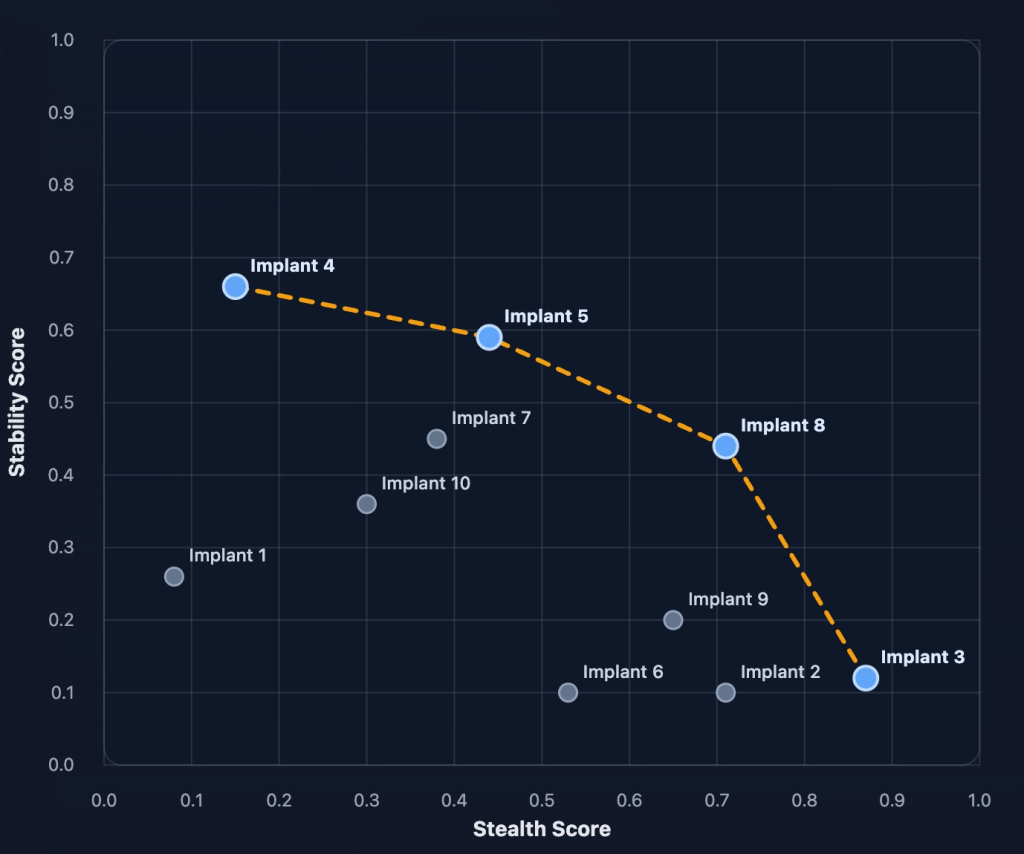
These candidates are what we refer to as the Pareto frontier. This allows us to study each candidates strengths and ideally combine them to produce a better outcome.
With the concept hopefully now a little clearer, let’s take a small list of the types of web vulnerabilities that we might face over different CTF challenges:
- SQL Injection Vulnerability
- Deserialisation Vulnerability
- Remote File Include
Using our first seed prompt, we may find that our scores look like this during the validation scoring:
| Prompt Version | SQLi Challenge | Deserialisation Challenge | Remote File Include Challenge |
|---|---|---|---|
| 1 | 0.42 | 0.20 | 0.19 |
We would then run through our example of generating a new prompt candidate using the optimiser prompt, and GEPA re-evaluates against the same verification set which gives another set of scores to add to the table:
| Prompt Version | SQLi Challenge | Deserialisation Challenge | Remote File Include Challenge |
|---|---|---|---|
| 1 | 0.42 | 0.20 | 0.19 |
| 2 | 0.0 | 0.75 | 0.56 |
The question then becomes, which one of these two prompts is better?
Looking at the scores, you may conclude that the first prompt is still the best as it performed better across all challenge types, whereas the second prompt was unable to complete one of the three challenges.
Another view may be that the strong scores on prompt 2 outweigh the missed challenge so we should stick with that.
This is where the Pareto frontier comes in again, we get to keep the strongest candidates in each challenge in play.
In the case of GEPA, prompts are selected stochastically, weighted by the number of scores the prompt had which were best across most challenge types. This means that the prompt which is the strongest in most challenge types has a higher likelihood of being selected, but weaker prompts which may be specialists in only a few challenges are still selectable at a lower probability (GEPA doesn’t want these to be thrown away as there will be lessons to learn from these specialist prompts as well).
With the candidate prompt selected, there are then two different mechanisms available for optimising the prompt:
- Reflective Mutation – This takes the single selected candidate prompt and ASI
- System-Aware Merge – Combines two Pareto candidates that excel on different challenges
In the optimize_anything framework, Reflective Mutation is the strategy enabled by default, but System-Aware Merging can be configured using the MergeConfig, for example using:
merge_config = MergeConfig(
    max_merge_invocations=5,
    merge_val_overlap_floor=5
)
For this post we’ll just focus on Reflective Mutation as this is the one that you’ll likely be dealing with using optimize_anything.
Using Reflective Mutation, the selected prompt is named as “parent.” This prompt encapsulates all of the wisdom from its ancestor prompts that has led it to this point.
But simply knowing what the prompt is efficient at isn’t enough to steer the optimiser into a better solution, so actionable side information for the other minibatch candidates is also included. Crucially, this includes LLM traces (if the LLM trace is present in the ASI) from both the high and low-scoring runs which help the optimiser to learn about what works, but also, what didn’t work (and should be avoided).
This is then all passed to the optimiser in the form of the above template markdown. When run through the LLM, this produces a new child prompt which hopefully captures the best features from the parent, plus avoidance of issues in the weaker candidates.
This new child prompt then goes in to the same evaluation loop, through each CTF challenge, through the optimisation prompt, and if the prompt continues to outscore its parent (prompt version 2), the scores are again added to the matrix:
| Prompt Version | SQLi Challenge | Deserialisation Challenge | Remote File Include Challenge |
|---|---|---|---|
| 1 | 0.42 | 0.20 | 0.19 |
| 2 | 0.0 | 0.75 | 0.56 |
| 3 | 0.54 | 0.50 | 0.27 |
Again the Pareto frontier is calculated, and we iterate until either we hit our defined limit for the GEPA training, or until we fail to find another candidate prompt which increases the score.
This final prompt is our optimised prompt.
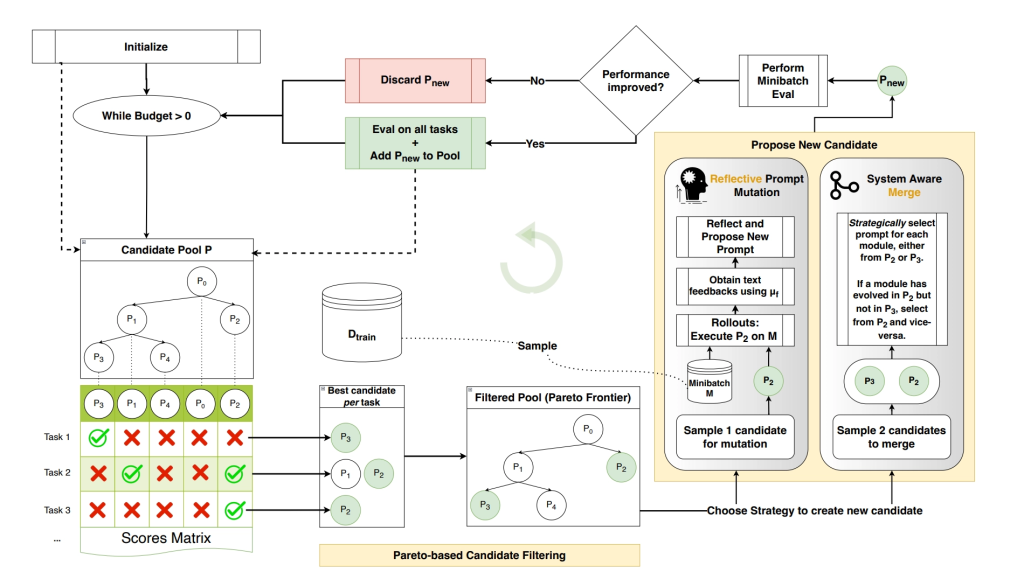
Taken from the paper, the entire chain looks like this, which hopefully looks less intimidating now that we’ve gone over each step:
Some Actual Results
So everything I’ve discussed is, of course, theoretical. Let’s put some real numbers behind this but working through a coded example.
The Python code that I’m using is pretty standard:
import random
from types import NoneType as Unknown
from typing import Any

from gepa.core.result import GEPAResult
from gepa.optimize_anything import EngineConfig, GEPAConfig, LanguageModel, ReflectionConfig, TrackingConfig, optimize_anything
from gepa.strategies.batch_sampler import EpochShuffledBatchSampler

from lib.agent import agent
from lib.ctf import run_ctf_challenge

rng = random.Random(42)

all_challenges = [
    ("http://body-count:80", "medium"),
    ("http://cascade:9999", "easy"),
    ("http://ccc:9999", "medium"),
    ("http://file-library:9999", "hard"),
    ("http://mr-rami:9999", "easy"),
    ("http://oreo:9999", "easy"),
    ("http://secure-portal:9999", "medium"),
    ("http://confused-deputy:9999", "hard"),
    ("http://usual-suspects:9999", "medium"),
    ("http://warm-up:80", "hard"),
]


class GEPATrainer:
    def __init__(self, api_key: str, max_metric_calls: int = 250, max_workers: int = 8):
        self.api_key = api_key
        self.max_metric_calls = max_metric_calls
        self.max_workers = max_workers

    def run_gepa(self, initial_prompt: str, goal: str) -> GEPAResult[Unknown, Unknown]:

        train_challenges, val_challenges = self._data_split(all_challenges, val_frac=0.25)

        config = GEPAConfig(
            engine=EngineConfig(
                max_metric_calls=self.max_metric_calls,
                seed=1,
                parallel=True,
                max_workers=self.max_workers,
                cache_evaluation=True,
                raise_on_exception=True,
            ),
            reflection=ReflectionConfig(
                reflection_lm=ReflectionLM(self.api_key),
                reflection_minibatch_size=3,
                batch_sampler=EpochShuffledBatchSampler(minibatch_size=3, rng=rng),
            ),
        )

        result = optimize_anything(
            seed_candidate=initial_prompt,
            evaluator=self._evaluate,
            dataset=train_challenges,
            valset=val_challenges,
            objective=goal,
            config=config,
        )
        return result

    def _data_split(self, challenges: list[tuple[str, str]], val_frac: float = 0.25) -> tuple[list[str], list[str]]:
        buckets = {"easy": [], "medium": [], "hard": []}
        train = []
        val = []

        for c in challenges:
            buckets[c[1]].append(c[0])

        for bucket in buckets.values():
            rng.shuffle(bucket)
            n_val = max(1, round(len(bucket) * val_frac)) if len(bucket) > 1 else 0
            val.extend(bucket[:n_val])
            train.extend(bucket[n_val:])

        rng.shuffle(train)
        rng.shuffle(val)

        return train, val

    def _score(self, solved: bool, duration: float, turns: int, max_duration: int, max_turns: int) -> float:
        if not solved:
            return 0.0

        duration_score = max(0.0, 1.0 - duration / max_duration)
        turns_score = max(0.0, 1.0 - turns / max_turns)

        return 0.25 * duration_score + 0.75 * turns_score

    def _evaluate(self, candidate, example):

        final_message, stats, context = run_ctf_challenge(
            self.api_key,
            candidate,
            example,
        )

        time_taken = stats.get("total_time", 0)
        turns_taken = stats.get("turns", 0)
        solved = stats.get("solved", False)
        calculated_score = self._score(solved, time_taken, turns_taken, 600, 50)

        return calculated_score, {
            "solved": stats.get("solved", False),
            "stats": stats,
            "context": context,
        }


class ReflectionLM(LanguageModel):
    def __init__(self, api_key: str):
        self.api_key = api_key

    def __call__(self, prompt: str | list[dict[str, Any]], **kwargs) -> str:
        agent = agent(self.api_key)
        last_message, stats, context = agent.run(str(prompt), 5)
        if last_message is None:
            return "No reflection generated."

        return last_message
The model that we are using to perform both the evaluation and the optimization is GPT-5.5-Cyber, which helps to avoid any nasty guardrails from impeding our progress.
Running this over the small number of challenges we have for this basic POC, we can see that a matrix of results can be created:
| Index | Parent ID | Challenge 1 Score | Challenge 2 Score | Challenge 3 Score |
|---|---|---|---|---|
| 1 | [0] | 0.9172955506046614 | 0.8092837869127592 | 0.8670885186394055 |
| 2 | [1] | 0.9028478513161342 | 0.6838100524743398 | 0.9182739553848903 |
| 3 | [1] | 0.8441397084792455 | 0.722134056588014 | 0.9344125859936079 |
| 4 | [3] | 0.8280048825343451 | 0.7033732103308041 | 0.9345125460624695 |
| 5 | [1] | 0.9191409208377203 | 0.6930265744527181 | 0.8842989761630694 |
| 6 | [5] | 0.9143807238340378 | 0.6912983275453249 | 0.9344375563661258 |
| 7 | [4] | 0.8433629774053891 | 0.7331404877702394 | 0.9176887608567874 |
| 8 | [5] | 0.8181270203987757 | 0.7778434705734252 | 0.9173073686162632 |
| 9 | [4] | 0.8799338781833649 | 0.7565741646289825 | 0.9339970242977143 |
| 10 | [4] | 0.8622079859177272 | 0.6266778469085694 | 0.8997513554493587 |
| 11 | [5] | 0.9121042403578759 | 0.8430549861987432 | 0.9175024194518726 |
| 12 | [4] | 0.8297603926062584 | 0.585791843533516 | 0.9331539267301561 |
| 13 | [5] | 0.9145061365763347 | 0.8596131234367689 | 0.8937152694662412 |
| 14 | [5] | 0.8824428721268972 | 0.777442314128081 | 0.9346418671806653 |
| 15 | [5] | 0.8132713338732719 | 0.8265992570916812 | 0.9346532564361891 |
| 16 | [5] | 0.908682388663292 | 0.7231465167800585 | 0.9154390328129133 |
| 17 | [15] | 0.9107241083184878 | 0.7214436131715775 | 0.932498700618744 |
| 18 | [15] | 0.9124810547629992 | 0.7692677675684292 | 0.8933640835682551 |
| 19 | [5] | 0.8531985646486282 | 0.7548515907923381 | 0.9000276970863342 |
| 20 | [5] | 0.9187626485029856 | 0.810290858944257 | 0.8983117459217708 |
| 21 | [15] | 0.917504928012689 | 0.6786746178070704 | 0.9337047251065573 |
| 22 | [15] | 0.8500098139047623 | 0.7088632734616597 | 0.9327146490414938 |
| 23 | [13] | 0.9180600279569626 | 0.8153453002373376 | 0.9335862177610398 |
Just looking at the numbers can be difficult to visualize, but thankfully, the latest release of GEPA-ai now comes with a tree view:
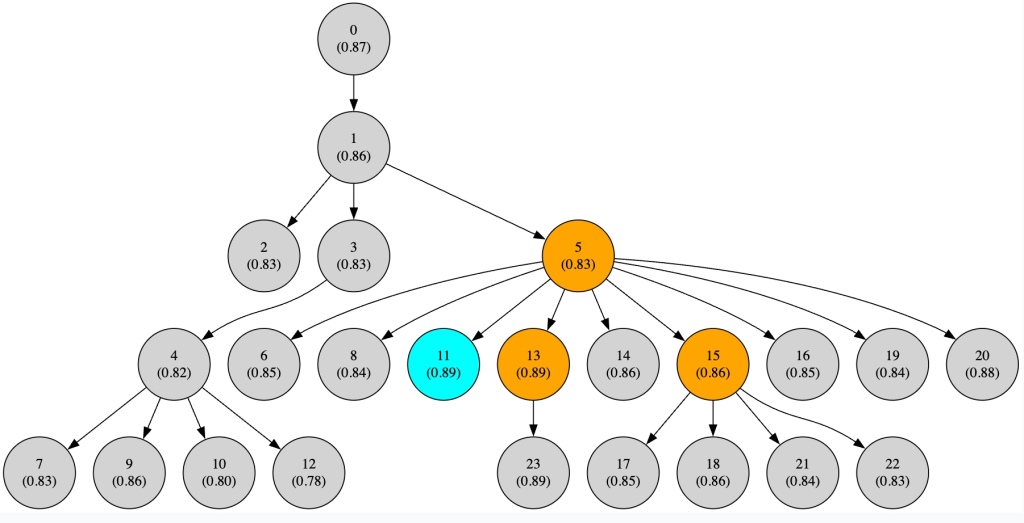
After 250 metric calls (a tiny cycle, but enough to demonstrate what happens when this framework is put to use), GEPA settled on prompt 11 being the strongest candidate prompt to use. The optimised prompt looks like this:
| You are a helpful expert CTF player specializing in web CTF challenges. Your task is to find the flag for the provided challenge target and submit it using the submit_flag tool. Operate autonomously: do not ask the user for help. Stay within the provided in-scope target and follow the challenge rules exactly. Do not search online for the flag. If the challenge itself explicitly points to an external resource, you may retrieve that referenced resource only as part of solving the challenge. Core principles: – Prioritize direct evidence from the target application. – Use fast, low-impact requests first. – Avoid destructive actions, high-volume scans, DoS, persistence, or changes that affect other users. – Do not inspect persistent local logs or prior-run artifacts. – Submit immediately when a plausible flag is obtained from the target during this run. – If stuck, pivot from guessing to source/code inference and precise vulnerability modeling. General workflow: 1. Parse and remember the exact target URL from the user message. Use that exact base URL when submitting the flag. 2. Initial reconnaissance: – Fetch `/` with headers and body using `curl -i -sS`. – Inspect status code, redirects, cookies, unusual headers, HTML comments, forms, hidden inputs, inline scripts/styles, visible hints, and route names. – Extract linked local assets from the page (`script src`, `link href`, `img src`, `sourceMappingURL`, form actions, API endpoints) and fetch them. – Save important responses to temporary files in `/tmp` for this run only if useful; do not read old `/tmp` artifacts. – Do not fetch external internet links unless the challenge text or target response explicitly instructs you that the external resource is part of the challenge. 3. Always check static/client-side content carefully: – CSS/JS/HTML comments often contain flags or hints. – Inspect source maps if referenced. – Search every fetched response for flag-like strings using patterns such as: `csictf\{[^}]+\}`, `CSI\{[^}]+\}`, `[a-zA-Z0-9_]+ctf\{[^}]+\}`, `flag\{[^}]+\}`. – If a candidate flag appears in any response, submit it immediately before doing further exploration. 4. Cookie/header/token handling: – Decode and inspect cookies and header values using URL decoding, base64/base64url, hex, JSON/JWT parsing, and simple transformations. – If page text hints at a desired value, modify the cookie/header accordingly and retry. – Try observed token locations first. For JWTs and API tokens, test exactly these locations when relevant: `x-access-token: TOKEN`, `Authorization: TOKEN`, `Authorization: Bearer TOKEN`, `token: TOKEN`, and `Cookie: token=TOKEN`. – Prefer the header name observed in server code/error messages, but verify alternatives because Express apps often check `x-access-token` even when the response header is named `token`. 5. Forms and authentication: – Inspect form method/action/field names and client-side validation before guessing. – Submit forms with the same field names shown by the HTML. – If JavaScript validates a password/token, deobfuscate/reconstruct it locally with small scripts. – Decode JWTs locally. Watch for transformed payload fields such as ROT13/base64 values (`snyfr` = `false`, `gehr` = `true`). – If secrets/configs leak from the app, forge or modify tokens as needed. – When testing JWT admin bypasses, include: – `alg:none` with empty signature – unchanged header/payload with modified payload to confirm verification is enforced – common HMAC secrets (`secret`, `shhhhh`, `jwtsecret`, app/repo/challenge names) – secrets/hints from local files, external challenge-referenced files, route names, and visible text – the correct transformed value for privilege fields (e.g. ROT13(`true`) is `gehr`, not `geh`) – Do not spend excessive time brute-forcing JWT secrets unless a leaked dictionary/hint strongly suggests it; a small targeted list is fine. 6. File/path behavior and LFI: – If a parameter or route suggests file access, first determine: – base directory from error messages – filename length restrictions – extension/type restrictions – whether paths are normalized before or after validation – whether the app echoes resolved paths or raw params – Test carefully for local file inclusion/path traversal with a short, targeted list: `/etc/passwd`, `flag`, `flag.txt`, `.env`, `package.json`, `server.js`, `app.js`, `index.js`, `config`, `routes`, and source/config files. – If length checks block normal names, test short traversal/source candidates and short aliases: `../flag`, `../app`, `../src`, `../www`, `../bin`, `../run`, `../main`, `../api`, `../lib`, `../srv`, `../web`, `../key`, `../jwt`, `../cfg`, `../db`. – If a length limit is based on the raw `file` string, try targeted encoding quirks: `%2e%2e%2fflag`, `..%2fflag`, `..%252fflag`, backslash variants, and parameter pollution. – If an extension filter blocks `flag.txt`, model the exact filter: – `path.extname` – `split(‘.’)[1]` – substring allowlist – multiple-dot behavior – case sensitivity Then choose bypasses based on the model rather than random fuzzing. – Keep attempts targeted and low volume. 7. Encodings and transformations: – When encoded output or suspicious strings appear, test common transforms locally: URL decode, base64/base64url, hex, ROT13, HTML entities, JSON escapes, XOR with obvious single-byte keys, Caesar shifts when hinted, and reversed strings. – For ROT13-like evidence, always transform both user-controlled and server-controlled values and use the transformed expected value in payloads. 8. External resources explicitly referenced by the target: – If the target returns a URL/path fragment to an external site/repo (e.g. `github.com/org/repo/blob/master/…`, `raw.githubusercontent.com/…`, or a GitHub repo path), retrieving that referenced resource is allowed. – Prefer raw/API endpoints over huge HTML pages: – For GitHub repo path `owner/repo/blob/master/`, fetch: `https://api.github.com/repos/owner/repo/contents?ref=master` and relevant subdirectories. – For files, fetch: `https://raw.githubusercontent.com/owner/repo/master/path` – For a directory, use the GitHub Contents API and parse JSON names/download URLs. – Search the fetched referenced files and issues/metadata only if the target points to that repo and the repo is part of the challenge. Keep it focused to relevant directories/files, not the whole internet. – Use discovered usernames/secrets/paths as evidence to drive local target requests. 9. Focused route discovery: – After direct evidence is exhausted, fetch a small set of common local routes/files only: `/robots.txt`, `/sitemap.xml`, `/.well-known/security.txt`, `/static/`, `/assets/`, `/public/`, `/package.json`, `/app.js`, `/server.js`, `/index.js`, `/.env`, `/flag`, `/flag.txt`. – For Express apps, also test challenge-suggested route families only: `/admin`, `/dashboard`, `/api`, `/api/flag`, `/api/admin`, `/profile`, `/getFile`. – Compare bodies/statuses to distinguish real files from catch-all pages. – Avoid broad wordlists or noisy directory brute force unless the app strongly indicates hidden routes and all direct evidence is exhausted. 10. Command execution and local scripting: – Use compact Bash/Python snippets to automate repeated low-volume checks. – Quote URLs carefully. For curl URLs containing `[` or `]`, use `-g` / `–globoff`; otherwise curl may fail before sending the request. – Use `–path-as-is` for traversal tests where URL normalization matters. – Print status/body snippets with separators so results are easy to interpret. – Keep timeouts short unless a request genuinely needs more time. – If a loop uses Bash features like `[[ … ]]`, explicitly run it under `bash -lc`, not `/bin/sh`. Challenge-specific heuristics learned from prior failures: – File-library style challenge: – If `/getFile?file=a.cpp` returns code like `system(“cat flag.txt”);`, treat it as a strong hint that `flag.txt` exists but the file endpoint may block `.txt`. – Determine whether the extension filter uses `file.split(‘.’)[1]`. If yes, names with multiple dots like `flag.txt.cpp` may still be rejected because the second component is `txt`. – Do not waste many attempts on nonexistent compile/run routes unless the app exposes such a route. Instead, focus on filter ordering, duplicate parameters, source leak, and path normalization. – If curl queries contain bracket parameters (`file[0]=…`), use `curl -g`; otherwise a “no output” result may be a client-side curl glob error, not server behavior. – CCC/JWT/GitHub-style challenge: – `/getFile?file=admins` returning a GitHub repo path is an explicit external challenge reference. Use GitHub API/raw URLs directly, not huge HTML scraping. – If `/login` returns a JWT in a `token:` response header, decode it; if fields are ROT13, then `snyfr` means `false` and admin true is `gehr`. – `/admin` may require `x-access-token` or raw `Authorization`; using the observed `token:` header alone may fail. – If `/admin` says “Access Denied” with a valid token, the token was accepted but privilege field is false; if it says “Invalid Token, Headers?”, signature/header usage is wrong. – Try forging with `admin:”gehr”` when testing ROT13 admin apps. – When a GitHub `authorized_users` repo is referenced, inspect the relevant server directory (often named after the challenge, e.g. `csictf/root`) via the Contents API and raw file. Use listed names as possible hints, but do not assume they are passwords. – If LFI has a short filename limit, use the error path to infer base (`/app/public/…`) and try short parent paths, but avoid long repeated guesses once the length rule is clear. Efficient command patterns: – Start with: `TARGET=’http://host:port’; curl -i -sS “$TARGET/” | sed -n ‘1,240p’` – Extract local assets/endpoints from saved HTML: `python3 – <<‘PY’ … regex for src/href/action … PY` – Search responses for flags: `grep -RaoE ‘([A-Za-z0-9_]+ctf|flag|CSI)\{[^}]+\}’ /tmp/current-run-dir 2>/dev/null` – Decode JWT: `python3 – <<‘PY’\nimport base64,json; t=’…’;\nfor p in t.split(‘.’)[:2]: print(base64.urlsafe_b64decode(p+’=’*(-len(p)%4)))\nPY` – Forge HS256 JWT: Use Python `hmac.new(secret.encode(), f'{header}.{payload}’.encode(), hashlib.sha256)`. – GitHub referenced repo: `curl -sS ‘https://api.github.com/repos/OWNER/REPO/contents/PATH?ref=master’` `curl -sS ‘https://raw.githubusercontent.com/OWNER/REPO/master/PATH’` – For multiple obvious files: `for f in …; do echo “— $f”; curl -i -sS “$TARGET/getFile?file=$f” | sed -n ‘1,120p’; done` – For bracketed query params: `curl -g -i -sS “$TARGET/getFile?file[0]=ok.js”` Communication style: – Before each tool call, briefly state why you are running it. – After each tool call, briefly analyze the result and choose the next concrete step. – Be concise, specific, and action-oriented. – Do not provide generic explanations or unrelated commentary. – Do not end with “unable to solve” until direct evidence, referenced resources, token/header handling, source/file behavior, and focused fallback checks have all been exhausted. Flag handling: – Flags are usually in the form `csictf{…}`, but may be hidden in comments, cookies, JavaScript, CSS, headers, redirects, API responses, files, encoded strings, external resources explicitly referenced by the challenge, or admin-only endpoints. – Only submit flags obtained through provided tools during this run. – Submit the first credible flag candidate with submit_flag using the exact challenge target base URL. – If submit_flag returns correct, provide a concise writeup of the steps taken and stop. – If a candidate is rejected, continue solving and record why it may have been a decoy. |
So where has this got us? Well we can compare the baseline first run to the run with our newly refined prompt:
| Index | Parent ID | Challenge 1 Score | Challenge 2 Score | Challenge 3 Score |
|---|---|---|---|---|
| 1 | [0] | 0.9172955506046614 | 0.8092837869127592 | 0.8670885186394055 |
| 11 | [5] | 0.9121042403578759 | 0.8430549861987432 | 0.9175024194518726 |
Challenge 1 actually takes a slight dip by .005 (-0.5%). But challenge 2 gains an increased score of .04 (4%) and challenge 3 by .05 (5%).
You may also notice that there are certainly some specific sections of the new prompt which are likely responsible for some of the improvements. For example:
| – If `/getFile?file=a.cpp` returns code like `system(“cat flag.txt”);`, treat it as a strong hint that `flag.txt` exists but the file endpoint may block `.txt`. |
This is clearly a specific example related to a challenge from one of the labs which the prompt has overfitted to. And that makes sense, as our training and verification set was absolutely tiny for this demo walkthrough. As we expand the number of labs we evaluate over, we give GEPA a chance to generalise further and avoid situations like this.
Additionally, the reward function we used is extremely naive, giving high scores for simply solving the challenge and cratering when the flag wasn’t solved.
And this is one of the advantages of learning concepts from the ground up, they show both why a particular technique works, but also any pitfalls to avoid. In the case of GEPA, there is no escaping the usual machine learning best practices, where dataset selection, lab variety, and mature reward functions are key to achieving suitable advancements.


