Keeping a Short Leash: New AzureHound Least-Privilege Documentation
TL;DR: AzureHound now has documented least-privilege permissions. This post walks through the research behind those permissions. We recommend least privilege for tighter access control, while recognizing broader read rights can reduce maintenance across future releases.
Introduction
At SpecterOps, the Research team’s role is to ensure we stay ahead in adversary simulation and identity attack path management (APM). We organize that work around three pillars;
- Adversary Tradecraft, turning real attacker behavior into something defenders can recognize; like Valdemar Carøe’s post Catching Credential Guard Off Guard sharing next-gen credential dumping techniques that bypass modern protections
- Graph Expansion, where we extend the BloodHound graph into new identity surfaces; like Michael Grafnetter’s work on the Okta Platform in his recent post Discovering Unexpected Okta Attack Paths with BloodHound
- Product Features, improving BloodHound by researching and prototyping new capabilities, and refining existing ones
That final pillar is where this post lands; I was tasked with bringing the official AzureHound permission requirements to least-privilege. That work produced three concrete deliverables that are live today: a new reference article, AzureHound Data Collection and Permissions, plus updated manual and scripted deployment steps that ship with the narrower permission set by default.
This post walks through my research to give you a glimpse behind the scenes of the problem definition, research methodology, and the decisions to reach a solution.
Problem Definition
AzureHound is the data collector that feeds Microsoft Entra ID and Azure Resource Manager information into BloodHound. Previously, deploying AzureHound CE and AzureHound Enterprise (which share collection-code) by the book meant granting broad access across three permission categories:
- Microsoft Graph application permissions: Directory.Read.All and RoleManagement.Read.All, with AuditLog.Read.All optional for user sign-in enrichment
- Azure RBAC role: Reader assigned at the Tenant Root Management Group
- Entra ID role: Directory Readers
That configuration works, but it goes against the Principle of Least Privilege and some BloodHound Enterprise (BHE) customers reported internal security policies refusing broad permissions, and Microsoft agrees:
- MS Graph’s Directory.Read.All permission is listed in “permissions to use with caution” and it is warned that it “might be deprecated in the future” (although the warning has existed for years).
- Azure RBAC’s Reader role includes the
*/readwildcard action for the control plane at the Tenant Root Management Group- This means read access to the control plane for all Azure resources, including many namespaces providers AzureHound never queries
Lastly, we wanted to give AzureHound the same attention thatBloodHound’s Active Directory collector, SharpHound, got with its Least-Privileged Collection documentation.
AzureHound’s APIs Usage & Permission Needs
The first task was knowing what APIs are being called. As part of SpecterOps’ work with OpenAI, I used Codex to accelerate the source-inventory phase by cataloguing AzureHound API calls and proposing an initial permission map. I treated that output as a starting point; the final mapping came from documentation review, endpoint-level permission testing, and full AzureHound output comparison. It was quickly clear that the two Azure APIs being called needed to be treated as separate problems.
Microsoft Graph at https://graph.microsoft.com is the API for the Azure identity plane: users, groups, applications, service principals, devices, roles, and more. Examples of MS Graph endpoints are:
GET https://graph.microsoft.com/v1.0/groupsGET https://graph.microsoft.com/beta/groups/{id}/members
Azure Resource Manager (ARM) at https://management.azure.com is the API for the Azure infrastructure plane: virtual machines (VMs), key vaults, management groups, subscriptions, resource groups, and more. Examples of ARM endpoints are:
GET https://management.azure.com/subscriptions
GET https://management.azure.com/subscriptions/{id}/providers/Microsoft.Compute/virtualMachines
From a network and authentication standpoint the two APIs look almost identical, but their permission models are not:
- MS Graph permissions are assigned to the AzureHound application via the app registration as Microsoft Graph application permissions or Microsoft Entra RBAC roles
- ARM permissions are granted as Azure RBAC role assignments consisting of three elements: security principal, role definition (collection of permissions/actions), and scope
Microsoft Graph
AzureHound sends GET requests to the 17 MS Graph endpoints in the table below. The rightmost column is the validated least-privilege permission mapping, after documentation review and empirical testing:
| API Path | Source File | Validated permission |
/v1.0/organization | client/tenants.go:32 | Organization.Read.All |
/v1.0/applications | client/apps.go:34 | Application.Read.All |
/beta/applications/{applicationObjectId}/owners | client/apps.go:51 | Application.Read.All |
/beta/applications/{applicationObjectId}/federatedIdentityCredentials | client/apps.go:66 | Application.Read.All |
/v1.0/servicePrincipals/{servicePrincipalId}/appRoleAssignedTo | client/app_role_assignments.go:33 | Application.Read.All |
/v1.0/groups | client/groups.go:34 | GroupMember.Read.All |
/beta/groups/{groupId}/owners | client/groups.go:50 | GroupMember.Read.All |
/beta/groups/{groupId}/members | client/groups.go:66 | GroupMember.Read.All |
/v1.0/devices | client/devices.go:34 | Device.Read.All |
/beta/devices/{deviceId}/registeredOwners | client/devices.go:50 | Device.Read.All |
/v1.0/servicePrincipals | client/service_principals.go:34 | Application.Read.All |
/beta/servicePrincipals/{servicePrincipalId}/owners | client/service_principals.go:50 | Application.Read.All |
/v1.0/users | client/users.go:33 | User.Read.All; add AuditLog.Read.All for signInActivity |
/v1.0/roleManagement/directory/roleDefinitions | client/roles.go:33 | RoleManagement.Read.Directory |
/v1.0/roleManagement/directory/roleAssignments | client/role_assignments.go:33 | RoleManagement.Read.Directory; add AdministrativeUnit.Read.All |
/v1.0/roleManagement/directory/roleEligibilityScheduleInstances | client/role_management.go:39 | RoleManagement.Read.Directory |
/v1.0/policies/roleManagementPolicyAssignments | client/role_management.go:54 | RoleManagement.Read.Directory |
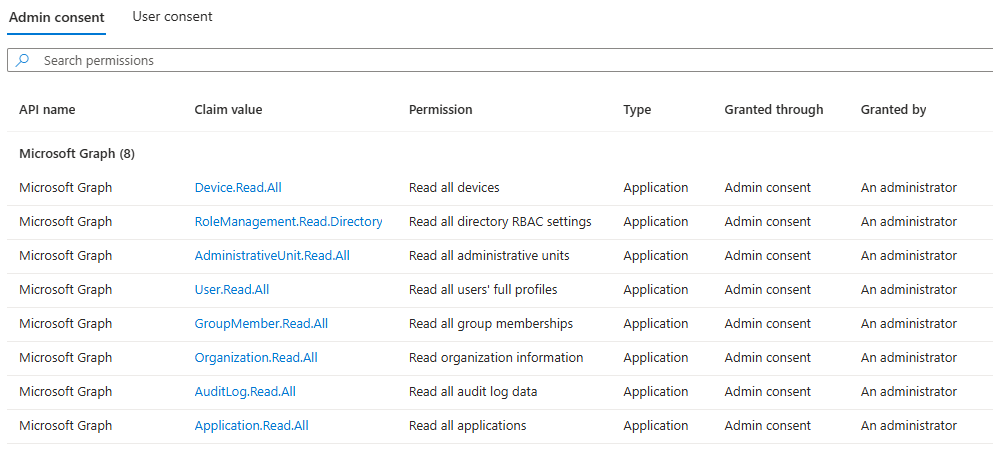
That inventory collapses to eight MS Graph application permissions with slight modifications from the automated scan:
- The initial candidate for some group endpoints was Group.Read.All, but documentation review and testing showed the GroupMember.Read.All permission was sufficient
- The initial candidate for RBAC endpoints was RoleManagement.Read.All, but AzureHound only needs Entra ID directory role-management, so the narrower RoleManagement.Read.Directory permission was sufficient
The research also surfaced three complexities of MS Graph that had to be considered:
Complexity 1: API-to-Permission mapping is One-to-Many, for example /v1.0/groups works with these permissions:
- Group.Read.All
- GroupMember.Read.All
- Directory.Read.All
Picking the narrowest permission means knowing which works with the fewest API endpoints.
Complexity 2: The MS Graph permissions reference can’t be treated as complete, with the working example of /v1.0/groups, the Microsoft documentation states the least-privilege application permission GroupMember.Read.All:
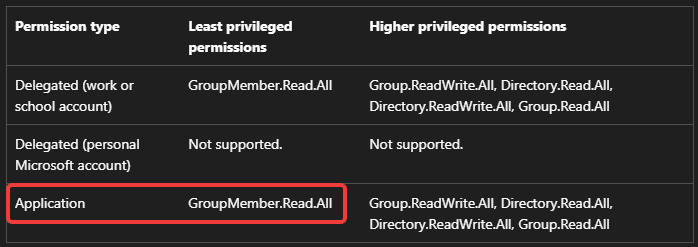
/v1.0/groupsUnfortunately, the documentation for other endpoints is different. For example, /v1.0/organization documentation lists ` as the lowest application permission:
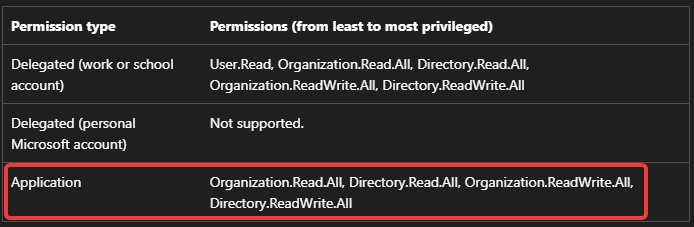
/v1.0/organizationLater empirical testing showed User.Read.All also worked for the same endpoint. By that observation alone, we could drop Organization.Read.All from the least-privilege set. However, Microsoft does not document User.Read.All as a valid application permission for /v1.0/organization, which leaves it as undocumented behavior: maybe the docs are incomplete, or maybe MS Graph is allowing more than intended. Either way, production collection should not depend on undocumented behavior, so Organization.Read.All will stay; the additional permission overhead is limited to low-sensitivity organization metadata.
I also did a lookup against Merrill Fernando’s Microsoft Graph Permissions Explorer, but, to my knowledge, it is mainly built on the incomplete Microsoft docs.
Property-level permission behavior, where an endpoint can return an HTTP 200 (i.e., “OK”) response but still omit, null, or withhold specific properties unless the token has the right permission set.
For /v1.0/users, both User.ReadBasic.All and User.Read.All can call the endpoint, but they diverge when AzureHound asks for additional user properties:
The same pattern shows up with signInActivity: AzureHound can read users with User.Read.All, but the signInActivity property requires AuditLog.Read.All as well, as shown in Microsoft’s user list documentation. Endpoint access alone does not prove that the collector received the full data it asked for.
The complexity of MS Graph is why Andy Robbins originally created BloodHound Attack Research Kit (BARK), which allows validating attack path abuses programmatically by mapping all the places a specific role or permission can perform write actions.
The MS Graph permissions are assigned and admin consented to the AzureHound service principal:
Azure Resource Manager (ARM)
AzureHound sends GET requests to the 17 ARM endpoints in the table below. The rightmost column is the validated least-privilege permission mapping, after documentation review and empirical testing:
| API Path | Source File | Validated RBAC action |
/tenants | client/tenants.go:46 & client/tenants.go:65 | Microsoft.Resources/tenants/read |
/subscriptions | client/subscriptions.go:31 | Microsoft.Resources/subscriptions/read |
/subscriptions/{subscriptionId}/resourcegroups | client/resource_groups.go:32 | Microsoft.Resources/subscriptions/resourceGroups/read |
/providers/Microsoft.Management/managementGroups | client/management_groups.go:32 | Microsoft.Management/managementGroups/read |
/providers/Microsoft.Management/managementGroups/{groupId}/descendants | client/management_groups.go:45 | Microsoft.Management/managementGroups/descendants/read |
/subscriptions/{subscriptionId}/providers/Microsoft.Automation/automationAccounts | client/automation_accounts.go:32 | Microsoft.Automation/automationAccounts/read |
/subscriptions/{subscriptionId}/providers/Microsoft.ContainerRegistry/registries | client/container_registries.go:32 | Microsoft.ContainerRegistry/registries/read |
/subscriptions/{subscriptionId}/providers/Microsoft.Web/sites | client/function_apps.go:32 | Microsoft.Web/sites/read |
/subscriptions/{subscriptionId}/providers/Microsoft.Web/sites | client/web_apps.go:32 | Microsoft.Web/sites/read |
/subscriptions/{subscriptionId}/providers/Microsoft.KeyVault/vaults | client/keyvaults.go:32 | Microsoft.KeyVault/vaults/read |
/subscriptions/{subscriptionId}/providers/Microsoft.Logic/workflows | client/logic_apps.go:32 | Microsoft.Logic/workflows/read |
/subscriptions/{subscriptionId}/providers/Microsoft.ContainerService/managedClusters | client/managed_clusters.go:32 | Microsoft.ContainerService/managedClusters/read |
/subscriptions/{subscriptionId}/providers/Microsoft.Storage/storageAccounts | client/storage_accounts.go:32 | Microsoft.Storage/storageAccounts/read |
/subscriptions/{subscriptionId}/resourceGroups/{resourceGroupName}/providers/Microsoft.Storage/storageAccounts/{storageAccountName}/blobServices/default/containers | client/storage_accounts.go:49 | Microsoft.Storage/storageAccounts/blobServices/containers/read |
/subscriptions/{subscriptionId}/providers/Microsoft.Compute/virtualMachines | client/virtual_machines.go:32 | Microsoft.Compute/virtualMachines/read |
/subscriptions/{subscriptionId}/providers/Microsoft.Compute/virtualMachineScaleSets | client/vm_scale_sets.go:32 | Microsoft.Compute/virtualMachineScaleSets/read |
/{resourceId}/providers/Microsoft.Authorization/roleAssignments | client/role_assignments.go:48 | Microsoft.Authorization/roleAssignments/read |
Mapping each endpoint to the narrowest RBAC action is easier than MS Graph, as there’s just one thing to consider:
Direct action mapping, each Azure RBAC action maps to exactly one resource provider operation. This means Microsoft.Compute/virtualMachines/read reads VMs, Microsoft.KeyVault/vaults/read reads key vaults, and so on. There is no one-to-many, and no property-level side effects like MS Graph.
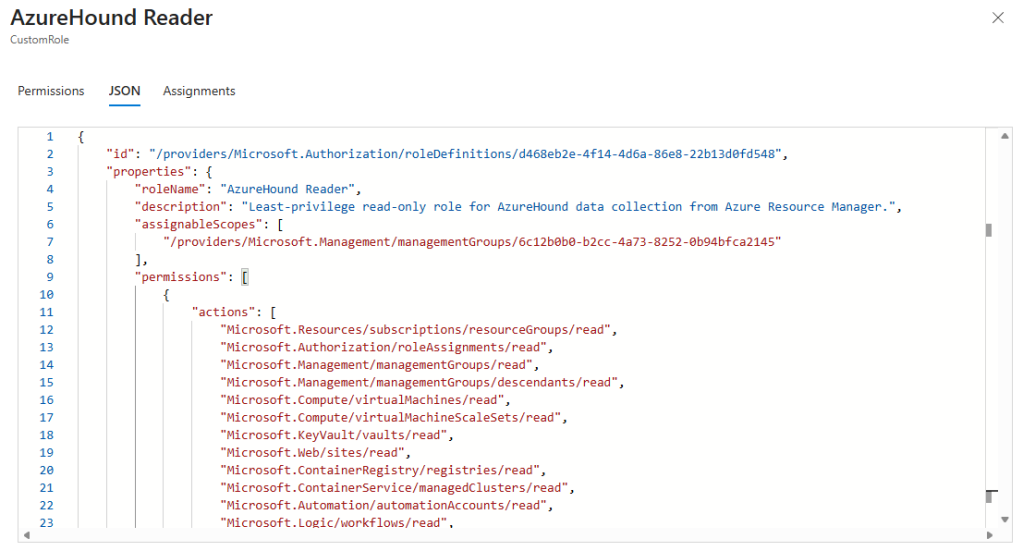
With the actions defined, the AzureHound Reader role can be defined. The role can be assigned to the AzureHound service principal scoped to the Tenant Root Management Group, which is inherited by every management group, subscription, resource group, and resource beneath it.
Scope still matters. Tenant Root Management Group is the recommended scope for tenant-wide collection. Assigning the role lower is valid for intentional partial collection, but AzureHound will only see resources under that scope; resources outside it may be absent rather than logged as permission failures because the service principal cannot enumerate what it cannot see.
Validation
At this point, I had a combined permission set that looked right on paper. The next question was whether the assumed Graph permissions allowed the expected endpoint access, and whether the full least-privilege configuration behaved like the old broad configuration when running an AzureHound collection against a real tenant.
MS Graph: Permission Matrix Test
For MS Graph, I built a permission matrix harness to answer the endpoint-access question: which permissions allow AzureHound to call each endpoint? The script creates one service principal per candidate Graph permission, calls every in-scope AzureHound Graph endpoint with each token, and records whether Graph returns HTTP 200 (i.e., “OK”) with an empty response or HTTP 403 (i.e., “Forbidden”).
I found the matrix useful for finding overlaps and surprises, such as User.Read.All returning HTTP 200 on /v1.0/organization even though Microsoft does not document it as a valid application permission for that endpoint. But the matrix was obviously limited; it measured access rather than data completeness, as described earlier. The final validation therefore came from a full comparison of the AzureHound collection output.
Comparing Collections: Least-Privilege Versus Broad-Privileges
The matrix test mapped MS Graph endpoint access, and the ARM inventory defined the custom role AzureHound should use instead of the broad built-in Reader role. Neither step proves that the full collector output is equivalent to the old broad configuration. That is what the output comparison checks.
I created two service principals in our test tenant: default-priv with the previous recommended broad privilege set, and least-priv with the proposed least-privilege set.
Before running anything, I ran a quick token decode to confirm each principal actually carries the permissions I expect:
Then a full azurehound list run with each principal, with verbose logs and JSON output captured to disk:
First a diff is run on the JSON output. PowerShell’s Compare-Object cmdlet was too slow on AzureHound’s large output files, so the comparison used a hashtable-based diff function. Comparing the JSON output produced either no output at all (identical collections) or a small number of differences:
It was found to be the same lines but in a different order as AzureHound collects in parallel with goroutines and writes records as they come back, so two runs against the same tenant can emit identical records in different orders.
To verify the diff function was working as expected, I introduced a deliberate change to one of the JSON outputs and re-ran the comparison.
Next up is diffing the verbose .LOG files. Here, I need to handle a timestamp prefix present on every line as it will differ between runs even when the underlying log message is identical. A regex pass strips them before comparison:
If a required MS Graph permission had been missing, AzureHound records the failure in its log file:
ERR unable to continue processing groups error="map[error:map[code:Authorization_RequestDenied innerError:map[SNIP] message:Insufficient privileges to complete the operation.]]"
As a final check, I compared the collection metadata object count embedded in each AzureHound JSON output:
I repeated the full pipeline several times. Every clean back-to-back pair produced the same outcome: identical content, logs, and counts.
Conclusion
Being responsible and deploying a least-privilege configuration requires effort from both vendor and customer. We at SpecterOps are showing our dedication to responsibility and transparency through our least-privilege documentation and this in-depth post.
The public result are these deliverables:
- A new reference article, AzureHound Data Collection and Permissions, is now the canonical description of which APIs AzureHound uses, what permissions are needed, and what the least-privilege approach is
- Updated manual AzureHound deployment steps for configuration through the Microsoft Azure web UI
- Updated scripted AzureHound configuration that automates the entire least-privilege configuration
- Updates to the AzureHound’s service principal requirements
In summary, the changes to AzureHound’s documented permissions are:
| Category | Previous guidance | Least-privilege |
| Entra RBAC | Built-in Directory Readers role | Not required for app-based collection when using the listed MS Graph application permissions |
| Microsoft Graph | Directory.Read.All + RoleManagement.Read.All + AuditLog.Read.All permissions | Eight granular application permissions |
| Azure RBAC | Built-in Reader role | 16 specific read actions, assigned to custom AzureHound Reader role |
We are not requiring existing AzureHound deployment to migrate immediately. The least-privilege set is the security recommendation because it reduces standing access if the AzureHound service principal would be compromised. That compromise would expose attack path intelligence, but the permissions remain read-only; they do not directly grant write access to abuse attack paths. The tradeoff is maintenance: when AzureHound gets new collection coverage the custom MS Graph or ARM permissions may need to be updated. Organizations may choose to keep broader read permissions in place to reduce operational friction across future collector releases, but that should be a conscious exception rather than the default.
When new AzureHound collection coverage requires additional permissions, we will call that out in the BloodHound release notes. Teams using the least-privilege configuration should treat collector upgrades as a checkpoint for reviewing whether custom permissions need to be updated.
The research takeaway is that least privilege for API-based collectors cannot be derived from documentation alone. Source inventory, empirical permission testing, and full output comparison each answered a different question: what AzureHound asks for, which permissions allow those requests, and whether the collected data remains equivalent.
Thanks to my colleagues Michael Grafnetter for reviewing the scripted configuration, and Jeff Matthews for his technical writing review and continuous improvements to the BloodHound documentation.
Got questions or feedback? Reach me in the BloodHound community Slack or directly: