Mythic Embarking on the Open Seas: Containerized Payload Delivery for Kubernetes Assessments
TL;DR: We created new Mythic extensions to simplify container-centric assessments, including Kubernetes and Docker-based ceded access workflows. These tools help operators wrap Mythic payloads in OCI-compatible containers and publish them to a self-hosted registry. Check the container_wrapper and container_registry on GitHub.

Introduction
There are quite a few command and control (C2) frameworks available for teams to use, but most are designed around Windows-heavy environments. As Kubernetes has become more common for orchestrating across Linux servers, we wanted to ease some workflows around penetration engagements that are utilizing container technology (i.e., container-centric). Fortunately, Mythic C2’s modular design gives us a flexible foundation to build on. In this post, we’ll highlight two new building blocks that help operators package and deliver Mythic payloads in container-centric environments.
Why C2 Initial Access?
In adversary simulation engagements, clients often want to cede access in a way that reflects realistic execution paths. For Kubernetes environments, that may mean running a C2 payload inside a container instead of using a traditional dropbox-style test. Until now, our process for bundling a Mythic payload into a container and pushing it to a registry was mostly manual. So these two minimum viable product (MVP) extensions were created for Mythic to help abstract that manual process, leveraging open standards from the container ecosystem, into a few button presses in the web UI.
Overview
To clarify, we are not releasing any new tactics, techniques, or procedures (TTPs) for Kubernetes. We will simply be covering how we can utilize container runtime defaults and some open-source projects to create some building blocks, and then how we started easing operator workflows while using Mythic.
Below is a high-level diagram that outlines the process an operator will use to generate the container and the steps a client will follow to deploy the container. The asterisk marks (i.e., *) in the legend are the two tools we created:
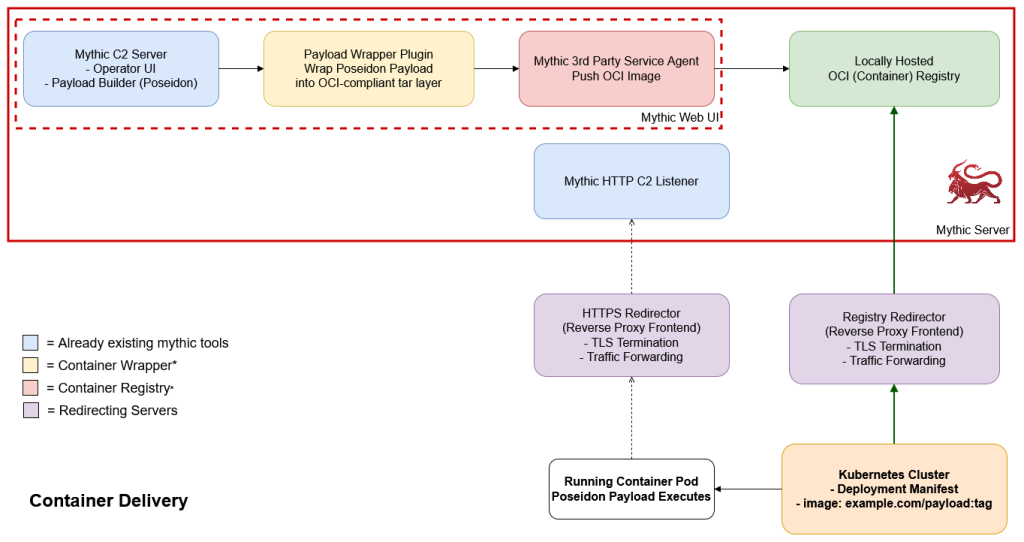
Architecture and Container Registry Background
There is quite a bit of documentation around Kubernetes on how to use and authenticate to private container registries, but most of the guides I’ve personally seen mainly talk about how to host registries inside of Kubernetes.
From a fundamental perspective, a container registry needs to satisfy the Open Container Initiative (OCI)’s distribution specification. In practice, for common container runtimes to interact with a “trusted” registry (i.e., no need to specify something like a --insecure flag), the registry should be reachable over TLS with a valid hostname and certificate. While authentication is strongly recommended in production environments for attribution, access control, and least privilege, it is not strictly required for the basic pull workflow. This means that if we deploy a container registry like the distribution project behind an HTTPS redirector (i.e., effectively a reverse proxy with TLS termination and a valid hostname), we satisfy those technical requirements.
There have been plenty of blog posts about HTTPS redirectors for C2 payloads, so we won’t harp on that very much. However, one of the more important configuration settings for the reverse proxy, since we do not have authentication by default with the distribution project, would be to ensure your .htaccess file enforces a “read-only” access to the registry. Here is a sample .htaccess file to help demonstrate that, but reviewing other projects like mythic2modrewrite can provide more information:
# Redirect Rules Check for http
# mod_rewrite rules generated from @AndrewChiles' project https://github.com/threatexpress/mythic2modrewrite:
#       Replace '{{ TEAMSERVER_EXTERNAL_IP }}' with the IP/Domain address of where matching traffic should go
#       Replace '{{ REDIRECT_URL }}' with the http(s) address of where non-matching traffic should go, ex: https://google.com


########################################
## .htaccess START
RewriteEngine On
## C2 Traffic (HTTP-GET, HTTP-POST, HTTP-STAGER URIs)
## Logic: If a requested URI AND the User-Agent matches, proxy the connection to the Teamserver
## Consider adding other HTTP checks to fine tune the check.  (HTTP Cookie, HTTP Referer, HTTP Query String, etc)
## Refer to http://httpd.apache.org/docs/current/mod/mod_rewrite.html

## Only allow GET and POST methods to pass to the C2 server
RewriteCond %{REQUEST_METHOD} ^(GET|HEAD) [NC]
## Profile URIs
RewriteCond %{REQUEST_URI} ^/v2(/|$)
## Profile UserAgent
RewriteCond %{HTTP_USER_AGENT} (.*(containerd(-client|)|docker|helm)/.*) [NC]
RewriteRule ^.*$ "http://{{ TEAMSERVER_EXTERNAL_IP }}:5000%{REQUEST_URI}" [P,L]

## Redirect all other traffic here
## .htaccess END
########################################

RewriteRule ^.*$ {{ REDIRECT_URL }}? [L,R=302]
As for where to deploy your registry, feel free to deploy it alongside your Mythic server with the following addition to the Mythic docker-compose.yml file since you are required to have a container runtime anyways.
    docker_registry:
        image: docker.io/registry:3
        network_mode: host
        restart: unless-stopped
Container Wrapper
Now that you have your Mythic server running and a container registry on the same host (if your mythic server is having issues communicating with the registry consider running: mythic-cli config set MYTHIC_DOCKER_NETWORKING host), you are now ready to build a payload container to push into it. This was the cumbersome manual part I’d mentioned before, but instead of needing to manually build a container via the Docker command-line interface (CLI), we created a wrapper payload called container_wrapper. It enables you to easily choose a Poseidon payload from the Mythic web UI that has already been built and add it to whatever base container image you choose during the build process.
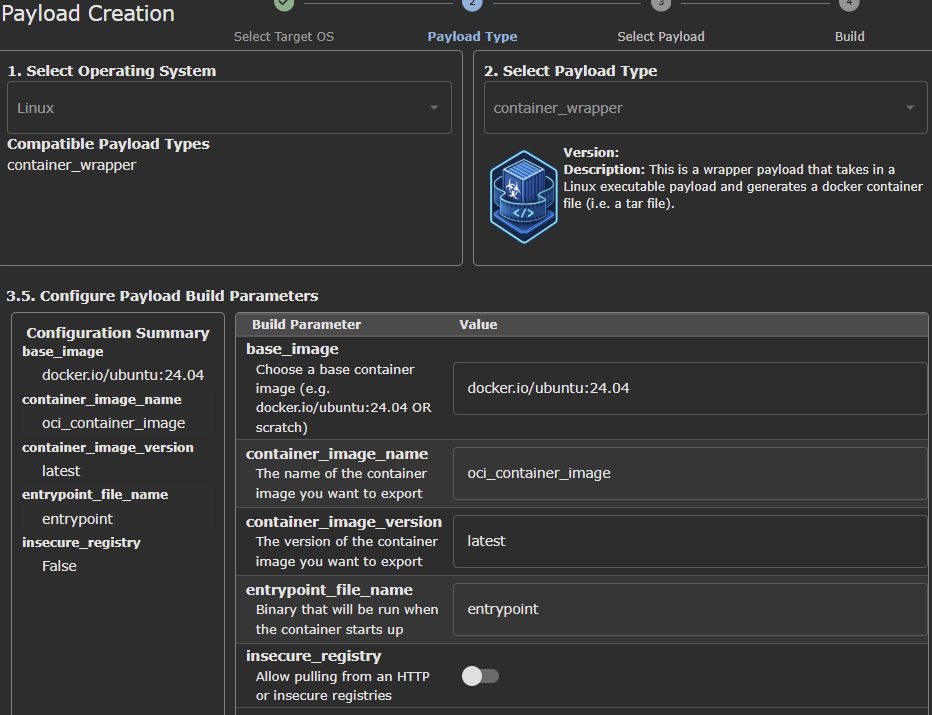
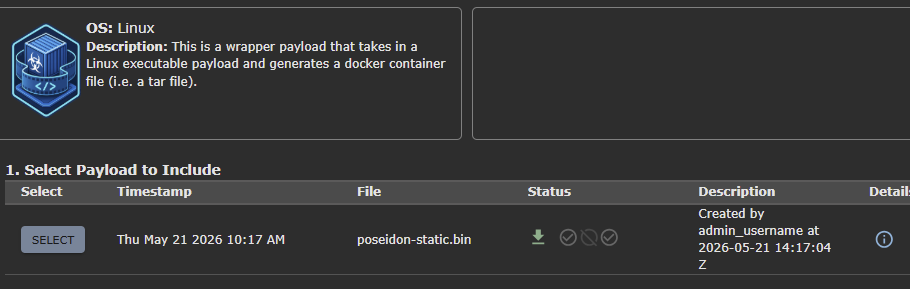
It accomplishes this by utilizing a well-known Cloud Native Computing Foundation (CNCF) project called Buildah. Once you’ve selected your payload and base image, it adds the Poseidon binary to the base image at /entrypoint (or whatever you want to name it, but entrypoint is an observed pattern) and sets the entrypoint for the container to be the Poseidon binary. The artifact of this payload wrapper is an OCI-compatible .tar file (more information at the image specification), which leads to our next tool.
Container Registry
Now that we have an OCI-compliant .tar file, we need to push that container into our OCI registry. That led to us creating a third-party service agent called container_registry, which enables you to set up a third-party agent callback and upload your payload to the local registry. There are a couple of reasons why we’re using a self-hosted registry:
- It enables us to locally host our payload and not be concerned about a large public registry provider taking it down
- We can restrict what clients are able to access our registry/payload through the reverse proxy
- Lastly, we can review registry access logs to identify client-side technology based on User-Agent headers
Here is an example of the build parameters used to deploy a container_registry callback if you used the default settings when configuring your distribution registry.
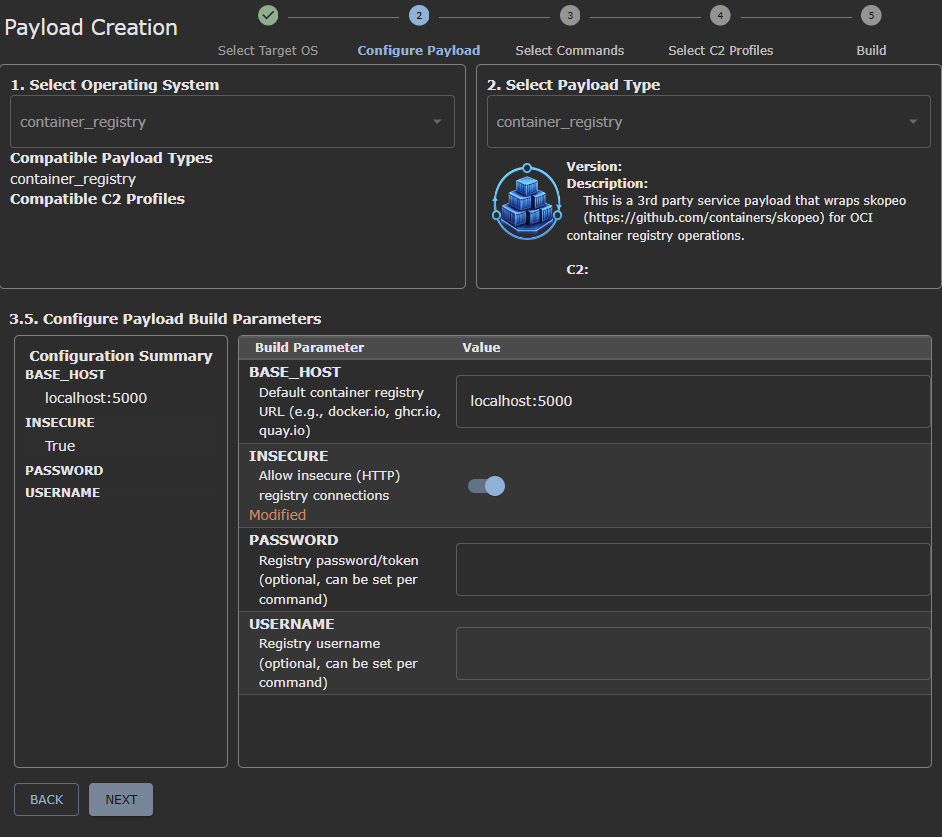
After you have a callback, the below screenshot would be the normal workflow for uploading the OCI .tar file to a specific container image reference in the registry (be sure to use Shift+Enter to open the Mythic modal and ease filling out information):
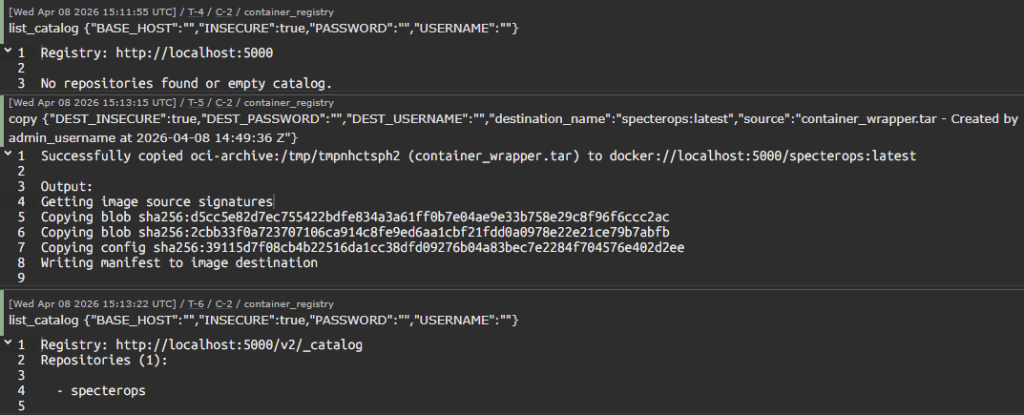
We leverage the skopeo project to handle pushing to the registry in order to simplify maintenance and leverage the amazing work of this awesome open-source project.
Once you have a container image pushed into the registry, you can now provide a Kubernetes manifest similar to this one to your client so they can deploy it in their Kubernetes cluster:
---
apiVersion: v1
kind: Pod
metadata:
  name: "specterops-pod"
spec:
  containers:
    - name: "specterops-app"
      image: example.com/specterops:latest
      resources:
        requests:
          cpu: "250m"
          memory: "512Mi"
        limits:
          cpu: "4"
          memory: "8Gi"
Conclusion
These initial building blocks make it easier to support container-based ceded access during Kubernetes assessments. This is assuming worker nodes have network egress access to the Internet and no policy restrictions are in place, since clusters deployed with kubeadm/containerd (i.e., a vanilla Kubernetes installation, current version of 1.36.1) will trust your registry by default. Operators can now wrap a Mythic payload in an OCI-compatible image, host it in a self-managed registry, and provide clients with a simple Kubernetes manifest for deployment.
This is only the beginning. We plan to release more tooling and content focused on container-centric assessments soon.
References
Check out the container_wrapper and container_registry on GitHub:
Here are a couple of supplemental references to Kubernetes initial access and the versions of tools installed in the lab tested in:
- https://unit42.paloaltonetworks.com/modern-kubernetes-threats/
- https://www.microsoft.com/en-us/security/blog/2025/04/23/understanding-the-threat-landscape-for-kubernetes-and-containerized-assets/
- https://microsoft.github.io/Threat-Matrix-for-Kubernetes/tactics/InitialAccess/
- https://media.defcon.org/DEF CON 32/DEF CON 32 villages/DEF CON 32 – Adversary Vilage – Leonidas Tsaousis – Kubernetes Attack Simulation – The Definitive Guide.pdf
- https://distribution.github.io/distribution/about/deploying/
Version of tools to validate vanilla installation, ludus lab deployed with this role and kube_version set to 1.36.1:
root@k8s-control-plane:~# containerd --version
containerd containerd.io v2.2.4 193637f7ee8ae5f5aa5248f49e7baa3e6164966e
root@k8s-control-plane:~# kubectl version
Client Version: v1.36.1
Kustomize Version: v5.8.1
Server Version: v1.36.1
root@k8s-control-plane:~# kubeadm version
kubeadm version: &version.Info{Major:"1", Minor:"36", EmulationMajor:"", EmulationMinor:"", MinCompatibilityMajor:"", MinCompatibilityMinor:"", GitVersion:"v1.36.1", GitCommit:"756939600b9a7180fc2df6550a4585b638875e67", GitTreeState:"clean", BuildDate:"2026-05-12T09:53:52Z", GoVersion:"go1.26.2", Compiler:"gc", Platform:"linux/amd64"}
root@k8s-control-plane:~# docker version
Client: Docker Engine - Community
 Version:           29.5.2
 API version:       1.54
 Go version:        go1.26.3
 Git commit:        79eb04c
 Built:             Wed May 20 14:38:23 2026
 OS/Arch:           linux/amd64
 Context:           default

Server: Docker Engine - Community
 Engine:
  Version:          29.5.2
  API version:      1.54 (minimum version 1.40)
  Go version:       go1.26.3
  Git commit:       568f755
  Built:            Wed May 20 14:38:23 2026
  OS/Arch:          linux/amd64
  Experimental:     false
 containerd:
  Version:          v2.2.4
  GitCommit:        193637f7ee8ae5f5aa5248f49e7baa3e6164966e
 runc:
  Version:          1.3.5
  GitCommit:        v1.3.5-0-g488fc13e
 docker-init:
  Version:          0.19.0
  GitCommit:        de40ad0
Acknowledgements
- Cover photo for this blog post was generated by ChatGPT
- container_wrapper was originally forked from service_wrapper (thank you Cody!) and manually modified to use Buildah
- ChatGPT session around minimal permissions for buildah in a container for docker-compose after hitting these errors: 1901 and 4920)
- ChatGPT generated the icon for the project
- container_registry was initially generated by Claude Code, however it didn’t work as well as intended so I manually refactored it and had it re-propagate changes. This was the general process I’d utilized AI for as I was replicating the same process I’d manually implemented in the container_wrapper project


