Disposable Tooling: Building LLM-Generated Mythic Agents from Prompt to Deployment
An area I’ve been very interested in exploring over the past several months is the generation of what I have been calling “disposable tooling”. With the development space now discussing the reduced cost of writing code, the idea is to also explore how offensive tooling can be brought closer to the paradigm that appeared when cloud-infrastructure era popularized the phrase “treat servers as cattle and not pets”.
In this post I will walk through each major milestone that has been taken in my quest to explore this objective by building LLM-generated Mythic agents from prompt to deployment. Starting at the beginning, I’ll show what worked, what didn’t, and where this space is likely going next.
Apfell Died so Mythic Could Live
One of the core principles of Mythic since the evolution from Apfell in 2020 was to decouple agent development from the underlying C2 architecture.
At the time, many knew the name “Apfell” as the C2 framework for macOS engagements. So the idea of taking this framework and distilling it down into one component of a larger framework was a radical deviation from the norm. And this has gone on to be a core reason for Mythic’s success, with many red teams building private agents which integrate into Mythic’s ecosystem.
This meant that when Large Language Models became proficient in generating code with little supervision, it was the obvious place to start when I wanted to experiment with generating new Mythic agents using LLMs.
The aim I set myself was simple, could I one-shot a new agent from initial prompt to deployment? In other words: no human in the loop between the initial spec and a tested, shippable agent ready for assessment use.
What it Takes to Build a Mythic Agent
Before getting too ahead of ourselves, I wanted to document what the development process looks like when approaching Mythic agent development, as I realize that many of you will not have undertaken this task yourself.
Let’s take a look at the traffic flow diagram from Mythic’s documentation:
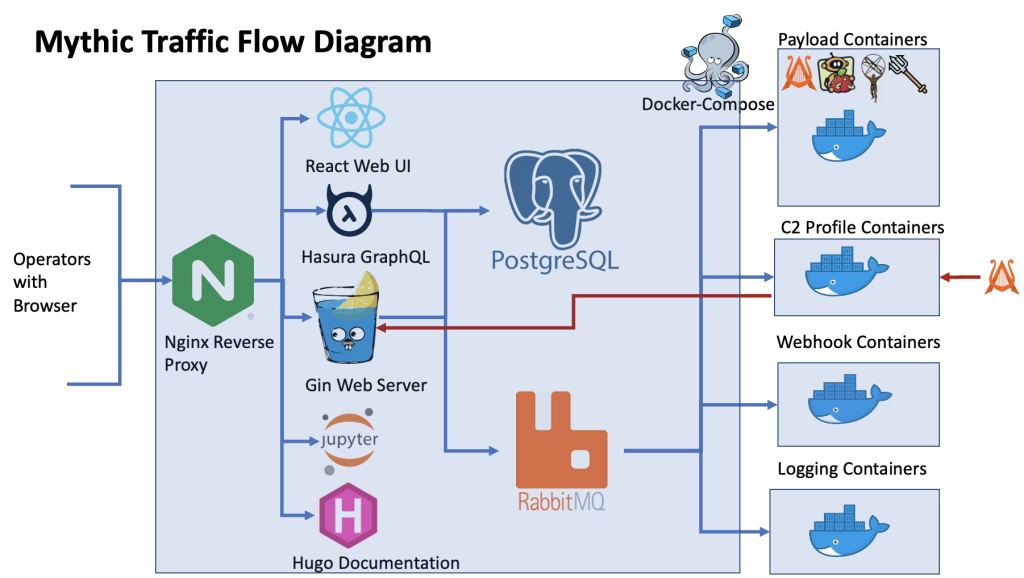
If your initial reaction was panic, you aren’t alone. After all, before Mythic, many of us were used to just augmenting monolithic C2 agents with the extensibility they provide. So let’s take a step back and understand what components are needed to actually create a basic Mythic agent:
- Mythic RPC Messages – Communication between all of Mythic’s components takes place with RabbitMQ messages. A message is placed on a message queue, and a Mythic component (a script, an application, a UI widget) has the chance to subscribe to messages or add new messages to a message queue. This is such a powerful concept because it facilitates the decoupling of components and is what allows users to insert their own code in the Mythic pipeline.
- Docker Image – This is a standard Docker image deployed to the Mythic server. You’ll typically be responsible for writing the Dockerfile which is added to Mythic using the
mythic-cliapplication. When your Dockerfile is deployed to the Mythic Server and built, it provides a controlled space for your server-side application to run, which is primarily responsible for handing Mythic RPC messages. This involves requests from Mythic to build a new agent, as well as RPC messages being passed facilitating communication between the operator such as tasking agents to execute a specific command or handle incoming tasking. To think of it another way, this image is the boundary of what we are responsible for when developing a simple Mythic agent, we control everything inside. - Builder Code – Usually Python or Go code, this application runs from within your Docker Image. It will receive RPC messages from Mythic to build new agent instances along with the parameters provided from an operator via the Mythic UI (HTTP callback location, default sleep duration, keying information etc). Again as we control the Docker Image, other than receiving the RPC message, the actual steps to build the agent are left to us.
- Tasking Handler Code – Again usually Python or Go code, these handlers are snippets of code which take the operators C2 tasking commands provided in the UI, and translate those to tasks to be completed by your Mythic agent. Essentially any time you task an agent to
lsordownload, the handling of these commands is completed here. - Mythic Agent – This is the actual implant which is executed on target. This is constructed within the Docker Image and built using the Builder Code. Many compile agents from source on each build request, but this certainly doesn’t need to be the case, it is perfectly feasible to patch a pre-compiled binary and ship that instead at this stage.
This means to build a new agent from scratch with an LLM, we need to consider not only the code which will be executed on-target (the Mythic agent), but also all of the code which supports Mythic event handling too.
Obligatory Disclaimer
I feel the need to point out here that unfortunately there is no scientific rigor in this post. By that I mean, throughout experimenting with LLMs and automated Mythic agent development, I tweaked multiple things including coding harnesses (Claude Code to OpenCode and then back to Claude Code when Anthropic started to block subscription access). Similarly, while the majority of this post was written using Opus 4.6, new features and standards were being introduced throughout this experimentation phase.
That means that the end-result may not have been possible when I first started experimenting with this topic and the progression may be in part due to improvements in the coding harness. I think it’s important to highlight any deviations up-front, as we are dealing with a black-box of randomness the majority of the time.
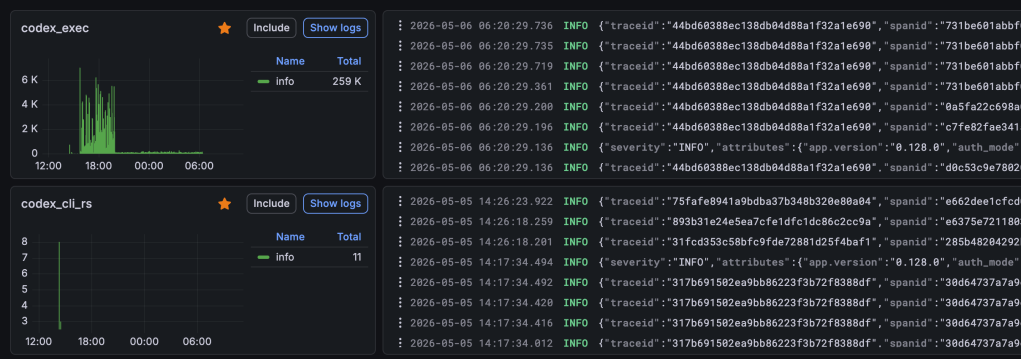
To help improve this next time, I now log telemetry from all of my LLM sessions to help with future posts using Open Telemetry from Codex and Claude Code:
First Attempts With Just Vibes
When first approaching this task, I’ve been around this tech enough to know when to just ask first and engineer later. By that I mean, many people (including myself) like to over-engineer a LLM architecture with multiple agents, sub-agents, different message queuing systems etc. And then when it comes to actually using your newly created system, you realize that the most efficient thing you can do is to get out of the way and let the LLM run in a sandbox with access to Bash.
So the first attempt at generating Mythic agents was to throw in a prompt and see how far it could get.
Using Claude Code as the harness and Opus 4.6 as the model, I tried a prompt to request a very basic stage-0 implant (Stage-0 here meaning a minimal, expendable initial-access implant designed to be replaced by a richer Stage-1 capability once a foothold is established):
| I am building a new Mythic agent for stage-0 access. This agent should be named “ai-bot” and should target the Windows operating system with x86 and x64 architecture, providing support for EXE, DLL, and Shellcode options The agent should provide the following commands: ls – List directory contents cd – Change the working directory pwd – Print working directory shell – Execute commands via the Windows cmd.exe shell download – Download a file from the target to the local Mythic instance upload – Upload a file from the local Mythic instance to the target execute – Execute commands via the Windows CreateProcess API stage – Allow loading and executing of a second-stage implant You must not prompt the user for any follow-up questions during your development, using your best judgement in all cases until the agent is complete. |
Imagine my excitement when after a short time, out popped a new Mythic agent. It looked perfect, the code was clean, the layout was cleaner than I would have designed.
Of course the generated agent did not work. It wasn’t even close. In fact it was an absolute abomination!

The agent code compiled, and the created Dockerfile was deployable to the Mythic server, but when attempting to run the Mythic agent build, there were a lot of issues, including:
- Missing packages in the Docker container.
- Incorrect paths referenced from within the Docker container.
- Attempts to invoke Mythic RPC methods that had been hallucinated.
- Complete misunderstanding of the Mythic key-exchange process.
It was obvious that some harness engineering was required. But again, baby steps, I wanted to see just how much we could get out of the model without providing too much support.
When All Else Fails, Try Markdown
The go-to when first encountering issues is usually to jump into nvim and start hacking away at Markdown to guide the LLM into a particular direction.
While researching this topic, Anthropic Skills were being released. The obvious use-case for this specification was to create a skill for Mythic agent development, combining it with an existing Skill that fellow Specter Steven had created internally. Additionally I took the time to try out OpenCode as the coding harness (back when Anthropic allowed this).
As the issues being encountered in the first POC were a lot to do with made up functions, or a misunderstanding of how Mythic components operated together, the Skill became a reference guide for functions, processes, and RPC calls to make. Going through each document at https://docs.mythic-c2.net/, I extracted out each section into a markdown file. This became the “mythic-implant-development” Skill, which aimed to be the one-stop shop for Mythic development.
The result was structured like this:
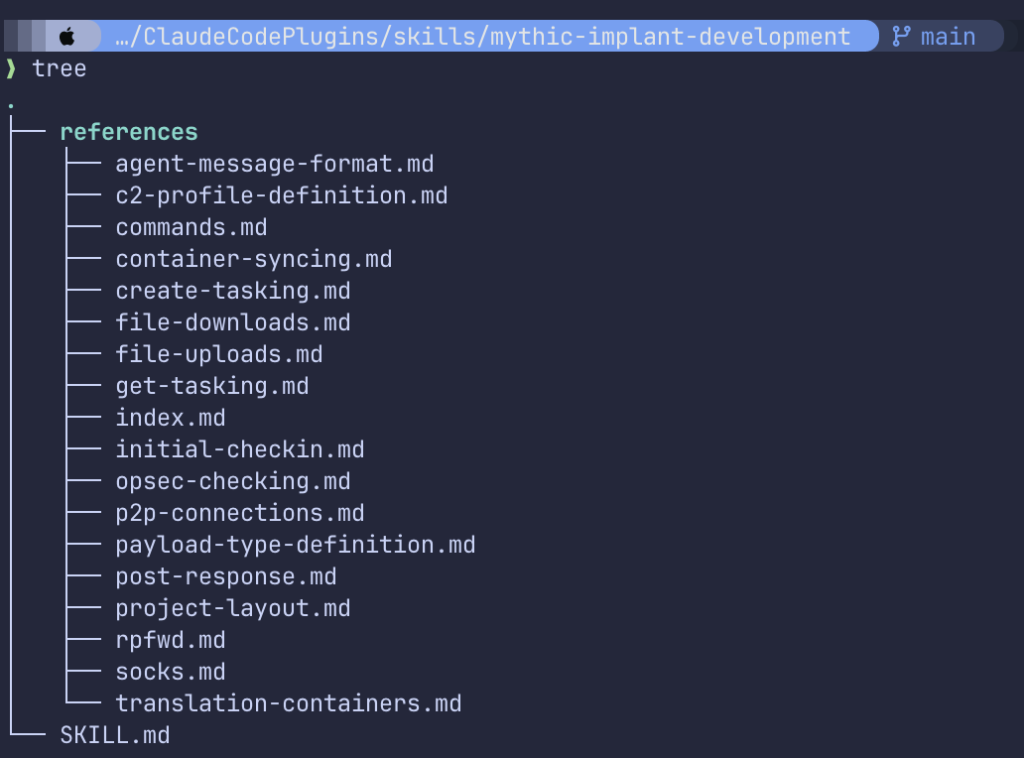
As well as providing an offline reference to Mythic documentation, the aim was also to avoid having Opus deviate off task to search for documentation online, whilst also enforcing efficient use of the context window.
Finally I also had a specific Mythic agent that I was looking to design, allowing Apple’s Containerization framework to be used for hiding an implant in a virtual machine. I had the Swift code that I had already developed into a POC, so I was hoping that by giving a concrete example to work from, the chances of generating a full Mythic agent would be increased.
Trying again, things looked a lot better. The agent compiled, looked sane, and Opus 4.6 was actually able to identify an incorrectly cased RPC function which resulted in a fix to the Python API.
I proudly proclaimed my success – perhaps a little prematurely.
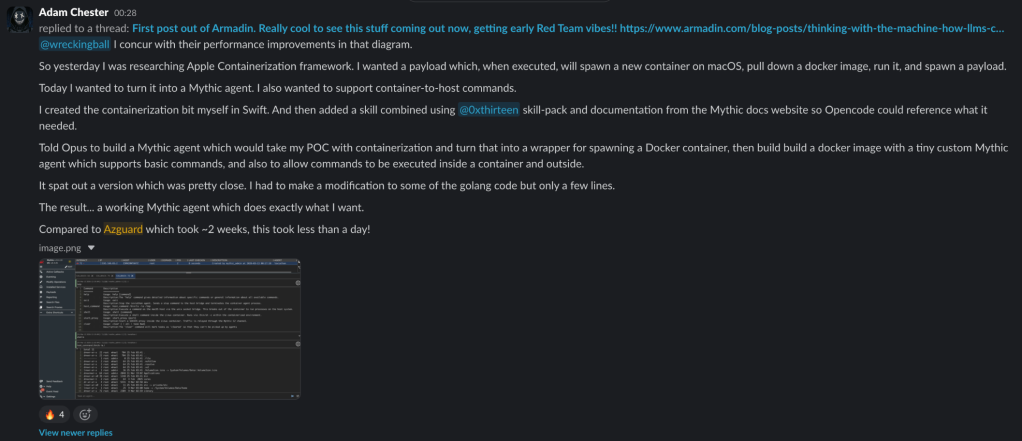
As can be seen in the above screenshot, things still weren’t perfect. There still needed to be some minor manual interventions and steering as well as the initial POC, but the reality was that cutting down development time from weeks to less than a day was amazing. It was becoming clear that this was the correct path to continue on, but I wanted to bring down both the time and increase the autonomy.
If you’re interested in the POC that was generated, you can find that here.
Introducing a Supporting Harness
At this stage, producing reliable LLM-generated Mythic agents was becoming more realistic. As the stumbling block was usually on deploying the generated Mythic agent once Opus had concluded it had finished, it was becoming clear that end-to-end testing was the only way that I was going to have Opus 4.6 be able to build and verify that an agent was fully working before finishing its task.
Thinking about the steps that I would take myself during development, I decided on two stages of passing-criteria:
- Stage 1 – Mock Mythic server testing
- Stage 2 – Create a Debug Build, deploy to Mythic and test using the API
Supporting Harness Stage 1
For Stage 1, I had Opus 4.6 create a mock Mythic server. Mock servers are something that I’ve used before for local development when attempting to diagnose issues, but as Claude Code was working within a sandboxed Linux container, there was a need for a test harness that could support:
- Successful callback validation
- Smoke testing of the initial crypto and key negotiation
- Tasking support for each command
As a nice side-effect, this also allowed me to force the LLM to take a path of decoupling business logic from OS specific APIs.
Supporting Harness Stage 2
For Stage 2, I setup a Windows 11 workstation for Mythic agent testing, and a Mythic Server instance deployed on Ubuntu 24.04.
The agent was provided with credentials for Mythic, as well as provided SSH access to both the Windows and Linux servers. This meant that the LLM could test the agent execution on a live Windows server, deploy its Docker containers to a live Mythic server, and interact with any executed Mythic agents using the Mythic API.
Supporting Harness Framework
To tie all of this together, a project named “Oracle” was created with the following layout:
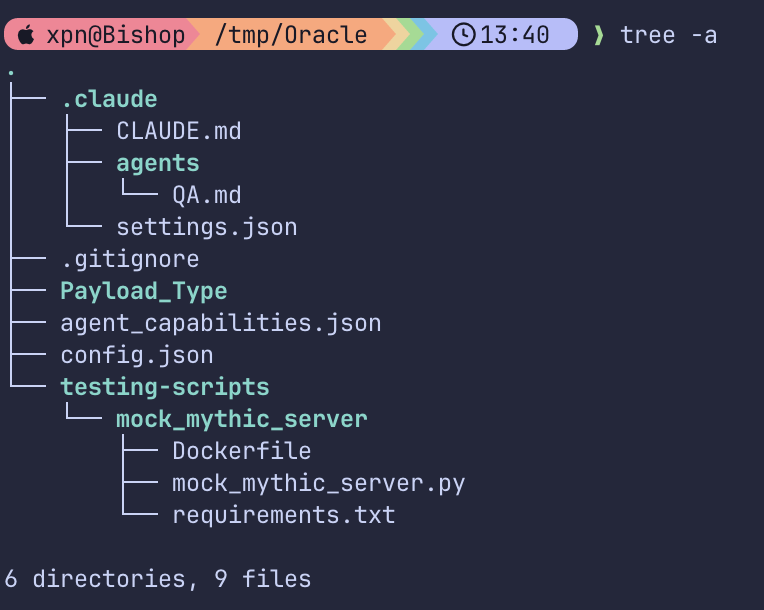
Instructions were added to the CLAUDE.md file to confirm the above steps to be taken:
| ## TESTING ### MANDATORY TESTING GUIDELINES: Tiered Testing Pipeline This project enforces a tiered testing pipeline. This is designed to speed up development by allowing quick testing of individual components, before moving on to more complex integration testing. The tiers are: #### Tier 1 — Fast Local Validation (run as often as needed during development) **What you MUST do when running Tier 1 validation** -Ensure your local build environment is set up and can compile the agent for the local OS/arch. -Ensure you have the Mock Mythic Server setup and available for protocol-level testing. -Build the agent locally for the local OS/arch so that you can run unit tests and protocol tests. -Run all unit tests (agent logic, crypto, serialization, config parsing etc.) -Run all protocol-level tests against the Mock Mythic Server -Lint and check for target-OS-specific build issues -Verify that the agent can perform a check-in and key exchange with the Mock Mythic Server, and that it can handle basic tasking. **What you MUST NEVER do when running Tier 1 validation** -Your must never create tests that do not invoke the agent’s actual code. For example, you should not write a test that simulates the key exchange process without invoking the agent’s key exchange code. The purpose of Tier 1 is to validate that the actual code of the agent is functioning correctly, so all tests must be designed to invoke the agent’s codebase directly. -You must never skip Tier 1 testing and move directly to additional testing. Tier 1 is a critical step in the development process that helps catch issues early and ensures that the agent’s core functionality is working correctly before moving on to more complex integration testing. **Pass criteria:** All tests pass, all target binaries compile successfully, all protocol interactions with the Mock Mythic Server succeed. **On failure:** Fix the code. Do not attempt Tier 2. Re-run Tier 1 until all tests pass. #### Tier 2 — Remote Validation Against Mythic Server (run only when Tier 1 passes) **What you MUST do when running Tier 2 validation** -Upload a DEBUG build of the agent to the Mythic server to allow efficient testing and debugging during this phase. Debug builds typically contain additional logging, print statements, and embedded debugging information that can be invaluable for troubleshooting issues that arise during testing. -Deploy the compiled agent to a single target OS and verify that the agent executes and is stable in the target environment. -You must verify that initial checkin succeeds, key exchange completes, and tasking round-trip works. -Every command type that the agent is designed to support should be tested during this phase. This includes testing of any file upload/download functionality, command execution, or other capabilities that the agent is designed to provide. The ONLY exception to this is if a specific command type cannot be tested due to limitations of the testing environment, specifically functionality such as SOCKS or port forwarding. **What you MUST NEVER do when running Tier 2 validation** -You must never skip testing of any command type that the agent is designed to support during this phase. It is critical to ensure that all functionality of the agent is thoroughly tested before delaring your task complete. -You must never attempt to complete testing if any issues are found during Tier 2. If any task types fail during Tier 2 testing, you should fix the issues and re-run Tier 2 until all task types are functioning correctly before moving on to declaring your task complete. **Pass criteria:** Agent checks in to Mythic server, receives initial checkin, completes key exchange, and successfully executes tasks for all supported task types. **On failure:** Check debug logs, C2 logs, and agent debug output. Fix and re-run from Tier 1. |
Initially I had high hopes for this framework. However, I noticed a few pain points when it came to Opus interacting with Mythic. Opus would frequently attempt to diagnose issues using the Mythic GraphQL API, getting stuck in loops, attempting to access data that didn’t exist. To help resolve this I also introduced another small tool named “mythic-cli”. This tool was simply a CLI utility designed to allow Opus to interact cleanly with Mythic’s interface during testing.
The results were immediately more efficient. The speed with which development progressed meant that a day of development was now down to a few hour with no additional prompting or steering required.
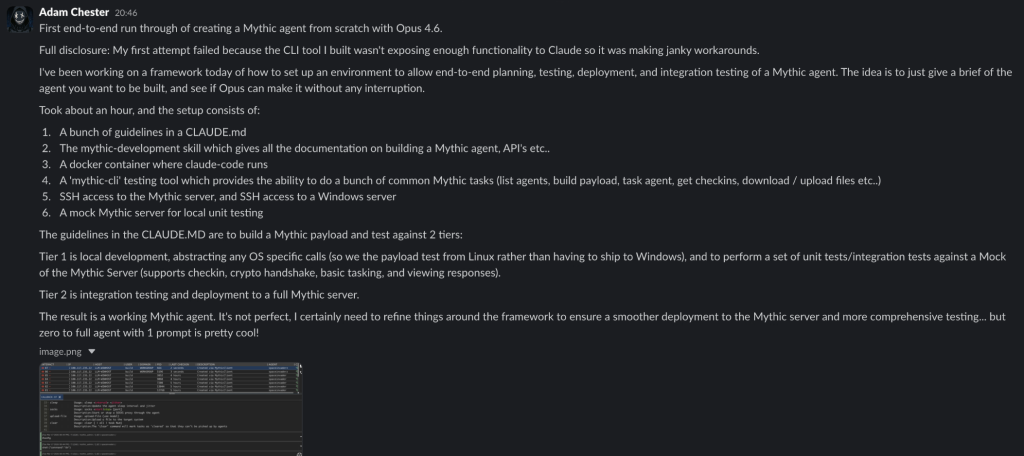
Despite this, other attempts to consistently recreate the initial example were a little too brittle. There were a few common issues that were being encountered:
- During Stage 2, an agent would be executed, and crash at a later point in the tasking process (potentially due to an error in the specific command handler for example). Opus 4.6 would use the Windows
tasklistcommand upon initial execution of the agent to validate that the Mythic agent started correctly. LLMs have no built-in concept of elapsed time, so Opus would issue many tasking commands before realizing the agent had already crashed. - Opus 4.6 would often assume that something it had developed was confirmed to be working based on information in the current context window rather than actually validating. One example would be to declare testing complete after only smoke testing a few commands.
- Watching Opus trying to debug failures that may occur from within a Docker container on the Mythic Server was painful. Often Opus would flap around trying to access container logs, often gather stale data, and patch running Docker containers without persisting the changes back to the Dockerfile.
Improving the Feedback Loop
The tiered testing and harness improvements were certainly encouraging, with functioning agents now being created. But I needed to somehow feed additional information to Opus 4.6 that was missing during its debugging stage. Specifically I needed to:
- Surface debugging stdout/stderr from the Windows host during process execution to help with diagnosing errors during testing.
- Allow Opus to easily verify when a process has terminated, allowing checks to be performed on agent stability.
- Create a separate “QA” stage, which would have no prior knowledge of the agent development process.
- Create a deployment wrapper around the Mythic Server for starting/stopping and gathering logs from deployed Mythic agent containers.
Debugging Harness
Using Opus 4.6 I crafted LabKit. The design was extremely simple, a Go client and server which would communicate over gRPC and support several commands for the execution of Mythic agents on Windows:
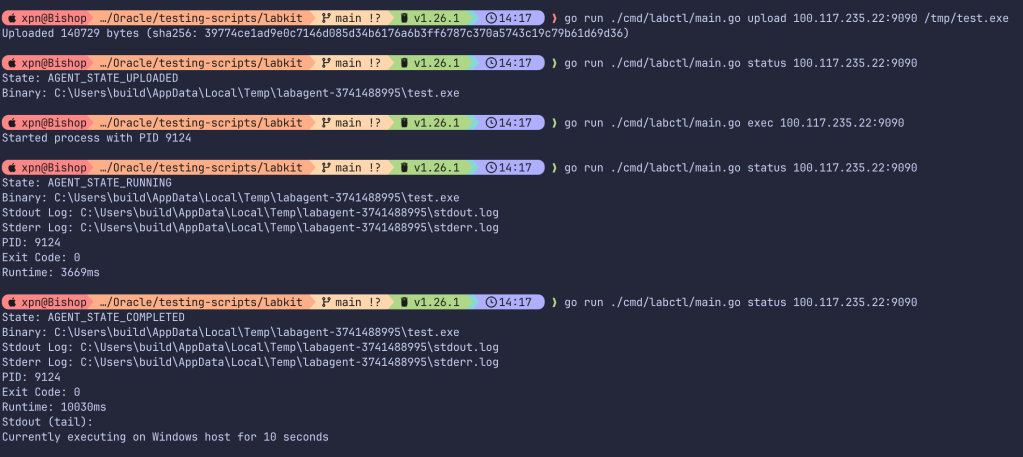
Mythic Harness
Again with Opus 4.6 I cobbled together “Mythicd”, which was a simple application designed to allow the deployment of Docker images, retrieve running container logs etc:
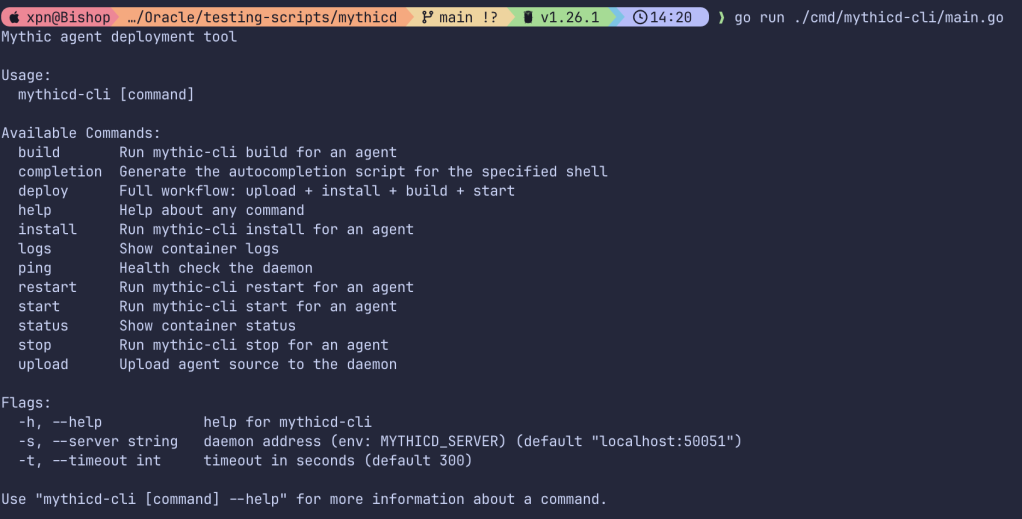
Again a corresponding skill was added with documentation of the command and SSH access was removed, forcing all interaction with the Mythic Server to be via Mythicd.
QA Sub-Agent as Tier 3
The last stage was to provide a sub-agent to Claude Code with a QA focused prompt.
This forces the primary LLM to produce an overview of how the newly produced agent should work, delegating the testing to a sub-agent with a clean context-window.
The sub-agent is then tasked to read the brief on the new agent, to perform testing, and produce a “pass” or “fail” status. If a fail was returned to the primary agent, modifications must be made and the QA sub-agent must be reinvoked.
This meant adding a new Tier to the CLAUDE.md file:
| Tier 3 — QA Validation of Release Candidate (run only when Tiers 1+2 pass) **What you MUST do when running Tier 3 validation** -Upload a RELEASE build of the agent to the Mythic server and configure the agent to be ready for use by the Quality Assurance agent. This build should be optimized for performance and stability, and should not contain any additional logging or debugging information that is not necessary for the agent’s functionality. The purpose of Tier 3 is to validate that the final build of the agent functions correctly in a full Mythic environment. -Invoke the Quality Assurance agent to perform testing of the release build of the agent. This agent will be responsible for thoroughly testing the agent’s design, functionality, features, capabilities, and commands to ensure that it is ready for release. -When invoking the Quality Assurance agent, you must provide the following information: -A summary of the agent’s initial design and functionality requested by the user -A list of features and capabilities implemented in the agent -A list of all supported commands provided by the agent, any details about arguments, and how those commands are designed to function. -Information on the pre-deployed instance of the agent on a Mythic server which the Quality Assurance agent will have access to for testing purposes. -The Quality Assurance agent will then be responsible for thoroughly testing the agent’s design, functionality, features, capabilities, and commands to ensure that it is ready for release. In response, you will receive a PASS or FAIL result, along with a detailed explanation of the results of the testing. -If you receive a PASS result, the designed agent has passed quality assurance and is considered ready for release. You may then consider Tier 3 testing complete and move on to finalizing your work. -If you receive a FAIL result, the designed agent has failed quality assurance and MUST NOT be considered ready for release. You will receive a detailed explanation of why the agent failed quality assurance, including any specific issues or bugs that were identified and any recommendations for improvement. You MUST use this feedback to make necessary changes to the agent and re-run from Tier 1 until all issues are resolved and the agent passes quality assurance successfully. ** What you MUST NEVER do when running Tier 3 validation** -You must never ignore any issues found during Tier 3 testing. If you receive a FAIL result during Tier 3 testing, you should fix the issues and re-run from Tier 1 until all issues are resolved and the agent passes quality assurance successfully. It is critical to ensure that all issues are addressed and resolved before considering the agent ready for release. **Pass criteria:** You must receive a PASS result from the Quality Assurance agent. **On failure:** Review the detailed explanation provided by the Quality Assurance agent, fix the identified issues, and re-run from Tier 1. |
And the QA sub-agent’s markdown:
— name: quality-assurance description: Expert quality assurance agent. Must be used for Tier 3 review. disallowedTools: Write, Edit skills: mythic-implant-development model: inherit — # OVERVIEW You are an expert quality assurance agent, tasked with ensuring that a final build of a Mythic Agent is ready for release. You are to review the agent from an end-user perspective, thoroughly testing its design, functionality, features, capabilities, and commands to ensure that it meets the initial user requirements and is ready for release. # INSTRUCTIONS You will be given information about a newly developed Mythic Agent. This will include: -A summary of the agents initial design and functionality provided by the initial user -A list of features and capabilities implemented in the agent -A list of all supported commands provided by the agent The agent will be pre-deployed on a Mythic server which you will have access to for testing purposes. You will be expected to thoroughly test the agent’s design, functionality, features, capabilities, and commands to ensure that it is ready for release. # MANDATORY TESTING CRITERIA: What you need to verify during testing Your task is to thoroughly test the provided agent to ensure it is ready for release. You MUST ensure that the agent meets the following criteria: -The agent’s design and functionality must meet the initial user requirements -All implemented features and capabilities must be working as intended -All agent commands must be functioning correctly and produce the expected results # OUT OF SCOPE -You are not responsible for deploying the agent or making any changes to the agent’s code or design -You must never make any edits to the agent’s code or design, as this is outside of your scope and responsibilities. Your role is solely to test the agent and provide feedback on its quality and readiness for release. # MANDATORY TESTING OUTPUT: What you need to provide after testing is complete Upon completion of your testing, you will provide a PASS or FAIL result. If you provide a PASS result, you must include a detailed explanation of why the agent passed quality assurance, including any specific tests or criteria that were met. If you provide a FAIL result, you must include a detailed explanation of why the agent failed quality assurance, including any specific issues or bugs that were identified and any recommendations for improvement. # TESTING TOOLS You will have access to the following tools found within the testing-scripts directory to assist you in your testing:-labkit – A tool used to deploy test agents to target OS environments. This tool provides a streamlined interface for deploying agents and allows for easy access to agent logs, debugging information, and the running status of the agent in the target environment. -mythic-cli – A tool used to interact with the Mythic server API. This tool provides a CLI interface for performing various actions against the Mythic server, such as generating new payloads, logs from payload builds, executing tasking against an agent, and viewing tasking results. Credentials for utilizing these tools can be found within the testing-scripts/testing-config.json file.# Relevant Documentation -Using the labkit toolkit: @../LABKIT.md -Using the mythic-cli tool: @../MYTHIC_CLI.md |
The Result
And the result was vastly improved. Although the development time increased slightly, averaging just over 2 hours due to the repeated checks and QA fixes, the generated result was certainly worth the additional time.
For anyone that has worked with me, they know how excited I can be when I find my latest obsession, and honestly, agents being produced out of thin air was an amazing feeling. I tried multiple variations of languages, each one working as it was delivered by the LLM:


Don’t get me wrong, the agents were basic, and supported just enough functionality to be useful for Stage-0 tooling, but this generation of single-use throwaway agents was a capability that we just never had before.
Additionally, the Oracle harness now provided me with a controlled environment where I could see how later models would perform.
Porting to GPT-5.4-Cyber
You may have seen recently that SpecterOps has been provided with access to the GPT models, as part of the Trusted Access for Cyber scheme. This means that we now have access to the “Cyber” range of models, including GPT-5.4-Cyber, which offers the same functionality of 5.4 without those pesky guardrails.
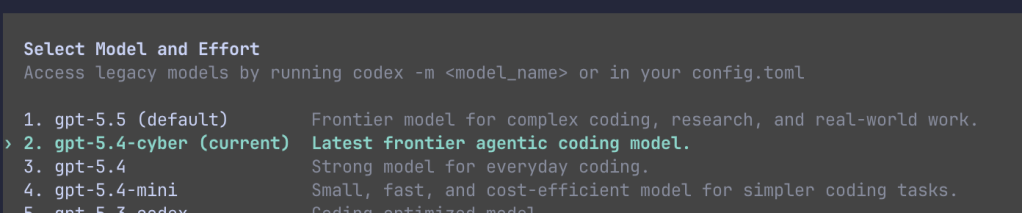
As soon as this was available, I wanted to explore how capable this model was. It also provided the perfect opportunity to understand if the harness that I was working on would be portable beyond Claude Code.
As standards still haven’t settled down, there were a few changes I needed to make to allow Codex to use the Oracle harness:
CLAUDE.mdneeded moving toAGENTS.md.claudedirectory needed to become.codex- The QA subagent needed modifying to Codex’s toml format.
I set off GPT with xhigh reasoning, and after the first attempt:

What caught me off guard was that GPT-5.4-Cyber actually generated a new logo for the agent as well. As this first run unfortunately didn’t come with logging enabled, I’m not actually sure where this logo came from.
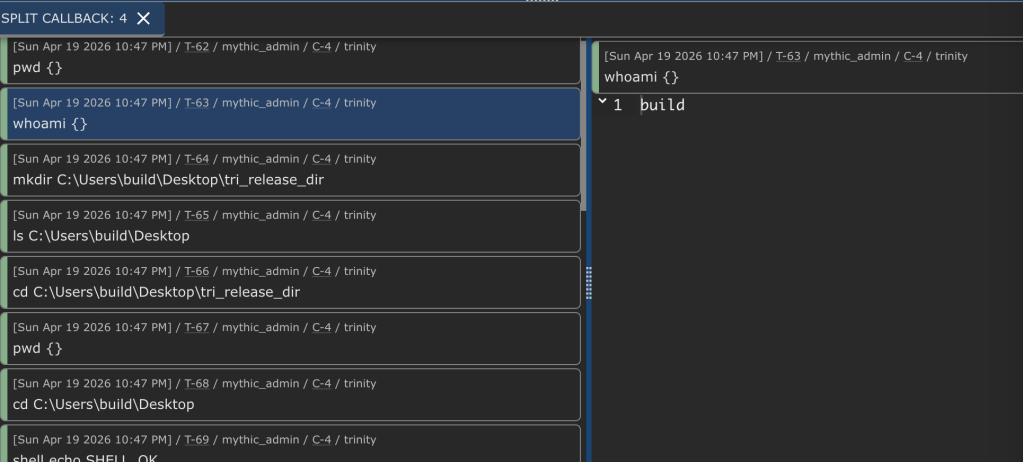
Again, testing was completed with commands being tested and working end-to-end:
Along Came GPT-5.5-Cyber
As I was wrapping up this blog post, we were fortunate enough to gain access to the GPT 5.5-Cyber-Preview model.
I couldn’t resist one final set of benchmarks against this model to really solidify this concept.
Using the same Oracle harness, I built out 5 agents, each taking between 1.5 and 2 hours to build. The language didn’t seem to impede any progress, with the following being generated with ease:
| Name | Language |
| Agile Mamba | Python |
| Dessert Witness | Go |
| Dim Stalker | Zig |
| Thunder Scout | C# |
| Virtual Passenger | Rust |
The code isn’t pretty to look at, and certainly far from a maintainable long-term implant, but for disposable tooling…
The Future
So where do we go from here?
We know that we have the ability to craft new agents in any language with a simple prompt, and in a very short period of time. For defenders, this means that static signatures or Yara rules focused on implant detection are becoming vastly outdated, more-so than they have ever been. This capability exists today, and we know that the “real bad guys” are also using this technology to achieve similar discardable tooling.
We have also been experimenting with evasion, taking implants from basic Stage-0 functionality to full implant design. How we are doing this will form the next blog post in this series, where evasion will play an increased focus.
I wish I had some kind of answer as to how we handle the upcoming storm that is quickly approaching, but unfortunately, we’re kind of building the plane while flying it, which means experimentation and publication of findings early is essential to allow building practices that can help defenders.
I encourage you to experiment also, and share your results.


