CVE-2026-4387: StrongDM State File Reuse
TL;DR : An attacker could transfer StrongDM state files, which hold session authentication information, between hosts to provide authenticated sessions. The attacker could reuse state files both inside and outside of the environment where an organization deployed it and requires user-level permissions to access the file. Reusing the state file will result in an authenticated session and access to infrastructure. StrongDM issued CVE-2026-4387and this vulnerability was patched in StrongDM Desktop version 23.74.0 and CLI version 53.77.0.
Synopsis
During an assessment, SpecterOps discovered a way to reuse authentication material for StrongDM’s desktop application. After signing in, the desktop application wrote user authentication material to a state file in the user directory, located at the following path:
- C:\Users\<username>\.sdm\state.kv
This state.kv file contained a JSON web token (JWT) along with a private and public key pair. The StrongDM desktop application referenced this file for sessions to determine the authentication for the application. Operators transferred the state file between hosts within the same environment and gained an authenticated session.
To carry the attack further, operators attempted to reuse the state file on an external host. Initial tests where operators deployed a new windows virtual machine (VM), installed StrongDM, and attempted to reuse the state file failed. Upon launching StrongDM, the application appeared to clear the contents of the state file.
SpecterOps suspected that an incorrect host or domain name caused the issue. The assessment team created tests for these, but ultimately found impersonation was unnecessary. Operators deployed a new VM, installed the StrongDM desktop application, launched the application, then uploaded the state.kv file to the current user directory. When the desktop application reloaded, it used the updated state.kv file and operators had an authenticated session for the target user whose state file was exfiltrated. The application refreshed with an authenticated session for the target user after a few seconds and allowed access to resources.
Replication Steps
- HOST1 – Valid host
- USER1 – Valid user
- HOST2 – Attacker host
- USER2 – Attacker account
- Permission level required: User
The following steps can be used to replicate this activity:
- Authenticate a session for StrongDM on HOST1 with USER1
- Gather state file from C:\Users\<USER1>\.sdm\state.kv on HOST1
- Launch StrongDM on HOST2 as any user (e.g., USER2)
- Replace the existing state file with the exfiltrated one from HOST1 for USER1 onto HOST2 at C:\Users\<USER2>\.sdm\state.kv
- This may take more than one attempt if the application is currently reading the state file
- StrongDM will refresh automatically and loads the session and resources for USER1
Note: It is possible to replace the state file and launch StrongDM, but results were more consistent in displaying resources when uploaded after the application launched.
Discovery
SpecterOps began by triaging files associated with the StrongDM desktop application in the user and program folders. The first discovery came when operators found a file in C:\Users\<username>\AppData\Roaming\StrongDM\Cache\Cache_data\data_1 (Figure 1).
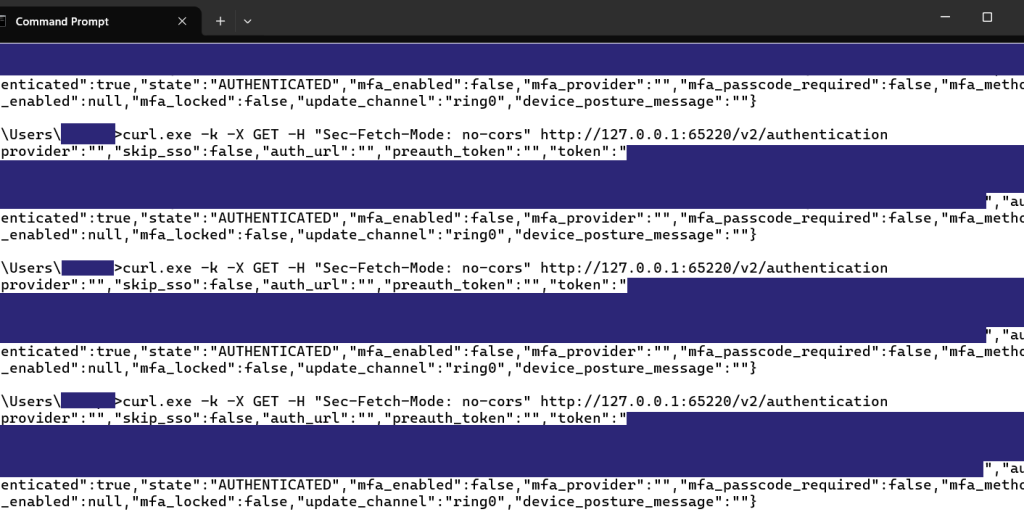
Figure 1 — Data_1 File Identified
SpecterOps opened the file in Notepad and observed what appeared to be a JSON response in the file, which contained a JWT (Figure 2).
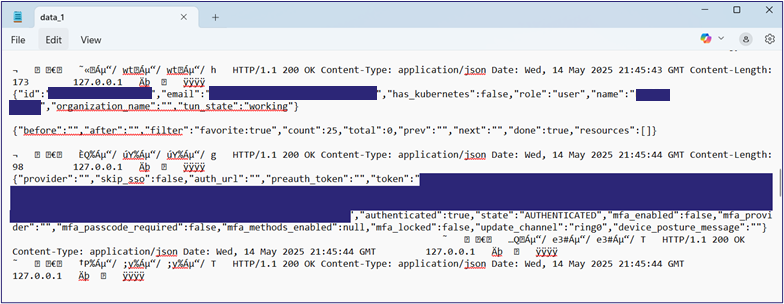
Figure 2 — Contents of Data_1
SpecterOps decoded the JWT to understand how the StrongDM desktop application used the JWT and where it originated from. Operators installed python along with ROADtools libraries to use the roadtx functions to decode the JWT locally. Operators decoded the JWT and confirmed its association with the logged-in user (Figure 3).
Figure 3 — Decoded JWT
SpecterOps identified the endpoint, which issued the response with the JWT as http://127.0.0.1:65220/v2/authentication. Operators attempted to interact with the endpoint but could not send requests to the endpoint with Burp. Instead, they used the built-in curl.exe to interact with the endpoint. Operators removed parameters from the request and sent it multiple times to test results (Figure 4).
Figure 4 — Authentication Endpoint
Operators found that only the Sec-Fetch-Mode: no-cors header was all the authentication endpoint needed to send a response containing the authenticated user’s JWT. On each request containing this parameter to the authentication endpoint, the endpoint reliably returned a response with the JWT while the was authenticated and the StrongDM desktop application ran. While the JWT was part of the authentication material used for an authenticated session, the application also required a public and private key pair.
SpecterOps authenticated a second time to the StrongDM desktop application and used Process Monitor to see file and registry interactions during the authentication process. While examining the results, operators identified several interactions with a file at C:\Users\<username>\.sdm\state.kv (Figure 5).
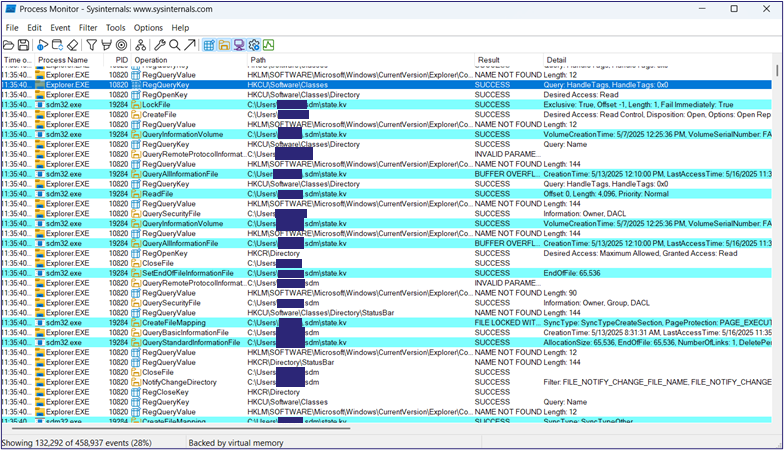
Figure 5 — State File Identification in Process Monitor
SpecterOps found the state.kv file in the USER folder and opened it to review the information it contained. Upon inspection, operators found that the state file stored both the JWT and a public and private key pair in plaintext (Figure 6).
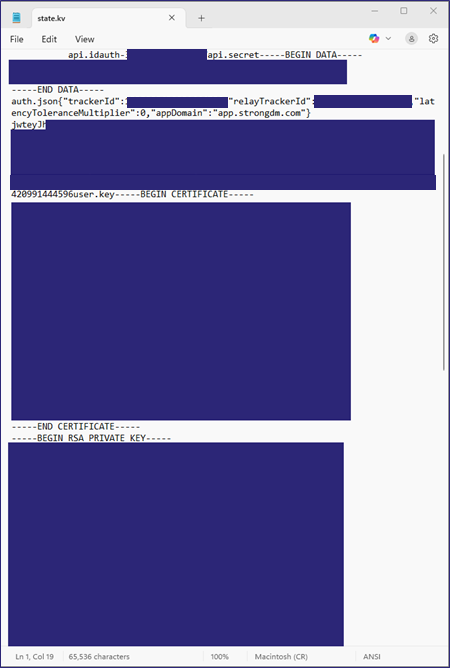
Figure 6 — State File Contents
SpecterOps evaluated the permissions on the state file and folder and found that it only required user-level permissions (Figure 7).
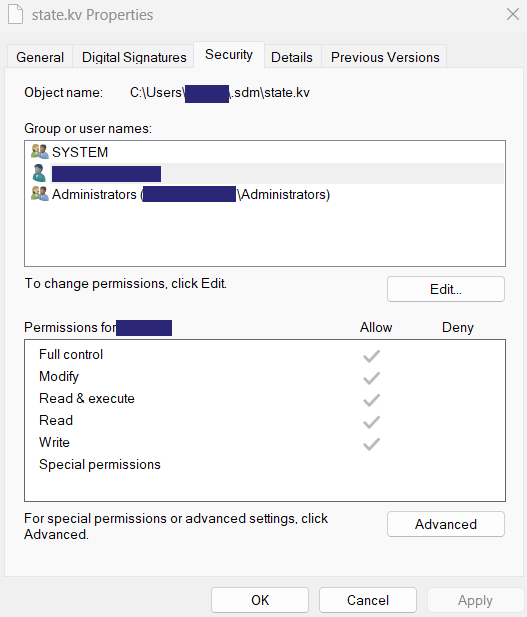
Figure 7 — File Permissions for the State File
SpecterOps uploaded the state file for USER1 from HOST1 to a secure share and then downloaded it onto a different host (e.g., HOST2) in the same environment. Operators then moved the USER1 state file to state.kv.bak on HOST2 where a different user (e.g., USER2) had an authenticated session. SpecterOps then moved the state file for USER1 to C:\Users\<USER2>\.sdm\state.kv and relaunched the StrongDM desktop application. This allowed operators to use an authenticated session as USER1 despite USER1 not logging into the host at any point. SpecterOps verified the context of the account through the StrongDM command-line interface (CLI) and with curl.exe. Operators sent a request via curl.exe to http://127.0.0.1:65220/v2/account, which disclosed the account of the current StrongDM user as USER1 (Figure 8).
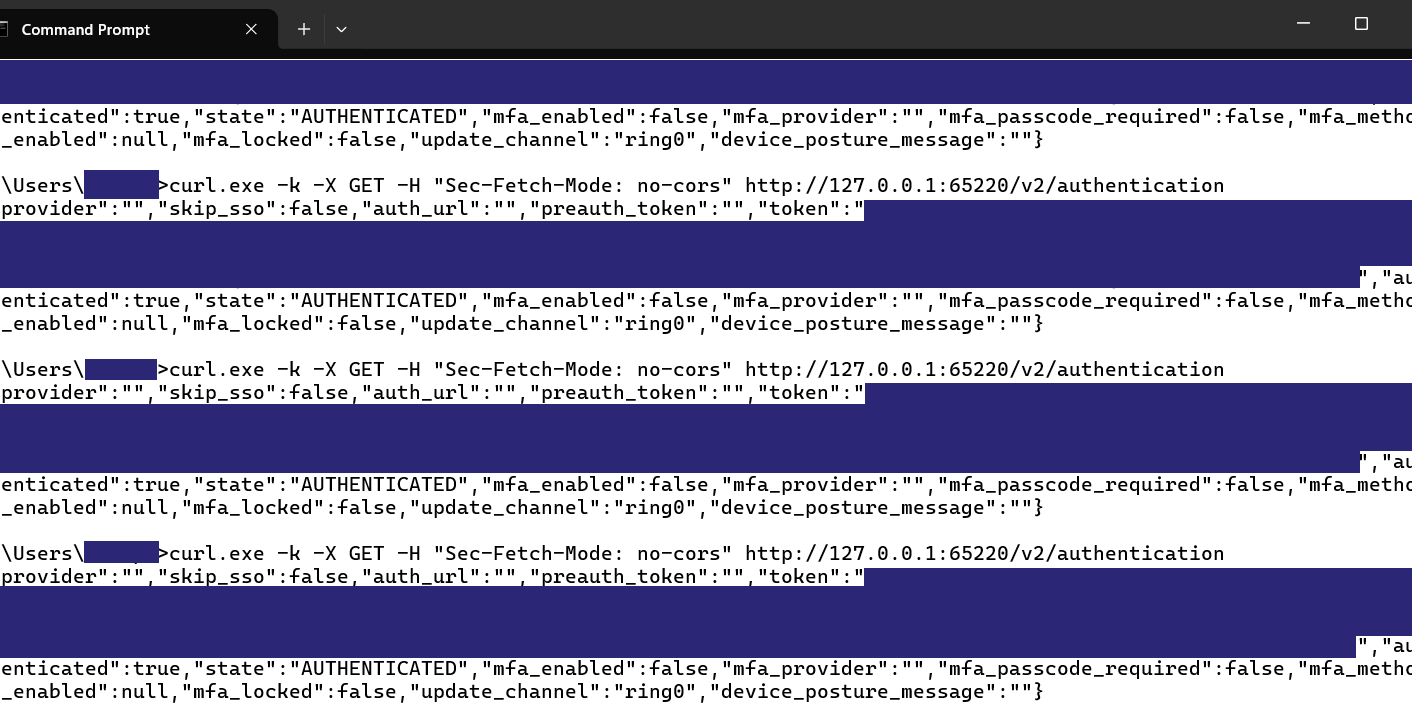
Figure 8 — StrongDM Account Query
To ensure the session was usable, SpecterOps used the StrongDM CLI to successfully connect to a resource (Figure 9).
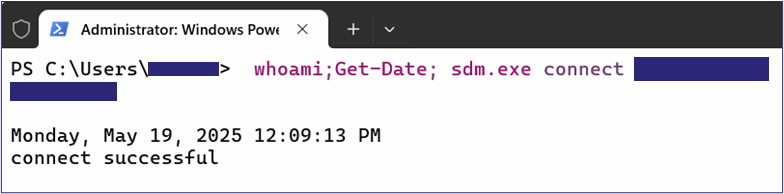
Figure 9 — StrongDM Resource Connection
The next step SpecterOps evaluated involved using the credential material on an external host (HOST3). To begin, operators created a VM and installed Duo Desktop and the StrongDM desktop application. Operators transferred the state.kv file to the new external VM and launched StrongDM. Operators were unsuccessful as the StrongDM desktop application immediately cleared the contents of the state file and would not allow the reuse of the file on the VM. Operators successfully conducted tests changing the hostname and domain name to reflect the originating domain.
In further testing, operators attempted to reuse the state.kv file again on a host without the correct hostname or domain name on a new VM. Initial testing had limited success, so operators moved to a different approach. Operators authenticated on HOST1 as USER1 to acquire fresh credentials and exfiltrated them from the host. On a newly created Windows VM (e.g., VM1), operators installed StrongDM and launched the application. Next, operators copied the state.kv file for USER1 to VM1 and uploaded it to C:\users\<username>\.sdm\state.kv. Initially, the application did not permit the upload, likely due to a lock on the file while the StrongDM desktop application had it open. On the second attempt, operators replaced the state file with the one for USER1 without issue. The StrongDM desktop application refreshed and used the new state file to connect and load resources which operators could connect to (Figure 10).
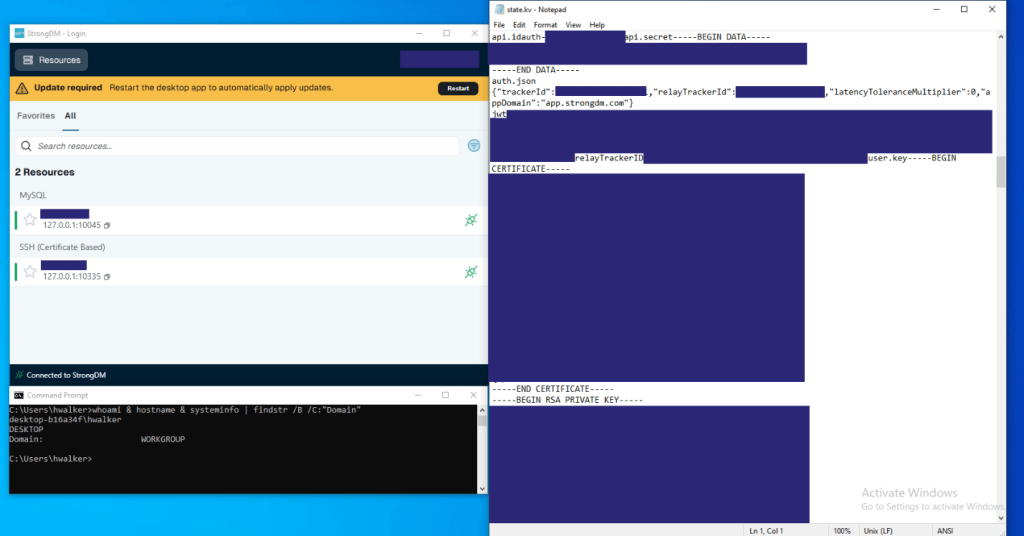
Figure 10 – State.kv File Reuse Verification
With this approach, SpecterOps could reliably connect to resources and reuse state files between hosts.
Remediation
StrongDM remediated this vulnerability as of March 17, 2026 The fix uses platform-native credential storage (macOS Keychain, DPAPI) rather than storing credentials in plaintext in state.kv. Desktop version 23.74.0 and CLI version 53.77.0 contain the fix and older versions should update to these or newer versions.
StrongDM provided SpecterOps with a test environment to retest and validate the remediation worked as expected. Operators confirmed the fix worked as expected and authentication material was no longer stored in plaintext. While the state.kv file is still present and contains public and private keys, it no longer contains the required JWT. The data_1 file also no longer contains the JWT issued during authentication. SpecterOps attempted to decrypt the DPAPI blob but were unable to do so with SharpDPAPI tooling. Further testing showed that moving files from one host to another no longer worked to provide an authenticated session on an external host. SpecterOps tested between May 11-14, 2026 using version 23.74.0.
Conclusion
SpecterOps found that after authentication to the StrongDM desktop application, all necessary authentication material was written to a state.kv file in the user’s directory. Attackers could move the state file from the original host to a different host and reuse it for an authenticated session on any other host. User level permissions are required to access and copy the state.kv file. This attack has been remediated in desktop version 23.74.0 and CLI version 53.77.0. StrongDM advises all users to update their desktop application and CLI applications to prevent this issue. StrongDM issued CVE-2026-4387 on May 29, 2026 and published the disclosure to their Trust Center.
Disclosure Timeline
May 15, 2025 – Began investigating StrongDM desktop application as part of a larger assessment
May 30, 2025 – HackerOne report opened for vulnerability
June 2, 2025 – StrongDM acknowledged report
June 9, 2025 – StongDM categorized vulnerability and assigned severity score
December 3, 2025 – StrongDM closed report on HackerOne platform
December 12, 2025 – Vulnerability report opened on Bugcrowd platform
December 16, 2025 – Bugcrowd erroneously closed report as duplicate
January 7, 2026 – SpecterOps spoke with StrongDM staff on a call and they reopened report
January 21, 2026 – StrongDM established communications for regular updates with SpecterOps
March 17, 2026 – StrongDM implemented the remediation
March 24, 2026 – StrongDM implemented the fix for Windows and macOS with CLI version 53.77.0
May 11-14, 2026 – SpecterOps retested the vulnerability and confirmed the fix worked
May 19, 2026 – CVE-2026-4387 Reserved
May 29, 2026 – CVE-2026-4387 published publicly
June 1, 2026 – Public disclosure
Acknowledgements
I would like to thank the StrongDM team for working with me throughout this process. Specifically, I would like to thank Craine Runton, Hunter Stradley, and April Palknap for their time and consideration during this process. StrongDM is now part of Delinea.


